1
 →
→
Free, high-quality text-to-speech API endpoint to replace OpenAI, Azure, or ElevenLabs
travisvn/openai-edge-tts is an open-source project on GitHub, mainly written in Python. Free, high-quality text-to-speech API endpoint to replace OpenAI, Azure, or ElevenLabs It currently holds 2,106 stars and 0 forks with 0 open issues, and was last pushed on an unknown date (repository created unknown).
Git Homed tracks it on the Audio Trending board and on the AI Audio Trending list.







This project provides a local, OpenAI-compatible text-to-speech (TTS) API using edge-tts. It emulates the OpenAI TTS endpoint (/v1/audio/speech), enabling users to generate speech from text with various voice options and playback speeds, just like the OpenAI API.
edge-tts uses Microsoft Edge's online text-to-speech service, so it is completely free.
View this project on Docker Hub
/v1/audio/speech with similar request structure and behavior.stream_format: "sse" is specified.edge-tts equivalents.The simplest way to get started without having to configure anything is to run the command below
docker run -d -p 5050:5050 travisvn/openai-edge-tts:latest
This will run the service at port 5050 with all the default configs
_(Docker required, obviously)_
requirements.txt.1. Clone the Repository:
git clone https://github.com/travisvn/openai-edge-tts.git
cd openai-edge-tts
2. Environment Variables: Create a .env file in the root directory with the following variables:
API_KEY=your_api_key_here
PORT=5050
DEFAULT_VOICE=en-US-AvaNeural
DEFAULT_RESPONSE_FORMAT=mp3
DEFAULT_SPEED=1.0
DEFAULT_LANGUAGE=en-US
REQUIRE_API_KEY=True
REMOVE_FILTER=False
EXPAND_API=True
DETAILED_ERROR_LOGGING=True
Or, copy the default .env.example with the following:
cp .env.example .env
3. Run with Docker Compose (recommended):
docker compose up --build
Run with -d to run docker compose in "detached mode", meaning it will run in the background and free up your terminal.
docker compose up -d
By default, docker compose up --build creates a minimal image _without_ ffmpeg. If you're building locally (after cloning this repository) and need ffmpeg for audio format conversions (beyond MP3), you can include it in the build.
This is controlled by the INSTALL_FFMPEG_ARG build argument. Set this environment variable to true in one of these ways:
1. Prefixing the command:
INSTALL_FFMPEG_ARG=true docker compose up --build
.env file:
Add this line to the .env file in the project root:
INSTALL_FFMPEG_ARG=true
docker compose up --build.
3. Exporting in your shell environment:
Add export INSTALL_FFMPEG_ARG=true to your shell configuration (e.g., ~/.zshrc, ~/.bashrc) and reload your shell. Then docker compose up --build will use it.
This is for local builds. For pre-built Docker Hub images, add the latest-ffmpeg tag to the version
docker run -d -p 5050:5050 -e API_KEY=your_api_key_here -e PORT=5050 travisvn/openai-edge-tts:latest-ffmpeg
---
Alternatively, run directly with Docker:
docker build -t openai-edge-tts .
docker run -p 5050:5050 --env-file .env openai-edge-tts
To run the container in the background, add -d after the docker run command:
docker run -d -p 5050:5050 --env-file .env openai-edge-tts
4. Access the API: Your server will be accessible at http://localhost:5050.
If you prefer to run this project directly with Python, follow these steps to set up a virtual environment, install dependencies, and start the server.
git clone https://github.com/travisvn/openai-edge-tts.git
cd openai-edge-tts
Create and activate a virtual environment to isolate dependencies:
# For macOS/Linux
python3 -m venv venv
source venv/bin/activate
For Windows
python -m venv venv
venv\Scripts\activate
Use pip to install the required packages listed in requirements.txt:
pip install -r requirements.txt
Create a .env file in the root directory and set the following variables:
API_KEY=your_api_key_here
PORT=5050
DEFAULT_VOICE=en-US-AvaNeural
DEFAULT_RESPONSE_FORMAT=mp3
DEFAULT_SPEED=1.0
DEFAULT_LANGUAGE=en-US
REQUIRE_API_KEY=True
REMOVE_FILTER=False
EXPAND_API=True
DETAILED_ERROR_LOGGING=True
Once configured, start the server with:
python app/server.py
The server will start running at http://localhost:5050.
You can now interact with the API at http://localhost:5050/v1/audio/speech and other available endpoints. See the Usage section for request examples.
/v1/audio/speechGenerates audio from the input text. Available parameters:
Required Parameter:
"tts-1").edge-tts voice (default: "en-US-AvaNeural").mp3, opus, aac, flac, wav, pcm (default: mp3).1.0."audio" (raw audio data, default) or "sse" (Server-Sent Events streaming with JSON events).instructions parameter (for fine-tuning voice characteristics) is not currently supported, but all other parameters work identically to OpenAI's implementation.
Example request with curl and saving the output to an mp3 file:
curl -X POST http://localhost:5050/v1/audio/speech \
  -H "Content-Type: application/json" \
  -H "Authorization: Bearer your_api_key_here" \
  -d '{
    "input": "Hello, I am your AI assistant! Just let me know how I can help bring your ideas to life.",
    "voice": "echo",
    "response_format": "mp3",
    "speed": 1.1
  }' \
  --output speech.mp3
You can pipe the audio directly to ffplay for immediate playback, just like OpenAI's API:
curl -X POST http://localhost:5050/v1/audio/speech \
  -H "Authorization: Bearer your_api_key_here" \
  -H "Content-Type: application/json" \
  -d '{
    "model": "tts-1",
    "input": "Today is a wonderful day to build something people love!",
    "voice": "alloy",
    "response_format": "mp3"
  }' | ffplay -i -
Or for immediate playback without saving to file:
curl -X POST http://localhost:5050/v1/audio/speech \
  -H "Authorization: Bearer your_api_key_here" \
  -H "Content-Type: application/json" \
  -d '{
    "input": "This will play immediately without saving to disk!",
    "voice": "shimmer"
  }' | ffplay -autoexit -nodisp -i -
Or, to be in line with the OpenAI API endpoint parameters:
curl -X POST http://localhost:5050/v1/audio/speech \
  -H "Content-Type: application/json" \
  -H "Authorization: Bearer your_api_key_here" \
  -d '{
    "model": "tts-1",
    "input": "Hello, I am your AI assistant! Just let me know how I can help bring your ideas to life.",
    "voice": "alloy"
  }' \
  --output speech.mp3
For applications that need structured streaming events (like web applications), use SSE format:
curl -X POST http://localhost:5050/v1/audio/speech \
  -H "Content-Type: application/json" \
  -H "Authorization: Bearer your_api_key_here" \
  -d '{
    "model": "tts-1",
    "input": "This will stream as Server-Sent Events with JSON data containing base64-encoded audio chunks.",
    "voice": "alloy",
    "stream_format": "sse"
  }'
SSE Response Format:
data: {"type": "speech.audio.delta", "audio": "base64-encoded-audio-chunk"}
data: {"type": "speech.audio.delta", "audio": "base64-encoded-audio-chunk"}
data: {"type": "speech.audio.done", "usage": {"input_tokens": 12, "output_tokens": 0, "total_tokens": 12}}
Example using fetch API for SSE streaming:
async function streamTTSWithSSE(text) {
  const response = await fetch('http://localhost:5050/v1/audio/speech', {
    method: 'POST',
    headers: {
      'Content-Type': 'application/json',
      Authorization: 'Bearer your_api_key_here',
    },
    body: JSON.stringify({
      input: text,
      voice: 'alloy',
      stream_format: 'sse',
    }),
  });
const reader = response.body.getReader();
  const decoder = new TextDecoder();
  const audioChunks = [];
while (true) {
    const { done, value } = await reader.read();
    if (done) break;
const chunk = decoder.decode(value);
    const lines = chunk.split('\n');
for (const line of lines) {
      if (line.startsWith('data: ')) {
        const data = JSON.parse(line.slice(6));
if (data.type === 'speech.audio.delta') {
          // Decode base64 audio chunk
          const audioData = atob(data.audio);
          const audioArray = new Uint8Array(audioData.length);
          for (let i = 0; i < audioData.length; i++) {
            audioArray[i] = audioData.charCodeAt(i);
          }
          audioChunks.push(audioArray);
        } else if (data.type === 'speech.audio.done') {
          console.log('Speech synthesis complete:', data.usage);
// Combine all chunks and play
          const totalLength = audioChunks.reduce(
            (sum, chunk) => sum + chunk.length,
            0
          );
          const combinedArray = new Uint8Array(totalLength);
          let offset = 0;
          for (const chunk of audioChunks) {
            combinedArray.set(chunk, offset);
            offset += chunk.length;
          }
const audioBlob = new Blob([combinedArray], { type: 'audio/mpeg' });
          const audioUrl = URL.createObjectURL(audioBlob);
          const audio = new Audio(audioUrl);
          audio.play();
          return;
        }
      }
    }
  }
}
// Usage
streamTTSWithSSE('Hello from SSE streaming!');
And an example of a language other than English:
curl -X POST http://localhost:5050/v1/audio/speech \
  -H "Content-Type: application/json" \
  -H "Authorization: Bearer your_api_key_here" \
  -d '{
    "model": "tts-1",
    "input": "じゃあ、行く。電車の時間、調べておくよ。",
    "voice": "ja-JP-KeitaNeural"
  }' \
  --output speech.mp3
Example using fetch API for SSE streaming:
async function streamTTSWithSSE(text) {
  const response = await fetch('http://localhost:5050/v1/audio/speech', {
    method: 'POST',
    headers: {
      'Content-Type': 'application/json',
      Authorization: 'Bearer your_api_key_here',
    },
    body: JSON.stringify({
      input: text,
      voice: 'alloy',
      stream_format: 'sse',
    }),
  });
const reader = response.body.getReader();
  const decoder = new TextDecoder();
  const audioChunks = [];
while (true) {
    const { done, value } = await reader.read();
    if (done) break;
const chunk = decoder.decode(value);
    const lines = chunk.split('\n');
for (const line of lines) {
      if (line.startsWith('data: ')) {
        const data = JSON.parse(line.slice(6));
if (data.type === 'speech.audio.delta') {
          // Decode base64 audio chunk
          const audioData = atob(data.audio);
          const audioArray = new Uint8Array(audioData.length);
          for (let i = 0; i < audioData.length; i++) {
            audioArray[i] = audioData.charCodeAt(i);
          }
          audioChunks.push(audioArray);
        } else if (data.type === 'speech.audio.done') {
          console.log('Speech synthesis complete:', data.usage);
// Combine all chunks and play
          const totalLength = audioChunks.reduce(
            (sum, chunk) => sum + chunk.length,
            0
          );
          const combinedArray = new Uint8Array(totalLength);
          let offset = 0;
          for (const chunk of audioChunks) {
            combinedArray.set(chunk, offset);
            offset += chunk.length;
          }
const audioBlob = new Blob([combinedArray], { type: 'audio/mpeg' });
          const audioUrl = URL.createObjectURL(audioBlob);
          const audio = new Audio(audioUrl);
          audio.play();
          return;
        }
      }
    }
  }
}
// Usage
streamTTSWithSSE('Hello from SSE streaming!');
edge-tts voices for a given language / locale.edge-tts voices, with language support information.Contributions are welcome! Please fork the repository and create a pull request for any improvements.
This project is licensed under GNU General Public License v3.0 (GPL-3.0), and the acceptable use-case is intended to be personal use. For enterprise or non-personal use of openai-edge-tts, contact me at [email protected]
---
[!TIP]
Swaplocalhostto your local IP (ex.192.168.0.1) if you have issues
> _It may be the case that, when accessing this endpoint on a different server / computer or when the call is made from another source (like Open WebUI), you need to change the URL fromlocalhostto your local IP (something like192.168.0.1or similar)_
Open up the Admin Panel and go to Settings -> Audio
Below, you can see a screenshot of the correct configuration for using this project to substitute the OpenAI endpoint
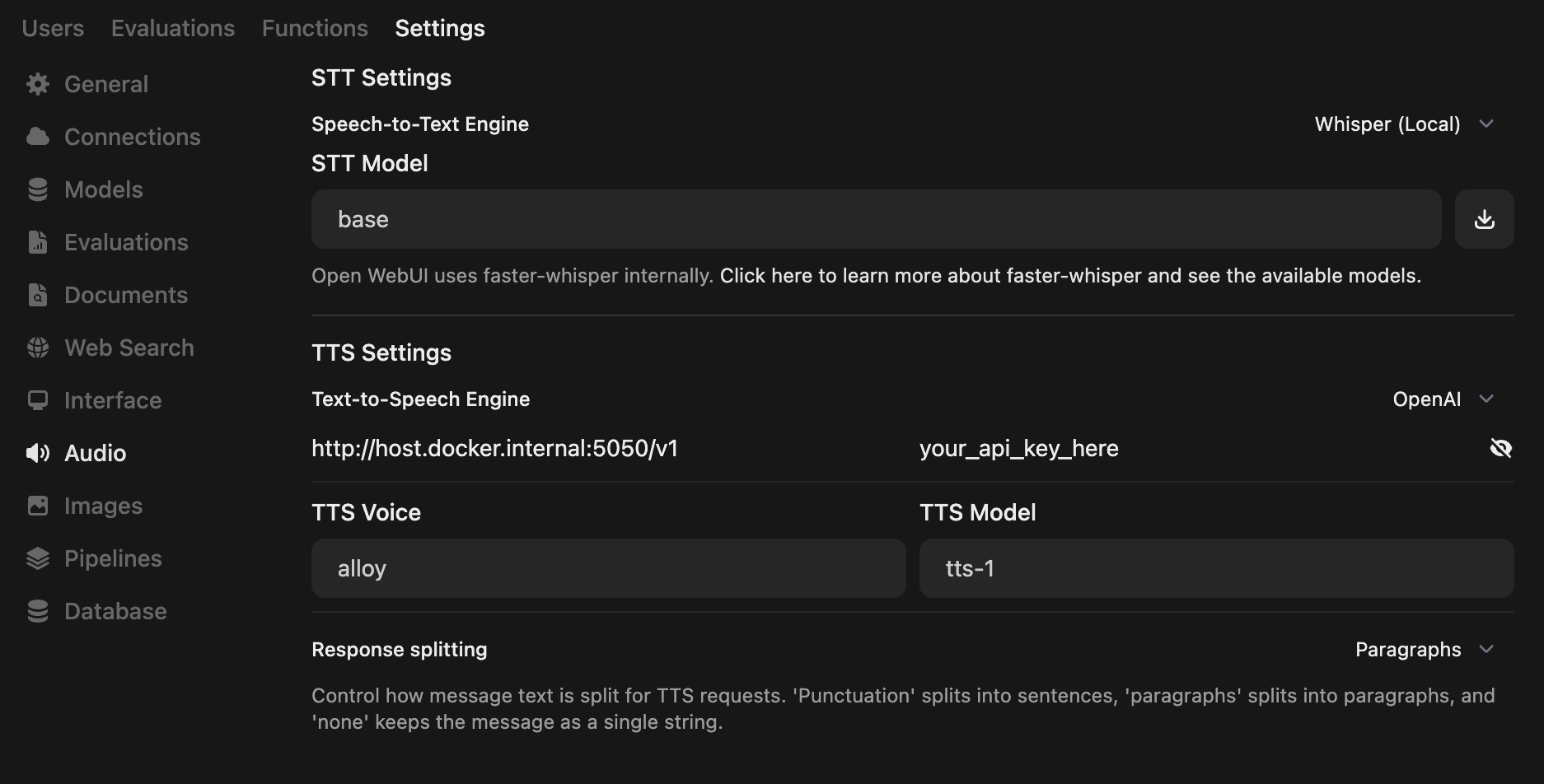
If you're running both Open WebUI and this project in Docker, the API endpoint URL is probably http://host.docker.internal:5050/v1
[!NOTE]
View the official docs for Open WebUI integration with OpenAI Edge TTS
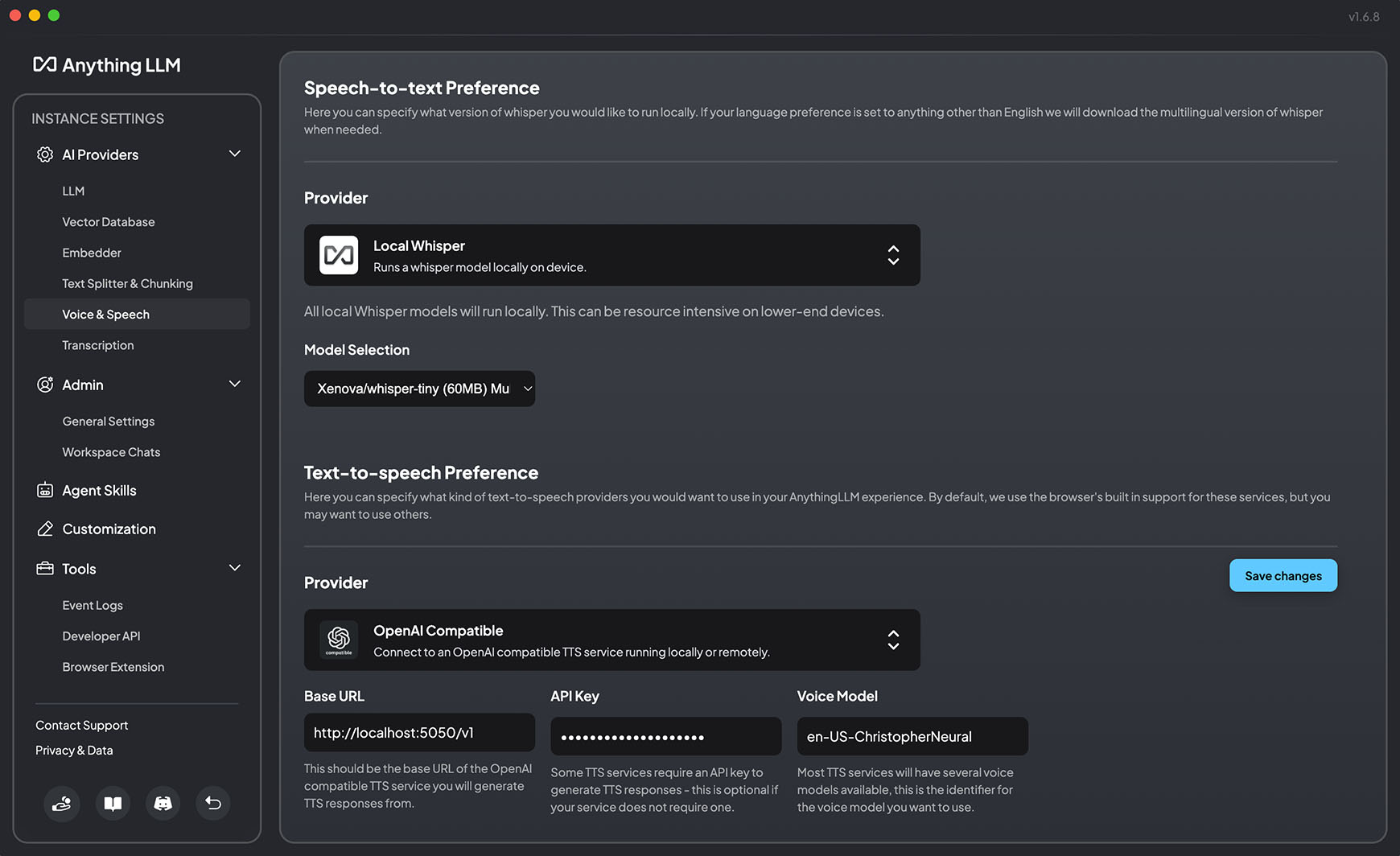
In version 1.6.8, AnythingLLM added support for "generic OpenAI TTS providers" — meaning we can use this project as the TTS provider in AnythingLLM
Open up settings and go to Voice & Speech (Under AI Providers)
Below, you can see a screenshot of the correct configuration for using this project to substitute the OpenAI endpoint
---
your_api_key_here never needs to be replaced — No "real" API key is required. Use whichever string you'd like.docker run -d -p 5050:5050 -e API_KEY=your_api_key_here -e PORT=5050 travisvn/openai-edge-tts:latest
---
→ →
→ →
→ →
→ →
→ →
→ →
→ →
→