1
 →
→
VoxCPM2: Tokenizer-Free TTS for Multilingual Speech Generation, Creative Voice Design, and True-to-Life Cloning
English | 中文









👋 Join our community for discussion and support!
 Feishu
|
Feishu
|
 Discord
|
📚 MiniCPM Wiki
Discord
|
📚 MiniCPM Wiki
VoxCPM is a tokenizer-free Text-to-Speech system that directly generates continuous speech representations via an end-to-end diffusion autoregressive architecture, bypassing discrete tokenization to achieve highly natural and expressive synthesis.
VoxCPM2 is the latest major release — a 2B parameter model trained on over 2 million hours of multilingual speech data, now supporting 30 languages, Voice Design, Controllable Voice Cloning, and 48kHz studio-quality audio output. Built on a MiniCPM-4 backbone.
Chinese Dialect: 四川话, 粤语, 吴语, 东北话, 河南话, 陕西话, 山东话, 天津话, 闽南话
pip install voxcpm
Requirements: Python ≥ 3.10 (<3.13), PyTorch ≥ 2.5.0, CUDA ≥ 12.0. See Quick Start Docs for details.
from voxcpm import VoxCPM
import soundfile as sf
model = VoxCPM.from_pretrained(
  "openbmb/VoxCPM2",
  load_denoiser=False,
)
wav = model.generate(
    text="VoxCPM2 is the current recommended release for realistic multilingual speech synthesis.",
    cfg_value=2.0,
    inference_timesteps=10,
    seed=42,
)
sf.write("demo.wav", wav, model.tts_model.sample_rate)
print("saved: demo.wav")
If you prefer downloading from ModelScope first, you can use:
pip install modelscope
from modelscope import snapshot_download
snapshot_download("OpenBMB/VoxCPM2", local_dir='./pretrained_models/VoxCPM2') # specify the local directory to save the model
from voxcpm import VoxCPM
import soundfile as sf
model = VoxCPM.from_pretrained("./pretrained_models/VoxCPM2", load_denoiser=False)
wav = model.generate(
    text="VoxCPM2 is the current recommended release for realistic multilingual speech synthesis.",
    cfg_value=2.0,
    inference_timesteps=10,
    seed=42,
)
sf.write("demo.wav", wav, model.tts_model.sample_rate)
Create a voice from a natural-language description — no reference audio needed. Format: put the description in parentheses at the start of text(e.g. "(your voice description)The text to synthesize."):
wav = model.generate(
    text="(A young woman, gentle and sweet voice)Hello, welcome to VoxCPM2!",
    cfg_value=2.0,
    inference_timesteps=10,
    seed=42,
)
sf.write("voice_design.wav", wav, model.tts_model.sample_rate)
Upload a reference audio. The model clones the timbre, and you can still use control instructions to adjust speed, emotion, or style.
wav = model.generate(
    text="This is a cloned voice generated by VoxCPM2.",
    reference_wav_path="path/to/voice.wav",
)
sf.write("clone.wav", wav, model.tts_model.sample_rate)
wav = model.generate(
    text="(slightly faster, cheerful tone)This is a cloned voice with style control.",
    reference_wav_path="path/to/voice.wav",
    cfg_value=2.0,
    inference_timesteps=10,
    seed=42,
)
sf.write("controllable_clone.wav", wav, model.tts_model.sample_rate)
Provide both the reference audio and its exact transcript for audio-continuation-based cloning with every vocal nuance reproduced. For maximum cloning similarity, pass the same reference clip to both reference_wav_path and prompt_wav_path as shown below:
wav = model.generate(
    text="This is an ultimate cloning demonstration using VoxCPM2.",
    prompt_wav_path="path/to/voice.wav",
    prompt_text="The transcript of the reference audio.",
    reference_wav_path="path/to/voice.wav", # optional, for better simliarity
)
sf.write("hifi_clone.wav", wav, model.tts_model.sample_rate)
🔄 Streaming API
import numpy as np
chunks = []
for chunk in model.generate_streaming(
    text="Streaming text to speech is easy with VoxCPM!",
):
    chunks.append(chunk)
wav = np.concatenate(chunks)
sf.write("streaming.wav", wav, model.tts_model.sample_rate)
# Voice design (no reference audio needed)
voxcpm design \
  --text "VoxCPM2 brings studio-quality multilingual speech synthesis." \
  --output out.wav
Controllable voice cloning with style control
voxcpm design \
  --text "VoxCPM2 brings studio-quality multilingual speech synthesis." \
  --control "Young female voice, warm and gentle, slightly smiling" \
  --seed 42 \
  --output out.wav
Voice cloning (reference audio)
voxcpm clone \
  --text "This is a voice cloning demo." \
  --reference-audio path/to/voice.wav \
  --output out.wav
Ultimate cloning (prompt audio + transcript)
voxcpm clone \
  --text "This is a voice cloning demo." \
  --prompt-audio path/to/voice.wav \
  --prompt-text "reference transcript" \
  --reference-audio path/to/voice.wav \ # optional, for better simliarity
  --output out.wav
Batch processing
voxcpm batch --input examples/input.txt --output-dir outs
Optional post-generation timestamps with stable-ts
pip install "voxcpm[timestamps]"
voxcpm design \
  --text "VoxCPM2 brings studio-quality multilingual speech synthesis." \
  --output out.wav \
  --timestamps \
  --timestamp-level word \
  --timestamp-language en
Character timestamps are best-effort and are derived from word alignment
voxcpm design \
  --text "欢迎使用 VoxCPM2。" \
  --output out.wav \
  --timestamps \
  --timestamp-level char \
  --timestamp-language zh
Help
voxcpm --help
python app.py --port 8808 # then open in browser: http://localhost:8808
Use --device to choose the runtime device:
python app.py --device auto
Supported values are auto, cpu, mps, cuda, and cuda:N. On Apple Silicon Macs, auto uses MPS when available.
For high-throughput serving, use Nano-vLLM-VoxCPM — a dedicated inference engine built on Nano-vLLM with concurrent request support and an async API.
pip install nano-vllm-voxcpm
from nanovllm_voxcpm import VoxCPM
import numpy as np, soundfile as sf
server = VoxCPM.from_pretrained(model="/path/to/VoxCPM", devices=[0])
chunks = list(server.generate(target_text="Hello from VoxCPM!"))
sf.write("out.wav", np.concatenate(chunks), 48000)
server.stop()
RTF as low as ~0.13 on NVIDIA RTX 4090 (vs ~0.3 with the standard PyTorch implementation), with support for batched concurrent requests and a FastAPI HTTP server. See the Nano-vLLM-VoxCPM repo for deployment details.
For production multi-tenant deployments, use vLLM-Omni — the official vLLM project's omni-modal extension with native VoxCPM2 support. PagedAttention KV cache, continuous batching, and a drop-in OpenAI-compatible /v1/audio/speech endpoint.
# Install from source (latest main — vllm-omni is rapidly evolving)
uv pip install vllm==0.19.0 --torch-backend=auto
git clone https://github.com/vllm-project/vllm-omni.git && cd vllm-omni
uv pip install -e .
See the vLLM-Omni installation guide for other platforms (ROCm, XPU, MUSA, NPU) and Docker images.
# Launch an OpenAI-compatible TTS server (--omni enables omni-modal serving)
vllm serve openbmb/VoxCPM2 --omni --port 8000
Call it from any OpenAI client
curl http://localhost:8000/v1/audio/speech \
  -H "Content-Type: application/json" \
  -d '{"model":"openbmb/VoxCPM2","input":"Hello from VoxCPM2 on vLLM-Omni!","voice":"default"}' \
  --output out.wav
Built on the upstream vLLM scheduler, with batched concurrent requests, streaming chunk delivery, and multi-GPU deployment out of the box. See the VoxCPM2 example for full deployment recipes.
For on-device / edge deployment without Python, use llama.cpp-omni — a high-performance C++ inference engine built on llama.cpp, with native VoxCPM2 GGUF support on CPU / Metal / CUDA / Vulkan.
1. Download GGUF weights from HuggingFace | ModelScope — you need one BaseLM (F16 or Q8_0) + the Acoustic file. Q8_0 halves the download with negligible quality loss.
2. Build
git clone https://github.com/tc-mb/llama.cpp-omni.git && cd llama.cpp-omni
cmake -B build -DCMAKE_BUILD_TYPE=Release
cmake --build build --target voxcpm2-cli -j
CMake auto-detects Metal (macOS) or CUDA (Linux with NVIDIA GPU).
3. Run
# Basic TTS
./build/bin/voxcpm2-cli \
    -t "Hello, this is VoxCPM2 running through llama.cpp-omni." \
    -o output.wav VoxCPM2-BaseLM-Q8_0.gguf VoxCPM2-Acoustic-F16.gguf
Voice cloning (reference audio)
./build/bin/voxcpm2-cli \
    -t "Cloned voice." -r speaker.wav -o clone.wav \
    VoxCPM2-BaseLM-Q8_0.gguf VoxCPM2-Acoustic-F16.gguf
Ultimate cloning (reference audio + transcript)
./build/bin/voxcpm2-cli \
    -t "Target text." --prompt-wav speaker.wav --prompt-text "transcript of speaker.wav" \
    -o clone.wav VoxCPM2-BaseLM-Q8_0.gguf VoxCPM2-Acoustic-F16.gguf
RTF ~1.76 (Q8_0) on Apple M4 Pro / Metal. Key flags:--cfg(guidance scale),--timesteps(CFM steps),--seed,--temperature,--stream. See the llama.cpp-omni repo and GGUF weights page for full details.
Full parameter reference, multi-scenario examples, and voice cloning tips → Quick Start Guide | Usage Guide | Cookbook
---
| | VoxCPM2 | VoxCPM1.5 | VoxCPM-0.5B | | ------------------------------- | ---------------------------------------------------------------------------------------------------- | -------------------------------------------------------------------------------------------------------- | ------------------------------------------------------------------------------------------------------------ | | Status | 🟢 Latest | Stable | Legacy | | Backbone Parameters | 2B | 0.6B | 0.5B | | Audio Sample Rate | 48kHz | 44.1kHz | 16kHz | | LM Token Rate | 6.25Hz | 6.25Hz | 12.5Hz | | Languages | 30 | 2 (zh, en) | 2 (zh, en) | | Cloning Mode | Isolated Reference & Continuation | Continuation only | Continuation only | | Voice Design | ✅ | — | — | | Controllable Voice Cloning | ✅ | — | — | | SFT / LoRA | ✅ | ✅ | ✅ | | RTF (RTX 4090) | ~0.30 | ~0.15 | ~0.17 | | RTF in Nano-VLLM (RTX 4090) | ~0.13 | ~0.08 | ~0.10 | | VRAM | ~8 GB | ~6 GB | ~5 GB | | Weights | 🤗 HF / MS | 🤗 HF / MS | 🤗 HF / MS | | Technical Report | arXiv | — | arXiv ICLR 2026 | | Demo Page | Audio Samples | — | Audio Samples |
VoxCPM2 is built on a tokenizer-free, diffusion autoregressive paradigm. The model operates entirely in the latent space of AudioVAE V2, following a four-stage pipeline: LocEnc → TSLM → RALM → LocDiT, enabling rich expressiveness and 48kHz native audio output.
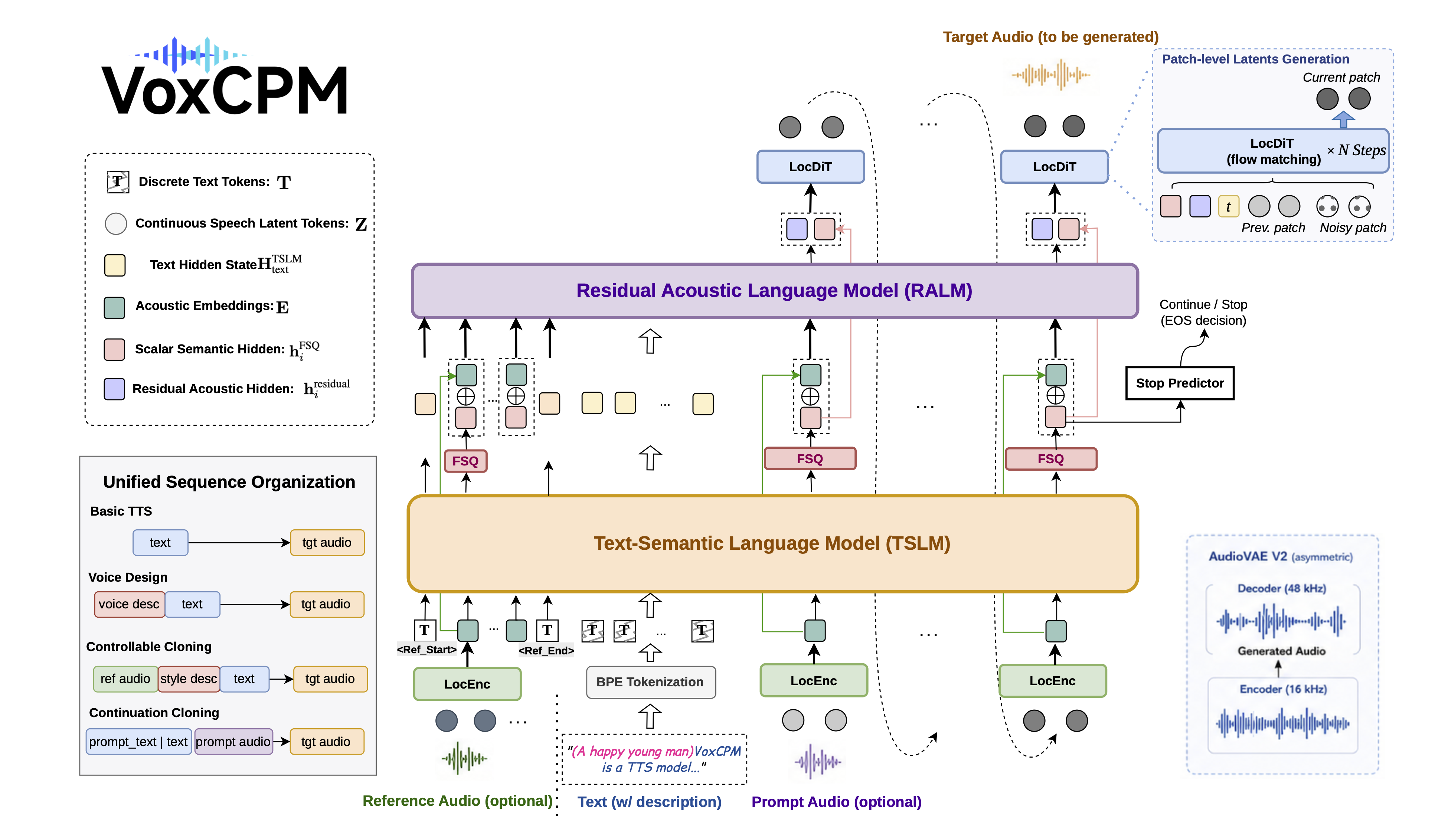
For full architectural details, VoxCPM2-specific upgrades, and a model comparison table, see the Architecture Design.
---
VoxCPM2 achieves state-of-the-art or comparable results on public zero-shot and controllable TTS benchmarks.
Seed-TTS-eval WER(⬇)&SIM(⬆) Results (click to expand)
| Model | Parameters | Open-Source | test-EN | | test-ZH | | test-Hard | | | ----------------- | ---------- | ----------- | ------- | ------ | ------- | ------ | --------- | ------ | | | | | WER/%⬇ | SIM/%⬆ | CER/%⬇ | SIM/%⬆ | CER/%⬇ | SIM/%⬆ | | MegaTTS3 | 0.5B | ❌ | 2.79 | 77.1 | 1.52 | 79.0 | - | - | | DiTAR | 0.6B | ❌ | 1.69 | 73.5 | 1.02 | 75.3 | - | - | | CosyVoice3 | 0.5B | ❌ | 2.02 | 71.8 | 1.16 | 78.0 | 6.08 | 75.8 | | CosyVoice3 | 1.5B | ❌ | 2.22 | 72.0 | 1.12 | 78.1 | 5.83 | 75.8 | | Seed-TTS | - | ❌ | 2.25 | 76.2 | 1.12 | 79.6 | 7.59 | 77.6 | | MiniMax-Speech | - | ❌ | 1.65 | 69.2 | 0.83 | 78.3 | - | - | | F5-TTS | 0.3B | ✅ | 2.00 | 67.0 | 1.53 | 76.0 | 8.67 | 71.3 | | MaskGCT | 1B | ✅ | 2.62 | 71.7 | 2.27 | 77.4 | - | - | | CosyVoice | 0.3B | ✅ | 4.29 | 60.9 | 3.63 | 72.3 | 11.75 | 70.9 | | CosyVoice2 | 0.5B | ✅ | 3.09 | 65.9 | 1.38 | 75.7 | 6.83 | 72.4 | | SparkTTS | 0.5B | ✅ | 3.14 | 57.3 | 1.54 | 66.0 | - | - | | FireRedTTS | 0.5B | ✅ | 3.82 | 46
→ →
→ →
→ →
→ →
→ →
→