1
 →
→
Local UI to run and train LLMs and diffusion models. Supports GGUF, MLX, Qwen3.8, DeepSeek-V4, MiniMax-H3, Gemma 4, FLUX and more.

Features • Quickstart • Notebooks • Documentation
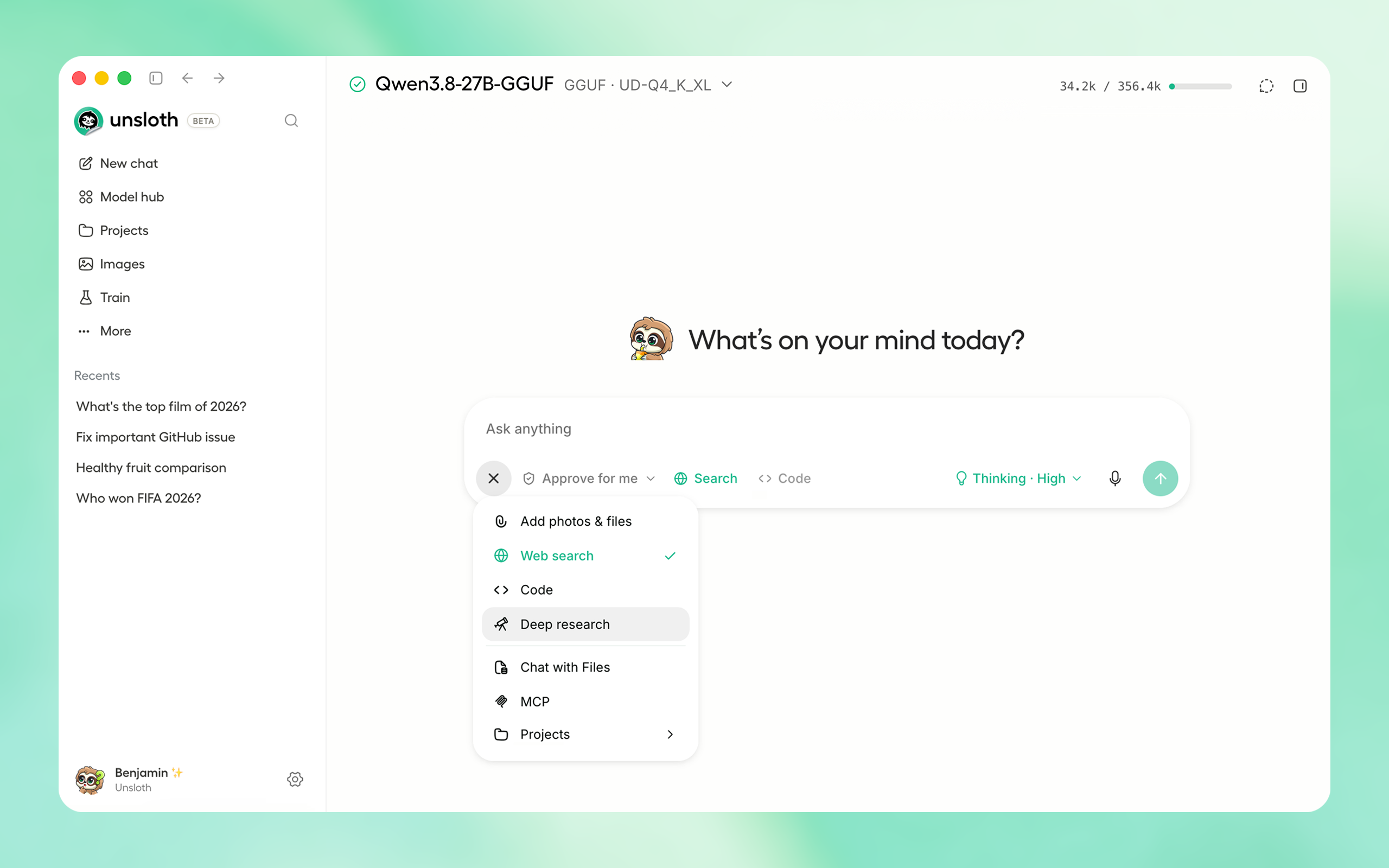
| Platform | Link |
| Windows | Download |
| macOS | Download |
| Linux / Ubuntu (deb) | Download |
| Linux (AppImage) | Download |
Download from Unsloth or GitHub Releases.
Or if you prefer to install manually:
curl -fsSL https://unsloth.ai/install.sh | sh
irm https://unsloth.ai/install.ps1 | iex
Unsloth Start connects Claude Code, Codex and other agents to local models with one command.
unsloth start claude --model unsloth/Qwen3.8-27B-GGUF:UD-Q4_K_XL
| Agent | Command |
| --- | --- |
| Claude Code | unsloth start claude |
| OpenAI Codex | unsloth start codex |
| DeepSeek Harness | unsloth start dsh |
| Hermes Agent | unsloth start hermes |
| OpenCode | unsloth start opencode |
| OpenClaw | unsloth start openclaw |
| Platform | Link |
| Windows | Download |
| macOS | Download |
| Linux / Ubuntu (deb) | Download |
| Linux (AppImage) | Download |
curl -fsSL https://unsloth.ai/install.sh | sh
irm https://unsloth.ai/install.ps1 | iex
unsloth studio
unsloth studio --secure
unsloth/unsloth`. On Linux, set up GPU access once with curl -fsSL https://raw.githubusercontent.com/unslothai/unsloth/main/docker/install_nvidia_toolkit.sh -o install_nvidia_toolkit.sh && sudo -E bash install_nvidia_toolkit.sh` (Windows: Docker Desktop with WSL 2). Run:
docker run -d --gpus all --ipc=host \
  -p 8000:8000 -p 8888:8888 \
  -e UNSLOTH_STUDIO_PASSWORD="mypassword" -e JUPYTER_PASSWORD="mypassword" \
  -v "$PWD":/workspace/host \
  -v unsloth-studio:/opt/unsloth-studio \
  unsloth/unsloth
docker logs -f. Studio is at http://localhost:8000 (user unsloth), JupyterLab at http://localhost:8888. The unsloth-studio volume keeps your accounts, chats and trained models across docker rm; each image brings its own Studio code, and a volume from an older image is migrated on the first start (its old code is kept under .unsloth-studio-legacy/). Tags (unsloth/unsloth:core for notebooks only), GPU support and options: Docker Hub.
--disable-tools when exposing Unsloth.
Global HTTPS Access: Creates a free Cloudflare link that serves Unsloth - you can access the link globally (even on your phone!)
unsloth studio --secure
-H 0.0.0.0 and different ports also work:
unsloth studio -H 0.0.0.0 -p 8888
Settings > API keys > LAN access
--secure, --cloudflare, or a non-loopback -H) asks once at the terminal for a new admin password. Ctrl+C there aborts the launch rather than exposing the auto-generated one; set a password non-interactively instead, or use -H 127.0.0.1 to stay off the network. On a non-loopback -H bind a terminal nobody answers is not a refusal: after ~30s Unsloth starts anyway and shuts down on the bootstrap deadline, so detached launches (docker run -dt, tmux new -d) are unaffected. Setting UNSLOTH_STUDIO_BOOTSTRAP_TIMEOUT=0 disables that shutdown, so give those launches a password instead. A tunnel gets no such timeout and waits indefinitely rather than publish a public URL unasked, so give a detached --secure / --cloudflare launch its password non-interactively.
Headless starts:
UNSLOTH_STUDIO_PASSWORD='your-strong-password' unsloth studio --secure # via env var
unsloth studio reset-password
curl -LsSf https://astral.sh/uv/install.sh | sh
uv venv unsloth_env --python 3.13
source unsloth_env/bin/activate
uv pip install unsloth --torch-backend=auto
winget install -e --id Python.Python.3.13
winget install --id=astral-sh.uv  -e
uv venv unsloth_env --python 3.13
.\unsloth_env\Scripts\activate
uv pip install unsloth --torch-backend=auto
Train for free with our notebooks. Read our guide. Add dataset, run, then deploy your trained model.
| Model | Free Notebooks | Performance | Memory use | |-----------|---------|--------|----------| | Unsloth Studio | ▶️ Start for free | | | | Gemma 4 (E2B) | ▶️ Start for free-Vision.ipynb) | 1.5x faster | 50% less | | Qwen3.5 (4B) | ▶️ Start for free_Vision.ipynb) | 1.5x faster | 60% less | | gpt-oss (20B) | ▶️ Start for free-Fine-tuning.ipynb) | 2x faster | 70% less | | Qwen3.5 GSPO | ▶️ Start for free_Vision_GRPO.ipynb) | 2x faster | 70% less | | gpt-oss (20B): GRPO | ▶️ Start for free-GRPO.ipynb) | 2x faster | 80% less | | Qwen3: Advanced GRPO | ▶️ Start for free-GRPO.ipynb) | 2x faster | 70% less | | embeddinggemma (300M) | ▶️ Start for free.ipynb) | 2x faster | 20% less | | Llama 3.1 (8B) Alpaca | ▶️ Start for free-Alpaca.ipynb) | 2x faster | 70% less | | Llama 3.2 Conversational | ▶️ Start for free-Conversational.ipynb) | 2x faster | 70% less | | Orpheus-TTS (3B) | ▶️ Start for free-TTS.ipynb) | 1.5x faster | 50% less |
unsloth start with Claude Code, Codex, Hermes, OpenCode, OpenClaw, DeepSeek Harness and more through Unsloth's OpenAI- and Anthropic-compatible APIs. Guidemain branch, which is the latest (nightly) source.
git clone https://github.com/unslothai/unsloth
cd unsloth
./install.sh --local
unsloth studio -p 8888
UNSLOTH_STUDIO_HOME:
UNSLOTH_STUDIO_HOME="$PWD/.studio" ./install.sh --local
UNSLOTH_STUDIO_HOME="$PWD/.studio" unsloth studio -p 8888
cd unsloth && git pull
./install.sh --local
unsloth studio -p 8888
main branch, which is the latest (nightly) source.
git clone https://github.com/unslothai/unsloth.git
cd unsloth
Set-ExecutionPolicy -Scope Process -ExecutionPolicy Bypass
.\install.ps1 --local
unsloth studio -p 8888
UNSLOTH_STUDIO_HOME:
$env:UNSLOTH_STUDIO_HOME="$PWD\.studio"; .\install.ps1 --local
$env:UNSLOTH_STUDIO_HOME="$PWD\.studio"; unsloth studio -p 8888
cd unsloth; git pull
.\install.ps1 --local
unsloth studio -p 8888
Skip PyTorch (GGUF-only mode):
curl -fsSL https://unsloth.ai/install.sh | UNSLOTH_NO_TORCH=1 sh
$env:UNSLOTH_NO_TORCH=1; irm https://unsloth.ai/install.ps1 | iex
Skip the post-install prompt that starts Unsloth (useful for automated installs):
curl -fsSL https://unsloth.ai/install.sh | UNSLOTH_SKIP_AUTOSTART=1 sh
$env:UNSLOTH_SKIP_AUTOSTART=1; irm https://unsloth.ai/install.ps1 | iex
Keep the install-time package cache under the Studio directory instead of reusing an existing uv cache. Downloads are slower the first time, and an explicit UV_CACHE_DIR still wins over this:
curl -fsSL https://unsloth.ai/install.sh | UNSLOTH_ISOLATE_UV_CACHE=1 sh
$env:UNSLOTH_ISOLATE_UV_CACHE=1; irm https://unsloth.ai/install.ps1 | iex
--isolated-uv-cache:
./install.sh --local --isolated-uv-cache
.\install.ps1 --local --isolated-uv-cache
Pinning the Python version:
curl -fsSL https://unsloth.ai/install.sh | UNSLOTH_PYTHON=3.12 sh
$env:UNSLOTH_PYTHON='3.12'; irm https://unsloth.ai/install.ps1 | iex
Install to a custom location with UNSLOTH_STUDIO_HOME:
curl -fsSL https://unsloth.ai/install.sh | UNSLOTH_STUDIO_HOME=/abs/path sh
$env:UNSLOTH_STUDIO_HOME='C:\path'; irm https://unsloth.ai/install.ps1 | iex
Point the frontend build at a corporate npm mirror/proxy with UNSLOTH_NPM_REGISTRY:
UNSLOTH_NPM_REGISTRY=https://artifactory.example.com/api/npm/npm/ ./install.sh --local
$env:UNSLOTH_NPM_REGISTRY='https://artifactory.example.com/api/npm/npm/'; .\install.ps1 --local
Cap Unsloth's native CPU thread pools on high-core hosts: UNSLOTH_CPU_THREADS=8 unsloth studio -p 8888.
You can force the backend during installation:
export UNSLOTH_LLAMA_CPP_BACKEND=vulkan   # or cpu, cuda, rocm, auto
curl -fsSL https://unsloth.ai/install.sh | sh
$env:UNSLOTH_LLAMA_CPP_BACKEND="vulkan"   # or cpu, cuda, rocm, auto
irm https://unsloth.ai/install.ps1 | iex
MacOS, WSL, Linux: curl -fsSL https://raw.githubusercontent.com/unslothai/unsloth/main/scripts/uninstall.sh | sh
Windows (PowerShell): irm https://raw.githubusercontent.com/unslothai/unsloth/main/scripts/uninstall.ps1 | iex
For more info, see our docs.
You can delete old model files either from the bin icon in model search or by removing the relevant cached model folder from the default Hugging Face cache directory. By default, HF uses:
MacOS, Linux, WSL: ~/.cache/huggingface/hub/
Windows: %USERPROFILE%\.cache\huggingface\hub\
 Discord | Join Discord server |
|
Discord | Join Discord server |
|  r/unsloth Reddit | Join Reddit community |
| 📚 Documentation & Wiki | Read Our Docs |
|
r/unsloth Reddit | Join Reddit community |
| 📚 Documentation & Wiki | Read Our Docs |
|  Twitter (aka X) | Follow us on X |
| 🔮 Our Models | Unsloth Catalog |
| ✍️ Blog | Read our Blogs |
Twitter (aka X) | Follow us on X |
| 🔮 Our Models | Unsloth Catalog |
| ✍️ Blog | Read our Blogs |
You can cite the Unsloth repo as follows:
@software{unsloth,
  author = {Daniel Han, Michael Han and Unsloth team},
  title = {Unsloth},
  url = {https://github.com/unslothai/unsloth},
  year = {2023}
}

This structure helps support ongoing Unsloth development while keeping the project open source and enabling the broader ecosystem to continue growing.
→ →
→ →
→ →
→ →
→ →
→