WesselKroos/youtube-ambilight

▲ 39 stars today★ 229⑂ 22

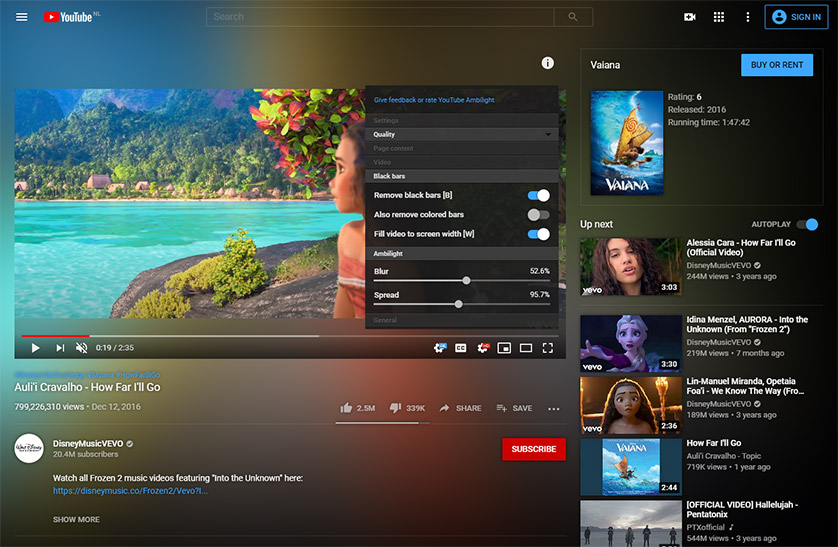
This browser extension adds ambient light to YouTube videos

About WesselKroos/youtube-ambilight

WesselKroos/youtube-ambilight is an open-source project on GitHub, mainly written in JavaScript. This browser extension adds ambient light to YouTube videos It currently holds 229 stars and 22 forks with 24 open issues, and was last pushed on 2025-11-21 (repository created 2017-11-25).

Project Overview

Git Homed tracks it on the Today's Trending board, currently at rank #85 with 39 new stars today.

GitHub Repository Details

Repository WesselKroos/youtube-ambilight · default branch develop · size 65794 KB · watchers 4 · source: GitHub REST API and repository README

README

Google Chrome Web rating Google Chrome users   Microsoft Edge rating Microsoft Edge users   Firefox rating Firefox users   Opera rating Opera users

Ambient light for YouTube™

Preview

Ambient light for YouTube™

Immerse yourself in YouTube videos with ambient light!

Installation

Go to the extensions site of your browser and add the extension:

Google Chrome Web Store

Microsoft Edge Store

Firefox Add-ons

Opera addons

Minimum requirements

Performance

A video card with a score of at least 1000 points in the PassMark Video Card Benchmark is recommended. Check your video card's score here:

https://www.videocardbenchmark.net/gpu_list.php

With a score lower than 1000 the extension will still work but it is likely that the YouTube video page will be slow and/or stuttering.

To troubleshoot performance problems or maximize the performance you can follow the checks and steps in the Troubleshoot guide

Browser versions

| Browser | Version | Reason | | -------- | ------- | ------ | | Chromium | 80 | Optional chaining operator (?.) | | Firefox | 74 | Optional chaining operator (?.) |

Privacy & Security

Read the privacy policy

Report, request or contribute

Feel free to

Support me

Support me via a donation

Development

1. Install Node (LTS) 2. In the terminal/commandline enter npm install. 3. In the terminal/commandline enter npm run build. A /dist folder will be generated which contains all the generated files of the extension. 4. Add the extension to Chrome: 1. In Chrome go to the url chrome://extensions/. 2. Turn on the Developer mode toggle. 3. Click Load unpacked and select the /dist folder. 4. Ambient light for YouTube™ has been added to the list of extensions. 5. After you've modified a file in the /src folder follow these steps: 1. In the terminal/commandline enter npm run build 2. In Chrome go to the url chrome://extensions/ and click the refresh/update button in the card of the extension.

GitHub Stars & Activity

229Stars
22Forks
24Open issues
JavaScriptLanguage

GitHub Popularity

GitHub stars229
Forks22
Open issues24
Primary languageJavaScript
LicenseMIT
Stars gained today39
Created2017-11-25
Last pushed2025-11-21

Trending History

Daily boardrank #85 · ▲ 39 stars

Related GitHub Projects

1

affaan-m / ECC

JavaScript★ 270,115⑂ 40,363▲ 650 stars
→
2

DietrichGebert / ponytail

JavaScript★ 148,990⑂ 8,012▲ 865 stars
→
3

Leonxlnx / taste-skill

JavaScript★ 91,512⑂ 6,218▲ 333 stars
→
4

pbakaus / impeccable

JavaScript★ 72,938⑂ 4,405▲ 460 stars
→
5

byoungd / up

JavaScript★ 66,331⑂ 6,634▲ 714 stars
→
6

vercel-labs / agent-skills

JavaScript★ 31,762⑂ 2,779▲ 45 stars
→
7

decolua / 9router

JavaScript★ 30,102⑂ 5,699▲ 71 stars
→
8

open-gsd / gsd-core

JavaScript★ 10,036⑂ 719▲ 56 stars
→

More Trending Repositories