1
 →
→
Lightning-Fast, On-Device, Multilingual TTS — running natively via ONNX.
This repository is archived. Development and support have ended.
> The code remains available for reference under the terms of the LICENSE. No updates, bug fixes, security patches, or support will be provided, and issues and pull requests are no longer monitored. The software is provided "AS IS" as set forth in the license, without any warranty or ongoing responsibility of the original authors.
The source code is preserved under the supertone-oss-archive GitHub organization.
Model downloads now use the supertone-oss-archive Hugging Face namespace:
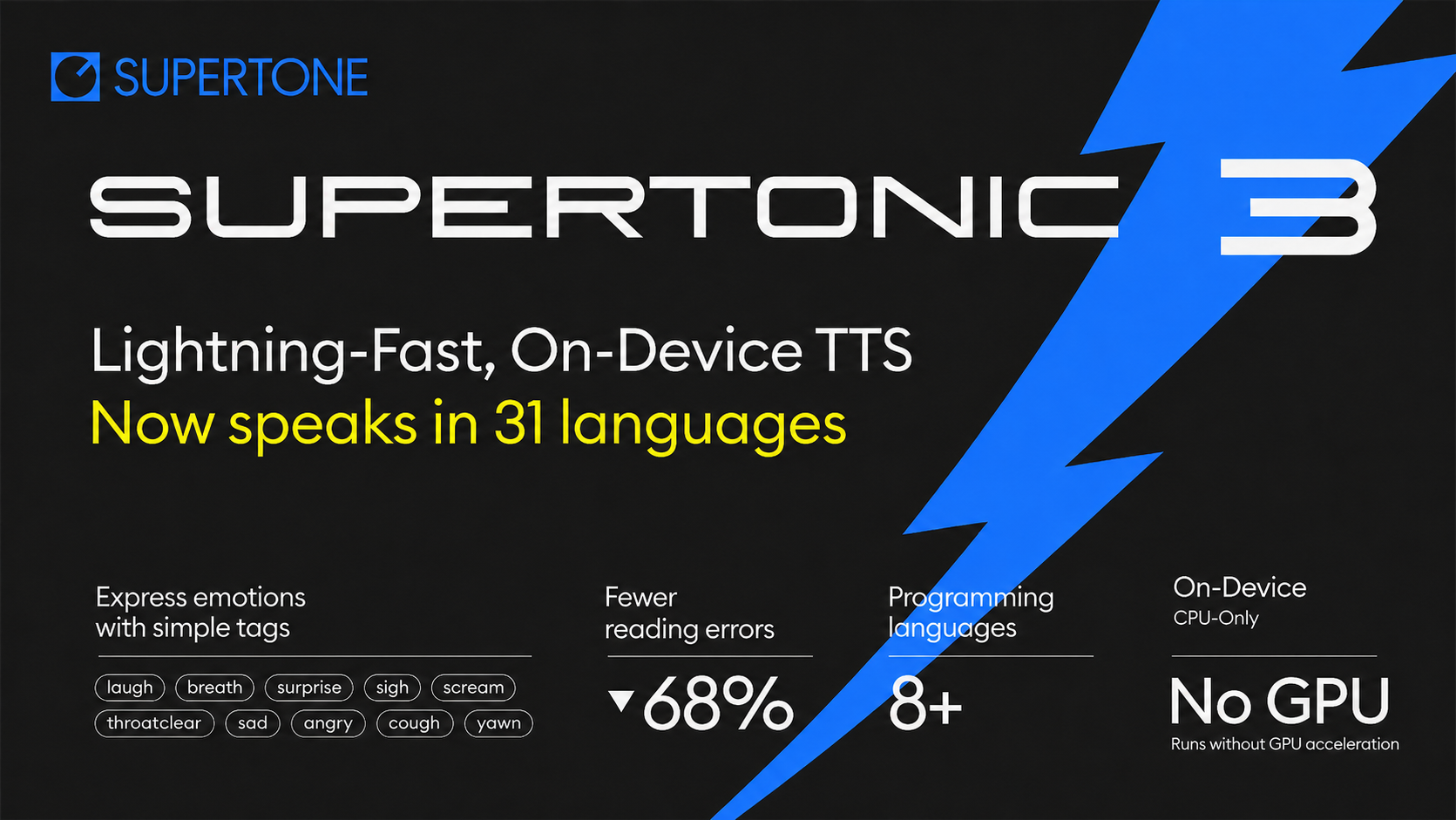





Supertonic is a lightning-fast, on-device multilingual text-to-speech system designed for local inference with minimal overhead. Powered by ONNX Runtime, it runs entirely on your device—no cloud, no API calls, no privacy concerns.
lang="na" to let Supertonic process the text language-agnostically when you don't know the input language — no separate language adapters needed, , `) bring natural human nuance into generated speech without prompt engineering or reference audioArabic (ar), Bulgarian (bg), Croatian (hr), Czech (cs), Danish (da), Dutch (nl), English (en), Estonian (et), Finnish (fi), French (fr), German (de), Greek (el), Hindi (hi), Hungarian (hu), Indonesian (id), Italian (it), Japanese (ja), Korean (ko), Latvian (lv), Lithuanian (lt), Polish (pl), Portuguese (pt), Romanian (ro), Russian (ru), Slovak (sk), Slovenian (sl), Spanish (es), Swedish (sv), Turkish (tr), Ukrainian (uk), Vietnamese (vi)
Not sure which language your text is in? Pass lang="na" and Supertonic will handle the input in a language-agnostic way — no explicit language tag required.
These entries describe past releases. Hosted services and support offers mentioned here are no longer provided by this archive. Follow the archive setup guide.
supertonic serve, a local HTTP server with native /v1/tts and OpenAI-compatible /v1/audio/speech endpoints. See the serve documentation.release/supertonic-2 branch.supertonic PyPI package! Install via pip install supertonic. For details, visit supertonic-py documentation---
Use the examples in this repository with model files downloaded explicitly from the archive. No Hugging Face login, hosted demo, or original Supertone service is required. These instructions use Supertonic 3.
Use Python 3.11 in a virtual environment:
git clone https://github.com/supertone-oss-archive/supertonic.git
cd supertonic
python3.11 -m venv .venv
source .venv/bin/activate
python -m pip install huggingface_hub
On Windows, activate the environment with .venv\Scripts\Activate.ps1 in PowerShell.
hf download supertone-oss-archive/supertonic-3 \
  --revision aafc6e32416a594460b32413efc49d7fe4ce6d46 \
  --local-dir assets
This downloads the ONNX models, configuration, and preset voice styles to assets/.
The revision pins the archived snapshot. Git LFS is not needed for this download method.
See Models & Versions for the archived Supertonic 1 and 2 weights.
python -m pip install -r py/requirements.txt
cd py
python example_onnx.py --n-test 1 --text "This speech was generated locally with the archived Supertonic model." --lang en
The generated WAV file is saved in py/results/. After dependencies and models
have been downloaded, this example performs inference locally without a network connection.
See Python examples for voice selection, batch synthesis, and other options.
Older releases of the supertonic Python package may still use the original
Supertone Hugging Face namespace for automatic downloads. Download assets/
as above and pass model_dir with auto_download=False instead.
To use the preserved SDK source with Supertonic 3 support, run these commands from the repository root in the same virtual environment:
python -m pip install "git+https://github.com/supertone-oss-archive/supertonic-py.git@df0f9686dac7fbbde391b759e2ee5286a3737622"
python py/example_pypi.py
The SDK example uses the local assets/ directory and does not download models.
The archived local server guide
is available for reference; the ONNX example above is the default archive setup.
Download the same assets/ directory from the repository root before running
the examples below. The language examples read these local files.
Some language examples need native runtimes:
brew install onnxruntime.brew install openjdk@17.Node.js Example (Details)
cd nodejs
npm install
npm start
Browser Example (Details)
cd web
npm install
npm run dev
Java Example (Details)
cd java
mvn clean install
mvn exec:java
C++ Example (Details)
cd cpp
mkdir build && cd build
cmake .. && cmake --build . --config Release
./example_onnx
C# Example (Details)
cd csharp
dotnet restore
dotnet run
Go Example (Details)
cd go
go mod download
go run example_onnx.go helper.go
Swift Example (Details)
cd swift
swift build -c release
.build/release/example_onnx
Rust Example (Details)
cd rust
cargo build --release
./target/release/example_onnx
iOS Example (Details)
cd ios/ExampleiOSApp
xcodegen generate
open ExampleiOSApp.xcodeproj
In Xcode: Targets → ExampleiOSApp → Signing: select your Team, then choose your iPhone as run destination and build.
---
Supertonic 3 is designed for practical on-device inference: compact enough to run locally, while staying competitive with much larger open TTS systems.
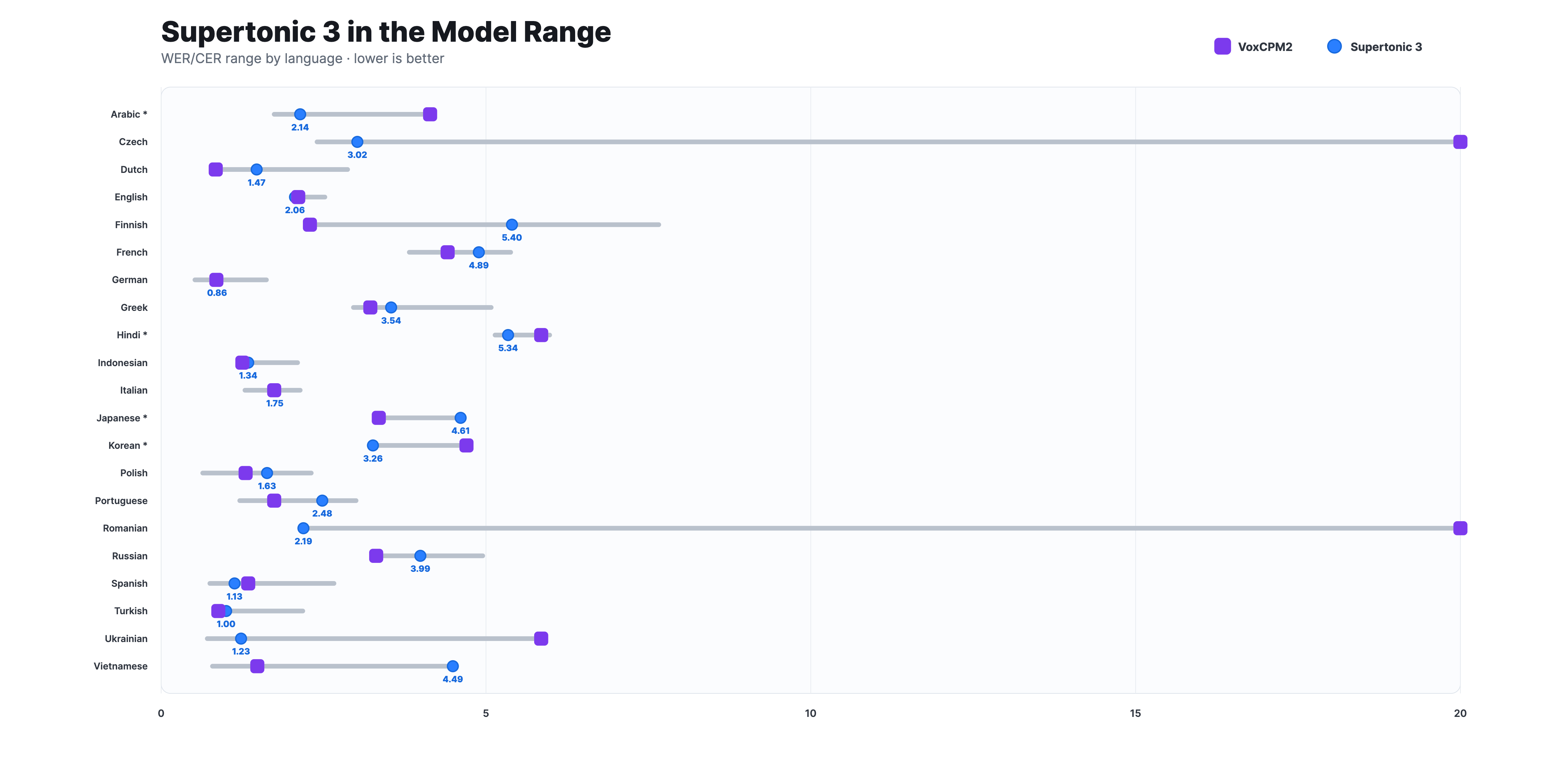
Evaluated on the Minimax-MLS-test benchmark, Supertonic 3 stays within a competitive WER/CER range against much larger open TTS models such as VoxCPM2, while preserving a lightweight on-device deployment path. Asterisked languages (*) use CER; the others use WER.
| Lang | VoxCPM2 | OmniVoice | Qwen3-TTS | Supertonic 2 | Supertonic 3 | |---|:---:|:---:|:---:|:---:|:---:| | arabic\* | 4.14 | 1.74 | — | — | 2.14 | | czech | 23.73 | 2.40 | — | — | 3.02 | | dutch | 0.84 | 0.77 | — | — | 1.47 | | english | 2.11 | 2.02 | 2.25 | 2.52 | 2.06 | | finnish | 2.29 | 3.94 | — | — | 5.40 | | french | 4.41 | 4.74 | 3.82 | 5.09 | 4.89 | | german | 0.85 | 0.96 | 0.52 | — | 0.86 | | greek | 3.22 | 2.96 | — | — | 3.54 | | hindi\* | 5.85 | 5.14 | — | — | 5.34 | | indonesian | 1.25 | 1.67 | — | — | 1.34 | | italian | 1.74 | 1.29 | 1.40 | — | 1.75 | | japanese\* | 3.35 | 3.81 | 3.67 | — | 4.61 | | korean\* | 4.70 | 3.22 | 4.07 | 3.65 | 3.26 | | polish | 1.30 | 0.64 | — | — | 1.63 | | portuguese | 1.74 | 1.40 | 1.21 | 1.52 | 2.48 | | romanian | 22.39 | 2.29 | — | — | 2.19 | | russian | 3.31 | 4.53 | 4.48 | — | 3.99 | | spanish | 1.34 | 0.99 | 0.75 | 1.81 | 1.13 | | turkish | 0.88 | 2.18 | — | — | 1.00 | | ukrainian | 5.85 | 0.71 | — | — | 1.23 | | vietnamese | 1.48 | 0.79 | — | — | 4.49 |
Lower is better.*indicates CER (character error rate); all other rows use WER (word error rate). Dashes (—) indicate the model does not officially support the language or no result is available.
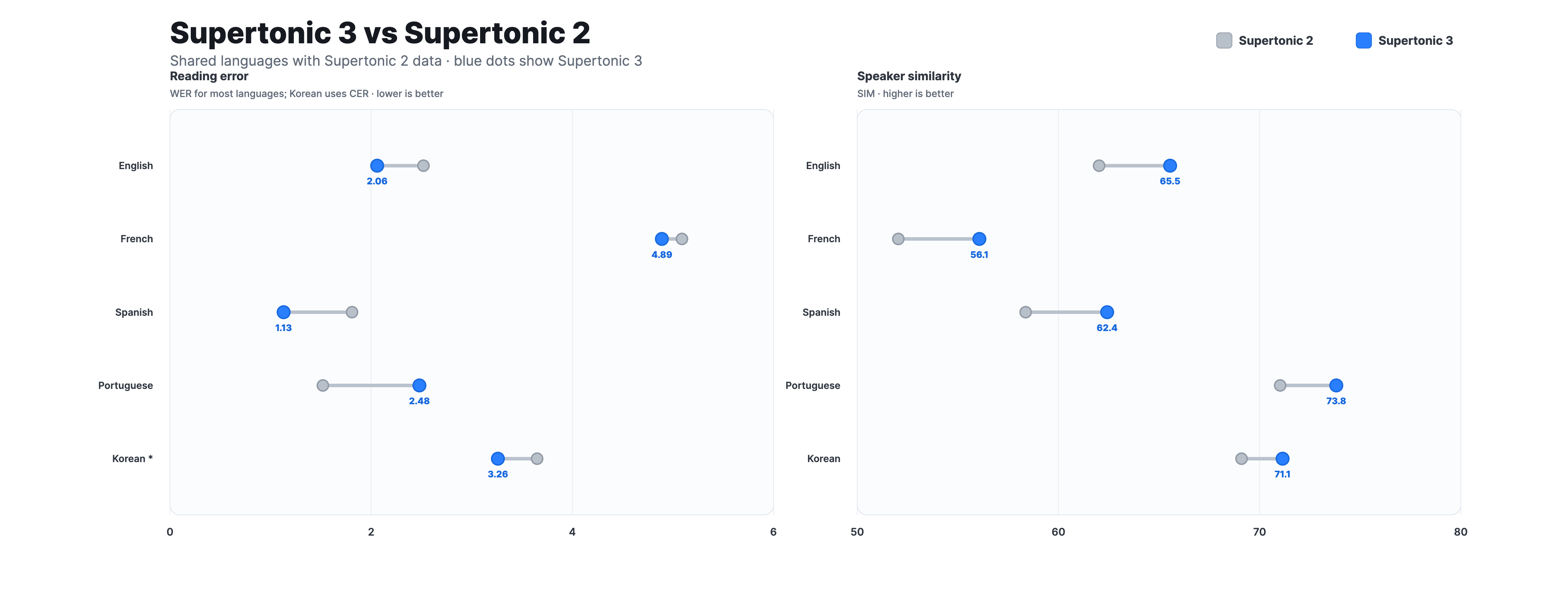
Compared with Supertonic 2, Supertonic 3 reduces repeat and skip failures, improves speaker similarity across the shared-language set, and expands language coverage from 5 to 31 languages. It keeps the v2-compatible public ONNX interface, so existing integrations can move to v3 with the same inference contract.
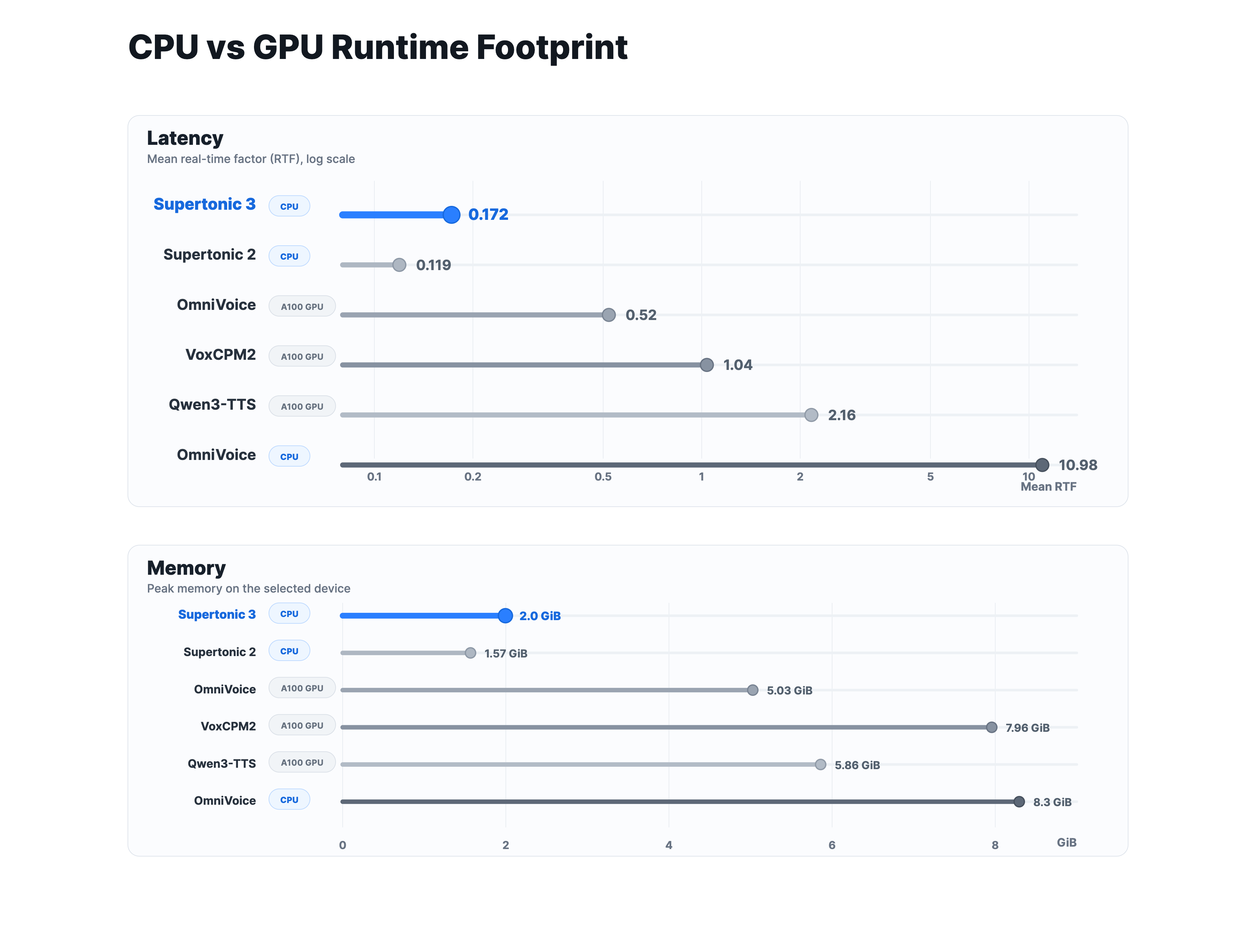
Supertonic 3 runs fast on CPU, even compared with larger baselines measured on A100 GPU, and uses substantially less memory. The open-weight fixed-voice setting does not require a GPU, which makes local, browser, and edge deployment much easier.
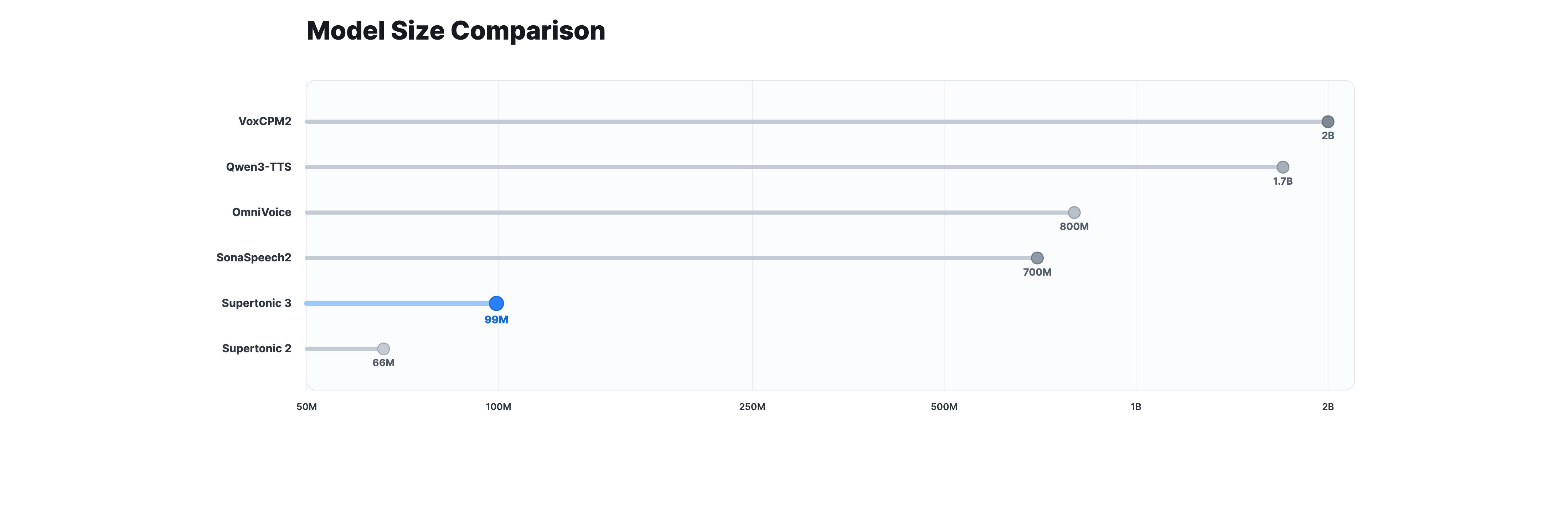
At about 99M parameters across the public ONNX assets, Supertonic 3 is much smaller than 0.7B to 2B class open TTS systems. The smaller model size is a practical advantage for download size, startup time, and on-device inference.
This open-weight repository focuses on fixed-voice, local TTS and does not include an official voice-cloning pipeline. If you want to bring your own voice to local Supertonic deployment, Voice Builder turns a short reference recording into version-specific JSON files for Supertonic 2 and Supertonic 3, so the same custom voice can move with you across supported Supertonic versions.
For a managed creation workflow, Supertonic 3 is now officially available in Supertone Play and the Supertone API. Use them when you want hosted content creation tools, diverse commercially usable preset voices, zero-shot voice cloning, or API-based integration without managing local model files. You can also listen to Supertonic 3 zero-shot samples on the official showcase.
Run locally: Follow Quick Start with the archived weights.
Watch Supertonic running on a Raspberry Pi, demonstrating on-device, real-time text-to-speech synthesis:
https://github.com/user-attachments/assets/ea66f6d6-7bc5-4308-8a88-1ce3e07400d2
Experience Supertonic on an Onyx Boox Go 6 e-reader in airplane mode, achieving an average RTF of 0.3× with zero network dependency:
https://github.com/user-attachments/assets/64980e58-ad91-423a-9623-78c2ffc13680
Turns any webpage into audio in under one second, delivering lightning-fast, on-device text-to-speech with zero network dependency—free, private, and effortless:
https://github.com/user-attachments/assets/cc8a45fc-5c3e-4b2c-8439-a14c3d00d91c
We provide ready-to-use TTS inference examples across multiple ecosystems:
| Language/Platform | Path | Description |
|-------------------|------|-------------|
| Python | py/ | ONNX Runtime inference |
| Node.js | nodejs/ | Server-side JavaScript |
| Browser | web/ | WebGPU/WASM inference |
| Java | java/ | Cross-platform JVM |
| C++ | cpp/ | High-performance C++ |
| C# | csharp/ | .NET ecosystem |
| Go | go/ | Go implementation |
| Swift | swift/ | macOS applications |
| iOS | ios/ | Native iOS apps |
| Rust | rust/ | Memory-safe systems |
| Flutter | flutter/ | Cross-platform apps |
For detailed usage instructions, please refer to the README.md in each language directory.
Supertonic is designed to handle complex, real-world text inputs that contain natural prose, punctuation, abbreviations, and proper nouns.
These historical audio samples are hosted externally and are not maintained as part of this archive.
Overview of Test Cases:
| Category | Key Challenges | Supertonic | ElevenLabs | OpenAI | Gemini | Microsoft | |:--------:|:--------------:|:----------:|:----------:|:------:|:------:|:---------:| | Financial Expression | Decimal currency, abbreviated magnitudes (M, K), currency symbols, currency codes | ✅ | ❌ | ❌ | ❌ | ❌ | | Phone Number | Area codes, hyphens, extensions (ext.) | ✅ | ❌ | ❌ | ❌ | ❌ | | Technical Unit | Decimal numbers with units, abbreviated technical notations | ✅ | ❌ | ❌ | ❌ | ❌ |
Text:
"The startup secured $5.2M in venture capital, a huge leap from their initial $450K seed round."
Challenges:
| System | Result | Audio Sample | |--------|--------|--------------| | Supertonic | ✅ | 🎧 Play Audio | | ElevenLabs Flash v2.5 | ❌ | 🎧 Play Audio | | OpenAI TTS-1 | ❌ | 🎧 Play Audio | | Gemini 2.5 Flash TTS | ❌ | 🎧 Play Audio | | VibeVoice Realtime 0.5B | ❌ | 🎧 Play Audio |
Text:
"You can reach the hotel front desk at (212) 555-0142 ext. 402 anytime."
Challenges:
| System | Result | Audio Sample | |--------|--------|--------------| | Supertonic | ✅ | 🎧 Play Audio | | ElevenLabs Flash v2.5 | ❌ | 🎧 Play Audio | | OpenAI TTS-1 | ❌ | 🎧 Play Audio | | Gemini 2.5 Flash TTS | ❌ | 🎧 Play Audio | | VibeVoice Realtime 0.5B | ❌ | 🎧 Play Audio |
Text:
"Our drone battery lasts 2.3h when flying at 30kph with full camera payload."
Challenges:
| System | Result | Audio Sample | |--------|--------|--------------| | Supertonic | ✅ | 🎧 Play Audio | | ElevenLabs Flash v2.5 | ❌ | 🎧 Play Audio | | OpenAI TTS-1 | ❌ | 🎧 Play Audio | | Gemini 2.5 Flash TTS | ❌ | 🎧 Play Audio | | VibeVoice Realtime 0.5B | ❌ | 🎧 Play Audio |
Note: These samples demonstrate how each system handles text normalization and pronunciation of complex expressions without requiring pre-processing or phonetic annotations.
| Project | Description | Links | |---------|-------------|-------| | TLDRL | Free, on-device TTS extension for reading any webpage | Chrome | | Read Aloud | Open-source TTS browser extension | Chrome · Edge · GitHub | | PageEcho | E-Book reader app for iOS | App Store | | VoiceChat | On-device voice-to-voice LLM chatbot in the browser | Demo · GitHub | | OmniAvatar | Talking avatar video generator from photo + speech | Demo | | CopiloTTS | Kotlin Multiplatform TTS SDK via ONNX Runtime | GitHub | | Aftertone | Local post-reply TTS for Cursor & Claude Code (Supertonic 3 ONNX, on-device daemon) | GitHub · Demo | | Voice Mixer | PyQt5 tool for mixing and modifying voice styles | GitHub | | Supertonic MNN | Lightweight library based on MNN (fp32/fp16/int8) | GitHub · PyPI | | Transformers.js | Hugging Face's JS library with Supertonic support | GitHub PR · [Demo](https://huggingface.co/spaces/webml-community/Su
→ →
→ →
→ →
→ →
→ →
→