1
 →
→
Dockerized OpenAI-compatible wrapper for Kokoro-82M text-to-speech w/multiplatform CPU, AMD, NVIDIA GPU PyTorch; multi-speaker, clone-tuning, caption timestamps, SSML, optional readalong web UI









Dockerized FastAPI wrapper for Kokoro-82M text-to-speech model. Generate hours of high quality speech in minutes.




Community projects that use, recommend, or enable Kokoro-FastAPI as a backend:
Pre-built multi-arch images with models baked in.
:latest is available, but please pin to a release tag for stable usage.
No GPU (laptop, CPU-only server)
docker run -p 8880:8880 ghcr.io/remsky/kokoro-fastapi-cpu:latest
NVIDIA (GTX 900-series through RTX 40; ships cu126)
docker run --gpus all -p 8880:8880 ghcr.io/remsky/kokoro-fastapi-gpu:latest
NVIDIA RTX 50-series / Blackwell (ships cu128)
docker run --gpus all -p 8880:8880 ghcr.io/remsky/kokoro-fastapi-gpu:latest-cu128
NVIDIA arm64 (Jetson, GH200; same tag, ships cu129)
docker run --gpus all -p 8880:8880 ghcr.io/remsky/kokoro-fastapi-gpu:latest
AMD GPU (ROCm, experimental, x86_64 only)
docker run --device=/dev/kfd --device=/dev/dri -p 8880:8880 ghcr.io/remsky/kokoro-fastapi-rocm:latest
Apple Silicon (native MPS clone; the CPU image also works)
./start-gpu_mac.sh
gpu:latest is the same image as gpu:latest-cu126. Configuration via environment variables, see the configuration guide.
Quick Start (docker compose)
1. Install prerequisites, and start the service using Docker Compose (Full setup including UI):
        git clone https://github.com/remsky/Kokoro-FastAPI.git
        cd Kokoro-FastAPI
cd docker/gpu   # For NVIDIA GPU support
        # or cd docker/cpu   # For CPU support
        # or cd docker/rocm  # For AMD GPU (ROCm, experimental, amd64 only)
        docker compose up --build
# *Note for Apple Silicon (M1/M2/M3) users:
        # The Docker GPU image is CUDA-only and won't run on Apple Silicon. With Docker, use docker/cpu.
        # For native MPS (Apple GPU) acceleration, run directly via UV with ./start-gpu_mac.sh.
cd ../..  # back to repo root for the paths below
# Models will auto-download, but if needed you can manually download:
        python docker/scripts/download_model.py --output api/src/models/v1_0
Configuration guide covers image vs build, the volume mounts, and env vars.
1. Install prerequisites:
        git clone https://github.com/remsky/Kokoro-FastAPI.git
        cd Kokoro-FastAPI
        ./start-cpu.sh OR
        ./start-gpu.sh
Windows
        .\start-cpu.ps1 OR
        .\start-gpu.ps1
Run locally as an OpenAI-Compatible Speech Endpoint
from openai import OpenAI
client = OpenAI(
    base_url="http://localhost:8880/v1", api_key="not-needed"
)
with client.audio.speech.with_streaming_response.create(
    model="kokoro",
    voice="af_sky+af_bella", #single or multiple voicepack combo
    input="Hello world!"
  ) as response:
      response.stream_to_file("output.mp3")
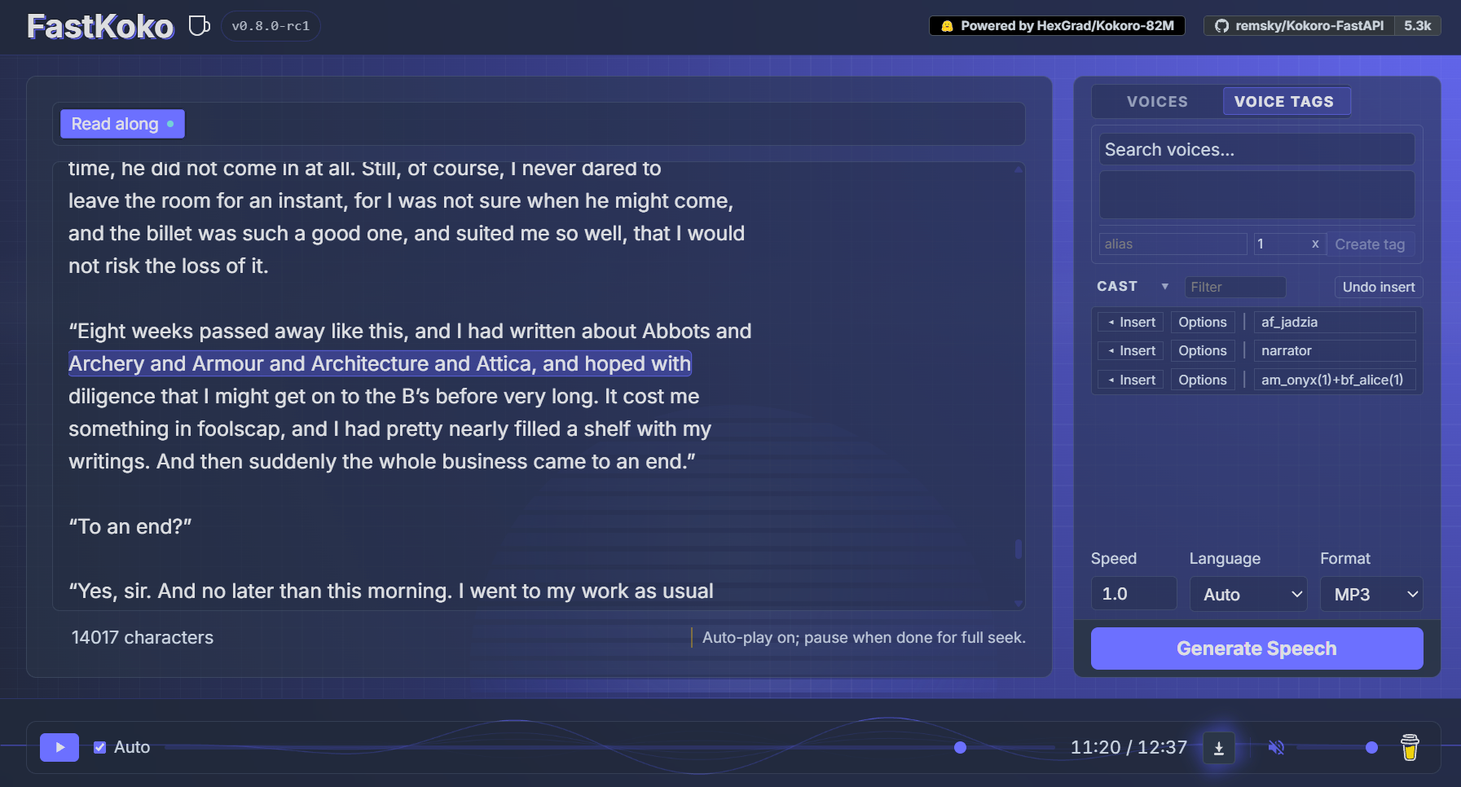
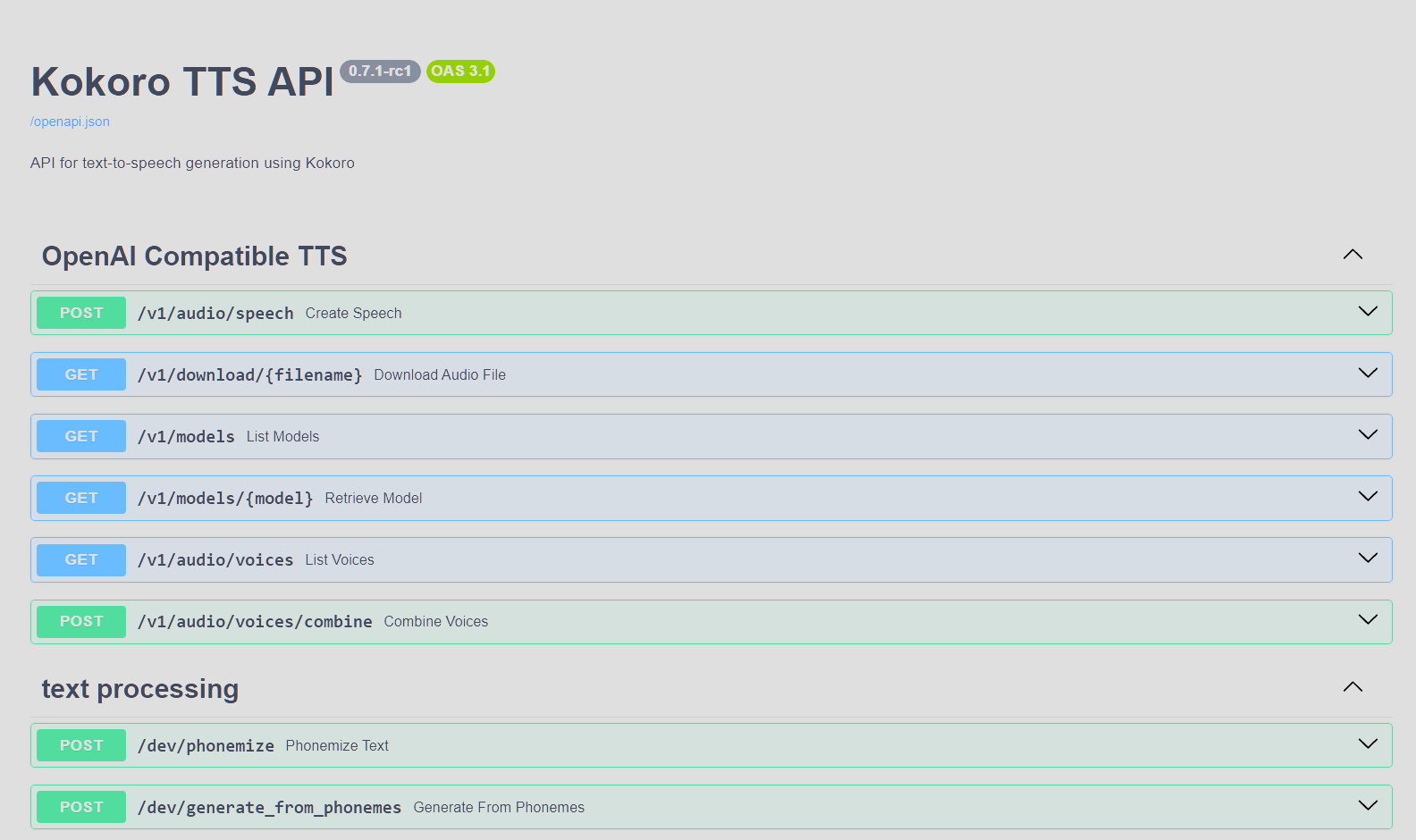
# Using OpenAI's Python library
from openai import OpenAI
client = OpenAI(base_url="http://localhost:8880/v1", api_key="not-needed")
response = client.audio.speech.create(
    model="kokoro",
    voice="af_bella+af_sky", # see /api/src/core/openai_mappings.json to customize
    input="Hello world!",
    response_format="mp3"
)
response.stream_to_file("output.mp3")
import requests
response = requests.get("http://localhost:8880/v1/audio/voices")
voices = [v["id"] for v in response.json()["voices"]]
Generate audio
response = requests.post(
    "http://localhost:8880/v1/audio/speech",
    json={
        "model": "kokoro",
        "input": "Hello world!",
        "voice": "af_bella",
        "response_format": "mp3",  # Supported: mp3, wav, opus, flac, aac, pcm
        "speed": 1.0
    }
)
Save audio
with open("output.mp3", "wb") as f:
    f.write(response.content)
Quick tests (run from another terminal):
python examples/assorted_checks/test_openai/test_openai_tts.py # Test OpenAI Compatibility
python examples/assorted_checks/test_voices/test_all_voices.py # Test all available voices
# OpenAI-compatible streaming
from openai import OpenAI
client = OpenAI(
    base_url="http://localhost:8880/v1", api_key="not-needed")
Stream to file
with client.audio.speech.with_streaming_response.create(
    model="kokoro",
    voice="af_bella",
    input="Hello world!"
) as response:
    response.stream_to_file("output.mp3")
Stream to speakers (requires PyAudio)
import pyaudio
player = pyaudio.PyAudio().open(
    format=pyaudio.paInt16,
    channels=1,
    rate=24000,
    output=True
)
with client.audio.speech.with_streaming_response.create(
    model="kokoro",
    voice="af_bella",
    response_format="pcm",
    input="Hello world!"
) as response:
    for chunk in response.iter_bytes(chunk_size=1024):
        player.write(chunk)
Or via requests:
import requests
response = requests.post(
    "http://localhost:8880/v1/audio/speech",
    json={
        "input": "Hello world!",
        "voice": "af_bella",
        "response_format": "pcm"
    },
    stream=True
)
for chunk in response.iter_content(chunk_size=1024):
    if chunk:
        # Process streaming chunks
        pass
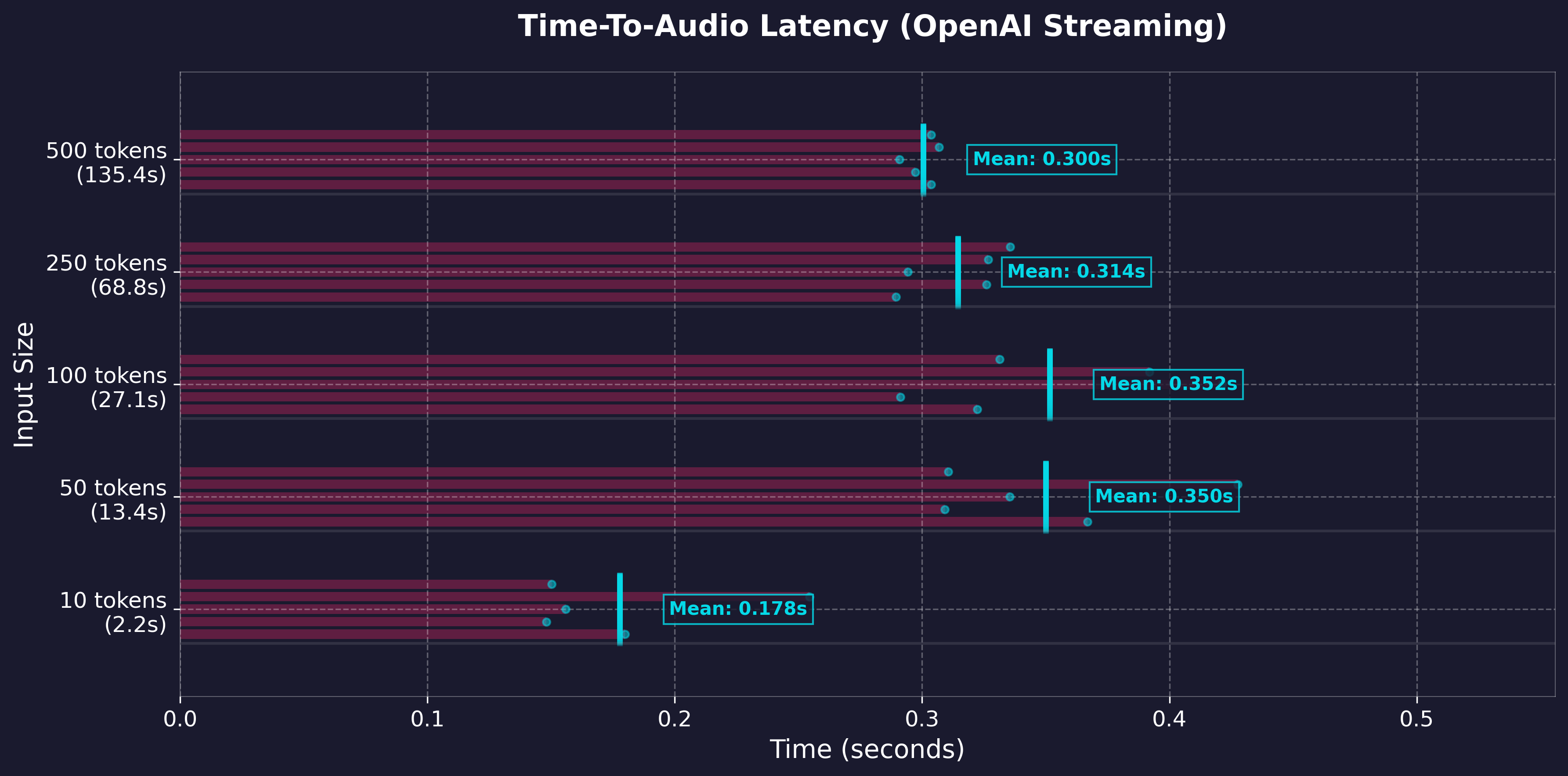
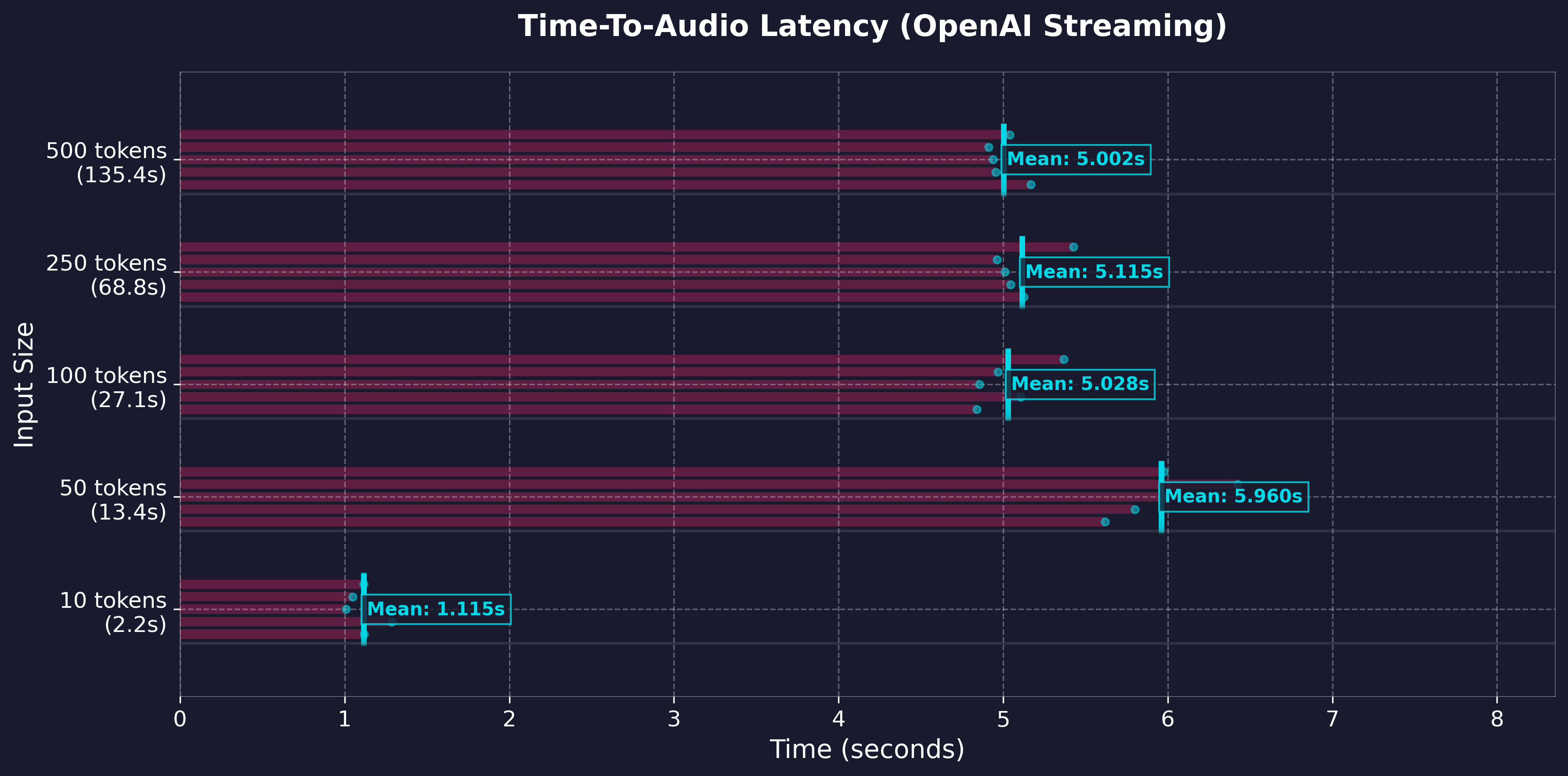
Key Streaming Metrics:
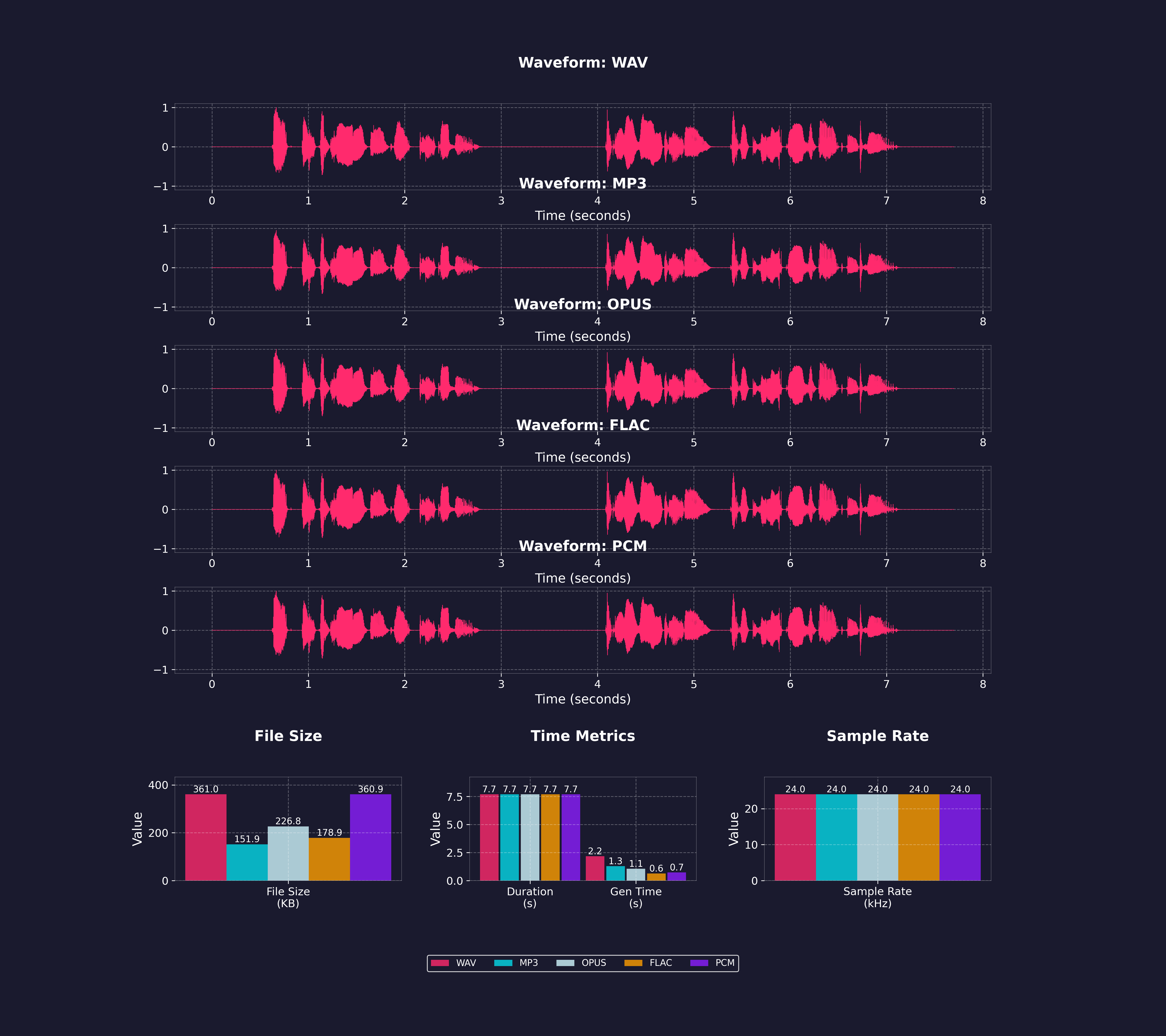
import requests
response = requests.get("http://localhost:8880/v1/audio/voices")
voices = [v["id"] for v in response.json()["voices"]]
Weighted voice combination (67%/33% mix)
response = requests.post(
    "http://localhost:8880/v1/audio/speech",
    json={
        "input": "Hello world!",
        "voice": "af_bella(2)+af_sky(1)",  # 2:1 ratio = 67%/33%
        "response_format": "mp3"
    }
)
Download combined voice as .pt file
response = requests.post(
    "http://localhost:8880/v1/audio/voices/combine",
    json="af_bella(2)+af_sky(1)"  # 2:1 ratio = 67%/33%
)
Save the .pt file
with open("combined_voice.pt", "wb") as f:
    f.write(response.content)
Use the downloaded voice file
response = requests.post(
    "http://localhost:8880/v1/audio/speech",
    json={
        "input": "Hello world!",
        "voice": "combined_voice",  # Use the saved voice file
        "response_format": "mp3"
    }
)
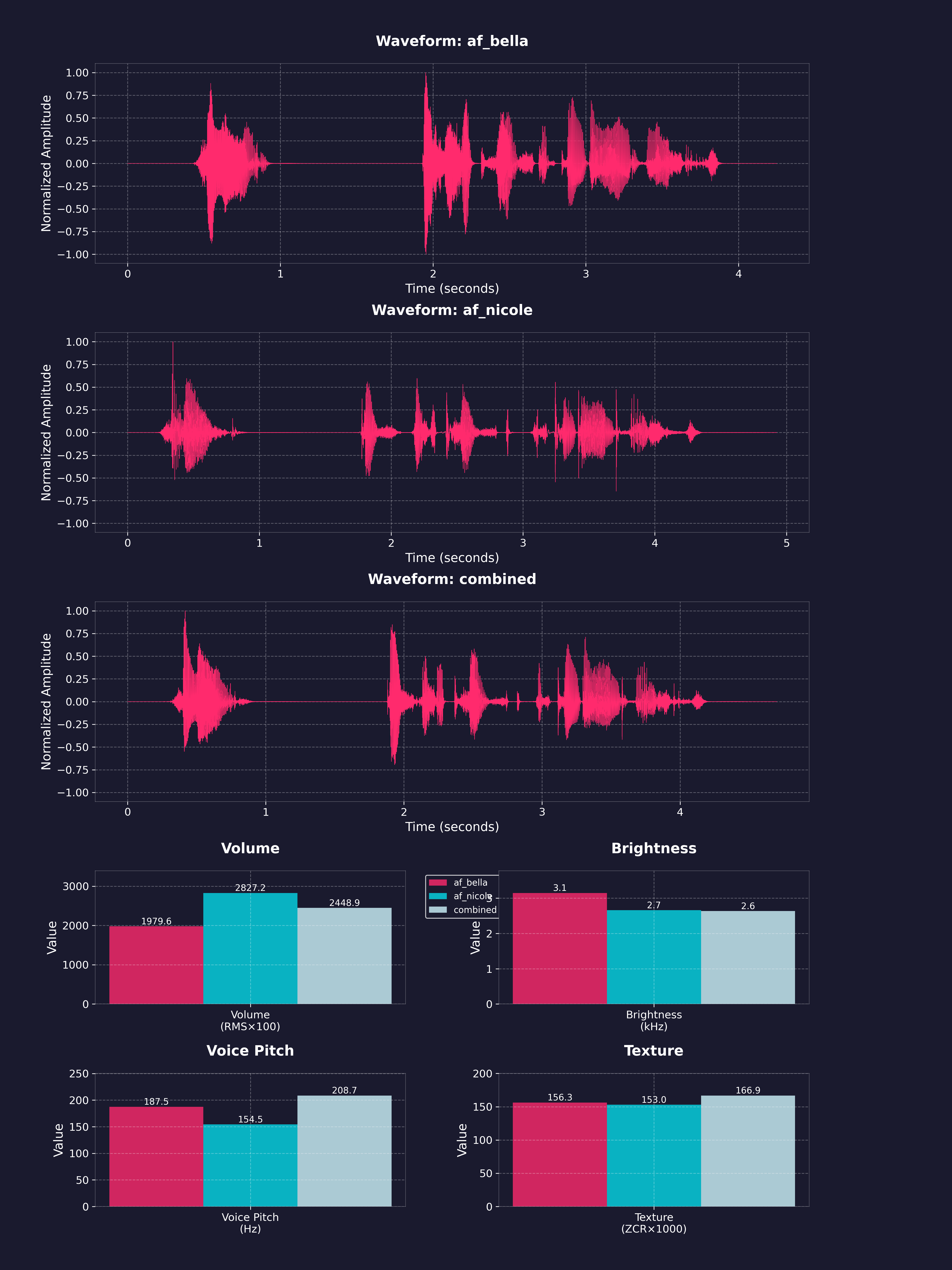
Weighted mixes can get long fast. voice_aliases maps a short name per request, for both the voice field and [voice:...] tags:
{"voice_aliases": {...}}; interchangeable for API calls.from openai import OpenAI
client = OpenAI(base_url="http://localhost:8880/v1", api_key="not-needed")
client.audio.speech.create(
model="kokoro",
voice="narrator",
input="[voice:narrator] Once upon a time. [voice:villain] Never!",
extra_body={
"allow_voice_tags": True,
"voice_aliases": {"narrator": "af_bella(2)+af_sky", "villain": "am_michael"},
},
)
or
curl -X POST http://localhost:8880/v1/audio/speech \
  -H "Content-Type: application/json" \
  -d '{
    "model": "kokoro",
    "voice": "narrator",
    "input": "[voice:narrator] Once upon a time. [voice:villain] Never!",
    "allow_voice_tags": true,
    "voice_aliases": {"narrator": "af_bella(2)+af_sky", "villain": "am_michael"},
    "response_format": "mp3"
  }' --output aliased.mp3
POST /dev/tune takes a 3 to 30 s clip of one English speaker and speaks with a voice tuned toward it, via inno-kokoro. A tuner, not a cloner: expect the same neighbourhood, not a match. Only tune voices you have permission to use.
curl -s http://localhost:8880/dev/tune -F [email protected] -F 'request={"input":"Hello there."}' -o out.mp3
curl -s http://localhost:8880/dev/tune -F [email protected] -F return_voice_pack=true -o ref.pt
curl -s http://localhost:8880/dev/tune -F [email protected] -F save_voice=am_ref   # saves am_ref_tuned, needs ALLOW_LOCAL_VOICE_SAVING=true
request is the /v1/audio/speech body minus voice; the pack only exists for the length of the response unless save_voice keeps it in VOICES_DIRam_, bf_, ax_, etc.) and saved voices get a _tuned suffix. Bundled tuned voices end in _innoprosody_head (default on), fmax pitch ceiling in Hz (default auto)ENABLE_INNO_TUNER=true enables with a web player tabALLOW_LOCAL_VOICE_SAVING=true allows saving them to the live server.[voice:...] tags switch speakers inline, anywhere input is accepted/v1/audio/speech needs allow_voice_tags: true per request; /dev/dialogue allows them by defaultENABLE_VOICE_TAGS=false opts out server-wide: the parameter is refused and /dev/dialogue 403scurl -X POST http://localhost:8880/v1/audio/speech \
-H "Content-Type: application/json" \
-d '{
"model": "kokoro",
"voice": "af_heart",
"input": "The narrator opens. [voice:af_bella] Did it land? [pause:0.3s] [voice:am_michael] It did.",
"allow_voice_tags": true,
"response_format": "mp3"
}' --output dialogue.mp3
With the official OpenAI client, pass the param in extra_body:
client.audio.speech.create(
    model="kokoro",
    voice="af_jadzia",
    input="The narrator opens. [voice:af_bella] Did it land?",
    extra_body={"allow_voice_tags": True},
)
POST /dev/dialogue uses structured turns, and allows pause_between_turns to be controlled by param.
curl -X POST http://localhost:8880/dev/dialogue \
  -H "Content-Type: application/json" \
  -d '{
    "turns": [
      {"voice": "af_bella", "text": "Did the multi speaker support land?"},
      {"voice": "am_michael", "text": "It did. Turns switch voices inline."}
    ],
    "pause_between_turns": 0.4,
    "response_format": "mp3"
  }' --output dialogue.mp3
Notes:
voice/default. lang_code will override every speaker.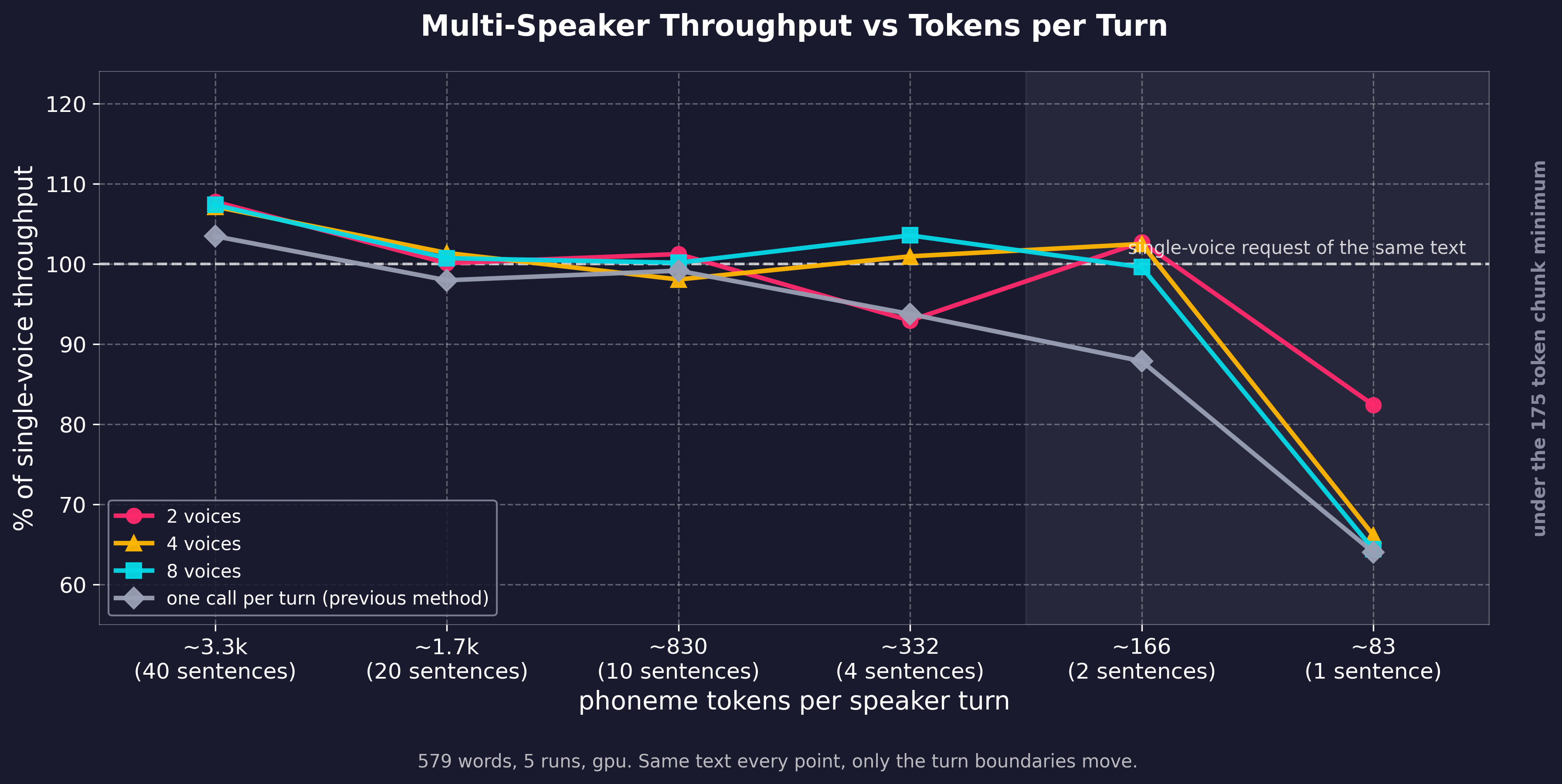
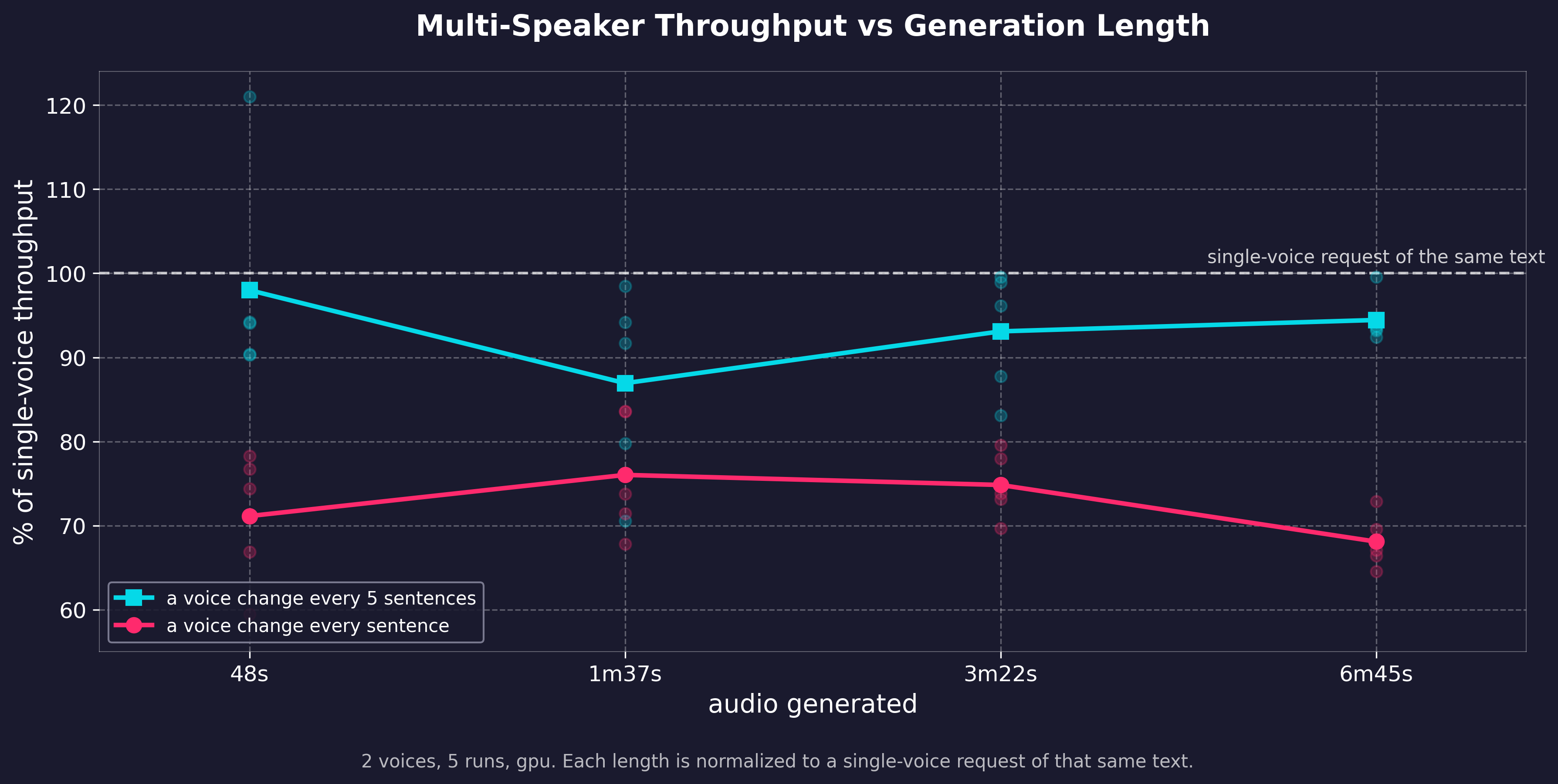
Number of voices has minimal impact on generation speed. For continuous swaps though, if each speaker gets less than about 2 sentences, chunking requirements slow generation down. Still a flat cost, not compounding as the text grows. Regenerate with examples/assorted_checks/test_dialogue/.
Four tokens can be embedded in the input text and are parsed server-side (API, WebUI, or any client):
[pause:1.5s] inserts that much silence. Must be exactly this form (colon, trailing s, case-insensitive). [pause=1.5] and [PAUSE 1.0] are not recognized and get read aloud.Worcester speaks the IPA between the slashes instead of the word. English only; use /dev/phonemize to find the IPA.[voice:am_michael] switches speaker for everything that follows.allow_voice_tags: true per request, and ENABLE_VOICE_TAGS server-side (on by default). Otherwise the tag is spoken as written.voice parameter ([voice:af_bella(2)+af_sky]), voice_aliases, [rate:1.5] scales the speaking voice's pace until the next rate tag or voice change; [rate:1.0] reverts. Applies on top of the request speed, clamped to 0.25-4.0. Same gating as voice tags.{"grandpa": {"voice": "am_michael", "rate": 0.8}} applies that rate whenever the alias speaks, as the voice parameter or in tags. Useful for voices that read fast or slow, and for named presets over one voice (narrator_fast, narrator_slow).[rate:] tag scales the speaker's calibrated pace rather than replacing it, so an alias throttled to 0.8 stays proportionally slower under [rate:1.1]. Every [voice:...] tag resets to the new voice's own rate, so a calibrated speaker cannot drag its pace onto the next one. Use speed for a pace over the whole request.The city of Worcester is easy. [pause:1s] See?
Send ssml: true with allow_voice_tags: true on /v1/audio/speech or /dev/captioned_speech to translate and speak in one call. Both flags are needed, since the translation emits [voice:] and [rate:] spans that would otherwise be read aloud; ssml without them is a 400.
{
  "model": "kokoro",
  "input": "Hithere",
  "voice": "af_bella",
  "allow_voice_tags": true,
  "ssml": true
}
POST /dev/ssml does the translation on its own when you want the tokens back as text rather than audio, or want to inspect them before synthesis. Send text, plus voice if your speech request uses one, then pass the result back with allow_voice_tags: true. Without a voice, `/` are stripped and their content kept.
becomes [pause:0.75s]. strength= instead of time=` gives none/x-weak 0s, weak 0.25s, medium 0.5s, strong 1s, x-strong 1.5s becomes [voice:am_michael]`, reverts at the closing tag becomes [rate:0.75], and takes 80% or 1.2 too. Scales the speaking voice's pace on top of the request speed, clamped 0.25-4.0, reverts. pitch/volume` ignoredWorcester becomes Worcester, IPA and English onlyWWW speaks the alias, , , , `, etc: markup dropped, text spoken
SSML_MAX_DEPTH (10) is a 400; no dialect uses a DTD, real documents nest 2-5google:style, mstts:express-as, amazon:effect) need their xmlns: on ``, vendor docs often omit itGET /dev/ssml serves these tables as data, read off the translator itselfcurl -s http://localhost:8880/dev/ssml -H "Content-Type: application/json" \
-d '{"text": "The city of Worcester is easy.See?"}'
{"text": "The city of Worcester is easy. [pause:1.0s] See?"}
TARGET_MIN_TOKENS, TARGET_MAX_TOKENS, and ABSOLUTE_MAX_TOKENS (175, 250, 450 by default, set via environment variables).
Convert text to phonemes and/or generate audio directly from phonemes: ```python import requests
def get_phonemes(text: str, language: str = "a"): """Get phonemes and tokens for input text""" response = requests.post( "http://localhost:8880/dev/phonemize", json={"text": text, "language": language} # "a" for American English ) response.raise_for_status() result = response.json() return result["phonemes"], result["tokens"]
def generate_audio_from_phonemes(phonemes: str, voice: str = "af_bella"): """Generate audio from phonemes""" response = requests.post( "http://localhost:8880/dev/generate_from_phonemes", json={"phonemes": phonemes, "v
→ →
→ →
→ →
→ →
→ →
→