1
 →
→
Real-time, local speech-to-text with streaming ASR, speaker diarization, translation, and OpenAI/Deepgram-compatible APIs.

WLK: Ultra-low-latency, self-hosted speech-to-text pipeline
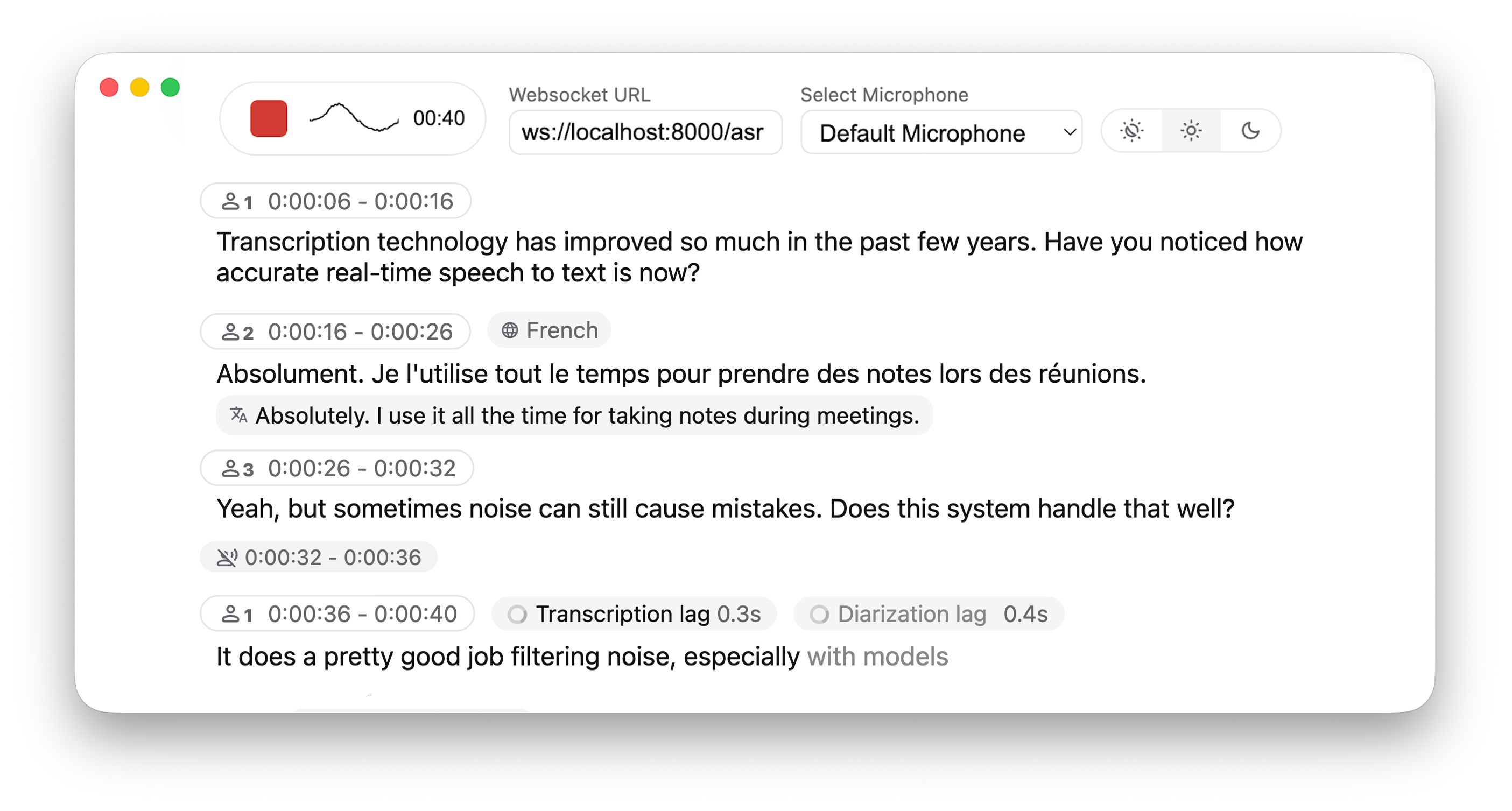






Why not just run a simple Whisper model on every audio batch? Whisper is designed for complete utterances, not real-time chunks. Processing small segments loses context, cuts off words mid-syllable, and produces poor transcription. WhisperLiveKit uses state-of-the-art simultaneous speech research for intelligent buffering and incremental processing.
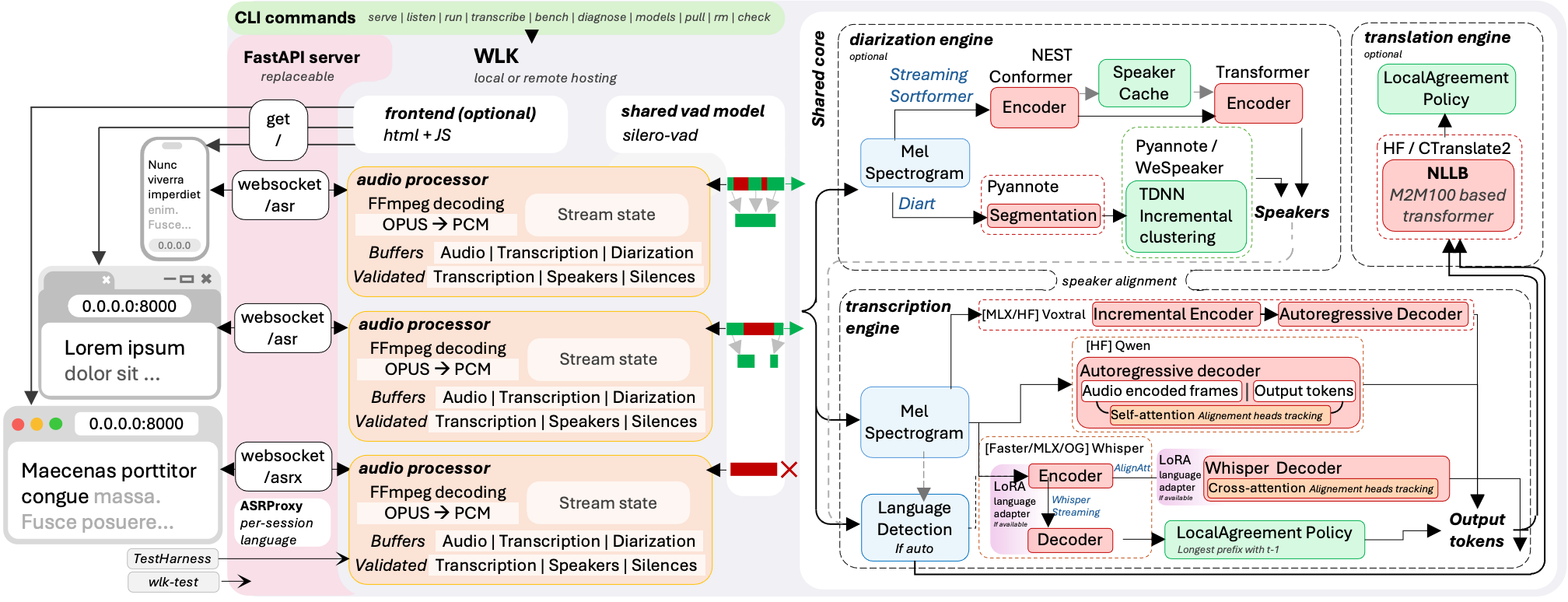
The backend supports multiple concurrent users. Voice Activity Detection reduces overhead when no voice is detected.
pip install whisperlivekit
Start the server — open http://localhost:8000 and start talking
wlk --model base --language en
Auto-pull model and start server
wlk run whisper:tiny
Transcribe a file (no server needed)
wlk transcribe meeting.wav
Generate subtitles
wlk transcribe --format srt podcast.mp3 -o podcast.srt
Manage models
wlk models                             # See what's installed
wlk pull large-v3                      # Download a model
wlk rm large-v3                        # Delete a model
Benchmark speed and accuracy
wlk bench
WhisperLiveKit exposes compatibility-oriented subsets of popular APIs:
# OpenAI-compatible REST API
curl http://localhost:8000/v1/audio/transcriptions -F [email protected]
Works with the OpenAI Python SDK
client = OpenAI(base_url="http://localhost:8000/v1", api_key="unused")
Deepgram-compatible WebSocket
See docs/API.md for supported options and current SDK setup
Native WebSocket for real-time streaming
ws://localhost:8000/asr
Per-session WebSocket query parameters:
| param | example | effect |
|---|---|---|
| language | ?language=fr | transcription language for this session (one shared engine serves mixed-language sessions) |
| target_language | ?target_language=de | translation target for this session (server must run with --target-language) |
| context | ?context=WhisperLiveKit%2C+Qwen3-ASR | terminology, names, or phrase-list text used to condition this session; supported by Whisper-family and SimulStreaming backends |
| mode | ?mode=diff | incremental snapshot/diff protocol instead of resending the full state (experimental, for integrators building their own client, see diff_protocol.py); the bundled web UI uses full |
| token | ?token=... | API token when the server runs with --api-token (also accepted as an Authorization: Bearer header) |
See docs/API.md for the complete API reference. For a native SwiftUI macOS client, see macos/WhisperLiveKitMac.
- See here for the list of all available languages.
- Check the troubleshooting guide for step-by-step fixes collected from recent GPU setup/env issues.
- For HTTPS requirements, see the Parameters section for SSL configuration options.
| Feature | uv sync | pip install -e |
|-----------|-------------|-------------|
| Apple Silicon MLX Whisper backend | uv sync --extra mlx-whisper | pip install -e ".[mlx-whisper]" |
| FunASR SenseVoiceSmall | uv sync --extra funasr | pip install -e ".[funasr]" |
| Voxtral (MLX backend, Apple Silicon) | uv sync --extra voxtral-mlx | pip install -e ".[voxtral-mlx]" |
| CPU PyTorch stack | uv sync --extra cpu | pip install -e ".[cpu]" |
| CUDA 12.9 PyTorch stack | uv sync --extra cu129 | pip install -e ".[cu129]" |
| Translation | uv sync --extra translation | pip install -e ".[translation]" |
| Sentence tokenizer | uv sync --extra sentence_tokenizer | pip install -e ".[sentence_tokenizer]" |
| Voxtral (HF backend) | uv sync --extra voxtral-hf | pip install -e ".[voxtral-hf]" |
| Qwen3-ASR vLLM (CUDA) | uv sync --extra qwen3-vllm | pip install -e ".[qwen3-vllm]" |
| Qwen3-ASR streaming (HF, CUDA/MPS/CPU) | uv sync --extra qwen3-streaming | pip install -e ".[qwen3-streaming]" |
| Qwen3-ASR vLLM Metal (Apple Silicon) | Install vLLM with the official vllm-metal script first, then uv sync --extra qwen3-vllm-metal | Install vLLM with the official vllm-metal script first, then pip install -e ".[qwen3-vllm-metal]" |
| Speaker diarization (Sortformer / NeMo 3) | uv sync --extra diarization-sortformer | pip install -e ".[diarization-sortformer]" |
| [Not recommended] Speaker diarization with Diart (Python 3.11 or 3.12) | uv sync --extra diarization-diart | pip install -e ".[diarization-diart]" |
| Canary-1b-v2 (NeMo, CUDA/CPU) | uv sync --extra canary | pip install -e ".[canary]" |
The Diart profile is limited to Python 3.11 and 3.12 because Diart 0.9.2 requires NumPy below 2. Use Sortformer for diarization on Python 3.13.
Supported GPU profiles:
# Profile A: Sortformer diarization
uv sync --extra cu129 --extra diarization-sortformer
Profile B: Voxtral HF + translation
uv sync --extra cu129 --extra voxtral-hf --extra translation
Profile C: Qwen3-ASR vLLM
uv sync --extra qwen3-vllm
qwen3-vllm uses vLLM's CUDA wheel stack and must be installed in a separate environment from cu129. Several heavy extras (voxtral-hf, qwen3-vllm-metal, and the vLLM stacks) intentionally conflict with one another and must be installed in separate environments; the authoritative list is [tool.uv].conflicts in pyproject.toml. The canary extra conflicts with voxtral-hf and qwen3-vllm-metal, but is compatible with diarization-sortformer (both pull nemo-toolkit[asr]).
See Parameters & Configuration below on how to use them.
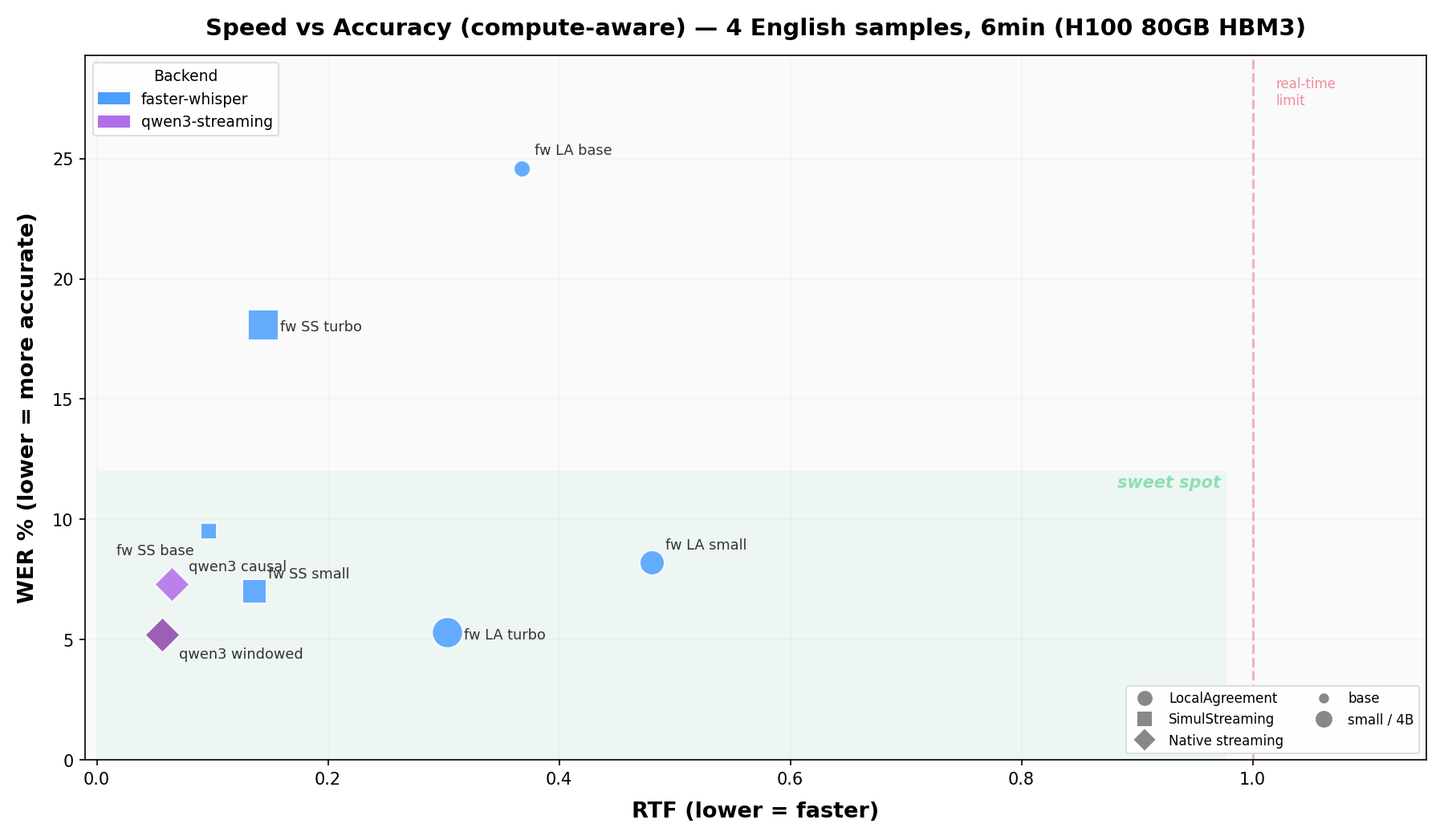
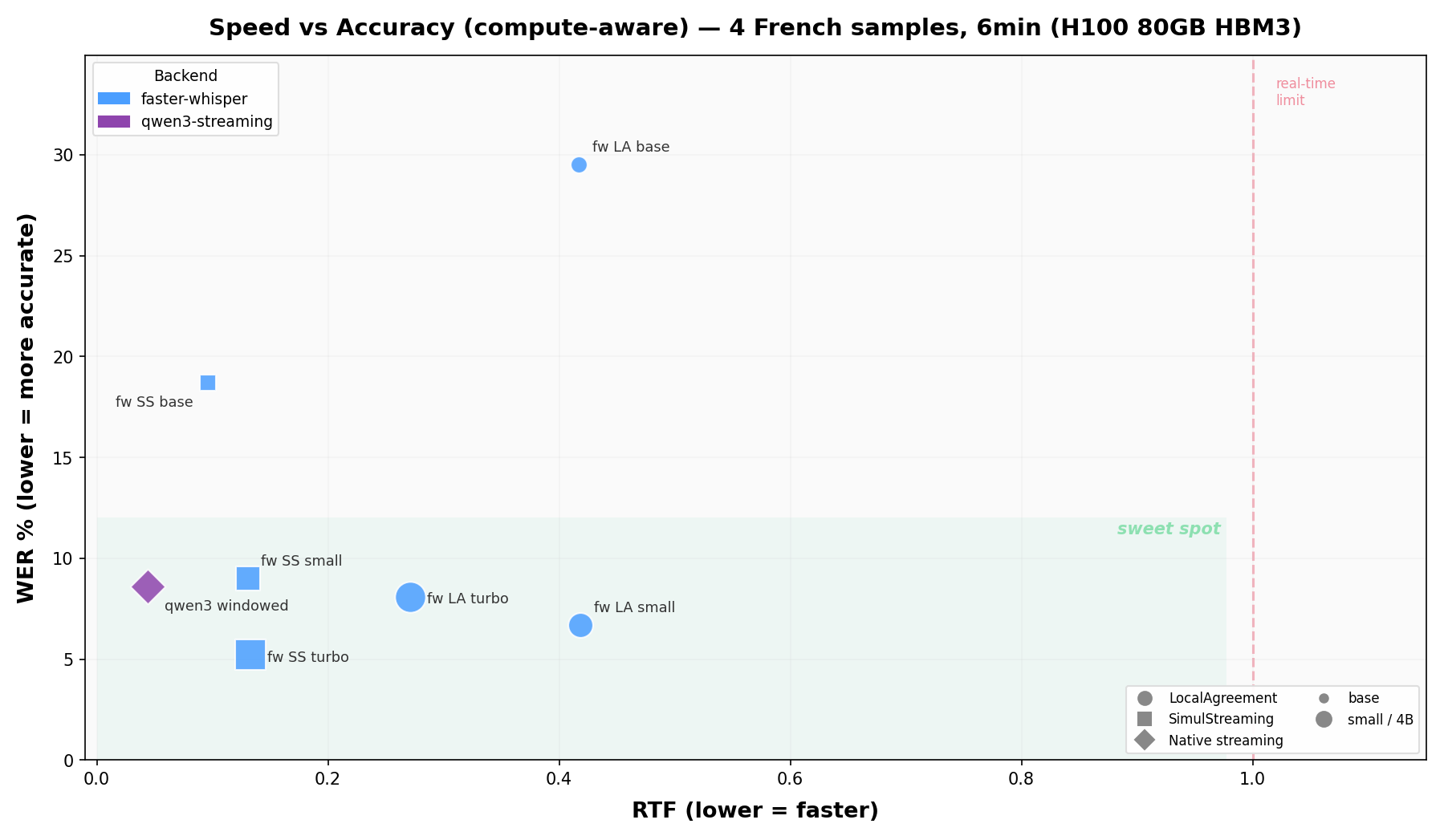
Benchmarks use 6 minutes of public LibriVox audiobook recordings per language (30s + 60s + 120s + 180s), with ground truth from Project Gutenberg. The figures above were measured on an NVIDIA H100 (CUDA); the qwen3 causal tower is English-only, so it only appears on the English chart. Fully reproducible with python scripts/run_scatter_benchmark.py (the script picks a matching combo set on Apple Silicon: mlx-whisper and voxtral-mlx instead of the CUDA-only backends). Raw results: benchmarks/h100_scatter/.
We are actively looking for benchmark results on other hardware (different NVIDIA GPUs, Apple Silicon chips, cloud instances). If you run the benchmarks on your machine, please share your results via an issue or PR!
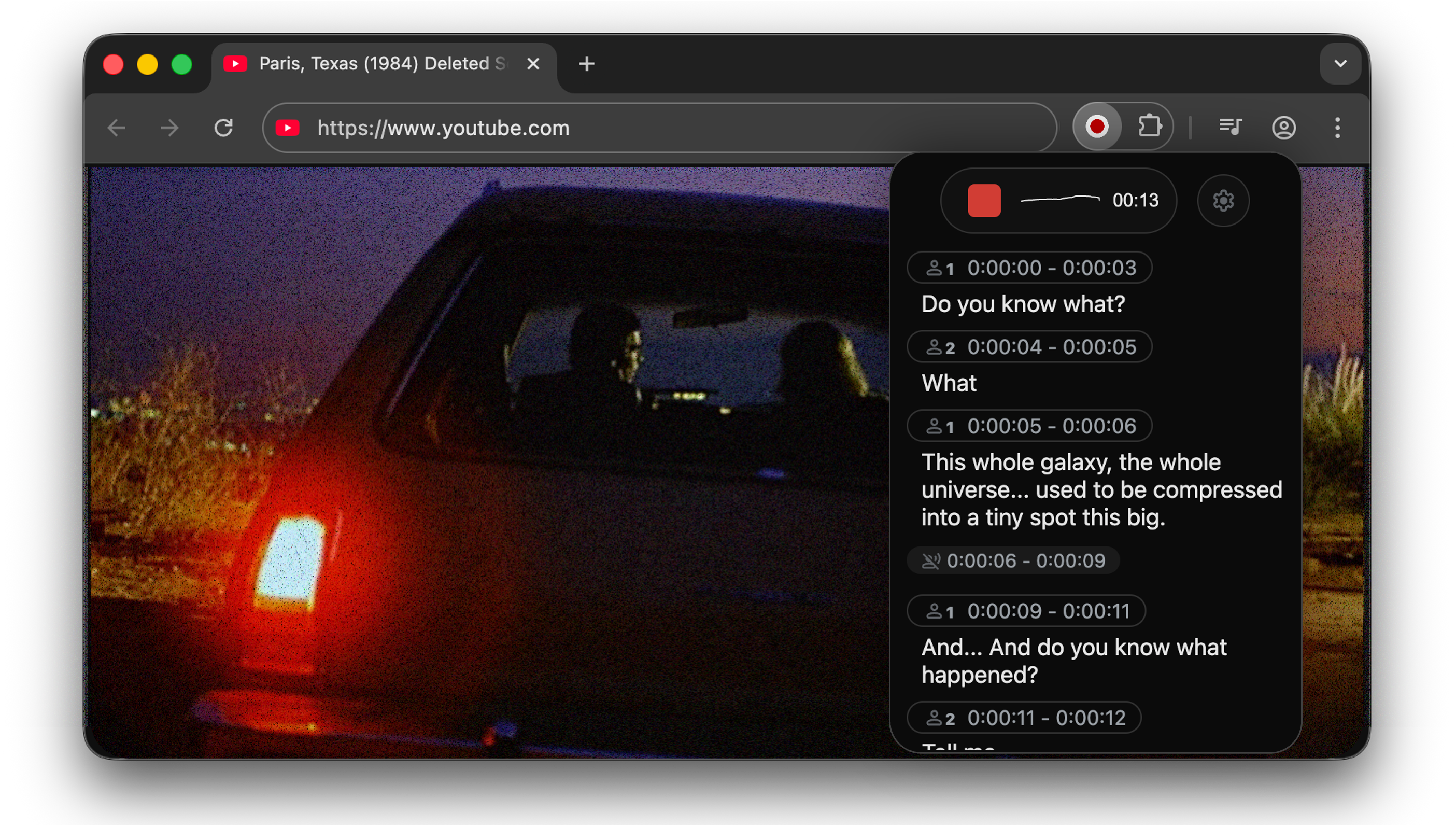
Go to chrome-extension for instructions.
WhisperLiveKit supports Voxtral Mini,
a 4B-parameter speech model from Mistral AI that natively handles 100+ languages with automatic
language detection. Whisper also supports auto-detection (--language auto), but Voxtral's per-chunk
detection is more reliable and does not bias towards English.
# Apple Silicon (native MLX, recommended)
pip install -e ".[voxtral-mlx]"
wlk --backend voxtral-mlx
Linux/GPU (HuggingFace transformers)
pip install transformers torch
wlk --backend voxtral
Voxtral uses its own streaming policy and does not use LocalAgreement or SimulStreaming. See BENCHMARK.md for performance numbers.
Install the optional backend and run SenseVoiceSmall through WLK's existing LocalAgreement and VAC/VAD pipeline:
pip install "whisperlivekit[funasr]"
wlk --backend funasr --language auto
Use a verified local model snapshot without executing remote model code:
wlk --backend funasr --model_dir /path/to/SenseVoiceSmall --language yue
The initial integration supports SenseVoiceSmall transcription in Mandarin
(zh), Cantonese (yue), English (en), Japanese (ja), Korean (ko), and
automatic detection. FunASR uses LocalAgreement only; selecting it with the
default policy switches that policy automatically. It does not support
--direct-english-translation, and WLK remains responsible for voice activity
control rather than enabling FunASR's internal VAD. This compatibility contract
does not cover arbitrary FunASR models. SenseVoiceSmall is distributed under
its model license.
qwen3-streaming runs Qwen3-ASR through plain HF Transformers with a
bounded-recompute audio cache: the pretrained audio tower only re-encodes a
local window (default 12 s) per update, cached audio embeddings are
append-only, and text is committed with a stable-prefix rule. Works on CUDA,
Apple Silicon (MPS) and CPU, no vLLM required.
pip install -e ".[qwen3-streaming]"
wlk --backend qwen3-streaming --language en
Notes:
--language is required (automatic detection switches language--backend qwen3-vllm
(ForcedAligner) when exact word timing matters.
--help for the --qwen3-streaming-* knobs.
Causal mode (minimum compute per chunk). The windowed default re-encodes up to 12 s of audio on every update. The causal mode runs an append-only causal-KV encoder instead: each ~2 s audio block is encoded exactly once, memory is bounded (15 s window + sentence-boundary segment resets), and per-chunk compute is constant in stream length:
wlk --backend qwen3-streaming --language en \
    --qwen3-streaming-audio-backend causal \
    --qwen3-streaming-tower-checkpoint qfuxa/qwen3-asr-0.6b-streaming
The fine-tuned tower (qfuxa/qwen3-asr-0.6b-streaming)
downloads automatically. The Qwen runtime, tests, experiments, benchmarks and
figures now live in Qwen3-ASR-causal,
which is consumed here through third_party/qwen3-asr-causal. WhisperLiveKit
keeps only the backend wiring and CLI flags.
Use causal mode for many concurrent streams, energy-constrained serving or unbounded session lengths; keep the windowed default for best accuracy. English only for now. Detailed WER/RTF results are in the Qwen3-ASR-causal repository.
Experimental vLLM Metal causal mode. On Apple Silicon, qwen3-vllm-metal
can also load the same causal tower and keep a rolling MLX decoder KV over the
[prompt + audio] prefix. New audio blocks are encoded once, and the decoder
replays only the new audio embeddings, prompt tail, and previous-hypothesis
draft:
wlk --backend qwen3-vllm-metal --language en \
    --qwen3-vllm-metal-audio-backend causal \
    --qwen3-vllm-metal-tower-checkpoint qfuxa/qwen3-asr-0.6b-streaming
This path has passed local short-form smoke tests and is useful for comparing
the Metal decoder path against the HF/MPS causal backend. It is still
experimental; use qwen3-streaming causal for the validated production stack.
Experimental vLLM CUDA causal mode. On NVIDIA GPUs, qwen3-vllm can load
the same causal tower, use vLLM for the text decoder, and keep vLLM
ForcedAligner timestamps:
WLK_QWEN3_VLLM_LIVE_MULTIPROCESSING=1 \
wlk --backend qwen3-vllm --language en \
    --qwen3-vllm-audio-backend causal \
    --qwen3-vllm-causal-decoder-backend vllm-live \
    --qwen3-vllm-tower-checkpoint qfuxa/qwen3-asr-0.6b-streaming
The vllm-text backend is the conservative fallback when you do not want the
live request-local append path; it still uses vLLM prefix caching but starts one
text-decoder request per chunk. The append-kv and rolling names remain as
compatibility aliases for the HF decoder path. Keep standard qwen3-vllm for
best current accuracy until the causal quality gate is fixed.
WhisperLiveKit supports NVIDIA Canary-1b-v2
via NeMo, a 1B-parameter model covering 25 European
languages with native word-level timestamps. Automatic language detection uses NeMo's
AmberNet language-ID model when --language auto is set; the detected language is locked
in once enough audio has accumulated. Canary streams through the LocalAgreement policy.
pip install -e ".[canary]"
wlk --backend canary --language auto
Notes:
scripts/smoke_canary.py) but is slow for a 1B-parameter model. On Apple
Silicon, NeMo's current restore path uses CPU; this backend does not enable
MPS device placement. NeMo is a heavy dependency (torch, Lightning, and
friends).
canary extranemo-toolkit[asr]>=3.0,<4, the NeMo line validated
with Canary timestamps and Python 3.13.
--language --canary-lid-min-sec (minimum audio before detecting) and
--canary-lid-min-conf (confidence threshold to lock in the detected language).
Command-line Interface: Start the transcription server with various options:
# Large model and translate from french to danish
wlk --model large-v3 --language fr --target-language da
Diarization and server listening on */80
wlk --host 0.0.0.0 --port 80 --model medium --diarization --language fr
Voxtral multilingual (auto-detects language)
wlk --backend voxtral-mlx
Python API Integration: Check basic_server for a more complete example of how to use the functions and classes.
import asyncio
from contextlib import asynccontextmanager
from fastapi import FastAPI, WebSocket, WebSocketDisconnect
from fastapi.responses import HTMLResponse
from whisperlivekit import AudioProcessor, TranscriptionEngine, parse_args
transcription_engine = None
@asynccontextmanager
async def lifespan(app: FastAPI):
    global transcription_engine
    transcription_engine = TranscriptionEngine(model_size="medium", diarization=True, lan="en")
    yield
app = FastAPI(lifespan=lifespan)
async def handle_websocket_results(websocket: WebSocket, results_generator):
    async for response in results_generator:
        await websocket.send_json(response)
    await websocket.send_json({"type": "ready_to_stop"})
@app.websocket("/asr")
async def websocket_endpoint(websocket: WebSocket):
    global transcription_engine
# Create a new AudioProcessor for each connection, passing the shared engine
    audio_processor = AudioProcessor(transcription_engine=transcription_engine)
    results_generator = await audio_processor.create_tasks()
    results_task = asyncio.create_task(handle_websocket_results(websocket, results_generator))
    await websocket.accept()
    while True:
        message = await websocket.receive_bytes()
        await audio_processor.process_audio(message)
Frontend Implementation: The package includes an HTML/JavaScript implementation here. You can also import it using from whisperlivekit import get_inline_ui_html & page = get_inline_ui_html()
| Parameter | Description | Default |
|-----------|-------------|---------|
| --model | Whisper model size. List and recommandations here | small |
| --model-path | Local .pt file/directory or Hugging Face repo ID containing the Whisper model. Overrides --model. Recommandations here | None |
| --language | List here. If you use auto, the model attempts to detect the language automatically, but it tends to bias towards English. | auto |
| --target-language | If sets, translates using NLLW. 200 languages available. If you want to translate to english, you can also use --direct-english-translation. The STT model will try to directly output the translation. | None |
| --translation-backend | nllb (in-process, CPU-friendly) or alignatt: streaming LLM translation through an Alignatt4LLM sidecar, with attention-gated append-only commits. See docs/translation-alignatt.md. | nllb |
| --diarization | Enable speaker identification | False |
| --backend-policy | Streaming strategy: 1/simulstreaming uses AlignAtt SimulStreaming, 2/localagreement uses the LocalAgreement policy | simulstreaming |
| --backend | ASR backend selector. auto picks MLX on macOS (if installed), otherwise Faster-Whisper, otherwise vanilla Whisper. Options: mlx-whisper, faster-whisper, whisper, openai-api (LocalAgreement only), funasr (SenseVoiceSmall, LocalAgreement only), voxtral-mlx (Apple Silicon), voxtral (HuggingFace), qwen3-vllm, qwen3-vllm-metal (Apple Silicon), qwen3-streaming (HuggingFace, CUDA/MPS/CPU), canary (NeMo, CUDA/CPU, LocalAgreement only) | auto |
| --pause-segmentation-seconds | Create a stable transcript boundary when a VAD pause is longer than this many seconds. Use 0 to disable pause-based segmentation. | 5.0 |
| --asr-coalesce-min-s | Defer an ASR call until this much new audio has accrued. Trades update cadence for fewer encoder passes; use 0 to disable. | 0 |
| --no-vac | Disable Voice Activity Controller. NOT ADVISED | False |
| --no-vad | Disable Voice Activity Detection. NOT ADVISED | False |
| --warmup-file | Audio file path for model warmup | jfk.wav |
| --host | Server host address | localhost |
| --port | Server port | 8000 |
| --ssl-certfile | Path to the SSL certificate file (for HTTPS support) | None |
| --ssl-keyfile | Path to the SSL private key file (for HTTPS support) | None |
| --forwarded-allow-ips | Ip or Ips allowed to reverse proxy the whisperlivekit-server. Supported types are IP Addresses (e.g. 127.0.0.1), IP Networks (e.g. 10.100.0.0/16), or Literals (e.g. /path/to/socket.sock) | None |
| --cors-origins | Comma-separated list of allowed CORS origins. Empty disables CORS; use * to allow all origins. | empty |
| --pcm-input | raw PCM (s16le) data is expected as input and FFmpeg will be bypassed. Frontend will use AudioWorklet instead of MediaRecorder | False |
| --lora-path | Path or Hugging Face repo ID for LoRA adapter weights (e.g., qfuxa/whisper-base-french-lora). Only works with native Whisper backend (--backend whisper) | None |
| Translation options | Description | Default |
|-----------|-------------|---------|
| --nllb-backend | transformers or ctranslate2 | transformers |
| --nllb-size | 600M or 1.3B | 600M |
| Diarization options | Description | Default |
|-----------|-------------|---------|
| --diarization-backend | diart or sortformer | sortformer |
| --sortformer-model-path | Path to a local Sortformer .nemo file, a directory containing exactly one .nemo file, or a NeMo/Hugging Face model ID. | None |
| --sortformer-max-speakers | Declare a known upper bound from 1 to 4 for a Sortformer session. The first N speaker channels are retained in arrival order. | all checkpoint channels (4 for the default model) |
| --disable-punctuation-split | [NOT FUNCTIONAL IN 0.2.15 / 0.2.16] Disable punctuation based splits. See #214 | False |
| --segmentation-model | Hugging Face model ID for Diart segmentation model. Available models | pyannote/segmentation-3.0
→ →
→ →
→ →
→ →
→ →
→