1
 →
→
Multilingual Automatic Speech Recognition with word-level timestamps and confidence
Multilingual Automatic Speech Recognition with word-level timestamps and confidence.
Whisper is a set of multi-lingual, robust speech recognition models trained by OpenAI that achieve state-of-the-art results in many languages. Whisper models were trained to predict approximate timestamps on speech segments (most of the time with 1-second accuracy), but they cannot originally predict word timestamps. This repository proposes an implementation to predict word timestamps and provide a more accurate estimation of speech segments when transcribing with Whisper models. Besides, a confidence score is assigned to each word and each segment.
The approach is based on Dynamic Time Warping (DTW) applied to cross-attention weights, as demonstrated by this notebook by Jong Wook Kim. There are some additions to this notebook:
whisper-timestamped is able to process long files with little additional memory compared to the regular use of the Whisper model.whisper-timestamped is an extension of the openai-whisper Python package and is meant to be compatible with any version of openai-whisper.
It provides more efficient/accurate word timestamps, along with those additional features:
An alternative relevant approach to recovering word-level timestamps involves using wav2vec models that predict characters, as successfully implemented in whisperX. However, these approaches have several drawbacks that are not present in approaches based on cross-attention weights such as whisper_timestamped. These drawbacks include:
Requirements:
python3 (version higher or equal to 3.7, at least 3.9 is recommended)ffmpeg (see instructions for installation on the whisper repository)whisper-timestamped either by using pip:
pip3 install whisper-timestamped
or by cloning this repository and running installation:
git clone https://github.com/linto-ai/whisper-timestamped
cd whisper-timestamped/
python3 setup.py install
If you want to plot alignment between audio timestamps and words (as in this section), you also need matplotlib:
pip3 install matplotlib
If you want to use VAD option (Voice Activity Detection before running Whisper model), you also need torchaudio and onnxruntime:
pip3 install onnxruntime torchaudio
If you want to use finetuned Whisper models from the Hugging Face Hub, you also need transformers:
pip3 install transformers
A docker image of about 9GB can be built using:
git clone https://github.com/linto-ai/whisper-timestamped
cd whisper-timestamped/
docker build -t whisper_timestamped:latest .
If you don't have a GPU (or don't want to use it), then you don't need to install the CUDA dependencies. You should then just install a light version of torch before installing whisper-timestamped, for instance as follows:
pip3 install \
     torch==1.13.1+cpu \
     torchaudio==0.13.1+cpu \
     -f https://download.pytorch.org/whl/torch_stable.html
A specific docker image of about 3.5GB can also be built using:
git clone https://github.com/linto-ai/whisper-timestamped
cd whisper-timestamped/
docker build -t whisper_timestamped_cpu:latest -f Dockerfile.cpu .
When using pip, the library can be updated to the latest version using:
pip3 install --upgrade --no-deps --force-reinstall git+https://github.com/linto-ai/whisper-timestamped
A specific version of openai-whisper can be used by running, for example:
pip3 install openai-whisper==20230124
In Python, you can use the function whisper_timestamped.transcribe(), which is similar to the function whisper.transcribe():
import whisper_timestamped
help(whisper_timestamped.transcribe)
whisper.transcribe() is that the output will include a key "words" for all segments, with the word start and end position. Note that the word will include punctuation. See the example below.
Besides, the default decoding options are different to favour efficient decoding (greedy decoding instead of beam search, and no temperature sampling fallback). To have same default as in whisper, use ``beam_size=5, best_of=5, temperature=(0.0, 0.2, 0.4, 0.6, 0.8, 1.0)``.
There are also additional options related to word alignement.
In general, if you import whisper_timestamped instead of whisper in your Python script and use transcribe(model, ...) instead of model.transcribe(...), it should do the job:
import whisper_timestamped as whisper
audio = whisper.load_audio("AUDIO.wav")
model = whisper.load_model("tiny", device="cpu")
result = whisper.transcribe(model, audio, language="fr")
import json
print(json.dumps(result, indent = 2, ensure_ascii = False))
Note that you can use a finetuned Whisper model from HuggingFace or a local folder by using the load_model method of whisper_timestamped. For instance, if you want to use whisper-large-v2-nob, you can simply do the following:
import whisper_timestamped as whisper
model = whisper.load_model("NbAiLab/whisper-large-v2-nob", device="cpu")
...
You can also use whisper_timestamped on the command line, similarly to whisper. See help with:
whisper_timestamped --help
The main differences with whisper CLI are:
--output_dir . for Whisper default.--verbose True for Whisper default.--accurate (which is an alias for ``--beam_size 5 --temperature_increment_on_fallback 0.2 --best_of 5``).
--compute_confidence to enable/disable the computation of confidence scores for each word.--punctuations_with_words to decide whether punctuation marks should be included or not with preceding words.tiny model and output the results in the current folder, as would be done by default with whisper, is as follows:
whisper_timestamped audio1.flac audio2.mp3 audio3.wav --model tiny --output_dir .
Note that you can use a fine-tuned Whisper model from HuggingFace or a local folder. For instance, if you want to use the whisper-large-v2-nob model, you can simply do the following:
whisper_timestamped --model NbAiLab/whisper-large-v2-nob <...>
In addition to the main transcribe function, whisper-timestamped provides some utility functions:
remove_non_speechRemove non-speech segments from audio using Voice Activity Detection (VAD).
from whisper_timestamped import remove_non_speech
audio_speech, segments, convert_timestamps = remove_non_speech(audio, vad="silero")
load_modelLoad a Whisper model from a given name or path, including support for fine-tuned models from HuggingFace.
from whisper_timestamped import load_model
model = load_model("NbAiLab/whisper-large-v2-nob", device="cpu")
Note that you can use the plot_word_alignment option of the whisper_timestamped.transcribe() Python function or the --plot option of the whisper_timestamped CLI to see the word alignment for each segment.
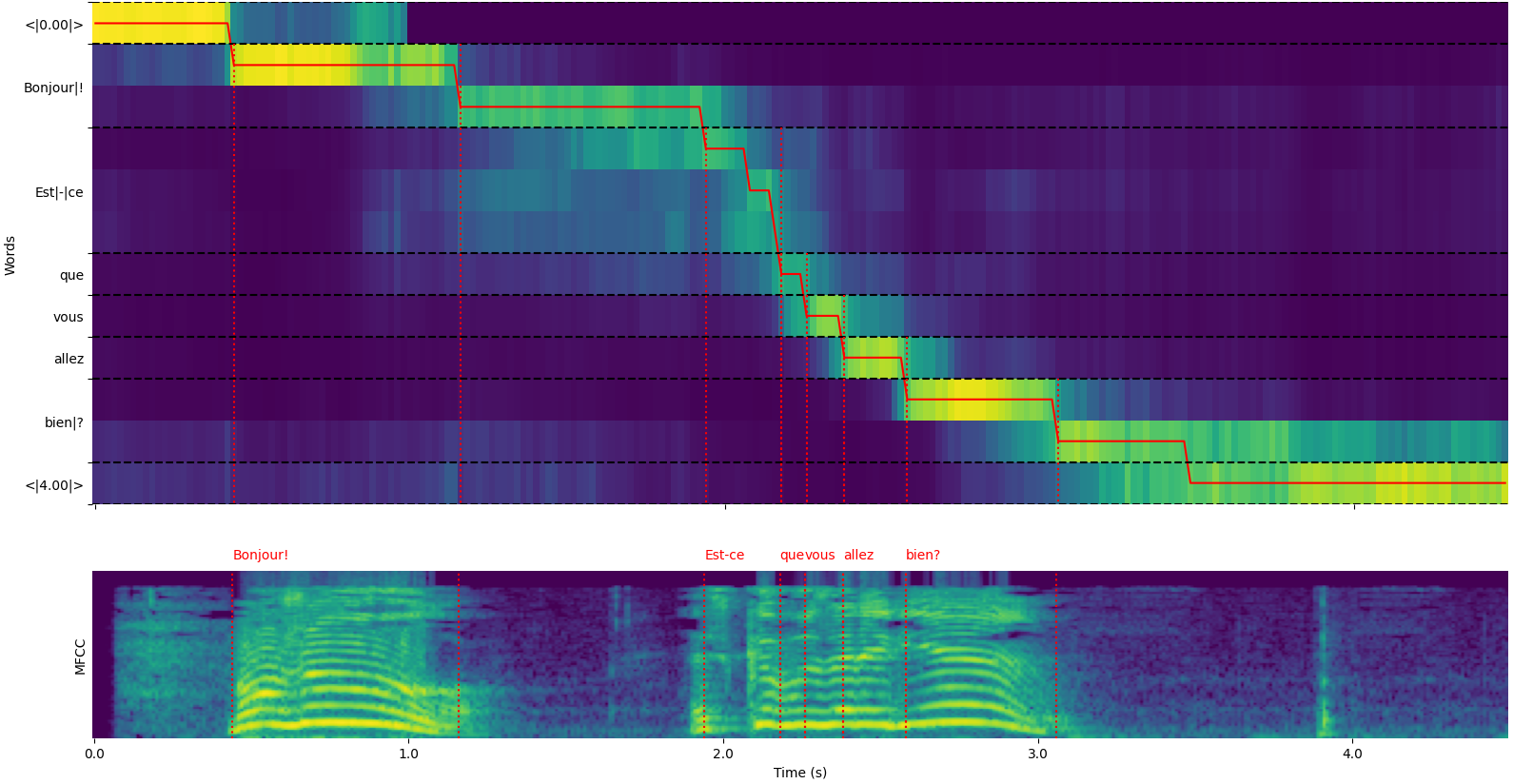
The output of whisper_timestamped.transcribe() function is a python dictionary,
which can be viewed in JSON format using the CLI.
The JSON schema can be seen in tests/json_schema.json.
Here is an example output:
whisper_timestamped AUDIO_FILE.wav --model tiny --language fr
{
  "text": " Bonjour! Est-ce que vous allez bien?",
  "segments": [
    {
      "id": 0,
      "seek": 0,
      "start": 0.5,
      "end": 1.2,
      "text": " Bonjour!",
      "tokens": [ 25431, 2298 ],
      "temperature": 0.0,
      "avg_logprob": -0.6674491882324218,
      "compression_ratio": 0.8181818181818182,
      "no_speech_prob": 0.10241222381591797,
      "confidence": 0.51,
      "words": [
        {
          "text": "Bonjour!",
          "start": 0.5,
          "end": 1.2,
          "confidence": 0.51
        }
      ]
    },
    {
      "id": 1,
      "seek": 200,
      "start": 2.02,
      "end": 4.48,
      "text": " Est-ce que vous allez bien?",
      "tokens": [ 50364, 4410, 12, 384, 631, 2630, 18146, 3610, 2506, 50464 ],
      "temperature": 0.0,
      "avg_logprob": -0.43492694334550336,
      "compression_ratio": 0.7714285714285715,
      "no_speech_prob": 0.06502953916788101,
      "confidence": 0.595,
      "words": [
        {
          "text": "Est-ce",
          "start": 2.02,
          "end": 3.78,
          "confidence": 0.441
        },
        {
          "text": "que",
          "start": 3.78,
          "end": 3.84,
          "confidence": 0.948
        },
        {
          "text": "vous",
          "start": 3.84,
          "end": 4.0,
          "confidence": 0.935
        },
        {
          "text": "allez",
          "start": 4.0,
          "end": 4.14,
          "confidence": 0.347
        },
        {
          "text": "bien?",
          "start": 4.14,
          "end": 4.48,
          "confidence": 0.998
        }
      ]
    }
  ],
  "language": "fr"
}
--language fr in the CLI) you will find an additional key with the language probabilities:
{
  ...
  "language": "fr",
  "language_probs": {
    "en": 0.027954353019595146,
    "zh": 0.02743500843644142,
    ...
    "fr": 0.9196318984031677,
    ...
    "su": 3.0119704064190955e-08,
    "yue": 2.2565967810805887e-05
  }
}
transcribe_timestamped(model, audio, kwargs)Transcribe audio using a Whisper model and compute word-level timestamps.
model: Whisper model instanceaudio: Union[str, np.ndarray, torch.Tensor]language: str, optional (default: None)task: str, default "transcribe"vad: Union[bool, str, List[Tuple[float, float]]], optional (default: False)detect_disfluencies: bool, default Falsetrust_whisper_timestamps: bool, default Truecompute_word_confidence: bool, default Trueinclude_punctuation_in_confidence: bool, default Falserefine_whisper_precision: float, default 0.5min_word_duration: float, default 0.02plot_word_alignment: bool or str, default Falseword_alignement_most_top_layers: int, optional (default: None)remove_empty_words: bool, default Falsenaive_approach: bool, default Falseuse_backend_timestamps: bool, default Falsetemperature: Union[float, List[float]], default 0.0compression_ratio_threshold: float, default 2.4logprob_threshold: float, default -1.0no_speech_threshold: float, default 0.6condition_on_previous_text: bool, default Trueinitial_prompt: str, optional (default: None)suppress_tokens: str, default "-1"fp16: bool, optional (default: None)verbose: bool or None, default FalseA dictionary containing:
text: str - The full transcription textsegments: List[dict] - List of segment dictionaries, each containing:id: int - Segment IDseek: int - Start position in the audio file (in samples)start: float - Start time of the segment (in seconds)end: float - End time of the segment (in seconds)text: str - Transcribed text for the segmenttokens: List[int] - Token IDs for the segmenttemperature: float - Temperature used for this segmentavg_logprob: float - Average log probability of the segmentcompression_ratio: float - Compression ratio of the segmentno_speech_prob: float - Probability of no speech in the segmentconfidence: float - Confidence score for the segmentwords: List[dict] - List of word dictionaries, each containing:start: float - Start time of the word (in seconds)end: float - End time of the word (in seconds)text: str - The word textconfidence: float - Confidence score for the word (if computed)language: str - Detected or specified languagelanguage_probs: dict - Language detection probabilities (if applicable)RuntimeError: If the VAD method is not properly installed or configured.ValueError: If the refine_whisper_precision is not a positive multiple of 0.02.AssertionError: If the audio duration is shorter than expected or if there are inconsistencies in the number of segments.naive_approach parameter can be useful for debugging or when dealing with specific audio characteristics, but it may be slower than the default approach.use_efficient_by_default is True, some parameters like best_of, beam_size, and temperature_increment_on_fallback are set to None by default for more efficient processing.remove_non_speech(audio, kwargs)Remove non-speech segments from audio using Voice Activity Detection (VAD).
audio: torch.Tensoruse_sample: bool, default Falsemin_speech_duration: float, default 0.1min_silence_duration: float, default 1dilatation: float, default 0.5sample_rate: int, default 16000method: str or List[Tuple[float, float]], default "silero"avoid_empty_speech: bool, default Falseplot: Union[bool, str], default FalseA tuple containing: 1. torch.Tensor: Audio with non-speech segments removed 2. List[Tuple[float, float]]: List of (start, end) timestamps for speech segments 3. Callable: Function to convert timestamps from the new audio to the original audio
ImportError: If the required VAD library (e.g., auditok) is not installed.ValueError: If an invalid VAD method is specified.load_model(name, device=None, backend="openai-whisper", download_root=None, in_memory=False)Load a Whisper model from a given name or path.
name: strdevice: Union[str, torch.device], optional (default: None)backend: str, default "openai-whisper"→ →
→ →
→ →
→ →
→ →
→