1
 →
→lharries/whatsapp-mcp is an open-source project on GitHub, mainly written in Go. WhatsApp MCP server It currently holds 6,375 stars and 1,353 forks with 252 open issues, and was last pushed on 2025-07-13 (repository created 2025-03-29).
Git Homed tracks it on the Today's Trending board, currently at rank #97 with 24 new stars today.
This is a Model Context Protocol (MCP) server for WhatsApp.
With this you can search and read your personal Whatsapp messages (including images, videos, documents, and audio messages), search your contacts and send messages to either individuals or groups. You can also send media files including images, videos, documents, and audio messages.
It connects to your personal WhatsApp account directly via the Whatsapp web multidevice API (using the whatsmeow library). All your messages are stored locally in a SQLite database and only sent to an LLM (such as Claude) when the agent accesses them through tools (which you control).
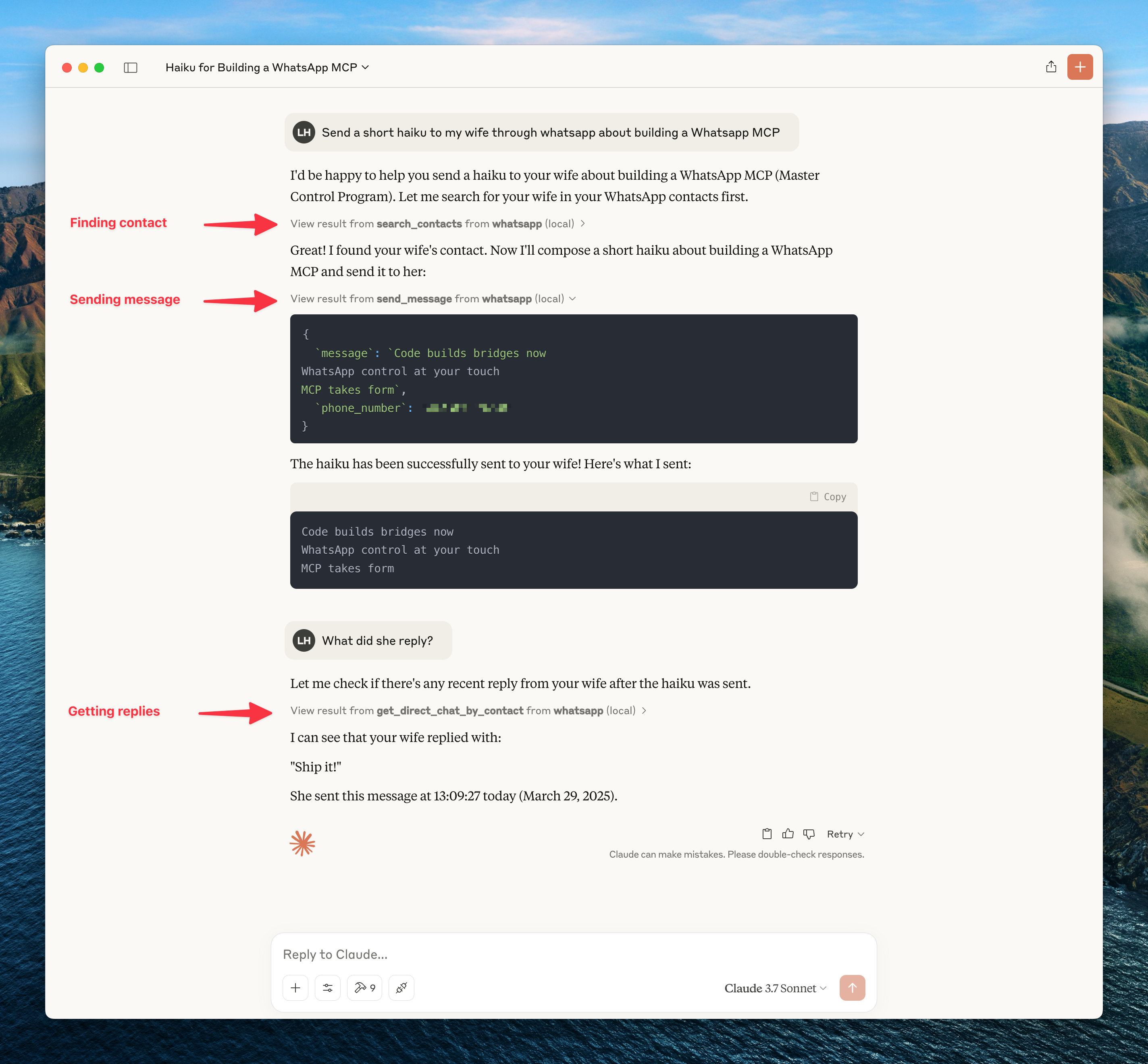
Here's an example of what you can do when it's connected to Claude.
To get updates on this and other projects I work on enter your email here
Caution: as with many MCP servers, the WhatsApp MCP is subject to the lethal trifecta. This means that project injection could lead to private data exfiltration.
curl -LsSf https://astral.sh/uv/install.sh | sh.ogg Opus format. With FFmpeg installed, the MCP server will automatically convert non-Opus audio files. Without FFmpeg, you can still send raw audio files using the send_file tool.1. Clone this repository
   git clone https://github.com/lharries/whatsapp-mcp.git
   cd whatsapp-mcp
2. Run the WhatsApp bridge
Navigate to the whatsapp-bridge directory and run the Go application:
   cd whatsapp-bridge
   go run main.go
The first time you run it, you will be prompted to scan a QR code. Scan the QR code with your WhatsApp mobile app to authenticate.
After approximately 20 days, you will might need to re-authenticate.
3. Connect to the MCP server
Copy the below json with the appropriate {{PATH}} values:
   {
     "mcpServers": {
       "whatsapp": {
         "command": "{{PATH_TO_UV}}", // Run which uv and place the output here
         "args": [
           "--directory",
           "{{PATH_TO_SRC}}/whatsapp-mcp/whatsapp-mcp-server", // cd into the repo, run pwd and enter the output here + "/whatsapp-mcp-server"
           "run",
           "main.py"
         ]
       }
     }
   }
For Claude, save this as claude_desktop_config.json in your Claude Desktop configuration directory at:
~/Library/Application Support/Claude/claude_desktop_config.json
For Cursor, save this as mcp.json in your Cursor configuration directory at:
~/.cursor/mcp.json
4. Restart Claude Desktop / Cursor
Open Claude Desktop and you should now see WhatsApp as an available integration.
Or restart Cursor.
If you're running this project on Windows, be aware that go-sqlite3 requires CGO to be enabled in order to compile and work properly. By default, CGO is disabled on Windows, so you need to explicitly enable it and have a C compiler installed.
1. Install a C compiler
We recommend using MSYS2 to install a C compiler for Windows. After installing MSYS2, make sure to add the ucrt64\bin folder to your PATH.
→ A step-by-step guide is available here.
2. Enable CGO and run the app
   cd whatsapp-bridge
   go env -w CGO_ENABLED=1
   go run main.go
Without this setup, you'll likely run into errors like:
Binary was compiled with 'CGO_ENABLED=0', go-sqlite3 requires cgo to work.This application consists of two main components:
1. Go WhatsApp Bridge (whatsapp-bridge/): A Go application that connects to WhatsApp's web API, handles authentication via QR code, and stores message history in SQLite. It serves as the bridge between WhatsApp and the MCP server.
2. Python MCP Server (whatsapp-mcp-server/): A Python server implementing the Model Context Protocol (MCP), which provides standardized tools for Claude to interact with WhatsApp data and send/receive messages.
whatsapp-bridge/store/ directoryOnce connected, you can interact with your WhatsApp contacts through Claude, leveraging Claude's AI capabilities in your WhatsApp conversations.
Claude can access the following tools to interact with WhatsApp:
The MCP server supports both sending and receiving various media types:
You can send various media types to your WhatsApp contacts:
send_file tool to share any supported media type.send_audio_message tool to send audio files as playable WhatsApp voice messages..ogg Opus format.send_file tool, but they won't appear as playable voice messages.By default, just the metadata of the media is stored in the local database. The message will indicate that media was sent. To access this media you need to use the download_media tool which takes the message_id and chat_jid (which are shown when printing messages containing the meda), this downloads the media and then returns the file path which can be then opened or passed to another tool.
1. Claude sends requests to the Python MCP server 2. The MCP server queries the Go bridge for WhatsApp data or directly to the SQLite database 3. The Go accesses the WhatsApp API and keeps the SQLite database up to date 4. Data flows back through the chain to Claude 5. When sending messages, the request flows from Claude through the MCP server to the Go bridge and to WhatsApp
whatsapp-bridge/store/messages.db and whatsapp-bridge/store/whatsapp.db) and restart the bridge to re-authenticate.→ →
→ →
→ →
→ →
→ →
→ →
→ →
→