1
 →
→
Native Quiet Home launcher, reversible cleanup tools, and an agent-readable guide for the Samsung U8000F running Tizen 9.
jss8649/quiet-tizen is an open-source project on GitHub, mainly written in Python. Native Quiet Home launcher, reversible cleanup tools, and an agent-readable guide for the Samsung U8000F running Tizen 9. It currently holds 424 stars and 57 forks with 0 open issues, and was last pushed on an unknown date (repository created unknown).
Git Homed tracks it on the Today's Trending board.
A practical, agent-readable guide to making a Samsung Tizen TV quieter and more useful as an HDMI display.
This project documents work performed on one Samsung UN75U8000FFXZA (2025 U8000F). It includes Quiet Home, a native launcher with a colorful, English-language interface, lightweight settings, local app cards and a shortcut to native Bluetooth controller pairing.
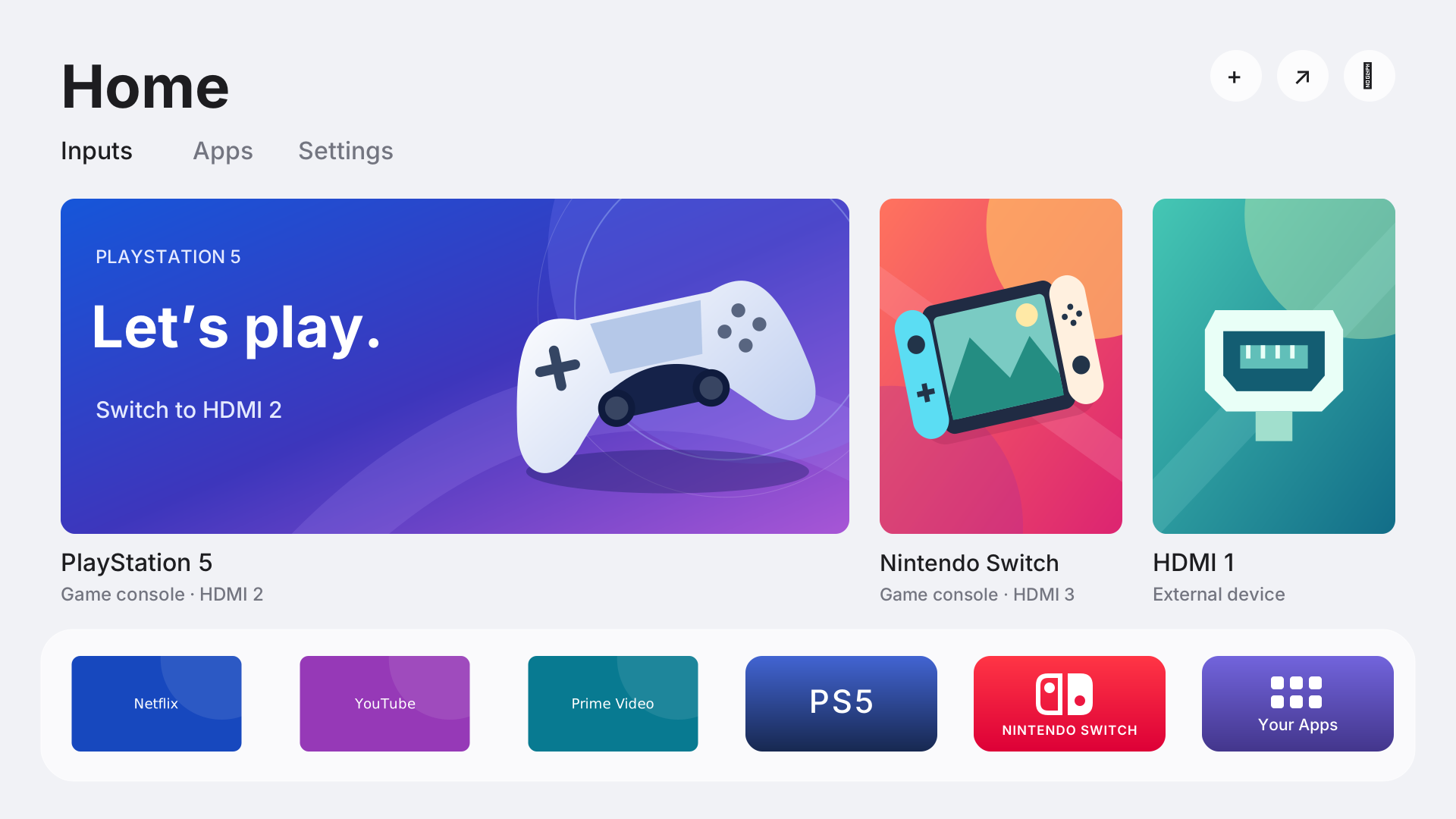
Layout illustration with the public text-only app cards. Input labels are configurable.
It also includes targeted cleanup profiles, source-build tools and rollback recipes. It is a working case study with a reusable toolkit, not a universal installer or a replacement operating system.
Clone the repository, open it in Codex, and use:
Read README.md and AGENTS.md, then inspect the documentation before touching
my TV. Help me reproduce Quiet Tizen on a TV I own. First identify its exact
model, firmware and runtime, compare them with the tested profile, and show
me any compatibility gaps. Keep HDMI, sound, networking, Bluetooth and
accessibility working. Prefer HDMI and minimize smart features; keep the
streaming apps I choose. Back up my actual settings and prepare rollback
before each change. Install and verify Quiet Home before assigning it to
Home/startup or replacing the slow settings sidebar. Use the measured
findings and known limitations rather than assuming every package is spyware
or promising a particular speed improvement.
If your TV differs, begin with an inventory. A matching brand, year, Tizen version or successful root check is not enough to establish launcher or cleanup compatibility.
| Component | What it does | |---|---| | Quiet Home source | Native .NET/NUI home, HDMI cards, app library and quick settings | | App catalog | Example shortcuts for Netflix, YouTube, Prime Video, HBO Max, Disney+, Hulu, Spotify, Apple TV, Tubi, Luna and Xbox | | Artwork tools | Vector/high-resolution artwork sources, optional local downloads and retained image views | | Cleanup profile | Separately selectable advertising, voice, context, smart-extras, sidebar and TV Plus groups | | Cleanup planner | Field-specific apply/restore SQL generated from your own fresh snapshot | | Access helper | Explicit-target SDB preflight, temporary authenticated root, bounded transfers and session cleanup checks | | Recipes | Snapshot, stop-marker, launcher, settings-bridge and restoration scripts | | Evidence | Sanitized observations and the limits of what was verified |
Quiet Home uses Tizen's existing display, audio, HDMI and application stack. It can become the default Home/startup experience; Samsung's underlying OS continues to run. The TV does not need a laptop running after installation. Root access is reacquired from the computer when maintenance requires it.
| Item | Recorded result |
|---|---|
| Model | UN75U8000FFXZA |
| Firmware | T-KSU2EFAKUC-0090-1300.9 |
| Platform | Tizen 9.0, Linux 5.4.261, ARMv7; .NET runtime 6.0.9 |
| Temporary root | Authenticated UID/EUID 0; session staging cleaned; passwd/SDB key unchanged |
| Home/startup | Quiet Home launch verified after a full restart |
| Inputs and everyday controls | HDMI switching, volume and mute verified; native settings remain available |
| Controller | Native DualSense pairing and launcher navigation verified |
| Cleanup | Package flags and selected service-stop conditions checked; a subset survives restart |
| App preloading | Vendor refreshes can restore the preference; no permanent enforcement daemon |
| Netflix | More available memory after closing background apps; perceived input lag not yet confirmed fixed |
The native launcher and underlying techniques were exercised on that TV. The generalized scripts in this public release were checked locally and compiled where applicable; they have not been replayed end-to-end on a second TV. This matters especially for private Samsung APIs and registry schemas.
1. Understand compatibility and inventory the TV. 2. Enable Developer Mode and check temporary access. 3. Take snapshots and apply selected cleanup. 4. Build, install and assign Quiet Home. 5. Pair a DualSense using the TV's Bluetooth support. 6. Customize apps, fetch artwork and keep it preloaded. 7. Diagnose slow streaming apps without overclaiming. 8. Understand privacy findings. 9. Restore the original experience.
Read AGENTS.md before using the tools. TV commands require a specific address and a verified firmware declaration. All downloaded proprietary references, local artwork, snapshots and session records stay under ignored paths.
Host tools use Python 3.12+ and the standard library. Raster artwork conversion optionally uses Pillow. Source builds use the .NET 6 SDK to match the tested TV; it is an older SDK and should be isolated from unrelated projects. Install Samsung's SDB separately.
python3 -m unittest discover -s tests -v
python3 tools/build.py payloads
After obtaining the four private Tizen reference assemblies:
python3 tools/build.py launcher --framework .local/tv-framework
GitHub Actions runs the offline tests and builds the open-source access payloads and app-catalog tests. The NUI launcher build needs Samsung reference assemblies and is deliberately not built from redistributed SDK files.
The visual design adapts Free My TV; the temporary archive-launcher access route comes from samsung-tv-root. This is a native Tizen port of the visual approach, not an installation of the Android launcher. See NOTICE.md and provenance for exact commits, licenses and local changes.
Original project code is MIT-licensed. Third-party fonts, symbols and access code retain their own licenses. No Samsung firmware, stock app binaries, private TV backups or publisher app artwork is included.
→ →
→ →
→ →
→ →
→ →
→ →
→ →
→