1
 →
→
Native Windows video motion capture with ExMR, FlowHMR and GVHMR, contact correction, humanoid retargeting, and FBX/VMD export.
toyxyz/toyxyz_RGBMocap is an open-source project on GitHub, mainly written in Python. Native Windows video motion capture with ExMR, FlowHMR and GVHMR, contact correction, humanoid retargeting, and FBX/VMD export. It currently holds 275 stars and 41 forks with 5 open issues, and was last pushed on 2026-10-28 (repository created 2026-10-26).
Git Homed tracks it on the Today's Trending board, currently at rank #24 with 0 new stars today.
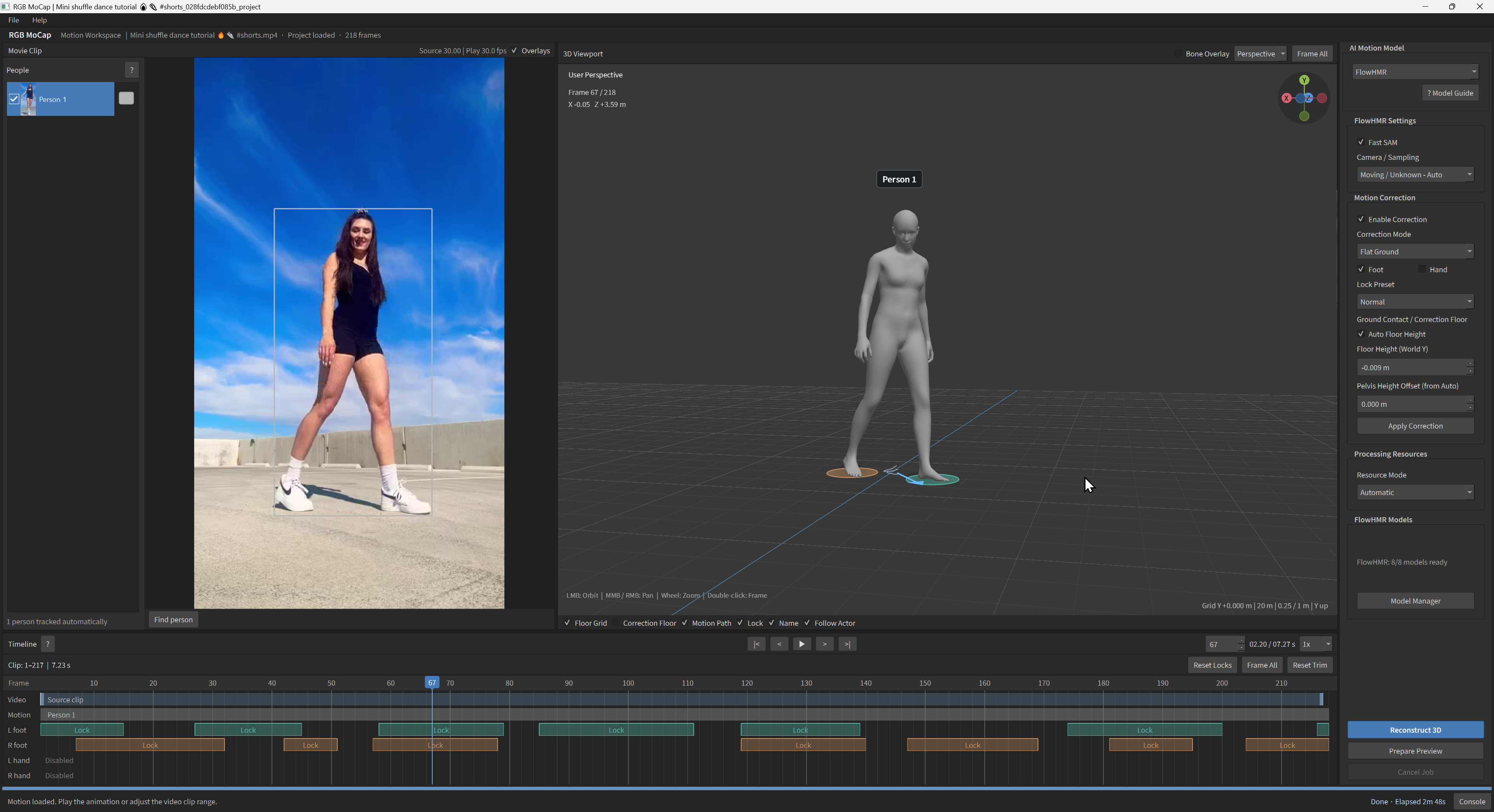
A native Windows app that turns video into editable human animation. Review and export motion with AI processing running locally.
https://github.com/user-attachments/assets/b948dd8c-43b9-493a-9d7f-2fae0317695e
https://github.com/user-attachments/assets/1759f1bf-a0d0-409f-84d8-dde9409cfe6f
1. Install Git for Windows. Open Command Prompt in a writable folder where you want to install RGB MoCap, then clone the repository:
   git clone https://github.com/toyxyz/toyxyz_RGBMocap.git
   cd toyxyz_RGBMocap
2. Download and install the required runtimes, Blender and FFmpeg:
install.cmd
3. Start the app:
RGBMoCap.cmd
Keep the console open while the app runs. Prepare the AI model files separately using Model Manager; some require account registration and manual download.
To update, close the app and run update.cmd from the same folder. See the
installation guide for disk space, prerequisites
and recovery.
1. Open a video, select an AI model and prepare its files in Model Manager. 2. Choose the people to capture and click Reconstruct 3D. 3. Review the motion, edit contacts if needed and Apply Correction. 4. Export FBX, or import a character, retarget the motion and export it.
| Model / original project | Body representation | Fingers | | --- | --- | --- | | ExMR | SMPL-X | Included | | FlowHMR | SMPL-H | Included | | GVHMR | SMPL-X | Optional HandFlow add-on |
Requires 64-bit Windows, a compatible NVIDIA GPU/driver and OpenGL 4.3. Model files are acquired separately; some require registration and license acceptance.
Disk space: allow about 45 GB (42 GiB) for the app, all AI runtimes, Blender and all supported model files, including optional add-ons. Videos, projects, imported characters, exports, generated caches and retained download archives need additional space. See the storage details.
Cache and project cleanup: paths and deletion effects.
→ →
→ →
→ →
→ →
→ →
→ →
→ →
→