1
 →
driceroland/Search is an open-source project on GitHub, mainly written in Swift. A small, fast WebKit browser for macOS, by Office Commun. It currently holds 3,415 stars and 351 forks with 41 open issues, and was last pushed on 2026-11-19 (repository created 2026-09-20).
Git Homed tracks it on the Today's Trending board, currently at rank #42 with 112 new stars today.
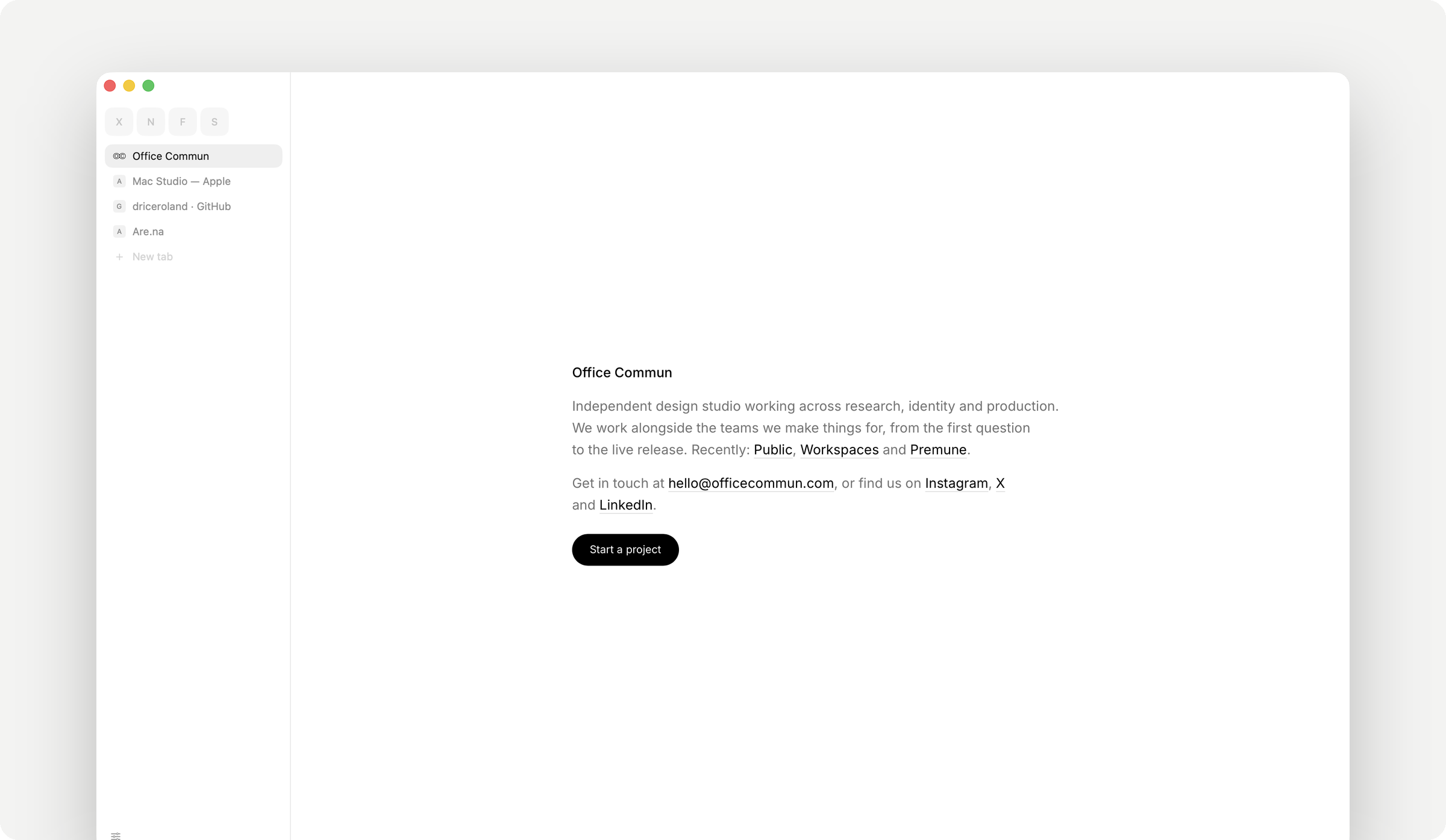
A small, fast, quiet web browser for the Mac, by Office Commun.
Download for macOS → · macOS 14 or later · free · about 10 MB
Or with Homebrew: brew install --cask driceroland/tap/search
---
Search is a browser with nothing in the way. A row of tabs — down the left, or across the top if you prefer — and the page. There is no toolbar, no start page, no sidebar of suggestions, no account to sign into, nothing that wants your attention. You type an address or a few words in one field and you are on the page.
It uses WebKit, the engine already inside every Mac (it is what Safari runs on). That is why the whole app is about 10 MB on disk and opens instantly: there is no second copy of Chromium to download, update and keep in memory.
It was built by a design studio that spends its whole day in a browser and was tired of the ones that had become products. This one is a tool.
⌘K lists your open tabs by name.⇧⌘R strips a page down to the article.⇧⌘H, then click a cookie banner, a newsletter overlay, a rail of "related" nonsense — it goes, and it is still gone on that site next time, before the page has drawn a single frame.⇧⌘P lifts the video out of the page into a small window that stays above everything, including other apps.On purpose:
| What | Where it is | Who can read it |
|---|---|---|
| Passwords | The macOS login keychain, as ordinary keychain items tagged Search | Search, signed by Office Commun. Any other app triggers the system's permission dialog. |
| History, bookmarks, open tabs, hidden elements | Small JSON files in ~/Library/Application Support/Search/ | You. |
| Cookies and site data | WebKit's own store for the app | The sites that set them, as in any browser. |
| Extensions | Unpacked in ~/Library/Application Support/Search/Extensions/, their data in WebKit's extension store | Each extension, within the permissions you accepted when adding it. |
| Anything else | Nowhere. There is no server. | — |
A private tab (⇧⌘N) has its own cookie jar and leaves nothing behind when it closes.
Apps you allow in System Settings › Privacy & Security › Automation can read the address and title of your tabs with AppleScript, and the name of the space and profile each window is in; private tabs are never shown, and a window with one in front shows neither name.
| | |
|---|---|
| ⌘L address · ⌘K switch tab · ⌘T new tab · ⌘W close · ⇧⌘T reopen | ⌘[ ⌘] back, forward · ⇧⌘[ ⇧⌘] previous, next tab · ⌘1–⌘9 jump |
| ⇧⌘S tabs down the left or across the top · ⌘S fold the sidebar away · ⇧⌘B bookmark this page | ⇧⌘R reading mode · ⇧⌘P float the video · ⇧⌘H hide something · ⇧⌘U what is hidden here |
| ⌘F find · ⌘D duplicate tab · ⇧⌘C copy address · ⇧⌘V paste and go | ⌘Y history · ⇧⌘J downloads · ⌘, settings · ⌥⌘L passwords |
Space keys (Control+1–9 by default) and the modifier used to peek at a link can be changed in Settings › Shortcuts while those features are enabled.
⌘R reloads the page; ⌥⌘R reloads it from origin, checking everything cached with the site again, as Safari's Reload Page From Origin, which is also in a right-click on the reload button.
⌃Tab and ⌃⇧Tab walk along the row of tabs; Tab stays the page's, for moving through a form. esc puts away whatever is open.
With Split View on, ⌥⌘N splits the current page and ⌃⌘← / ⌃⌘→ go from one page to the other. ⌘W closes the focused tab and gives the remaining page the whole area. Tabs › Separate Split Tabs keeps both tabs open separately.
---
So anyone can read exactly what a browser handling their passwords and history is doing, build it themselves, or fix something that bothers them. The code is small enough to actually read — about 42,000 lines of Swift, no dependencies beyond what Apple ships with macOS, one file per concern.
swift build — runs the app straight from the SwiftPM binary./build.sh — assembles a real, double-clickable Search.app in build/, ad-hoc signed so it runs on your own Mac. SEARCH_DEV=1 ./build.sh makes it a dev build, on a yellow icon and named for its branch (Search-split-view from claude/split-view-4a6927), so it's never mistaken for an installed Search or for another worktree's build; SEARCH_FEATURE=name picks the name. It shares the installed app's settings and its bundle id, so while both run, a link from another app may land in either./build.sh release dmg also makes Search.dmg / Search.zip. ./build.sh release ship additionally notarizes and staples — that step needs a Developer ID certificate and Apple credentials, so it only really does anything for Office Commun's own releases.
Tab per page. Its web view is built lazily — a tab restored from last session doesn't cost a process until you switch to it. That's most of why launching with twenty tabs is still instant. Each page runs in WebKit's own content process, as in Safari; a tab you close is really gone.WKContentRuleList compiled once at launch and enforced inside WebKit's networking, before a request is made — zero cost at run time, unlike a JavaScript blocker.Design.swift, resolved by the window's appearance; nothing else in the code knows which mode it is in.WKWebExtension (macOS 15.4+). Crx.swift fetches an extension from the Chrome Web Store's public update address and checks the CRX3 signature against the extension's id before anything is unpacked. Extensions.swift is the browser's side of WebKit's contract — tabs, the window, permissions, popups. ExtensionShims.swift adds, at install, a small script to the extension's worker, pages and content scripts: it defines the Chrome APIs WebKit lacks — userScripts, privacy, browsingData, sessions, the old FileSystem API and more — as calls answered natively by Search, and mends the places where WebKit behaves differently from Chrome: replies from pages that don't answer, listeners added after a worker starts, workers WebKit loses track of, members and constants it leaves out. Extension pages are served from chrome-extension:///, the address they have in Chrome, so servers and sites recognise them. ./bench ext-* drives all of it from the shell against a test run. ExtensionNative.swift speaks Chrome's native messaging to hosts registered in Chrome's NativeMessagingHosts folders.Sources/Search/ is one file per concern: Vault.swift is the keychain, Shield.swift the ad blocker, Curtain.swift the hidden elements, Session.swift what comes back at launch, Updater.swift the update, Bench.swift the test socket, and so on. There's no framework of its own to learn first.Turn on Settings › General › Let a script drive Search and the running app listens on a Unix socket in its own folder (readable by your user only). ./bench at the root of the repository speaks it:
./bench open https://example.com     # a tab of its own, at the end of your row, marked with a flask
./bench wait 2e7e7e89                 # until it has loaded
./bench text 2e7e7e89                 # the page's text
./bench shot 2e7e7e89 out.png         # a picture of it
./bench click 2e7e7e89 "button.go"    # click, type, submit — through the page's own events
./bench probe                         # the window's state: open panels, a modal, every window
./bench close all
Bench tabs are never selected for you, never enter the session or the history, and go when the script says so. It is how this browser is tested while somebody is using it.
A coding agent can drive it through ./bench-mcp, an MCP server over the same socket: claude mcp add search-bench -- "$PWD/bench-mcp" (or codex mcp add …). Each session starts this checkout's build/Search.app hidden, in a test world of its own, and wipes that world when it closes; the browser you use is never in reach. Its tools read a page as roles and names, click with real mouse events, type and check what the field holds, and wait on a condition, and a handle that has gone stale or a button that is covered is an error, never a guess. python3 Tests/bench_mcp.py checks it end to end.
To let an agent use the Search you have open instead, turn on Settings › About › Developer › Let coding agents use Search, and give it ./search-mcp: claude mcp add search -- "$PWD/search-mcp". Search asks you in the window each time one connects, shows a pill with Stop while it is there, and keeps it to tabs of its own; the rules are in Sources/Search/AgentControl.swift, and python3 Tests/agent_control.py checks them in a hidden probe.
python3 Tests/split_view.py, after ./build.sh, checks Split View through the app's own model in a hidden test run with its own settings and files, all removed afterwards. It never makes or shows a window; what can only be seen (dragging onto a page's edge, the divider under the pointer, the motion) is checked by hand on a release candidate.
Issues and pull requests are genuinely welcome — see CONTRIBUTING.md for how this is reviewed and what tends to get merged. The short version: small changes, no new dependencies, nothing that phones home. Found a security problem? Please report it privately, as SECURITY.md says.
MIT — see LICENSE. Do what you want with the code. "Search" and the app icon are Office Commun's; please rename a fork before distributing it under another name.
→ →
 →
 →
 →
 →
 →
 →