1
 →

Knowledge infrastructure to make your agents smarter. Search, scrape and access 550+ data providers through one API.
firecrawl/firecrawl is an open-source project on GitHub, mainly written in TypeScript. Knowledge infrastructure to make your agents smarter. Search, scrape and access 550+ data providers through one API. It currently holds 206,536 stars and 10,796 forks with 911 open issues, and was last pushed on 2026-11-22 (repository created 2024-04-15).
Git Homed tracks it on the AI Agent Skills Trending board and on the AI AI Agent Skills Trending list, currently at rank #5 with 991 new stars today.



---
Knowledge infrastructure to make your agents smarter. 🔥 You can use Firecrawl three ways. This repo holds the code for Firecrawl Local and the self-hosted server, along with SDKs that work with all three.
apps/api with its own queues, workers and databases on your own infrastructure.

---
Firecrawl Local scrapes, crawls and maps from your own machine without a database, queue or container, and it reaches Firecrawl Cloud when your AI agents need search or Alexandria. It installs from crates.io. You need Rust and a C compiler, which on macOS means xcode-select --install and on Debian or Ubuntu means build-essential.
cargo install firecrawl-local
If you don't have Rust, Firecrawl Cloud runs the same scrape with nothing to build and no signup.
npx -y firecrawl-cli@latest scrape https://firecrawl.dev
Scrape a page and print its markdown.
firecrawl-local scrape https://firecrawl.dev --markdown
Crawl a site and save one markdown file per page.
firecrawl-local crawl https://docs.firecrawl.dev --limit 50 --out ./pages
List every URL on a site.
firecrawl-local map https://firecrawl.dev
Pages that need JavaScript render in the Chrome or Chromium already on your machine, and PDFs and Office documents are parsed locally too. Without a browser, static pages still work and a page that needed one comes back with a warning.
init finds Claude Code, Claude Desktop, Cursor, Windsurf, Gemini CLI and Codex on your machine and adds Firecrawl Local to each one as an MCP server. It backs up every config file first, and the MCP server itself needs Node.js 22 or newer.
firecrawl-local init
Restart your AI tool afterwards. Its scrape, crawl, map and batch scrape tools run on your machine, and the other Firecrawl tools go to Firecrawl Cloud.
serve answers the Firecrawl v2 API on port 3002, so code written for Firecrawl runs against it unchanged and local routes need no API key.
firecrawl-local serve
Point any Firecrawl SDK at it by setting the API URL.
from firecrawl import Firecrawl
app = Firecrawl(api_url="http://localhost:3002")
print(app.scrape("https://firecrawl.dev").markdown)
The Firecrawl Local README covers every command and option, the security defaults for serve and running it in Docker. Move to Firecrawl Cloud when you need structured JSON, Interact, the Agent or scale beyond one machine.
---
| Feature | Firecrawl Local | Firecrawl Cloud |
|---------|-----------------|-----------------|
| Scrape | Markdown, HTML, raw HTML and links | Adds structured JSON, summaries, screenshots and browser actions |
| Crawl, Map and Batch Scrape | ✅ | ✅ |
| PDFs and Office documents | ✅ | ✅, plus Parse for uploaded files |
| Search | Through Firecrawl Cloud, no account needed | ✅ |
| Alexandria | Through Firecrawl Cloud after firecrawl-local login | ✅ |
| Interact, Agent and Monitor | | ✅ |
Scraping, crawling and mapping run on your machine. By default a single-page scrape that won't load there is fetched by Firecrawl Cloud instead and marked "source": "firecrawl-cloud" in the result. Those Cloud calls work without an account at a limited rate, and firecrawl-local login puts them on your Firecrawl account. Set FIRECRAWL_CLOUD=off to keep everything on your machine.
---
Firecrawl Cloud runs everything Firecrawl Local does at scale, with no browser or machine of your own to look after. It also gives your AI agents access to far more knowledge than scraping alone, with search, Alexandria, Interact and Agent all through a single API.
Search the web and get full content from results.
from firecrawl import Firecrawl
app = Firecrawl(api_key="fc-YOUR_API_KEY")
search_result = app.search("firecrawl", limit=5)
Node.js
import { Firecrawl } from 'firecrawl';
const app = new Firecrawl({apiKey: "fc-YOUR_API_KEY"});
app.search("firecrawl", { limit: 5 })
cURL
curl -X POST 'https://api.firecrawl.dev/v2/search' \
-H 'Authorization: Bearer fc-YOUR_API_KEY' \
-H 'Content-Type: application/json' \
-d '{
  "query": "firecrawl",
  "limit": 5
}'
CLI
firecrawl search "firecrawl" --limit 5
[
  {
    "url": "https://firecrawl.dev",
    "title": "Firecrawl",
    "markdown": "Turn websites into..."
  },
  {
    "url": "https://docs.firecrawl.dev",
    "title": "Firecrawl Docs",
    "markdown": "# Getting Started..."
  }
]
Get LLM-ready context from any website as markdown, JSON, screenshots and more.
from firecrawl import Firecrawl
app = Firecrawl(api_key="fc-YOUR_API_KEY")
result = app.scrape('firecrawl.dev')
Node.js
import { Firecrawl } from 'firecrawl';
const app = new Firecrawl({ apiKey: "fc-YOUR_API_KEY" });
app.scrape('firecrawl.dev')
cURL
curl -X POST 'https://api.firecrawl.dev/v2/scrape' \
-H 'Authorization: Bearer fc-YOUR_API_KEY' \
-H 'Content-Type: application/json' \
-d '{
  "url": "firecrawl.dev"
}'
CLI
firecrawl scrape https://firecrawl.dev
firecrawl https://firecrawl.dev --only-main-content
# Firecrawl
Firecrawl helps AI agents search, scrape, and interact with the web.
Features
- Search: Find information across the web
- Scrape: Clean data from any page
- Interact: Click, navigate, and operate pages
- Agent: Autonomous data gathering
Scrape a page, then interact with it using AI prompts or code.
from firecrawl import Firecrawl
app = Firecrawl(api_key="fc-YOUR_API_KEY")
result = app.scrape("https://amazon.com")
scrape_id = result.metadata.scrape_id
app.interact(scrape_id, prompt="Search for 'mechanical keyboard'")
app.interact(scrape_id, prompt="Click the first result")
Node.js
import { Firecrawl } from 'firecrawl';
const app = new Firecrawl({apiKey: "fc-YOUR_API_KEY"});
const result = await app.scrape("https://amazon.com");
await app.interact(result.metadata.scrapeId, {
  prompt: "Search for 'mechanical keyboard'"
});
await app.interact(result.metadata.scrapeId, {
  prompt: "Click the first result"
});
cURL
# 1. Scrape the page
curl -X POST 'https://api.firecrawl.dev/v2/scrape' \
-H 'Authorization: Bearer fc-YOUR_API_KEY' \
-H 'Content-Type: application/json' \
-d '{"url": "https://amazon.com"}'
2. Interact with the page (use scrapeId from step 1)
curl -X POST 'https://api.firecrawl.dev/v2/scrape/SCRAPE_ID/interact' \
-H 'Authorization: Bearer fc-YOUR_API_KEY' \
-H 'Content-Type: application/json' \
-d '{"prompt": "Search for mechanical keyboard"}'
CLI
firecrawl scrape https://amazon.com
firecrawl interact exec --prompt "Search for 'mechanical keyboard'"
firecrawl interact exec --prompt "Click the first result"
{
  "success": true,
  "output": "Keyboard available at $100",
  "liveViewUrl": "https://liveview.firecrawl.dev/..."
}
Describe what you need, and our AI agent searches, navigates and retrieves it with no URLs required.
curl -X POST 'https://api.firecrawl.dev/v2/agent' \
  -H 'Authorization: Bearer fc-YOUR_API_KEY' \
  -H 'Content-Type: application/json' \
  -d '{
    "prompt": "Find the pricing plans for Notion"
  }'
{
  "success": true,
  "data": {
    "result": "Notion offers the following pricing plans:\n\n1. Free - $0/month...\n2. Plus - $10/seat/month...\n3. Business - $18/seat/month...",
    "sources": ["https://www.notion.so/pricing"]
  }
}
Pass a schema to get structured data back.
from firecrawl import Firecrawl
from pydantic import BaseModel, Field
from typing import List, Optional
app = Firecrawl(api_key="fc-YOUR_API_KEY")
class Founder(BaseModel):
    name: str = Field(description="Full name of the founder")
    role: Optional[str] = Field(None, description="Role or position")
class FoundersSchema(BaseModel):
    founders: List[Founder] = Field(description="List of founders")
result = app.agent(
    prompt="Find the founders of Firecrawl",
    schema=FoundersSchema
)
print(result.data)
The Agent documentation covers starting URLs, effort levels and the spark-2 model.
Crawl an entire website and get content from all pages.
curl -X POST 'https://api.firecrawl.dev/v2/crawl' \
  -H 'Authorization: Bearer fc-YOUR_API_KEY' \
  -H 'Content-Type: application/json' \
  -d '{
    "url": "https://docs.firecrawl.dev",
    "limit": 100,
    "scrapeOptions": {
      "formats": ["markdown"]
    }
  }'
It returns a job ID, and the SDKs poll it for you until the crawl finishes.
{
  "success": true,
  "id": "123-456-789",
  "url": "https://api.firecrawl.dev/v2/crawl/123-456-789"
}
Discover all URLs on a website instantly.
from firecrawl import Firecrawl
app = Firecrawl(api_key="fc-YOUR_API_KEY")
result = app.map("https://firecrawl.dev", search="pricing")
Returns URLs ordered by relevance to "pricing"
Scrape many URLs at once.
from firecrawl import Firecrawl
app = Firecrawl(api_key="fc-YOUR_API_KEY")
job = app.batch_scrape([
    "https://firecrawl.dev",
    "https://docs.firecrawl.dev",
    "https://firecrawl.dev/pricing"
], formats=["markdown"])
for doc in job.data:
    print(doc.metadata.source_url)
Firecrawl Alexandria gives your AI agents 550+ data providers in one library (250M+ people, 75M+ companies, 41M+ research papers), plus specialized indexes and the live web, through one API, MCP or CLI. AI agents discover a tool alongside their web results, inspect its inputs and pricing, then run it to get structured data. Discovery is free, and running a tool uses the credits listed on it.
Install it in your AI agent from alexandria.firecrawl.dev, or see the Alexandria documentation for CLI, MCP, SDK and API usage. Alexandria runs on Firecrawl Cloud, and Firecrawl Local can use it once you sign in with firecrawl-local login.
The Firecrawl CLI gives your AI agent every Cloud tool with one command. It works with Claude Code, Antigravity, OpenCode and more, so restart your agent after installing.
npx -y firecrawl-cli@latest init --all --browser
Any MCP client can connect with this config.
{
  "mcpServers": {
    "firecrawl-mcp": {
      "command": "npx",
      "args": ["-y", "firecrawl-mcp"],
      "env": {
        "FIRECRAWL_API_KEY": "fc-YOUR_API_KEY"
      }
    }
  }
}
An AI agent can sign up its user and get an API key by fetching the onboarding skill.
curl -s https://firecrawl.dev/agent-onboarding/SKILL.md
See the Skill and CLI documentation for every command, and firecrawl-mcp-server for MCP.
The SDKs cover every Firecrawl feature and poll async jobs for you. They work with Firecrawl Cloud, and with Firecrawl Local once you set the API URL to http://localhost:3002.
pip install firecrawl
from firecrawl import Firecrawl
app = Firecrawl(api_key="fc-YOUR_API_KEY")
Scrape a single URL
doc = app.scrape("https://firecrawl.dev", formats=["markdown"])
print(doc.markdown)
Use the Agent for autonomous data gathering
result = app.agent(prompt="Find the founders of Stripe")
print(result.data)
Crawl a website (automatically waits for completion)
docs = app.crawl("https://docs.firecrawl.dev", limit=50)
for doc in docs.data:
    print(doc.metadata.source_url, doc.markdown[:100])
Search the web
results = app.search("best AI data tools 2024", limit=10)
print(results)
npm install firecrawl
import { Firecrawl } from 'firecrawl';
const app = new Firecrawl({ apiKey: 'fc-YOUR_API_KEY' });
// Scrape a single URL
const doc = await app.scrape('https://firecrawl.dev', { formats: ['markdown'] });
console.log(doc.markdown);
// Use the Agent for autonomous data gathering
const result = await app.agent({ prompt: 'Find the founders of Stripe' });
console.log(result.data);
// Crawl a website (automatically waits for completion)
const docs = await app.crawl('https://docs.firecrawl.dev', { limit: 50 });
docs.data.forEach(doc => {
    console.log(doc.metadata.sourceURL, doc.markdown.substring(0, 100));
});
// Search the web
const results = await app.search('best AI data tools 2024', { limit: 10 });
results.data.web.forEach(result => {
    console.log(${result.title}: ${result.url});
});
| Language | Install | Guide |
|----------|---------|-------|
| Go | go get github.com/firecrawl/firecrawl/apps/go-sdk | Go SDK |
| Java | com.firecrawl:firecrawl-java from Maven Central | Java SDK |
| Rust | cargo add firecrawl | Rust SDK |
| Ruby | gem install firecrawl-sdk | Ruby SDK |
| .NET | dotnet add package firecrawl-sdk | .NET SDK |
| PHP | composer require firecrawl/firecrawl-sdk | PHP SDK |
| Elixir | {:firecrawl, "~> 1.0"} in mix.exs | Elixir SDK |
AI agents and tools
npx skills add firecrawl/skillsskills/, and CI mirrors them into the catalog. To contribute a skill, send CLI skills (including the research and developer index skills) to firecrawl/cli, build and SDK skills to this repo's skills/ folder, and workflow skills to firecrawl/firecrawl-workflows. The catalog at firecrawl/skills is read-only, so never open a PR against it directly.
Platforms
View all integrations →Missing your favorite tool? Open an issue and let us know!
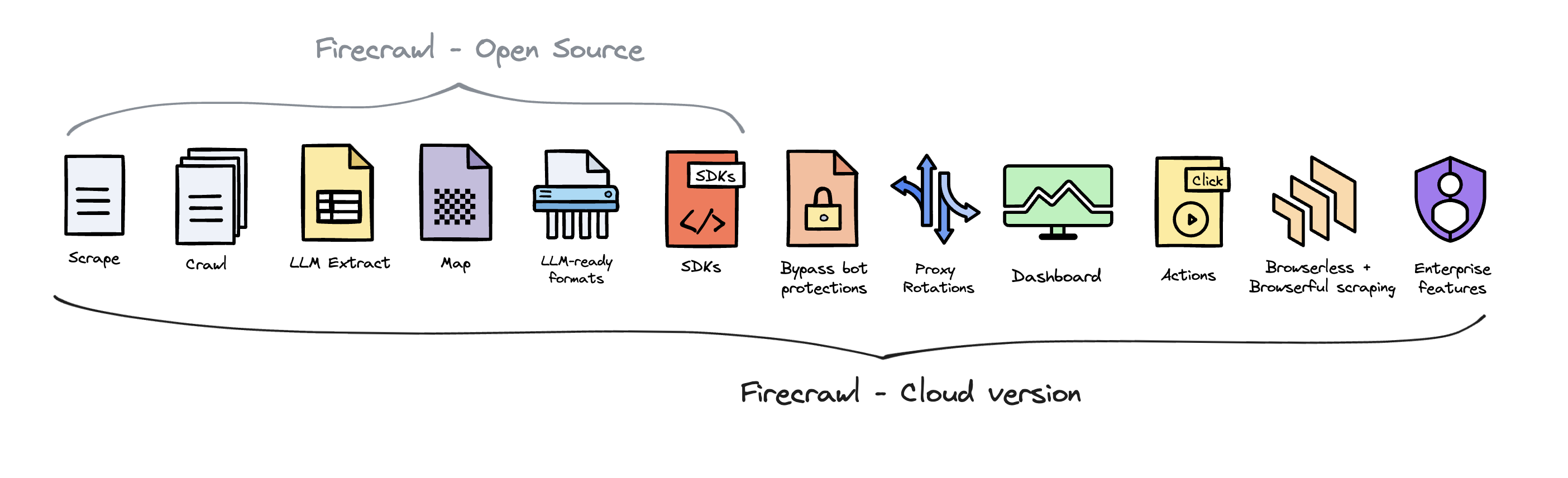
Firecrawl Local is the easiest way to run Firecrawl yourself. If you really want the full Firecrawl server with its own queues, workers and databases, all of it still lives in this repo and you can run it on your own infrastructure. If you'd rather not run anything yourself, Firecrawl Cloud gives you every feature with no setup.
The server runs with Docker Compose alongside Redis, PostgreSQL and a browser service, and the self-hosting guide takes you from checkout to your first scrape.
SELF_HOST.md lists the services and settings for the revision you checked out, and larger deployments can start from the Kubernetes manifests or the Helm chart. Alexandria runs on Firecrawl Cloud, so the self-hosted server does not include it.
---
We love contributions! Please read our Contributing Guide before submitting a pull request.
---
This project is primarily licensed under the GNU Affero General Public License v3.0 (AGPL-3.0). The SDKs and some UI components are licensed under the MIT License. See the LICENSE files in specific directories for details.
---
It is the sole responsibility of end users to respect websites' policies when scraping. Users are advised to adhere to applicable privacy policies and terms of use. By default, Firecrawl respects robots.txt directives. By using Firecrawl, you agree to comply with these conditions.
→ →
 →
 →
 →
 →
 →
 →