1
 →
→
Stream any torrent, video or audio, and skip to any moment in about a second. Free, open-source desktop app for Windows, macOS and Linux. No servers, no accounts, no telemetry.
torrentplayer/torrentplayer is an open-source project on GitHub, mainly written in Rust. Stream any torrent, video or audio, and skip to any moment in about a second. Free, open-source desktop app for Windows, macOS and Linux. It currently holds 708 stars and 20 forks with 0 open issues, and was last pushed on an unknown date (repository created unknown).
Git Homed tracks it on the Today's Trending board.

Stream at the speed of the swarm.
Movies, shows, music, podcasts, audiobooks: any torrent starts in seconds and skips to any
moment in under a second, straight from the swarm. No servers, no accounts, no limits.
torrentplayer.io · Why TorrentPlayer · Compare · Features · Performance · Privacy · Get it · Discord

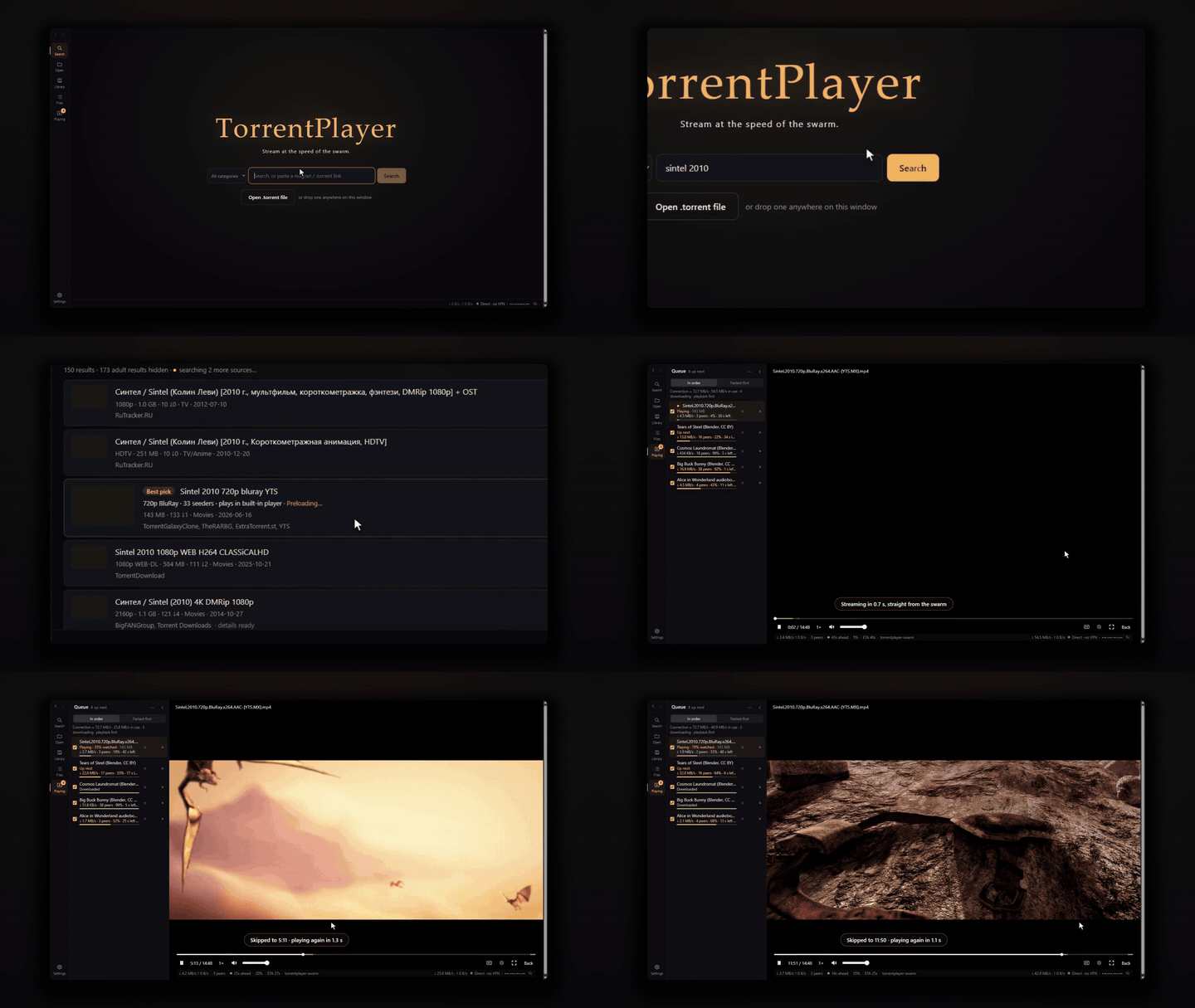
Search, play, skip. GIF shown at normal speed. Original real-time demo with sound (MP4, 35 s).
Sintel and Tears of Steel © Blender Foundation, CC BY 3.0.

Tears of Steel, Sintel, and Big Buck Bunny © Blender Foundation, CC BY 3.0.
---
TorrentPlayer is a free, open-source desktop app that plays any torrent straight from BitTorrent, video or audio, the way a streaming service would. Press play and it starts in seconds; drag the seek bar to minute 47 and it is playing minute 47 a moment later, long before the download gets there. No separate torrent client, no waiting for the file, no server in between.
Use it for whatever you stream from torrents: films and series, music albums, podcasts, audiobooks, lectures, and open media. You are responsible for having the right to download and share what you play.
.torrent file needs
nothing but the swarm.)
| | TorrentPlayer | Stremio (torrent add-ons) | WebTorrent Desktop | qBittorrent + VLC | Debrid / cloud services | webtor.io (browser) | | -------------------------------------- | ----------------------------------- | ---------------------------------------- | -------------------- | ----------------------------------- | --------------------------------- | ----------------------------- | | Stream and skip anywhere | ✅ the spot you skip to comes first | ✅ | ✅ | ❌ plays in order only | Only after the service fetches it | ✅ via its servers | | Video straight from peers, no server | ✅ | Via a local streaming server | ✅ | ✅ | ❌ provider's servers | ❌ webtor.io's servers | | Speed limited only by the swarm | ✅ | ✅ | ✅ | ✅ | ❌ plan and provider limits | ❌ free speed cap, paid tiers | | Free, no account | ✅ | ✅ free tier, guest mode | ✅ | ✅ | ❌ paid plans | ✅ basic use | | Fully open source | ✅ | Partly (streaming server is proprietary) | ✅ | ✅ | ❌ | ✅ | | Built-in VPN (WireGuard) + kill switch | ✅ | ❌ bring your own | ❌ | ❌ proxy and interface binding only | Not applicable | Not applicable | | Queue that downloads ahead | ✅ shares bandwidth with playback | Paid plan | ❌ | As a download client | Cloud storage | Paid tiers | | No telemetry | ✅ | ❌ analytics (per privacy policy) | ❌ basic usage stats | ✅ none documented | Not checked | Not checked | | Actively maintained | ✅ | ✅ | Last release 2020 | ✅ | ✅ | ✅ |
Checked on 20 October 2026. Stremio and Kodi reach more devices (TVs, phones), and VLC- or mpv-based players play more codecs today; see the full comparison for sources, details, and where other tools are the better fit.
torrentplayer-swarm), written for playback rather than bulk.torrent files and links (drag one onto theMeasured with the bundled benchmark tool, torrentplayer-bench, which acts like a real player through
the app's stream server. Every run starts from an empty cache, and every seek is measured from
a fresh session, so nothing is already downloaded. It reports data-ready time: until the
player has the bytes it needs.
| Swarm | Start-up, median (p95) | Skip, median (p95) | | --------------------------------------------------------------- | ---------------------- | ------------------- | | Local seeder, 8 MiB/s link | 0.35 s (0.36 s) | 0.27 s (0.30 s) | | Local seeder, 2 MiB/s link | 1.08 s (1.08 s) | 0.68 s (0.80 s) | | Public swarm (Ubuntu 24.04 ISO, ~600 peers), capped at 10 MiB/s | 1.2–2.8 s | 0.70 s (1.47 s) |
Public swarms vary between runs; that row comes from three runs per configuration. Since 0.2.0 magnet links stream through TorrentPlayer's engine too (librqbit only fetches their metadata); in 0.1.0 they used the embedded librqbit engine, which took 3.7 s to start and 2.7 s per skip on the same swarm. See docs/performance.md for the methodology, and run it yourself:
cargo run -p torrentplayer-bench --release -- local --upload-mibps 8 --runs 5
cargo run -p torrentplayer-bench --release -- torrent path/to/file.torrent --runs 3 --download-mibps 10
TorrentPlayer has no telemetry, analytics, crash reporting, or accounts, and it does not phone home. Its only network traffic is:
.torrent file instead.
.torrent files you link to, fetched from where they are hosted.ipv4. and ipv6.icanhazip.com) for the addresses it sees: at start-up, when the connection
changes, and every 10 minutes. It carries no identifiers and can be turned off in Settings →
Network & VPN.
All of it goes through your selected VPN, WireGuard tunnel, or proxy, and nothing is sent while the kill switch is engaged. See the threat model and network modes. Your queue, settings, and watch progress stay on this computer; the playback library is a user-only local SQLite database and is never sent anywhere.
TorrentPlayer is an early preview. The latest version is 0.3.2; see the release notes for what changed. You can:
installers- artifact. Unsigned builds trigger SmartScreen on
Windows and Gatekeeper on macOS.
.msi, .exe (NSIS) |
| macOS 13+ (Apple Silicon, Intel) | .dmg, .app |
| Linux (x64) | AppImage, .deb, .rpm |
The player uses your system's web engine (WebView2 on Windows, WebKit on macOS and Linux), so it plays the formats that engine supports: commonly MP4, WebM, and MKV with H.264, VP9, or AV1 video and AAC, Opus, or MP3 audio. Dolby (AC-3, E-AC-3, TrueHD) and DTS audio in MP4 and MKV files is converted to AAC as it plays.
On Linux, WebKit plays audio and video through GStreamer, which needs several plugin packages. You don't install them yourself (since 0.3.3):
| Package | For | GStreamer's plugins |
| -------- | -------------------------------------------- | ------------------------------------------------------------- |
| AppImage | Any distribution, including Arch and Manjaro | Bundled inside the AppImage |
| .deb | Debian, Ubuntu, Linux Mint, Pop!\_OS | Installed with TorrentPlayer by apt (declared dependencies) |
| .rpm | Fedora, RHEL and its rebuilds, openSUSE | Installed with TorrentPlayer by dnf or zypper |
Install the .deb or .rpm with your package manager so it brings them along:
sudo apt install ./TorrentPlayer__amd64.deb         # Debian, Ubuntu, Mint, Pop!_OS
sudo dnf install ./TorrentPlayer--1.x86_64.rpm       # Fedora, RHEL, Rocky, Alma
sudo zypper install ./TorrentPlayer--1.x86_64.rpm    # openSUSE
Double-clicking the file in your software center works too. A bare dpkg -i or rpm -i does not
install dependencies; if you used one, run sudo apt -f install (or install the file again with
dnf or zypper). The video decoders (libav, and openh264 on Fedora and openSUSE, whose libav
leaves H.264 out) are recommended packages, which package managers install by default; on Fedora
openh264 comes from Cisco's repository, which Fedora enables by default. Upgrading to a new
version installs any new dependencies the same way, and a new AppImage brings its own plugins.
Every release installs each package on Ubuntu, Debian, Fedora, and openSUSE, and checks the
AppImage on Arch, before it ships. If audio or video still plays silently or not at all, see
Troubleshooting.
You need:
rust-toolchain.toml and installed sudo apt install libwebkit2gtk-4.1-dev build-essential curl wget file \
libxdo-dev libssl-dev libayatana-appindicator3-dev librsvg2-dev \
gstreamer1.0-plugins-base gstreamer1.0-plugins-good gstreamer1.0-plugins-bad \
gstreamer1.0-gl gstreamer1.0-libav
The GStreamer plugins are needed at run time: without them audio and video play silently or not at all.
Then:
git clone https://github.com/torrentplayer/torrentplayer.git
cd torrentplayer/ui    # npm commands run in the frontend folder
npm ci
npm run tauri dev      # run the app with hot reload
npm run tauri build    # build optimized installers for your platform
See docs/building.md for the full development workflow, including how to run every CI check locally.
mdbook serve docs.
Working today: the streaming engine (for .torrent files and magnet links), player, search, the
queue with background downloads, the WireGuard and SOCKS5 modes with a kill switch, and
bandwidth limits. Next:
Is it legal? BitTorrent is a distribution protocol, and TorrentPlayer is built for openly licensed and public-domain material. Search covers general public torrent indexers whose results are not license-checked, so you are responsible for having the right to download and share what you play.
Why is a video slow to start? Speed comes from the swarm. A torrent with few seeders or peers can only be as fast as they are; the queue shows each video's peers and speed so you can pick one that plays smoothly, or move it up in the queue.
Does TorrentPlayer upload? Yes. Both torrent engines share verified pieces while a torrent is active, under the global upload limit. A queued torrent keeps sharing until you pause or remove it in the queue.
What happens if my VPN drops? In the WireGuard and SOCKS5 modes, the kill switch stops all traffic and closes connections u
→ →
→ →
→ →
→ →
→ →
→ →
→ →
→