1
 →
→
Point it at any web page and it finds the video, extracts the stream, transcodes it and casts in real time to your TV. It even burns subtitles….
stupside/castor is an open-source project on GitHub, mainly written in Go. Point it at any web page and it finds the video, extracts the stream, transcodes it and casts in real time to your TV. It even burns subtitles…. It currently holds 2,384 stars and 0 forks with 0 open issues, and was last pushed on an unknown date (repository created unknown).
Git Homed tracks it on the Video Trending board and on the AI Video Trending list.







Smart TVs won't cast arbitrary web video, and screen mirroring is laggy. Castor puts the video from a web page or a link on your TV, even when the TV can't play it as it is, with generated subtitles if you want them.
Use it on your computer alone, or run a castor server on a machine that stays on, such as a NAS, and cast through it from every computer at home.
A general-purpose casting tool: it casts only what you point it at. See Purpose and disclaimer.
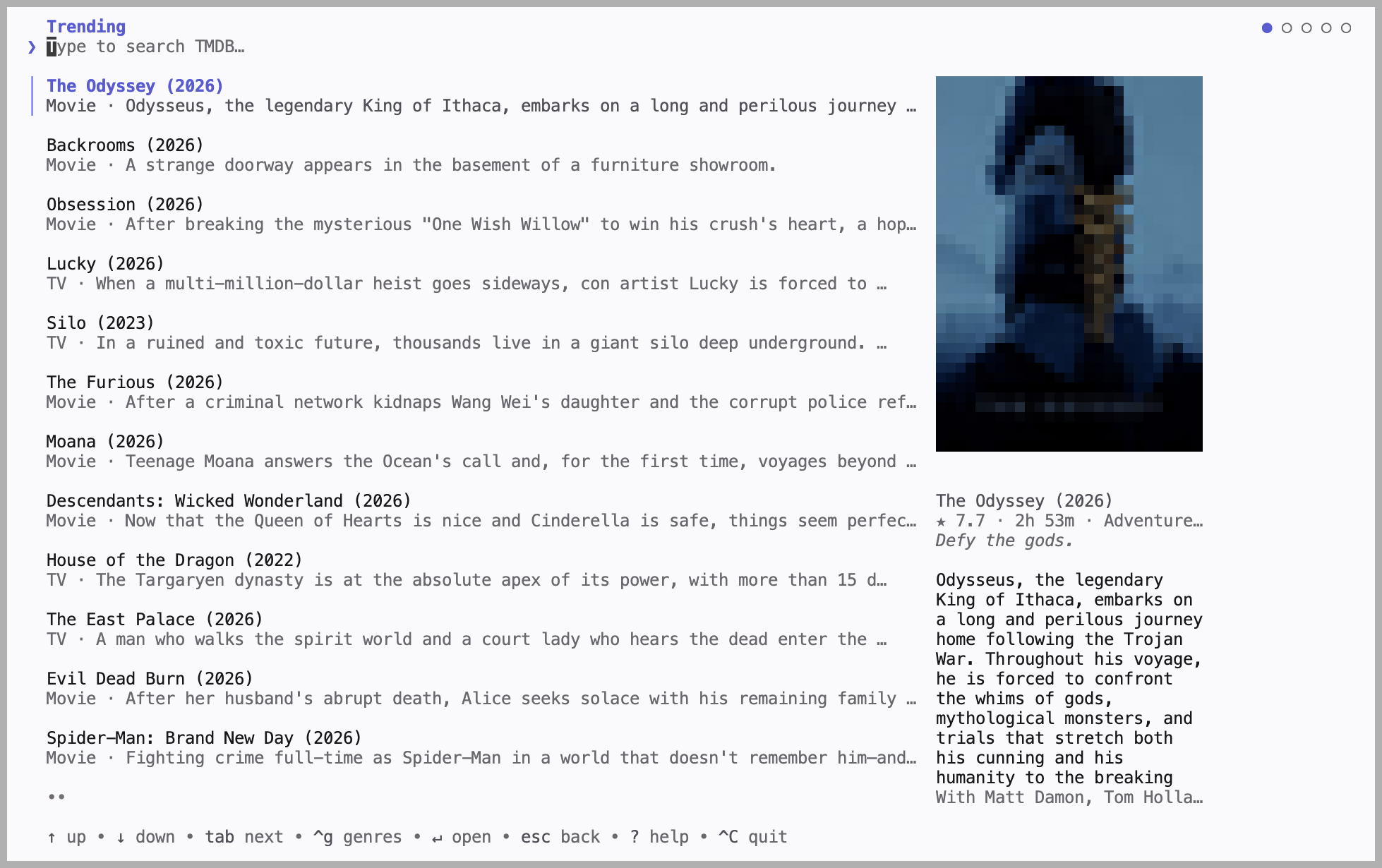
Run castor cast to browse titles and cast, without leaving the terminal.
1. Install (macOS. Other options)
brew install --cask stupside/tap/castor
2. Find your TV
castor scan
3. Save it to config.yaml
device:
  name: "Living Room TV"   # exact name from castor scan
  type: dlna               # or: chromecast, roku
4. Cast
castor cast player https://example.com/watch/some-video
See Configuration for subtitles, quality, and title search.
castor scan found nothing? See Troubleshooting.| Command | What it does |
| --- | --- |
| castor scan | List cast targets on your network |
| castor cast player | Cast a web page with an embedded video player |
| castor cast url | Cast a direct stream or video URL |
| castor cast | Browse titles and cast, interactively (needs a TMDB key) |
| castor cast movie | Resolve a movie id against your sources and cast |
| castor cast episode --season N --episode N | Same, for a TV episode |
| castor server | Run castor as the media server other machines cast through (media server) |
Run castor --help for all flags.
flowchart LR
    pc[Your computer] -- starts the cast --> server[castor server]
    server -- streams --> tv[TV]
    pc -. tells it what to play .-> tv
Your computer starts the cast and tells the TV what to play; the TV then streams from the server.
On the server:
castor server # listens on :8410 (server.listen)
On your computer:
remote:
  url: http://my-nas:8410
Once the TV plays, you can close castor on your computer; Ctrl+C stops the cast instead. Subtitles, quality and delivery still come from your computer's config.
For a server outside your home network, set where the TV reaches it with server.advertise (e.g. http://castor.example.com:8410). The server has no password: only run it on a network you trust.
Castor runs best as a native binary on the same network as your TV. It needs three tools on your PATH.
| Tool | Version | Used for | | --- | --- | --- | | Chrome / Chromium | Any recent | Finding the video on a page | | ffmpeg | 7.1+ | Converting the video for your TV | | ffprobe | 7.1+ | Reading the video's format |
[!IMPORTANT]
ffmpeg and ffprobe must be 7.1 or newer: older builds reject flags Castor uses.
Download castor__windows_amd64.zip (or _arm64.zip for Windows on ARM) from the latest release, extract castor.exe into a folder on your PATH, and install the tools:
winget install Gyan.FFmpeg     # ffmpeg + ffprobe
winget install Google.Chrome   # skip if Chrome is already installed
On first run:
On macOS or Linux, with Go 1.27+ and cmake. Clone with submodules, then make:
git clone --recurse-submodules https://github.com/stupside/castor.git
cd castor
make          # builds libwhisper.a, then the castor binary
go install won't work: the whisper.cpp bindings need that locally built library.
Castor reads config.yaml from the working directory (or --config ). Only device is required; every key can also be set as a CASTOR_SECTION__FIELD environment variable, e.g. CASTOR_RESOLVER__MAX_HEIGHT=720.
[!TIP]
Keep secrets in a git-ignoredconfig.local.yaml, which overlaysconfig.yaml, or in environment variables. See SECURITY.md.
Generated subtitles, burned into the video. The model downloads once to your user cache.
whisper:
  enable: true             # off by default
  # language: "fr"         # default: English
  # model_path: ""         # default: ggml-tiny.en (~75 MB, auto-downloaded)
[!NOTE]
DLNA only: Chromecast and Roku don't get burned-in subtitles.
Set max_height to your TV's vertical resolution; nothing taller reaches it. Raise it if you'd rather the TV play a taller video as it is.
resolver:
  max_height: 2160         # default: 1080
cast movie, cast episode, and the interactive browser turn a title id into a page URL. Castor bundles no sources: you add your own, for sites you are authorized to use. The id is substituted into your templates under each of your proxies, and the page is extracted like cast player.
sources:
- proxies: ["https://your-source.example"] # base URLs, tried in order
templates:
movie: "/embed/movie/{itemID}"
episode: "/embed/tv/{itemID}/{season}-{episode}"
So castor cast movie tt12300742 opens https://your-source.example/embed/movie/tt12300742.
Only the interactive browser (castor cast) needs one. Get a free key from themoviedb.org:
tmdb:
  api_key: ""
When a TV refuses a video for no visible reason, have castor always send it the video itself:
cast:
  delivery: serve   # "auto" (the default) decides per source
Relaying costs bandwidth and CPU, so try it once first with CASTOR_CAST__DELIVERY=serve.
Run castor scan to list what is on your network.
| Protocol | Works with | Status |
| --- | --- | --- |
| DLNA / UPnP (MediaRenderer:1) | Most smart TVs, and players like Kodi, VLC, and Plex | Tested on Samsung |
| Chromecast | Google Cast devices | Experimental, not yet tried on real hardware |
| Roku | Roku TVs and players, through a sideloaded channel | Experimental, not yet tried on real hardware |
Roku can't play an arbitrary URL from a preinstalled app, so Castor installs a small channel of its own. That needs one extra step.
1. Turn on Developer Mode (once, by hand: there's no remote API for it)
On the Roku remote press Home x3, Up x2, Right, Left, Right, Left, Right, enable developer mode, and set a web-server password. The device reboots.
2. Put the password in your config
device:
  name: "Living Room"   # from castor scan
  type: roku
  roku:
    password: ""   # first cast only
Keep it in a git-ignored config.local.yaml, or set CASTOR_DEVICE__ROKU__PASSWORD.
3. Cast. Castor sideloads its channel automatically; later casts reuse it.
Already published the channel to your account? Set device.roku.app_id to its numeric id instead: no dev mode, no password.
[!NOTE]
Roku plays about 30 s behind, so it starts slower than DLNA.
castor scan finds nothing: pin the device by IPDiscovery doesn't cross VLANs or subnets, and is blocked on Android/Termux (netlinkrib: permission denied). Pinning a host reaches the device directly, and skips the discovery wait.
device:
  name: "Living Room TV"   # now just a label
  type: dlna
  host: 192.168.0.3        # the device's LAN IP
If a DLNA TV doesn't answer at its IP, use its full description URL instead (e.g. http://192.168.0.3:9197/dmr).
On Android/Termux, also leave network.interface empty (the default): pinning one needs the same blocked interface lookup.
Castor plays the page to find its video, so it only works on pages whose video starts without a click. DRM-protected streams are refused.
Try forcing a relay.
The ghcr.io/stupside/castor image bundles Chrome, ffmpeg, and ffprobe. Run it on a Linux host on your TV's network.
[!WARNING]
--network hostis required, and Docker Desktop (macOS/Windows) ignores it, soscanfinds nothing there. Use the native binary instead (macOS, Windows).
# Discover devices (no config needed)
docker run --rm --network host ghcr.io/stupside/castor:latest scan
Cast, passing a Linux render device through for hardware transcoding
docker run --rm --network host --device /dev/dri \
  -v "$PWD/config.yaml:/config.yaml" \
  -v castor-cache:/root/.cache \
  ghcr.io/stupside/castor:latest \
  cast player https://example.com/watch/some-video
--device /dev/dri lets Castor convert video on an Intel GPU.config.yaml.castor-cache volume keeps downloaded whisper models.docker run -d --network host ghcr.io/stupside/castor:latest server runs the image as a media server for castor on your laptop. Without host networking, set server.advertise.:latest | Latest stable release |
| :canary | Latest preview build |
| :v1.7.0 | A specific pinned version |
Castor is a general-purpose caster, not a service tied to any site.
See CONTRIBUTING.md, and ARCHITECTURE.md for how castor works inside.
→ →
→ →
→ →
→ →
→ →
→ →
→ →
→