1
 →
→
Ultimate camera streaming application





Ultimate camera streaming application with support for dozens formats and protocols.
1. Download binary or use Docker or Home Assistant add-on or integration
2. Open web interface: http://localhost:1984/
3. Add streams to config
Developers: integrate HTTP API into your smart home platform.
Download binary for your OS from latest release:
| name | description | |-----------------------------------------------------------------------------------------------------------------|-------------------------------------------------------------------------------------------------------------------------------------------| | go2rtc_win64.zip | Windows 10+ 64-bit | | go2rtc_win32.zip | Windows 10+ 32-bit | | go2rtc_win_arm64.zip | Windows ARM 64-bit | | go2rtc_linux_amd64 | Linux 64-bit | | go2rtc_linux_i386 | Linux 32-bit | | go2rtc_linux_arm64 | Linux ARM 64-bit (ex. Raspberry 64-bit OS) | | go2rtc_linux_arm | Linux ARM 32-bit (ex. Raspberry 32-bit OS) | | go2rtc_linux_armv6 | Linux ARMv6 (for old Raspberry 1 and Zero) | | go2rtc_linux_mipsel | Linux MIPS (ex. Xiaomi Gateway 3, Wyze cameras) | | go2rtc_mac_amd64.zip | macOS 11+ Intel 64-bit | | go2rtc_mac_arm64.zip | macOS ARM 64-bit | | go2rtc_freebsd_amd64.zip | FreeBSD 64-bit | | go2rtc_freebsd_arm64.zip | FreeBSD ARM 64-bit |
Don't forget to fix the rights chmod +x go2rtc_xxx_xxx on Linux and Mac.
PS. The application is compiled with the latest versions of the Go language for maximum speed and security. Therefore, the minimum OS versions depend on the Go language.
The Docker containers alexxit/go2rtc and ghcr.io/alexxit/go2rtc support multiple architectures including 386, amd64, arm/v6, arm/v7 and arm64.
These containers offer the same functionality as the Home Assistant add-on but are designed to operate independently of Home Assistant.
It comes preinstalled with FFmpeg and Python.

1. Settings > Add-ons > Plus > Repositories > Add
https://github.com/AlexxIT/hassio-addons
WebRTC Camera custom component can be used on any Home Assistant installation, including HassWP on Windows. It can automatically download and use the latest version of go2rtc. Or it can connect to an existing version of go2rtc. Addon installation in this case is optional.
Latest, but maybe unstable version:
alexxit/go2rtc:master or alexxit/go2rtc:master-hardware versionsgo2rtc master or go2rtc master hardware versionsThis is the go2rtc.yaml file in YAML-format.
The configuration can be changed in the WebUI at http://localhost:1984.
The editor provides syntax highlighting and checking.
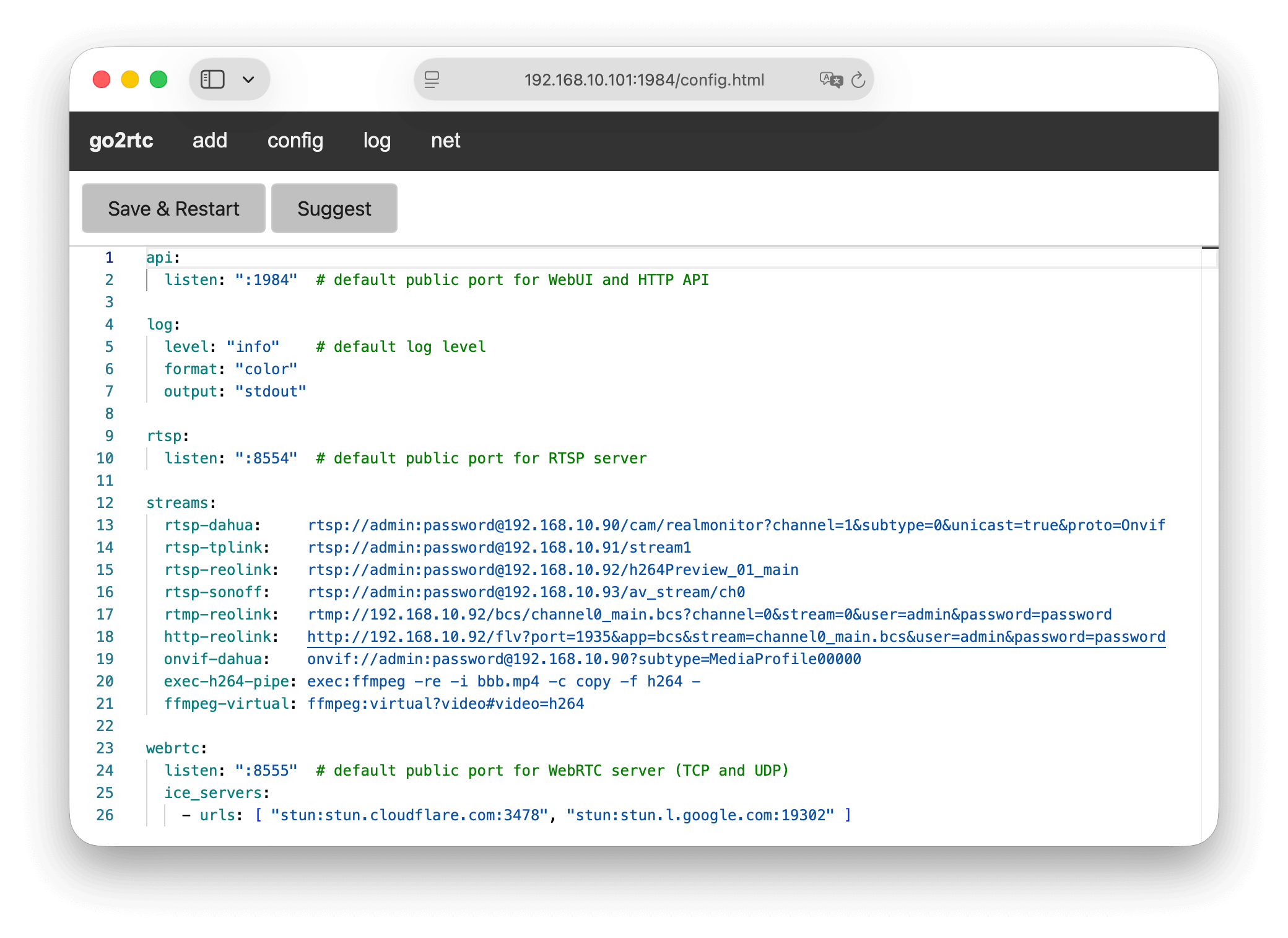
The simplest config looks like this:
streams:
  hall-camera: rtsp://admin:[email protected]/cam/realmonitor?channel=1&subtype=0
go2rtc.yaml in the current work directoryapi server will start on default 1984 port (TCP)rtsp server will start on default 8554 port (TCP)webrtc will use port 8555 (TCP/UDP) for connectionsA summary table of all modules and features can be found here.
Core modules
app - Reading configs and setting up logs.api - Handle HTTP and WebSocket API.streams - Handle a list of streams.mpjpeg - The legacy but still used MJPEG protocol for real-time media transmission.onvif - A popular ONVIF protocol for receiving media in RTSP format.rtmp - The legacy but still used RTMP protocol for real-time media transmission.rtsp - The most common RTSP protocol for real-time media transmission.webrtc - WebRTC web-compatible protocol for real-time media transmission.yuv4mpegpipe - Raw YUV frame stream with YUV4MPEG header.bubble - Some NVR from dvr163.com and eseecloud.com.doorbird - Doorbird devices with two-way audio.dvrip - DVR-IP NVR, NetSurveillance, Sofia protocol (XMeye SDK).eseecloud - Some NVR from dvr163.com and eseecloud.com.gopro - GoPro cameras, connected via USB or Wi-Fi.hass - Import cameras from Home Assistant config files.homekit - Cameras with Apple HomeKit protocol.isapi - Two-way audio for Hikvision ISAPI protocol.kasa - TP-Link Kasa cameras.multitrans - Two-way audio for Chinese version of TP-Link cameras.nest - Google Nest cameras through user-unfriendly and paid APIs.ring - Ring cameras with two-way audio support.roborock - Roborock vacuums with cameras with two-way audio support. tapo - TP-Link Tapo cameras with two-way audio support.vigi - TP-Link Vigi cameras.tuya - Tuya ecosystem cameras with two-way audio support.webtorrent - Stream from another go2rtc via WebTorrent protocol.wyze - Wyze cameras using native P2P protocolxiaomi - Xiaomi Mi Home ecosystem cameras with two-way audio support.alsa - A framework for receiving audio from devices on Linux OS.v4l2 - A framework for receiving video from devices on Linux OS.adts - Audio stream in AAC codec with Audio Data Transport Stream headers.flv - The legacy but still used Flash Video format.h264 - AVC/H.264 bitstream.hevc - HEVC/H.265 bitstream.hls - A popular HTTP Live Streaming format.mjpeg - A continuous sequence of JPEG frames (without HTTP headers).mpegts - The legacy MPEG transport stream format.wav - Audio stream in Waveform Audio File format.echo - If the source has a dynamic link, you can use a bash or python script to get it.exec - You can run an external application (ffmpeg, gstreamer, rpicam, etc.) and receive a media stream from it.expr - If the source has a dynamic link, you can use Expr language to get it.ffmpeg - Use FFmpeg as a stream source. Hardware-accelerated transcoding and streaming from USB devices are supported.creality - Creality 3D printer cameras.kinesis - Amazon Kinesis video streams.openipc - Cameras on open-source OpenIPC firmware.switchbot - SwitchBot cameras.whep - WebRTC/WHEP is replaced by WebRTC/WISH standard for WebRTC video/audio viewers.wyze - Legacy method to connect to Wyze cameras via docker-wyze-bridge.adts - Output stream in ADTS format with AAC audio.ascii - Just for fun stream as ASCII to Terminal.flv - Output stream in Flash Video format.hls - Output stream in HTTP Live Streaming format.homekit - Output stream to Apple Home using HomeKit protocol.jpeg - Output snapshots in JPEG format.mpjpeg - Output a stream in MJPEG format.mp4 - Output as MP4 stream or Media Source Extensions (MSE) compatible format.mpegts - Output stream in MPEG transport stream format.onvif - Output stream using ONVIF protocol.rtmp - Output stream using Real-Time Messaging protocol.rtsp - Output stream using Real-Time Streaming protocol.webrtc - Output stream using Web Real-Time Communication API.webtorrent - Output stream using WebTorrent protocol.yuv4mpegpipe - Output in raw YUV frame stream with YUV4MPEG header.Supported for:
flv,
mjpeg,
mpegts,
rtmp,
rtsp,
webrtc.
This is a feature when go2rtc expects to receive an incoming stream from an external application. The stream transmission is started and stopped by an external application.
Supported for:
doorbird,
dvrip,
exec,
isapi,
multitrans,
ring,
roborock,
rtsp,
tapo,
tuya,
webrtc,
wyze,
xiaomi.
Two-way audio can be used in browser with WebRTC technology. The browser will give access to the microphone only for HTTPS sites (read more).
You can play audio files or live streams on any camera with two-way audio support.
You can publish any stream to streaming services (YouTube, Telegram, etc.) via RTMP/RTMPS.
You can preload any stream on go2rtc start. This is useful for cameras that take a long time to start up.
WebUI provides detailed information about all active connections, including IP-addresses, formats, protocols, number of packets and bytes transferred.
Via the HTTP API in json or dot) format on an interactive connection map.
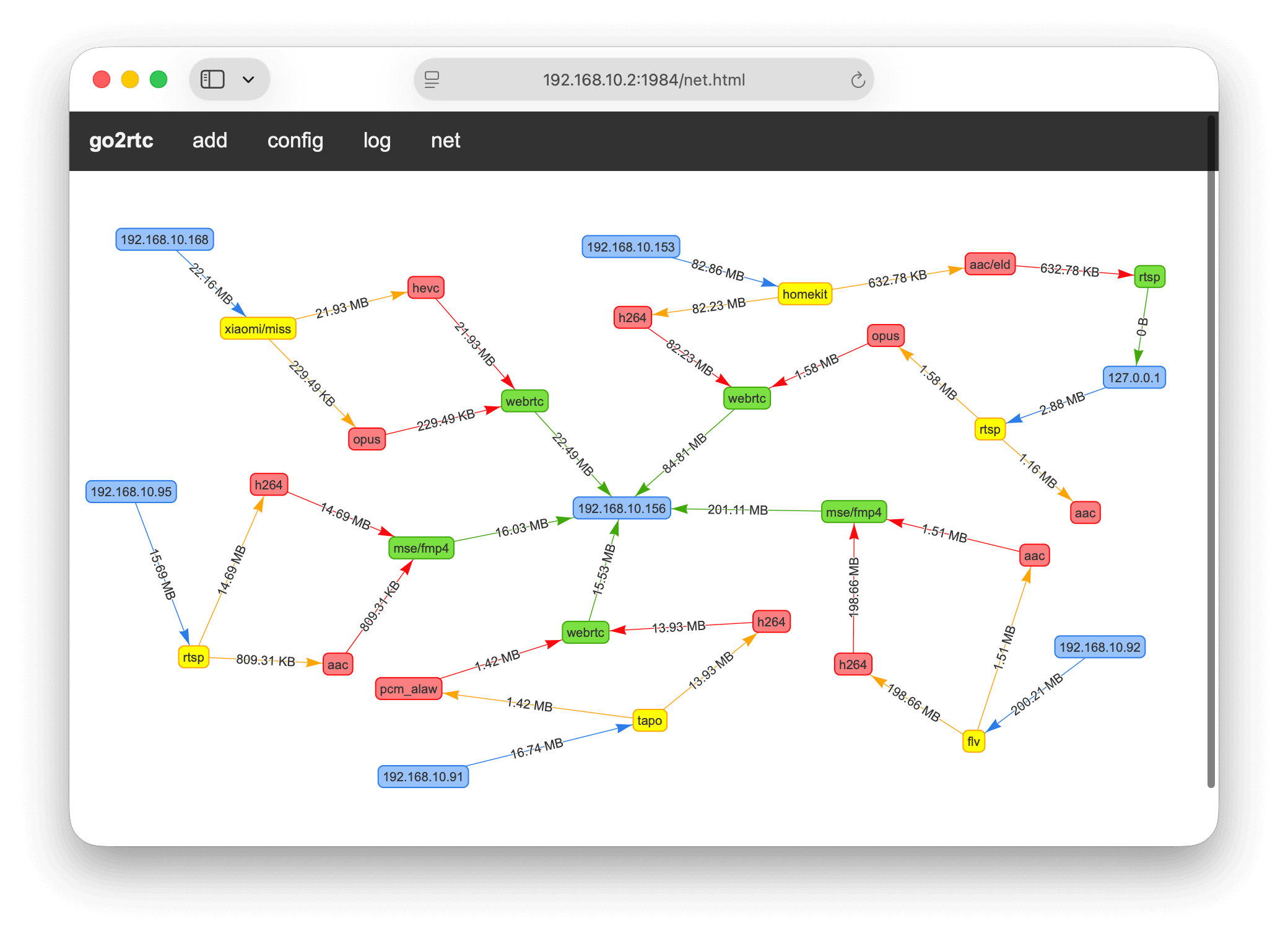
If you have questions about why video or audio is not displayed, you need to read the following sections.
| Name | FFmpeg | RTSP | Aliases |
|------------------------------|----------|---------------|-------------|
| Advanced Audio Coding | aac | MPEG4-GENERIC | |
| Advanced Video Coding | h264 | H264 | AVC, H.264 |
| G.711 PCM (A-law) | alaw | PCMA | G711A |
| G.711 PCM (µ-law) | mulaw | PCMU | G711u |
| High Efficiency Video Coding | hevc | H265 | HEVC, H.265 |
| Motion JPEG | mpjpeg | JPEG | |
| MPEG-1 Audio Layer III | mp3 | MPA | |
| Opus Codec | opus | OPUS | |
| PCM signed 16-bit big-endian | s16be | L16 | |
go2rtc can automatically detect which codecs your device supports for WebRTC and MSE technologies.
But it cannot be done for RTSP, HTTP progressive streaming, HLS technologies. You can manually add a codec filter when you create a link to a stream. The filters work the same for all three technologies. Filters d
→ →
→ →
→ →
→ →
→ →
→