1
 →
→
Open source autonomous engineering harness in your cloud. One sandbox per task, no real secrets inside.
rudderlabs/devbox is an open-source project on GitHub, mainly written in TypeScript. Open source autonomous engineering harness in your cloud. One sandbox per task, no real secrets inside. It currently holds 160 stars and 9 forks with 10 open issues, and was last pushed on 2026-10-27 (repository created 2026-10-27).
Git Homed tracks it on the Today's Trending board, currently at rank #43 with 0 new stars today.
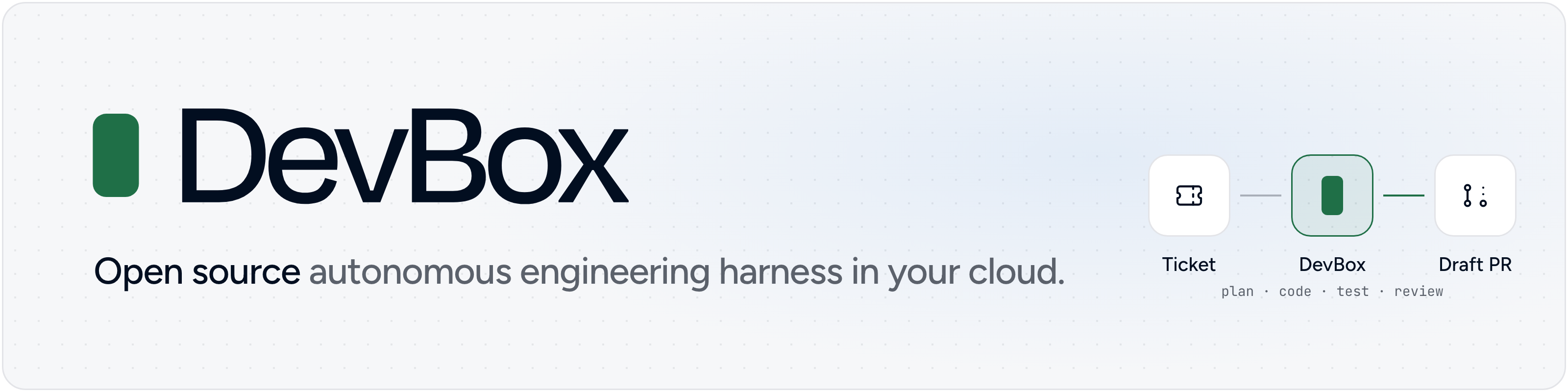

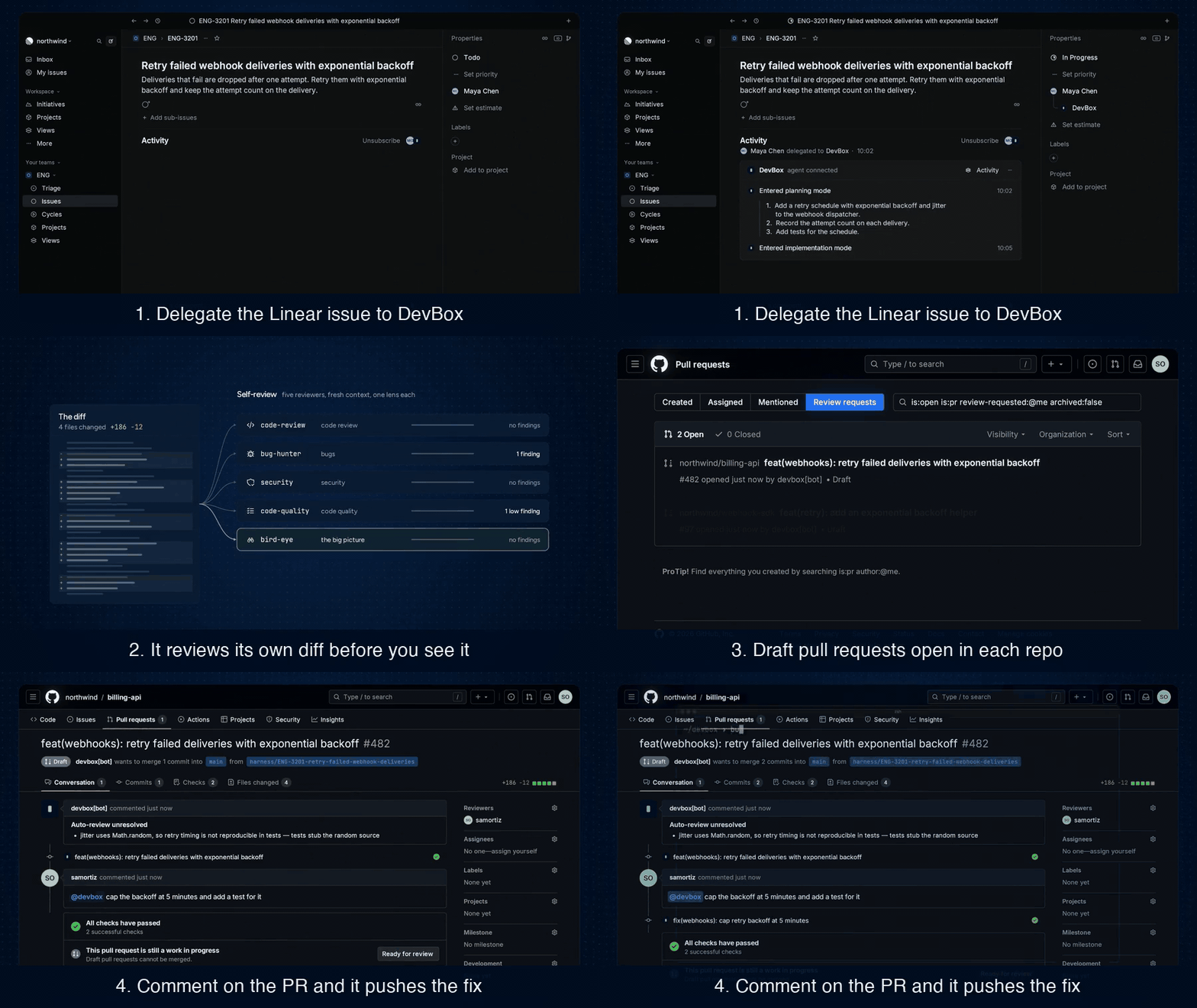
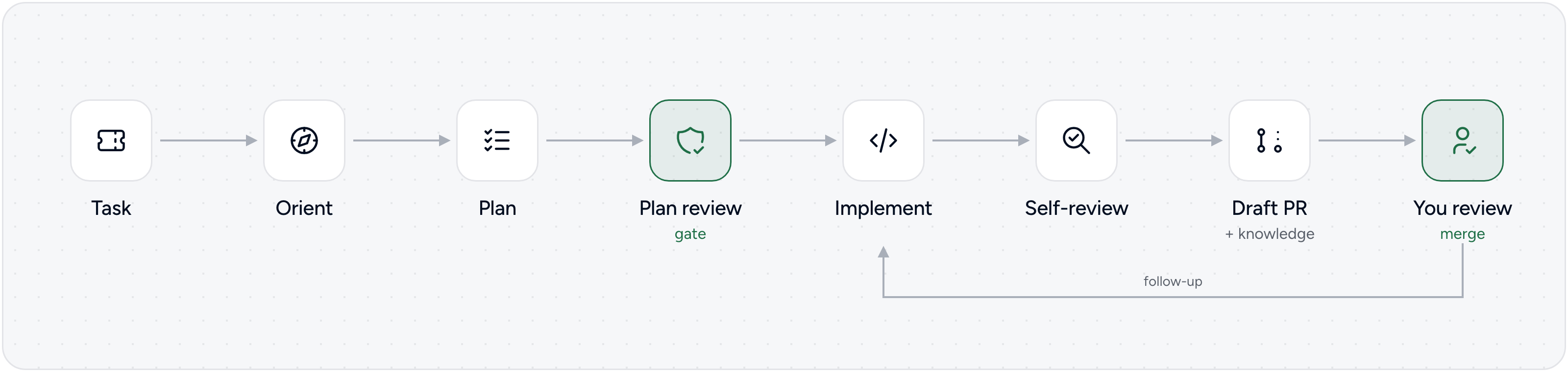
Hand DevBox a ticket. It plans the change, writes the code, runs the tests, reviews its own work and opens a draft pull request. You review and merge. Comment on the pull request, and it pushes the fix to the same branch.
Watch the full launch video (2 min)
DevBox runs on your infrastructure, with your model keys. It is built for a whole engineering org: one shared harness that picks up Linear tickets, answers on GitHub pull requests, works across your repos, and remembers what it learned in them.
We are RudderStack, a customer data infrastructure company. Since April our engineers have handed tickets to DevBox. Today it merges about 35% of our internal pull requests, with about an 80% merge rate. Read the story behind it.
Coding tools like Claude Code and Codex make one developer faster. We wanted the other half: a shared teammate the whole org can delegate to, that runs where our code and secrets already live, and that gets better at our repos over time. DevBox works alongside those tools.
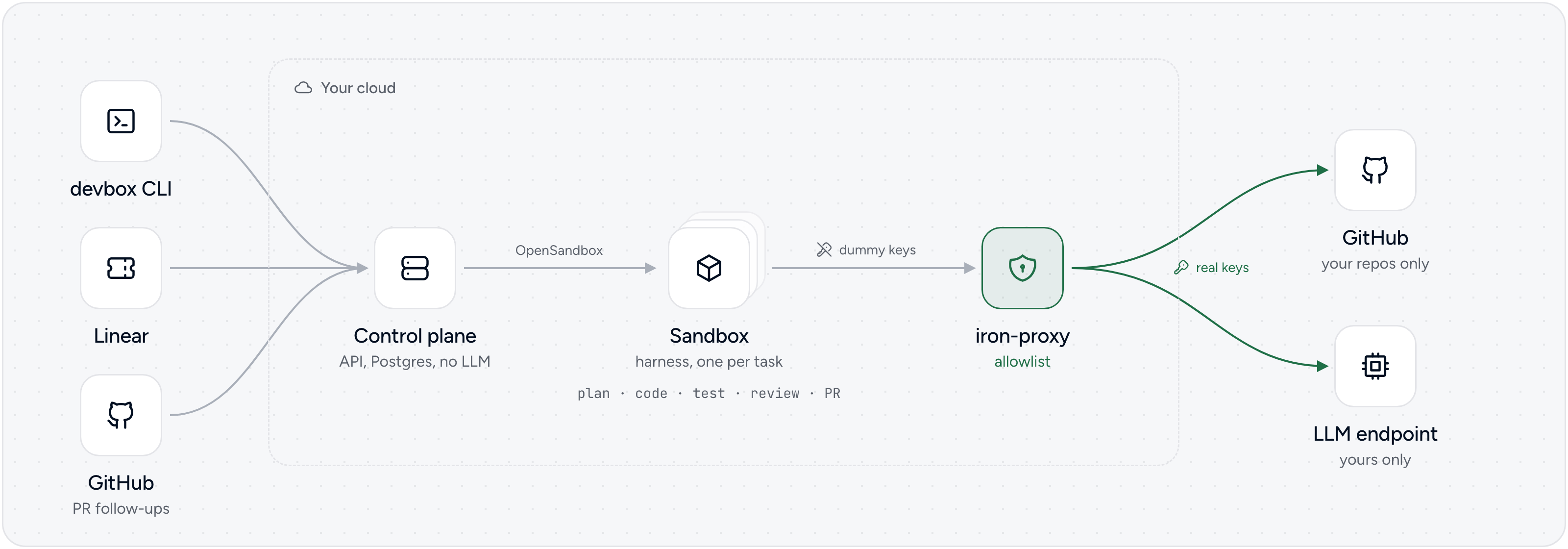
control-plane/) stores tasks, starts a sandbox forharness/) runs in the sandbox, built ondocs/architecture.md has the details.
About 15 minutes, most of it the first image build. The steps assume macOS; see the notes below for Linux.
You need: Docker Desktop
with 8 GB of memory for Docker (Compose 2.13 or newer),
Bun 1.4.4 or newer, make, openssl, a GitHub token or
gh logged in, and an OpenAI or Anthropic API key.
1. Get the code.
git clone https://github.com/rudderlabs/devbox.git && cd devbox
> [!TIP]
> Set it up with Claude Code. Run claude in this directory and ask
> it to help you set up DevBox. The repo ships a DevBox skill
> (.claude/skills/devbox, also /devbox): Claude checks your tools,
> writes devbox.config.json with you, and hands you the
> bun run quickstart command to run. Run it yourself, in another terminal
> or with a ! in front in Claude Code, so you type your keys at its hidden
> prompts and they never go through the chat. Other coding agents can read
> the same skill in skills/devbox/.
2. Pick your repo and model. Copy the example config, then set your repo's URL and your LLM in it.
cp devbox.config.example.json devbox.config.json
   {
     "repos": [{ "url": "https://github.com/your-org/your-repo.git", "branch": "main" }],
     "llm": { "provider": "openai", "baseUrl": "https://api.openai.com/v1", "model": "gpt-5.6-sol" }
   }
DevBox only ever writes to the repos listed here. Anthropic and per-stage models: docs/configuration.md.
Or skip this step: when there is no devbox.config.json, bun run quickstart
asks for your repos and model and writes it.
3. Start DevBox.
bun run quickstart
It checks your config and the tools you need, and asks whether to run on Docker Compose or a local kind cluster and whether to set up Linear and the GitHub App now (say no for a first try; Next steps adds them later). Then it starts DevBox with bun run up, which asks for your GitHub token (or takes it from gh) and your LLM key, and offers to save them in the macOS Keychain, never in a file. It builds the images (about 10 minutes the first time) and logs the CLI in.
4. Give it a task.
bun run devbox create "Add a /health endpoint to your-org/your-repo"
It prints the task's key, for example DBX-API-1.
5. Watch it work.
bun run devbox logs -f DBX-API-1
You see it orient, plan, review its plan, implement, test and review its own diff. At the end, a draft pull request opens on your repo, under your GitHub account.
6. Ask for changes.
bun run devbox send DBX-API-1 "Also add a test"
It pushes new commits to the same pull request.
7. Stop it.
bun run down
Your tasks are kept for the next bun run up. bun run reset deletes them.
Explore the CLI: bun run devbox --help lists every command: ls,
show, wait, restart and more.
[!WARNING]
Linux: add your user to the docker group
(sudo usermod -aG docker $USER, then log out and back in).bun run up
uses the Secret Service (libsecret) instead of the Keychain.
[!TIP]
On a corporate network or VPN that blocks public DNS, run
bun run up --dns-resolver with a DNS server that works there.After you changedevbox.config.json, runbun run upagain. After you
change the model, try it on a new task.
Delegate an issue to DevBox, or @mention it, and it moves the issue to started, posts its progress in the issue's agent session and opens a draft pull request. Follow-ups in the session reach the task. Nobody on the team needs the CLI.
Linear sends webhooks, so it needs a public HTTPS URL that reaches port 3000 on your machine. With ngrok:
ngrok http 3000                                              # in another terminal
bun run linear:setup --public-url https:// # registers the app in Linear
bun run up                                                   # applies it
bun run linear:status                                        # checks the URL reaches DevBox
linear:setup opens Linear's "create app" page, filled in for you. Click
Create, then paste the client ID and the two secrets it asks for.
[!IMPORTANT]
Tunnels on a laptop. A free tunnel gets a new URL each time it restarts,
and Linear keeps sending to the old one. Use a URL that doesn't change: a
free ngrok static domain
(ngrok http --url= 3000) or a named
Cloudflare tunnel.
If the URL changed anyway, see
When the public URL changes.
If delegating does nothing, bun run linear:status tells you whether the
URL reaches DevBox, and Troubleshooting
maps each message to a fix.
docs/linear.md covers Kubernetes, private teams and rotating secrets.
Your token alone is enough for DevBox to open pull requests. A GitHub App adds:
commits from a bot instead of your account, tokens that refresh on their own,
and @ mentions, reviews and failed CI runs on its pull requests that
reach the task.
bun run github:setup --public-url https://   # same URL as Linear
bun run up
bun run github:status
docs/github.md covers the modes, trust lists and token scope.
Put your conventions and build and test commands in AGENTS.md, CLAUDE.md
or .agents/knowledge/. DevBox reads them before every task and adds what it
learns there in each pull request
(docs/extending.md).
A Helm chart runs each task in its own pod, with the same egress proxy. Try it
locally with bun run k8s:kind, then follow
docs/kubernetes/README.md for the installer,
GitOps and the Amazon EKS guide.
bun run secrets ls shows what DevBox saved in your keychain, and
bun run secrets rm removes one. Environment variables
(GITHUB_TOKEN, LLM_API_KEY) win over saved values
(docs/configuration.md).
To report a vulnerability, see SECURITY.md.
main or merge my pull requests?It works on its own branch and opens draft pull requests. Merging stays with you, and your branch protection rules still apply.
Your code stays in your sandboxes and on GitHub. What the model needs to see goes to the LLM endpoint you configure, as with any coding tool.
No. DevBox sends nothing to RudderStack. Tracing with Langfuse is optional, off by default, and goes to the Langfuse instance you set up.
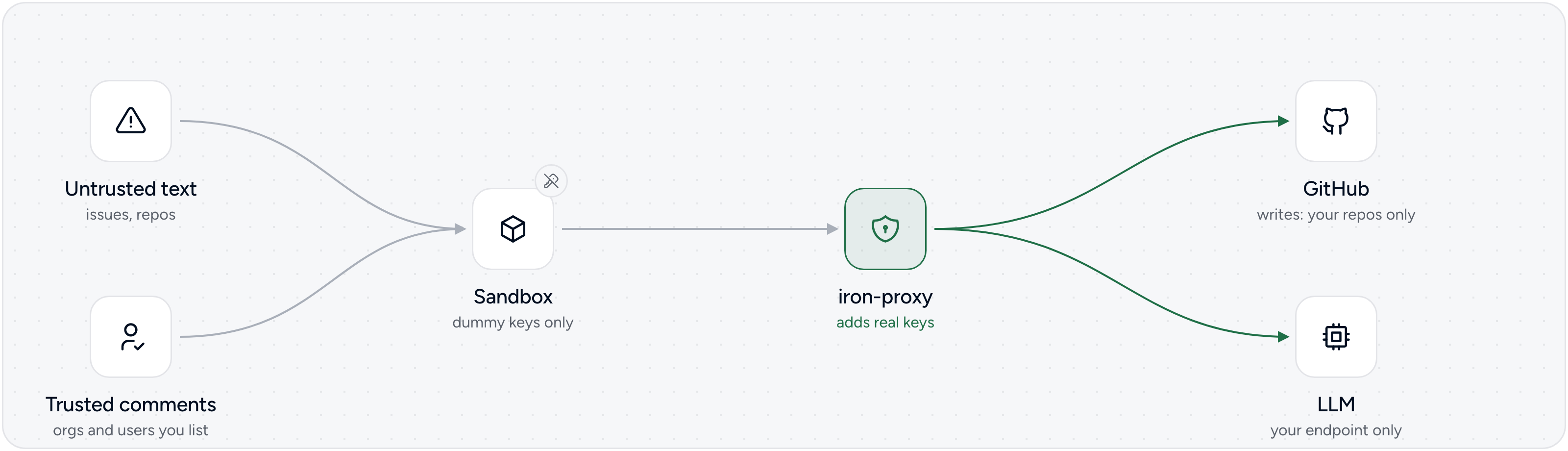
The keys are never in the sandbox, so there is nothing to steal there. DevBox reads pull request comments only from people you trust. See Secure by default.
With a personal token, DevBox acts as you. Set up the GitHub App to get a bot identity.
No. The CLI does everything. Linear makes it a team tool: anyone can delegate an issue and follow along without the CLI.
No. Those help one developer at the keyboard, and we use them every day. DevBox is the org's shared harness that picks up tickets in the background.
devbox.config.json, secrets and the keychain, environment variables, trust settings, per-stage models.DevBox is open source and licensed under the MIT License.
→ →
→ →
→ →
→ →
→ →
→ →
→ →
→