1
 →
→
Node.js & React bindings for Zed’s GPUI. Build memory efficient native apps with React and no Electron
remorses/gpuix is an open-source project on GitHub, mainly written in Rust. Node.js & React bindings for Zed’s GPUI. Build memory efficient native apps with React and no Electron It currently holds 2,296 stars and 66 forks with 20 open issues, and was last pushed on 2026-09-23 (repository created 2026-01-29).
Git Homed tracks it on the Today's Trending board, currently at rank #56 with 62 new stars today.
React and Solid for GPUI, Zed's GPU UI framework.
Write a React or Solid tree in TypeScript. GPUIX paints it with Metal, DirectX, or Vulkan. No Electron. No web view.
useState and JSX still apply. Layout, text, and input go through GPUI, not the DOM.
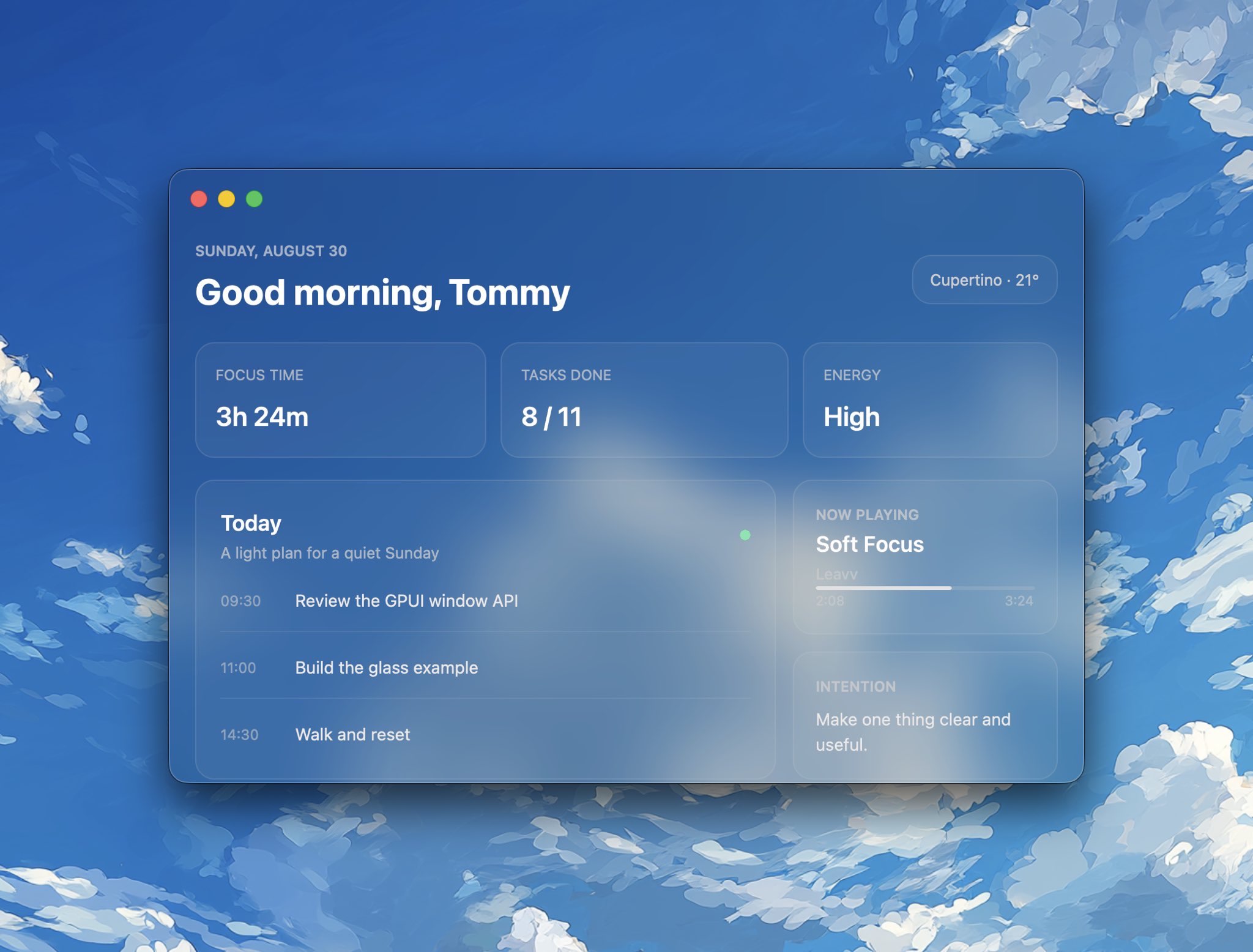
Everything above is GPUIX: the glass window, the cards, the schedule, and native text.
Create an app from the official example. The command downloads only
example-app/ and installs its dependencies. There is no repository clone,
native build, or Rust toolchain.
bunx @gpuix/cli new my-app
cd my-app
bun run dev
@gpuix/react pulls the native renderer for your platform. Edit app.tsx and
the running window remounts on save. Click and keyboard handlers switch to the
new tree without recreating the window.
Using Solid 1 instead? Start with the Solid quick start.
Install the packages directly when you do not want the example app:
bun add --exact @gpuix/react @gpuix/native react
bun add -d @types/react typescript
Pin your adapter and @gpuix/native to the same exact version. GPUIX is
still pre-1.0, so a new release can break either package. The adapter pulls
@gpuix/native with a version range, and that range can install a newer native
binary under an older adapter. Add both as direct dependencies. Upgrade them
together.
jsxImportSource is required. Without it TypeScript uses DOM types, so
`, , and style.hover` all fail to
typecheck.
{
  "compilerOptions": {
    "target": "ES2022",
    "module": "ESNext",
    "moduleResolution": "bundler",
    "jsx": "react-jsx",
    "jsxImportSource": "@gpuix/react",
    "strict": true,
    "skipLibCheck": true,
    "noEmit": true
  }
}
End the file with render(). That call creates the window, mounts React, and
starts the frame loop.
import { useState } from 'react'
import { render } from '@gpuix/react'
function App() {
  const [count, setCount] = useState(0)
  return (

       setCount((c) => c + 1)}
        style={{
          padding: 12,
          borderRadius: 8,
          cursor: 'pointer',
          backgroundColor: '#232323',
          hover: { backgroundColor: '#2c2c2c' },
        }}
      >
        Count: {count}


  )
}
render(, { title: 'My App', width: 800, height: 600 })
[!IMPORTANT]
Give every `acolor.GPUI does not inherit color` from a
parent, so text with no color paints black and disappears on a dark
surface.
bun --hot app.tsx
Use bun --hot, not plain bun. A save then remounts React on the same
window instead of opening a second one.
bun build --compile app.tsx --outfile dist/app
./dist/app
The binary carries the renderer, so it runs with no Bun and no Node install.
For a smaller ship set, run the same React app on hermes-node instead of Bun. That path is 12 MB plus a 22 MB native sidecar. The steps are in that guide.
A raw Mach-O has no Dock icon. Use cargo-packager to wrap the binary. Config: Config. CLI: docs.rs/cargo-packager.
cargo install cargo-packager --locked
Build an .icns from a 1024 PNG, then pack. Pass the .icns, not a 1024 PNG.
cargo-packager rejected a 1024 PNG with No matching IconType.
mkdir AppIcon.iconset
sips -z 16 16 icon-1024.png --out AppIcon.iconset/icon_16x16.png
sips -z 32 32 icon-1024.png --out AppIcon.iconset/[email protected]
sips -z 32 32 icon-1024.png --out AppIcon.iconset/icon_32x32.png
sips -z 64 64 icon-1024.png --out AppIcon.iconset/[email protected]
sips -z 128 128 icon-1024.png --out AppIcon.iconset/icon_128x128.png
sips -z 256 256 icon-1024.png --out AppIcon.iconset/[email protected]
sips -z 256 256 icon-1024.png --out AppIcon.iconset/icon_256x256.png
sips -z 512 512 icon-1024.png --out AppIcon.iconset/[email protected]
sips -z 512 512 icon-1024.png --out AppIcon.iconset/icon_512x512.png
sips -z 1024 1024 icon-1024.png --out AppIcon.iconset/[email protected]
iconutil -c icns AppIcon.iconset -o AppIcon.icns
Bun (one binary):
{
  "productName": "My App",
  "version": "0.1.0",
  "identifier": "dev.example.app",
  "binariesDir": "dist",
  "outDir": "bundle",
  "binaries": [{ "path": "app", "main": true }],
  "icons": ["AppIcon.icns"],
  "formats": ["app"]
}
cargo packager --release --config packager.json
open "bundle/My App.app"
Hermes needs the .node next to the exe. List it as a second binary,
not a resource. Resources go in Contents/Resources. dlopen looks in
Contents/MacOS.
{
  "binaries": [
    { "path": "gpuix-hermes", "main": true },
    { "path": "gpuix-native.darwin-arm64.node", "main": false }
  ]
}
formats is the host OS only:
| OS | formats | Output |
|---|---|---|
| macOS | "app", then "dmg" | .app, optional .dmg |
| Windows | "nsis" | setup .exe |
| Linux | "appimage" | .AppImage |
On this machine the Bun chat .app is 82 MB. The Hermes counter .app
is 34 MB.
Packaging does not turn on updates. The running app calls
checkUpdate on @gpuix/native. HTTP uses the same reqwest_client as
Host on GitHub Releases. Create the release first. CI packs on each OS,
signs, and uploads the bundle plus its .sig. The app hits
https://github.com/OWNER/REPO/releases/latest. That rewrites to
https://api.github.com/repos/OWNER/REPO/releases/latest. The updater
reads tag_name and assets, then GETs the sibling {name}.sig.
Sign once:
cargo packager signer generate
Store the private key and its password as repo secrets
CARGO_PACKAGER_SIGN_PRIVATE_KEY and
CARGO_PACKAGER_SIGN_PRIVATE_KEY_PASSWORD. Put the public key in the app.
import { checkUpdate } from '@gpuix/native'
import { render } from '@gpuix/react'
import { App } from './app'
async function maybeUpdate() {
  const update = await checkUpdate('0.1.0', {
    endpoints: ['https://github.com/OWNER/REPO/releases/latest'],
    pubkey: '',
  })
  if (update) await update.downloadAndInstall()
}
maybeUpdate()
render()
https://github.com/OWNER/REPO is the same endpoint.
Packager only builds the host OS. Run it on macOS, Linux, and Windows.
--release is the packager profile (look in binariesDir for a release
binary). It is not cargo build --release. Signing is automatic when those
two env vars are set. Source:
cargo-packager CLI.
With productName: "My App", version: "0.1.0", and
binaries: [{ "path": "app", "main": true }], packager writes:
| OS | formats | Files in outDir (bundle/) |
|---|---|---|
| macOS | "app" | My App.app, then on sign My App.app.tar.gz + My App.app.tar.gz.sig |
| Linux | "appimage" | app_0.1.0_x86_64.AppImage + .sig |
| Windows | "nsis" | app_0.1.0_x64-setup.exe + .sig |
The macOS updater wants the .app.tar.gz, not the .app and not a
.dmg. Packager tars the .app only when it signs. Linux and Windows names
use the binary stem (app), not productName. NSIS arch is x64, not
x86_64. A missing sibling .sig is an error.
Create the GitHub release yourself, then pack and upload. --clobber
replaces an asset if CI retries. Do not upload a feed JSON.
# macOS
bun build --compile app.tsx --outfile dist/app
cargo packager --release --config packager.json
gh release upload v0.1.0 \
  "bundle/My App.app.tar.gz" \
  "bundle/My App.app.tar.gz.sig" \
  --clobber
Linux
bun build --compile app.tsx --outfile dist/app
cargo packager --release --config packager.json
gh release upload v0.1.0 \
  bundle/app_0.1.0_x86_64.AppImage \
  bundle/app_0.1.0_x86_64.AppImage.sig \
  --clobber
Windows
bun build --compile app.tsx --outfile dist/app.exe
cargo packager --release --config packager.json
gh release upload v0.1.0 \
  bundle/app_0.1.0_x64-setup.exe \
  bundle/app_0.1.0_x64-setup.exe.sig \
  --clobber
downloadAndInstall() replaces the packaged files. It does not relaunch.
Quit after it returns, or the next start uses the new app.
HTTPS is in the native crate. This works on Bun and hermes-node. It
does not exist in the browser wasm build. The repo must be public, or
GitHub will 404 the API. Optional: put a Cloudflare cache in front of
api.github.com. Same GitHub JSON. Not a custom schema.
example-app/ is a complete todo app in one file, with dev,
build, web:dev and typecheck scripts already wired. Create a copy with
bunx @gpuix/cli new my-app.
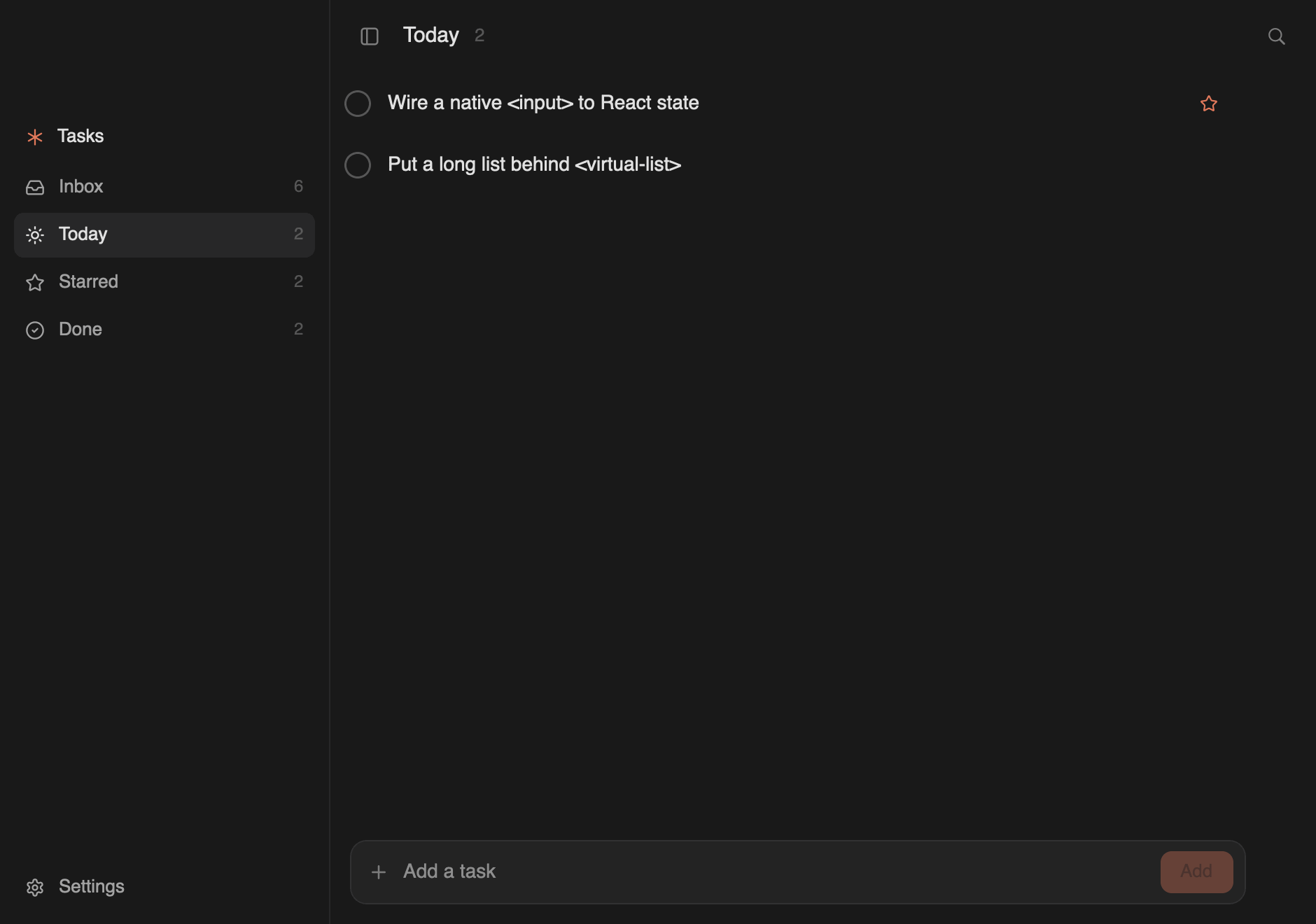
Install completions for the gpuix command:
bun add -g @gpuix/cli
gpuix completions install
| Example | Run | What it shows |
|---|---|---|
| todo | The todo app lives in Or download a standalone chat build from the GitHub release. No Bun or Rust install is required. The archive keeps the executable bit, so there is no On Windows, download The web example bundles the same React app and reconciler as the desktop chat
example. wasm-bindgen exposes mutations and event callbacks to the existing
retained tree and The web build needs nightly Rust and the matching wasm-bindgen CLI: The generated Wasm uses shared memory, so the page must be cross-origin
isolated. Production servers must send these headers on the top-level
document: Fast Refresh only applies to a module whose exports are all components. Edit
anything else, such as the entry file, and Bun reloads the page instead. Both
paths are correct; the reload is only slower. The Wasm half is a singleton and must never re-evaluate.
The chat example puts a virtualized `` and a GFM table inside an assistant
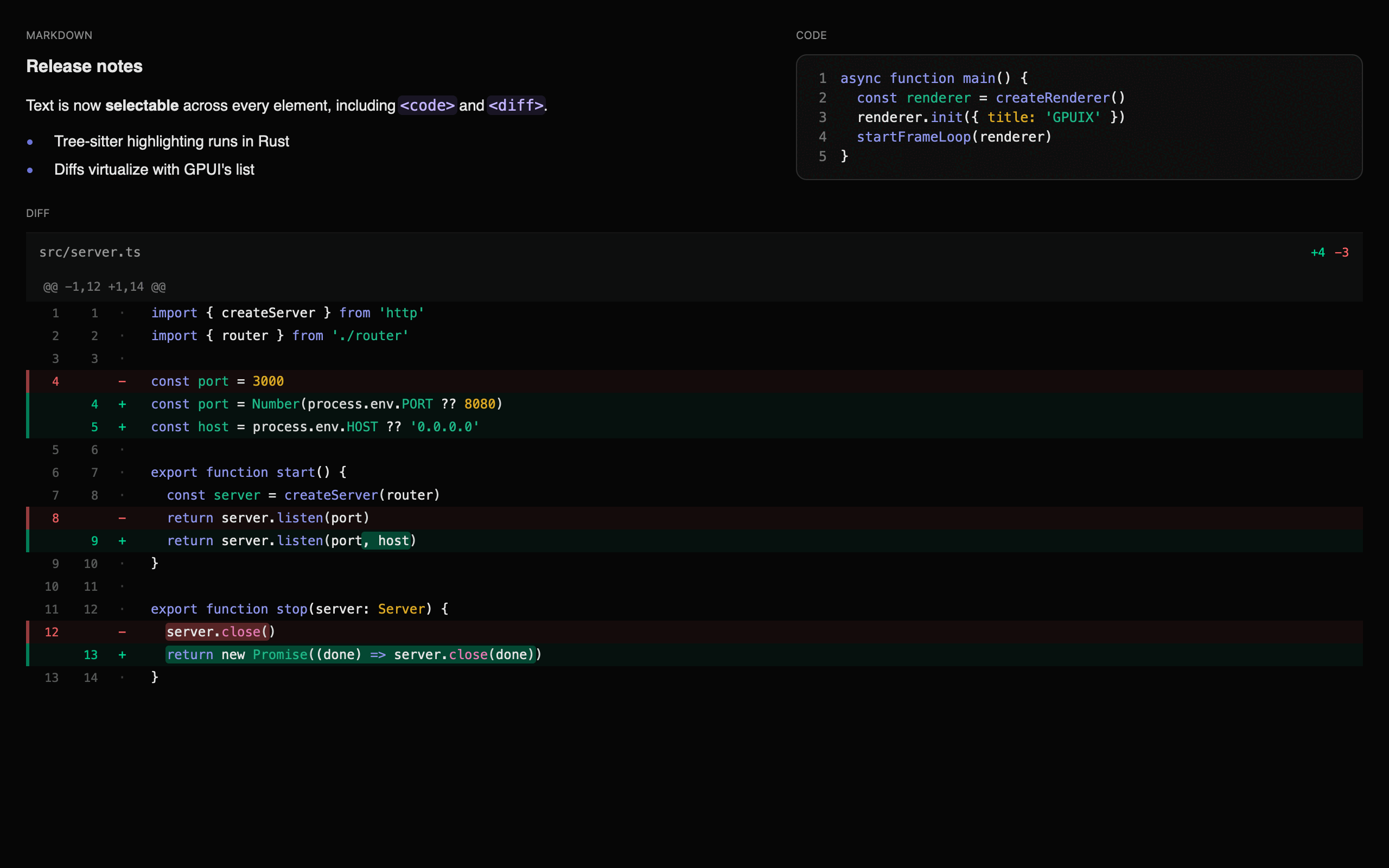
turn, inside a scrolling transcript: Markdown, code and a virtualized diff in one frame: GPUIX bridges React and Solid to GPUI using a shared mutation-based runtime.
Desktop apps use napi-rs; browser apps load the same Rust renderer through
wasm-bindgen. Each framework adapter collects changed elements into one atomic
mutation batch. Rust applies that batch to a retained element tree that GPUI
reads each frame. GPUI is an immediate-mode UI framework — it rebuilds the entire element tree every frame. Instead of fighting this, GPUIX embraces it: 1. The React or Solid adapter detects a state change and queues host mutations ( React and Solid use the same IDs, mutation queue, event routing, testing API,
automation client, observers, and text-search matcher. Their framework-specific
schedulers and component contexts stay in the adapter packages. The mutation surface between JS and Rust is one atomic method. Desktop uses napi and the browser uses wasm-bindgen: Element IDs are plain numbers generated by an incrementing counter in JS. React may abandon work in concurrent render mode, so GPUIX keeps new host nodes in JS until React places the accepted subtree during commit. Only then are its mutations added to the batch. Events travel from GPUI back to React through a Event handlers are stored in a JS-side registry keyed by Install Solid and the official Solid adapter: Use Solid's preserved JSX. The preload compiles application function App() {
const [count, setCount] = createSignal(0)
return (
render(() => , { title: 'Solid GPUIX', width: 800, height: 600 })
Run it directly. No wrapper command or Vite configuration is required. For production await Bun.build({
entrypoints: ['./app.tsx'],
target: 'bun',
outdir: './dist',
plugins: [solidPlugin],
})
The full Solid adapter API is in the Solid guide. This section is for working on GPUIX itself. To build an app with it, see
Quickstart instead. Installing the packages needs no Rust
toolchain and no submodule. 1. Rust toolchain
2. Node.js 18+
3. Xcode with Metal Toolchain (macOS) ```tsx
import React, { useState } from 'react'
import { render } from '@gpuix/react' function App() {
const [count, setCount] = useState(0)
return (
bun run dev in example-app/ | The starting point: one file, a `, a native `, and an animated sidebar |
| blurred window | bun run blurred-window | A macOS frosted-glass surface using GPUI's native vibrancy backdrop and transparent titlebar |
| chat | bun --hot chat.tsx | A GPUIX app: transparent titlebar, animated sidebar, per-thread transcripts, demo replies, composer, `` |
| timeline | bun --hot timeline.tsx | A video-editor timeline: clip dragging, edge trimming with snapping, playhead scrubbing, marquee selection, zoom under the pointer, and a two-axis pan with a frozen ruler and track column |
| mail | bun --hot mail.tsx | A Superhuman-style mail client: three panes, thread list, and a Framer newsletter |
| native-text | bun --hot native-text.tsx | The three native text components with a tab switcher |
| counter | bun --hot counter.tsx | The smallest possible app: state, events, hover |
| diff | bun --hot diff.tsx | A diff viewer composed from and `` in JS, for comparison |
| web | bun run web from the repository root | The ChatGPT example rendered in a browser canvas with WebGPU |
example-app/ and is meant to be copied with bunx @gpuix/cli new.
The rest live in examples/. Those bun --hot commands need a clone of this repo and a local native build. They will not run against the published packages alone.tar -xzf example-chat-aarch64-apple-darwin.tar.gz
./example-chat-aarch64-apple-darwin
chmod step. macOS may still block the unsigned binary the first time. Right-click the file, choose Open, and confirm.example-chat-x86_64-pc-windows-msvc.exe and double-click it. On Linux, the file is example-chat-x86_64-unknown-linux-gnu.tar.gz.GpuixView, which run through GPUI's browser platform.rustup toolchain install nightly --component rust-src --target wasm32-unknown-unknown
cargo install wasm-bindgen-cli --version 0.2.127 --locked
bun run web
Cross-Origin-Opener-Policy: same-origin
Cross-Origin-Embedder-Policy: require-corp
require-corp then constrains cross-origin subresources, which must supply
their own CORS or Cross-Origin-Resource-Policy. Serve the JavaScript and the
Wasm from the same origin as the document and nothing else is needed.bun run web rebuilds the Wasm only when packages/native/wasm is missing.
After a Rust change, force it:bun scripts/web.ts --rebuild
Hot reload in the browser
bun run web serves the example through Bun's frontend dev server, so an edit
to examples/chat.tsx arrives as a React Fast Refresh update. Components
swap in place and useState survives, which means the composer text, the
sidebar selection, and the scroll position all stay where they were. The GPUI
canvas is never re-created and the ~19 MB Wasm module is never re-fetched.WebGpuixRenderer::init fails with GPUIX web is already running once its
thread-local app exists, and GPUI's browser platform appends its own canvas to
`. What protects it is not that it lives in node_modules`; Bun bundles
it into the same client registry as your app. It is that Bun re-runs only the
changed module and then walks upward through its importers, so an unchanged
dependency stays evaluated and cached. Two rules follow:
Bun runs an importer's dependency-accept callback even when the imported
module already self-accepted, so that callback would remount the tree on top
of a successful refresh and throw away every import.meta.hot.accept("./your-app", ...) in the entry file.useState
boundary and is never explicitly accepted
@gpuix/native import in a module that can never become a Refresh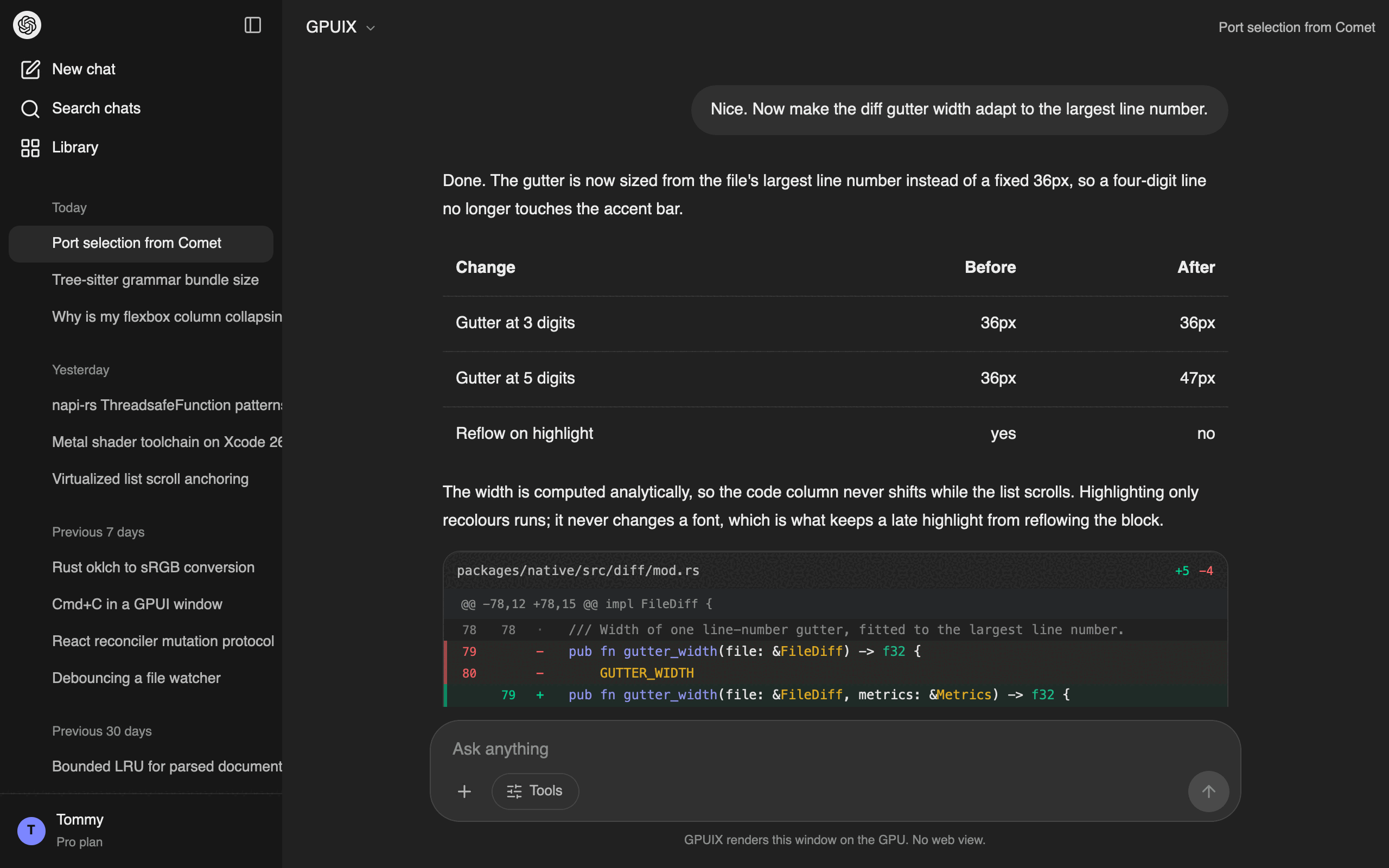
Architecture
┌─────────────────────────────────────────────────────────────────┐
│ React or Solid (JavaScript) │
│ │
│ function App() { │
│ const [count, setCount] = useState(0) │
│ return ( │
│ │
│ │
│ ) │
│ } │
└─────────────────────────────────────────────────────────────────┘
│ napi desktop / wasm-bindgen browser
│ applyBatch([
│ ["createElement", 1, "div"],
│ ["setStyle", 1, {...}],
│ ["setRoot", 1]
│ ])
▼
┌─────────────────────────────────────────────────────────────────┐
│ Rust host bridge │
│ │
│ RetainedTree ── stores elements, styles, event flags │
│ │ │
│ ▼ each GPUI frame │
│ GpuixView::render() → build_element() → GPUI elements │
└─────────────────────────────────────────────────────────────────┘
│
▼
┌─────────────────────────────────────────────────────────────────┐
│ GPUI │
│ │
│ Metal, DirectX, Vulkan, or browser WebGPU / WebGL2 │
│ Flexbox layout via Taffy │
└─────────────────────────────────────────────────────────────────┘
setCount(c => c + 1)}> │
│ Count: {count} │
│ │
│ Why This Works
createElement, setStyle, appendChild, etc.)
2. applyBatch() validates and applies the complete commit to the Rust RetainedTree
3. On each GPUI frame, GpuixView::render() walks the RetainedTree and calls build_element() to produce ephemeral GPUI elements
4. GPUI lays them out (Taffy flexbox) and renders to the GPU
5. Only changed elements cross the FFI boundary. The framework adapter sends minimal mutationsMutation API
type MutationHost = Pick
createMutationQueue only needs that. Window size, focus, and selection use smaller host types (WindowSizeHost, SelectionHost). NativeRenderer is MutationHost plus those methods, so a fake can implement applyBatch alone.applyBatch() applies that accepted commit atomically and marks the Rust view dirty for the next frame.Event Flow
ThreadsafeFunction on desktop
and a wasm-bindgen callback in the browser.User clicks element id=3
│
▼
GPUI fires on_click on the element
│
▼
Rust closure calls emit_event_full(callback, 3, "click", {x, y, ...})
│
▼
Desktop ThreadsafeFunction / browser callback sends EventPayload
│
▼
JS event registry: eventHandlers.get(3)?.get("click")?.(payload)
│
▼
React handler runs: onClick={() => setCount(c => c + 1)}
│
▼
State update triggers re-render → reconciler sends mutations back to Rust
(elementId, eventType). Rust only knows whether an element has a listener (via setEventListener), not the closure itself — the actual handler lives in JS.Packages
Pin the selected adapter and @gpuix/native: Rust bindings plus the framework-neutral TypeScript host runtime. It owns host types, mutation batching, renderer state, event routing, observers, native testing, and automation.@gpuix/native/host: host contracts, mutation helpers, renderer ownership, window observers, selection observation, and text search. Importing it does not load the .node addon.@gpuix/native/testing: the shared TestRenderer over the real TestGpuixRenderer.@gpuix/native/automation: the shared automation protocol, client, locators, and process launcher.@gpuix/react: the React reconciler and React components. It preserves its existing exports and re-exports shared testing, automation, search, and observer APIs.@gpuix/solid: the Solid 1 universal renderer, Solid primitives, motion, Select, Combobox, Tooltip, Bun preload, and build plugin.@gpuix/cli — gpuix new downloads example-app/, sets its published React dependency, and installs it as a standalone project.@gpuix/native to the same exact version.
GPUIX is still pre-1.0. Breaking changes can land before v1. Upgrade them
together.
Solid quick start
bun add --exact @gpuix/solid @gpuix/native solid-js
.tsx and .jsx
files for Solid's universal renderer and selects the reactive client runtime.{
"compilerOptions": {
"target": "ES2022",
"module": "ESNext",
"moduleResolution": "bundler",
"jsx": "preserve",
"jsxImportSource": "@gpuix/solid",
"strict": true,
"skipLibCheck": true,
"noEmit": true
}
}
preload = ["@gpuix/solid/preload"]
import { createSignal } from 'solid-js'
import { render } from '@gpuix/solid'
)
}
setCount((value) => value + 1)}>
Count: {count()}
bun app.tsx
bun --hot app.tsx
Bun.build, pass the exported plugin:import solidPlugin from '@gpuix/solid/bun-plugin'
@gpuix/solid targets stable Solid 1.9. Its peer range is >=1.9 <2.Building
Prerequisites
# Install Metal Toolchain if needed
xcodebuild -downloadComponent MetalToolchain
Install dependencies
bun install
Check out the pinned GPUI fork
git submodule update --init --recursive
Build native package
cd packages/native
bun run build
Build React package
cd ../react
bun run build
Build Solid package
cd ../solid
bun run build
Run example (use tmux for long-running sessions)
cd ../../examples
bun --hot counter.tsx
Usage
setCount(c => c + 1)}
>
GitHub Stars & Activity
2,296Stars66Forks20Open issuesRustLanguageGitHub Popularity
GitHub stars2,296Forks66Open issues20Primary languageRustLicenseApache-2.0Stars gained today62Created2026-01-29Last pushed2026-09-23Trending History
Daily boardrank #56 · ▲ 62 starsRelated GitHub Projects
1→2 →3
→3 →4
→4 →5
→5 →6
→6 →7
→7 →8
→8 →
→More Trending Repositories