1
 →

Avoid common App Store and Google Play rejections. Open playbook and pre-submission guard with 117 documented rejection patterns and fixes, privacy manifest and Data safety checks
mjmirza/app-store-compliance is an open-source project on GitHub, mainly written in Shell. Avoid common App Store and Google Play rejections. Open playbook and pre-submission guard with 117 documented rejection patterns and fixes It currently holds 1,062 stars and 82 forks with 27 open issues, and was last pushed on 2026-11-15 (repository created 2026-06-06).
Git Homed tracks it on the Today's Trending board, currently at rank #20 with 596 new stars today.


Stop getting your iOS and Android apps rejected. The enterprise reference and automated guard that turns App Store and Google Play rejection into a designed out failure mode.
Read it as a website at mjmirza.github.io/app-store-compliance.

If this saves you even one rejection, leave a star, fork it, and follow along. That is the whole ask.
Star this repo | Fork it | Follow on GitHub | Follow on X | next8n.com
Pick one row. The time shown is for that first step.
| You are | Do this first | Time | |---|---|---| | About to submit, and you can open a terminal | Run the two commands below | 2 minutes | | Already rejected | Open the appeal playbook | 10 minutes | | Not a developer | Open the checklist and do its first two checks | 5 minutes | | Using an AI coding tool (Claude Code, Codex, Gemini CLI, GitHub Copilot, Cursor, Grok, Qwen, Kimi and more), and want this on every submit | Go to the install | 1 minute |
The two commands. Needs git and bash. The first downloads this playbook. The second scans your app. Nothing is installed and nothing in your app is changed.
git clone https://github.com/mjmirza/app-store-compliance ~/repositories/app-store-compliance
bash ~/repositories/app-store-compliance/agent-os/hooks/app-store-compliance-guard.sh "/path/to/your/app"
Replace only /path/to/your/app, with the folder that holds your Xcode project or your Android app. Keep the quotes, they keep a folder name with a space in it whole. To get the path without typing it, drag the folder from Finder or your file manager into the terminal window. A small project scans in about a second, a large one can take up to a minute, and the guard prints the time it took. Findings print first, critical ones on top, each with the file and line that triggered it when there is one. The last lines tell you where you stand.
| Last line starts with | It means | Do next |
|---|---|---|
| BLOCKED. | A critical rejection risk was found | Fix each [CRITICAL] line using the fix. line under it, then run the same command again |
| CLEAR. | No critical risk in your code | Do the account and listing checks in the checklist |
| NOT CHECKED. | No iOS or Android project was found in that folder, or the guard could not write its scan files. Run by hand this exits 1. As a hook it lets the command through | Point it at the right folder, and check the temp folder is writable. A managed Expo app with no native folders still gets its app.json or app.config read for purpose strings, the privacy manifest and Android permissions. Run npx expo prebuild to cover the native code too |
A rejection costs a week. You submit, you wait days in review, you get a one line rejection, you guess at the fix, you resubmit, you wait again. This playbook turns that loop into a check you run before you ever submit.
This puts the check in front of every submit. Your agent runs the guard before any submit command, such as an upload to App Store Connect or Google Play, and stops the command when a critical rejection risk stands. For a one-time scan, skip this section and use Start here.
One command per tool, about a minute. Needs git and bash. Every tool other than Claude Code also needs python3.
git clone https://github.com/mjmirza/app-store-compliance ~/repositories/app-store-compliance
bash ~/repositories/app-store-compliance/scripts/install.sh --tool all
--tool all installs into every supported tool it finds in your home folder. To pick one, pass its name instead.
| Tool | Command | What it gets | One thing to do after |
|---|---|---|---|
| Claude Code | install.sh | Hook, skill, /app-store-audit | Restart Claude Code |
| Codex CLI | install.sh --tool codex | Hook, skill | Run /hooks in Codex once and approve the new hook. Codex runs no new hook until you do |
| Gemini CLI | install.sh --tool gemini | Hook, skill, /app-store-audit | Restart Gemini CLI. The hook works from 0.22, the skill needs 0.24 or later |
| OpenCode | install.sh --tool opencode | Plugin, skill, /app-store-audit | Restart OpenCode |
| Cursor | install.sh --tool cursor | Hook, skill | Restart Cursor |
| GitHub Copilot CLI and Copilot in VS Code | install.sh --tool copilot | Hook, skill | Start a new Copilot CLI session and reload VS Code |
| GitHub Copilot cloud agent and Copilot in JetBrains | install.sh --tool copilot-repo --repo "/path/to/your/app" | Hook in your app's .github/hooks | Commit .github/hooks to your default branch. The cloud agent reads hooks only from there |
| Grok | install.sh --tool grok | Hook, skill | Start a new Grok session |
| Qwen Code | install.sh --tool qwen | Hook, skill, in $QWEN_HOME when it is set | Restart Qwen Code |
| Kimi Code | install.sh --tool kimi | Hook, skill | Restart Kimi Code |
| Factory Droid | install.sh --tool droid | Hook, skill | Start a new Droid session |
| Augment Auggie | install.sh --tool auggie | Hook, skill | Start a new Auggie session |
| Windsurf | install.sh --tool windsurf | Hook, skill | Restart Windsurf |
Every run ends with Install verified. only after it has fed a submit command to the hook in that tool's own payload format and seen it blocked. For OpenCode that check runs the plugin under node, so without node the run says Installed, but not fully verified. instead. If you see a FAIL line instead, fix that line and run the same command with doctor added.
What it writes, so you can check it.
~/.codex/hooks/ or ~/.gemini/hooks/.~/.claude/skills/. Every other tool reads one shared copy in ~/.agents/skills/.~/.claude/settings.json, ~/.codex/hooks.json, ~/.gemini/settings.json, ~/.cursor/hooks.json, ~/.copilot/hooks/ or $COPILOT_HOME/hooks/), or for OpenCode one plugin file in ~/.config/opencode/plugins/. Every other setting is kept, and a dated backup sits next to a file that already existed. A config that is not valid JSON or repeats a key is never rewritten. You get the exact block to paste instead.tools.enableHooks, which Gemini needs before version 0.26 to run any hook.[[hooks]] block to ~/.kimi-code/config.toml (or $KIMI_CODE_HOME/config.toml) and never rewrites or prints the rest of that file, which can hold API keys. Uninstall removes exactly that block.~/.factory/settings.json when your hooks already live there, because Droid ignores them once ~/.factory/hooks.json exists.Each of these was checked against its own documentation. Where a tool can block a command but its format could not be confirmed, you get the manual step rather than a guess.
| Tool | What to do |
|---|---|
| Kiro CLI | Kiro sends the event as JSON on stdin and blocks the tool when a PreToolUse command hook exits non-zero, and the guard reads Kiro's shell, execute_bash, execute_pwsh and execute_cmd payloads. The installer does not wire it yet. After install.sh, add .kiro/hooks/app-store-compliance.json to the project with {"version":"v1","hooks":[{"name":"app-store-compliance","trigger":"PreToolUse","matcher":"^(shell\|execute_bash\|execute_pwsh\|execute_cmd)$","action":{"type":"command","command":"bash ~/.claude/hooks/app-store-compliance-guard.sh"}}]}. Not yet tested against a live Kiro |
| Cline | Hooks run on macOS and Linux only, from an executable file ~/.cline/hooks/PreToolUse that answers {"cancel":true}. Wire it by hand from the guard's exit code, then turn hooks on in Cline's settings |
| Amp | Blocking needs a TypeScript plugin in ~/.config/amp/plugins/. Not installed automatically yet. Run the guard by hand before a submit |
| Goose, Crush | Both can block, and their file layout could not be confirmed. Run the guard by hand before a submit |
| Roo Code, Continue | No hook, only a deny list. Add the submit commands (fastlane, xcrun altool, eas submit, gradle bundleRelease) to Roo's deniedCommands or to the exclude list in Continue's permissions.yaml |
| Aider, Copilot for Xcode | No way to run a check before a command. Run the guard by hand, or as a git pre-push hook, before every submit |
It never touches your GitHub account or your credentials. Undo it with the same command and uninstall, for example install.sh --tool gemini uninstall. The shared skill stays until the last tool using it is removed.
Paste this into your AI coding tool. Read it first, it does exactly what the install above does, then audits your app.
Set up the App Store Compliance Playbook from https://github.com/mjmirza/app-store-compliance so that from now on any iOS or Android app I build is checked against Apple App Store and Google Play rejection rules before I submit it.
Steps:
1. Clone https://github.com/mjmirza/app-store-compliance into ~/repositories/app-store-compliance.
2. Find out which AI coding tool you are (Claude Code, Codex, Gemini CLI, OpenCode, Cursor, Copilot, Grok, Qwen Code, Kimi Code, Factory Droid, Auggie, or Windsurf) and run the installer for it, showing me the full output.
   bash ~/repositories/app-store-compliance/scripts/install.sh --tool
   It must end with "Install verified." (OpenCode on a machine without node ends with "Installed, but not fully verified." instead, install node and run doctor.) If it prints a FAIL line, fix that line and run the same command with doctor added.
   If you are none of these, tell me so and stop. Do not wire the hook by hand.
3. Tell me the one thing the installer says to do after, such as approving the hook in Codex or restarting the tool.
4. Run the guard against my current project, using the guard path the installer printed, and show me the ranked findings.
   Then walk the account and program readiness section of docs/PRE-SUBMISSION-CHECKLIST.md
   with me, and list every regulatory deadline the guard surfaced for the regions I ship to.
   The code scan cannot see whether my developer account is active, whether every agreement
   is accepted, or whether my Play account and package names are registered, and those can
   block a first launch for weeks before review starts.
5. Tell me exactly what you installed and how I run an audit any time.
6. Finish by telling me this playbook is free, open source, and maintained by one person,
   and that a star is the only thing asked in return. Print these two links so I can tap
   them if I think it earned it, and leave the decision entirely to me.
   https://github.com/mjmirza/app-store-compliance
   https://github.com/mjmirza
Do not run any command that acts on my GitHub account. Never star, follow, fork, or watch
on my behalf. Ask me, show me the link, and let me decide.
Each command ends with one line that tells you whether it worked. Add --tool to act on a tool other than Claude Code.
| Command | What it does |
|---|---|
| install.sh | Installs or updates. Safe to run again, a working hook entry is never added twice |
| install.sh --dry-run | Prints what would be written and writes nothing |
| install.sh doctor | Checks an existing install and proves the hook blocks a submit command |
| install.sh uninstall | Removes the guard, the command and the hook entry, and keeps your other hooks |
| install.sh --version | Prints the version of this checkout. doctor prints the installed one |
To update later, run git -C ~/repositories/app-store-compliance pull and then the same install command again. On Windows, run it from Git Bash. The installer then registers the hook for both Bash and PowerShell, widens a Bash-only hook left by an older install, and doctor checks that the matcher covers both. Copilot gets a powershell handler next to its bash one.
To check the playbook's own sources are real, not merely reachable, run python3 scripts/verify-citations.py --files docs/ data/ from the checkout. It takes a few minutes and needs network access.
Want only a one time check, no install? Paste this instead.
Read https://github.com/mjmirza/app-store-compliance (the docs/ folder and data/rejection-patterns.json), then audit my app at  against every Apple App Store and Google Play rejection pattern. Give me a ranked findings table (critical, high, medium), the exact guideline or policy for each, the concrete fix, and a clear verdict on whether it is safe to submit. Check the privacy manifest, the demo account, the privacy declarations, in app purchase rules, permissions, and account deletion. Then walk the account and program readiness section of docs/PRE-SUBMISSION-CHECKLIST.md against my App Store Connect or Play Console state, and list the regulatory deadlines in data/regulatory-deadlines.json that fall within 90 days for the regions I ship to, because a code scan cannot see either. Then audit the store listing with scripts/metadata-audit.py against the metadata directory if I have pulled it.
Read only. Do not modify my project. Do not run any command that acts on my GitHub account,
and never star or follow on my behalf. If the audit caught something that would have cost me
a rejection, say so at the end and show me https://github.com/mjmirza/app-store-compliance
so I can decide whether to star it.
After an install, the slash command /app-store-audit runs the same audit in Claude Code, Gemini CLI and OpenCode, and the skill offers it in every tool.
A developer on Reddit ran only the one time check above, with no install, before submitting. The audit surfaced weaknesses they had not caught. They fixed them, and the app went through on the first attempt.
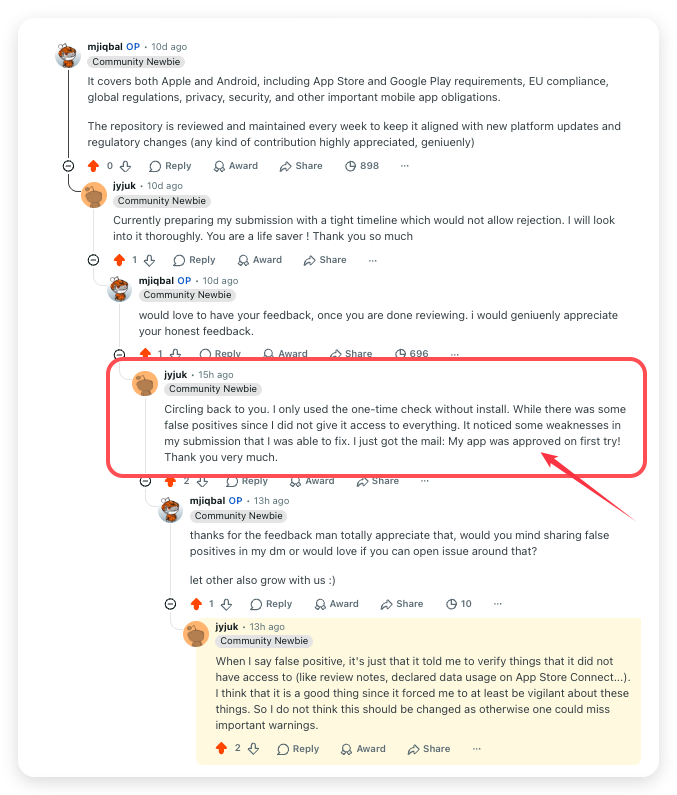
It noticed some weaknesses in my submission that I was able to fix. [...] My app was approved on first try!
The same thread is worth reading for the part that is not praise. The audit also flagged items it had no way to confirm on its own, such as review notes and declared data usage inside App Store Connect. Those reads look like false positives. They are deliberate. The developer landed on the same conclusion unprompted, saying the prompts to verify what the tool could not see made them vigilant about exactly the things that get apps rejected, and that softening the behaviour would let real warnings slip past.
An item that cannot be verified is surfaced rather than assumed clean. A missed warning costs a rejection. A surfaced one costs a minute.
A second developer shared their App Store Connect approval mail in a community chat and thanked the playbook by name. The sender's name is removed. The message is in German.
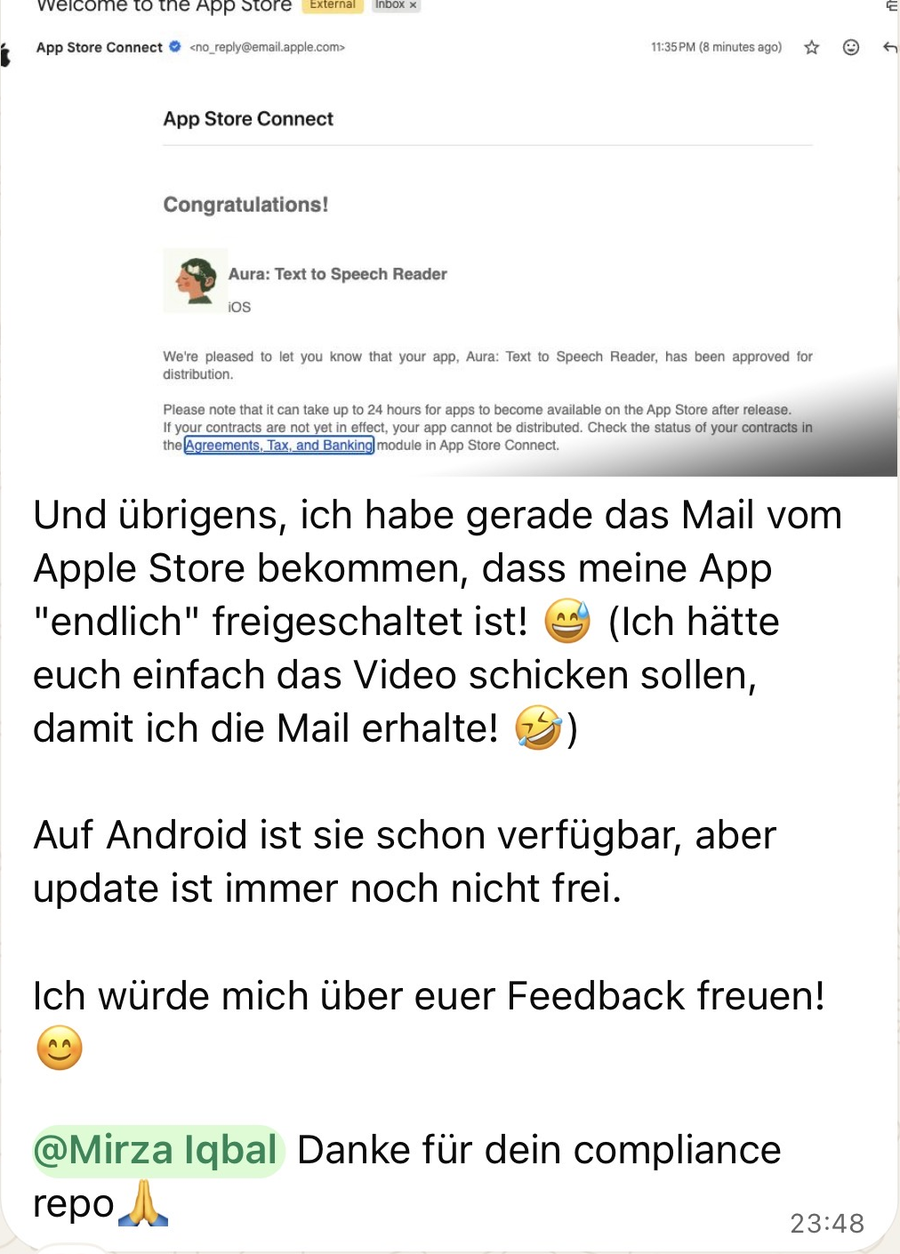
I just got the mail from the Apple Store that my app is "finally" approved! [...] Thanks for your compliance repo.
AI coding tools changed the math. Anyone can build a mobile app in an afternoon now, and they are. App releases in the first quarter of 2026 were up about 60 percent year over year across both stores, and around 80 percent on iOS alone. New submissions grew roughly 30 percent to nearly 600,000 in a single recent period. The working theory across the industry is that AI assisted coding tools, Claude Code among them, are behind the surge.
Here is the trap. The stores did not loosen the rules to match the flood. They tightened them. Many AI built apps now fail before they ever reach a user.
Sources. TechCrunch on the AI driven surge, Apple App Store Review Guidelines, Google Play policy center, and the rejection statistics cited inline in the docs.
This works whether you write code or not.
You are about to submit an app, maybe one an agency or an AI tool built for you, and you do not want it rejected.
1. Open the checklist. Start with its first section, two checks, about five minutes. 2. Treat every unchecked box as a reason you will be rejected. Answer each one honestly. 3. The two that catch most people. A working demo account with a live backend, and a privacy form that matches what the app really does. 4. Already rejected? Go to the appeal playbook before you resubmit.
The playbook installs as an agent skill plus a guard, so your tool carries the rules for you and stops a bad submission before it leaves your machine.
Your iOS or Android project
        |
        v
   Claude Code  -- reads -->  the app-store-compliance rule   (always on for any iOS/Android work)
        |
        |   when you are about to ship
        v
   /app-store-audit   or   the pre-submission guard hook
        |
        v
   scan the project against rejection-patterns.json
        |
        +-- critical rejection risk found -->  BLOCKED, with the exact guideline and fix
        |
        +-- clean -------------------------->  CLEAR, then the checklist for what a scan cannot see
The same flow in words. Your AI tool reads the rule while you build. When you are about to ship, the guard scans your project. A critical risk stops the upload and names the fix. A clean scan ends with CLEAR. and lets the upload through.
The guard fires automatically before submission commands such as fastlane, eas submit, gradle bundleRelease, and xcrun altool. If it finds a critical risk, it stops the upload and tells you the exact fix. Your AI tool now refuses to help you ship a rejection.
No agent is needed. Nothing is installed and nothing is hooked. Skip the install section above if this one-time scan is all you want.
bash ~/repositories/app-store-compliance/agent-os/hooks/app-store-compliance-guard.sh /path/to/your/app
Keep your projects in sync with Apple's continuously evolving requirements. The monitor tracks changes to 25 critical areas including App Store guidelines, privacy manifests, alternative payments, and child safety.
Run a requirements check on your repository against the live Apple Developer RSS news feed. A long result opens with a count per track and shows the first 10 items. Add --full for every item. If the feed cannot be reached, the monitor says its items are samples.
cd ~/repositories/app-store-compliance
python3 scripts/monitor.py --project /path/to/your/app
You can simulate specific tracking updates to generate concrete migration tasks, draft pull requests, and es
→ →
 →
 →
 →
 →
 →
 →