1
 →
→
Open-source Grok Bot alternative with a virtual machine that bots can use
milind-soni/OpenMausBot is an open-source project on GitHub, mainly written in TypeScript. Open-source Grok Bot alternative with a virtual machine that bots can use It currently holds 7,040 stars and 1,075 forks with 520 open issues, and was last pushed on 2026-10-29 (repository created 2026-08-11).
Git Homed tracks it on the Today's Trending board, currently at rank #7 with 1,190 new stars today.
The open-source Grok Bot alternative: your own team of AI bots, in a chat app.
openmausbot.com · Download · Open source Grok Bot alternative, compared
OpenMausBot is an open-source Grok Bot alternative: an independent project inspired by Grok Bot, and the open-source alternative to Meta Muse, OpenAI dots and Cue by Manus — bring-your-own-agent, local-first, on the models you already have. Also known as MausBot; formerly OpenGrokBot. Not affiliated with xAI, Meta, OpenAI or Manus.
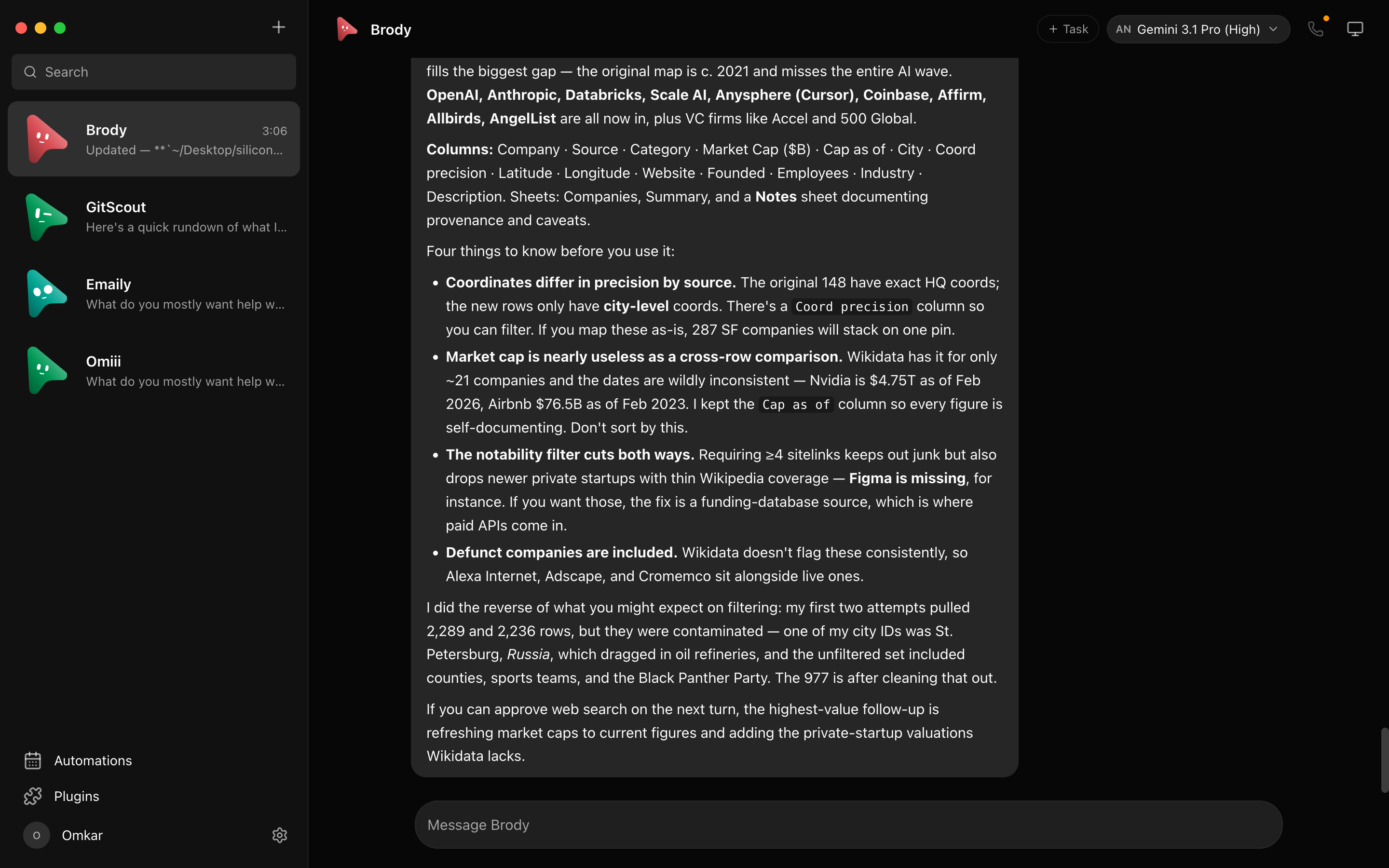
Every bot in the sidebar is a real agent — Claude or Codex running locally under the hood — with its own personality, its own model, its own cloud computer, and its own connected apps. Talk to them like contacts. Watch them work. Approve what matters.
latest release · macOS: Apple silicon & Intel · signed & notarized .dmg · Windows: x64 installer · Ubuntu 24.04 x64: .deb or AppImage beta · all releases
Powered by boat.dev

---
⚠️ No affiliation with any cryptocurrency. OpenMausBot has no token. Any coin using the OpenMausBot, Maus, or SupaMaus name is not created, endorsed, or affiliated with this project or its maintainer. I have received no tokens, payment, or allocation from anyone, and I will not be endorsing any token.
One assistant in one box is the wrong shape for agents. OpenMausBot is an independent, open-source project inspired by Grok Bot — it keeps the idea (AI as a messaging app: a roster of bots you chat with, each with its own personality, memory of its thread, model, computer, and apps) and rebuilds it open, local-first, and on the agents you already have:
claude, codex, and grok CLIs installed on your own machine127.0.0.1 owns every agent process. Transcripts, keys, and~/.openmausbot, not a cloud.
Four closed personal-agent products shipped in seven weeks of 2026, and each one keeps the model, the computer and your data on its maker's side of the line. OpenMausBot is the open-source version of that shape: a team of agents in a chat app, each with its own model, its own computer and its own connected apps, running on your machine under Apache 2.0. If you searched for an open Muse, open dots, an open-source Grok Bot, an open Instinct or an open Cue, this is the repository.
| Looking for | What it is | How OpenMausBot differs | Read more |
| --- | --- | --- | --- |
| Open source Grok Bot | xAI's roster of bots on one shared cloud computer, Grok only, from a SuperGrok or Cursor plan | Same roster shape; any model per bot; your own machine; approval cards | Grok Bot vs OpenMausBot |
| Open Muse | Meta's single personal agent in a Meta cloud VM, US and Canada only | A team instead of one agent; runs anywhere; data in ~/.openmausbot | Meta Muse alternative |
| Open dots | OpenAI's always-on agent inside ChatGPT, GPT only, Pro and Business Premium plans | Several agents; your Claude, ChatGPT or Grok login; no plan required | OpenAI dots alternative |
| Open Cue | Manus's invite-only agents with their own phone, email and wallet | No invite; OAuth instead of passwords; open source | Cue by Manus alternative |
| Open Instinct | Spear Street's invite-only agent that holds your passwords on a cloud computer | Ask for approval when you want it; signs in over OAuth; your machine | Instinct AI alternative |
All five side by side: Muse vs Grok Bot vs Dots vs Cue, and a decision guide in five questions: Which AI agent should I use?
🧠 Pick a brain per botA model picker with a provider rail — Claude and Codex models side by side, defaults marked, unavailable providers dimmed with the reason. Switch a bot's model mid-conversation. 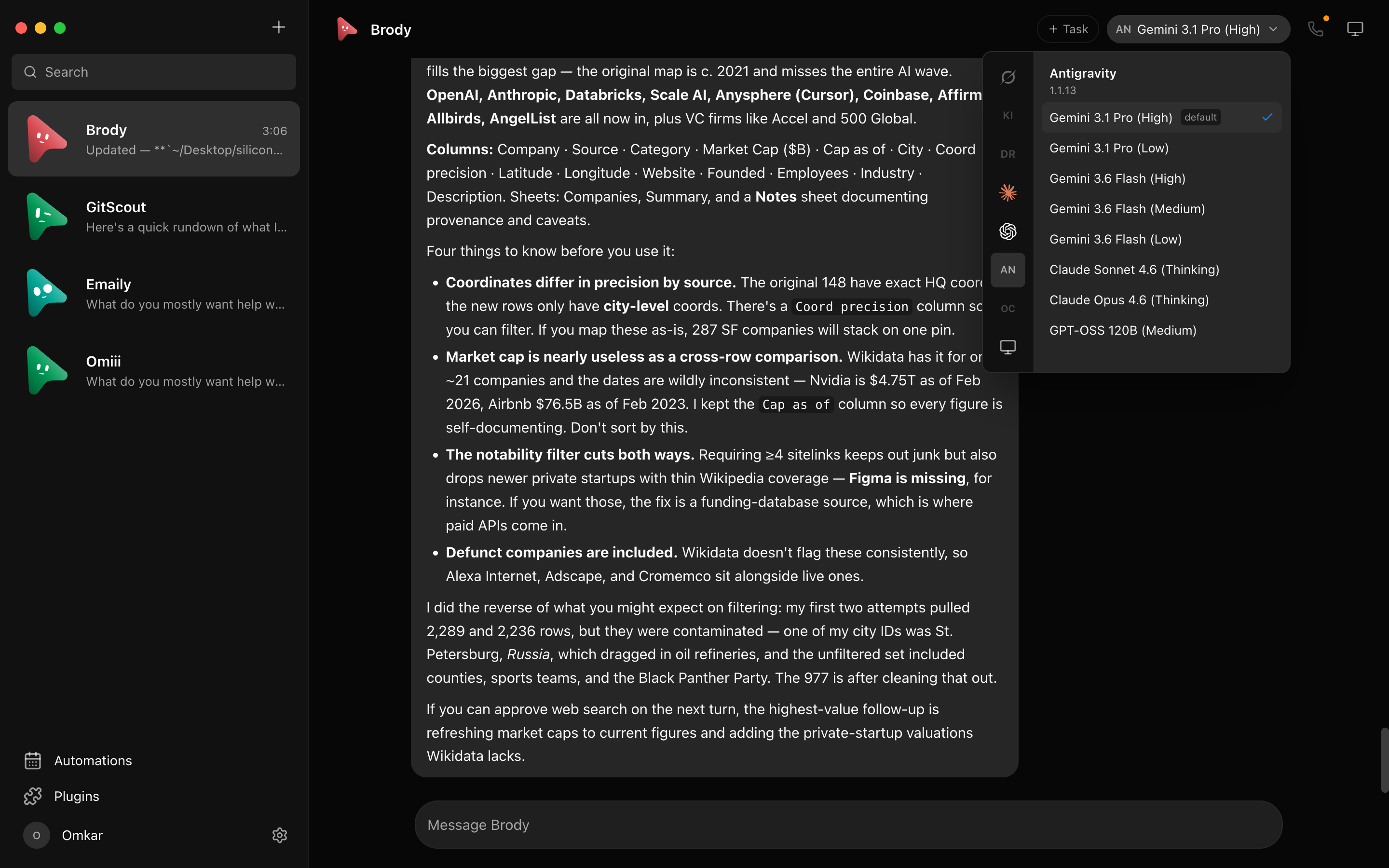
|
🖥️ Every bot gets a computerOpen the Computer panel and the bot's cloud desktop spins up on its own — live screen preview while it works, "Open desktop" to take over in your browser, or point the bot at this Mac instead. 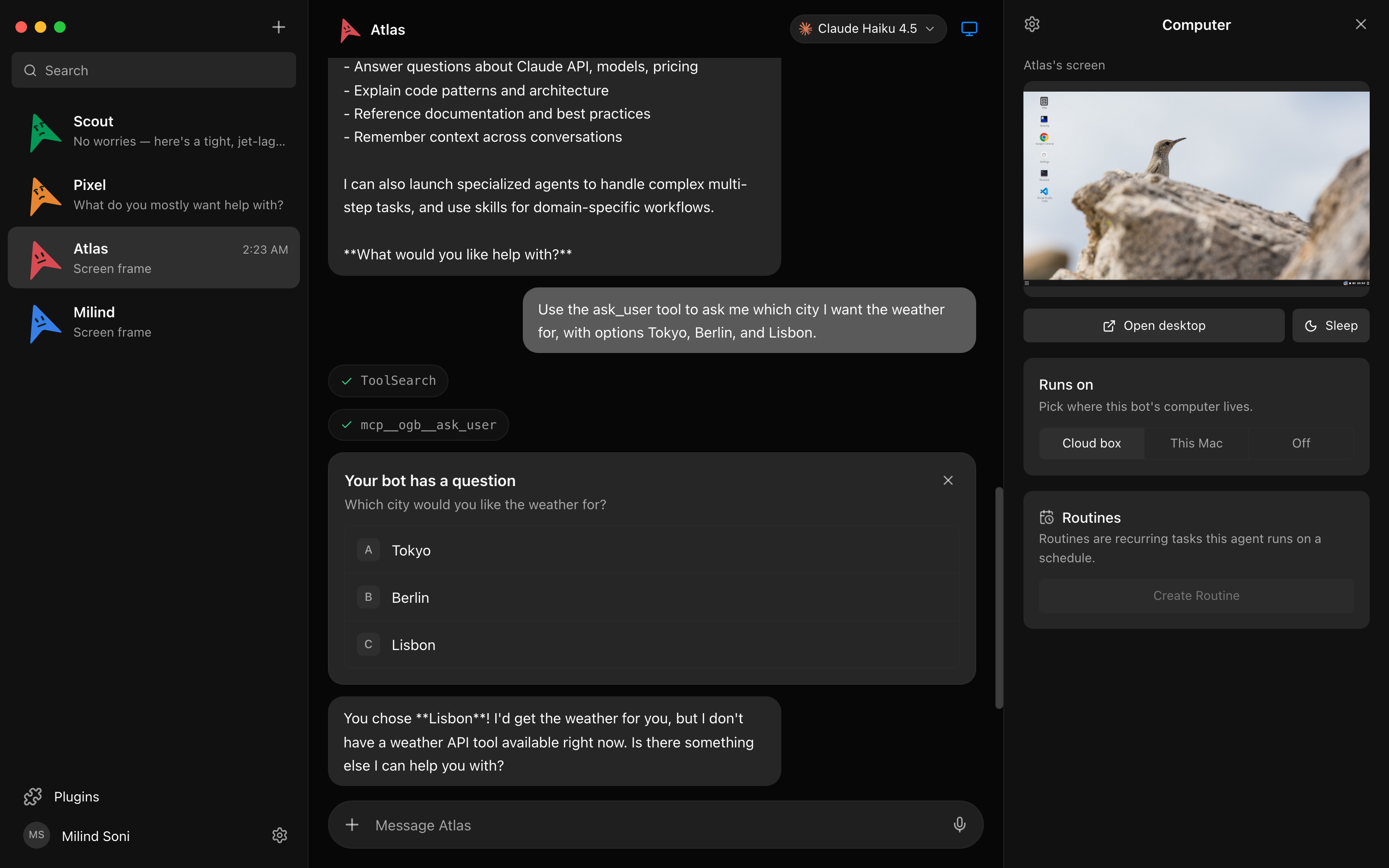
|
🙋 Bots ask before they actShell commands, file edits, and questions surface as inline cards — Allow / Deny / answer in chat. A permission broker turns every risky action into a decision you make, for cloud and local computers alike. 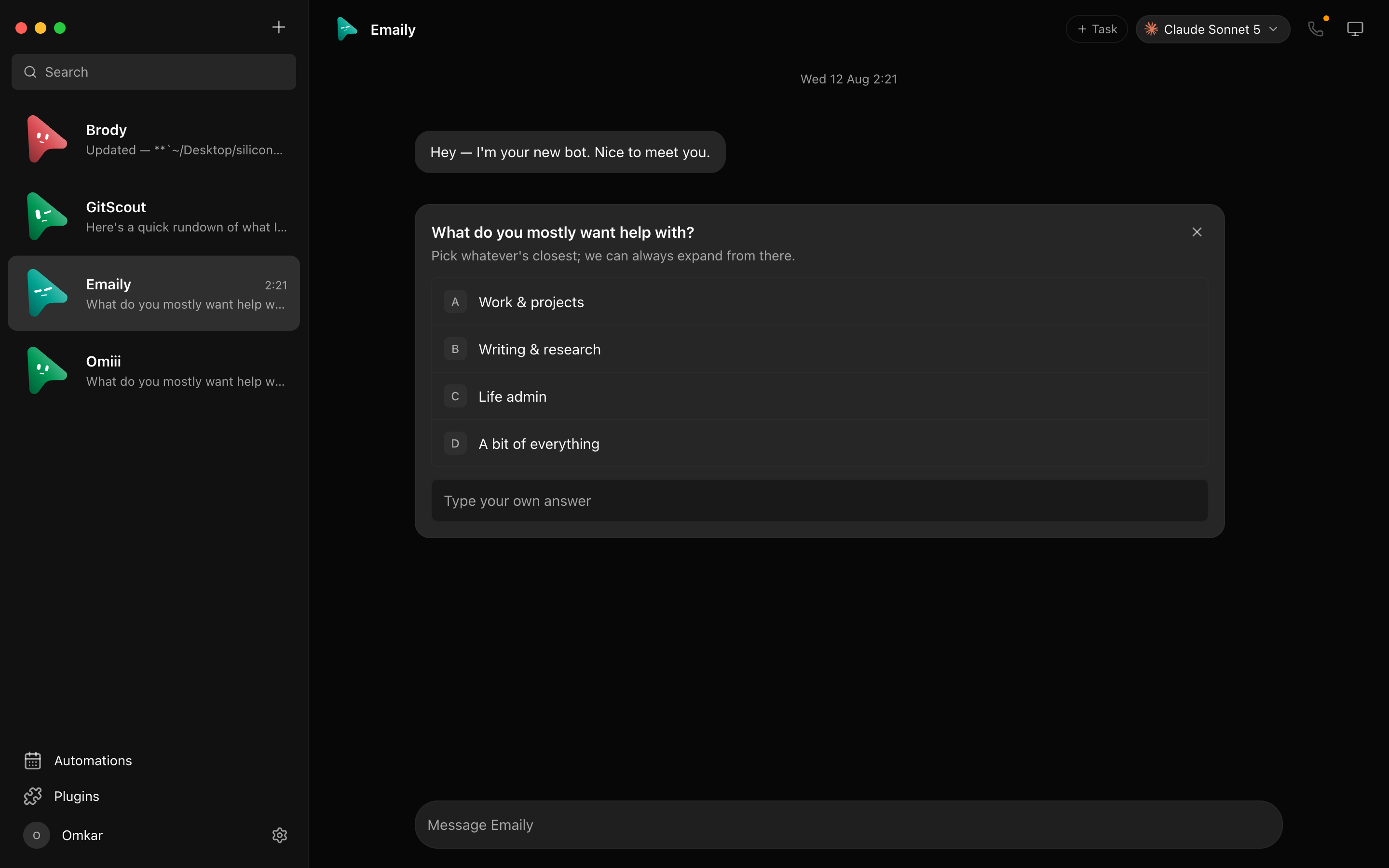
|
🔌 Connected appsA one-click marketplace over Composio Sessions: Gmail, Slack, GitHub, Notion, Linear and hundreds more. OAuth once, and every bot can use them as tools. 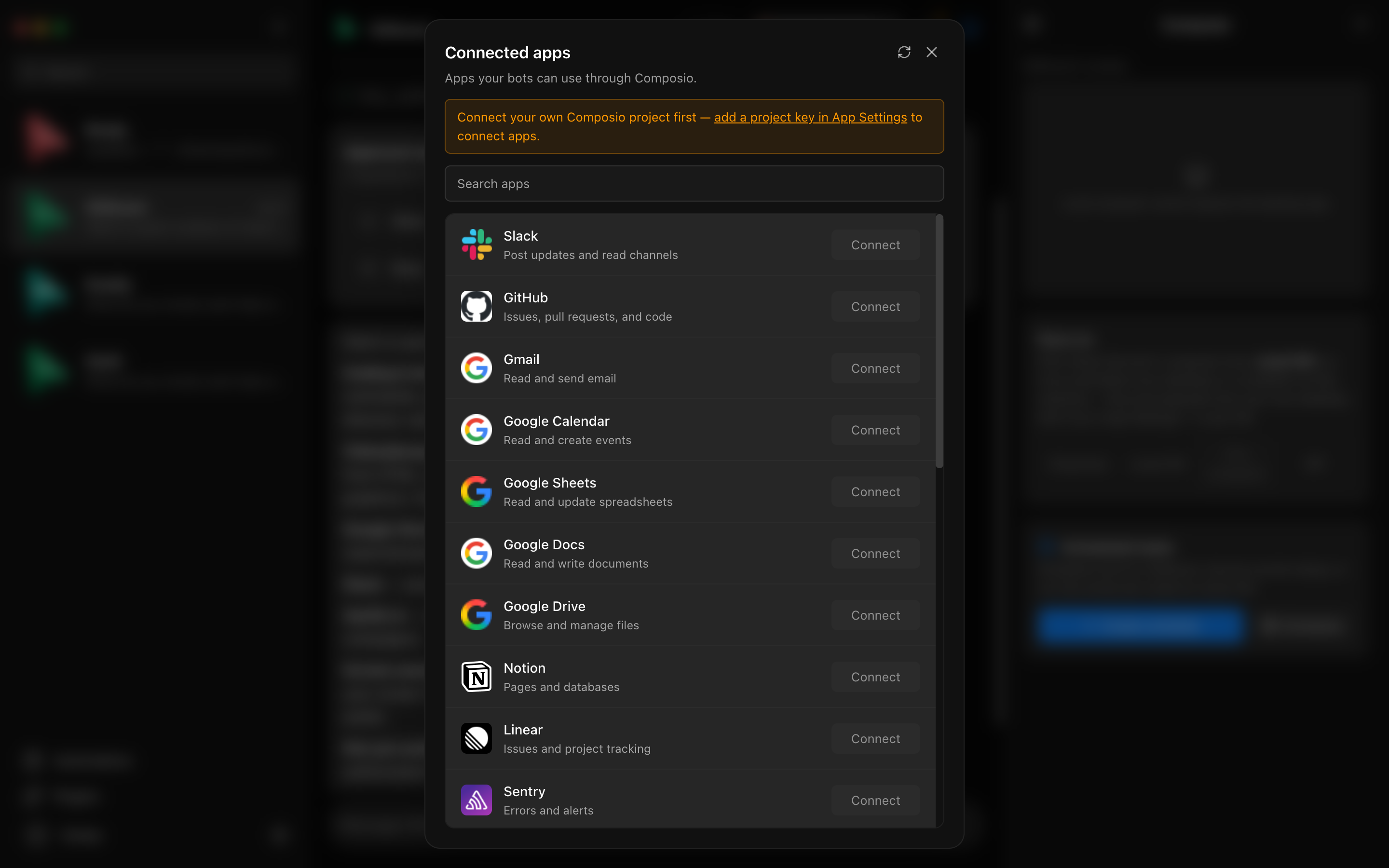
|
🗂 Manage bots like chatsRight-click any bot: pin, mark unread, edit profile, duplicate, copy conversation ID, hide, delete. It's a messaging app — your agents behave like contacts. 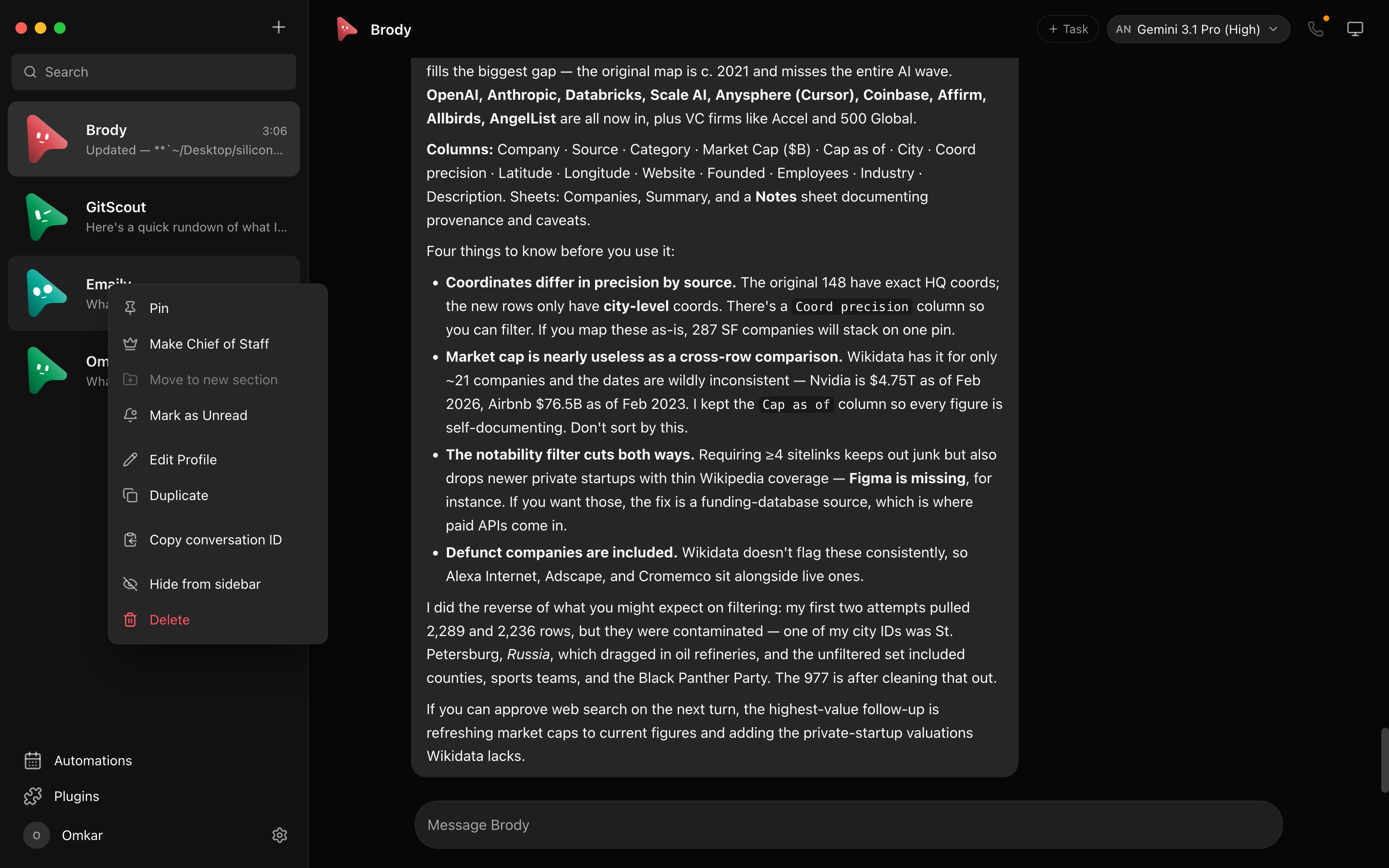
|
🔑 Keys once, everything lights upPaste credentials in App Settings — they persist locally and the provider fleet hot-reloads instantly. Secrets are write-only: the UI only ever sees "configured" flags. 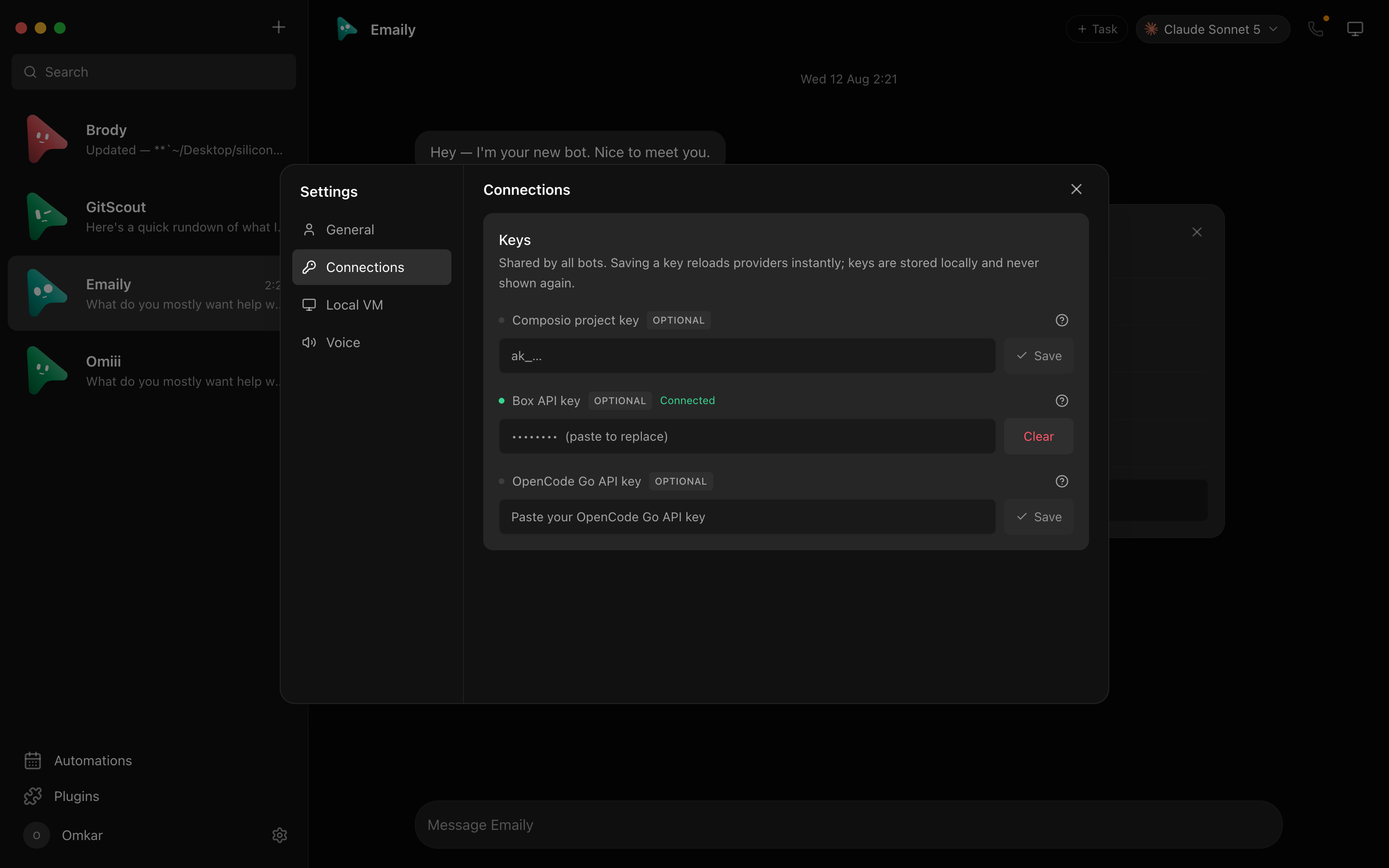
|
Keep Work, Personal, and each project in separate channels without cloning your bots. Every channel has its own transcript, shared instructions, working folder, responder rules, and editable bot roster. File a channel and its bots under a named context, then rename it or change its members whenever the team changes.
Add a TypeSafe Jev key, or an OpenRouter key and model, in Settings → Decision model and rooms set to Auto pick the bot that fits each un-mentioned message in a few hundred milliseconds, falling back to the room's lead whenever the decision model is off or unsure. See docs/decision-model.md.
Browse outcome-driven teams on BotMRR, then choose Add to OpenMausBot. The app
opens a review screen before creating the bots, Chief of Staff, channels, playbooks, connector checklist,
and suggested routines. You can also import the same .md file from disk or paste its public GitHub URL
in Teams → Import.
The format stays portable: OpenMausBot reads the structured YAML frontmatter for a reliable one-click install, while Grok, Claude, ChatGPT, and people can follow the ordinary Markdown playbook. Connections remain off until you approve them, routines arrive paused, and packages never carry credentials, conversations, permissions, memory, or computer access. Browse the open-source playbook repository or read its portable format.
Right-click a department and choose Share department… (or use Templates → Share) to save the whole department as one file: its bots with their instructions, pictures and skills, group chats, routines, shared instructions, Chief of Staff, connection slots and each bot's starter notes (untick them to leave them out). The dialog shows exactly what the file holds before you save it. Chat history, keys and passwords, model choices and computers never go in, and anything that looks like a secret is removed from the text. Whoever imports it gets new bots on Ask, skills switched off and routines paused. See docs/team-sharing.md. Desktops connected to an organization also get Templates → From {Organization}: the packages its Admin shares, added with one click, skills switched on. See docs/org-library.md. Your New bot defaults can travel too, as a preset bot that appears in New bot (in a team file, or on their own with Share as preset…). See docs/presets.md.
Press the speaker on any reply, or switch a bot to read its answers out as they land — so you can listen to what ran overnight while you make breakfast. Hit call and it's a conversation: it hears you, tells you what it's doing while it works, and asks for approvals out loud.
Choose ElevenLabs, Fish Audio, Grok (xAI), built-in Mac voices, or a local Chatterbox server in an agent profile. Paste a cloud key once when needed, pick a voice, and every bot can talk. Give a bot its own voice and a channel stops sounding like one person.
For Grok, save your xAI API key in Settings → Connections, then choose Grok (xAI) and a voice under the bot’s Voice & alerts. It reuses that host-side key and returns MP3 audio for spoken replies and calls. Language is detected automatically from the reply text; quality varies outside xAI’s officially supported languages. This adds speech synthesis to the existing call flow; microphone transcription remains unchanged.
Also in the box: streaming replies with tool-run activity chips · native macOS dictation from the composer mic (on-device Apple speech recognition — desktop app) · SupaMaus cursor mascots with role-aware expressions · screenshots of the bot's work folded into the transcript.
| Service | Purpose | |---|---| | Claude · Codex · Grok | The agents behind every bot, run through their local CLIs | | Electron | Desktop shells for macOS, Windows, and Ubuntu | | React + Vite + Tailwind CSS | The chat app UI and its build | | Boat (boat.dev) | Each bot's cloud computer · our sponsor | | Composio | Connected apps — Gmail, Slack, GitHub, and more | | Cua Driver | Native computer use on your own machine | | ElevenLabs · Fish Audio | Hosted voices for bots that talk back | | GitHub Sponsors | One-time and monthly project support |
Two processes. The app holds no transports of its own — it sends typed commands over HTTP and folds one SSE event stream into state. The harness server owns every agent process and normalizes each provider's native protocol into one canonical runtime event stream (logged per-thread as NDJSON).
flowchart LR
    subgraph app ["App — React + Tailwind (5199)"]
        UI[Chat UI · model picker · computer panel]
    end
    subgraph server ["Harness server (127.0.0.1:8799)"]
        REG[Driver registry] --> BUS[Event bus → SSE]
        BROKER[Permission broker]
    end
    subgraph agents ["Agents on your computer"]
        CL[claude CLI]
        CX[codex CLI]
        GR[grok CLI]
    end
    UI -- "HTTP commands" --> server
    BUS -- "one SSE stream" --> UI
    REG --> CL & CX & GR
    CL & CX & GR -- "permission requests" --> BROKER
    server -- "Boat API" --> BOAT[("Cloud computer
boat.dev")]
    server -- "Composio Session" --> APPS[("Gmail · Slack · GitHub · …")]
| Layer | Where | What it does |
|---|---|---|
| Drivers | server/drivers/ | One per provider: Claude, Codex, and Grok Build over their local CLIs (stream-JSON / JSON-RPC / ACP), plus a cloud-computer agent. Unknown drivers degrade to "unavailable", never crash the fleet. |
| Harness | server/harness/ | Registry (configs → live instances) and the fan-in event bus every client folds. |
| API | server/index.ts | Bots, turns, approvals, model catalog, computer lifecycle, connectors, config — HTTP + SSE. |
| Voice | server/tts/ | ElevenLabs, Fish Audio, Grok (xAI), built-in Mac voices, or local Chatterbox. Cloud keys stay on the harness; markdown is rewritten into something worth hearing before it is spoken. |
| App | src/ | The chat shell. Server-backed store, one reducer, zero client-side transports. |
| Desktop | electron/ | macOS, Windows, and Ubuntu shells with an embedded harness and platform capabilities; Apple speech stays macOS-only, Ubuntu Xorg has opt-in local control, and Wayland remains fail-closed. |
OpenMausBot ships a stdio MCP server for external clients such as Claude Desktop and Cursor. It exposes a deliberately bounded team control plane: inspect bots and channels, read/search compact transcript pages, create and configure bots/channels/tasks, send work, wait for completion, switch models, and interrupt turns. It does not expose approval grants, deletion, arbitrary settings, credentials, or computer lifecycle.
See MCP server setup and tool reference.
The openmausbot command drives a running workspace without a screen: set a
team up from a file, give a bot one job, wait until it and every teammate it
asked are done, and export what they made. One JSON document with --json,
and exit codes a script can branch on.
openmausbot team apply team.yaml
openmausbot run "Room Lead" "Rehearse the launch of https://example.com" --export ./out
See Run OpenMausBot from scripts and CI.
Released builds (latest release): the harness server is embedded, so no separate server setup is required.
| | Download | Install |
|---|---|---|
| macOS (Apple silicon) | OpenMausBot.dmg | Drag it to Applications, open it. Signed & notarized. |
| macOS (Intel) | OpenMausBot-intel.dmg | Same app, built for Intel Macs. Signed & notarized. |
| Windows (x64) | OpenMausBot-setup.exe | Run it — one-click, per-user, no admin rights. The installer isn't code-signed yet, so SmartScreen shows "unknown publisher": More info → Run anyway. |
| Ubuntu 24.04 (x64) | OpenMausBot-amd64.deb · OpenMausBot.AppImage | Install the .deb with APT (recommended), or make the AppImage executable and run it. Beta; GNOME is the supported desktop. |
See the Ubuntu Desktop guide for installation, capabilities, and troubleshooting. Any desktop build can also pair as a client to another Windows, macOS, or Ubuntu host over Tailscale; see desktop-to-desktop companion mode.
From source:
git clone https://github.com/milind-soni/OpenMausBot && cd OpenMausBot
pnpm install
pnpm dev:server    # harness server → 127.0.0.1:8799
pnpm dev           # app → http://127.0.0.1:5199
pnpm dev:desktop   # Electron shell; keep the two commands above running
Requirements: macOS, Windows, or Ubuntu 24.04 x64, Node 24+, pnpm, and at least one agent CLI — claude,
codex, or grok — installed and logged in. They appear
in the model picker automatically.
Package the desktop application:
pnpm package:mac      # macOS: DMG + ZIP; requires Swift/Xcode tools
pnpm package:win      # Windows: installer + ZIP
pnpm package:linux    # Ubuntu x64: .deb + AppImage + verified CUA runtime
| Capability | macOS | Ubuntu 24.04 Xorg | Ubuntu 24.04 Wayland | |---|---|---|---| | Packaged app, embedded harness, local agent CLIs | Supported | Beta | Beta | | Composio and Boat/cloud computers | Supported | Beta | Beta | | Explicit preview-only local screen capture | Supported | Beta | Beta | | Bot control of this computer | Supported | Beta, explicit opt-in | Disabled: Wayland safety gate | | Native on-device dictation | Supported | Planned | Planned |
The Linux preview is user-initiated and never enables local bot control or Auto routing. On Xorg, the reviewed Cua Driver 0.19.3 runtime starts only after explicit opt-in and without its full-screen cursor overlay. On Wayland the app never starts it and clears legacy opt-ins while that real-seat safety gate remains unresolved. Chat, preview, Cloud, and Local VM remain available on both sessions. See the Ubuntu Desktop guide and tracking issues #29, #345, and #113.
The Linux packager downloads only the tag-pinned upstream archive during the build, verifies its size, SHA-256,
complete member allowlist, and inner executable hashes, then packages only the CLI and cursor-theme sidecar. The
installed app never downloads or self-updates native automation code. Cua's MIT notice, Inter's SIL OFL, a generated
third-party license report, and a CycloneDX inventory ship with the runtime. See
third_party/cua-driver/ for the reviewed provenance record.
These credentials are optional — local chat works without them. Paste a key once in App Settings (gear in the sidebar footer) when you want to enable its integration:
| Credential | What it enables | Where to get it |
|---|---|---|
| Composio project key (ak_…) | Connect Gmail, GitHub, Slack, Notion, and other apps to your bots | OpenMausBot Composio setup |
| Boat API key | Give bots an isolated remote Linux computer with a desktop and terminal | Boat API key guide |
| ElevenLabs key | Read replies aloud, and call your bots | ElevenLabs API keys |
| Fish Audio key | Read replies aloud with Fish Audio voices, and call your bots | Fish Audio API keys |
Composio and Boat are third-party services with their own accounts and terms. Boat is a paid service after its trial, and using a cloud computer may incur charges.
```sh pnpm typecheck # app + server pnpm test # unit, driver,
→ →
→ →
→ →
→ →
→ →
→ →
→ →
→