1
 →

Open-source, self-hosted AI platform (PHP/Symfony): chat with any model, RAG over your docs, embeddable widget, MCP — see the cost of every answer. Apache-2.0.
metadist/synaplan is an open-source project on GitHub, mainly written in PHP. Open-source, self-hosted AI platform (PHP/Symfony): chat with any model, RAG over your docs, embeddable widget, MCP — see the cost of every answer. Apache-2.0. It currently holds 417 stars and 54 forks with 14 open issues, and was last pushed on 2026-10-31 (repository created 2025-03-30).
Git Homed tracks it on the Today's Trending board, currently at rank #90 with 35 new stars today.
We produce AI freedom.
Try it hosted or run it yourself in three minutes — open-source, self-hosted AI platform (PHP/Symfony): chat with any model, RAG over your docs, embeddable widget, MCP, and see the cost of every answer. Apache-2.0. On web.synaplan.com you sign up with a paid plan or an invitation code. We send invitation codes to friends and partners who want to try it; write to [email protected]. Running it yourself stays free.
Website · Docs · Live instance · iOS · Android · Desktop · Outlook Add-in · Discord

---
If Synaplan is useful to you, a star helps the next person find it.
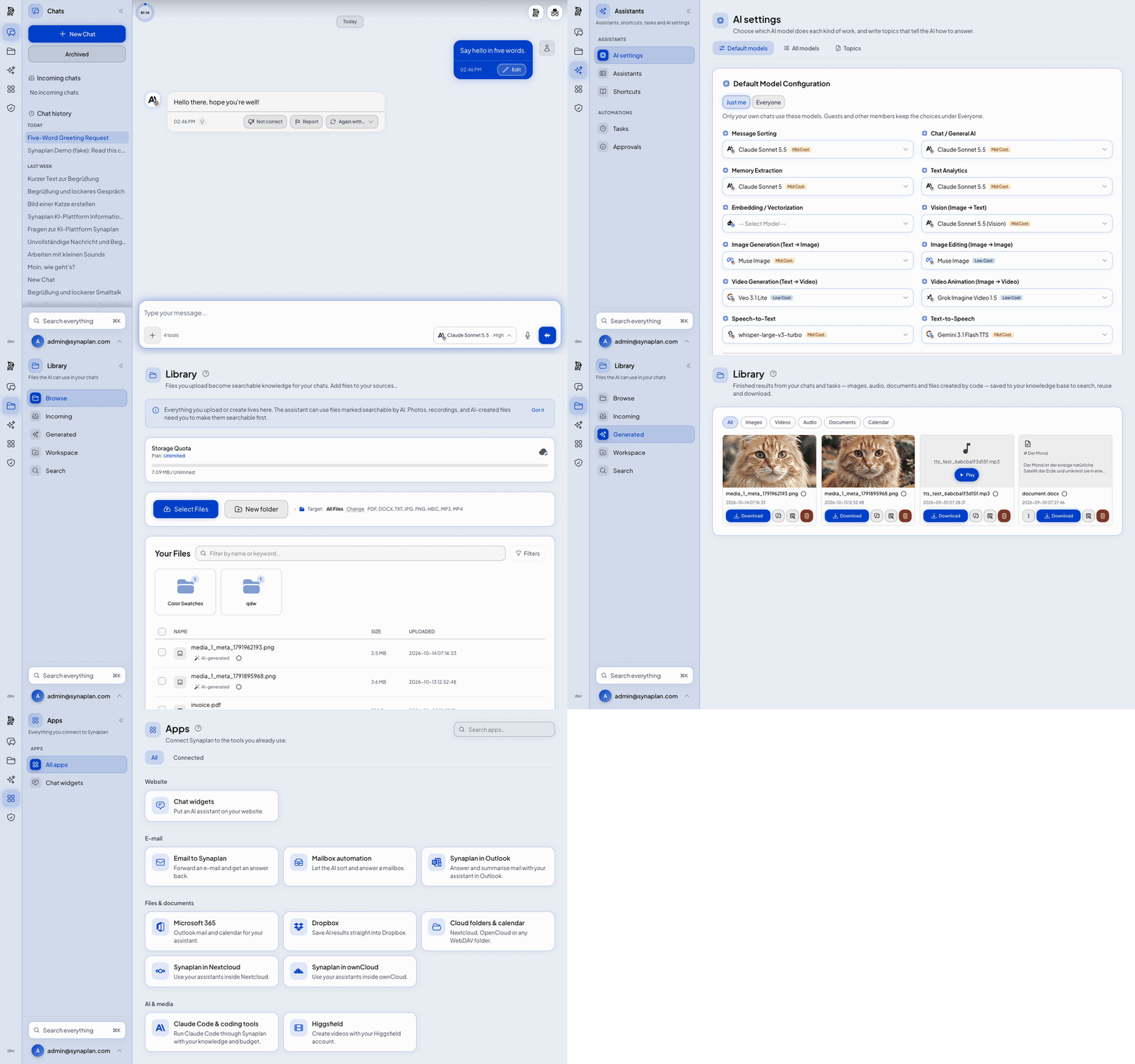
Chat, what each answer cost, your files, generated media, and the apps you can connect. About 30 seconds.
git clone https://github.com/metadist/synaplan.git
cd synaplan
make up
Open **. Log in as [email protected] / admin123 and type your first message: it starts the Synaplan Demo (40 messages/day for 14 days, no API key needed — how it works). Or connect your own AI key (free: Groq) or local Ollama.
A published image, a Docker GUI, a closed network, or a Linux server: More ways to install.
People usually arrive comparing Synaplan with a chat window or an app builder. This is what each project is for. It is not a scoreboard.
| | Synaplan | Open WebUI | LibreChat | Dify | | --- | --- | --- | --- | --- | | What it is | A team platform: chat, your files as knowledge, a site widget, and the same assistant on WhatsApp and email | A chat interface for local and cloud models | A chat app for many providers | A builder for AI apps and workflows | | First run | Several containers, about 4 GB | One container | A Compose stack | A Compose stack, and a hosted cloud | | Cost of an answer | Shown on the answer | Not on the answer | Not on the answer | In the builder's usage logs, not on the chat answer | | Same assistant on your site, WhatsApp and email | Yes | No | No | Site widget yes. WhatsApp and email are not built in |
If you only want a chat window, Open WebUI or LibreChat gets you there faster.
---
▶ Watch the full demo on YouTube
Click any screenshot to see it full size.
 Chat Every answer shows what it cost |
 Provider setup One key, tested and encrypted |
 Model choice A different model per task |
 RAG search Semantic search over your files |
 Media generation Images, video and audio in chat |
 Chat widget One snippet, any website |
 AI instructions Your own system prompts |
 Files Uploads become knowledge |
 Plugins Extend without forking |
 Admin Users, usage and health |
 Branding White-label the whole app |
Regenerate these assets after a UI change with scripts/build-readme-tour.sh.
---
The quickstart is a local checkout. The variants below are a published image, a machine with no route to the public internet, and a Linux server.
The quickstart is this path. Open . A status screen is up within seconds and lists every boot step, then switches to the app when it is ready. First start: 5–15 minutes. Later starts: seconds.
make up answers on :5173 before the rest of the images finish pulling. docker compose up -d starts the same stack; :5173 stays quiet until those pulls finish.
1. Log in as [email protected] / admin123. The status screen shows this too.
2. Type your first chat message: it starts the Synaplan Demo (14 days, 40 messages a day via web.synaplan.com). Or paste one provider key (free: Groq). You do not edit a config file for that.
3. Same notes in the terminal: docker compose logs -f startup-notes.
No cloud key? COMPOSE_PROFILES=local-ai ENABLE_LOCAL_GPT_OSS=true make up pulls a local chat model (gpt-oss:20b, ~14 GB). Chat starts when the download finishes.
One file is enough. A .env beside it is optional.
mkdir synaplan && cd synaplan
curl -fsSL -o compose.yaml https://raw.githubusercontent.com/metadist/synaplan/main/deploy/quickstart/compose.yaml
docker compose up -d
Open . The first visit opens the setup: create the administrator, then click Start with Synaplan Demo or paste one provider key (free: Groq), done. The first start pulls the images and takes a few minutes.
Need a smaller footprint (~3.2 GB instead of ~5.3 GB)? deploy/quickstart/compose.lite.yaml omits tts, qdrant (document search stays on MariaDB VECTOR; memories pause) and centrifugo while keeping the exact same volume names — so you can switch to compose.yaml later without losing a single chat or file.
Docker GUI (Portainer, Dockge, Synology Container Manager, …): create a stack, paste deploy/quickstart/compose.yaml as its compose file, deploy. Any setting from deploy/quickstart/.env.example goes into the stack's environment variables — nothing is required. When the GUI runs on another machine (a NAS or a server), add SYNAPLAN_HTTP_BIND=0.0.0.0 and SYNAPLAN_URL=http://:8000; without them Synaplan only opens on that machine itself. Dockge marks the stack "exited" once the one-time secrets-init step has finished; that is expected, and Synaplan keeps running.
Settings go into .env, then docker compose up -d again (in a GUI: the stack's variables, then redeploy):
Data lives in named Docker volumes — the database, uploads, vectors and the generated secrets. Keep them together: a database without its SYNAPLAN_VERSION picks a release tag from the releases page. Empty means the release this file was published with. Never latest.SYNAPLAN_HTTP_BIND=0.0.0.0 plus SYNAPLAN_URL=http://:8000 opens it to your network. SYNAPLAN_URL must be the address people type, or live chat stays disconnected. Over plain http:// on a network address, browsers block the microphone and copying to the clipboard; chat and files work. For those two, use Closed network HTTPS.secrets volume does not start. docker compose down keeps everything; docker compose down -v deletes it all.
Change the release: back up the volumes, set SYNAPLAN_VERSION, run docker compose up -d (or redeploy the stack in the GUI). Going back to an older tag after a newer one migrated the database means restoring that backup. The steps are in Update a self-hosted deployment.
Office documents, local AI, file work, closed-network TLS and scripted backups use the full deploy/compose.yaml with deploy/selfhost.env.example instead.
Opt-in. The default stays http://127.0.0.1:8000 on this machine.
Turn it on when the network has no route to the public internet and people open Synaplan by the machine's address. Chat needs https:///. The machine creates the certificate. The browser warns once.
Any IPv4 address on that network works, including 10.0.0.0/8, 172.16.0.0/12, 192.168.0.0/16, 100.64.0.0/10 and 169.254.0.0/16, plus a block you assigned and do not announce.
cp deploy/selfhost.env.example deploy/.env
Set SYNAPLAN_VERSION. Leave SYNAPLAN_HTTP_BIND at 127.0.0.1.
deploy/scripts/local-tls.sh 10.0.0.15
deploy/scripts/prepare.sh
docker compose --env-file deploy/.env -f deploy/compose.yaml pull
deploy/scripts/validate-release.sh
docker compose --env-file deploy/.env -f deploy/compose.yaml up -d
Colleagues open https://10.0.0.15/. Ports 80 and 443 must be free. The app itself stays on 127.0.0.1:8000. A second interface is another argument: deploy/scripts/local-tls.sh 10.0.0.15 192.168.1.20. A public name keeps your own HTTPS proxy and leaves this off.
Details: docs.synaplan.com/local-network · deploy/README.md.
The commands above are the development stack (source build, Vite, MailHog, phpMyAdmin) or the published image. For a Linux server, the installer writes deploy/.env, pins the latest release, and runs prepare → pull → validate → start → smoke-test. Secrets land in deploy/data/secrets.env.
curl -fsSL https://raw.githubusercontent.com/metadist/synaplan/main/install.sh | \
  bash -s -- --mode server --domain https://ai.example.com
The same steps by hand are in Installation and deploy/README.md. Flags: bash install.sh --help.
One-liner for the development stack, if you would rather not clone by hand:
curl -fsSL https://raw.githubusercontent.com/metadist/synaplan/main/install.sh | bash
---
The same assistant, the same knowledge base, the same model policy — on every channel your team already uses. Connect a system once under Channels; the planner can then read from it and deliver results into it.
| Surface | What it does | Get it |
|---------|--------------|--------|
| Web app | Full chat + admin UI, light/dark, five languages | This repo — make up |
| Mobile apps | Chat, documents and voice on iPhone and Android — pointed at web.synaplan.com or your own server | App Store · Google Play |
| Synaplan Desktop | Pair a computer and run skills on it. In the web app: Channels → Synaplan Desktop. No installer yet — build from the repository. | metadist/synaplan-desktop |
| Outlook add-in | Bring Synaplan into Outlook (Web, new & classic, Mac) — find and process mail without sending it anywhere | metadist/Synamail |
| Chat widget | Embed your assistant on any website with one snippet — cross-origin ready, human takeover included | Widget guide |
| WhatsApp & Email | The AI answers on the channel the question came in on | WhatsApp · Email |
| MCP & Claude Code | Your RAG and memories as MCP tools; Anthropic-compatible POST /v1/messages endpoint | MCP guide · guide |
Set these up under Manage → Connections (or Manage → Connections → MCP Servers / Manage → Channels → Email**). In chat, use the channel word shown as a pill on the Connections page — for example nextcloud, dropbox, outlook.
| Channel | What it unlocks | Setup |
|---------|-----------------|-------|
| Microsoft 365 | Live Outlook mail search, calendar events (outlook), send from your own mailbox | Manage → Connections — OAuth, no password stored |
| Dropbox | Save generated files into a Dropbox folder (dropbox) | Manage → Connections — OAuth |
| Nextcloud / ownCloud / WebDAV | File results into a folder you own (nextcloud / folder) | Manage → Connections — app password, never your account password |
| CalDAV calendar | Put generated meetings into a calendar you own (calendar) | Same Nextcloud preset can create folder + calendar in one step |
| IMAP mailbox | Live search of any IMAP inbox, merged with Microsoft 365 results | Manage → Channels → Email |
| Jira & Confluence | Search and summarize; create tickets or pages when you allow writes. A pasted Confluence page is read through the signed-in account | Manage → Connections → MCP Servers — Jira & Confluence card, then sign in with Atlassian (no API token) |
| Saved Tasks | Pin a plan and run it on demand or on a schedule (hourly / daily / weekdays) | Manage → Automations → Saved Tasks |
| Nextcloud / OpenCloud apps | Use files from those clouds as AI knowledge — the file store stays in charge | synaplan-nextcloud · synaplan-opencloud |
Details and channel words: docs/CONNECTIONS.md.
---
Everything below is the same platform, packaged for different homes. Pick what fits — nothing else is required.
| Project | What it is |
|---------|------------|
| synaplan | The platform itself (this repo): backend, frontend, widget, plugins, dev stack, and the deploy/ production contract with Elestio, AWS Marketplace, and Umbrel adapters |
| synaplan-charts | Helm charts for Kubernetes — for partners and enterprises running K8s clusters |
| Mobile apps | Native iOS and Android — App Store · Google Play |
| synaplan-desktop | Synaplan Desktop — pair a computer and run skills on it. No installer yet; build from source. |
| Synamail | Outlook add-in (Web, new & classic, Mac) — Synaplan inside your mailbox |
| synaplan-nextcloud / synaplan-opencloud | Apps for Nextcloud / OpenCloud — use those files as AI knowledge while the file store stays in charge (ownCloud works via the built-in WebDAV connection) |
| synaplan-tts | Optional self-hosted text-to-speech service for voice output |
| synaplan-base-php | The base Docker image (FrankenPHP + gRPC + whisper.cpp) the platform builds on |
---
curl + tar when git is missing)local-ai profile)local-ai, +~14 GB if you also enable the local chat model)Apple Silicon (M1–M4) Macs — build the backend image, don't pull it. The three-step start above already does this:make upbuilds the backend and worker locally from a multi-arch base image, so PHP/FrankenPHP runs natively onarm64with no emulation tax. That is by far the fastest setup, and it is the default — you don't have to do anything special. (The publishedghcr.io/metadist/synaplanimage is multi-arch too, so pulling it also runs natively.) The first local build takes a few minutes; every later start is a cache hit. phpMyAdmin is the official multi-arch image and runs natively on Apple Silicon. MailHog is still an amd64-only upstream image — if you keep it, enable Docker Desktop → Settings → General → "Use Rosetta for x86/amd64 emulation on Apple Silicon" (macOS 13+) so it emulates quickly.
---
| Mode | Command | Size | Best For |
|------|---------|------|----------|
| One-liner | curl -fsSL https://raw.githubusercontent.com/metadist/synaplan/main/install.sh \| bash | ~4 GB | Easiest start — checks prerequisites, fetches, and starts the standard stack (--mode server available for production) |
| Standard | make up | ~4 GB | Local try-out: chat works after one click (Synaplan Demo or your own key), file work, spoken answers — status page first, then the rest |
| Quickstart (lite) | deploy/quickstart/compose.lite.yaml | ~3.2 GB | Published image, 6 runtime containers (no git clone, no .env; shares volumes with compose.yaml) |
| + local AI | COMPOSE_PROFILES=local-ai make up | ~5 GB | Adds Ollama and the bge-m3 embedding model on your own hardware (local chat model optional, +~14 GB) |
| Production | install.sh --mode server or deploy/ compose + scripts | published image | Self-host on a Linux server — see Installation |
| Kubernetes | synaplan-charts | published image | Helm-based cluster deployments for partners and enterprises |
A plain docker compose up -d starts the same stack but :5173 stays silent
→ →
 →
 →
 →
 →
 →
 →