1
 →
→
Run frontier MoE models on hardware you already own — pure C, zero deps, experts streamed from disk. Tiny engine, immense model. 🐦
JustVugg/colibri is an open-source project on GitHub, mainly written in C. Run frontier MoE models on hardware you already own — pure C, zero deps, experts streamed from disk. Tiny engine, immense model. 🐦 It currently holds 40,277 stars and 4,429 forks with 79 open issues, and was last pushed on 2026-10-06 (repository created 2026-07-01).
Git Homed tracks it on the Today's Trending board.



Website · Discord · English · 简体中文 · 繁體中文 · Italiano · 日本語 · Bahasa Indonesia
Tiny engine, immense model. colibri runs very large open models on the machine you already have. A mixture-of-experts model of hundreds of billions of parameters uses only a small part of itself for each token, so colibri keeps that part in RAM and reads the rest, the experts, from the disk when the model asks for them. Pure C, one file per model family, no GPU required.
Thirteen engines run today. Ten are for language models: GLM-5.2/5.3, GLM-5.3-Flash, Inkling, Kimi K3, DeepSeek V4 Flash, DeepSeek V4.1 Flash, MiMo-V2.6 Flash (and Pro), Qwen3.8-Flash-Next, Qwen3.6 (which also runs Qwen3-Coder and the dense Qwen3.8-27B) and OLMoE. One draws pictures: Qwen-Image-2.1. Two answer decisions: Laya and GLiNER2.5-Decide, with a third decision model, Clef, on the Qwen3.6 engine. Which one for my machine
$ ./coli chat
  colibri v2.0.0 · GLM-5.2 · 744B MoE · int4 · streaming CPU
  ✓ ready in 32s · resident 9.9 GB
  › ciao!
  ◆ Ciao! Come posso aiutarti oggi?
You need a computer with 8 GB of RAM at the very least (16 GB or more is better), 22 GB free on the disk for the smallest model, and an internet connection. A graphics card is optional.
Windows
1. On this page click Code, then Download ZIP, and unzip it.
2. Double-click START-HERE.bat in the unzipped folder. If Python is
missing, it offers to install it for you.
Linux (Ubuntu and Debian; other distributions have the same packages under their own names)
sudo apt install git python3 build-essential
git clone https://github.com/JustVugg/colibri
cd colibri
./start-here.sh
macOS (with Homebrew)
xcode-select --install
brew install libomp git python
git clone https://github.com/JustVugg/colibri
cd colibri
./start-here.sh
You answer one question, which model, and Enter takes the recommendation. Then the setup:
1. looks at your machine: RAM, free disk, CPU and GPUs; 2. recommends a model that fits: the part of the model that always stays in RAM, plus a minimum cache of experts, must fit in your RAM, and the download on your disk; 3. gets the engine: it builds it for your machine when a compiler is there, otherwise it downloads the prebuilt one, which runs on the CPU and, on Linux and Windows, on a Vulkan GPU too. It builds for your GPU when that pays: CUDA for an NVIDIA card on Linux when the CUDA toolkit is installed, otherwise Vulkan. On a discrete GPU it always does; on an integrated GPU, which shares the CPU's RAM, only for the models measured faster there (Qwen3.6, Qwen3-Coder and Qwen3.8-Flash-Next). If a package is missing it prints the exact command to install it and carries on with the CPU; run the setup again afterwards and it rebuilds for the GPU; 4. downloads the model with progress and resume: stop it whenever you like, run it again and it continues where it stopped; 5. starts colibri and opens the dashboard in your browser, and prints the addresses other apps can use:
Starting colibri
  Browser:             http://127.0.0.1:8000/
  OpenAI base URL:     http://127.0.0.1:8000/v1
  Anthropic base URL:  http://127.0.0.1:8000
  stop: press Ctrl+C here (or close this window)
Next time, run START-HERE.bat or ./start-here.sh again: colibri starts
straight away, with no download and no build. c/coli status shows what is
installed and whether it runs, c/coli stop stops it (c\coli.cmd status and
c\coli.cmd stop on Windows).
Options go after ./start-here.sh or START-HERE.bat:
| Option | What it does |
|---|---|
| --list | every model against this machine, and why one does not fit |
| --model ID | install that model (the ids are in the tables below) |
| --yes | no questions: take the recommendation |
| --dir DIR | put the models on another disk (default ~/colibri-models) |
| --backend vulkan, cuda or cpu | choose the engine build yourself; --no-gpu is --backend cpu |
| --model-dir DIR | use a model you already downloaded |
| --reconfigure | choose another model |
What each step does, in detail: docs/quickstart.md.
| What you see | What to do |
|---|---|
| it stopped during the download | run the same command again: it resumes from the bytes already on disk |
| to use the GPU through ..., first run: | run that command, then the setup again: it rebuilds for the GPU and does not download again |
| the ... build failed, for example Unsupported gpu architecture when the installed CUDA toolkit no longer supports the card | the setup checks the toolkit against the card first and picks Vulkan by itself, saying why; if a build still fails it offers the next one (Vulkan, then the CPU). ./start-here.sh --backend vulkan forces Vulkan; --no-gpu stays on the CPU |
| needs N GB free for the download | --dir with a folder on a bigger disk |
| on WSL, the model folder is under /mnt/c | keep it on the Linux disk (the default, ~/colibri-models): /mnt/c is many times slower |
| you updated the checkout (git pull) | run ./start-here.sh again: it rebuilds the engine when the sources changed, then starts it |
| anything else | c/coli logs -n 50 shows the log of a server started in the background (one started in the foreground prints to its own terminal) and c/coli logs --install the setup's; open an issue with the last lines the setup printed |
If you use an AI coding assistant, it can do all of this for you. Ask it:
Set up colibri on this machine following docs/AI_SETUP.md from https://github.com/JustVugg/colibri
docs/AI_SETUP.md gives the assistant every step as a
command with a machine-readable result, and tells it to ask you before it
downloads a model or installs a system package. Assistants that speak the Model
Context Protocol can use colibri's MCP server instead: coli mcp offers tools
to detect the hardware, recommend a model, install, start, stop and check it
(docs/MCP_SERVER.md).
To choose each step yourself (a prebuilt release or a source build, any model
from the tables below, then coli chat, coli web or coli serve), see
Install by hand, or the
Quick Start guide for every platform step by step.
A mixture-of-experts model is huge on disk and small per token. GLM-5.2 has 744B parameters, uses about 40B for each token, and only about 11 GB of those change from one token to the next: the routed experts.
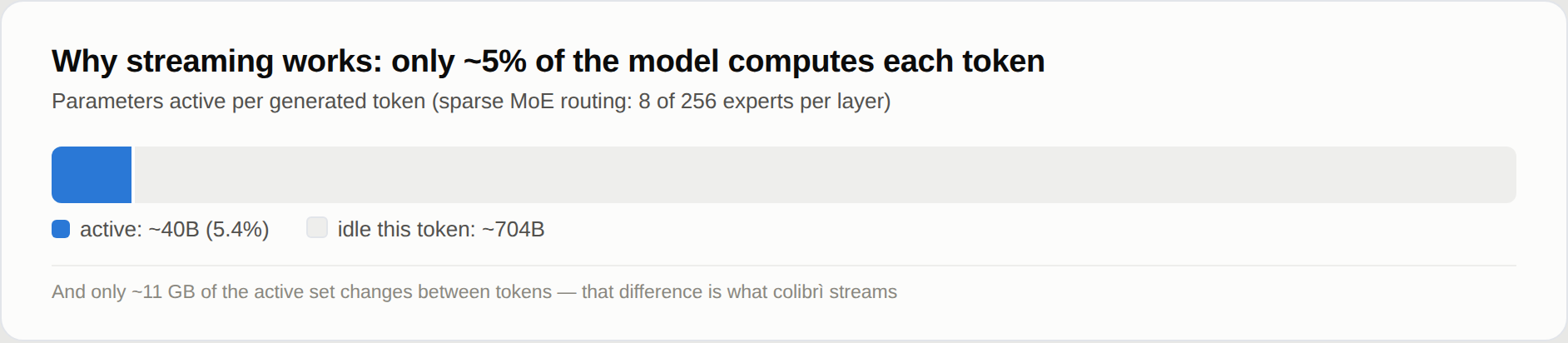
So the model does not have to fit in fast memory; it has to be placed. The dense part (attention, shared experts, embeddings) stays in RAM. The routed experts stay on the disk and are read when the router asks for them, through a cache that learns which experts your work uses. A GPU, when there is one, holds the hottest experts and the dense layers. Where a weight sits changes how fast the answer comes, not which weights or which router decisions produce it.
Why: to run models of this size on hardware people already own, to watch them work (the dashboard shows every expert as it fires), and to keep the engine small enough that anyone can measure it and make it faster. colibri is also an open research platform: an optimisation earns its place with a reproducible end-to-end measurement, and the default policy never silently changes model precision or router semantics. Less fast memory may cost speed; it must not quietly redefine the model. How it works has the details.
The setup recommends the most capable model that runs from RAM on your
machine, and lists the larger ones that stream from the disk right below it.
./start-here.sh --list shows them all against your machine. The tables follow
the setup's own catalog (c/setup_catalog.py); the
downloads are the sizes Hugging Face lists for each repository.
Small models, which run from RAM
| Model | --model | Download | RAM | GPU | Measured |
|---|---|---|---|---|---|
| Qwen3.6-35B-A3B: chat with thinking and tools | qwen36-35b | 23 GB | 10 / 20 GB | CUDA, Vulkan (integrated too) | 6.0 tok/s on the CPU, 9.9 with Vulkan on the integrated GPU (A); 30.0 with CUDA (C) |
| Qwen3-Coder-30B-A3B: code and tool calls, no thinking | qwen3-coder-30b | 19 GB | 8 / 18 GB | CUDA, Vulkan (integrated too) | 8.5-9.6 tok/s with every expert in RAM, 5.1 with 32 per layer (A, CPU) |
| Qwen-Image-2.1: text to picture, non-commercial licence | qwen-image-2.1 | 33 GB | 12 / 18 GB | Vulkan | one 768x512 picture in 2 min 40 s (8 Zen 4 cores, CPU) |
Large models, whose experts stream from the disk (the disk sets the speed: a fast NVMe drive helps most)
| Model | --model | Download | RAM | GPU | Measured |
|---|---|---|---|---|---|
| DeepSeek V4 Flash REAP 150B: 132 of the 256 experts | deepseek-v4-flash-reap | 85 GB | 16 / 32 GB | CUDA, Vulkan | |
| DeepSeek V4 Flash (284B): tools | deepseek-v4-flash | 167 GB | 16 / 32 GB | CUDA, Vulkan | 0.93 tok/s with 32 GB (Ryzen 7 5800X), 1.24 with 63 GB (Ryzen 9 5950X), CPU only; 1.5-1.6 with CUDA (RTX 5080, 32 GB, two NVMe) |
| MiMo-V2.6 Flash (309B): vision and tools | mimo-v2.6-flash | 172 GB | 32 / 52 GB | Vulkan | 2.34-3.37 tok/s (A, CPU) |
| Qwen3.8-Flash-Next (125B + 51B n-gram): vision and tools | qwen38-flash-next | 186 GB | 24 / 32 GB | CUDA, Vulkan (integrated too) | 1.91-2.56 tok/s with 32-96 experts per layer; 3.99 with the optional int4 experts (A, CPU) |
| GLM-5.2 (744B): the reference model, with the MTP head | glm-5.2 | 429 GB | 16 / 24 GB | CUDA, Vulkan | 0.05-0.1 tok/s cold on a 25 GB laptop; 1.83 on a 128 GB Ryzen AI Max+ 395; 9.0-9.2 on 6x RTX 5090 |
| GLM-5.3 (744B): the same engine, no MTP head | glm-5.3 | 419 GB | 16 / 24 GB | CUDA, Vulkan | |
| Inkling (975B): int4 experts, bf16 dense weights | inkling | 514 GB | 120 / 128 GB as downloaded; 25 GB after a dense conversion | CUDA, Vulkan | 0.25 tok/s (Ryzen 9 7900, 187 GB, RTX A6000) |
| MiMo-V2.6 Pro (1.02T): vision and tools | mimo-v2.6-pro | 564 GB | 54 / 64 GB | Vulkan | 0.66-0.79 tok/s (A, CPU) |
| Kimi K3 (2.8T): the largest | kimi-k3 | 1.56 TB | 32 / 64 GB | CUDA, Vulkan | about 9.4 s per token, experts read at 6.3 GB/s |
By hand: a conversion or preparation step after the download
| Model | Download, then on disk | RAM | GPU | Measured | |---|---|---|---|---| | OLMoE (7B): small, to learn the tools on | 14 GB, 7 GB after conversion to int8 | 8 GB | Vulkan | 22-23 tok/s (A, CPU) | | Qwen3.8-27B (dense): text and images | 56 GB, 51 GB after conversion | 20 GB in int4, 30 GB in int8 | Vulkan | 3.45 tok/s in int4, 2.1 in int8 (16-thread CPU server) | | GLM-5.3-Flash (321B): vision and tools | 328 GB, converted shard by shard to 195 GB | 25 GB | CUDA, Vulkan | about 20 s per token warm, 44 s cold (6 cores, 25 GB, ordinary disk) | | DeepSeek V4.1 Flash (552B): vision and tools, no conversion but a one-off preparation | 510 GB | about 18 GB plus the expert cache (24.8 GB peak with 8 per layer) | Vulkan | 0.21-0.24 tok/s (16-thread CPU server holding 68% of the experts) |
Decision models (they answer System One questions, they do not chat)
| Model | Download, then on disk | RAM | GPU | Measured | |---|---|---|---|---| | Laya (Convai Innovations), English | 0.85 GB | 1.7 GB | CPU | 219 ms for one question, 882 ms for three (B) | | GLiNER2.5-Decide (fastino), English | 1.95 GB | 1.9 GB | CPU | 294 ms for one question, 897 ms for three (B, under load) | | Clef (Cloudflare): Qwen3.8-27B with a decision head, it also chats | 55 GB, 52 GB after conversion | 19 GB in int4 to 55 GB in f16 | CPU | 20.4 s per request in int8 (A) |
The machines: A a Ryzen 7 PRO 8700GE desktop (8 cores, 61-64 GB DDR5, NVMe, integrated Radeon 780M); B an i7-1355U laptop; C an RTX 3070 8 GB in a Threadripper 3945WX box, with the dense layers and the DeltaNet layers on the card (per-row int4 container). Each number comes from its model's page in docs/ or from the benchmark tables, with the exact settings.
Each family has its page: qwen36.md (Qwen3.6, Qwen3-Coder, Qwen3.8-27B), qwen38.md, deepseek-v4.md, deepseek-v41.md, mimo.md, glm53-flash.md, inkling.md, kimi_k3.md, qwen-image.md, laya.md, gliner_decide.md, clef.md, and GLM-5.2 in the Quick Start. Checkpoints with the same architecture as a supported one, such as KAT-Coder v2.5 on the Qwen3.6 engine, run unchanged.
Every engine runs on the CPU with nothing else installed. A GPU is a faster place to keep weights, not a requirement: for the large models the disk sets the speed, for the small ones the RAM.
Every MoE engine can use any GPU with a Vulkan 1.2 driver (AMD, Intel, NVIDIA, integrated or discrete) in two ways:
Measured on the integrated Radeon 780M of machine A, the model files dropped from the page cache before each run, 100 tokens decoded (vulkan.md):
| | CPU | Vulkan, expert tier | Vulkan, tier and dense chain | |---|---|---|---| | Qwen3.6-35B-A3B, decode | 6.0 tok/s | 8.0 tok/s | 9.9 tok/s | | Qwen3.6-35B-A3B, a 512-token prompt | 35.7 s | 12.2 s | 9.5 s | | Qwen3.8-Flash-Next (int4 experts), decode | 3.5 tok/s | 3.8 tok/s | 3.2 tok/s | | Qwen3.8-Flash-Next, a 512-token prompt | 43.6 s | 38.7 s | 30.1 s | | OLMoE, decode (warm) | 23.1 tok/s | 12.8 tok/s | 17.3 tok/s |
An integrated GPU shares the CPU's RAM. What it saves is the work and the disk
reads of the experts it holds, so it pays on a model like Qwen3.6, and a small
model whose experts already sit in RAM, like OLMoE, can lose. That is why the
setup turns Vulkan on for an integrated GPU only for Qwen3.6, Qwen3-Coder and
Qwen3.8-Flash-Next, and why each engine decides for itself whether to run the
dense chain there (Qwen3.6 yes, Qwen3.8 no). --backend vulkan asks for Vulkan
anyway.
Turning the GPU on or off. coli setup --backend vulkan uses the GPU for any
model, and coli setup --backend cpu (or --no-gpu) keeps everything on the
CPU. An engine built with Vulkan uses the GPU only with COLI_VULKAN=1 in the
environment of coli chat, serve or web (the setup sets it when it chose
Vulkan); without it, the engine runs on the CPU. With the GPU on, COLI_VK_CHAIN=0
keeps the expert tier and runs the dense layers on the CPU. On an integrated GPU,
try both: on a laptop with an Intel Iris Xe (Core i7-1355U), Qwen3.6 decoded
2.1 tok/s on the CPU, 1.7 to 1.9 with Vulkan, and 2.1 with the dense chain off.
On a discrete GPU the setup builds Vulkan for every engine (CUDA first, where the engine has it and the toolkit is installed), with the dense layers on the card. That is the case the design is for. We have not measured a discrete GPU ourselves yet. The first number comes from a user: Qwen3.6 at 17 to 19 tok/s on a Tesla V100 16 GB, with the expert tier and the dense chain (#1852). (Before them, GLM-5.2's earlier Vulkan path decoded 1.7-1.8 tok/s on a discrete RX 9070.) Numbers from your card are welcome.
Cards without Resizable BAR now work. Such a card (every Turing card, Ampere cards on their launch firmware, older AMD cards with the option off) lets the CPU write only about 256 MB of its memory directly; colibri now copies the weights in through a staging buffer, on its own. The path is tested by forcing it and by emulating the small window on three devices, and it costs nothing measurable on the 780M; it has not been measured on a card without Resizable BAR (vulkan.md).
CI checks every engine's Vulkan path against the CPU's tokens on a software driver. The GPU adds numbers in a different order, and keeps some activations in f32 where the CPU rounds them, so a long answer can drift from the CPU's by a word (vulkan.md).
The setup builds CUDA on Linux when the CUDA toolkit is installed, for the
engines that have a CUDA path: GLM-5.2/5.3, GLM-5.3-Flash, Inkling, Kimi K3,
DeepSeek V4 Flash, Qwen3.8-Flash-Next, and Qwen3.6 with Qwen3-Coder. On
Windows the CUDA engine is a separate DLL (windows.md), and
every release ships it built: colibri--windows-x86_64-cuda.zip has
coli_cuda.dll (cards of compute capability 8.0 and newer) and the colibri,
qwen36 and kimi_k3 engines that load it. Unpack it over the main archive and the
setup picks CUDA.
Q36_DN_GPU=1,CUDA_ARCH=portable-pre-ampere NO_TC=1).
All of it: docs/cuda.md.
A Metal backend does the expert math on the unified-memory GPU for several
engines (docs/metal.md). The release's macOS archive has
colibri, inkling and kimi_k3 built with it: COLI_METAL=1 (K3_METAL=1
for Kimi K3) turns it on, and without it they run on the CPU. From source,
build with METAL=1; the one-step setup builds for the CPU.
Most of what people ask a model for is a choice, not a paragraph: which queue,
which verdict, yes or no. POST /v1/systemone takes a state (text or JSON) and
typed questions, and answers each one with the probability of every allowed
option and a confidence. Nothing is generated, so no answer can fall outside
your list, and "the model is not sure" is a number you can put a threshold on.
curl -s http://127.0.0.1:8000/v1/systemone -H 'Content-Type: application/json' -d '{
  "state": "340 lines, 8 files, no tests. CI is green but nothing covers that path.",
  "questions": {
    "review": {"type": "choice", "instructions": "What should the reviewer do?",
               "criteria": {"merge": null, "request changes": null, "close": null}},
    "risky":  {"type": "noul", "instructions": "Is this change risky?"}}}'
A choice comes back with the chosen label, a probability for every label and a
confidence from 0 (flat) to 1 (certain); a noul with the probability of yes;
a score with the expected level.
Who answers:
Switching from Jev. The request and the reply are those of TypeSafe's Jev
API, so a Jev client switches to colibri by changing its base URL and nothing
else: TYPESAFE_BASE_URL=http://127.0.0.1:8000 (the key it already sends is
accepted by a server started without COLI_API_KEY). The two official SDKs,
unmodified, are tested against coli serve.
The same mode is in the terminal (/decide merge | request changes | close in
coli chat) and on the dashboard's System One page. The request and reply in
full, the scoring rules and where it does not help:
docs/systemone.md.
coli web opens it, and so does the one-step setup: the chat, the System One
page, the Brain and the Profiling page, in a light or a dark theme.
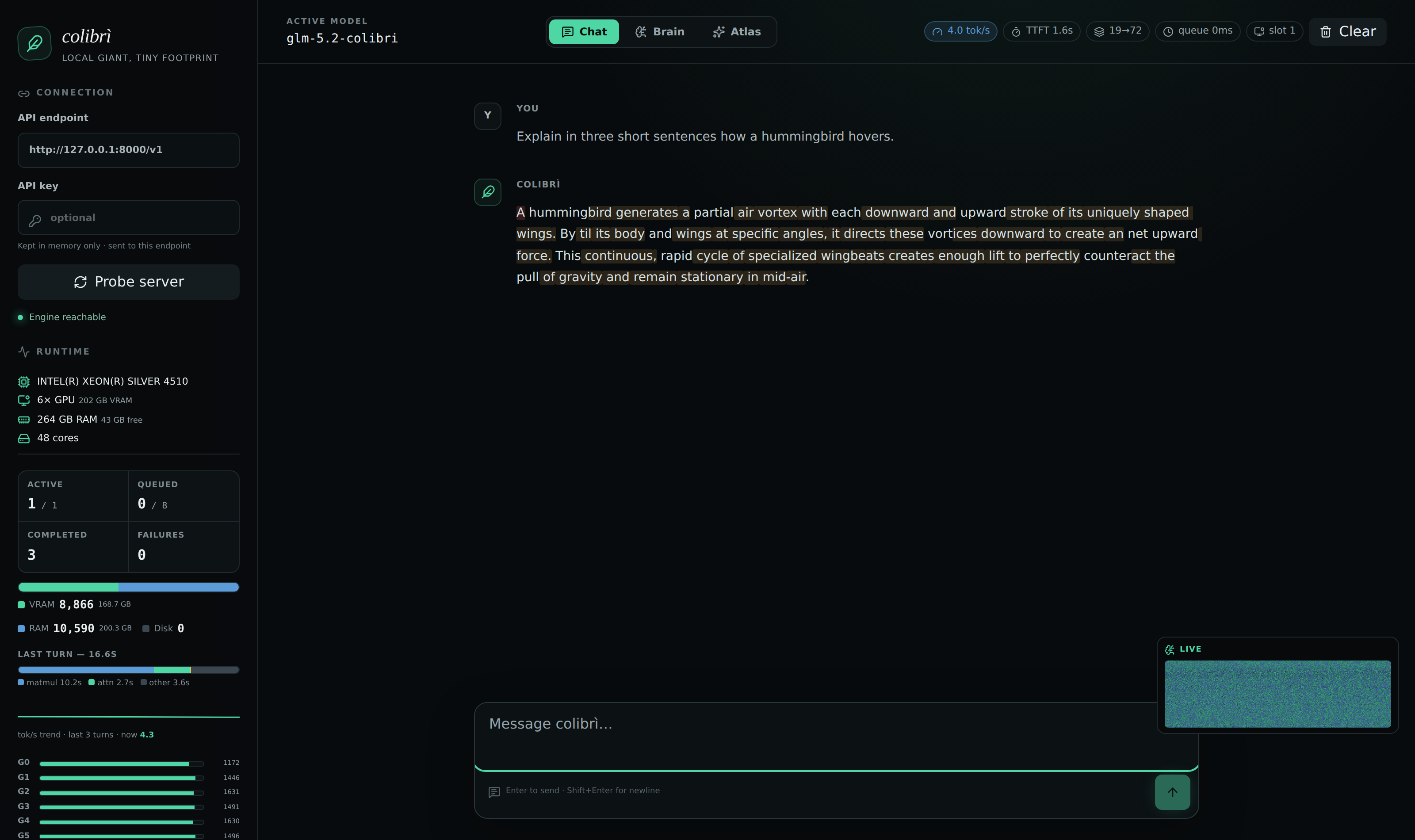
Qwen3.6 answering on a CPU box, experts streamed from disk.
→ →
→ →
→ →
→ →
→ →
→ →
→ →
→