1
 →
→
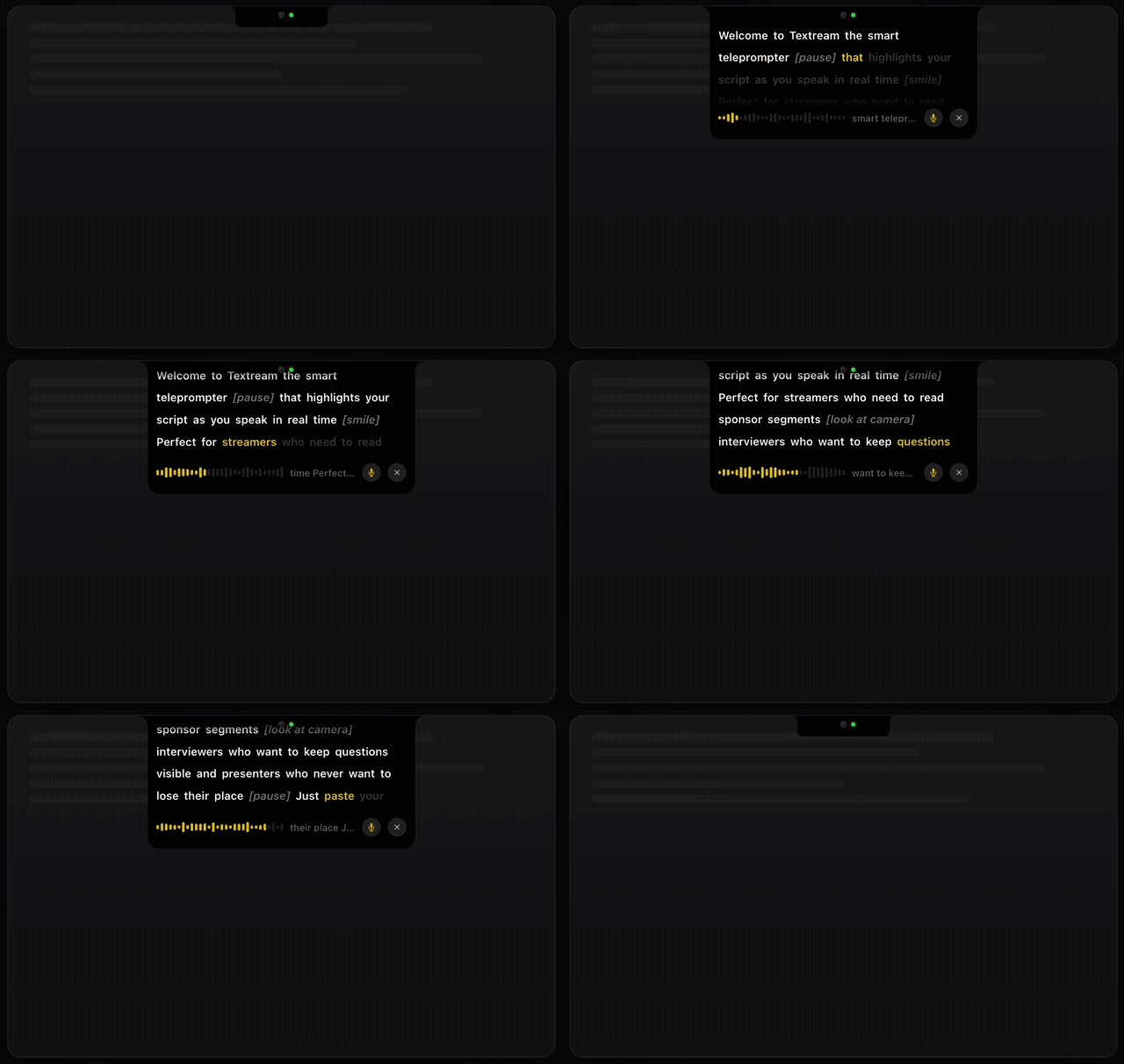
Textream is a free macOS teleprompter app for streamers, interviewers, and presenters. It highlights your script in real-time as you speak, displayed in a beautiful Dynamic Island overlay.
f/textream is an open-source project on GitHub, mainly written in Swift. Textream is a free macOS teleprompter app for streamers, interviewers, and presenters. It currently holds 3,898 stars and 272 forks with 69 open issues, and was last pushed on 2026-09-06 (repository created 2026-02-08).
Git Homed tracks it on the Today's Trending board, currently at rank #66 with 66 new stars today.

A free teleprompter for Mac, iPhone, and iPad.
Built for streamers, interviewers, presenters, and podcasters.
Download · iPhone & iPad · Features · How It Works · Build · Privacy
---
Textream is a free, open-source teleprompter that guides you through your script with three modes: word tracking (highlights each word as you say it), classic (constant-speed auto-scroll), and voice-activated (scrolls while you speak, pauses when you're silent). The Mac app displays your text in a sleek Dynamic Island-style overlay, a draggable floating window, or fullscreen on a Sidecar iPad. The iPhone and iPad app adds near-camera reading and presenter-only camera recording.
Paste your script, hit play, and start speaking. When you're done, the overlay closes automatically.
Download Textream from the App Store for Mac, iPhone, and iPad.
Or download the latest .dmg from GitHub Releases.
Or install with Homebrew:
brew install textream
Requires macOS 15 Sequoia or later. Works on Apple Silicon and Intel.
The Textream companion for iPhone and iPad is part of the same universal App Store listing as the Mac app.
| Mode | Description | Microphone | |---|---|---| | Word Tracking (default) | macOS speech recognition highlights each word as you say it. Depending on your Mac, language, and system availability, recognition may happen on-device or Apple may process microphone audio. | Required | | Classic | Auto-scrolls at a constant speed. No microphone needed. | Not needed | | Voice-Activated | Scrolls while you speak, pauses when you're silent or muted. Perfect for natural pacing. | Required |
| Mode | Description | |---|---| | Pinned to Notch | A Dynamic Island–shaped overlay anchored below the MacBook notch. Sits above all apps. | | Floating Window | A draggable window you can place anywhere on screen. Always on top. | | Fullscreen | Fullscreen teleprompter on any display. Press Esc to stop. |
| Setting | Options | |---|---| | Font Family | Sans, Serif, Mono, OpenDyslexic (dyslexia-friendly) | | Font Size | XS (14 pt), SM (16 pt), LG (20 pt), XL (24 pt) | | Highlight Color | White, Yellow, Green, Blue, Pink, Orange |
| Mode | Description | |---|---| | Off | No external display output. | | Teleprompter | Fullscreen teleprompter on the selected external display or Sidecar iPad. | | Mirror | Flipped output for prompter mirror rigs. |
View your teleprompter on any device — phone, tablet, or another computer — via a local network browser connection.
?mirror=1 or ?mirror=0 in the URL presets it.Let someone else control your teleprompter remotely. A director can write, edit, and push scripts to your teleprompter in real time from any browser.
| Use case | How Textream helps | |---|---| | Streamers | Read sponsor segments, announcements, and talking points without looking away from the camera. | | Interviewers | Keep your questions visible while maintaining natural eye contact with your guest. | | Presenters | Deliver keynotes, demos, and talks with confidence. Never lose your place. | | Podcasters | Follow show notes, ad reads, and topic outlines hands-free while recording. |
1. Paste your script — Drop your talking points, interview questions, or full script into the text editor. 2. Hit play — The Dynamic Island overlay slides down from the top of your screen. 3. Start speaking — Words highlight in real-time as you read. When you finish, the overlay closes automatically.
For the macOS app:
git clone https://github.com/f/textream.git
cd textream/Textream
open Textream.xcodeproj
Choose the Textream scheme for macOS or TextreamiOS for iOS, select a compatible destination, then build and run with ⌘R in Xcode. The TextreamiOS scheme also includes the iOS unit tests.
You can install and try the development build on your own device with a personal Apple Account; a paid Apple Developer Program membership is not required for local testing.
1. Install Xcode 26 or later, clone this repository, and open Textream/Textream.xcodeproj.
2. In Xcode → Settings → Accounts, add your Apple Account.
3. Connect your unlocked iPhone or iPad to the Mac. Trust the computer if the device asks, then wait for it to appear in Xcode's run-destination menu.
4. Select the Textream project, select the TextreamiOS target, and open Signing & Capabilities.
5. Leave Automatically manage signing enabled and choose your personal team. If Xcode reports that dev.fka.textream is unavailable, change the bundle identifier to a unique value such as com.yourname.textream.dev.
6. Select the TextreamiOS scheme and your connected device in the Xcode toolbar, then press ⌘R or choose Product → Run.
7. If prompted, enable Developer Mode on the device in Settings → Privacy & Security → Developer Mode, restart the device, confirm Developer Mode after restart, and run the app from Xcode again.
8. Accept the camera, microphone, speech-recognition, and Photos permissions only for the features you want to test.
This installs a development-signed build directly from your Mac; it does not publish anything to the App Store or TestFlight.
To try mirror mode, choose Read, enable Mirror in landscape, select an axis, and start the prompter. Rotate the device to landscape and use the small ↔ button at the top right to adjust mirror axis, reading position, text size, scroll speed, or hide the playback controls while the prompt is running.
Run the iOS test suite with Product → Test or ⌘U. Camera capture, microphone input, recording, and Photos saving should be verified on a physical device because Simulator doesn't provide the same hardware behavior.
Textream/
├── Textream.xcodeproj
├── Info.plist
├── Textream/                         # macOS app
│   ├── TextreamApp.swift              # App entry point, deep link handling
│   ├── ContentView.swift              # Main text editor UI + About view
│   ├── TextreamService.swift          # Service layer, URL scheme handling
│   ├── SpeechRecognizer.swift         # macOS speech recognition integration
│   ├── NotchOverlayController.swift   # Dynamic Island + floating overlay
│   ├── ExternalDisplayController.swift # Sidecar / external display output
│   ├── NotchSettings.swift            # User preferences and presets
│   ├── SettingsView.swift             # Tabbed settings UI
│   ├── MarqueeTextView.swift          # Word flow layout and highlighting
│   ├── BrowserServer.swift            # Remote connection HTTP + WebSocket server
│   ├── DirectorServer.swift           # Director mode HTTP + WebSocket server
│   ├── PresentationNotesExtractor.swift # PPTX presenter notes extraction
│   ├── UpdateChecker.swift            # GitHub release update checker
│   └── Assets.xcassets/               # macOS app icon and colors
├── TextreamiOS-Info.plist             # iOS permissions and orientations
├── TextreamiOS/                       # iOS app, capture, speech, models, and views
│   └── Resources/                     # iOS assets and OpenDyslexic font
└── TextreamiOSTests/                  # iOS prompt and matching tests
Textream supports the textream:// URL scheme for launching directly into the overlay:
textream://read?text=Hello%20world
It also registers as a macOS Service, so you can select text in any app and send it to Textream via the Services menu.
The Director Mode exposes an HTTP server and a WebSocket server on your local network. You can build your own director client using the protocol below.
| Service | Default Port | Configurable in |
|---|---|---|
| HTTP (serves the built-in web UI) | 7575 | Settings → Director → Advanced (1024–65534) |
| WebSocket (bidirectional communication) | 7576 (HTTP port + 1) | Automatic |
1. Fetch the built-in Director page from http://: and extract the current 64-character AUTH_TOKEN embedded in its script. The token changes whenever the Director server restarts.
2. Open a WebSocket connection to ws://: (e.g. ws://192.168.1.42:7576).
3. Within five seconds, send {"type":"auth","text":""} as the first WebSocket frame. The server closes clients that skip or fail authentication.
4. Send command frames to control the teleprompter. Once a script is active, the server broadcasts state frames as JSON at approximately 10 Hz.
Director Mode is intended for trusted local networks. HTTP and WebSocket traffic is not encrypted, so do not expose either port to the public internet or log/share the token.
Send JSON messages over the WebSocket:
auth — Authenticate the connection{
"type": "auth",
"text": "<64-character token from the Director page>"
}
This must be the first frame on every connection. It does not start a read.
setText — Start reading a new script{
"type": "setText",
"text": "Welcome everyone to today's live stream..."
}
Replaces the current text, starts word tracking, and opens the teleprompter overlay. This is equivalent to pressing Go in the built-in web UI.
updateText — Edit unread text while active{
"type": "updateText",
"text": "Welcome everyone to today's live stream We changed the rest of the script...",
"readCharCount": 42
}
Updates the full script text while preserving the confirmed read position. Set readCharCount to the latest highlightedCharCount received from Textream; do not calculate this offset independently. Textream clamps it to the Mac’s recognized count and the new script length. Keep the prefix before that offset unchanged and edit only unread text after it.
stop — Stop the teleprompter{
"type": "stop"
}
Stops word tracking and dismisses the overlay.
The server broadcasts a JSON object on every tick (~100 ms):
{
  "words": ["Welcome", "everyone", "to", "today's", "live", "stream"],
  "highlightedCharCount": 24,
  "totalCharCount": 120,
  "isActive": true,
  "isDone": false,
  "isListening": true,
  "fontColor": "#F5F5F7",
  "cueColor": "#F5F5F7",
  "lastSpokenText": "Welcome everyone to today's",
  "audioLevels": [0.12, 0.34, 0.08, ...]
}
| Field | Type | Description |
|---|---|---|
| words | string[] | The script split into words (same order as displayed in the overlay). |
| highlightedCharCount | int | Number of characters recognized so far. Use this to determine the read boundary. |
| totalCharCount | int | Total character count of the full script. |
| isActive | bool | true when the teleprompter overlay is visible and a script is loaded. |
| isDone | bool | true when highlightedCharCount >= totalCharCount (finished reading). |
| isListening | bool | true when the microphone is actively listening. |
| fontColor | string | CSS color of the text in the overlay (user preference). |
| cueColor | string | CSS color of bracketed stage directions (user preference). |
| lastSpokenText | string | Last recognized speech fragment. |
| audioLevels | double[] | Array of audio level samples (0.0–1.0) for waveform visualization. |
When the overlay is not active, the server sends a frame with isActive: false and empty arrays.
import asyncio, json, re, urllib.request
import websockets
HOST = "192.168.1.42"
HTTP_PORT = 7575
def director_token():
    with urllib.request.urlopen(f"http://{HOST}:{HTTP_PORT}", timeout=3) as response:
        html = response.read().decode("utf-8")
    match = re.search(r"AUTH_TOKEN='([0-9a-f]{64})'", html)
    if not match:
        raise RuntimeError("Director token not found")
    return match.group(1)
async def director():
    async with websockets.connect(f"ws://{HOST}:{HTTP_PORT + 1}") as ws:
        # Authenticate before sending any commands.
        await ws.send(json.dumps({
            "type": "auth",
            "text": director_token()
        }))
# Send a script
        await ws.send(json.dumps({
            "type": "setText",
            "text": "Hello everyone, welcome to the show."
        }))
# Listen for state updates
        async for msg in ws:
            state = json.loads(msg)
            pct = 0
            if state["totalCharCount"] > 0:
                pct = state["highlightedCharCount"] / state["totalCharCount"] * 100
            print(f"Progress: {pct:.0f}%  Done: {state['isDone']}")
            if state["isDone"]:
                break
# Stop
        await ws.send(json.dumps({"type": "stop"}))
asyncio.run(director())
MIT
---
Original idea by Semih Kışlar — thanks to him!
Made by Fatih Kadir Akin
Privacy · Support
→ →
→ →
→ →
→ →
→ →
→ →
→ →
→