
1
 →
→EpicGames/raddebugger is an open-source project on GitHub, mainly written in C. A native, user-mode, multi-process, graphical debugger. It currently holds 7,804 stars and 381 forks with 315 open issues, and was last pushed on 2026-10-07 (repository created 2024-01-10).
Git Homed tracks it on the Today's Trending board, currently at rank #52 with 82 new stars today.
build folder after a
local copy has been built. You can find pre-built release binaries
here._
The RAD Debugger is a native, user-mode, multi-process, graphical debugger. It
currently only supports local-machine Windows x64 debugging with PDBs, with
plans to expand and port in the future. In the future we'll expand to also
support native Linux debugging and DWARF debug info.
The debugger is currently in ALPHA. In order to get the debugger
bullet-proof, it'd greatly help out if you submitted the issues you find
here, along with any
information you can gather, like dump files (along with the build you used),
instructions to reproduce, test executables, and so on.
In addition to the debugger, we aim to further improve the toolchain with two
additional related technologies: (1) the RAD Debug Info (RDI) format, and
(2) the RAD Linker.
src/lib_rdi folder. In rdi.h and
rdi.c, the types and functions which define the format
itself are specified. In rdi_parse.h and
rdi_parse.c, helpers for parsing the format are
included.
We also have an in-progress library for constructing and serializing RDI data,
located within the src/lib_rdi_make folder.
Our radbin utility (accessible through the debugger too, via the --bin
command line argument) is capable of converting native debug information formats
to RDI, and of producing textual dumps of contents stored within RDI files.
/help.
Our current designed-for use case for the linker is to help with the
compile-debug cycle of huge projects. We don't yet have support for
link-time-optimizations, but this feature is on the road map.
By default, the linker spawns as many threads as there are cores, so if you plan
to run multiple linkers in parallel, you can limit the number of thread workers
via /rad_workers.
We also have support for large memory pages, which, when enabled, reduce link
time by another 25%. To link with large pages, you need to explicitly request
them via /rad_large_pages. Large pages are off by default, since Windows
support for large pages is a bit buggy; we recommend they only be used in Docker
or VM images where the environment is reset after each link. In a standard
Windows environment, using large pages otherwise will fragment memory quickly,
forcing a reboot. We are working on a Linux port of the linker that will be able
to build with large pages robustly.
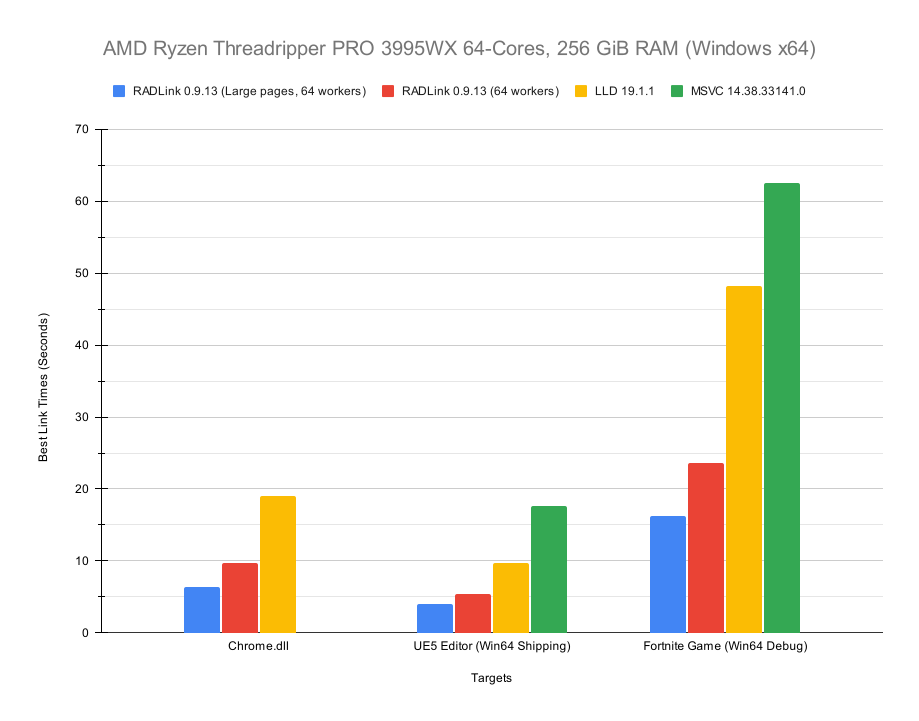
A benchmark of the linker's performance is below:
 ---
---
vcvarsall.bat x64, which is included in the
Microsoft C/C++ Build Tools. This script is automatically called by the `x64
Native Tools Command Prompt for VS variant of the vanilla cmd.exe`. If
you've installed the build tools, this command prompt may be easily located by
searching for Native from the Windows Start Menu search.
You can ensure that the MSVC compiler is accessible from your command line by
running:
```
cl
```
If everything is set up correctly, you should have output very similar to the
following:
```
Microsoft (R) C/C++ Optimizing Compiler Version 19.29.30151 for x64
Copyright (C) Microsoft Corporation. All rights reserved.
usage: cl [ option... ] filename... [ /link linkoption... ]
```
cd to the root directory of the codebase, and just run
the build.bat script:
```
build
```
You should see the following output:
```
[debug mode]
[msvc compile]
[default mode, assuming raddbg build]
metagen_main.c
searching C:\devel\raddebugger/src... 458 files found
parsing metadesk... 16 metadesk files parsed
gathering tables... 97 tables found
generating layer code...
raddbg_main.c
```
If everything worked correctly, there will be a build folder in the root
level of the codebase, and it will contain a freshly-built raddbg.exe.
This raddbg.exe will have been built in debug mode, which is not built
with optimizations, and may perform worse. To produce a
release mode executable, run build.bat with a release argument:
```
build release
```
This build will take significantly longer.
By default, build.bat only builds the debugger if no arguments (or just
release) are passed, but additional arguments can be passed to build the RAD
Linker, or the radbin CLI binary file utility:
```
build radlink release
build radbin release
```
libfreetype
libx11
libxext
libxfixes
libxrandr
libgl
libegl
cd to the root directory of the codebase, and run the build.sh
script:
```
./build.sh
```
You should see something similar to the following output:
```
[clang compile]
[debug mode]
[building metagen]
searching /mnt/c/devel/raddebugger/src... 562 files found
parsing metadesk... 23 metadesk files parsed
gathering tables... 138 tables found
generating layer code...
```
If everything worked correctly, there will be a build folder in the root
level of the codebase, and it will contain a freshly-built raddbg binary.
This raddbg will have been built in debug mode, which is not built with
optimizations, and may perform worse. To produce a release mode executable,
run build.sh with a release argument:
```
./build.sh release
```
This build will take significantly longer.
By default, build.sh only builds the debugger if no arguments (or just
release) are passed, but additional arguments can be passed to build the RAD
Linker, or the radbin CLI binary file utility:
```
./build.sh radlink release
./build.sh radbin release
```
---
/opt:ref), and link-time-optimizations with the help
of clang (we won't support LTCG from MSVC, since it is undocumented).
src/demon layer to implement the Demon local process control
src/ctrl layer.
src/rdi_from_dwarf.
src/render layer to implement all of the rendering features the
src/font_provider layer to a Linux-compatible font
src/os layers to Linux. This includes core operating system
data: Small binary files which are used when building, either to embed
src: All source code.
build: All build artifacts. Not checked in to version control.
local: Local files, used for local build configuration input files. Not
src directory. Sometimes, one folder inside of the src
directory will include multiple sub-layers, but the structure is intended to be
fairly flat.
Layers correspond roughly 1-to-1 with namespaces. The term "namespaces" in
this context does not refer to specific namespace language features, but rather
a naming convention for C-style namespaces, which are written in the codebase as
a short prefix, usually 1-3 characters, followed by an underscore. These
namespaces are used such that the layer to which certain code belongs may be
quickly understood by glancing at code. The namespaces are generally quite short
to ensure that they aren't much of a hassle to write. Sometimes, multiple sub-
layers will share a namespace. A few layers do not have a namespace, but most
do. Namespaces are either all-caps or lowercase depending on the context in
which they're used. For types, enum values, and some macros, they are
capitalized. For functions and global variables, they are lowercase.
Layers depend on other layers, but circular dependencies would break the
separability and isolation utility of layers (in effect, forming one big layer),
so in other words, layers are arranged into a directed acyclic graph.
A few layers are built to be used completely independently from the rest of the
codebase, as libraries in other codebases and projects. As such, these layers do
not depend on any other layers in the codebase. The folders which contain these
layers are prefixed with lib_, like lib_rdi.
A list of the layers in the codebase and their associated namespaces is below:
artifact_cache (AC_): Implements an asynchronously-filled cache of
base (no namespace): Universal, codebase-wide constructs. Strings, math,
codeview (CV_): Code for parsing and writing the CodeView format.
coff (COFF_): Code for parsing and writing the COFF (Common Object File
content (C_): Implements a cache for general data blobs, keyed by a
ctrl (CTRL_): The debugger's "control system" layer. Implements
dbg_engine (D_): Implements the core debugger system, without any
dbg_info (DI_): Implements asynchronous debug info conversion and loading.
demon (DMN_): An abstraction layer for local-machine, low-level process
ctrl.
disasm (DASM_): Implements disassembly generation, including exposing the
draw (DR_): Implements a high-level graphics drawing API for the
render abstraction layer. Provides
high-level APIs for various draw commands, but takes care of batching them,
and so on.
dwarf (DW_): Code for parsing the DWARF format.
eh (EH_): Code for parsing the EH frame format.
elf (ELF_): Code for parsing the ELF format.
eval (E_): A compiler for an expression language, built for evaluation of
eval_visualization (EV_): Implements the core non-graphical evaluation
eval layer) in a number of ways. Implements core data structures and
transforms for watch tables.
file_stream (FS_): Implements asynchronous file streaming, storing the
content and
artifact_cache layers, hot-reloading the contents of files when they change.
Allows callers to map file paths to data hashes, which can then be used to
obtain the file's data.
font_cache (FNT_): Implements a cache of rasterized font data, both in
font_provider abstraction
layer.
font_provider (FP_): An abstraction layer for various font file decoding
lib_raddbg_markup (RADDBG_): Standalone library for marking up user
base, and can be independently relocated to other codebases.
lib_rdi (RDI_): Standalone library which defines the core RDI types
base, and can be independently relocated to other
codebases.
lib_rdi_make (RDIM_): Standalone library for constructing RDI debug info
base, and can be independently relocated
to other codebases.
linker (LNK_): The layer which implements the RAD Linker executable
mdesk (MD_): Code for parsing Metadesk files (stored as .mdesk), which
metagen layer.
metagen (MG_): A metaprogram which is used to generate primarily code and
.mdesk, and
generates C code which is then included by hand-written C code. Currently, it
does not analyze the codebase's hand-written C code, but in principle this is
possible. This allows easier & less-error-prone management of large data
tables, which are then used to produce e.g. C enums and a number of
associated data tables. There are also a number of other generation features,
like embedding binary files or complex multi-line strings into source code.
msf (MSF_): Code for parsing and writing the MSF file format.
msvc_crt (MSCRT_): Code for parsing that's specific to the MSVC CRT.
mule (no namespace): Test executables for battle testing debugger
mutable_text (MTX_): Implements an asynchronously-filled-and-mutated
Output log.
natvis (no namespace): NatVis files for type visualization of the codebase's
os/core (OS_): An abstraction layer providing core, non-graphical
os/gfx (OS_): An abstraction layer, building on os/core, providing
pdb (PDB_): Code for parsing and writing the PDB file format.
pe (PE_): Code for parsing and writing the PE (Portable Executable) file
radbin (RB_): The layer implementing the radbin binary utility
raddbg (RD_): The layer which ties everything together for the main
rdi (RDI_): A layer which includes the lib_rdi layer and bundles it with
rdi_from_coff (C2R_): Code for converting information in COFF files to the
rdi_from_dwarf (D2R_): In-progress code for converting DWARF to the
rdi_from_elf (E2R_)): Code for converting ELF data to the equivalent RDI
rdi_from_pdb (P2R_): Code for converting P→ →
→ →
→ →
→ →
→ →
→ →
→ →
→