1
 →
→
Run any site JavaScript from Python with the real Firefox engine. Headless SpiderMonkey + Necko for automation and scraping.
cutetailbud/ff-ruyijs is an open-source project on GitHub, mainly written in C++. Run any site JavaScript from Python with the real Firefox engine. Headless SpiderMonkey + Necko for automation and scraping. It currently holds 151 stars and 166 forks with 3 open issues, and was last pushed on 2026-10-29 (repository created 2026-10-28).
Git Homed tracks it on the Today's Trending board, currently at rank #47 with 0 new stars today.
A new-generation, minimalist browser purpose-built for AI-driven automation.
The authentic Firefox JavaScript engine and networking stack, with no window and no renderer —
made for web scraping, JS reverse engineering, data collection, and getting past bot checks.
Sponsored by

Install · Features · Verification systems · Examples · FAQ · Contact · LinuxDO · English · 简体中文
⚠️ Disclaimer: This project is for researching next-generation AI browsers. Any form of brute-force reverse engineering is strictly rejected. The source code is fully open-source. Unauthorized commercial use is prohibited.
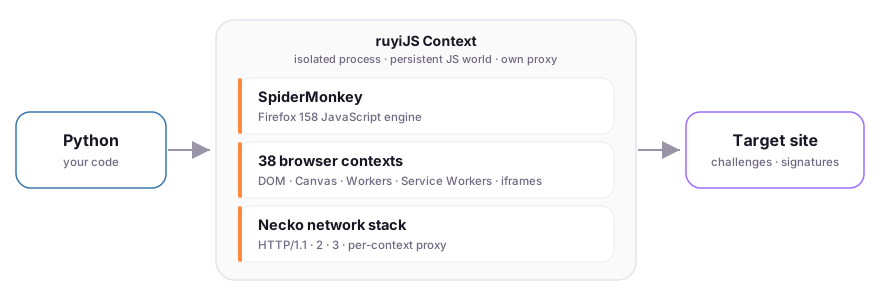
Headless Chrome and Playwright hand you a whole browser: a GPU-rendering, window-managing, memory-hungry process that anti-bot vendors have spent years learning to detect. ruyiJS takes the opposite path — it embeds only the Firefox internals that matter for automation and leaves the rest behind:
Context is its own process with a persistent JavaScript world and its own proxy, so sessions never leak into each other.Runs on Windows x64 with Python 3.10+ (verified on Python 3.14). The wheel bundles the pinned native runtime, so there's nothing else to download.
python -m pip install ruyijs
Requirements: Python 3.10+ on Windows x64 (64-bit). Verified on Python 3.10 – 3.14.
The wheel ships the SHA256-pinned SpiderMonkey + Necko runtime (~42 MB). Local scripts run offline right after install — no browser download, no external dependencies.
To upgrade:
python -m pip install --upgrade ruyijs
To verify the installation:
import ruyijs
print(ruyijs.__version__)   # 0.1.6
1 · Open a context and run JavaScript. Variables and functions persist across eval calls within the same context.
from ruyijs import Context
with Context() as context:
    context.eval("let count = 40")
    print(context.eval("count += 2"))        # 42
    print(context.eval("navigator.userAgent"))
3 · Point it at a real target. Configure the environment, load the page, and let the site's own JavaScript mint whatever token it demands.
with Context(proxy="http://127.0.0.1:7890") as context:
    context.configure_fingerprint({
        "navigator": {"language": "zh-CN", "hardwareConcurrency": 8},
        "locale": {"timezone": "Asia/Shanghai"},
    })
    context.load_page("https://target.example/", html)
    token = context.eval("window.__sign(payload)")   # run the page's signer
    print(token)
Python  ──►  ruyiJS Context (isolated process)  ──►  Target site
                 ├─ SpiderMonkey — Firefox 159 JS engine
                 ├─ 38 browser contexts — DOM · Canvas · Workers · iframes · …
                 └─ Necko — HTTP/1.1 · 2 · 3, per-context proxy
Your Python code drives a Context. Inside it, the genuine SpiderMonkey engine runs the page's scripts against a real DOM and 38 bounded browser subsystems, while in-page fetch/XHR ride the Necko transport. The implementation lives under src/ (domain, application, and every browser subsystem) and python/ruyijs/ (the binding).
Execute scripts in a persistent context, load real HTML with iframes and classic scripts, and query the resulting DOM. References to live JS objects come back as JSObject / JSFunction you can call from Python.
| Capability | How |
| :-- | :-- |
| Execute JS, keep state | context.eval(src) — variables and functions persist |
| Get a callable back | context.eval(src, to_py=False) → JSFunction |
| Load a page | context.load_page(url, html) — relative URLs resolve against url |
| Top-level navigation | context.navigate(url) — no Referer, Sec-Fetch-Site: none |
| Query the DOM | context.eval("document.querySelector('#x').textContent") |
with Context() as context:
    context.set("config", {"offset": 2})
    add = context.eval("(value) => value + config.offset", to_py=False)
    print(add(40))  # 42
Set Navigator, Screen, viewport, timezone, and locale through one validated profile surface. Commit it before the first page script runs.
with Context() as context:
    context.configure_fingerprint({
        "navigator": {"language": "zh-CN", "hardwareConcurrency": 8},
        "screen": {"width": 1920, "height": 1080},
        "viewport": {"width": 1280, "height": 720},
        "locale": {"timezone": "Asia/Shanghai"},
    })
    print(context.eval("[navigator.language, screen.width]"))  # ['zh-CN', 1920]
In-page fetch and XHR ride real HTTP/1.1, 2, and 3, through a proxy scoped to the context. Serve responses yourself with put_resource() to replay an entire captured flow offline. Inspect every request with net_log().
The network stack is Firefox's own Necko + NSS (the same TLS library real Firefox uses). The TLS ClientHello — cipher suites, extensions, ALPN, key shares, and their ordering — is produced by the real NSS library, not an emulation, so bot-detection systems that inspect TLS cannot distinguish ruyiJS traffic from a genuine Firefox session.
The Necko transport can freely switch between Firefox 100 – 159 TLS profiles. Each profile reproduces that version's exact ClientHello, giving you a different JA3 / JA4 fingerprint on the wire — useful for rotating browser identities, evading per-version blocks, or testing how a site reacts to different Firefox releases.
with Context(proxy="http://127.0.0.1:7890", timeout=30) as context:
    context.load_page("https://example.com/", "")
    context.eval("globalThis.r = null; fetch('/api').then(x => x.json()).then(v => r = v)")
    context.advance(25)               # drive the event loop until it settles
    print(context.eval("r"))
Pass data in with set(), get callable JS functions out, and expose Python functions to the running script. Workers, Service Workers, and iframes are included.
with Context() as context:
    context.expose(lambda a, b: a + b, "add")
    print(context.eval("add(20, 22)"))  # 42
Drive timers with a logical clock for perfectly reproducible runs, or use the system clock for live work. The host advances time explicitly.
with Context() as context:
    context.configure_clock("logical", epoch_ms=1700000000000)
    context.eval("globalThis.result = 0; setTimeout(() => { result = 42 }, 10)")
    context.advance(10)
    print(context.eval("result"))  # 42
JavaScript exceptions surface as JSError with name, message, and stack. console_log() and net_log() return the captured console and network records.
from ruyijs import Context, JSError
with Context(timeout=10) as context:
    try:
        context.eval("throw new TypeError('bad input')", filename="demo.js")
    except JSError as error:
        print(error.name, error.message)  # TypeError bad input
        print(error.stack)
Each example drives the site's own JavaScript to produce the parameters it demands, then completes the flow end to end. All ship runnable in the package: python -m ruyijs.examples .
| System | Category | Example |
| :-- | :-- | :-- |
| Akamai Bot Manager 3.x | sensor_data + sbsd challenge | akamai |
| DataDome | Interstitial device-check (plv2 + plv3) | datadome |
| CreepJS | Fingerprint audit — passes every section | creepjs |
🔒 Strictly prohibited for any unlawful use. ruyiJS is provided solely for research into a new generation of AI browsers. Live results depend on current network conditions and each site's present responses.
Examples ship inside the package — no need to clone the repo:
python -m ruyijs.examples                      # list every example and its install path
python -m ruyijs.examples akamai               # Akamai Bot Manager 3.x
python -m ruyijs.examples datadome             # DataDome interstitial device-check
python -m ruyijs.examples creepjs              # CreepJS fingerprint audit
Every example supports --direct (direct connection) and --proxy http://127.0.0.1:7890. Add --help after a name for all options, and --output result.json to save results. Each example directory ships its own README.
| | |
| :-- | :-- |
| Context.eval / set / expose | Execute JS, pass data in, expose Python callbacks |
| load_page / navigate / put_resource | Load HTML, top-level navigation, serve resources offline |
| configure_fingerprint / configure_environment | Navigator, Screen, viewport, timezone, locale |
| configure_clock / advance / tick | Logical vs. system clock, drive the event loop |
| JSError / console_log / net_log | Errors as exceptions, console and network records |
| JSObject / JSFunction / get_runtime_path | Live JS handles, bundled-runtime path |
ruyiJS provides JavaScript execution and a broad Web API environment on Windows x64. It has no browser window and no full page layout or rendering — it is a tool for automation, analysis, and research. Use it in compliance with the terms of service of any site you interact with and with applicable law.
Related: ruyiHttp — a Requests-style Python HTTP library built on Firefox's native networking components.
Python 3.10 and above on Windows x64 (64-bit). Tested up to Python 3.14.
Not yet — currently Windows x64 only. Cross-platform support is planned.
The JS engine is Mozilla's official SpiderMonkey and the networking stack is Mozilla's official Necko — both are pulled directly from the Firefox source tree. You can check out and build them yourself from mozilla-central. The customizations ruyijs makes on top do not affect the engines' core functionality, so a vanilla SpiderMonkey + Necko built for Linux or macOS will work as the foundation for a port.
No. The wheel bundles the pinned SpiderMonkey + Necko runtime. Everything works offline right after pip install ruyijs.
with statement (with Context() as ctx:) so the process is cleaned up properly.context = Context(proxy="http://127.0.0.1:7890").Context(timeout=60).The site's JavaScript threw an exception. Inspect error.name, error.message, and error.stack to locate the cause. If the page relies on APIs not yet implemented, the stack trace will point to the missing call.
with Context(proxy="http://127.0.0.1:7890") as ctx:
    ctx.navigate("https://example.com/")
HTTP, HTTPS, and SOCKS5 proxies are supported per-context.
python -m ruyijs.examples              # list all examples
python -m ruyijs.examples akamai --proxy http://127.0.0.1:7890
python -m ruyijs.examples creepjs
Questions, permission requests, commercial licensing, or just to talk shop — add the author on WeChat, or scan to join the discussion group.
 WeChat: 如意 |
 Group: AI 浏览器交流群 |
The group QR refreshes periodically; if it has expired, add the author on WeChat (如意) for an invite.
Licensed under the ff-ruyijs Source Available License v1.0.
See NOTICE for third-party attributions.
If ff-ruyijs saved you from reimplementing a browser, a ⭐ helps others find it.
→ →
→ →
→ →
→ →
→ →
→ →
→ →
→