
1
 →
→bin456789/reinstall is an open-source project on GitHub, mainly written in Shell. 一键DD/重装脚本 (One-click reinstall OS on VPS) It currently holds 13,550 stars and 2,194 forks with 45 open issues, and was last pushed on 2026-10-04 (repository created 2022-09-25).
Git Homed tracks it on the Today's Trending board, currently at rank #47 with 105 new stars today.




一键 VPS 系统重装脚本 English
VirtIO 等公有云驱动Linux to Linux、Linux to Windows、Windows to Windows、Windows to Linux/32、/128、网关不在子网范围内、纯 IPv6、IPv4/IPv6 在不同网卡



原系统可以是表格中的任意系统
目标系统的配置要求如下:
| 系统 | 版本 | 内存 | 硬盘 |
| ---------------------------------------------------------------------------------------------------------------------------------------------------------------------------------------------------------------------------------------------------------------------------------------------------------------------------------------------------------------------- | ------------------------------------- | --------- | ------------ |
| 

 Kali | Last-Snapshot, Rolling (滚动) | 256 MB | 1 ~ 1.5 GB ^ |
|
Kali | Last-Snapshot, Rolling (滚动) | 256 MB | 1 ~ 1.5 GB ^ |
|  Ubuntu | 18.04 LTS - 26.04 LTS | 512 MB \* | 2 GB |
|
Ubuntu | 18.04 LTS - 26.04 LTS | 512 MB \* | 2 GB |
|  Anolis | 7, 8, 23 | 512 MB \* | 5 GB |
|
Anolis | 7, 8, 23 | 512 MB \* | 5 GB |
| 

 Rocky
Rocky  Oracle | 8, 9, 10 | 512 MB \* | 5 GB |
|
Oracle | 8, 9, 10 | 512 MB \* | 5 GB |
| 
 CentOS Stream | 9, 10 | 512 MB \* | 5 GB |
|
CentOS Stream | 9, 10 | 512 MB \* | 5 GB |
| 


 NixOS | 26.05 | 512 MB | 5 GB |
|
NixOS | 26.05 | 512 MB | 5 GB |
|  Arch Linux / Arch Linux ARM | 滚动 | 512 MB | 5 GB |
|
Arch Linux / Arch Linux ARM | 滚动 | 512 MB | 5 GB |
|  Gentoo | 滚动 | 512 MB | 5 GB |
|
Gentoo | 滚动 | 512 MB | 5 GB |
|  安同 OS | 滚动 | 512 MB | 5 GB |
|
安同 OS | 滚动 | 512 MB | 5 GB |
| 

 Windows (DD) | 任何 | 512 MB | 取决于镜像 |
| Windows (ISO) | Vista, 7, 8.x (Server 2008 - 2012 R2) | 512 MB | 25 GB |
| Windows (ISO) | 10, 11 (Server 2016 - 2025) | 1 GB | 25 GB |
Windows (DD) | 任何 | 512 MB | 取决于镜像 |
| Windows (ISO) | Vista, 7, 8.x (Server 2008 - 2012 R2) | 512 MB | 25 GB |
| Windows (ISO) | 10, 11 (Server 2016 - 2025) | 1 GB | 25 GB |
\* 表示使用云镜像安装,非传统网络安装
^ 表示需要 256 MB 内存 + 1.5 GB 硬盘,或 512 MB 内存 + 1 GB 硬盘
[!WARNING]
> 本脚本理论上支持独服和 PC
> 但如果能使用 IPMI 或 U 盘,则不建议使用本脚本
[!WARNING]
> ❌ 本脚本不支持 OpenVZ、LXC 虚拟机
> 请改用
 Linux)
国外服务器:
curl -O https://raw.githubusercontent.com/bin456789/reinstall/main/reinstall.sh || wget -O ${_##*/} $_
国内服务器:
curl -O https://cnb.cool/bin456789/reinstall/-/git/raw/main/reinstall.sh || wget -O ${_##*/} $_
[!IMPORTANT]
请先关闭Windows Defender的实时保护功能。该功能会阻止certutil下载任何文件。
解决 Windows 7 下无法下载脚本
由于不支持 TLS 1.2、SHA-256、根证书没有更新等原因,Vista,7 和 Server 2008 (R2) 可能无法自动下载脚本,因此需要手动下载,具体操作如下:
用 IE 下载 (先在 IE 高级设置里启用 TLS 1.2),或者通过远程桌面,将这两个文件保存到同一个目录
reinstall.bat
国外服务器:
certutil -urlcache -f -split https://raw.githubusercontent.com/bin456789/reinstall/main/reinstall.bat
国内服务器:
certutil -urlcache -f -split https://cnb.cool/bin456789/reinstall/-/git/raw/main/reinstall.bat
所有功能 都可在 Linux / Windows 下运行
bash reinstall.sh ...cmd,再运行 reinstall.bat ..."" 将链接包裹起来,不能用 '' Linux[!CAUTION]
> 此功能会清除当前系统整个硬盘的全部数据(包含其它分区)!
> 如果不小心运行了脚本,可以在重启前运行 bash reinstall.sh reset 取消重装
root 和随机密码qcow2 镜像链接,也可以安装其它类 RHEL 系统的 qcow2,例如 Alibaba Cloud Linux 和 TencentOS Server/etc/ssh/sshd_config.d/ 里面的文件bash reinstall.sh anolis 7|8|23
rocky 8|9|10
oracle 8|9|10
almalinux 8|9|10
opencloudos 8|9|23
centos 9|10
fnos 1
fygoos 1
nixos 26.05
fedora 43|44
debian 9|10|11|12|13
opensuse 16.0|tumbleweed
alpine 3.21|3.22|3.23|3.24
kali last-snapshot|rolling
openeuler 20.03|22.03|24.03|26.09
ubuntu 18.04|20.04|22.04|24.04|26.04 [--minimal]
arch
gentoo
aosc
redhat --img="http://access.cdn.redhat.com/xxx.qcow2"
--username USERNAME 设置用户名--password PASSWORD 设置密码--ssh-key KEY 设置 SSH 登录公钥,格式如下。当使用公钥时,密码为空--ssh-port PORT 修改 SSH 端口--web-port PORT 修改 Web 端口(安装期间观察日志用)--frpc-config PATH 添加 frpc 内网穿透,参数填配置文件的本地路径或 HTTP 链接--no-cloud-kernel 不使用云内核,避免部分机器黑屏/花屏,适用于 Debian、Ubuntu、Alpine、openSUSE--hold 1 仅重启到安装环境,不运行安装,用于 SSH 登录验证网络连通性--hold 2 安装结束后不重启,用于 SSH 登录修改系统内容,Debian/Kali 会挂载在 /target,其它系统会挂载在 /os[!TIP]
> 可通过多种方式(SSH、HTTP 80 端口、商家后台 VNC、串行控制台)查看安装进度。
> 即使安装过程出错,也能连接 SSH 手动救砖。
> 目标系统非 Debian/Kali 时,可以运行 /trans.sh alpine 自动救砖成 Alpine 系统。
已弃用的功能
云镜像安装 Debian
bash reinstall.sh debian --ci
ISO 安装 CentOS, AlmaLinux, Rocky, Fedora
root,密码 123@@@,SSH 端口 22,不支持用参数修改bash reinstall.sh centos --installer
bash reinstall.sh almalinux --installer
bash reinstall.sh rocky --installer
bash reinstall.sh fedora --installer
ISO 安装 Ubuntu
root,密码 123@@@,SSH 端口 22,不支持用参数修改bash reinstall.sh ubuntu --installer
[!CAUTION]
> 此功能会清除当前系统整个硬盘的全部数据(包含其它分区)!
> 如果不小心运行了脚本,可以在重启前运行 bash reinstall.sh reset 取消重装
raw 和固定大小的 vhd 镜像。未压缩或者压缩成 .gz .xz .zst .tar .tar.gz .tar.xz .tar.zstroot 和随机密码bash reinstall.sh dd --img "https://example.com/xxx.xz"
--username USERNAME 设置用户名(安装期间观察日志用)--password PASSWORD 设置密码(安装期间观察日志用)--ssh-key KEY 设置 SSH 登录公钥(安装期间观察日志用),格式如下。当使用公钥时,密码为空--ssh-port PORT 修改 SSH 端口(安装期间观察日志用)--rdp-port PORT 修改 RDP 端口(仅限 DD Windows)--web-port PORT 修改 Web 端口(安装期间观察日志用)--allow-ping 设置 Windows 防火墙允许被 Ping(仅限 DD Windows)--frpc-config PATH 添加 frpc 内网穿透(仅限 DD Windows),参数填配置文件的本地路径或 HTTP 链接--cloud-data PATH_OR_URL 为 DD Linux 镜像注入 cloud-init NoCloud 配置(仅限 DD Linux)--hold 1 仅重启到安装环境,不运行安装,用于 SSH 登录验证网络连通性--hold 2 DD 结束后不重启,用于 SSH 登录修改系统内容,Windows 系统会挂载在 /os,Linux 系统不会自动挂载[!TIP]
>--cloud-data参数为本地目录或 HTTP 基础 URL,目录须包含user-data文件,meta-data、network-config可选:
>> seed/
├── user-data # 必须
├── meta-data # 可选
└── network-config # 可选
>> # 使用本地目录
bash reinstall.sh dd --img "https://example.com/xxx.xz" --cloud-data /path/to/seed/
# 使用 HTTP 目录
bash reinstall.sh dd --img "https://example.com/xxx.xz" --cloud-data "https://example.com/seed/"
[!TIP]
> 可通过多种方式(SSH、HTTP 80 端口、商家后台 VNC、串行控制台)查看安装进度。
> 即使安装过程出错,也能连接 SSH 手动救砖
> 也可以运行 /trans.sh alpine 自动救砖成 Alpine 系统。
Alpine Live OS(内存系统)root 和随机密码[!TIP]
> 虽然运行的脚本叫 reinstall,但是此功能不会删除任何数据和进行自动重装,而是要用户手动操作
> 如果用户手动操作没有破坏原系统,再次重启将回到原系统
bash reinstall.sh alpine --hold 1
--username USERNAME 设置用户名--password PASSWORD 设置密码--ssh-key KEY 设置 SSH 登录公钥,格式如下。当使用公钥时,密码为空--ssh-port PORT 修改 SSH 端口--frpc-config PATH 添加 frpc 内网穿透,参数填配置文件的本地路径或 HTTP 链接 netboot.xyz
[!TIP]
> 虽然运行的脚本叫 reinstall,但是此功能不会删除任何数据和进行自动重装,而是要用户手动操作
> 如果用户手动操作没有破坏原系统,再次重启将回到原系统
bash reinstall.sh netboot.xyz
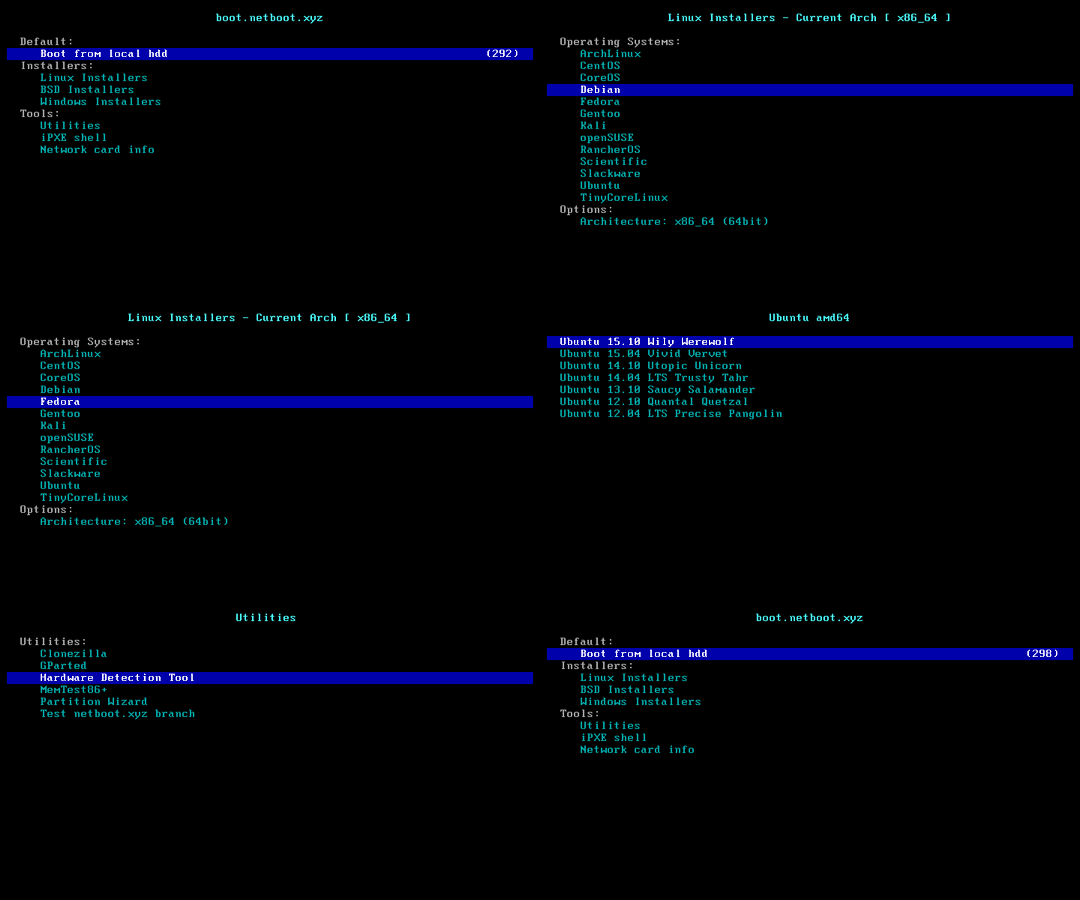 Windows ISO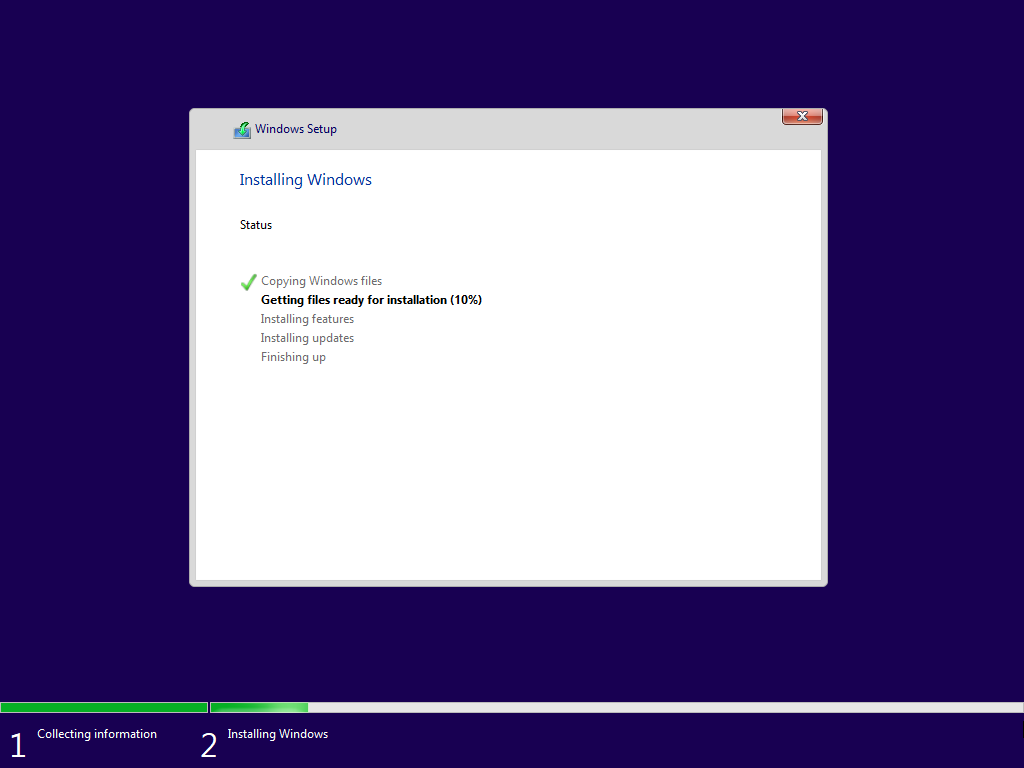
[!CAUTION]
> 此功能会清除当前系统整个硬盘的全部数据(包含其它分区)!
> 如果不小心运行了脚本,可以在重启前运行 bash reinstall.sh reset 取消重装
administrator 和随机密码.\,例如 .\administratoradministrator 详情--bit 32bash reinstall.sh windows \
--image-name "Windows 11 Enterprise LTSC 2024" \
--lang zh-cn
以下版本支持自动查找,其它版本请用方法 2 手动指定 ISO 链接安装
Windows Vista Starter
Windows Vista HomeBasic
Windows Vista HomePremium
Windows Vista Business
Windows Vista Ultimate
Windows Vista Enterprise
Windows 7 Starter
Windows 7 HomeBasic
Windows 7 HomePremium
Windows 7 Professional
Windows 7 Ultimate
Windows 7 Enterprise
Windows 8
Windows 8 Pro
Windows 8 Enterprise
Windows 8.1
Windows 8.1 Pro
Windows 8.1 Enterprise
Windows 10 Home
Windows 10 Home Single Language
Windows 10 Pro
Windows 10 Pro Education
Windows 10 Pro for Workstations
Windows 10 Education
Windows 10 Enterprise
Windows 10 Enterprise 2015 LTSB
Windows 10 Enterprise 2016 LTSB
Windows 10 Enterprise LTSC 2019
Windows 10 Enterprise LTSC 2021
Windows 10 IoT Enterprise
Windows 10 IoT Enterprise 2015 LTSB
Windows 10 IoT Enterprise 2016 LTSB
Windows 10 IoT Enterprise LTSC 2019
Windows 10 IoT Enterprise LTSC 2021
Windows 11 Home
Windows 11 Home Single Language
Windows 11 Pro
Windows 11 Pro Education
Windows 11 Pro for Workstations
Windows 11 Education
Windows 11 Enterprise
Windows 11 Enterprise LTSC 2024
Windows 11 IoT Enterprise
Windows 11 IoT Enterprise LTSC 2024
Windows 11 IoT Enterprise Subscription
Windows 11 IoT Enterprise Subscription LTSC 2024
Windows Longhorn ServerWeb
Windows Longhorn ServerWebCore
Windows Longhorn ServerStandard
Windows Longhorn ServerStandardCore
Windows Longhorn ServerEnterprise
Windows Longhorn ServerEnterpriseCore
Windows Longhorn ServerDatacenter
Windows Longhorn ServerDatacenterCore
Windows Server 2008 R2 ServerWeb
Windows Server 2008 R2 ServerWebCore
Windows Server 2008 R2 ServerStandard
Windows Server 2008 R2 ServerStandardCore
Windows Server 2008 R2 ServerEnterprise
Windows Server 2008 R2 ServerEnterpriseCore
Windows Server 2008 R2 ServerDatacenter
Windows Server 2008 R2 ServerDatacenterCore
Windows Server 2012 ServerStandard
Windows Server 2012 ServerStandardCore
Windows Server 2012 ServerDatacenter
Windows Server 2012 ServerDatacenterCore
Windows Server 2012 R2 ServerStandard
Windows Server 2012 R2 ServerStandardCore
Windows Server 2012 R2 ServerDatacenter
Windows Server 2012 R2 ServerDatacenterCore
Windows Server 2016 ServerStandard
Windows Server 2016 ServerStandardCore
Windows Server 2016 ServerDatacenter
Windows Server 2016 ServerDatacenterCore
Windows Server 2019 ServerStandard
Windows Server 2019 ServerStandardCore
Windows Server 2019 ServerDatacenter
Windows Server 2019 ServerDatacenterCore
Windows Server 2022 ServerStandard
Windows Server 2022 ServerStandardCore
Windows Server 2022 ServerDatacenter
Windows Server 2022 ServerDatacenterCore
Windows Server 2025 ServerStandard
Windows Server 2025 ServerStandardCore
Windows Server 2025 ServerDatacenter
Windows Server 2025 ServerDatacenterCore
支持这三种语言代码格式,不区分大小写
| CC 格式 | CC-CC 格式 | 语言 | | - | - | - | | ar | ar-sa | Arabic | | bg | bg-bg | Bulgarian | | cs | cs-cz | Czech | | da | da-dk | Danish | | de | de-de | German | | el | el-gr | Greek | | gb | en-gb | Eng_Intl | | en | en-us | English | | es | es-es | Spanish | | mx | es-mx | Spanish_Latam | | et | et-ee | Estonian | | fi | fi-fi | Finnish | | | fr-ca | FrenchCanadian | | fr | fr-fr | French | | he | he-il | Hebrew | | hr | hr-hr | Croatian | | hu | hu-hu | Hungarian | | it | it-it | Italian | | ja | ja-jp | Japanese | | ko | ko-kr | Korean | | lt | lt-lt | Lithuanian | | lv | lv-lv | Latvian | | no | nb-no | Norwegian | | nl | nl-nl | Dutch | | pl | pl-pl | Polish | | pp | pt-pt | Portuguese | | pt | pt-br | Brazilian | | ro | ro-ro | Romanian | | ru | ru-ru | Russian | | sk | sk-sk | Slovak | | sl | sl-si | Slovenian | | sr | sr-latn / sr-latn-rs | Serbian_Latin | | sv | sv-se | Swedish | | th | th-th | Thai | | tr | tr-tr | Turkish | | uk | uk-ua | Ukrainian | | cn | zh-cn | ChnSimp | | tw | zh-tw | ChnTrad | | hk | zh-hk | ChnTrad_Hong_Kong |
--image-name,可以随便填,在重启后连接 SSH,根据错误提示重新输入正确的值bash reinstall.sh windows \
--image-name "Windows 11 Enterprise LTSC 2024 Evaluation" \
--iso "https://go.microsoft.com/fwlink/?linkid=2289029"
或者磁力链接
bash reinstall.sh windows \
     --image-name "Windows 11 Enterprise LTSC 2024" \
     --iso "magnet:?xt=urn:btih:7352bd2db48c3381dffa783763dc75aa4a6f1cff"
以下网站可找到 ISO 链接
→ →
→ →
→ →
→ →
→ →
→ →
→ →
→