
AlexeyAB/darknet
YOLOv4 / Scaled-YOLOv4 / YOLO - Neural Networks for Object Detection (Windows and Linux version of Darknet )
README
Yolo v4, v3 and v2 for Windows and Linux
- Read the FAQ: https://www.ccoderun.ca/programming/darknet_faq/
- Join the Darknet/YOLO Discord: https://discord.gg/zSq8rtW
- Recommended GitHub repo for Darknet/YOLO: https://github.com/hank-ai/darknetcv/
- Hank.ai and Darknet/YOLO: https://hank.ai/darknet-welcomes-hank-ai-as-official-sponsor-and-commercial-entity/
(neural networks for object detection)
- Paper YOLOv7: https://arxiv.org/abs/2207.02696
- source code YOLOv7 - Pytorch (use to reproduce results): https://github.com/WongKinYiu/yolov7
- Paper YOLOv4: https://arxiv.org/abs/2004.10934
- source code YOLOv4 - Darknet (use to reproduce results): https://github.com/AlexeyAB/darknet
- Paper Scaled-YOLOv4 (CVPR 2021): https://openaccess.thecvf.com/content/CVPR2021/html/Wang_Scaled-YOLOv4_Scaling_Cross_Stage_Partial_Network_CVPR_2021_paper.html
- source code Scaled-YOLOv4 - Pytorch (use to reproduce results): https://github.com/WongKinYiu/ScaledYOLOv4
YOLOv7: Trainable bag-of-freebies sets new state-of-the-art for real-time object detectors
- Paper: https://arxiv.org/abs/2207.02696
- source code - Pytorch (use to reproduce results): https://github.com/WongKinYiu/yolov7
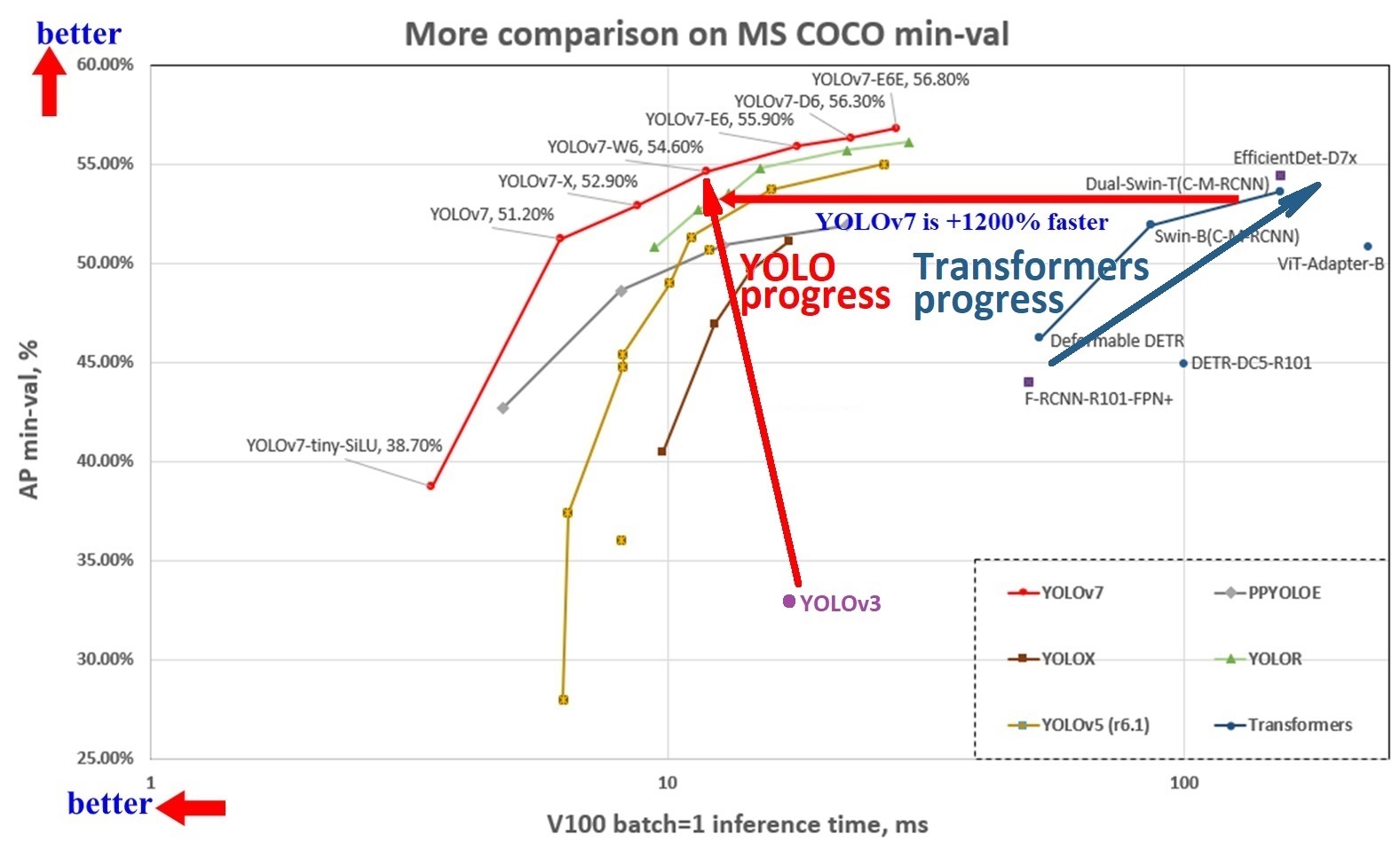
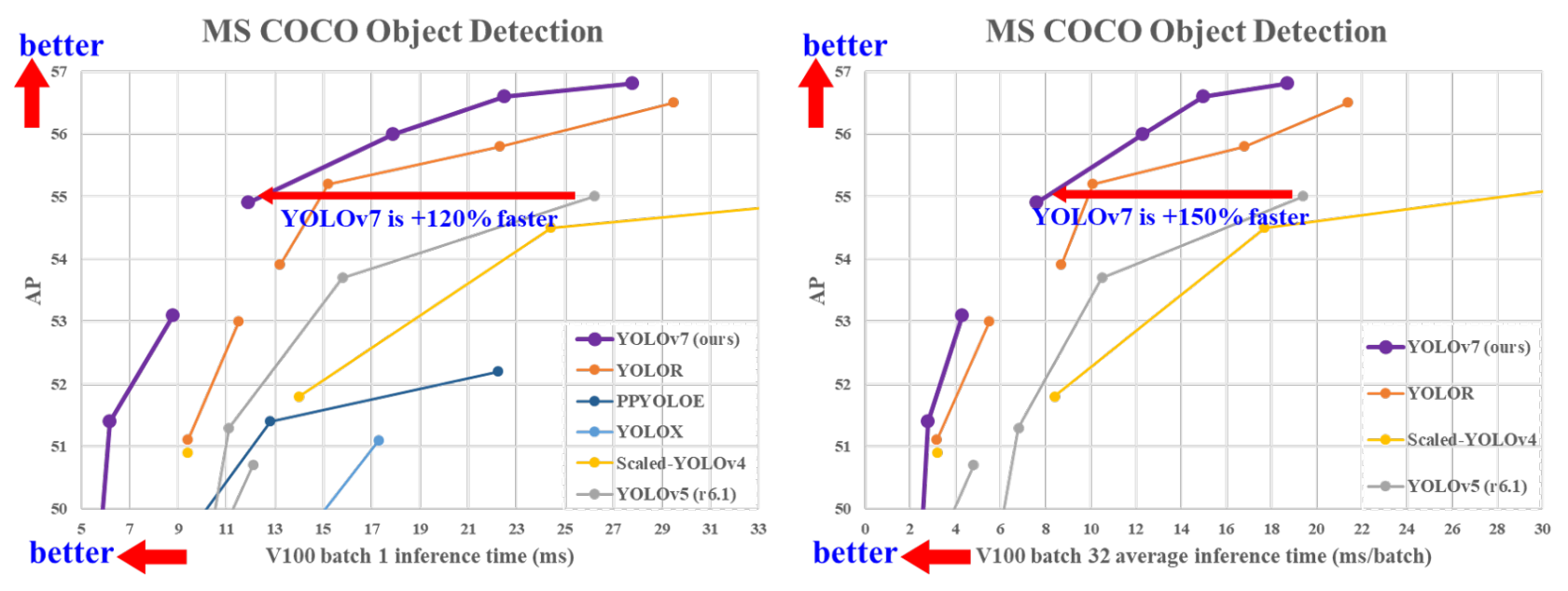
YOLOv7 is more accurate and faster than YOLOv5 by 120% FPS, than YOLOX by 180% FPS, than Dual-Swin-T by 1200% FPS, than ConvNext by 550% FPS, than SWIN-L by 500% FPS, than PPYOLOE-X by 150% FPS.
YOLOv7 surpasses all known object detectors in both speed and accuracy in the range from 5 FPS to 160 FPS and has the highest accuracy 56.8% AP among all known real-time object detectors with 30 FPS or higher on GPU V100, batch=1.
- YOLOv7-e6 (55.9% AP, 56 FPS V100 b=1) by
+500%FPS faster than SWIN-L C-M-RCNN (53.9% AP, 9.2 FPS A100 b=1) - YOLOv7-e6 (55.9% AP, 56 FPS V100 b=1) by
+550%FPS faster than ConvNeXt-XL C-M-RCNN (55.2% AP, 8.6 FPS A100 b=1) - YOLOv7-w6 (54.6% AP, 84 FPS V100 b=1) by
+120%FPS faster than YOLOv5-X6-r6.1 (55.0% AP, 38 FPS V100 b=1) - YOLOv7-w6 (54.6% AP, 84 FPS V100 b=1) by
+1200%FPS faster than Dual-Swin-T C-M-RCNN (53.6% AP, 6.5 FPS V100 b=1) - YOLOv7x (52.9% AP, 114 FPS V100 b=1) by
+150%FPS faster than PPYOLOE-X (51.9% AP, 45 FPS V100 b=1) - YOLOv7 (51.2% AP, 161 FPS V100 b=1) by
+180%FPS faster than YOLOX-X (51.1% AP, 58 FPS V100 b=1)
----
----
----
More details in articles on medium:
Manual: https://github.com/AlexeyAB/darknet/wikiDiscussion:
About Darknet framework: http://pjreddie.com/darknet/- YOLOv4 model zoo

- Requirements (and how to install dependencies)
- Pre-trained models
- FAQ - frequently asked questions
- Explanations in issues
- Yolo v4 in other frameworks (TensorRT, TensorFlow, PyTorch, OpenVINO, OpenCV-dnn, TVM,...)
- Datasets
- Yolo v4, v3 and v2 for Windows and Linux
- (neural networks for object detection)
- GeForce RTX 2080 Ti
- Youtube video of results
- How to evaluate AP of YOLOv4 on the MS COCO evaluation server
- How to evaluate FPS of YOLOv4 on GPU
- Pre-trained models
- Requirements for Windows, Linux and macOS
- Yolo v4 in other frameworks
- Datasets
- Improvements in this repository
- How to use on the command line
- For using network video-camera mjpeg-stream with any Android smartphone
- How to compile on Linux/macOS (using
CMake) - Using also PowerShell
- How to compile on Linux (using
make) - How to compile on Windows (using
CMake) - How to compile on Windows (using
vcpkg) - How to train with multi-GPU
- How to train (to detect your custom objects)
- How to train tiny-yolo (to detect your custom objects)
- When should I stop training
- Custom object detection
- How to improve object detection
- How to mark bounded boxes of objects and create annotation files
- How to use Yolo as DLL and SO libraries
- Citation
AP50:95 - FPS (Tesla V100) Paper: https://arxiv.org/abs/2011.08036
----
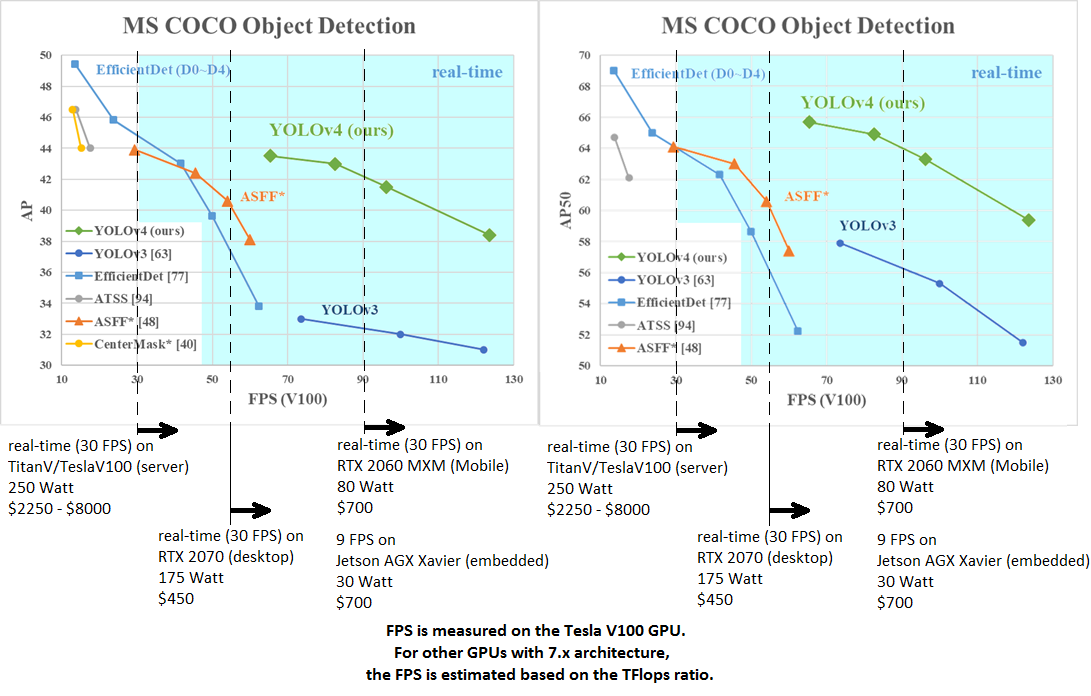
AP50:95 / AP50 - FPS (Tesla V100) Paper: https://arxiv.org/abs/2004.10934
tkDNN-TensorRT accelerates YOLOv4 ~2x times for batch=1 and 3x-4x times for batch=4.
- tkDNN: https://github.com/ceccocats/tkDNN
- OpenCV: https://gist.github.com/YashasSamaga/48bdb167303e10f4d07b754888ddbdcf
GeForce RTX 2080 Ti
| Network Size | Darknet, FPS (avg) | tkDNN TensorRT FP32, FPS | tkDNN TensorRT FP16, FPS | OpenCV FP16, FPS | tkDNN TensorRT FP16 batch=4, FPS | OpenCV FP16 batch=4, FPS | tkDNN Speedup | |:--------------------------:|:------------------:|-------------------------:|-------------------------:|-----------------:|---------------------------------:|-------------------------:|--------------:| |320 | 100 | 116 | 202 | 183 | 423 | 430 | 4.3x | |416 | 82 | 103 | 162 | 159 | 284 | 294 | 3.6x | |512 | 69 | 91 | 134 | 138 | 206 | 216 | 3.1x | |608 | 53 | 62 | 103 | 115 | 150 | 150 | 2.8x | |Tiny 416 | 443 | 609 | 790 | 773 | 1774 | 1353 | 3.5x | |Tiny 416 CPU Core i7 7700HQ | 3.4 | - | - | 42 | - | 39 | 12x |
- Yolo v4 Full comparison: map_fps
- Yolo v4 tiny comparison: tiny_fps
- CSPNet: paper and map_fps comparison: https://github.com/WongKinYiu/CrossStagePartialNetworks
- Yolo v3 on MS COCO: Speed / Accuracy ([email protected]) chart
- Yolo v3 on MS COCO (Yolo v3 vs RetinaNet) - Figure 3: https://arxiv.org/pdf/1804.02767v1.pdf
- Yolo v2 on Pascal VOC 2007: https://hsto.org/files/a24/21e/068/a2421e0689fb43f08584de9d44c2215f.jpg
- Yolo v2 on Pascal VOC 2012 (comp4): https://hsto.org/files/3a6/fdf/b53/3a6fdfb533f34cee9b52bdd9bb0b19d9.jpg
Youtube video of results
| [
](https://youtu.be/1_SiUOYUoOI "Yolo v4") | [
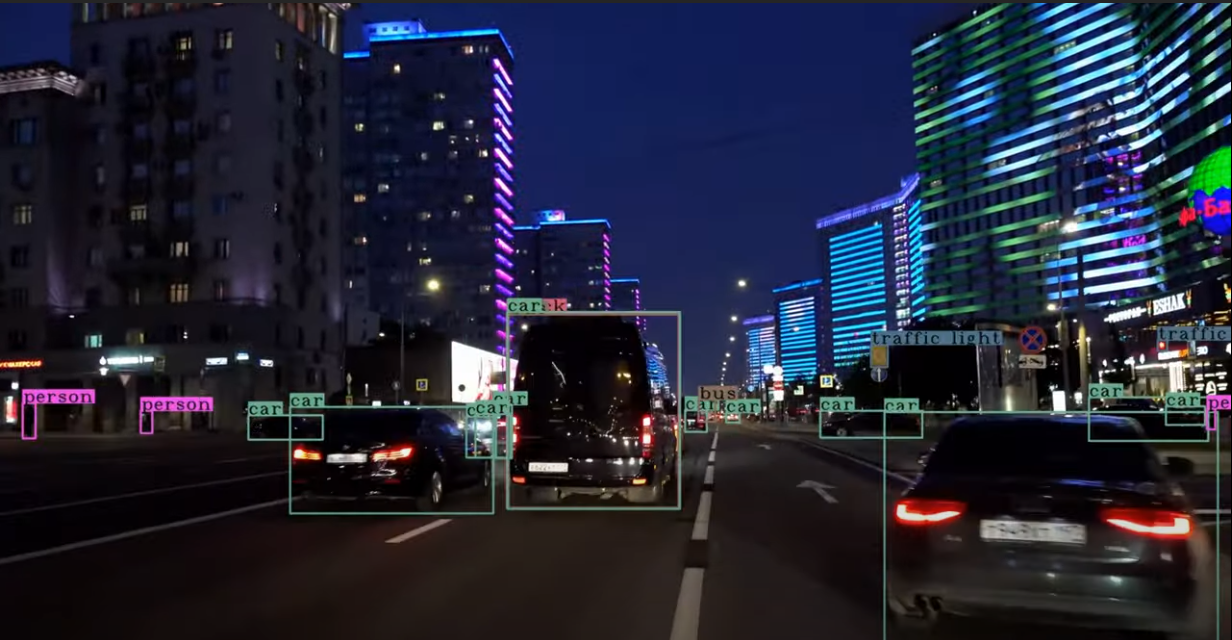
](https://youtu.be/YDFf-TqJOFE "Scaled Yolo v4") |
|---|---|
Others: https://www.youtube.com/user/pjreddie/videos
How to evaluate AP of YOLOv4 on the MS COCO evaluation server
1. Download and unzip test-dev2017 dataset from MS COCO server: http://images.cocodataset.org/zips/test2017.zip
2. Download list of images for Detection tasks and replace the paths with yours: https://raw.githubusercontent.com/AlexeyAB/darknet/master/scripts/testdev2017.txt
3. Download yolov4.weights file 245 MB: yolov4.weights (Google-drive mirror yolov4.weights )
4. Content of the file cfg/coco.data should be
classes= 80
train = /trainvalno5k.txt
valid = /testdev2017.txt
names = data/coco.names
backup = backup
eval=coco
5. Create /results/ folder near with ./darknet executable file
6. Run validation: ./darknet detector valid cfg/coco.data cfg/yolov4.cfg yolov4.weights
7. Rename the file /results/coco_results.json to detections_test-dev2017_yolov4_results.json and compress it to detections_test-dev2017_yolov4_results.zip
8. Submit file detections_test-dev2017_yolov4_results.zip to the MS COCO evaluation server for the test-dev2019 (bbox)
How to evaluate FPS of YOLOv4 on GPU
1. Compile Darknet with GPU=1 CUDNN=1 CUDNN_HALF=1 OPENCV=1 in the Makefile
2. Download yolov4.weights file 245 MB: yolov4.weights (Google-drive mirror yolov4.weights )
3. Get any .avi/.mp4 video file (preferably not more than 1920x1080 to avoid bottlenecks in CPU performance)
4. Run one of two commands and look at the AVG FPS:
- include video_capturing + NMS + drawing_bboxes:
./darknet detector demo cfg/coco.data cfg/yolov4.cfg yolov4.weights test.mp4 -dont_show -ext_output
- exclude video_capturing + NMS + drawing_bboxes:
./darknet detector demo cfg/coco.data cfg/yolov4.cfg yolov4.weights test.mp4 -benchmark
Pre-trained models
There are weights-file for different cfg-files (trained for MS COCO dataset):
FPS on RTX 2070 (R) and Tesla V100 (V):
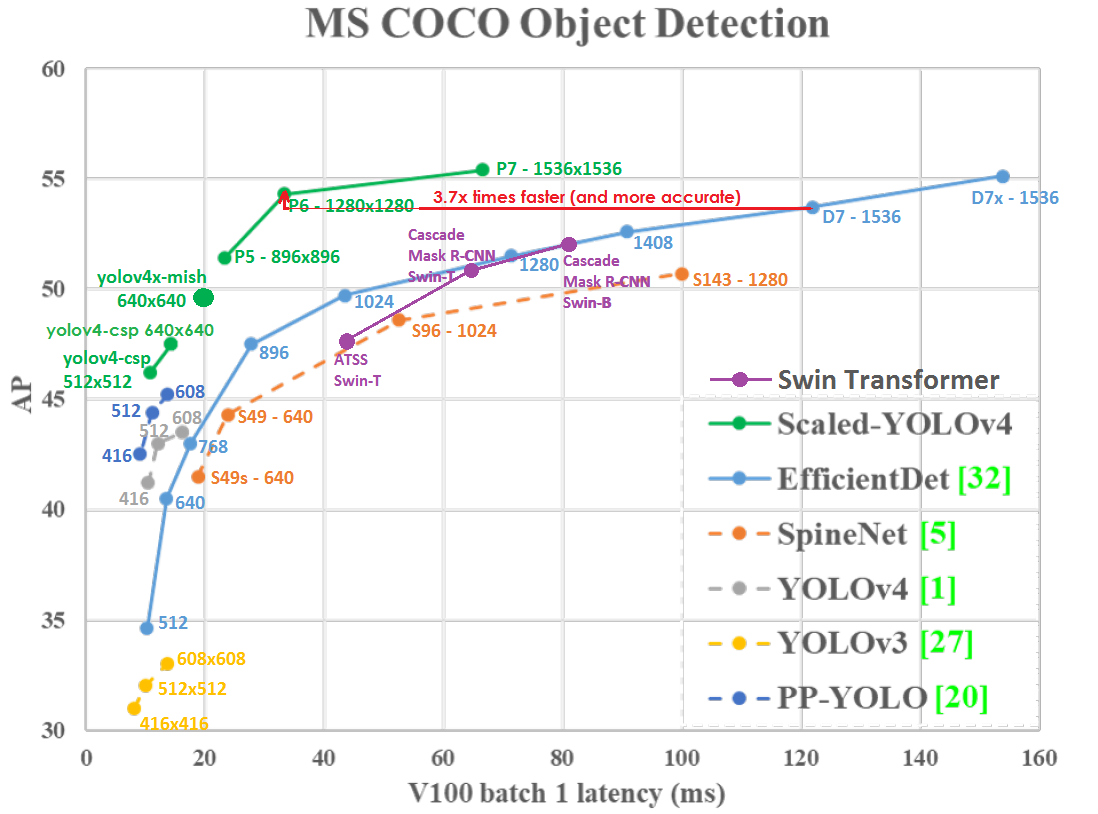
- yolov4-p6.cfg - 1280x1280 - 72.1% [email protected] (54.0% [email protected]:0.95) - 32(V) FPS - xxx BFlops (xxx FMA) - 487 MB: yolov4-p6.weights
- pre-trained weights for training: https://github.com/AlexeyAB/darknet/releases/download/darknet_yolo_v4_pre/yolov4-p6.conv.289
- yolov4-p5.cfg - 896x896 - 70.0% [email protected] (51.6% [email protected]:0.95) - 43(V) FPS - xxx BFlops (xxx FMA) - 271 MB: yolov4-p5.weights
- pre-trained weights for training: https://github.com/AlexeyAB/darknet/releases/download/darknet_yolo_v4_pre/yolov4-p5.conv.232
- yolov4-csp-x-swish.cfg - 640x640 - 69.9% [email protected] (51.5% [email protected]:0.95) - 23(R) FPS / 50(V) FPS - 221 BFlops (110 FMA) - 381 MB: yolov4-csp-x-swish.weights
- pre-trained weights for training: https://github.com/AlexeyAB/darknet/releases/download/darknet_yolo_v4_pre/yolov4-csp-x-swish.conv.192
- yolov4-csp-swish.cfg - 640x640 - 68.7% [email protected] (50.0% [email protected]:0.95) - 70(V) FPS - 120 (60 FMA) - 202 MB: yolov4-csp-swish.weights
- pre-trained weights for training: https://github.com/AlexeyAB/darknet/releases/download/darknet_yolo_v4_pre/yolov4-csp-swish.conv.164
- yolov4x-mish.cfg - 640x640 - 68.5% [email protected] (50.1% [email protected]:0.95) - 23(R) FPS / 50(V) FPS - 221 BFlops (110 FMA) - 381 MB: yolov4x-mish.weights
- pre-trained weights for training: https://github.com/AlexeyAB/darknet/releases/download/darknet_yolo_v4_pre/yolov4x-mish.conv.166
- yolov4-csp.cfg - 202 MB: yolov4-csp.weights paper Scaled Yolo v4
width= and height= parameters in yolov4-csp.cfg file and use the same yolov4-csp.weights file for all cases:
width=640 height=640in cfg: 67.4% [email protected] (48.7% [email protected]:0.95) - 70(V) FPS - 120 (60 FMA) BFlopswidth=512 height=512in cfg: 64.8% [email protected] (46.2% [email protected]:0.95) - 93(V) FPS - 77 (39 FMA) BFlops- pre-trained weights for training: https://github.com/AlexeyAB/darknet/releases/download/darknet_yolo_v4_pre/yolov4-csp.conv.142
- yolov4.cfg - 245 MB: yolov4.weights (Google-drive mirror yolov4.weights ) paper Yolo v4
width= and height= parameters in yolov4.cfg file and use the same yolov4.weights file for all cases:
width=608 height=608in cfg: 65.7% [email protected] (43.5% [email protected]:0.95) - 34(R) FPS / 62(V) FPS - 128.5 BFlopswidth=512 height=512in cfg: 64.9% [email protected] (43.0% [email protected]:0.95) - 45(R) FPS / 83(V) FPS - 91.1 BFlopswidth=416 height=416in cfg: 62.8% [email protected] (41.2% [email protected]:0.95) - 55(R) FPS / 96(V) FPS - 60.1 BFlopswidth=320 height=320in cfg: 60% [email protected] ( 38% [email protected]:0.95) - 63(R) FPS / 123(V) FPS - 35.5 BFlops- yolov4-tiny.cfg - 40.2% [email protected] - 371(1080Ti) FPS / 330(RTX2070) FPS - 6.9 BFlops - 23.1 MB: yolov4-tiny.weights
- enet-coco.cfg (EfficientNetB0-Yolov3) - 45.5% [email protected] - 55(R) FPS - 3.7 BFlops - 18.3 MB: enetb0-coco_final.weights
- yolov3-openimages.cfg - 247 MB - 18(R) FPS - OpenImages dataset: yolov3-openimages.weights
CLICK ME - Yolo v3 models
- csresnext50-panet-spp-original-optimal.cfg - 65.4% [email protected] (43.2% [email protected]:0.95) - 32(R) FPS - 100.5 BFlops - 217 MB: csresnext50-panet-spp-original-optimal_final.weights
- yolov3-spp.cfg - 60.6% [email protected] - 38(R) FPS - 141.5 BFlops - 240 MB: yolov3-spp.weights
- csresnext50-panet-spp.cfg - 60.0% [email protected] - 44 FPS - 71.3 BFlops - 217 MB: csresnext50-panet-spp_final.weights
- yolov3.cfg - 55.3% [email protected] - 66(R) FPS - 65.9 BFlops - 236 MB: yolov3.weights
- yolov3-tiny.cfg - 33.1% [email protected] - 345(R) FPS - 5.6 BFlops - 33.7 MB: yolov3-tiny.weights
- yolov3-tiny-prn.cfg - 33.1% [email protected] - 370(R) FPS - 3.5 BFlops - 18.8 MB: yolov3-tiny-prn.weights
CLICK ME - Yolo v2 models
yolov2.cfg(194 MB COCO Yolo v2) - requires 4 GB GPU-RAM: https://pjreddie.com/media/files/yolov2.weightsyolo-voc.cfg(194 MB VOC Yolo v2) - requires 4 GB GPU-RAM: http://pjreddie.com/media/files/yolo-voc.weightsyolov2-tiny.cfg(43 MB COCO Yolo v2) - requires 1 GB GPU-RAM: https://pjreddie.com/media/files/yolov2-tiny.weightsyolov2-tiny-voc.cfg(60 MB VOC Yolo v2) - requires 1 GB GPU-RAM: http://pjreddie.com/media/files/yolov2-tiny-voc.weightsyolo9000.cfg(186 MB Yolo9000-model) - requires 4 GB GPU-RAM: http://pjreddie.com/media/files/yolo9000.weights
Put it near compiled: darknet.exe
You can get cfg-files by path: darknet/cfg/
Requirements for Windows, Linux and macOS
- CMake >= 3.18: https://cmake.org/download/
- Powershell (already installed on windows): https://docs.microsoft.com/en-us/powershell/scripting/install/installing-powershell
- CUDA >= 10.2: https://developer.nvidia.com/cuda-toolkit-archive (on Linux do Post-installation Actions)
- OpenCV >= 2.4: use your preferred package manager (brew, apt), build from source using vcpkg or download from OpenCV official site (on Windows set system variable
OpenCV_DIR=C:\opencv\build- where are theincludeandx64folders image) - cuDNN >= 8.0.2 https://developer.nvidia.com/rdp/cudnn-archive (on Linux follow steps described here https://docs.nvidia.com/deeplearning/sdk/cudnn-install/index.html#installlinux-tar , on Windows follow steps described here https://docs.nvidia.com/deeplearning/sdk/cudnn-install/index.html#installwindows)
- GPU with CC >= 3.0: https://en.wikipedia.org/wiki/CUDA#GPUs_supported
Yolo v4 in other frameworks
- Pytorch - Scaled-YOLOv4: https://github.com/WongKinYiu/ScaledYOLOv4
- TensorFlow:
pip install yolov4YOLOv4 on TensorFlow 2.0 / TFlite / Android: https://github.com/hunglc007/tensorflow-yolov4-tflite
yolov4.weights/cfg files to yolov4.pb by using TNTWEN project, and to yolov4.tflite TensorFlow-lite
- OpenCV the fastest implementation of YOLOv4 for CPU (x86/ARM-Android), OpenCV can be compiled with OpenVINO-backend for running on (Myriad X / USB Neural Compute Stick / Arria FPGA), use
yolov4.weights/cfgwith: C++ example or Python example - Intel OpenVINO 2021.2: supports YOLOv4 (NPU Myriad X / USB Neural Compute Stick / Arria FPGA): https://devmesh.intel.com/projects/openvino-yolov4-49c756 read this manual (old manual ) (for Scaled-YOLOv4 models use https://github.com/Chen-MingChang/pytorch_YOLO_OpenVINO_demo )
- PyTorch > ONNX:
- WongKinYiu/PyTorch_YOLOv4
- maudzung/3D-YOLOv4
- Tianxiaomo/pytorch-YOLOv4
- YOLOv5
- ONNX on Jetson for YOLOv4: https://developer.nvidia.com/blog/announcing-onnx-runtime-for-jetson/ and https://github.com/ttanzhiqiang/onnx_tensorrt_project
- nVidia Transfer Learning Toolkit (TLT>=3.0) Training and Detection https://