1
 →
→
A tiny (118 bytes), secure, URL-friendly, unique string ID generator for JavaScript
ai/nanoid is an open-source project on GitHub, mainly written in JavaScript. A tiny (118 bytes), secure, URL-friendly, unique string ID generator for JavaScript It currently holds 27,046 stars and 885 forks with 5 open issues, and was last pushed on 2026-09-23 (repository created 2017-08-05).
Git Homed tracks it on the Today's Trending board, currently at rank #99 with 34 new stars today.

English | 日本語 | Русский | 简体中文 | Bahasa Indonesia | 한국어 | العربية
A tiny, secure, URL-friendly, unique string ID generator for JavaScript.
“An amazing level of senseless perfectionism,
which is simply impossible not to respect.”
crypto.randomUUID().A-Za-z0-9_-).import { nanoid } from "nanoid";
model.id = nanoid(); //=> "V1StGXR8_Z5jdHi6B-myT"
---
 Nano ID is built by Evil Martians, an American design and engineering consultancy for developer tools, AI, and cybersecurity startups.
---
[Size Limit]: https://github.com/ai/size-limit
Nano ID is quite comparable to UUID v4 (random-based). It has a similar number of random bits in the ID (126 in Nano ID and 122 in UUID), so it has a similar collision probability:
For there to be a one in a billion chance of duplication,
103 trillion version 4 IDs must be generated.
There are two main differences between Nano ID and UUID v4:
1. Nano ID uses a bigger alphabet, so a similar number of random bits
are packed in just 21 symbols instead of 36.
2. Nano ID is faster than crypto.randomUUID and uuid/v4.
$ node ./test/benchmark.js
nope-id 20,386,830 ops/sec
nanoid 20,434,827 ops/sec
customAlphabet 20,544,476 ops/sec
crypto.randomUUID 12,865,759 ops/sec
uuid v4 7,930,104 ops/sec
@napi-rs/uuid 5,573,171 ops/sec
uid/secure 6,308,267 ops/sec
@lukeed/uuid 5,278,597 ops/sec
nanoid for browser 311,497 ops/sec
secure-random-string 301,667 ops/sec
uid-safe.sync 297,815 ops/sec
Non-secure:
uid 20,286,757 ops/sec
nanoid/non-secure 2,397,594 ops/sec
rndm 2,445,462 ops/sec
_See a good article about random generators theory: [Secure random values (in Node.js)]_
Math.random(), Nano IDcrypto module in Node.js and the Web Crypto API in browsers.
These modules use unpredictable hardware random generator.
random % alphabet is a popular mistake to make when coding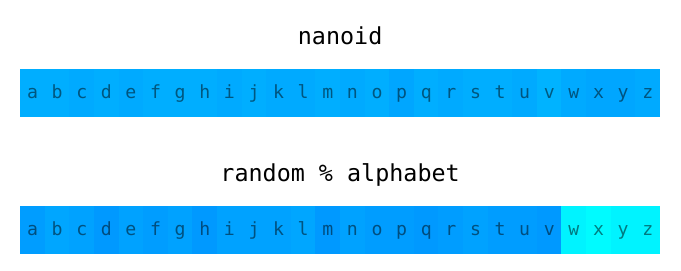
[Secure random values (in Node.js)]: https://gist.github.com/joepie91/7105003c3b26e65efcea63f3db82dfba [better algorithm]: https://github.com/ai/nanoid/blob/main/index.js [the source]: https://github.com/ai/nanoid/blob/main/index.js
npm install nanoid
JSR is a replacement for npm with open governance and active development (in contrast to npm).
npx jsr add @sitnik/nanoid
You can use it in Node.js, Deno, Bun, etc.
// Replace nanoid to @sitnik/nanoid in all imports
import { nanoid } from "@sitnik/nanoid";
For Deno install it by deno add jsr:@sitnik/nanoid or import
from jsr:@sitnik/nanoid.
For quick hacks, you can load Nano ID from CDN. Though, it is not recommended to be used in production because of the lower loading performance.
import { nanoid } from "https://cdn.jsdelivr.net/npm/nanoid/nanoid.js";
By default, Nano ID uses URL-friendly symbols (A-Za-z0-9_-) and returns an ID
with 21 characters (to have a collision probability similar to UUID v4).
import { nanoid } from "nanoid";
model.id = nanoid(); //=> "V1StGXR8_Z5jdHi6B-myT"
If you want to reduce the ID size (and increase collisions probability), you can pass the size as an argument.
nanoid(10); //=> "IRFa-VaY2b"
Don’t forget to check the safety of your ID size in our [ID collision probability] calculator.
You can also use a custom alphabet or a random generator.
[ID collision probability]: https://zelark.github.io/nano-id-cc/
customAlphabet returns a function that allows you to create nanoid
with your own alphabet and ID size.
import { customAlphabet } from "nanoid";
const nanoid = customAlphabet("1234567890abcdef", 10);
model.id = nanoid(); //=> "4f90d13a42"
import { customAlphabet } from "nanoid/non-secure";
const nanoid = customAlphabet("1234567890abcdef", 10);
user.id = nanoid();
Check the safety of your custom alphabet and ID size in our
[ID collision probability] calculator. For more alphabets, check out the options
in [nanoid-dictionary].
Alphabet must contain from 1 to 256 symbols. Otherwise, the security of the internal generator algorithm is not guaranteed, and a generator built from an empty or over-256-symbol alphabet can loop forever instead of returning an ID.
In addition to setting a default size, you can change the ID size when calling the function:
import { customAlphabet } from "nanoid";
const nanoid = customAlphabet("1234567890abcdef", 10);
model.id = nanoid(5); //=> "f01a2"
[nanoid-dictionary]: https://github.com/CyberAP/nanoid-dictionary
customRandom allows you to create a nanoid and replace alphabet
and the default random bytes generator.
In this example, a seed-based generator is used:
import { customRandom } from "nanoid";
const rng = seedrandom(seed);
const nanoid = customRandom("abcdef", 10, (size) => {
  return new Uint8Array(size).map(() => 256 * rng());
});
nanoid(); //=> "fbaefaadeb"
random callback must accept the array size and return an array
with random numbers.
If you want to use the same URL-friendly symbols with customRandom,
you can get the default alphabet using the urlAlphabet.
import { customRandom, urlAlphabet } from "nanoid";
const nanoid = customRandom(urlAlphabet, 10, random);
Note, that between Nano ID versions we may change random generator call sequence. If you are using seed-based generators, we do not guarantee the same result.
Nano ID uses hardware random bytes generation for security and low collision probability. If you are not so concerned with security, you can use it for environments without hardware random generators.
import { nanoid } from "nanoid/non-secure";
const id = nanoid(); //=> "Uakgb_J5m9g-0JDMbcJqLJ"
Note, that non-secure version is _slower_ than secure. Use it only if you have to.
There’s no correct way to use Nano ID for React key prop
since it should be consistent among renders.
function Todos({ todos }) {
return (
{todos.map((todo) => (
-
{" "}
/ DON’T DO IT /
{todo.text}
))}
);
}
You should rather try to reach for stable ID inside your list item.
const todoItems = todos.map((todo) => {todo.text} );
In case you don’t have stable IDs you'd rather use index as key
instead of nanoid():
const todoItems = todos.map((text, index) => (

    {" "}
    /* Still not recommended but preferred over nanoid(). Only do this if items have no stable IDs.
    */
    {text}

));
In case you just need random IDs to link elements like labels
and input fields together, [useId] is recommended.
That hook was added in React 18.
[useId]: https://react.dev/reference/react/useId
React Native does not have built-in random generator. The following polyfill
works for plain React Native and Expo starting with 39.x.
1. Check [react-native-get-random-values] docs and install it.
2. Import it before Nano ID.
import "react-native-get-random-values";
import { nanoid } from "nanoid";
[react-native-get-random-values]: https://github.com/LinusU/react-native-get-random-values
In PouchDB and CouchDB, IDs can’t start with an underscore _.
A prefix is required to prevent this issue, as Nano ID might use a _
at the start of the ID by default.
Override the default ID with the following option:
db.put({
  _id: 'id' + nanoid(),
  …
})
You can get unique ID in terminal by calling npx nanoid. You need only
Node.js in the system. You do not need Nano ID to be installed anywhere.
$ npx nanoid
npx: installed 1 in 0.63s
LZfXLFzPPR4NNrgjlWDxn
Size of generated ID can be specified with --size (or -s) option:
$ npx nanoid --size 10
L3til0JS4z
Custom alphabet can be specified with --alphabet (or -a) option
(note that in this case --size is required):
$ npx nanoid --alphabet abc --size 15
bccbcabaabaccab
Nano ID allows casting generated strings into opaque strings in TypeScript. For example:
declare const userIdBrand: unique symbol;
type UserId = string & { [userIdBrand]: true };
// Use explicit type parameter:
mockUser(nanoid());
interface User {
  id: UserId;
  name: string;
}
const user: User = {
  // Automatically casts to UserId:
  id: nanoid(),
  name: "Alice",
};
Nano ID was ported to many languages. You can use these ports to have the same ID generator on the client and server side.
[CLI]: #cli
nanoid-dictionary] with popular alphabets to use with [customAlphabet].nanoid-good] to be sure that your ID doesn’t contain any obscene words.nanoid-dictionary]: https://github.com/CyberAP/nanoid-dictionary
[ID size calculator]: https://zelark.github.io/nano-id-cc/
[customAlphabet]: #custom-alphabet-or-size
[nanoid-good]: https://github.com/y-gagar1n/nanoid-good→ →
→ →
→ →
→ →
→ →
→ →
→ →
→