1
 →
→
Agent skill for beautiful, verifiable architecture, workflow, sequence, data-flow, and lifecycle diagrams—self-contained HTML with motion and crisp export.
English · 简体中文

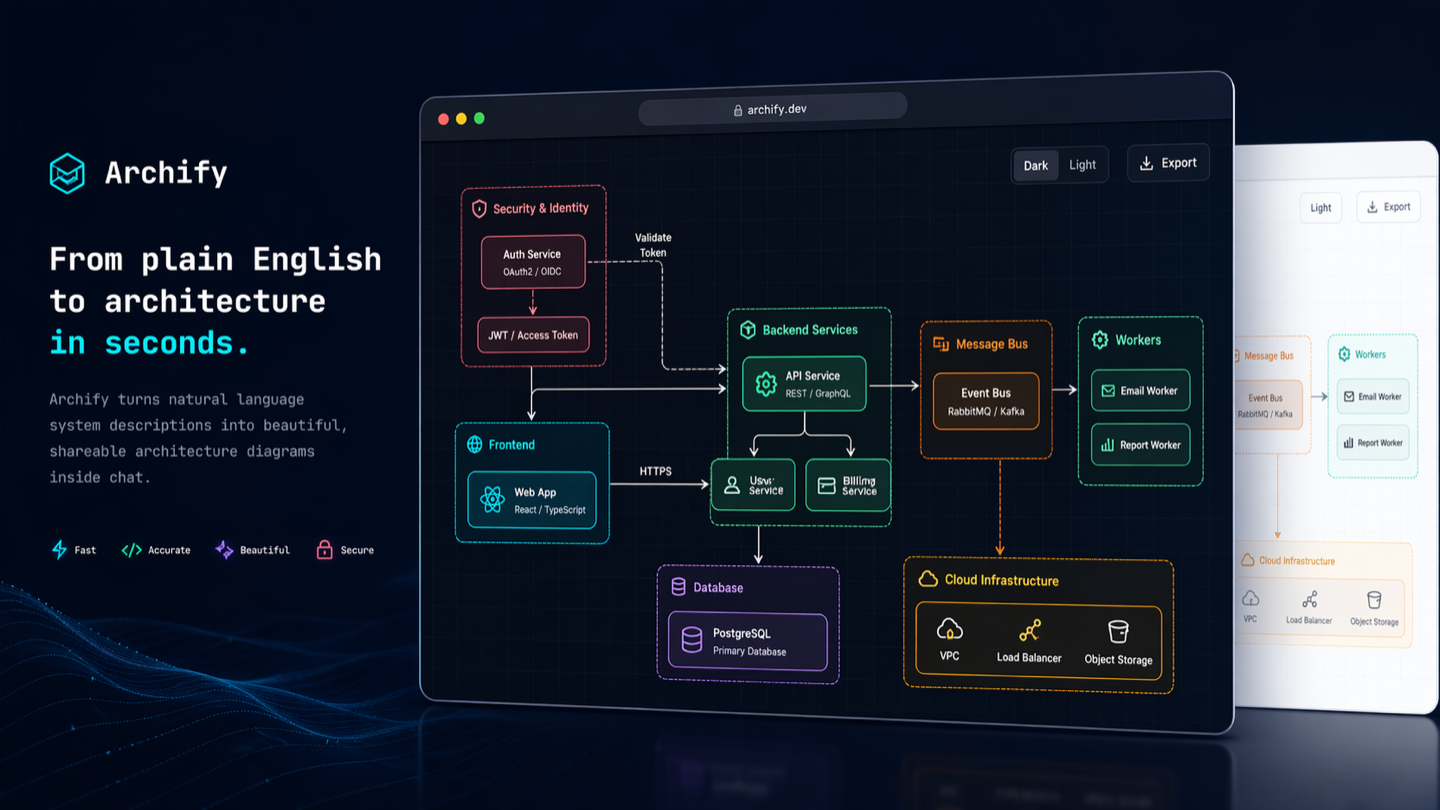
Turn a codebase or system description into a polished, interactive system map — directly in chat.
Archify is a Node.js rendering and validation system for Cursor, Claude Code, Codex CLI, and OpenCode. Agents produce typed JSON IR; Archify deterministically compiles it into HTML/SVG.



Current development version: v2.17.0-dev.1. See Changelog.
Project page · Scenario guide · Proof Lab
npx skills add tt-a1i/archify -g
Using Cursor? Open the agent-aware quick start for exact global and project commands.
No repository is required: describe the system in any agent chat.
 supercode.sh |
Supercode sponsors Archify and enhances Codex and Cursor with token optimization, curated Skills, and spec-driven development. Archify is featured as a Supercode Editor’s Choice skill. |
 EverMind · Raven | EverMind sponsors Archify and builds memory infrastructure for agents. Its Raven harness supports Archify as a Skill for verified, interactive system maps. |
Want to sponsor Archify? Contact us by email.
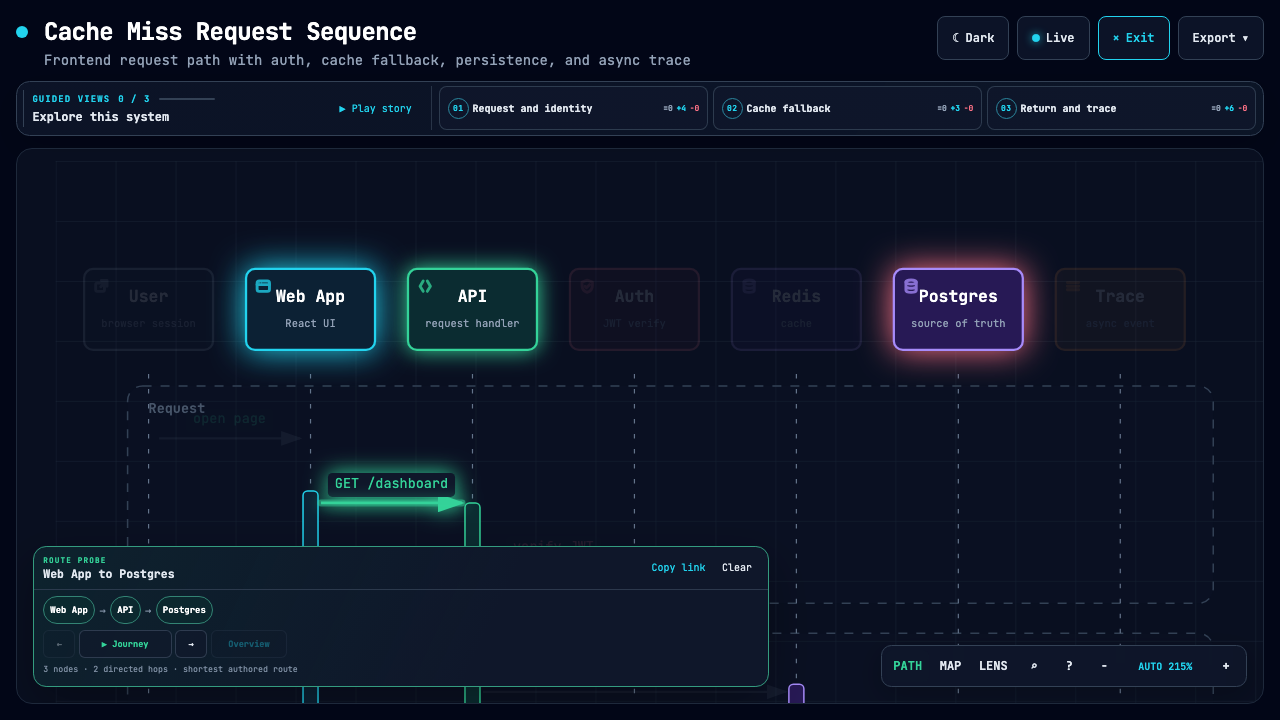
These are generated Archify artifacts, not product mockups. Click a frame to open its live, shareable state.
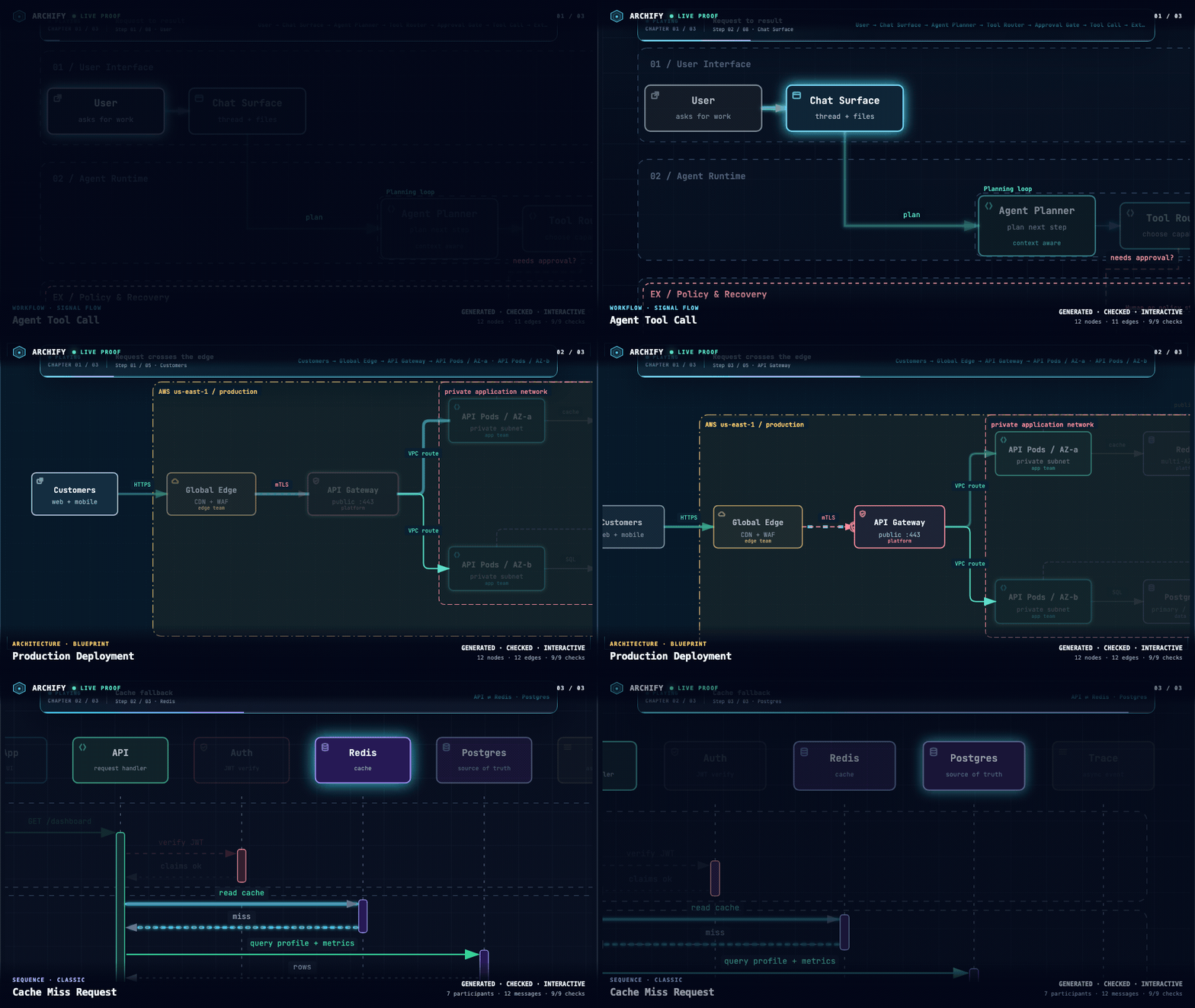
Three real generated artifacts. Signal Flow · Blueprint · Classic · open the interactive Proof Lab ↗
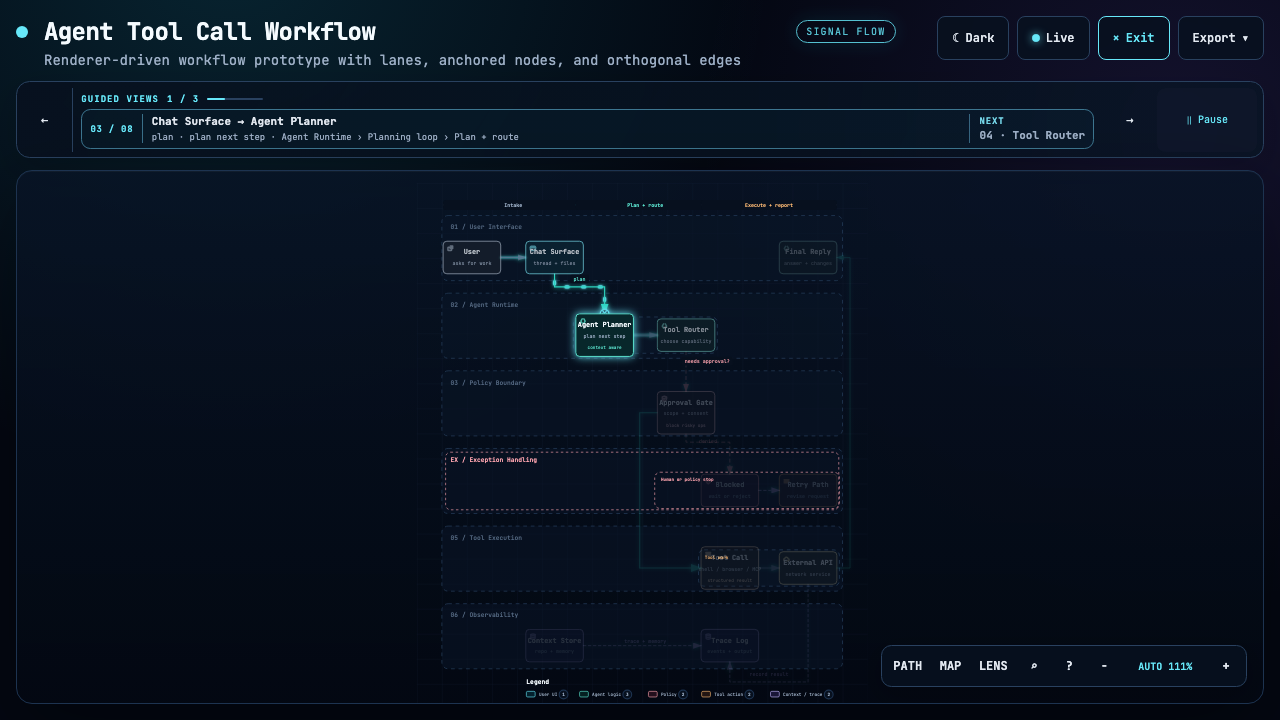
| Guided story | Route probe | Semantic lens |
|---|---|---|
|  |
|  |
| 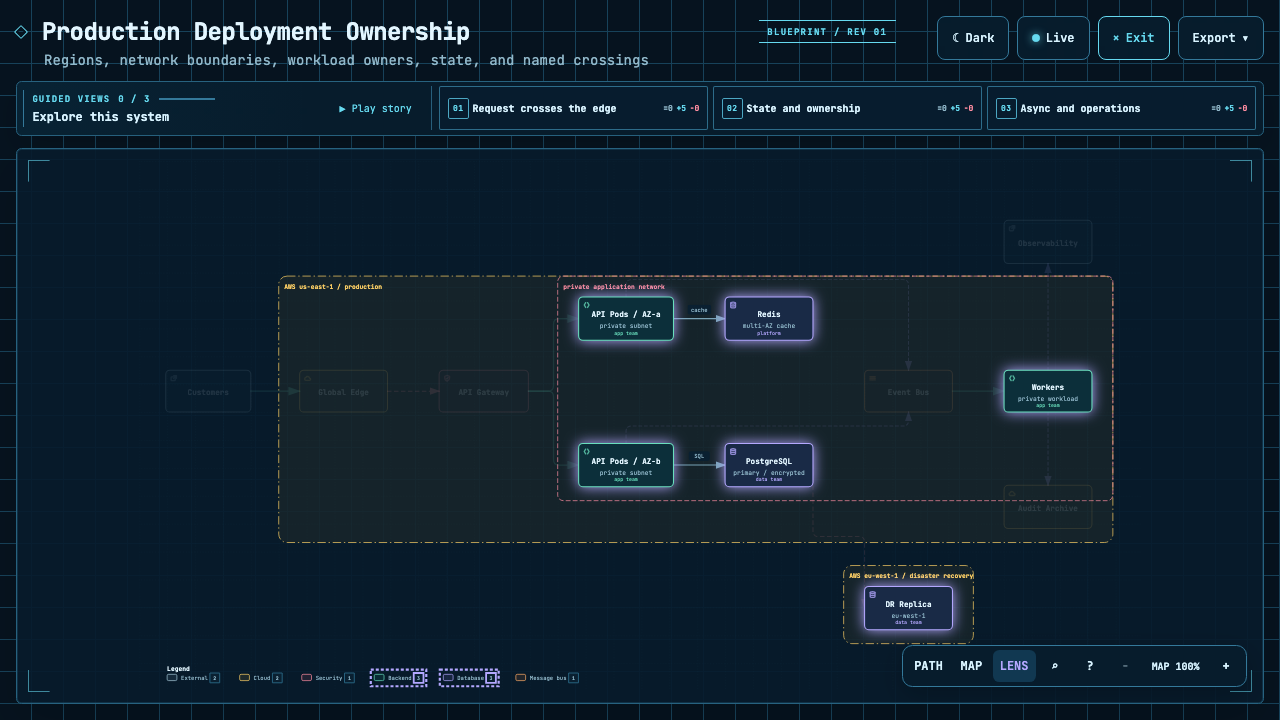 |
| Play one finite named chapter. | Inspect the shortest authored directed path. | Compare real traffic between semantic roles. |
|
| Play one finite named chapter. | Inspect the shortest authored directed path. | Compare real traffic between semantic roles. |
The Proof Lab contains all 11 checked-in scenarios, their JSON sources, named views, and validation receipts.
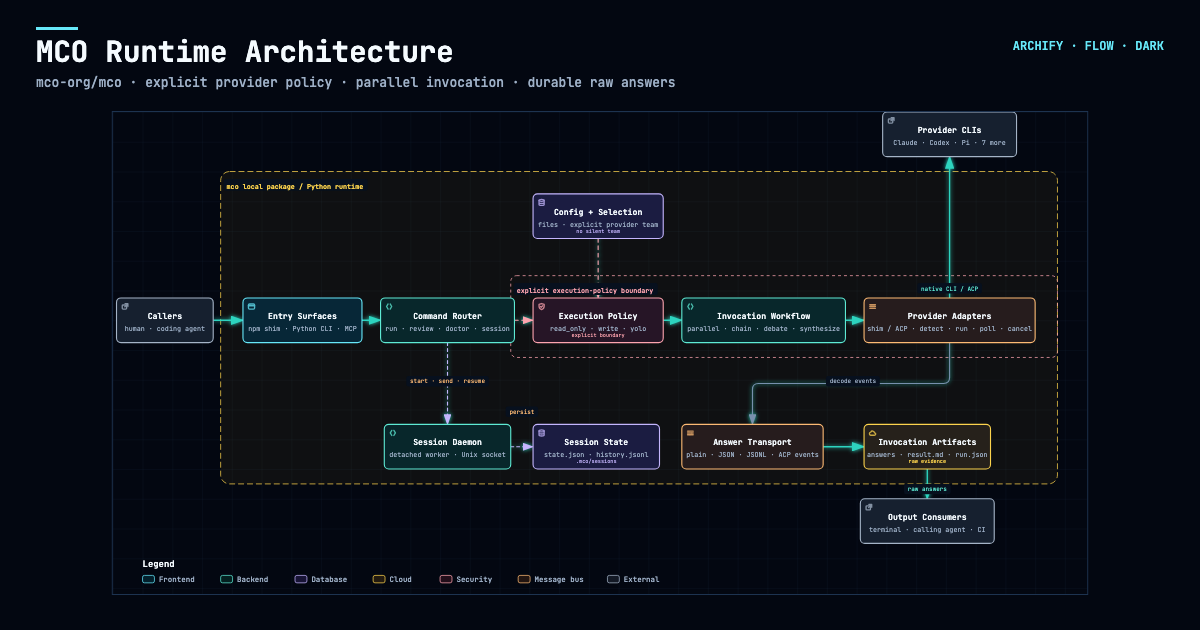
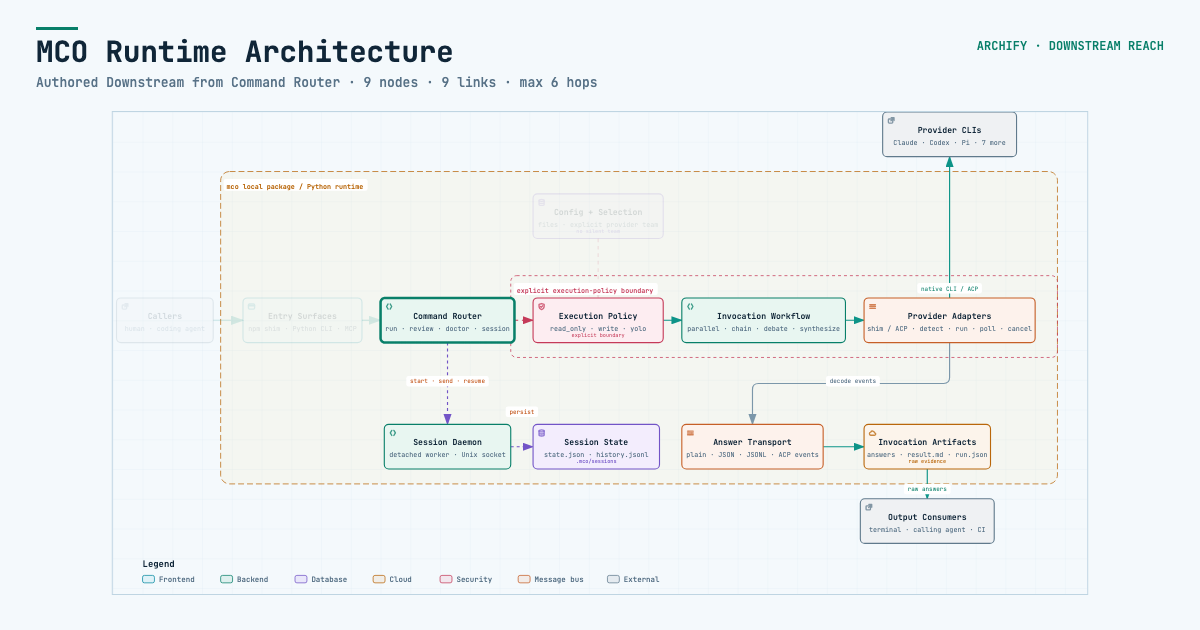
Archify traced mco-org/mco at 9f1a1cf and produced this checked map. Open it ↗ · trace reach ↗ · typed source
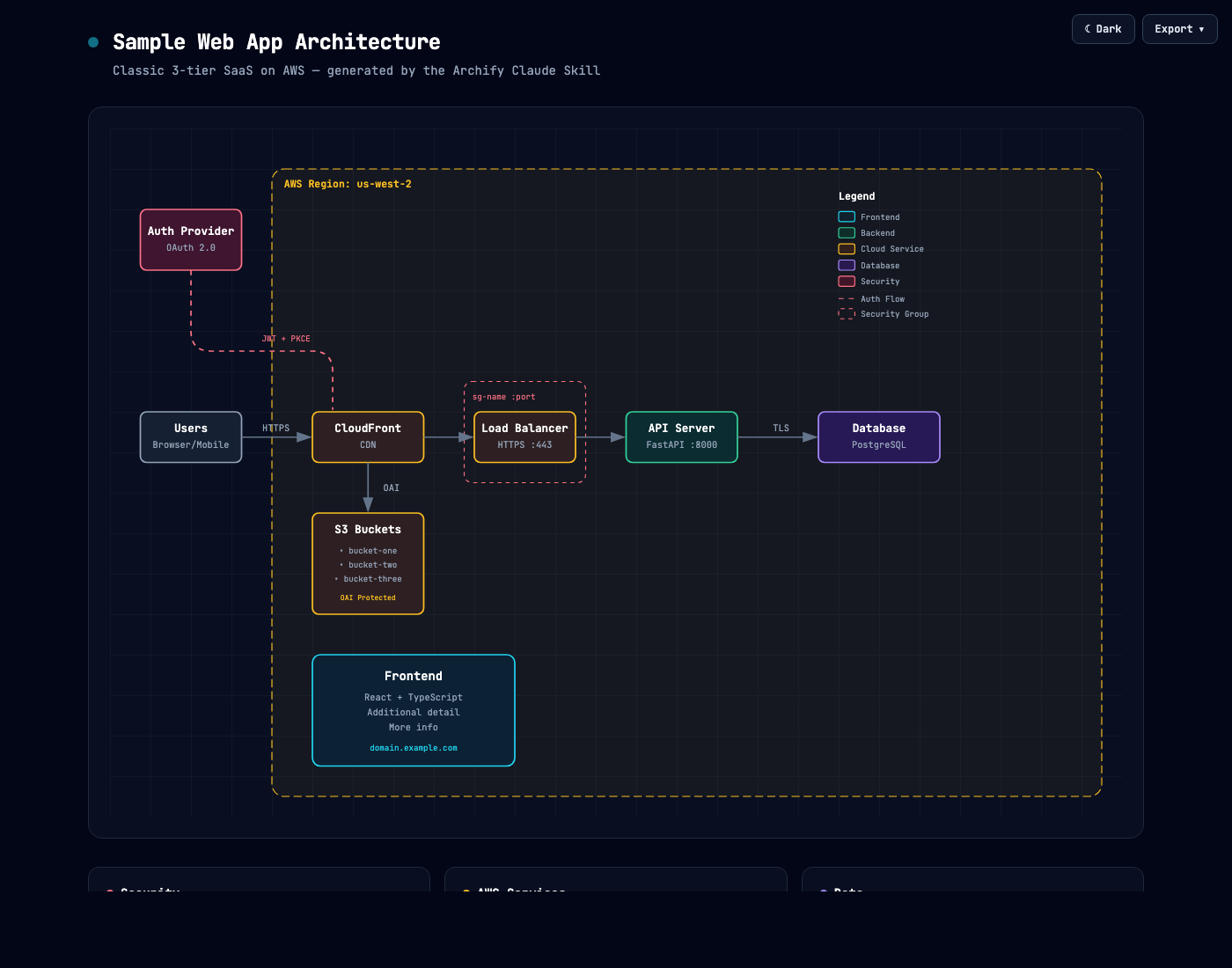
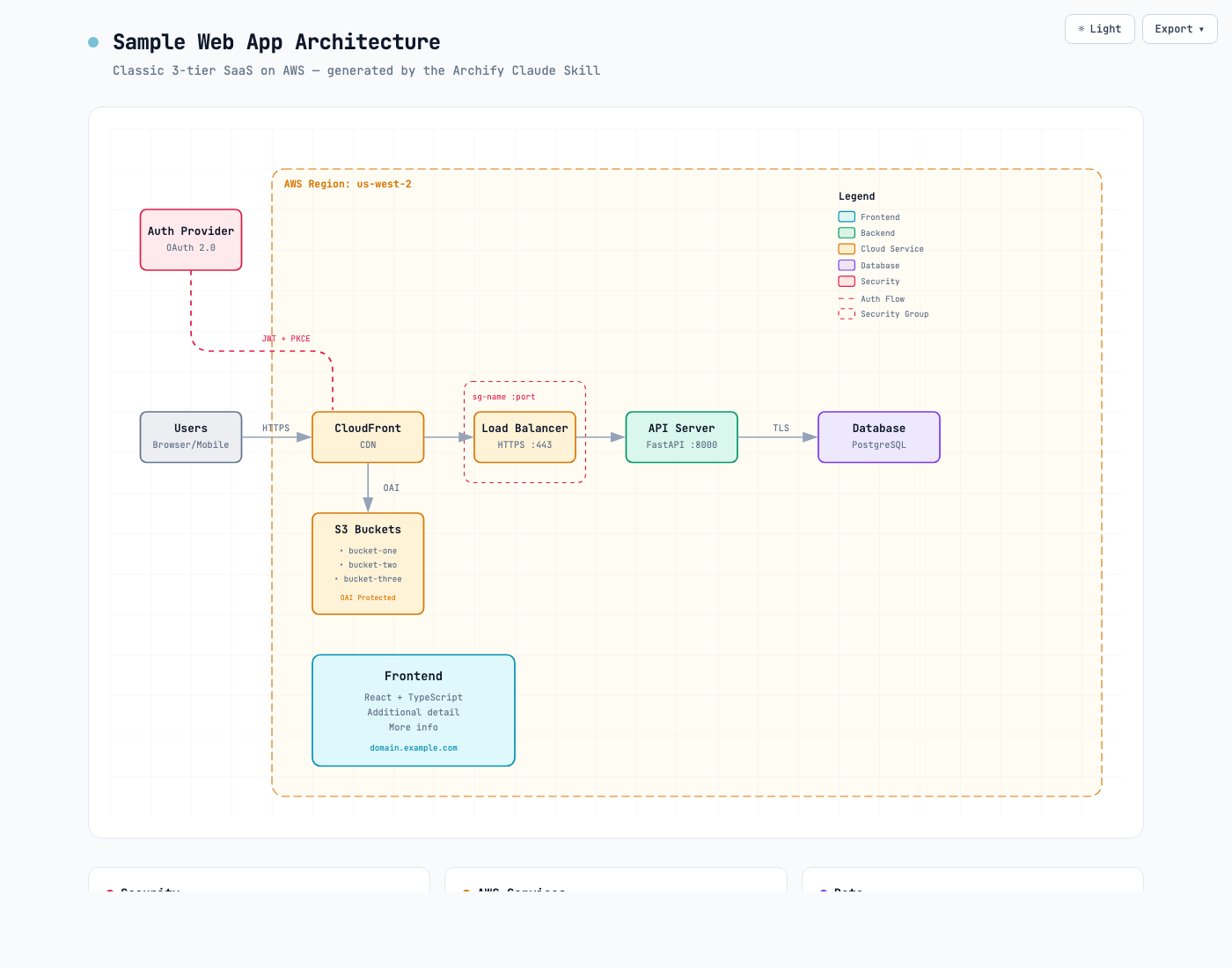
Same diagram, two themes, one click to switch:
| Dark | Light |
|---|---|
|  |
|  |
|
The Export menu copies PNG to the clipboard and downloads static or motion formats:
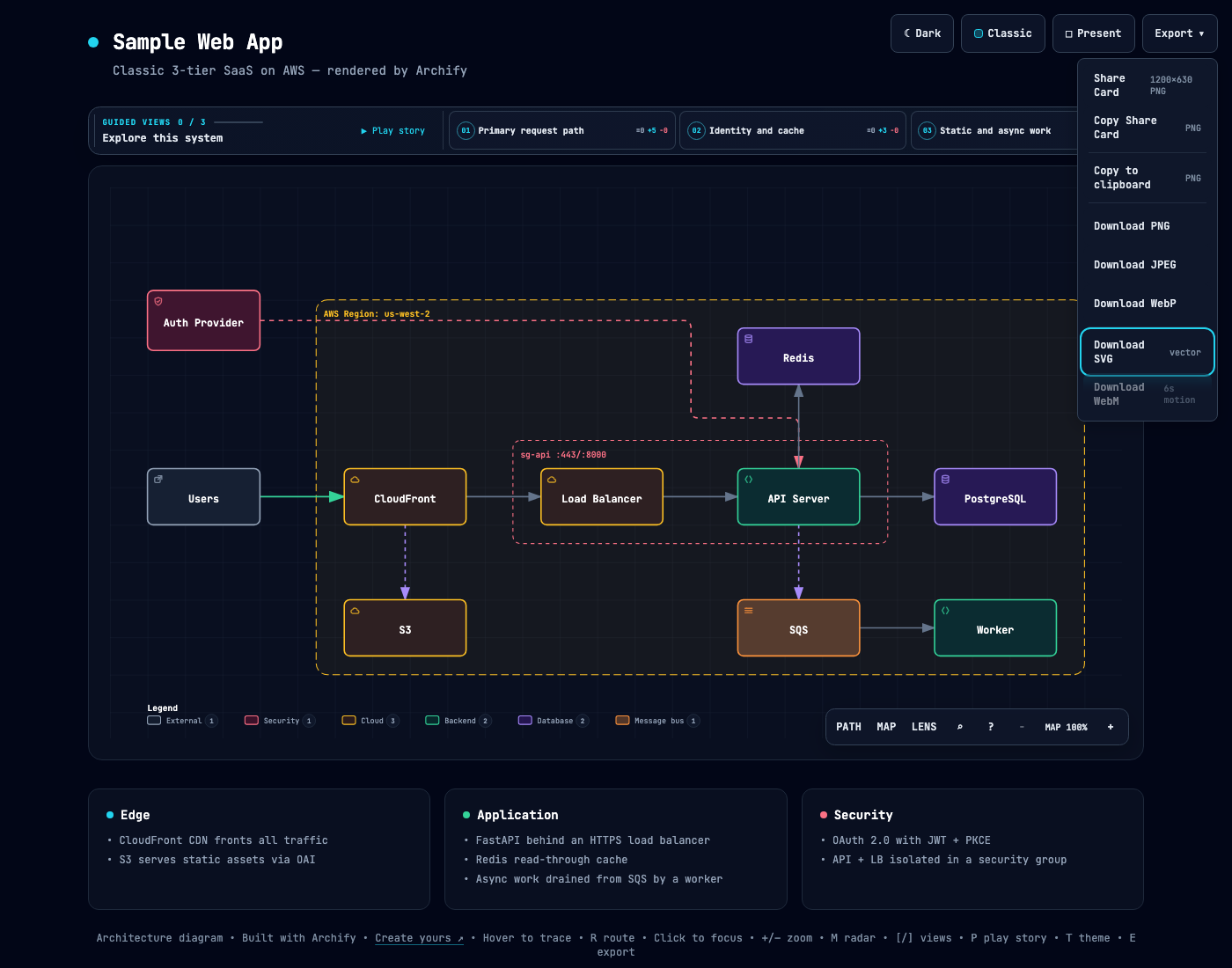
Use Copy Share Card when you want a canonical 1200×630 image for a README, release, or social post.
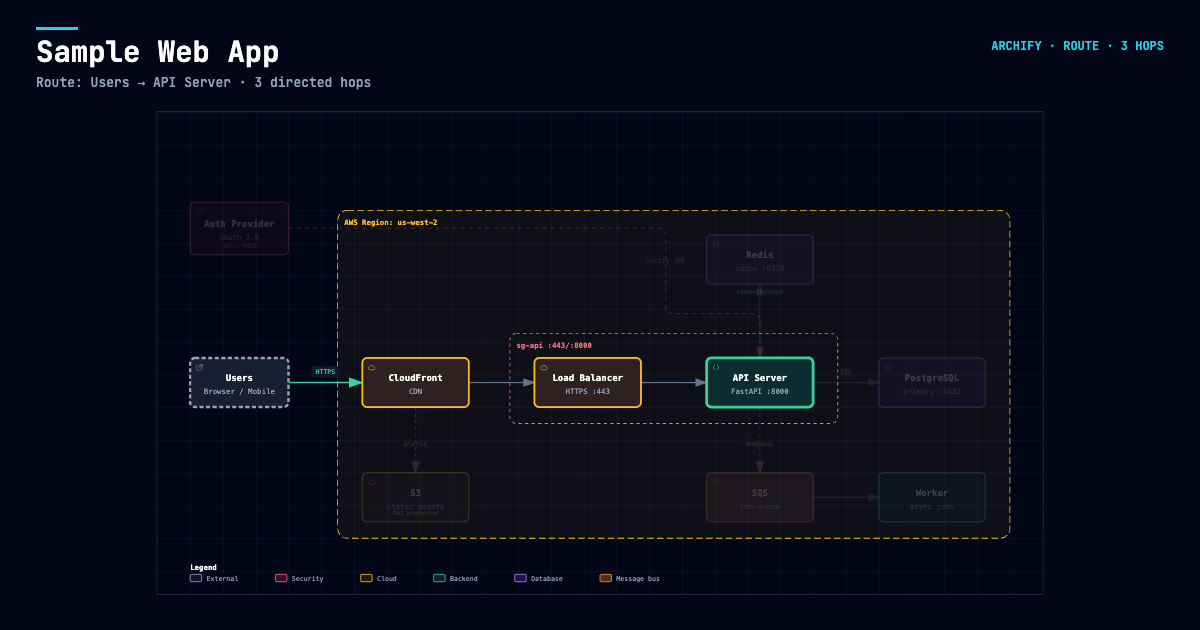
After tracing a route, Export → Route Share Card downloads that authored path as a 1200×630 PNG with the full diagram retained for context.
After tracing authored Upstream or Downstream reach, Export → Reach Share Card captures that exact reading without claiming runtime impact.
Open examples/web-app.html locally to try the complete viewer.
npx skills add tt-a1i/archify -g
For an explicit, non-interactive Cursor install:
npx -y skills add tt-a1i/archify --skill archify --agent cursor --global --copy --yes
To try without installing:
npx skills use tt-a1i/archify@archify --agent codex
DSH community opt-in: dsh plugin --profile web add @tt-a1i/[email protected]
The agent switcher covers cursor, codex, claude-code, and opencode. For Raven's manual ZIP install, extract archify.zip into ~/.raven/workspace/skills; it yields ~/.raven/workspace/skills/archify. Raven is not a switcher target.
Archify may GET the fixed stable manifest solely to show an optional reminder; it never downloads or installs updates. Successful checks wait about 72 hours (±20%); active use retries failures after 6, then 24 hours. The server sees normal HTTP metadata (IP and time), but receives no version, Agent, project data, prompts, account/device ID, or ETag. You decide whether and when to update. Set ARCHIFY_UPDATE_CHECK_DISABLED=1 to disable networking and reminder-state writes.
Use Archify to draw: Browser -> API -> Redis cache -> PostgreSQL fallback.
For source evidence, open a repository and ask:
Analyze this repository, then use archify to create a high-level runtime architecture diagram.
Show 8–12 core components, one primary path, external dependencies, and trust boundaries.
Put supporting detail in cards instead of adding more edges.
Continue with focused requests such as add Redis, move auth to the left, or highlight the rollback path. Archify keeps the typed source available for targeted iteration.
| Type | Best for | Include in your prompt | |---|---|---| | Architecture | Components, services, storage, boundaries | Scope, core components, primary path | | Workflow | CI/CD, approvals, tool calls, runbooks | Participants, order, branches, exceptions | | Sequence | API calls, cache fallback, auth, async traces | Callers, callees, returns, timing | | Data Flow | Pipelines, lineage, PII, consumers | Sources, transforms, stores, boundaries | | Lifecycle | States, retries, waits, terminal outcomes | States, events, retry and cancellation paths |
Architecture's optional deployment-ownership profile fails closed when authored owners, region placement, private database scope, or named crossings are missing; it is never implicit and does not inspect live infrastructure. See the checked deployment proof.
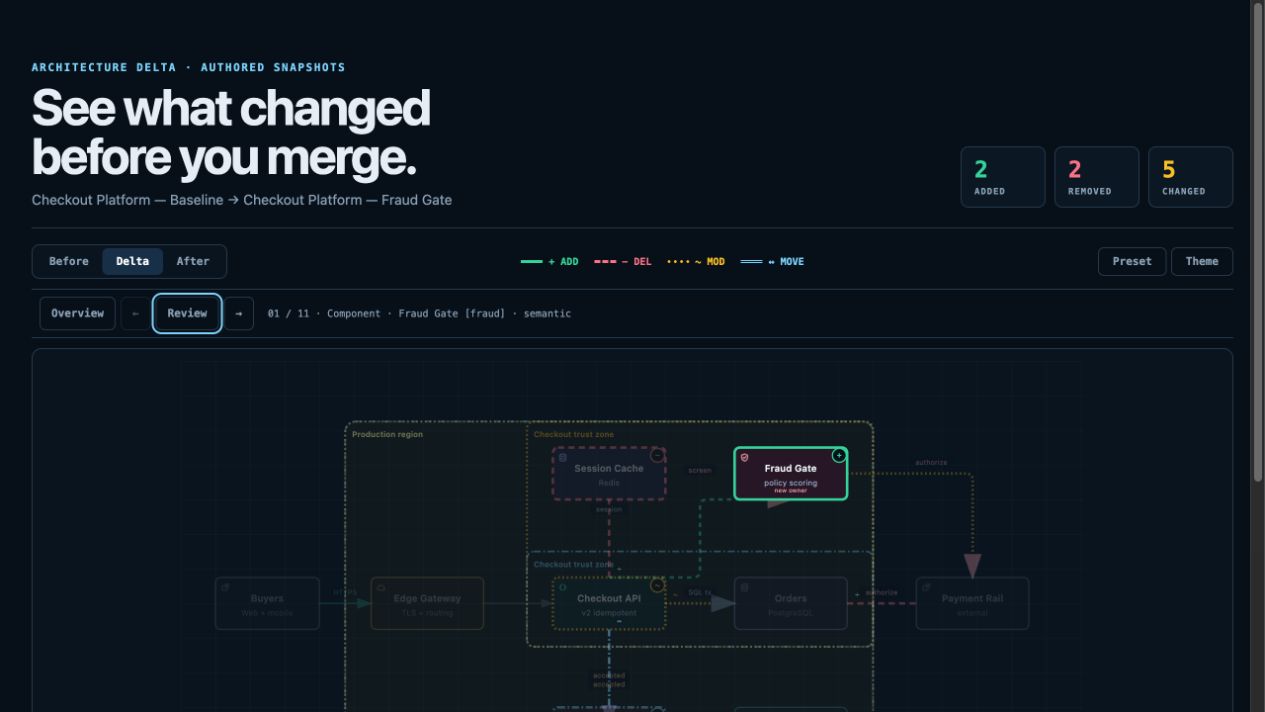
For design or PR review, Architecture Delta compares validated Before / Delta / After snapshots with a machine receipt. Select an authored change or play one finite, viewer-only Review; it infers no impact, risk, or merge safety.
node archify/bin/archify.mjs compare architecture base.json head.json architecture-delta.html --json
Not sure which one fits? Use the interactive scenario guide, or ask the zero-dependency CLI:
node archify/bin/archify.mjs guide "Show an API request with Redis cache miss"
node archify/bin/archify.mjs guide "Map Kafka topics, consumer groups, replay, and DLQ" --json
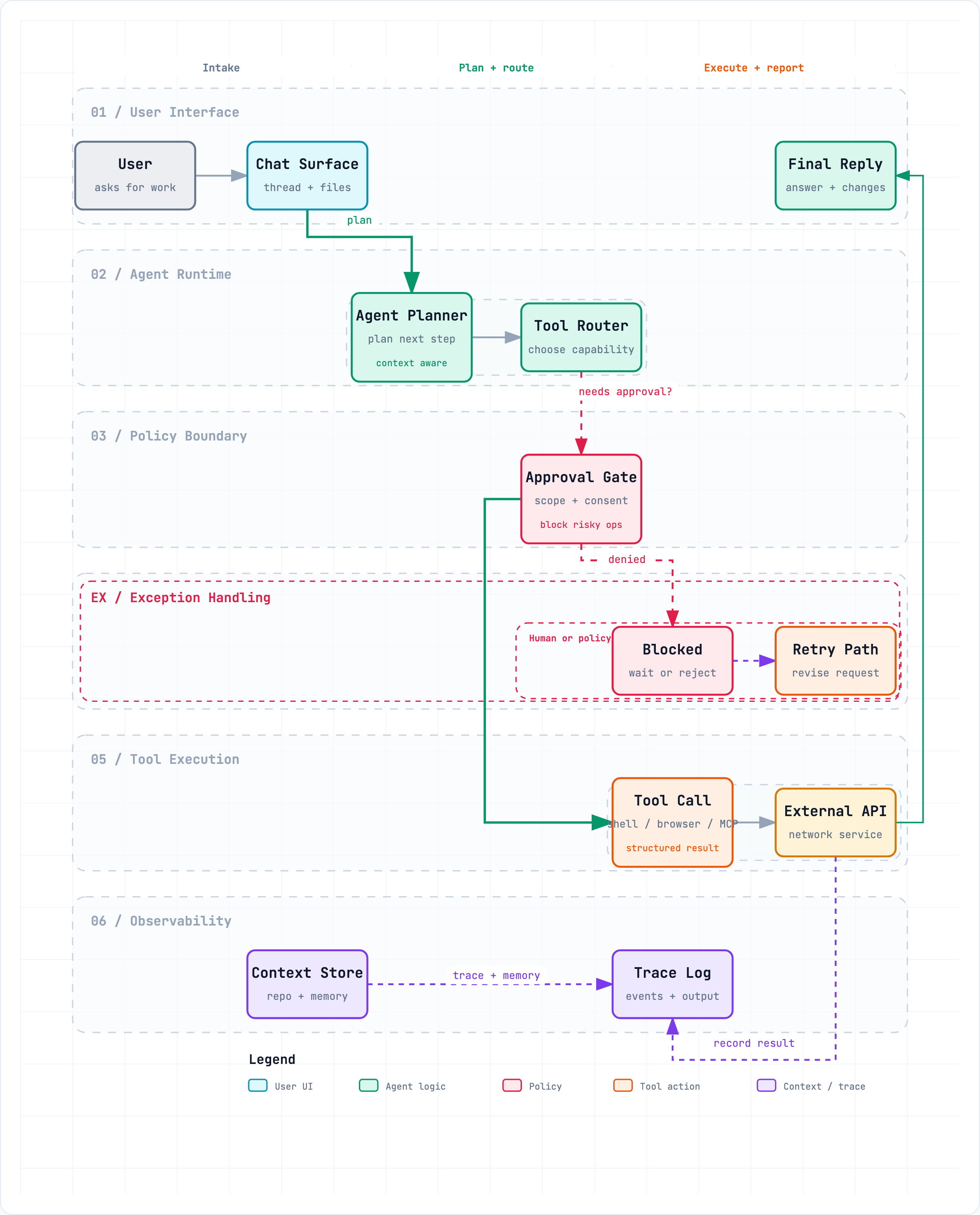
Workflow keeps the happy path clear across lanes:
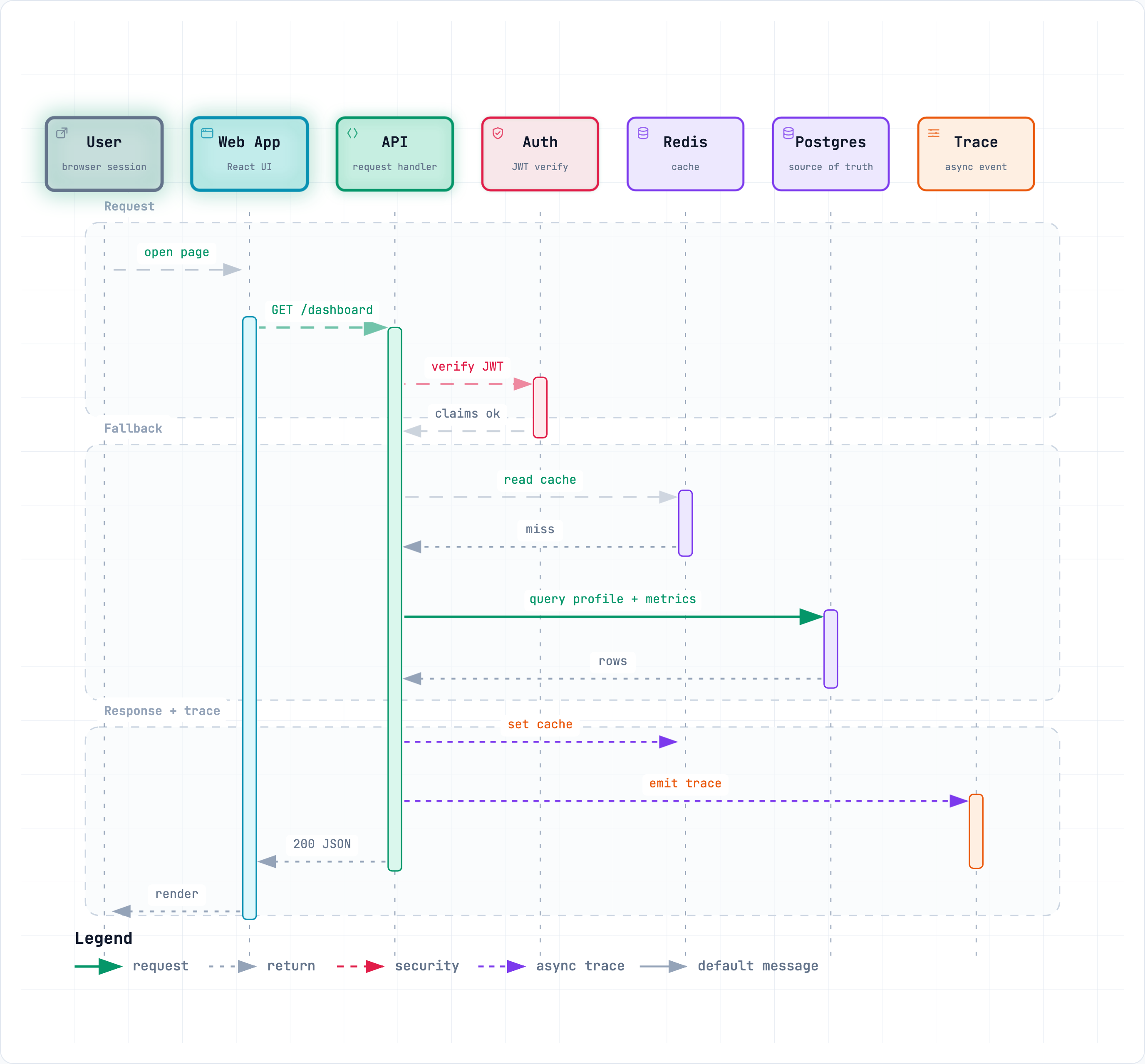
Sequence explains one interaction over time:
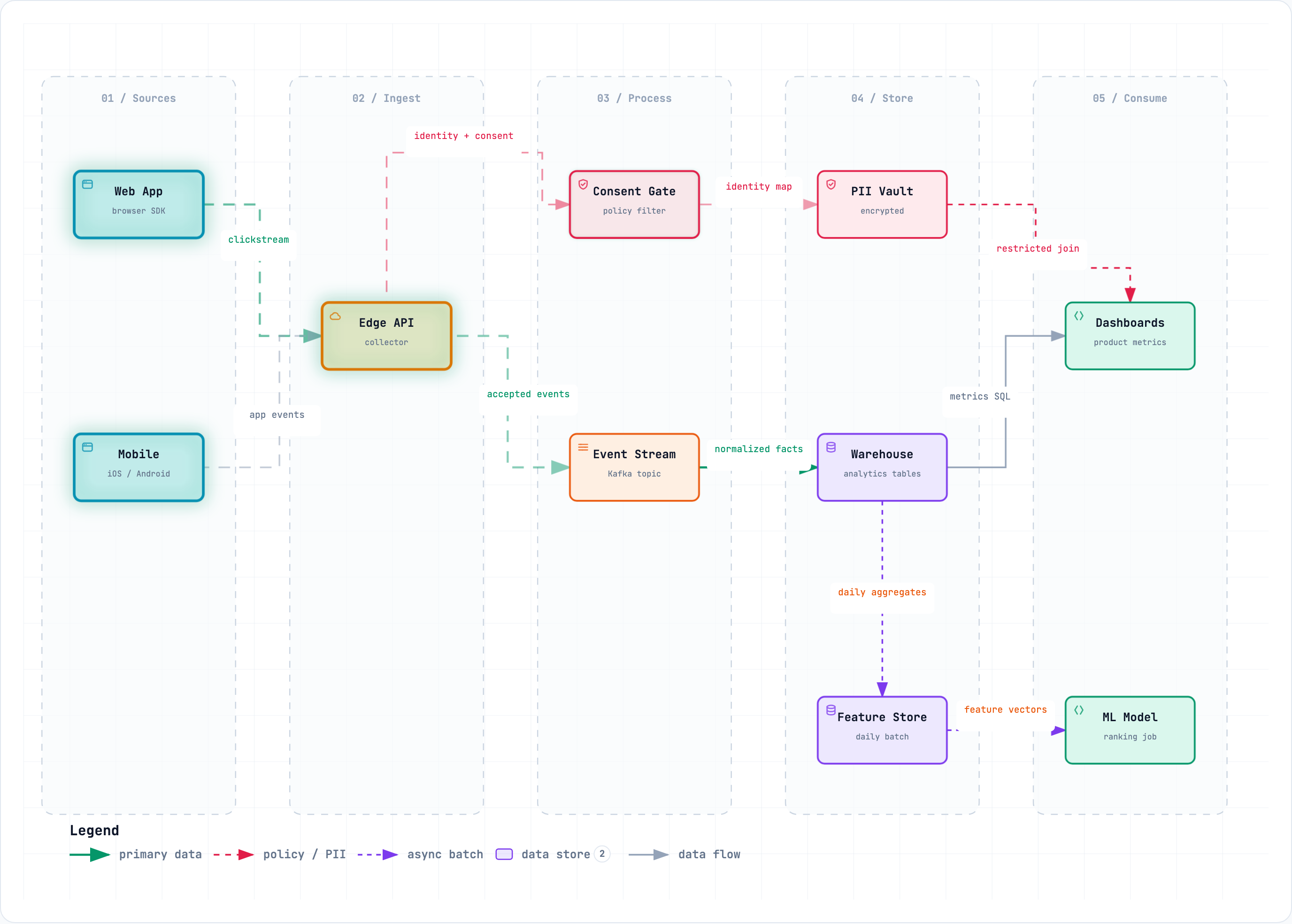
Data Flow makes movement and sensitivity boundaries explicit:
Lifecycle separates progress, waits, retries, and terminal outcomes:
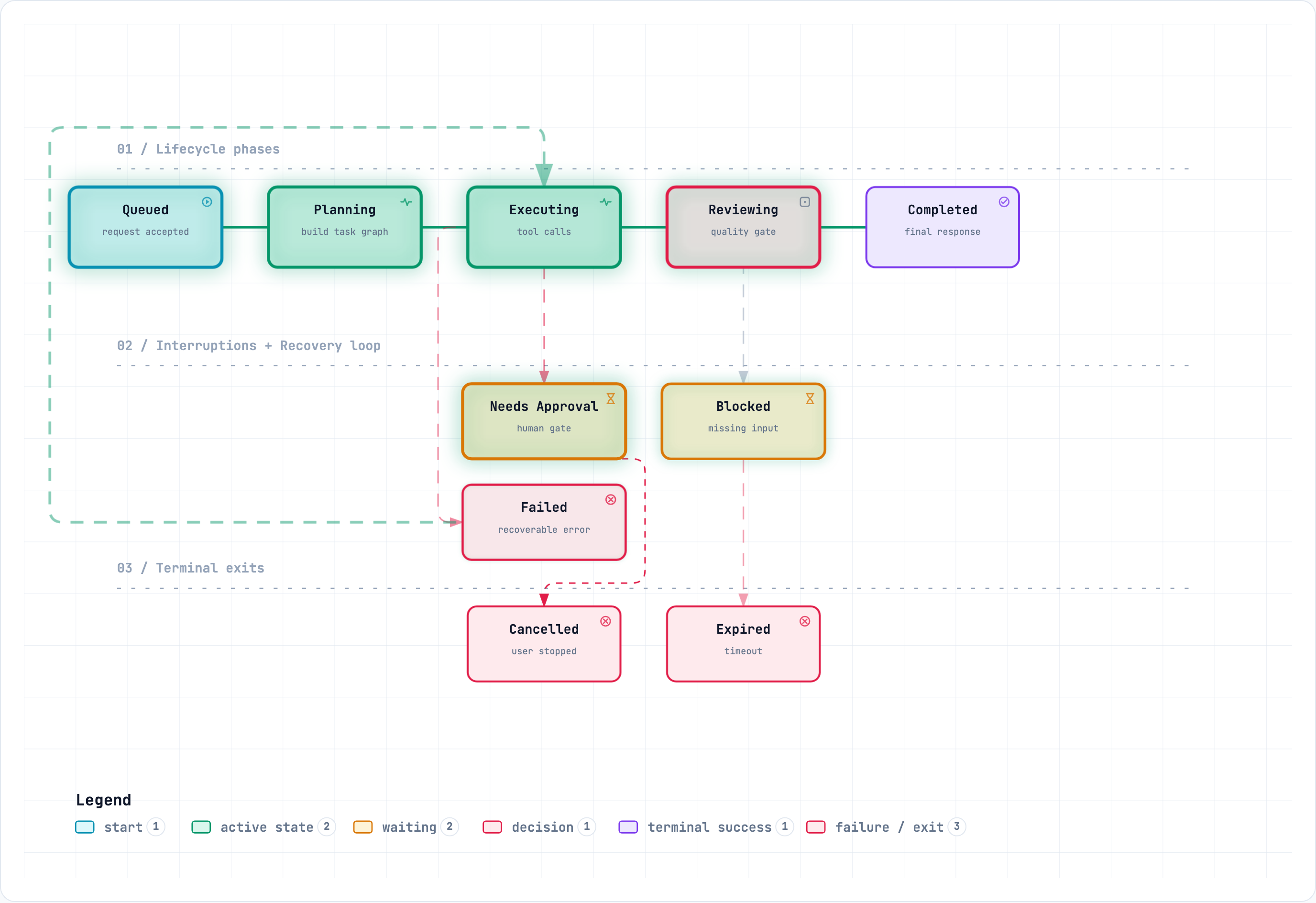
Architecture examples: web-app · Archify pipeline · grid placement · desktop agent
validate --json and deliver --json return stable rule codes, the exact subject, measured evidence, and only supported repair controls instead of a Node stack or an unstructured retry guess.SRC n and open Git-verified files and line ranges pinned to one public commit; ordinary artifacts stay source-free.| Step | What happens |
|---|---|
| Generate | The agent creates typed JSON IR from your description. |
| Validate | Bundled validators and layout rules check the source; failures identify the exact local repair in machine-readable JSON. |
| Preview (optional) | A loopback-only desktop session watches one source and reloads only verified revisions; failures keep the last-good artifact. |
| Deliver | A same-directory candidate is rendered and checked; only a passing artifact atomically replaces the target, then optional --open launches that exact file. |
| Iterate | The agent updates the source while unrelated structure stays stable. |
Useful repository commands:
cd archify
node bin/archify.mjs doctor
node bin/archify.mjs demo /tmp/archify-demo
node bin/archify.mjs guide "Show CI/CD checks, approval, deploy, and rollback"
node bin/archify.mjs validate workflow examples/agent-tool-call.workflow.json --quality showcase --json
node bin/archify.mjs preview workflow examples/agent-tool-call.workflow.json /tmp/workflow.html --quality showcase
node bin/archify.mjs deliver workflow examples/agent-tool-call.workflow.json /tmp/workflow.html --quality showcase --open --json
preview is an explicit loopback-only desktop mode: it watches one JSON file on a random 127.0.0.1 port, keeps the last verified output through failures, stops with Ctrl-C, and adds no generated-HTML runtime. Use --no-open for tests or manual URL opening.
deliver --open is an opt-in one-shot handoff after commit. Opener failure preserves success; JSON remains on stdout and the absolute fallback path goes to stderr.
On failure, validate --json and deliver --json emit one JSON object. Apply only each diagnostics[] subject's supportedFixes, within the Skill's two correction rounds; visual review remains separate.
Settings:
{
  "meta": {
    "locale": "en",
    "animation": "trace",
    "visual_preset": "signal-flow"
  }
}
meta.locale=en|zh-CN localizes page title, Legend, states/errors, a11y, HTML/SVG lang—never authored content. Otherwise omit; preserve requested-language copy; disclose English fallback. Static omits animation; classic defaults.
| Action | Control |
|---|---|
| Open the factual Diagram Guide | ? |
| Find and focus a semantic node | / |
| Trace upstream/downstream authored reach | Focus a node → Upstream / Downstream |
| Probe a directed route and inspect its journey | R or PATH |
| Compare one or two semantic roles | L or LENS |
| Open the live overview radar | M or MAP |
| Play a guided story / change chapter | P / [ ] |
| Enter Presentation Stage | F |
| Choose visual style (S cycles) / toggle theme / open Export | S / T / E |
| Zoom or reset | + / - / 0 |
Stable links can restore #focus=, #focus=&reach=upstream|downstream, #relation=, #route=, #lens=~, and #view=. Reader-driven motion is finite, respects prefers-reduced-motion, and never enters canonical exports.
The complete generation and viewer contract lives in archify/SKILL.md.
| Surface | Install location or method | Capability |
|---|---|---|
| Raven | Manual ZIP into ~/.raven/workspace/skills → ~/.raven/workspace/skills/archify | Full renderer + validation workflow |
| Claude Code | ~/.claude/skills/ or .claude/skills/ | Full renderer + validation workflow |
| Codex CLI | ~/.agents/skills/ or .agents/skills/ | Full renderer + validation workflow |
| opencode | ~/.config/opencode/skills/, .opencode/skills/, or .agents/skills/ | Full renderer + validation workflow |
| Claude.ai | Upload archify.zip under Settings → Capabilities → Skills | Depends on Node.js access in the sandbox |
| Project Knowledge | Upload archify.zip to the project | Prompt-driven architecture fallback |
| DeepSeek Harness | Opt-in: dsh plugin --profile web add @tt-a1i/[email protected]. Invoke: Use the archify skill to map this repository's runtime architecture. Remove: dsh plugin --profile web remove @tt-a1i/archify-dsh. | Community integration for developer-preview @deepseek-ai/[email protected]; Node ^22.19.0 \|\| >=24.0.0; not an official DeepSeek product. No telemetry. Shell files need exact workspace paths, not Web Produced Files. Details. |
MIT — free to use, modify, and distribute.
Issues, pull requests, and real-world diagrams are welcome. Start with the contribution guide, use the reproducible bug form for failures, or submit a validated diagram through the community showcase form. · LINUX DO
→ →
→ →
→ →
→ →
→ →
→