1
 →
→
A modern launcher for downloading, installing, and running apps from GitHub and GitLab releases. With a personal library, community catalog subscriptions, and flexible filtering.
tgeorgiadis/quiver-launcher is an open-source project on GitHub, mainly written in C#. A modern launcher for downloading, installing, and running apps from GitHub and GitLab releases. It currently holds 1,511 stars and 27 forks with 52 open issues, and was last pushed on 2026-10-08 (repository created 2026-06-18).
Git Homed tracks it on the Today's Trending board.




About - Quiver Launcher is a fork of GithubLauncher, extended with the features I wanted: tag filters, library management with the Quiver catalog, mod management support, UI improvements and more. It was rebranded from GithubLauncher to avoid using the GitHub trademark.
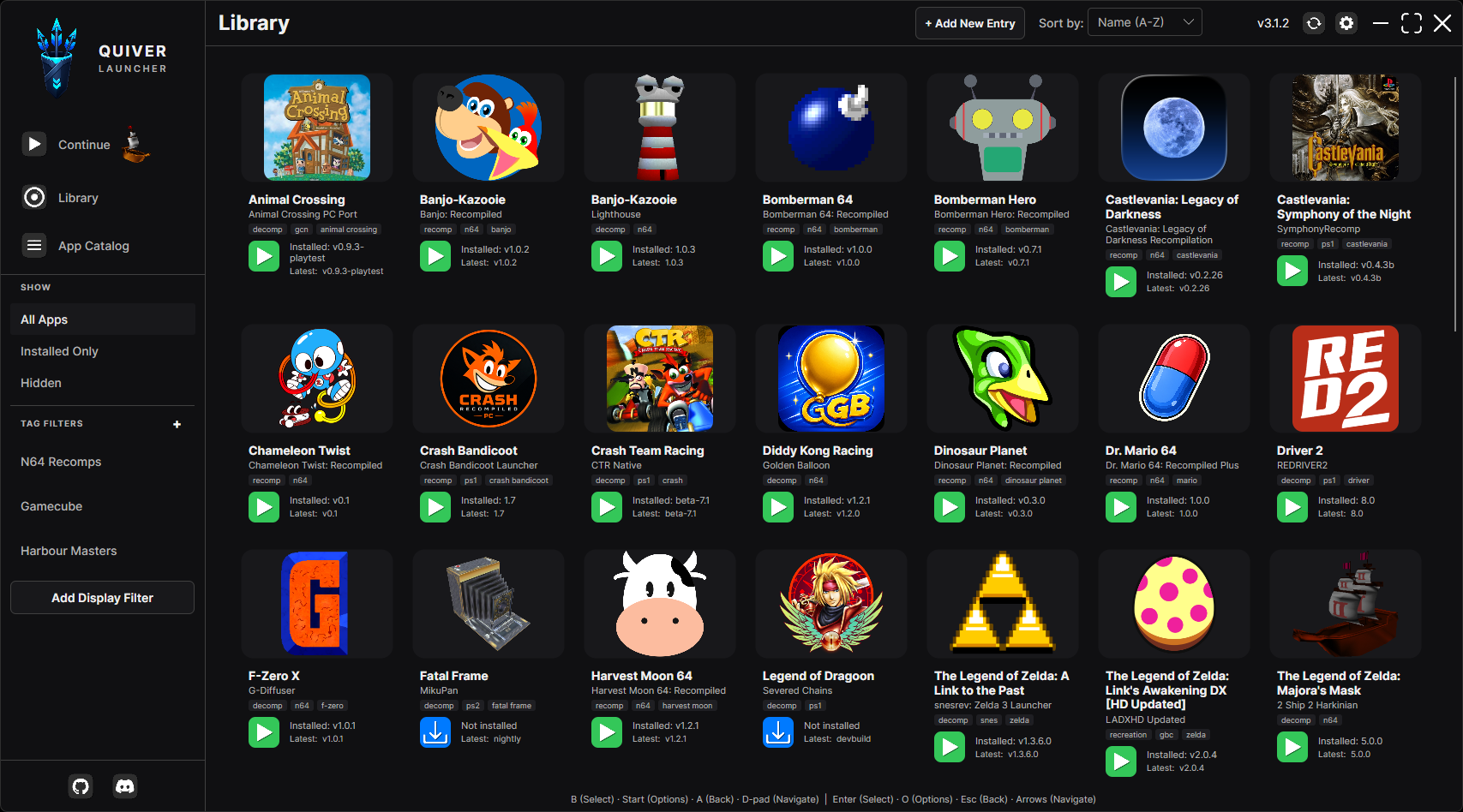
A modern launcher for downloading, installing, and running apps from GitHub and GitLab releases. With a personal library, the Quiver catalog, and flexible filtering.
Note if you are upgrading from 2.4.x or older: the in-app update cannot migrate Quiver Launcher 2.4.x onto version 3.0 or higher. Download a fresh 3.x version of Quiver Launcher and copy your library over. See MIGRATING.md.
Windows
1. Download QuiverLauncher-win-Portable.zip from Releases
2. Extract it
3. Run QuiverLauncher.exe from the extracted folder
Your library stays in that same folder (apps.json, settings.json, Apps/, Cache/ next to current/), so you can move the whole directory wherever you want.
QuiverLauncher/
├── QuiverLauncher.exe          # launcher stub
├── current/            # app binaries (replaced on update)
├── apps.json
├── settings.json
├── Apps/
└── Cache/
To verify a signed QuiverLauncher.exe: right-click → Properties → Digital Signatures, or Get-AuthenticodeSignature .\QuiverLauncher.exe in PowerShell.
Linux
1. Download QuiverLauncher-linux-x64.AppImage or QuiverLauncher-linux-arm64.AppImage from Releases
2. Put the AppImage in its own folder (it creates library files beside itself), mark it executable, then run it:
   mkdir -p ~/QuiverLauncher
   mv QuiverLauncher*.AppImage ~/QuiverLauncher/
   cd ~/QuiverLauncher
   chmod +x QuiverLauncher*.AppImage
   ./QuiverLauncher*.AppImage
Library data (apps.json, settings.json, Apps/, Cache/) is stored beside the AppImage so you can move that folder together. If the AppImage’s directory is not writable (e.g. /usr/local/bin), Quiver Launcher falls back to ~/.local/share/QuiverLauncher/ (or $XDG_DATA_HOME/QuiverLauncher).
MyFolder/
├── QuiverLauncher-linux-x64.AppImage
├── apps.json
├── settings.json
├── Apps/
└── Cache/
macOS
Currently macOS support is a work in progress.
1. Download the macOS package from Releases
2. Keep QuiverLauncher.app in a writable folder (not only /Applications if you want portable data)
Library data lives beside QuiverLauncher.app in that folder. If the parent directory is not writable, Quiver Launcher falls back to ~/Library/Application Support/QuiverLauncher/.
MyFolder/
├── QuiverLauncher.app
├── apps.json
├── settings.json
├── Apps/
└── Cache/
Quiver keeps verified library snapshots in Backups/apps/ alongside apps.json
on Windows, Linux, macOS, and Android. See library protection and recovery for how to restore a snapshot if the library becomes damaged.
1. Launch the application
2. On first launch, open the App Catalog (internet required), open an app and choose Add to library. You can also add apps later with + Add New Entry, including manually managed apps that have no GitHub/GitLab repository. Your library is stored in local apps.json
3. Browse your app library in the Library view
4. Click the Download/Launch button on the app/game you want to use
The App Catalog reads the catalog from the quiverlauncher.com API the first time you open it, and again whenever you search, sort or filter. Reviews are written on the website: an app's Write a review on the website button opens its page.
Settings → General → Kiosk mode keeps the next launch fullscreen and limited to browsing and launching. Settings, the app catalog, add, update, and exit controls are hidden. Press Ctrl+Alt+K to unlock this session, and press it again to lock it without restarting. An optional PIN can be set in that same section; Quiver stores only a hash of the PIN, and the PIN is required only to unlock.
--kiosk starts one locked session without changing settings.json, for a cabinet shortcut.
Kiosk mode does not block the Windows key, Alt+Tab, or Ctrl+Alt+Del. For a public machine, make Quiver the session: Windows Assigned Access or shell replacement, or a Linux Gamescope or cage session that only runs Quiver. Steam Deck Gaming Mode already keeps the desktop away.
read_api at GitLab personal access tokens. Paste it into GitLab API Token. Public gitlab.com releases work without a token.Apps can expose a Mods browser when mods.path and mods.sources are set in the catalog entry (or via + Add New Entry).
Optional mods.layout:
| Value | Behavior |
|-------|----------|
| (omitted) / flat | Extract archive paths as-is into the mods folder (default; typical for Thunderstore .nrm packs). |
| folderPerMod | If the archive has payload files at its root, wrap everything in a folder named from the download filename (e.g. Music-FRLG.zip → mods/Music-FRLG/). Archives that already use a top-level folder are left unchanged. |
Use folderPerMod for apps that expect each mod in its own subfolder. Enable it in the catalog JSON or with Install each mod into its own folder when editing an entry.
Source URL formats (one per line in Mod Sources):
| Provider | Examples |
|----------|----------|
| Thunderstore | https://thunderstore.io/c/banjo-recompiled/ or slug banjo-recompiled |
| GameBanana | https://gamebanana.com/mods/games/24774, https://gamebanana.com/games/24774, or bare id 24774 |
GameBanana URLs are detected automatically (no gamebanana| prefix required). Other hosts can still use provider|url.
Browse & search
Apps from the Quiver catalog follow what quiverlauncher.com checked:
Quiver Launcher no longer subscribes to app lists. If you keep your own list, set it in Settings → Advanced → My app list: a local JSON file, or a URL such as a GitHub raw link. Its apps appear under My app list in the App Catalog, where you can add them to your library. A list you added in an earlier version is carried over automatically; if you had several, the first enabled one is kept.
The list uses the same format as apps.json: an apps array of app entries (an older list file's name, description and version are ignored).
Each app entry requires the following properties:
name - Canonical app/title (for ports, usually the game name). Library display can compose this with project via Settings → Library name styleproject (optional) - Project, team, or author attribution shown when library name style includes projectcustomDisplayName (optional) - Per-app library label override; always wins over name/project compositionrepository (required unless manually managed) - The repository path in the format username/repository (GitHub) or namespace/project (GitLab). The same repository may be used by more than one app when each has a distinct folderName (for example two games shipped in one GitHub release). Omit this field for manually managed apps: Quiver creates {Apps}/{folderName} and you place the files yourself. There is no download or update management until a repository is added. On Edit App Entry, filling in a repository promotes the app to a managed install (existing files are kept; Auto Update stays off until you update). Clearing the repository demotes it back to manual.repositorySource (optional) - github (default when omitted) or gitlab. Ignored for manually managed apps. Older Quiver Launcher versions ignore this field and treat entries as GitHub-only.folderName - The folder name under Apps where the app is installed (prefer Title-Project, without type suffixes like -Recomp). Must be unique. For manually managed apps this folder is created immediately as the drop target.releaseAssetFilter (optional) - Case-insensitive substring matched against release filenames. Use this when one repository ships more than one game so each app downloads only its files (e.g. EXIT1 / EXIT2). Ignored for manually managed apps.tags (optional) - Freeform tags (classification such as recomp / decomp lives here, not in the title)appIconUrl - URL of the app's icon image. If null, a default icon will be used.{
"apps": [
{
"name": "Majora's Mask",
"project": "2 Ship 2 Harkinian",
"repository": "HarbourMasters/2ship2harkinian",
"folderName": "MajorasMask-2Ship2Harkinian",
"tags": ["n64", "decomp", "harbour-masters"],
"appIconUrl": null
},
{
"name": "Example App",
"repository": "username/example-app-repo",
"folderName": "ExampleApp",
"appIconUrl": null
},
{
"name": "GitLab Example App",
"repository": "namespace/example-project",
"repositorySource": "gitlab",
"folderName": "GitLabExampleApp",
"appIconUrl": null
},
{
"name": "Manually Managed Example",
"project": "Itch drop",
"folderName": "ManualExample",
"tags": ["manual"],
"appIconUrl": null
}
]
}
If you encounter any issues or have questions:
When building and running from source, Quiver Launcher is not a packaged release install, so self-update checks no-op (and Debug builds always skip automatic checks). Set QuiverLauncher_SKIP_UPDATES=1 (or true) to skip automatic checks in Release local runs as well.
# Debug: no env var needed
dotnet run --project QuiverLauncher.Desktop/QuiverLauncher.Desktop.csproj -c Debug
Release local testing
$env:QuiverLauncher_SKIP_UPDATES = "1"
dotnet run --project QuiverLauncher.Desktop/QuiverLauncher.Desktop.csproj -c Release
Requires the .NET 10 SDK.
Android uses a separate head project (QuiverLauncher.Android) that installs and launches APK release assets. Desktop binaries (.exe, AppImage, Wine/Proton) are not supported on device.
1. Install the .NET 10 SDK and the Android workload:
dotnet workload install android
dotnet build QuiverLauncher.Android/QuiverLauncher.Android.csproj -c Debug
User data for unpackaged Windows debug builds still lives beside the build output. Unpackaged macOS/Linux runs (no AppImage / .app package) use the OS app-support fallbacks (~/Library/Application Support/QuiverLauncher/ or ~/.local/share/QuiverLauncher/).
Fast local run (excludes the slow publish integration test):
dotnet test QuiverLauncher.sln -c Release --filter "Category!=Slow" --logger "console;verbosity=normal"
Full suite including publish integration test (matches CI; the publish test can take several minutes):
dotnet test QuiverLauncher.sln -c Release
Run only the slow publish packaging test:
dotnet test QuiverLauncher.sln -c Release --filter "Category=Slow"
Test categories include library file safety, adding catalog apps, settings store round-trip, launcher version helpers, Windows runner command building, download asset selection, game status checks, ViewModel sorting/catalog helpers, GameManager hide/filter behavior, and Avalonia headless smoke tests.
Collect coverage locally with:
dotnet test QuiverLauncher.sln -c Release --filter "Category!=Slow" --collect:"XPlat Code Coverage"
 →
→ →
→ →
→ →
→ →
→ →
→ →
→