1
 →
→
Modern SSH & SFTP client — terminal, SFTP, port forwarding, folder mirror, encrypted sync. Windows · macOS · Linux · Android.
SinaXhpm/Submarine is an open-source project on GitHub, mainly written in TypeScript. Modern SSH & SFTP client — terminal, SFTP, port forwarding, folder mirror, encrypted sync. Windows · macOS · Linux · Android. It currently holds 364 stars and 27 forks with 20 open issues, and was last pushed on 2026-08-22 (repository created 2026-05-27).
Git Homed tracks it on the Today's Trending board, currently at rank #54 with 40 new stars today.

A fast, secure SSH and SFTP client for Windows, macOS, Linux — and now Android.
Manage servers, edit remote files, forward ports, and sync folders from one native window. Built with Rust and Tauri.





---
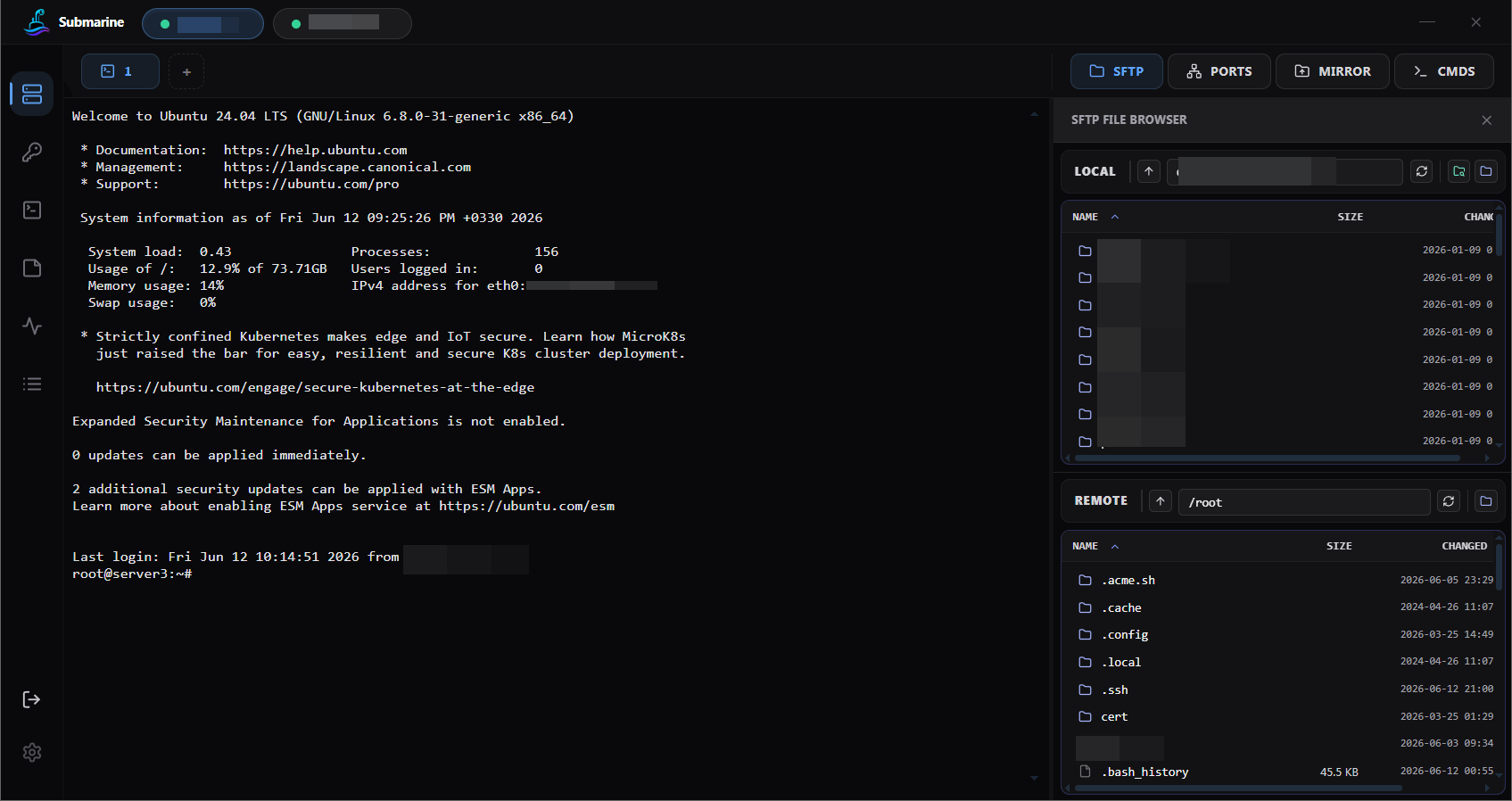
TL;DR — Submarine is a fast, free, open-source SSH and SFTP client for Windows, macOS, Linux, and Android. It replaces the typical PuTTY + WinSCP + tunnel-manager stack with one tabbed window per server: terminal, SFTP, port forwarding (SOCKS / HTTP / local / remote), folder mirror, and end-to-end encrypted profile sync. Built with Rust + Tauri. MIT licensed.
synchronize-panes for cross-server).deb / .rpm / Arch / AppImage), and Android — same encrypted vault everywhereapi.sinaxhpm.com/account to manage your account and stored profilesdocker exec shells as first-class session tabs.reg, MobaXterm .mxtsessions, OpenSSH config, and Submarine JSON exports all bulk-imported from the Servers page

Port forwarding — local / remote / dynamic SOCKS tunnels, live active-connection counters, autostart with the app |

Folder mirror — two-way sync, excludes, per-mirror conflict resolution, soft delete to .submarine-trash/
|

Quick commands & notes — per-server snippet library and a Notes tab for runbook / contacts |

Logins — saved passwords and SSH keys, with built-in key generation; all credentials encrypted in the vault |

Monitoring — per-node SSH polling for CPU, RAM, and live network in/out with sparklines |

Server details — folder, tag colour, host, auth, proxy, tunnels, mirrors, and autostart in one form |
If you're searching for one of these, Submarine is a direct fit:
Most SSH clients feel like they were built a decade ago and never updated. Submarine is a clean, modern alternative for developers and sysadmins who connect to remote servers every day.
.deb, .rpm, Arch package, and AppImage.── reconnected ── divider marks the boundary)docker exec shell into any container, with bash → sh → ash auto-fallback so distroless / Alpine / Ubuntu all just workPick a local folder, pick a remote folder, and Submarine keeps them in sync.
.submarine-trash/ on the server — a fat-fingered rm won't wipe out remote work.A read-only inspection pane for the active session — no terminal commands required.
iptables chains rendered per-chain with colored ACCEPT/DROP/REJECT badges; nftables raw view)ss -tulnp (or netstat fallback) with PID and process name, protocol + state filterssystemctl units with Start / Stop / Restart buttons (auto-retries with sudo -n on permission denied)Manage Docker on any session host without typing a single docker command.
--volumes, never -a so nothing important gets eatendocker exec shell as a new session tabdocker first, falls back to sudo -n docker on permission errors-L), Remote (-R), and Dynamic (-D) tunnelsPick a binary from the latest release and you're done — no extra dependencies.
| OS | File |
|---|---|
| Windows 10 / 11 | .exe installer or .msi |
| macOS (Apple Silicon, or Intel via Rosetta) | .dmg or .app.zip |
| Debian / Ubuntu / Mint | .deb — sudo apt install ./submarine_*.deb |
| Fedora / RHEL / openSUSE | .rpm — sudo dnf install ./submarine-*.rpm |
| Arch / Manjaro / EndeavourOS | .pkg.tar.zst — sudo pacman -U submarine-*.pkg.tar.zst |
| Any Linux | .AppImage — chmod +x and double-click |
| Android 8.0+ | .apk — sideload, no Play Store required |
Builds are currently unsigned. Windows SmartScreen will prompt — click "More info → Run anyway". On macOS you may need xattr -d com.apple.quarantine /Applications/Submarine.app. Android sideloading needs "Install unknown apps" enabled for the installer source.
Submarine on Android is a true native build of the same Rust core — same SSH stack, same encrypted vault, same profile sync. Reach a server from your phone with the same credentials you saved on your desktop.
Your data is encrypted on your machine before anything leaves it. Submarine and the sync server never see your passwords, private keys, or profile content.
How it works:
1. Your master password becomes a vault key — on your device. When you unlock, your password is run through Argon2id to derive a key. The password is wiped from memory the moment derivation finishes. It never goes anywhere. 2. Profiles are sealed with AES-256-GCM — on your device. Every saved server (credentials, keys, tunnels, notes, mirrors) is compressed and encrypted with that key. What hits disk is opaque ciphertext. 3. Sync uploads that same ciphertext — byte for byte. When you turn cloud sync on, the bytes uploaded are exactly the encrypted blob from your disk. The server stores ciphertext plus a random nonce. Nothing else.
Why the sync server can't read your profiles:
Yes. MIT-licensed. Use it personally, use it at work, fork it, redistribute it.
Yes. Cloud sync is opt-in. All profiles, mirrors, and tunnels live locally and are encrypted at rest.
PuTTY and WinSCP are two separate apps you alt-tab between. MobaXterm bundles them but feels dated and is Windows-only. Submarine puts terminal, SFTP, tunnels, and folder mirror in one modern tabbed window per server — and runs natively on Windows, macOS, and Linux.
Yes. File-based keys and pasted PEM/OpenSSH keys, with or without passphrase.
Yes. The encrypted vault is platform-portable. Enable sync on one machine, unlock on another with the same master password.
Smaller installer (around 10 MB vs ~100 MB for an Electron equivalent), lower RAM, faster startup, native window controls, and no Chromium per app.
In a single encrypted file under your OS app-data directory. Nothing in plaintext. Nothing in a global Keychain or registry hive.
No. There's no analytics SDK, no crash reporter that sends data home, no "phone home" call on launch. The only outbound network call beyond your SSH targets is the optional cloud-sync endpoint at api.sinaxhpm.com, and that endpoint only ever receives opaque ciphertext.
Yes. Install the APK, unlock with the same master password you use on desktop, and the encrypted vault syncs. Every server, key, and saved tunnel appears on the phone. Folder mirror is desktop-only for now; everything else (terminal, SFTP, port forwarding) works on Android.
No. Distribution is via sideloadable APK from the releases page. This keeps the same untouched binary running on every platform with no store-mandated changes.
Requirements: Node 20+, Rust stable, Tauri prerequisites for your OS. Windows additionally needs Strawberry Perl for the vendored OpenSSL build (winget install StrawberryPerl.StrawberryPerl).
git clone https://github.com/sinaxhpm/submarine
cd submarine
npm install
npm run tauri dev          # run in development
npm run tauri build        # build release bundle
Extra requirements: Android SDK + Platform-Tools, NDK 27, and JDK 17. scripts/android-env.ps1 sets JAVA_HOME, ANDROID_HOME, and NDK_HOME for the current PowerShell session.
. .\scripts\android-env.ps1
npm run android:init       # one-time per checkout
npm run android:dev        # build + install on the connected device
npm run android:build      # produce a signed-with-debug-key APK
Device must be plugged in over USB with debugging enabled.
npm run android:dev runs scripts/android-dev.ps1, which:
1. Verifies adb is on PATH and at least one device is listed.
2. Applies adb reverse tcp:1420 tcp:1420 and tcp:1421 tcp:1421 (Vite dev + HMR) so the WebView reaches the host via USB loopback.
3. Runs tauri android dev --host 127.0.0.1 so the WebView's devUrl bakes in 127.0.0.1, matching what adb reverse exposes.
This path works whether Wi-Fi is on or off — only USB matters. If you still see failed request for http://127.0.0.1:1420 while debugging, USB has dropped or the reverse mapping was cleared (re-plug, reboot, or adb kill-server all clear it). Re-run npm run android:dev and it'll re-apply the mapping. To bypass the helper, use npm run android:dev:raw (calls tauri android dev directly — Tauri then picks the host's LAN IP).
Frontend — React 18 · TypeScript · Tailwind CSS · xterm.js Backend — Rust · Tauri 2 · russh · rusqlite · aes-gcm · argon2 · zstd
Designed and built by Sina in collaboration with Claude. Every line of code in this repo was written together with Anthropic's Claude.
MIT — see LICENSE.
---
Keywords: SSH client, SFTP client, terminal emulator, port forwarding, SOCKS proxy, HTTP proxy, folder mirror, folder sync, remote file edit, encrypted profile sync, zero-knowledge cloud, Argon2id, AES-256-GCM, TOFU host keys, Rust, Tauri, React, xterm.js, Windows SSH client, macOS SSH client, Linux SSH client, Android SSH client, open source SSH, MIT licensed, PuTTY alternative, WinSCP alternative, MobaXterm alternative, Bitvise alternative, Termius alternative, SecureCRT alternative, Royal TSX alternative, ConnectBot alternative, JuiceSSH alternative, rsync GUI, sshfs alternative, Tabby alternative.
Bitvise, forever in my heart.
→ →
→ →
→ →
→ →
→ →
→ →
→ →
→