1
 →
→
Iconic font aggregator, collection, & patcher. 3,600+ icons, 50+ patched fonts: Hack, Source Code Pro, more. Glyph collections: Font Awesome, Material Design Icons, Octicons, & more
ryanoasis/nerd-fonts is an open-source project on GitHub, mainly written in CSS. Iconic font aggregator, collection, & patcher. 3,600+ icons, 50+ patched fonts: Hack, Source Code Pro, more. It currently holds 65,052 stars and 3,970 forks with 0 open issues, and was last pushed on an unknown date (repository created unknown).
Git Homed tracks it on the Today's Trending board.

[Releases][release] | Fonts | Font Patcher | [Wiki Documentation][wiki] | [Stickers][stickers] | [VimDevIcons][vim-devicons]
[![GitHub release][img-version-badge]][repo] [![Gitter][img-gitter-badge]][gitter] [![Code of Conduct][coc-badge]][coc] [![PRs Welcome][prs-badge]][prs] 
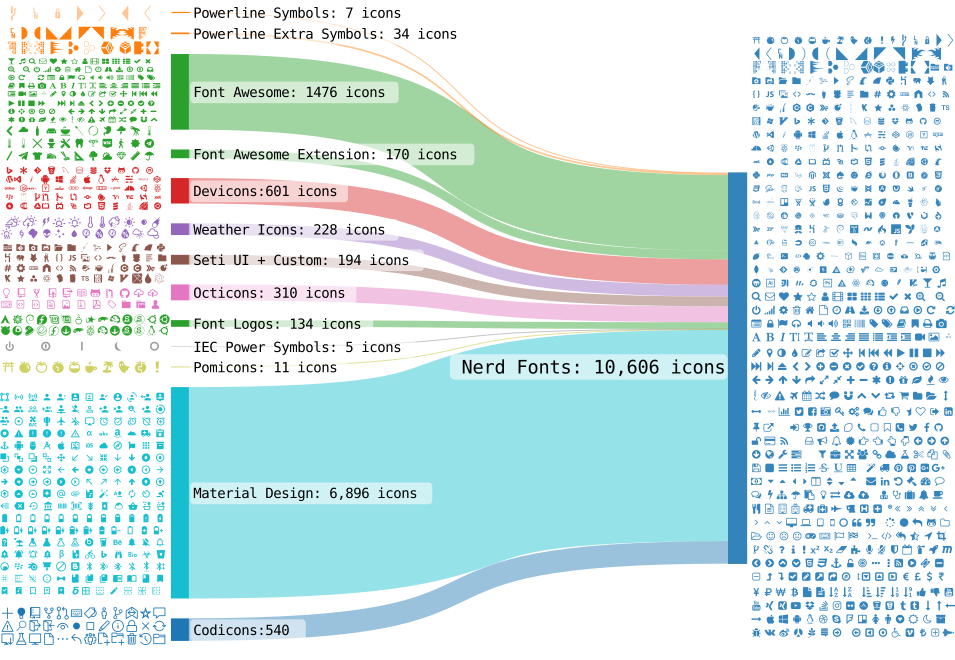
Nerd Fonts is a project that patches developer targeted fonts with a high number of glyphs (icons). Specifically to add a high number of extra glyphs from popular 'iconic fonts' such as [Font Awesome][font-awesome], [Devicons][devicons], [Octicons][octicons], and others.
The following flow diagram shows the current glyph sets included:
master branch file paths are not considered stable. Verify your repository URI referencesAdditional Info
_If you..._
Option 1. want to download a font family package of variations (bold, italic, etc.) see download an archiveOption 2. are on macOS or Linux and want to use Homebrew see Homebrew FontsOption 3. want to automate installing or use in scripts see the Install ScriptOption 4. are on Windows and want to use Chocolatey or Scoop see Unofficial Chocolatey or Scoop RepositoriesOption 5. are on Arch Linux and want to use Extra packages see Arch Extra RepositoriesOption 6. are using PowerShell and want an interactive setup or use in scripts see the PowerShell InstallerOption 7. want to install only one font for all fonts see Font FallbackOption 8. want complete control then see cloning the repoOption 9. want to patch your own font see the Font Patcher67 already patched font families10,000 glyphs/icons combined (more details)The currently used sets are listed in src/glyphs/README.md.
:mag: :mag: You can search for glyphs easily on [NerdFonts.com][Cheat Sheet] via the [Cheat Sheet][]
See [Wiki: Glyph Sets and Codepoints for more details][wiki-glyph-sets-codepoints]
See [Wiki: Icon names in shell][wiki-icon-names-in-shell]
A preview of all fonts can be found here.
| Font Name | Original Font Name and Repository | ver |\*RFN | |:--------------------------------------------------|:---------------------------------------|:-----------|:-----| | [0xProto Nerd Font][p-0xProto] | [0xProto][f-0xProto] | 2.502 | NO | | [3270 Nerd Font][p-3270] | [3270][f-3270] | 3.0.1 | NO | | [AdwaitaMono Nerd Font][p-adwaita-mono] | [Adwaita Mono][f-adwaita-mono] | 34.1 | NO | | [Agave Nerd Font][p-agave] | [Agave][f-agave] | 38 | NO | | [AnnotationMono Nerd Font][p-annotation] | [Annotation Mono][f-annotation] | 0.4 | NO | | [AnonymicePro Nerd Font][p-anonymous-pro] | [Anonymous Pro][f-a-pro] | 1.002 | YES | | [Arimo Nerd Font][p-arimo] | [Arimo][f-arimo] | 1.33 | NO | | [AtkynsonMono Nerd Font][p-atkinson-mono] | [Atkinson Hyperlegible Mono][f-atkinson]| 2.001 | YES | | [AurulentSansMono Nerd Font][p-aurulent] | Aurulent Sans Mono (Stephen G. Hartke) | | NO | | [BigBlueTerminal Nerd Font][p-bigblueterm] | BigBlueTerminal (VileR) | | NO | | [BitstromWera Nerd Font][p-bitstream] | Vera Sans Mono (Bitstream Inc) | 1.1 | YES | | [BlexMono Nerd Font][p-blex] | [IBM Plex Mono][f-ibm-plex] | 2.004 | YES | | [CaskaydiaCove Nerd Font][p-cascadia] | [Cascadia Code][f-cascadia] | 2407.24 | YES | | [CaskaydiaMono Nerd Font][p-cascadia-mono] | [Cascadia Mono][f-cascadia] | 2407.24 | YES | | [CodeNewRoman Nerd Font][p-code-nr] | Code New Roman (Sam Radian) | 2.0 | NO | | [ComicShannsMono Nerd Font][p-comic] | [Comic Shanns Mono][f-comic] | 1.3.2 | NO | | [CommitMono Nerd Font][p-commit] | [Commit Mono][f-commit] | 1.143 | NO | | [Cousine Nerd Font][p-cousine] | [Cousine][f-cousine] | 1.241 | NO | | [D2Koding Nerd Font][p-d2coding] | [D2Coding][f-d2coding] | 1.3.2 | YES | | [DaddyTimeMono Nerd Font][p-daddytimemono] | [DaddyTimeMono][f-daddytimemono] | 1.2.3 | NO | | [DepartureMono Nerd Font][p-departuremono] | [Departure Mono][f-departuremono] | 1.500 | NO | | [DejaVuSansMono Nerd Font][p-dejavu] | [DejaVu][f-dejavu] | 2.37 | NO | | [DroidSansMono Nerd Font][p-droid] | Droid Sans Mono (Ascender Corp) | 1.00-113 | NO | | [EnvyCodeR Nerd Font][p-envy] | [Envy Code R][f-envy] | 0.79 | YES | | [FantasqueSansMono Nerd Font][p-fantasque] | [Fantasque Sans Mono][f-fant] | 1.8.0 | NO | | [FiraCode Nerd Font][p-fira-code] | [Fira Code][f-fira-code] | 6.2 | NO | | [FiraMono Nerd Font][p-fira-mono] | [Fira Mono][f-fira-mono] | 3.206 | NO | | [GeistMono Nerd Font][p-geist-mono] | [Geist Mono][f-geist-mono] | 1.702 | NO | | [GoMono Nerd Font][p-go-mono] | [Go-Mono][f-go-mono] | 2.010 | NO | | [Gohu Nerd Font][p-gohu] | [Gohu TTF][f-gohu2], [Gohu][f-gohu] | 2.0 | NO | | [GoogleSansCode Nerd Font][p-googlesc] | [Google Sans Code][f-googlesc] | 7.001 | NO | | [Hack Nerd Font][p-hack] | [Hack][f-hack] | 3.003 | NO | | [Hasklug Nerd Font][p-hasklig] | [Hasklig][f-hasklig] | 1.2 | YES | | [HeavyDataMono Nerd Font][p-heavy-data] | HeavyData (Vic Fieger) | 1 | NO | | [Hurmit Nerd Font][p-hermit] | [Hermit][f-hermit] | 2.0 | YES | | [iM-Writing Nerd Font][p-im-writing] | [iA-Writer][f-ia-writer] | Dec 2018 | YES | | [Inconsolata Nerd Font][p-inconsolata] | [Inconsolata][f-inconsolata] | 3.000 | NO | | [InconsolataGo Nerd Font][p-inconsolata-go] | [InconsolataGo][f-inconsolatago] | 1.013 | NO | | [Inconsolata LGC Nerd Font][p-inconsolata-lgc] | [Inconsolata LGC][f-inconsolatalgc] | 3.201 | NO | | [IntoneMono Nerd Font][p-intel-one-mono] | [Intel One Mono][f-intel-one-mono] | 1.4.0 | YES | | [Iosevka Nerd Font][p-iosevka] | [Iosevka][f-iosevka] | 34.8.0 | NO | | [IosevkaTerm Nerd Font][p-iosevka-term] | [Iosevka Term][f-iosevka] | 34.8.0 | NO | | [IosevkaTermSlab Nerd Font][p-iosevka-term-slab] | [Iosevka Term Slab][f-iosevka] | 34.8.0 | NO | | [JetBrainsMono Nerd Font][p-jetbrains-mono] | [JetBrains Mono][f-jetbrains-mono] | 2.304 | NO | | [Lekton Nerd Font][p-lekton] | [Lekton][f-lekton] | 34 | NO | | [Literation Nerd Font][p-liberation] | [Liberation][f-liberation] | 2.1.5 | YES | | [Lilex Nerd Font][p-lilex] | [Lilex][f-lilex] | 2.700 | NO | | [MartianMono Nerd Font][p-martian] | [MartianMono][f-martian] | 1.1.0 | NO | | [Meslo Nerd Font][p-meslo] | [Meslo][f-meslo] | 1.21 | NO | | [Monaspice Nerd Font][p-monaspace] | [Monaspace][f-monaspace] | 1.400 | YES | | [Monofur Nerd Font][p-monofur] | Monofur (Tobias B Koehler) | 1.0 | NO | | [Monoid Nerd Font][p-monoid] | [Monoid][f-monoid] | 0.61 | NO | | [Mononoki Nerd Font][p-mononoki] | [Mononoki][f-mononoki] | 1.6 | YES | | [M+ Nerd Font][p-mplus] | [MPlus Fonts][f-mplus] | 1.100 | NO | | [Noto Nerd Font][p-noto] | [Noto][f-noto] | div | NO | | [OpenDyslexic Nerd Font][p-opendyslexic] | [OpenDyslexic][f-opendyslexic] | 2.001 | NO | | [Overpass Nerd Font][p-overpass] | [Overpass][f-overpass] | 3.0.5 | NO | | [ProFont Nerd Font][p-profont] | [ProFont][f-profont] | 2.3, 2.2 | NO | | [ProggyClean Nerd Font][p-proggy-clean] | ProggyClean (Tristan Grimmer) | 2004/04/15 | NO | | [RecMono Nerd Font][p-recursive] | [Recursive Mono][f-recursive] | 1.085 | NO | | [RobotoMono Nerd Font][p-roboto] | [Roboto Mono][f-roboto] | 3.0 | NO | | [SauceCodePro Nerd Font][p-source-code-pro] | [Source Code Pro][f-source] | 2.042 | YES | | [ShureTechMono Nerd Font][p-share-tech-mono] | [Share Tech Mono][f-share] | 1.003 | YES | | [SpaceMono Nerd Font][p-space-mono] | [Space Mono][f-space] | 1.003 | NO | | [Terminess Nerd Font][p-terminus] | [Terminus TTF][f-terminus] | 4.49.3 | YES | | [Tinos Nerd Font][p-tinos] | [Tinos][f-tinos] | 1.23 | NO | | [Ubuntu Nerd Font][p-ubuntu] | [Ubuntu Font][f-ubuntu] | 0.83 | NO | | [UbuntuMono Nerd Font][p-ubuntu-mono] | [Ubuntu Font][f-ubuntu] | 0.80 | NO | | [UbuntuSans Nerd Font][p-ubuntu-sans] | [Ubuntu Sans][f-ubuntu-sans] | 1.006 | NO | | [UbuntuSansM Nerd Font][p-ubuntu-sans] | [Ubuntu Sans Mono][f-ubuntu-sans-m] | 1.100 | NO | | [VictorMono Nerd Font][p-victor] | [Victor Mono][f-victor] | 1.5.6 | NO | | [ZedMono Nerd Font][p-zed-mono] | [Zed Mono][f-zed-mono] | 1.2.0 | NO |
_\*RFN = Reserved Font Name_
Some of the options below just help you to download the font file(s) (i.e. .ttf or .otf) or archives of font files.
These must be installed on your system, depending on your OS. Usually (double) clicking the font files individually does the trick.
Ask your OS' community if installing a font file is a problem.
Option 1: Release Archive DownloadBest option if you want an archive or complete font family of variations (Bold, Italic, etc.).
Fonts are available for download as packages in the latest release
A nice overview is on the Nerd Font site (but misses the more compact xv archives).
If you want download the latest release of a given font inside a script you can use (replace "JetBrainsMono" with your font):
curl -OL https://github.com/ryanoasis/nerd-fonts/releases/latest/download/JetBrainsMono.tar.xz
Option 2: Homebrew FontsBest option if you want to use Homebrew.
All fonts are available via Homebrew Cask on macOS or Linux
brew install font-hack-nerd-font
_On Linux you have to add --cask after install._
Option 3: Install ScriptTo install fonts from (latest) release use this script.
Best option if you want to automate installing or for use in scripts.
Only available for Linux / MacOS. It downloads the release artifacts of the latest or any other release and installs the files.
If you install all patched Fonts: _Warning: This is a lot of Fonts adding up to a large size_
The script is a standalone tool that you can download individually, use like the following. No need to clone the complete repository (which does not contain all patched fonts anyhow).
curl -s https://raw.githubusercontent.com/ryanoasis/nerd-fonts/master/install.sh -o install.sh
chmod u+x install.sh
./install.sh help
Examples:
./install.sh list
./install.sh install                           # interactive mode
./install.sh install Hack
./install.sh install HeavyData
./install.sh install Hack heAvYdatA            # not case sensitive
./install.sh install all
./install.sh --verbose install DaddyTimeMono
./install.sh list --release v3.2.1
./install.sh remove --dry
Option 4: Unofficial Chocolatey or Scoop RepositoriesOption for Windows and wanting to use Chocolatey or Scoop.
Chocolatey users can download fonts published to the Chocolatey Community Repository (CCR):
choco install nerd-fonts-hack
Scoop users can download fonts using the Scoop bucket for Nerd Fonts:
scoop bucket add nerd-fonts
scoop install Hack-NF
Option 5: Arch Extra RepositoryOption for Arch Linux and wanting to use Extra packages.
Most fonts are available via Arch Extra packages. Some special packages are in AUR.
Option 6: PowerShell InstallerBest option for interactive setup guidance or automating installations through PowerShell scripts.
This is a 3rd-party community tool. More information can be found on its GitHub repository here.
To install the module:
Install-PSResource -Name NerdFonts
Import-Module -Name NerdFonts
To install one font:
Install-NerdFont -Name 'FiraCode' # Tab completion works on name
This is a 3rd-party community tool. More information can be found on its GitHub repository here.
& ([scriptblock]::Create((iwr 'https://to.loredo.me/Install-NerdFont.ps1')))
To install specific fonts directly, use the following command:
& ([scriptblock]::Create((iwr 'https://to.loredo.me/Install-NerdFont.ps1'))) -Name hack, heavy-data
Option 7: Font FallbackFor this font fallback you can use one of the SymbolsOnly fonts.
For fontconfig based systems like Linux you can improve the behavior with the
10-nerd-font-symbols.conf configuration file, that needs to be manually installed.
Option 8: Clone the RepoBest option for full control, all or some of the fonts, or contributing to development.
_Note_: Will not work to get newer fonts as they are not inside the repo anymore.
A full clone of this repository is not required nor efficient (mostly due to Repository size) if you are simply only interested in a limited set of fonts.
If you do want to clone the entire repo be sure to _shallow_ clone:
git clone --depth 1
Even if you develop you probably do not need the old versions of the font files. With this command you have all commits but not all the old data - it will be loaded only if you check out old binaries (or do a blame):
git clone --filter=blob:none [email protected]:ryanoasis/nerd-fonts
If you want to clone just a sub-directory, use git sparse-checkout.
git clone --filter=blob:none --sparse [email protected]:ryanoasis/nerd-fonts
cd nerd-fonts
git sparse-checkout add patched-fonts/JetBrainsMono
Option 9: Patch Your Own FontThe option for patching your own font or fully customizing the patched font.
Use the provided Python command line script to generate a patched font from your own font to get the extra new glyphs
See: Font Patcher for usage
Patching the font of your own choosing:
font-patcher script is not enough.python-fontforge and argparse packagesbrew install fontforge fontforge -script font-patcher PATH_TO_FONT
./font-patcher PATH_TO_FONT
chmod u+x the AppImage after download. All supplied paths need to be absolute and an explicit output path is required! If everything is located in the same directory, you can use the $PWD shorthand.
./FontForge.AppImage -script $PWD/font-patcher $PWD/BaseFont.ttf -out /tmp
docker run --rm -v /path/to/fonts:/in:Z -v /path/for/output:/out:Z nerdfonts/patcher [OPTIONS]
docker run --rm -v /path/to/fonts:/in:Z -v /path/for/output:/out:Z -e "PN=1" nerdfonts/patcher [OPTIONS]
docker run --rm -v /path/to/fonts:/in:Z -v /path/for/output:/out:Z -e "PN=10" nerdfonts/patcher [OPTIONS]
docker pull nerdfonts/patcher
font-patcher invocation and all debug output and error messages: docker run -it -v /path/to/fonts:/in:Z --entrypoint=/bin/sh nerdfonts/patcher
 →
→ →
→ →
→ →
→ →
→ →
→ →
→