
1
 →
MochiDiffusion/MochiDiffusion is an open-source project on GitHub, mainly written in Swift. Run Stable Diffusion on Mac natively It currently holds 7,978 stars and 366 forks with 3 open issues, and was last pushed on 2026-11-02 (repository created 2022-12-15).
Git Homed tracks it on the Image Trending board and on the AI Image Trending list.

Run Stable Diffusion and FLUX.2 Klein on Mac natively

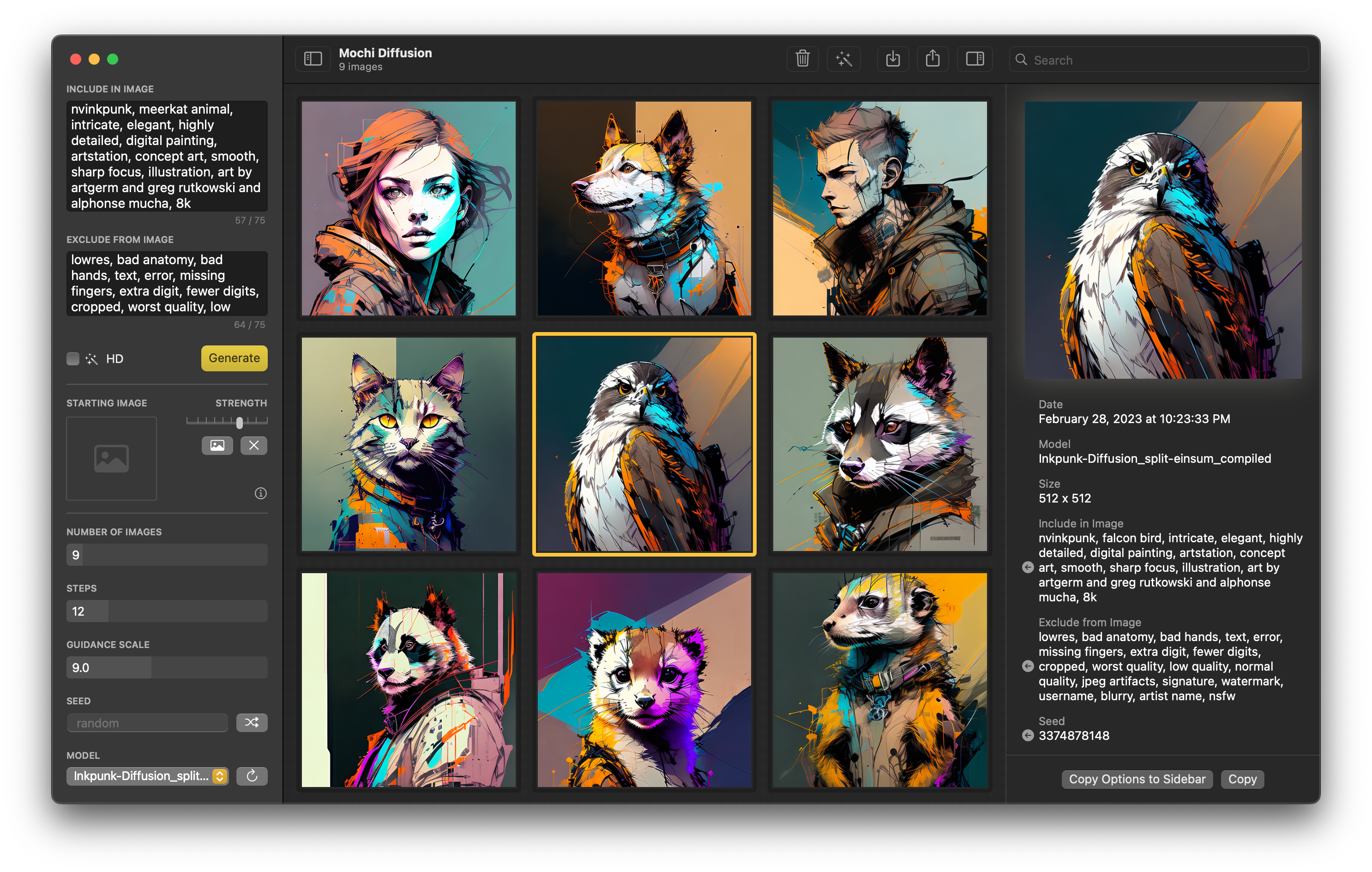
Mochi Diffusion is a native macOS app for generating images locally using Apple's Core ML Stable Diffusion implementation to achieve maximum performance and speed with reduced memory requirements, and the Iris pipeline for running FLUX.2 Klein and Z-Image Turbo models with native Metal GPU acceleration
You will need model files. Mochi Diffusion supports Core ML Stable Diffusion, FLUX.2 Klein, and Z-Image Turbo.
Mochi Diffusion uses Stable Diffusion models which have been specially converted (Core ML) to run on Apple hardware. The advantage of this is that they are extremely fast and memory efficient, especially on Apple Silicon Macs with Neural Engine. The downside is that each model can only generate images of a fixed size which is baked in during the conversion.
Stable Diffusion allows generating images based on another “starting image”, or with ControlNet
CPU & Neural Engine provides a good balance between speed and low memory usageCPU & GPU may be faster on M1 Max, Ultra and later but will use more memory1. Convert or download Core ML models
split_einsum version is compatible with all compute unit options including Neural Engineoriginal version is only compatible with CPU & GPU option/
└── MochiDiffusion/
└── models/
├── stable-diffusion-2-1_split-einsum_compiled/
│ ├── merges.txt
│ ├── TextEncoder.mlmodelc
│ ├── Unet.mlmodelc
│ ├── VAEDecoder.mlmodelc
│ ├── VAEEncoder.mlmodelc
│ └── vocab.json
├── ...
└── ...
When using a model for the very first time, it may take up to 2 minutes for the Neural Engine to compile a cached version. Afterwards, subsequent generations will be much faster.
No conversion is required for FLUX.2 Klein models.
Klein can use up to 4 “input images” in generations. Due to pipeline constraints, it may be necessary to constrain input image dimensions to fit the attention budget. Mochi will automatically resize inputs and indicate the new sizes in the UI.
1. Download text_encoder, tokenizer, transformer, and vae for a FLUX.2 Klein model from the Downloads links above (or use download_model.sh)
2. Place in MochiDiffusion's model folder
3. Your directory structure should look like this:
/
└── MochiDiffusion/
    └── models/
        ├── flux-klein-4b/
        │   ├── text_encoder/
        │   ├── tokenizer/
        │   ├── transformer/
        │   └── vae/
        ├── ...
        └── ...
(see iris.c issue #12) for specific guidance for flux-klein-4b)
No conversion is required for Z-Image Turbo. It does not use input images or starting image; its iris pipeline only supports t2i.
The "recommended" full precision download of Z-Image Turbo is large, about 32 GB. iris.c has not been optimized to read Z-Image Turbo model weights from disk, and so may fail to run on Macs with less than 24GB RAM (iris.c/issues/37)
1. Download the files for Z-Image Turbo from the Downloads links above (or use download_model.py)
2. Place a subfolder containing the model files in MochiDiffusion's model folder
3. Your directory structure should look like this:
/
└── MochiDiffusion/
    └── models/
        ├── z-image-turbo/
        │   ├── text_encoder/
        │   ├── tokenizer/
        │   ├── transformer/
        │   ├── vae/
        │   └── model_index.json
        ├── ...
        └── ...
The project supports SharedXcodeSettings for local overrides to keep per-developer signing state out of the project file.
Create a sibling SharedXcodeSettings/DeveloperSettings.xcconfig next to this repository:
directory/
  SharedXcodeSettings/
    DeveloperSettings.xcconfig
  MochiDiffusion/
    Mochi Diffusion.xcodeproj
Example SharedXcodeSettings/DeveloperSettings.xcconfig:
CODE_SIGN_IDENTITY = Apple Development
DEVELOPMENT_TEAM =
CODE_SIGN_STYLE = Automatic
PROVISIONING_PROFILE_SPECIFIER =
PRODUCT_BUNDLE_IDENTIFIER = com.example.Mochi-Diffusion
Mochi Diffusion doesn’t collect any data or telemetry. All generation happens locally and absolutely nothing is sent to the cloud.
Mochi Diffusion is always looking for contributions, whether it's through bug reports, code, or new translations.
→ →
 →
 →
 →→
 →
 →