1
 →
→
Open-source local AI audio & music studio for macOS & Windows. TTS, voice cloning, songs with lyrics, and multi-track scores — 100% offline, zero API fees.
leemysw/yovoice is an open-source project on GitHub, mainly written in TypeScript. Open-source local AI audio & music studio for macOS & Windows. TTS, voice cloning, songs with lyrics, and multi-track scores — 100% offline, zero API fees. It currently holds 1,967 stars and 147 forks with 9 open issues, and was last pushed on 2026-10-28 (repository created 2026-09-15).
Git Homed tracks it on the Audio Trending board and on the AI Audio Trending list.

Give your words a voice. Compose your ideas into songs.



English · 简体中文
Website · CLI & Agent Skill · API / MCP Deployment · Development
---
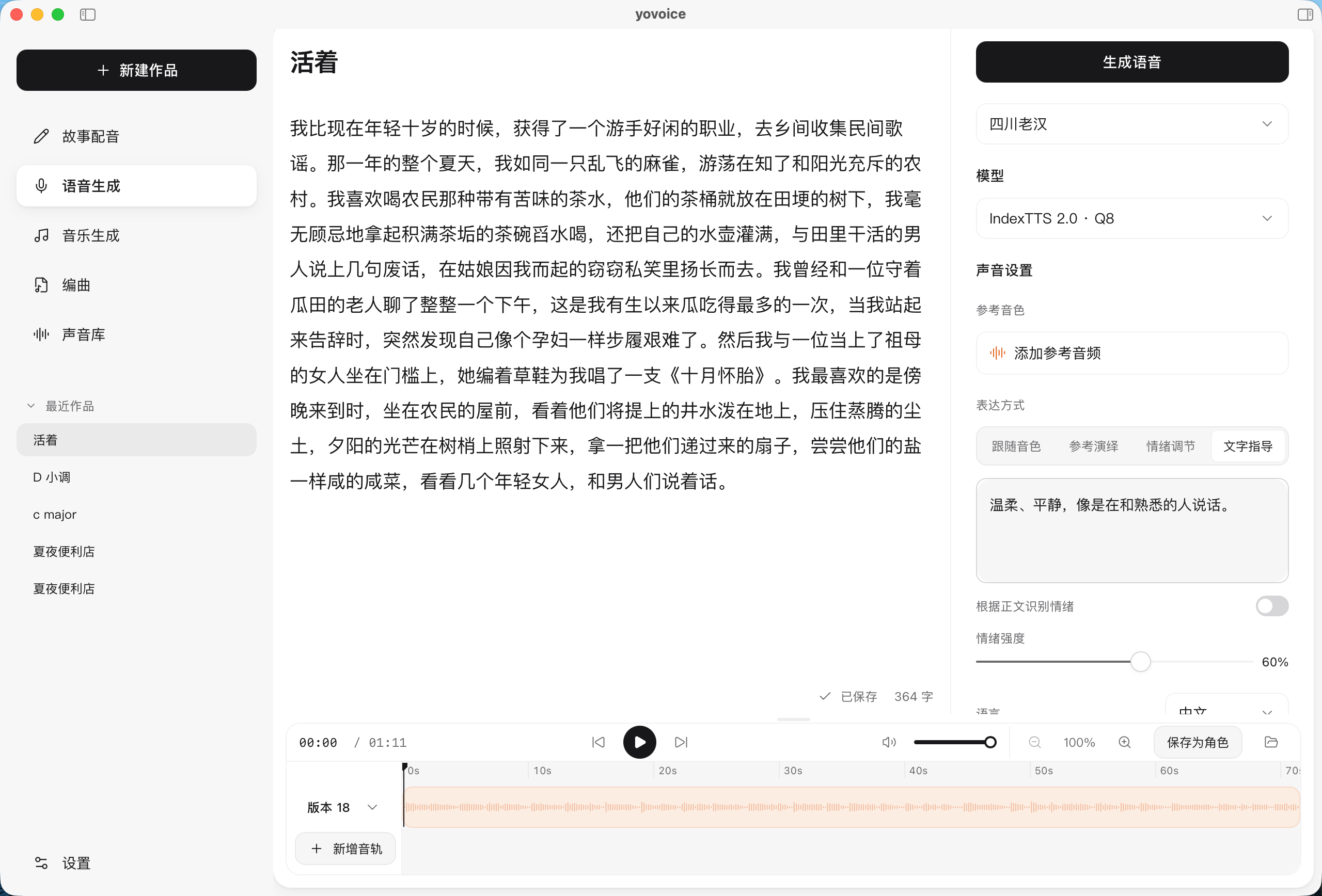
yovoice is an open-source, local-first audio and music creation studio for macOS, Windows and Linux.
Turn text into expressive speech, natural cloned voices, complete vocal songs, and multi-track scores right on your machine. Featuring zero-shot voice cloning, emotional performance controls, AI music generation with lyrics, and General MIDI score arranging—all running 100% locally with zero cloud API calls, zero per-character fees, and zero Python environment headaches.
---
| Use | Models | | --- | --- | | Voice cloning and emotion | IndexTTS 2.0 / 2.5, Qwen3-TTS Base | | Voice design and cloning | VoxCPM2, OmniVoice, Qwen3-TTS VoiceDesign, Breeze TTS 2 | | Built-in voices | Kokoro-82M, Qwen3-TTS CustomVoice | | Songs and instrumentals | ACE-Step 1.5 Turbo / XL Turbo, YuE2 3B | | Instrumentals and sound effects | Stable Audio 3 Small Music / Small SFX / Medium |
All models are downloaded inside the App or with the CLI. See model selection for file sizes, hardware requirements, inputs and examples. OmniVoice, YuE2 and Breeze TTS 2 weights are restricted to non-commercial use; Stable Audio 3 is free below USD 1M annual revenue under the Stability AI Community License.
---
Choose the package for your platform from the repository’s Releases tab or visit the official website.
| Platform | Package | Install |
| --- | --- | --- |
| macOS 14+ · Apple Silicon | .dmg | Open the disk image and drag yovoice to Applications |
| Windows 10/11 · x64 | -setup.exe | Run the installer, then open yovoice from the Start menu |
| Windows 10/11 · x64 · NVIDIA GPU | -cuda12.4-setup.exe | Bundles the CUDA 12.4 runtime; works with older GPUs and drivers and uses the GPU from first launch |
| Windows 10/11 · x64 · NVIDIA GPU | -cuda13.3-setup.exe | Bundles the CUDA 13.3 runtime; needs a newer driver, smaller download |
| Linux · x64 (Debian/Ubuntu) | -linux-x64.deb | sudo apt install ./yovoice--linux-x64.deb, then open yovoice from the application menu |
| Linux · x64 (other distributions) | -linux-x64.tar.gz | Extract and run ./install.sh to add yovoice to the application menu for the current user |
The Windows installer downloads and installs WebView2 Runtime if needed. Models are downloaded inside the app; uninstalling preserves user data in ~/.yovoice.
On Linux the app needs WebKitGTK 4.1 (libwebkit2gtk-4.1-0 on Debian/Ubuntu, webkit2gtk4.1 on Fedora, webkit2gtk-4.1 on Arch); the .deb installs it automatically. Linux runs on the CPU out of the box, and a Vulkan GPU runtime can be downloaded in Settings → Inference engine. The Linux app doesn't update itself yet; download new versions from Releases.
Check for updates from the app menu on macOS or Windows. Updates are also checked and downloaded in the background; restart to install when ready. Windows updates download only the app (-update.exe) and keep the installed runtime; when a release recommends a newer runtime you can upgrade it in Settings → Inference engine.
---
1. Set up a model. Download a model in Settings (e.g. Kokoro-82M for fast narration, or VoxCPM2 for cloning). 2. Create a project. Choose Story dubbing, Speech generation, Music, or Score. 3. Add content. Enter text, lyrics, or notes, then pick a character and adjust style. 4. Generate audio. Select Generate, then preview, compare takes, edit, and export.
---
Give your agent the yovoice Skill link and ask it to install the Skill and set up the local CLI, engine, and model:
Install this Skill and set up yovoice for local speech generation: https://github.com/leemysw/yovoice/tree/main/skills/yovoice
Then describe what you want:
Read narration.txt using voice.wav as the reference voice, with a calm delivery, and save it as narration.wav.
The agent runs the standalone CLI without opening the desktop app. See the CLI guide for details.
---
Run yovoice serve to provide an authenticated HTTP API and MCP inference service for other machines. See the API / MCP deployment guide for deployment and client examples.

make install
make app-run
See the development guide for prerequisites. It also covers browser preview, tests, and project structure. For how the processes and packages fit together, see Architecture.
---
Scan the QR code with WeChat to join the yovoice user group. If the code has expired, open an issue and we will post a new one.

---
Bug reports, feature suggestions, and pull requests are welcome. Include your platform, model, and steps to reproduce when reporting a problem. Run make check before submitting code changes.
---
---
Apache-2.0. Dependencies retain their original licenses; IndexTTS models are covered separately by their model license.
→ →
→ →
→ →
→ →
→ →
→ →
→ →
→