1
 →
→
Formerly KrillinAI. Open-source AI workspace for creators, powered by Codex. Create videos, images, voice, avatars, translations, and edits with Agents in one place.
krillinai/OpenCreator is an open-source project on GitHub, mainly written in TypeScript. Formerly KrillinAI. Open-source AI workspace for creators, powered by Codex. Create videos, images, voice, avatars, translations It currently holds 11,879 stars and 1,182 forks with 29 open issues, and was last pushed on 2026-09-20 (repository created 2024-12-17).
Git Homed tracks it on the Today's Trending board, currently at rank #17 with 317 new stars today.

Bring visual creator tools, reusable Skills, and Agents together for scripts, video, images, voice, avatars, translation, and editing—all in one workspace.
OpenCreator was formerly known as KrillinAI.

English | 简体中文 | 日本語 | 한국어 | Bahasa Indonesia | Español | Français | Deutsch | Português | Русский | العربية





Project Highlights · Creator Tools · Creation Templates · Skills · Conversation & Workspace · Models Supported · Examples · Quick Start · Desktop · OpenCreator System Architecture · Development · Documentation · Contributing · Contributors · Star History
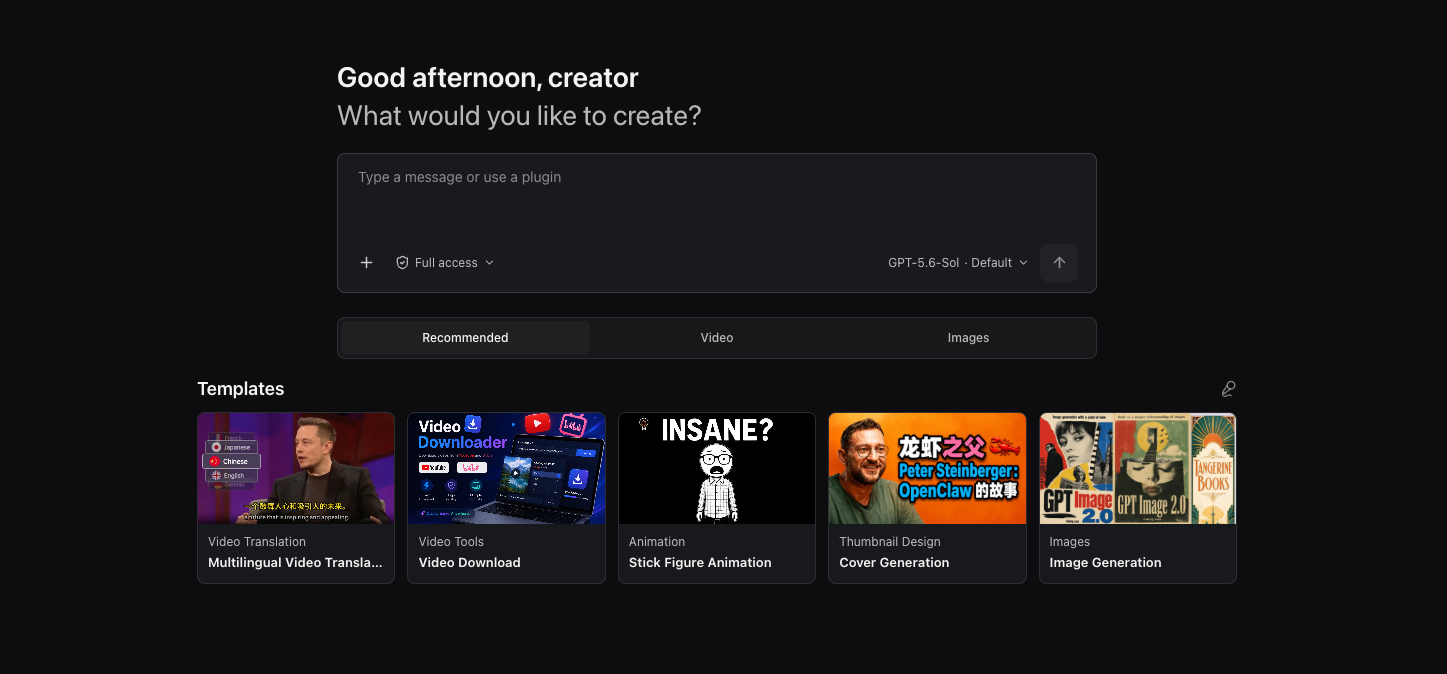
OpenCreator is built for individuals and teams who want to keep creative and development work running locally. Instead of reimplementing an Agent loop, it uses Codex CLI as the execution engine and adds a stable local Runtime, a visual workspace, and a Desktop host around it.
OpenCreator offers two connected ways to work:
The current release includes ten creator tools. Available models and services depend on your local Codex environment and AI service settings.
Open the Dashboard to write articles, Xiaohongshu posts, or short-video scripts; create stick figure animations; translate or download videos; generate thumbnails, images, or videos; and create voiceovers with Smart Dubbing.
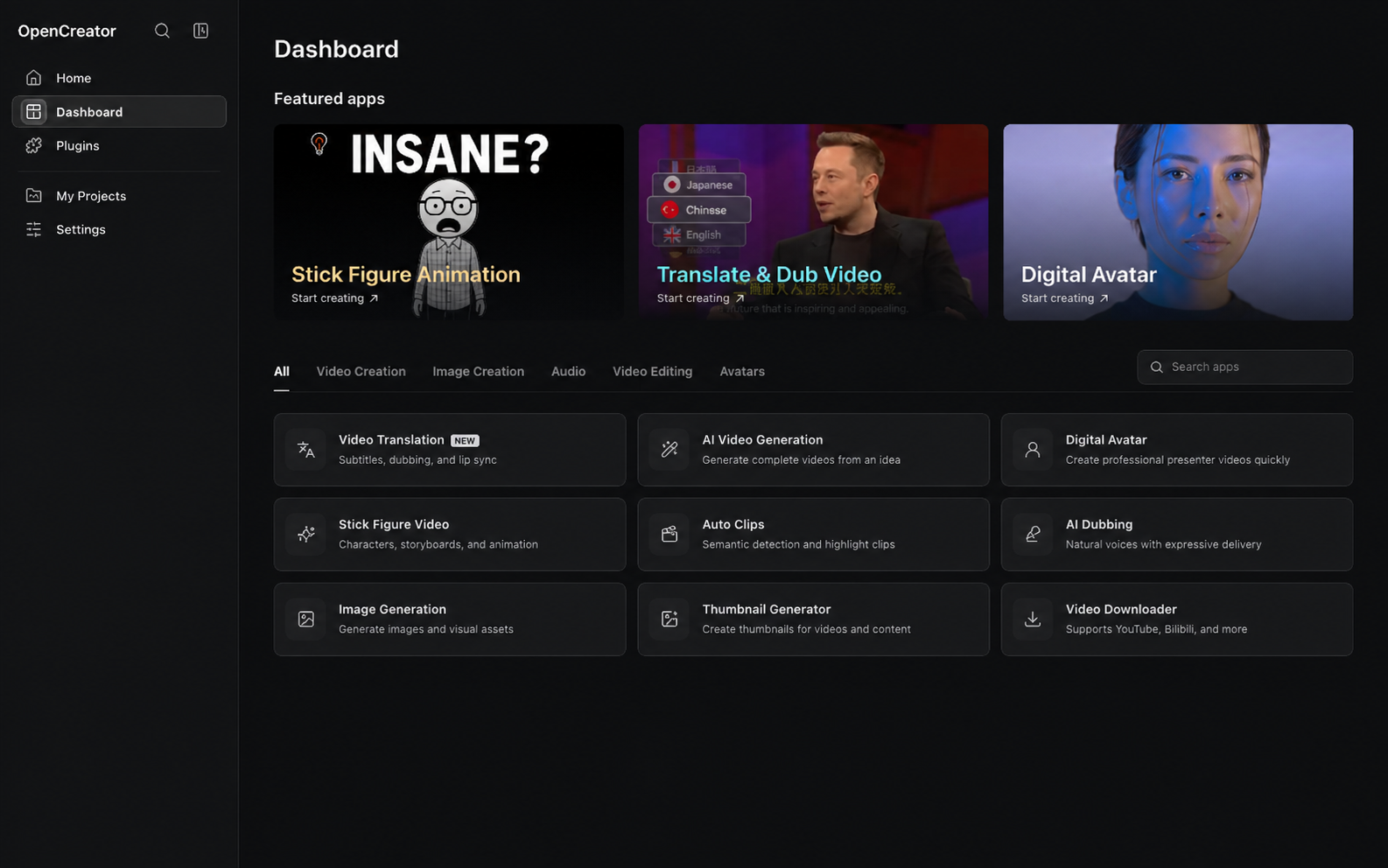
More creator tools are continuously being added.
| Workspace | Status | Capabilities |
|---|---|---|
| Video Translation | ✅ Available | Import local or public videos; transcribe with cloud or local Whisper services; use LLM context for subtitle segmentation, alignment, terminology, and translation; configure bilingual subtitles, dubbing or a custom voice sample, subtitle styles, landscape or portrait composition, and export SRT, audio, or video |
| Video Downloader | ✅ Available | Parse YouTube, Bilibili, and other supported public links, inspect available quality and format options, and download video or audio for later workflows |
| Thumbnail Generator | ✅ Available | Combine a topic, video link, and optional reference image to generate and compare multiple content-thumbnail variations |
| Image Generation | ✅ Available | Generate with GPT Image from a prompt and optional reference image, configure the aspect ratio and output count, then preview and download individual images |
| Article Writer | ✅ Available | Turn a topic, links, videos, or source documents into editable topic options, an outline, and a complete article; add generated images and export Markdown, HTML, or PDF |
| Xiaohongshu Posts | ✅ Available | Generate a complete Xiaohongshu post from a topic or source material, with controls for the target audience, post type, and length, then copy or download the result |
| Short Video Script | ✅ Available | Create a shoot-ready segmented script from a topic or source material, tailored to the audience, platform, duration, and tone, then edit, copy, or download it |
| Stick Figure Animation | ✅ Available | Turn text or YouTube content into narration, voice, consistent-character storyboard visuals, subtitles, and a downloadable stick figure animation |
| Auto Clips | In development | Analyze long videos, identify highlights, and turn selected moments into reusable short clips |
| Smart Dubbing | ✅ Available | Turn scripts into voiceovers with selectable voices, pacing, and emotion controls |
| Video Generation | ✅ Available | Generate videos with Seedance from prompts and reference images, then preview, regenerate, and download each version |
| Digital Avatar | In development | Combine scripts, voice, and avatar presentation to produce talking-head videos |
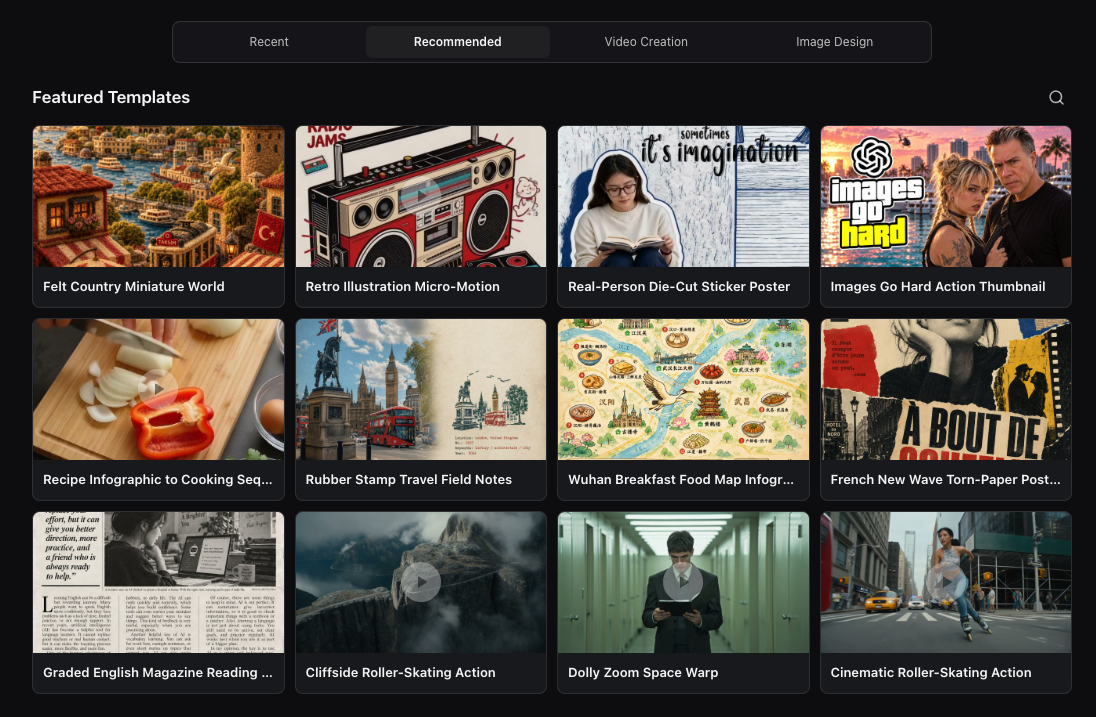
Start creating from a template instead of building every prompt and setting from scratch. Browse featured templates by category, including video creation and image design, to find a starting point for your idea.
The collection brings together templates created by OpenCreator and by independent creators. Third-party templates credit their creators and link to the original source on the template detail page.
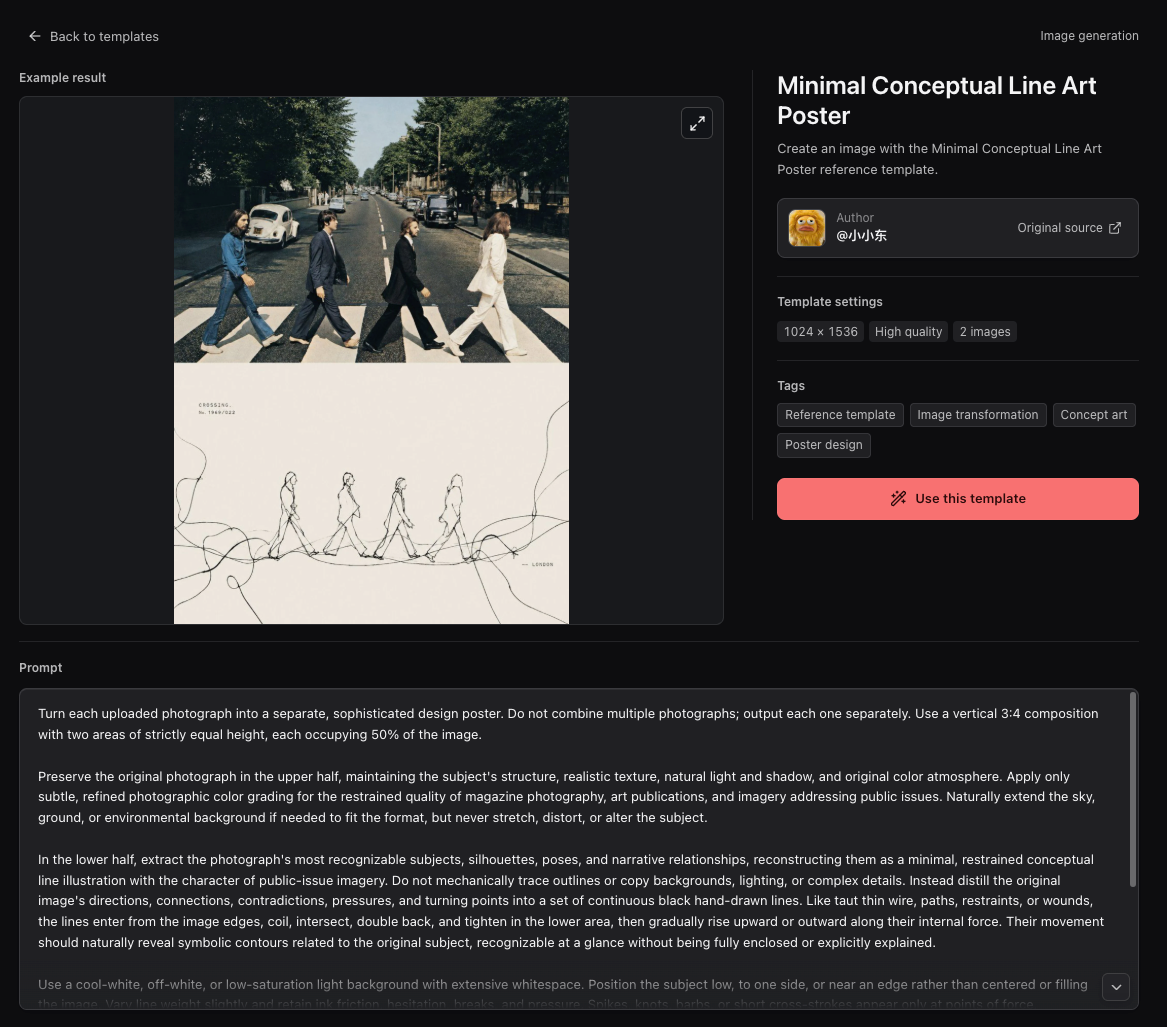
Open a template to preview its example result and inspect its prompt, settings, tags, author, and original source. Select Use this template to start creating with it, then adjust the inputs for your own work.
Creator tools provide visual controls; Skills give the Agent reusable instructions and tool workflows. OpenCreator includes video-production Skills in the repository, alongside support for managing local Codex Skills.
The repository's skills/ directory contains reusable instructions for Agents operating the embedded KrillinAI CLI.
| Skill | Capabilities | | --- | --- | | KrillinAI CLI | Choose commands, check configuration, and interpret progress, manifests, outputs, and errors | | Subtitle | Download platform captions or transcribe media, translate subtitles, and produce bilingual or short portrait subtitles | | TTS | Generate target-language dubbing from subtitles and optionally produce a dubbed video | | Landscape Render | Render landscape videos with bilingual subtitles or dubbed audio and target-language subtitles | | Portrait Render | Compose portrait videos with titles, bilingual subtitles, or dubbing | | Cover | Generate a cover image from a complete text prompt and save the image and final prompt | | Pipeline Plan | Validate a multi-stage output plan in dry-run mode; execute actual work through the individual stage Skills |
OpenCreator supports local Codex Skills defined by SKILL.md, so you can add your own methods and workflows rather than relying only on fixed creator tools. Skill availability depends on the active Codex home and installed Skills; video workflow Skills require the CLI and relevant services to be configured. Inclusion in the repository does not mean every Skill is automatically installed or every external service is bundled.
Describe tasks naturally, then step into visual tools whenever you need precise control.
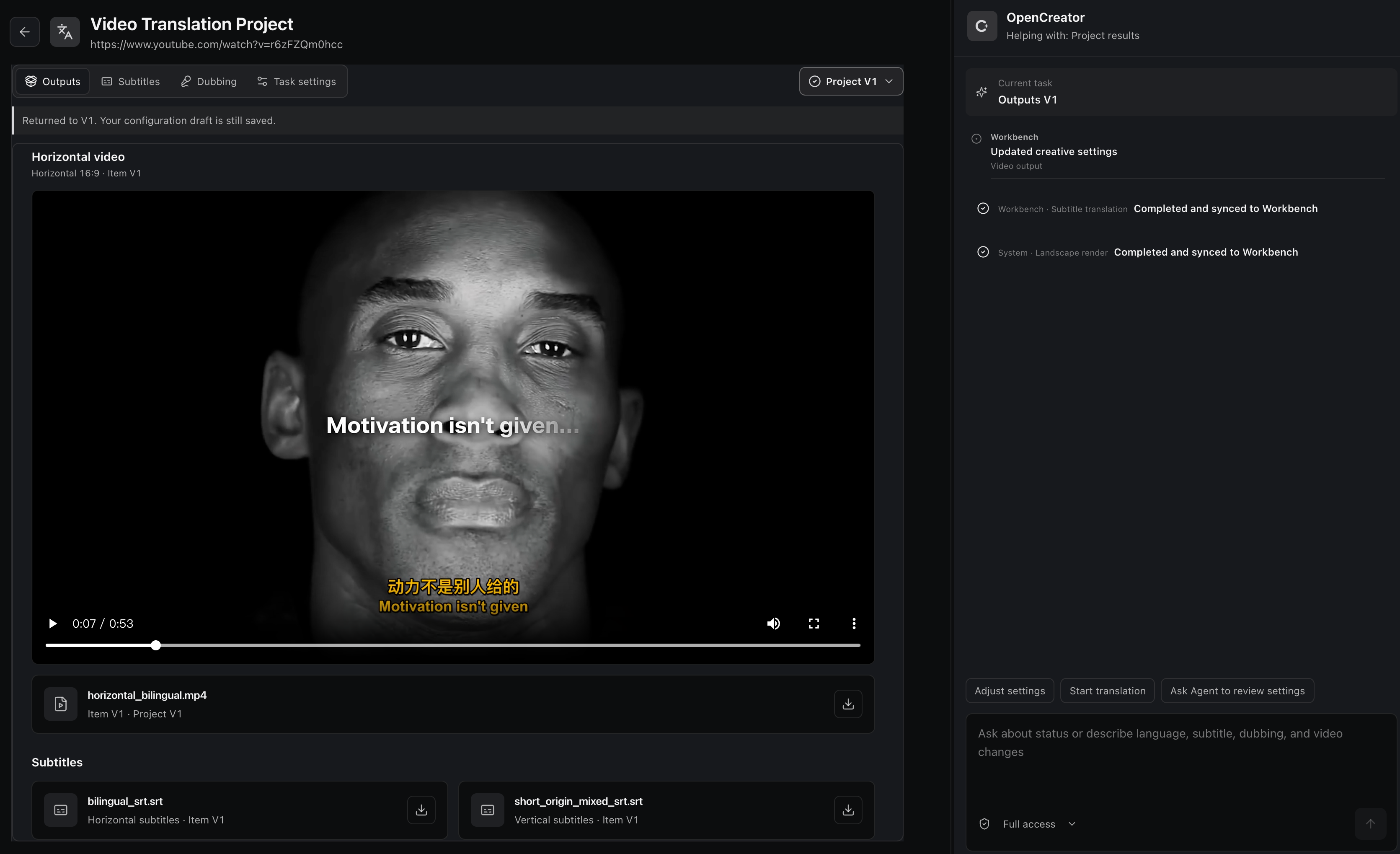
Adjust subtitles, shots, audio, and generation settings precisely.
Tell the Agent what to change and refine the result in natural language.
Conversation and workspace share the current task state, so nothing needs repeating.
Each revision creates a separate version without overwriting earlier results or settings.
Language model availability follows the Codex model catalog or your OpenAI-compatible provider. Image, video, voice, and transcription models use the services configured in Settings → AI Services.
The providers and models shown are examples; actual availability depends on your credentials, provider account access, and platform.
 GPT |
 DeepSeek |
 Qwen |
 Kimi |
 GLM |
 Grok |
 Doubao |
 ERNIE |
 Hunyuan |
 MiniMax |
GPT Image |
 Seedream 4.0 Jimeng |
 Kling v2.1 Kling Image |
 Nano Banana Gemini 2.5 Flash Image |
 Seedance 2.5 |
Kling v2.1 Master |
Veo 3.1 |
Whisper |
OpenAI TTS |
MiniMax |
 Edge TTS |
 Aliyun Speech |
Local transcription also supports faster-whisper, WhisperKit, and whisper.cpp where available.
The public examples below were produced when OpenCreator was still named KrillinAI. They demonstrate the established subtitle alignment, translation, dubbing, and portrait-video workflow that OpenCreator's Video Translation workspace brings into a wider Agent workflow.
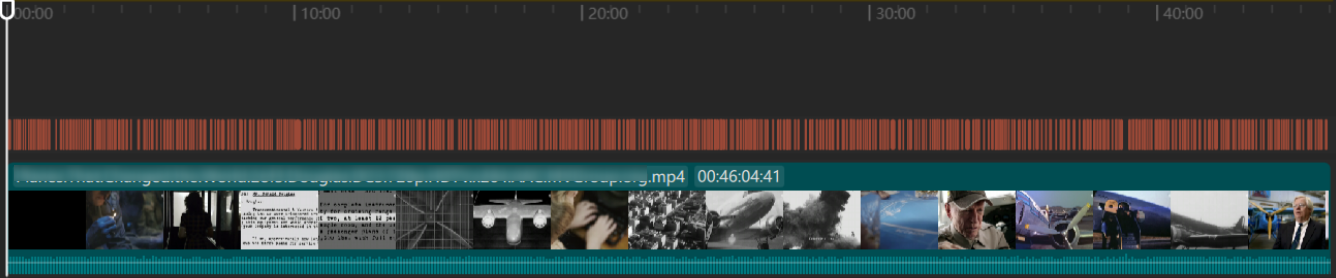
The project generated the subtitle file below from a 46-minute local video in one run, without manual subtitle adjustments. The published result shows complete coverage, no overlapping lines, natural segmentation, and high-quality translation.
Subtitle Translationhttps://github.com/user-attachments/assets/bba1ac0a-fe6b-4947-b58d-ba99306d0339 |
Dubbinghttps://github.com/user-attachments/assets/0b32fad3-c3ad-4b6a-abf0-0865f0dd2385 |
Portrait Modehttps://github.com/user-attachments/assets/c2c7b528-0ef8-4ba9-b8ac-f9f92f6d4e71 |
These video examples and the subtitle alignment image were produced while OpenCreator still used the KrillinAI name.
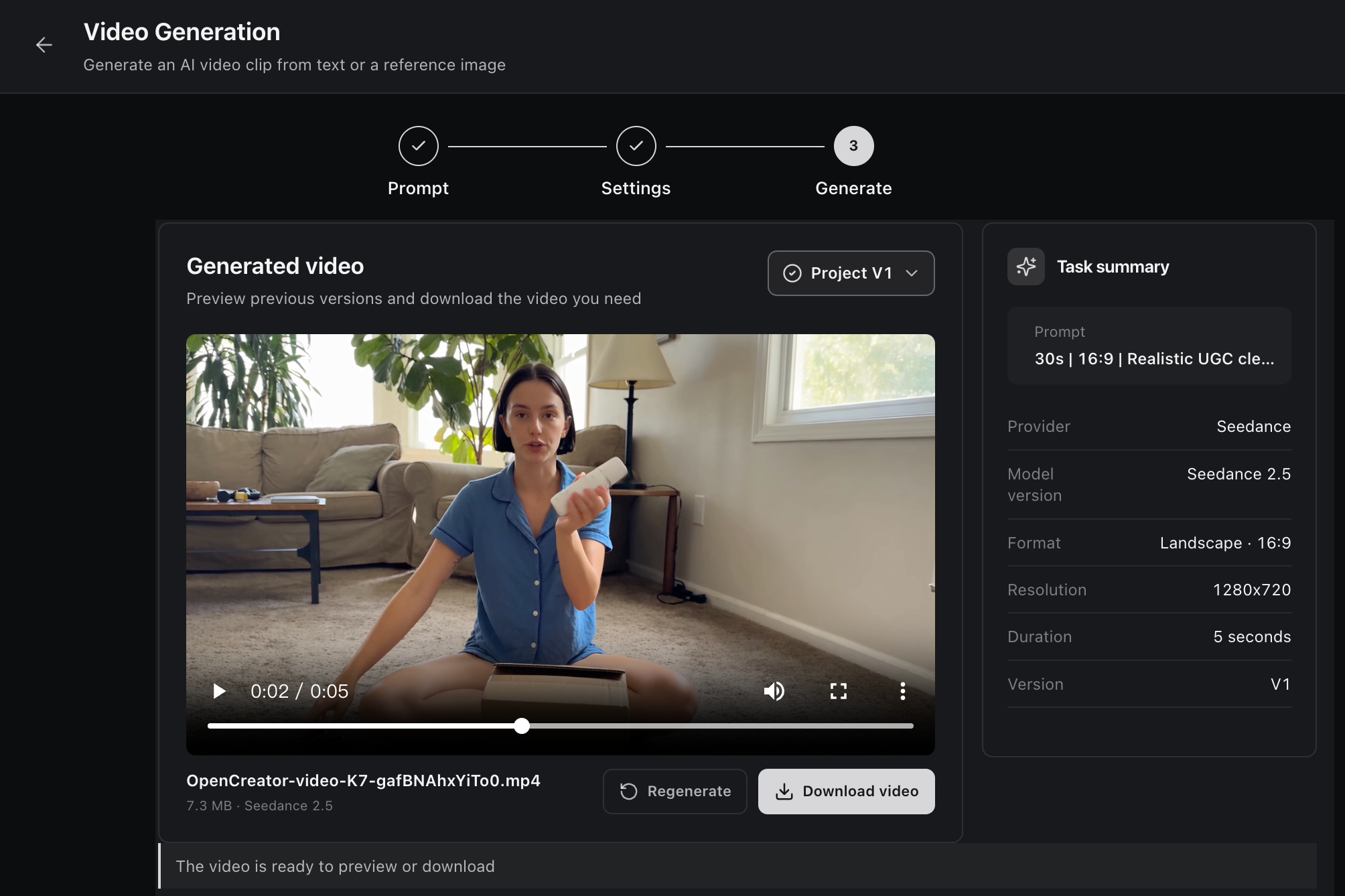
Generate an AI video from a text prompt or reference image with Seedance. Configure the model, aspect ratio, resolution, and duration, then preview, regenerate, or download each version from the project workspace.
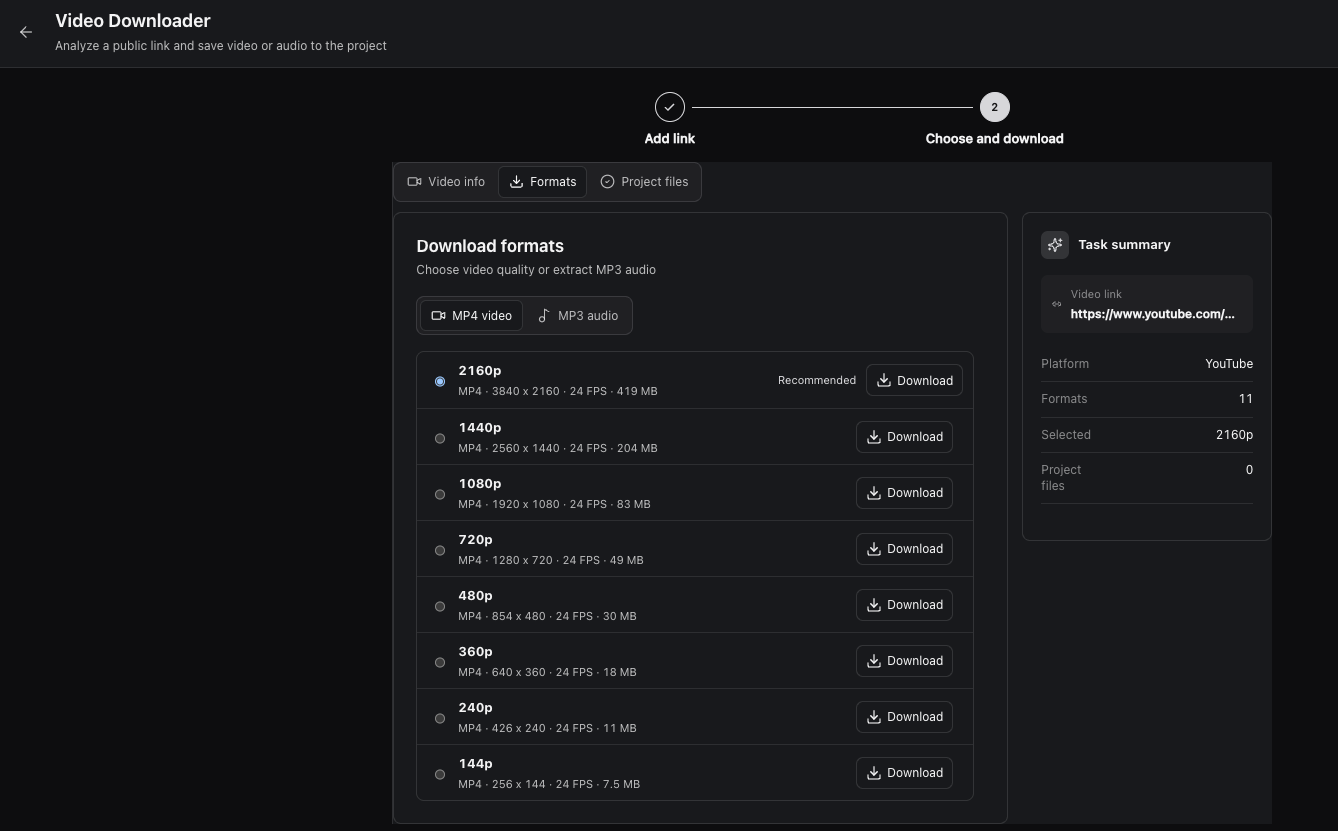
Analyze a public video link, compare the available formats, and download video or audio directly to the project.
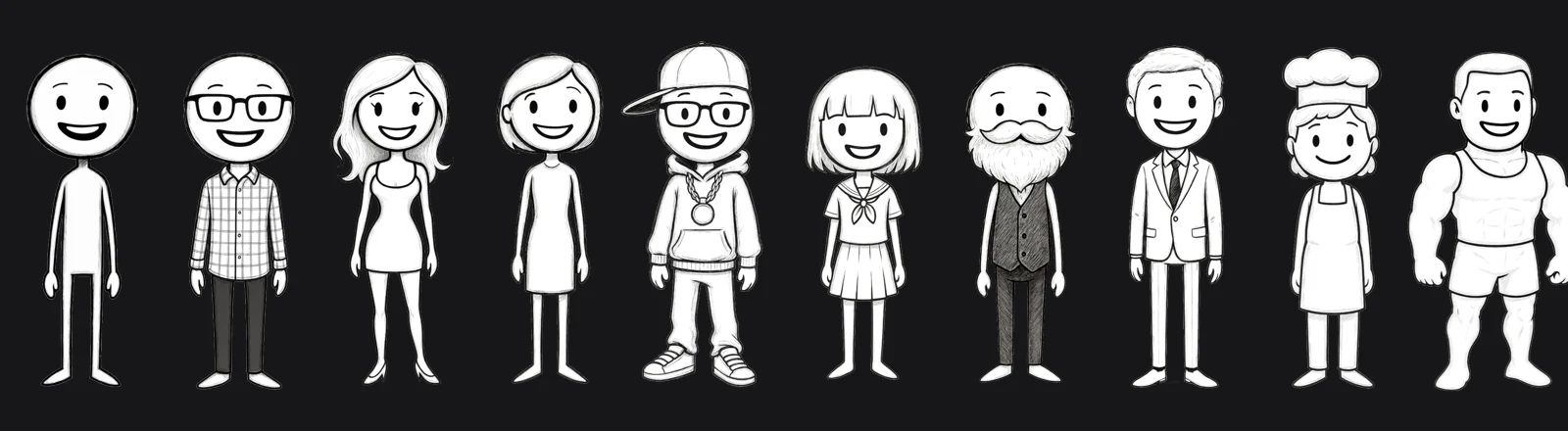
OpenCreator developed this original character collection in collaboration with artist Harbor Hsia, creator of Stickman on Behance. The built-in cast keeps character identities consistent throughout the animation workflow.
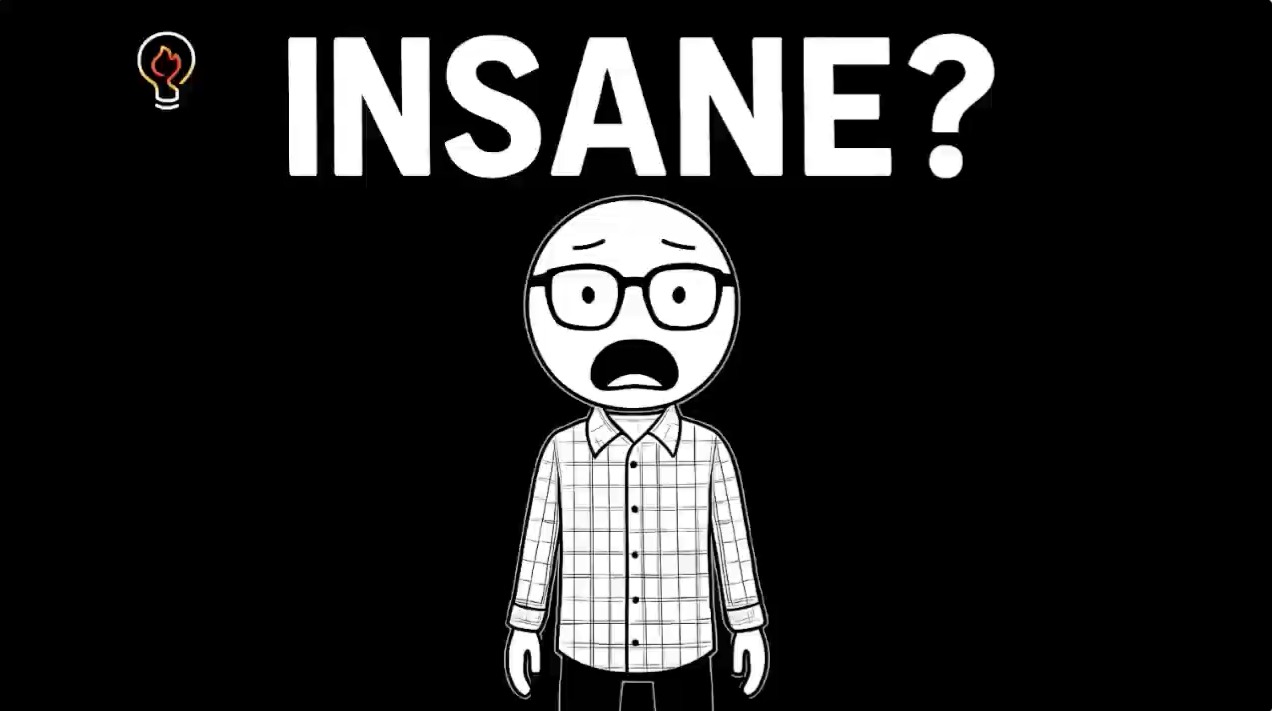
Turn text or YouTube content into a complete animation through a guided workflow for script review, narration, timing, storyboard visuals, subtitles, rendering, and downloadable video output.
packageManager fieldnode --version
pnpm --version
codex --version
git clone https://github.com/krillinai/OpenCreator.git
cd OpenCreator
corepack enable
pnpm install
pnpm web:dev
Open http://127.0.0.1:19861/. The development server starts the local daemon on demand and injects a temporary Runtime token through a same-origin proxy, so no connection token needs to be copied manually.
On first launch, the Runtime prepares a default project. The composer is ready as soon as the connection completes. To work on the daemon only:
pnpm daemon:dev
The daemon listens only on a loopback address and prints its connection address and temporary token to stdout once.
Desktop and the browser use the same React frontend from apps/web. General project, conversation, task, and settings behavior calls the same Daemon/API. Electron adds only real system paths, window controls, tray behavior, and native notifications.
pnpm desktop:dev
| Command | Output |
| --- | --- |
| pnpm desktop:package | A runnable directory for the current platform, intended for local verification |
| pnpm desktop:dist | An installer for the current platform |
| pnpm desktop:release | The formal release packaging entry point |
| pnpm --filter @opencreator/desktop verify:package | Verification for an existing Desktop package |
| pnpm krillinai:package | Separate KrillinAI Server and CLI archives for the selected platform |
Desktop packaging rebuilds Web from the current workspace, records the commit, dirty state, platform, architecture, and Web hash, and compares apps/web/dist with the resources embedded in the application. Packaging fails if they differ. See the Desktop release runbook for signing, notarization, Windows builds, and release requirements.
1. Select a project or start a new conversation. 2. Enter a task and choose the permission level, Profile, model, and reasoning effort. 3. While a Run is active, queue follow-up tasks or interrupt it and continue immediately. 4. Use the Timeline to inspect reasoning summaries, tool calls, file changes, approvals, and final results. 5. Use the task center to track running, completed, failed, and approval-blocked tasks globally.
/ or the add menu so the next task follows its workflow.$CODEX_HOME by default, so confirm the impact before changing global Skills or MCP configuration.queue or skip policy.OpenCreator treats the visual workspace and the Agent conversation as two interfaces to the same creative task, rather than two separate workflows. Each creator workflow is modeled as a state machine: source input, configuration, generation, review, revision, and export become explicit states and events. Workspace actions and conversational commands enter the same state machine, while the current step, configuration, progress, versions, and results are projected back into both interfaces. This keeps the workspace and conversation synchronized without introducing a second source of truth.
Creative work is iterative, so revisions do not overwrite the current result. Each correction or regeneration creates a new version from the existing workflow state, retaining the settings and outputs of earlier versions for review, comparison, and continued refinement.
```text +-----------------------------+ +------------------------------------+ | Browser Access | | Desktop Host | | | | Shared Web build + Electron | +--------------+--------------+ +------------------+-----------------+
→ →
→ →
→ →
→ →
→ →
→ →
→ →
→