1
 →
→
RAGFlow is a leading open-source Retrieval-Augmented Generation (RAG) engine that fuses cutting-edge RAG with Agent capabilities to create a superior context layer for LLMs
infiniflow/ragflow is an open-source project on GitHub, mainly written in Go. RAGFlow is a leading open-source Retrieval-Augmented Generation (RAG) engine that fuses cutting-edge RAG with Agent capabilities to create a superior context It currently holds 91,105 stars and 10,805 forks with 1,469 open issues, and was last pushed on 2026-09-21 (repository created 2023-12-12).
Git Homed tracks it on the AI Agent Skills Trending board and on the AI AI Agent Skills Trending list.













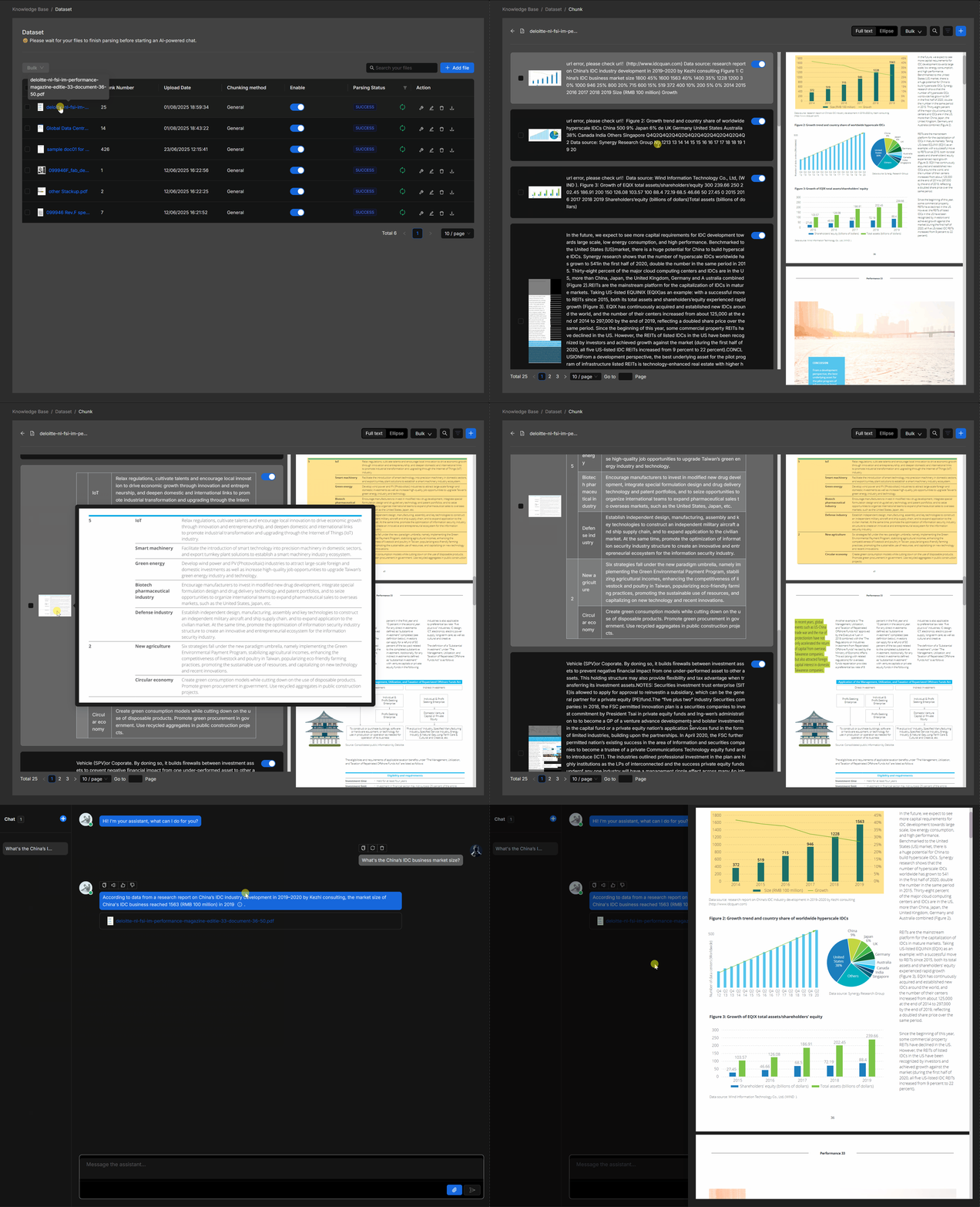
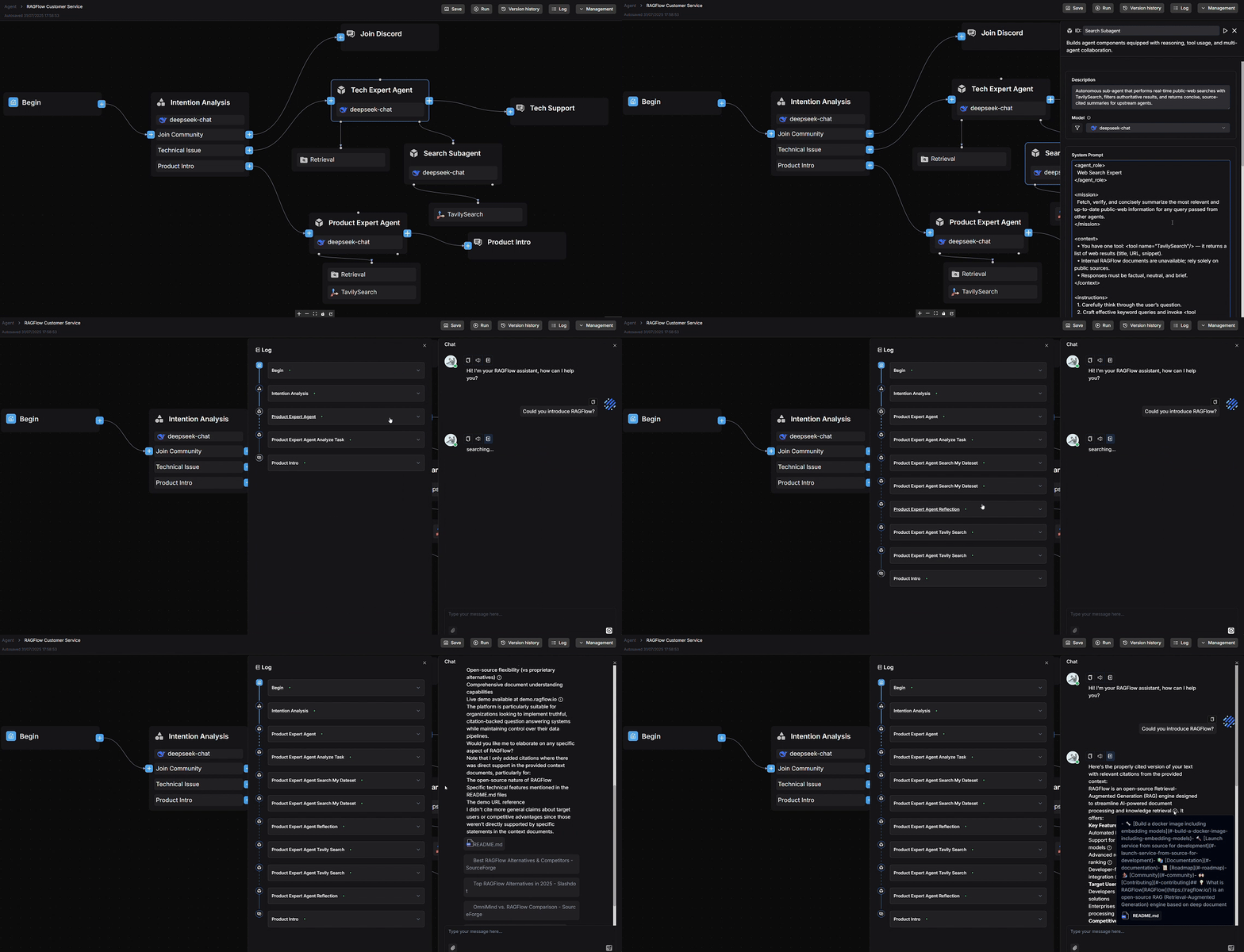
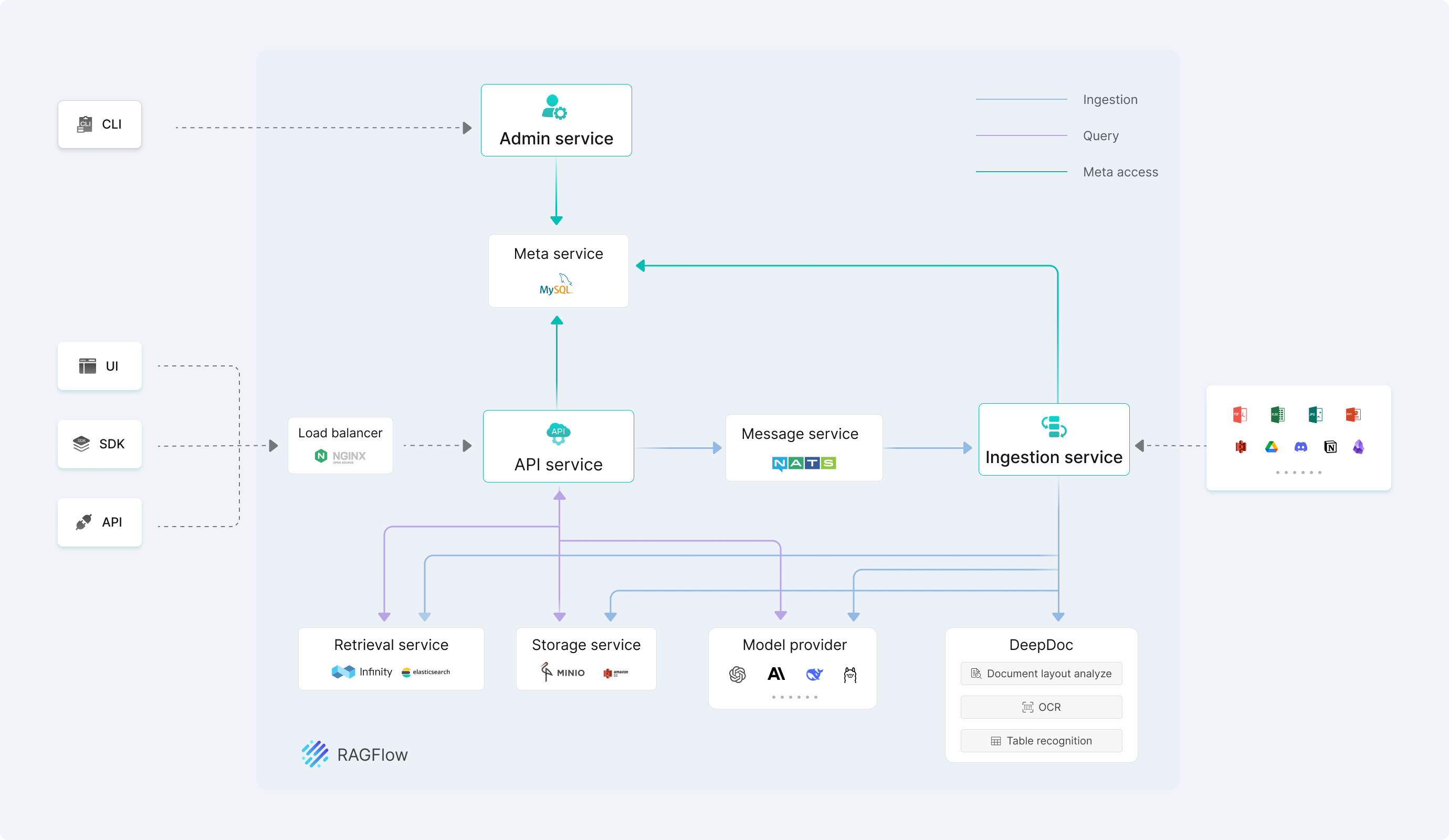
RAGFlow is a leading open-source Retrieval-Augmented Generation (RAG) engine that fuses cutting-edge RAG with Agent capabilities to create a superior context layer for LLMs. It offers a streamlined RAG workflow adaptable to enterprises of any scale. Powered by a converged context engine and pre-built agent templates, RAGFlow enables developers to transform complex data into high-fidelity, production-ready AI systems with exceptional efficiency and precision.
Try our cloud service at https://cloud.ragflow.io.
For local deployment, see Local Deployment.
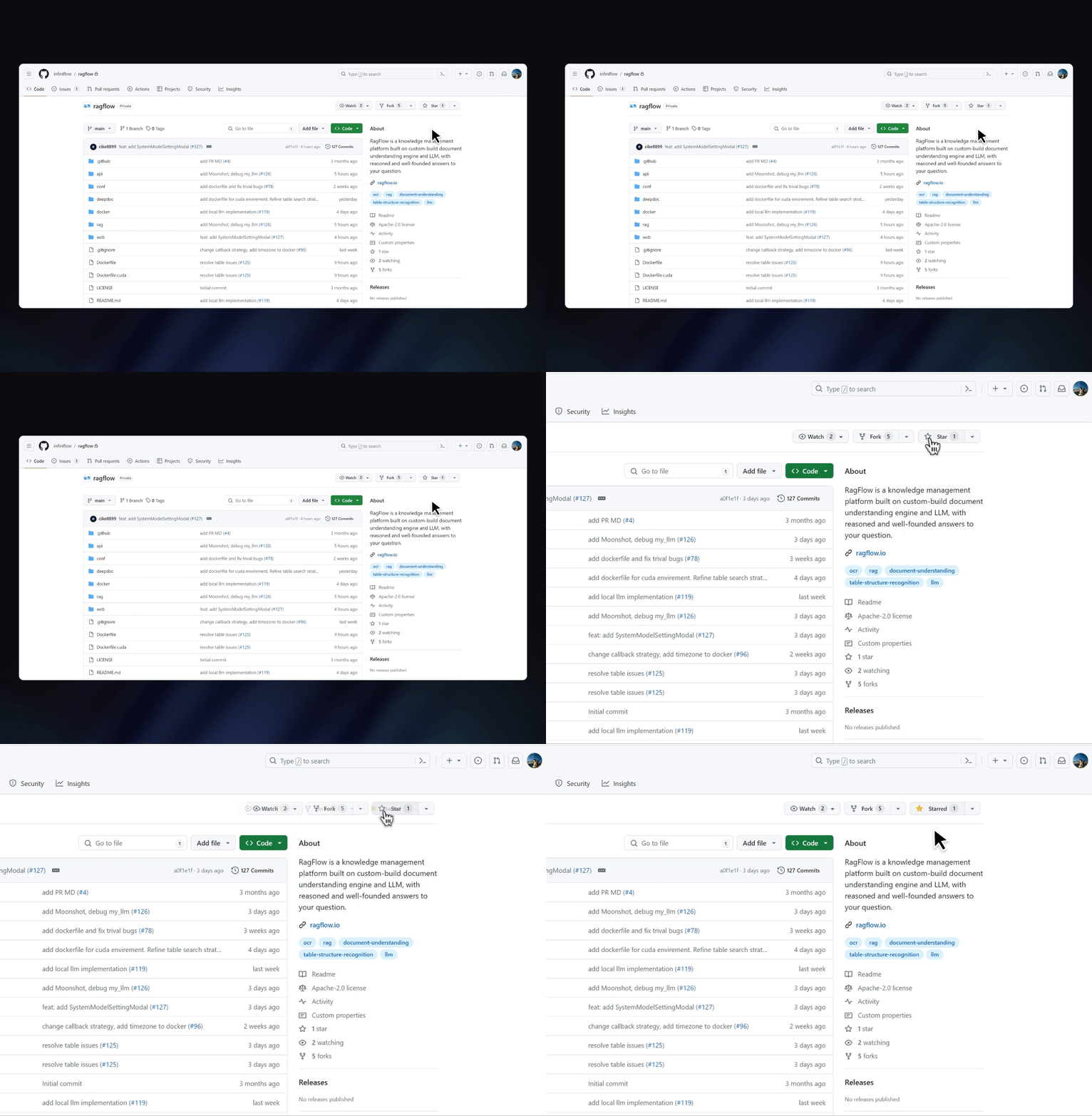
⭐️ Star our repository to stay up-to-date with exciting new features and improvements! Get instant notifications for new releases! 🌟
[!TIP]
If you have not installed Docker on your local machine (Windows, Mac, or Linux), see Install Docker Engine.
1. If using Elasticsearch, set vm.max_map_count on the Docker host to at least 262144. This step is usually unnecessary with Infinity:
> To check the value of vm.max_map_count:
>
>
   > sysctl vm.max_map_count
   >
> # In this case, we set it to 262144:
> sudo sysctl -w vm.max_map_count=262144
> vm.max_map_count value in /etc/sysctl.conf accordingly:
>
> > vm.max_map_count=262144
> git clone https://github.com/infiniflow/ragflow.git
> [!NOTE]
> The v1.0.0-rc1 tag and later release tags use the Go implementation. See the Go Docker image build and platform support guide only if you need to build an image locally.
>
   > # Enter the Docker deployment directory.
   > cd ragflow/docker
   > # Check out the Go v1.0.0-rc1 release tag.
   > git checkout v1.0.0-rc1
   > # Start the Go services and their dependencies in the background.
   > docker compose -f docker-compose.yml up -d
   >
> In the default MySQL configuration, the Go image entrypoint runs database migrations before starting Syncer, Admin, API, and Ingestor through bin/ragflow_server.
> In the RAGFlow open-source 1.0 release, DeepDoc uses CPU inference for layout analysis, OCR, and table recognition.
4. Check service status and API readiness after startup:
docker ps
The command above displays dependency status. RAGFlow itself does not define a Compose healthcheck; confirm readiness through its API:
curl -f http://localhost/api/v1/system/healthz
An HTTP 200 response indicates readiness. If you changed SVR_WEB_HTTP_PORT, use that port in the health-check URL. If startup fails, inspect the relevant service logs with docker logs --tail 50 .
5. In your web browser, enter the IP address of your server and log in to RAGFlow.
> With the default settings, you only need to enter http://IP_OF_YOUR_MACHINE (sans port number) as the default
> HTTP serving port 80 can be omitted when using the default configurations.
>
6. After signing in, add an LLM, embedding, and reranker on the model provider page, including the model name, service address, and API key.
Go Docker deployment uses docker/.env and docker/docker-compose.yml, uses Kvrocks for cache and Checkpoint storage, and uses NATS JetStream as the message queue. Configure the image, ports, passwords, document engine, and model image source as described in the Docker configuration guide. For platform limitations and macOS requirements, see the Go Docker image build and platform support guide.
For document-engine changes, configuration updates, restarting services, and retaining or removing existing data, follow the Docker configuration guide.
Install the Go version specified in go.mod (currently Go 1.27), Clang 20, LLD 20, CMake ≥ 4.0, PCRE2 development files, and the native libraries required by CGO. Node.js and npm are required only when developing the React frontend.
1. Clone the repository and install the Go version specified in go.mod (currently Go 1.27), Clang 20, LLD 20, CMake ≥ 4.0, and PCRE2 development files. Go services depend on CGO and native static libraries; build.sh sets the required build parameters.
   git clone https://github.com/infiniflow/ragflow.git
   cd ragflow
2. Prepare native libraries, model files, and tokenizer assets with the Go dependency download script, then build the Go services:
   python3 -m venv /tmp/ragflow-go-download-venv
   /tmp/ragflow-go-download-venv/bin/python -m pip install requests huggingface-hub
   /tmp/ragflow-go-download-venv/bin/python ragflow_deps/download_deps.py
   bash build.sh --all
The script prepares native libraries and model resources required for the Go build and needs requests and huggingface-hub. Skip this step if you have prepared the same resources by other means. When started from the repository root, Go services automatically find internal/rag/res/deepdoc; to start from another directory, set DEEPDOC_MODEL_DIR to its absolute path.
3. Start the local dependencies and make sure the hosts and ports in conf/service_conf.yaml point to addresses accessible from the host. Go source services connect to Compose-exposed Kvrocks at localhost:6379, while Go Docker services connect to Kvrocks on the container network. If using the default Elasticsearch engine, set vm.max_map_count on the Docker host to at least 262144 first.
   sudo sysctl -w vm.max_map_count=262144
   docker compose --env-file docker/.env -f docker/docker-compose-base.yml \
     up -d --wait es01 mysql minio nats kvrocks clickhouse
4. Migrate the database first, then start the Go services in order in five separate terminals. Run each command below from the repository root. Keep the four service terminals running. The migration command does not need RAGFLOW_DEV_MODE; set RAGFLOW_DEV_MODE=true for Admin, Ingestor, Syncer, and API in a development environment. Close the migration terminal after the migration completes.
Terminal 1: migrate the database.
./bin/ragflow_server --migrate
Terminal 2: start Admin (target port 9381).
RAGFLOW_DEV_MODE=true ./bin/ragflow_server --admin
Terminal 3: start Ingestor.
RAGFLOW_DEV_MODE=true ./bin/ragflow_server --ingestor
Terminal 4: start Syncer.
RAGFLOW_DEV_MODE=true ./bin/ragflow_server --syncer
Terminal 5: start API (target port 9380).
RAGFLOW_DEV_MODE=true ./bin/ragflow_server --api
The startup modes work as follows:
--migrate: Runs database migrations and exits when complete.--admin: Starts the Admin service for management and initialization operations.--ingestor: Starts the Ingestor service for data ingestion and parsing tasks.--syncer: Starts the Syncer service for data synchronization tasks.--api: Starts the API service for the Web UI, SDKs, and external clients.RAGFLOW_DEV_MODE=true is only for development; it disables the downgrade check between code and database migration versions, but does not run migrations or change the database schema. Do not set it in production. Start Admin before the other services. After database migration, RAGFLOW_DEV_MODE=true bash build.sh --run can conveniently start Admin, Ingestor, and API. It does not start Syncer; start it separately with RAGFLOW_DEV_MODE=true ./bin/ragflow_server --syncer for the complete service chain.
5. Only when developing the frontend, install Node.js and npm, then start the React frontend:
   cd web
   npm install
   API_PROXY_SCHEME=go npm run dev
In another terminal, confirm that the Go API is ready:
curl -f http://127.0.0.1:9380/api/v1/system/healthz
An HTTP 200 response indicates that the API is responding. See Launch Service from Source for complete frontend, ClickHouse, and DeepDoc verification steps.
When development is complete, press Ctrl+C in each service terminal to stop the processes. To stop dependencies but keep the containers for next time, run docker compose --env-file docker/.env -f docker/docker-compose-base.yml stop es01 mysql minio nats kvrocks clickhouse. To remove the dependency containers and Compose network while keeping named data volumes, run docker compose --env-file docker/.env -f docker/docker-compose-base.yml down.
See Launch Service from Source for details.
See the RAGFlow Roadmap 2026
RAGFlow flourishes via open-source collaboration. In this spirit, we embrace diverse contributions from the community. If you would like to be a part, review our Contribution Guidelines first.
→ →
→ →
→ →
→ →
→ →
→ →
→ →
→