1
 →
→
An interactive Formula 1 race visualisation and data analysis tool built with Python! 🏎️
IAmTomShaw/f1-race-replay is an open-source project on GitHub, mainly written in Python. An interactive Formula 1 race visualisation and data analysis tool built with Python! 🏎️ It currently holds 6,670 stars and 880 forks with 154 open issues, and was last pushed on 2026-10-06 (repository created 2025-11-21).
Git Homed tracks it on the Today's Trending board, currently at rank #34 with 148 new stars today.
A Python application for visualizing Formula 1 race telemetry and replaying race events with interactive controls and a graphical interface.
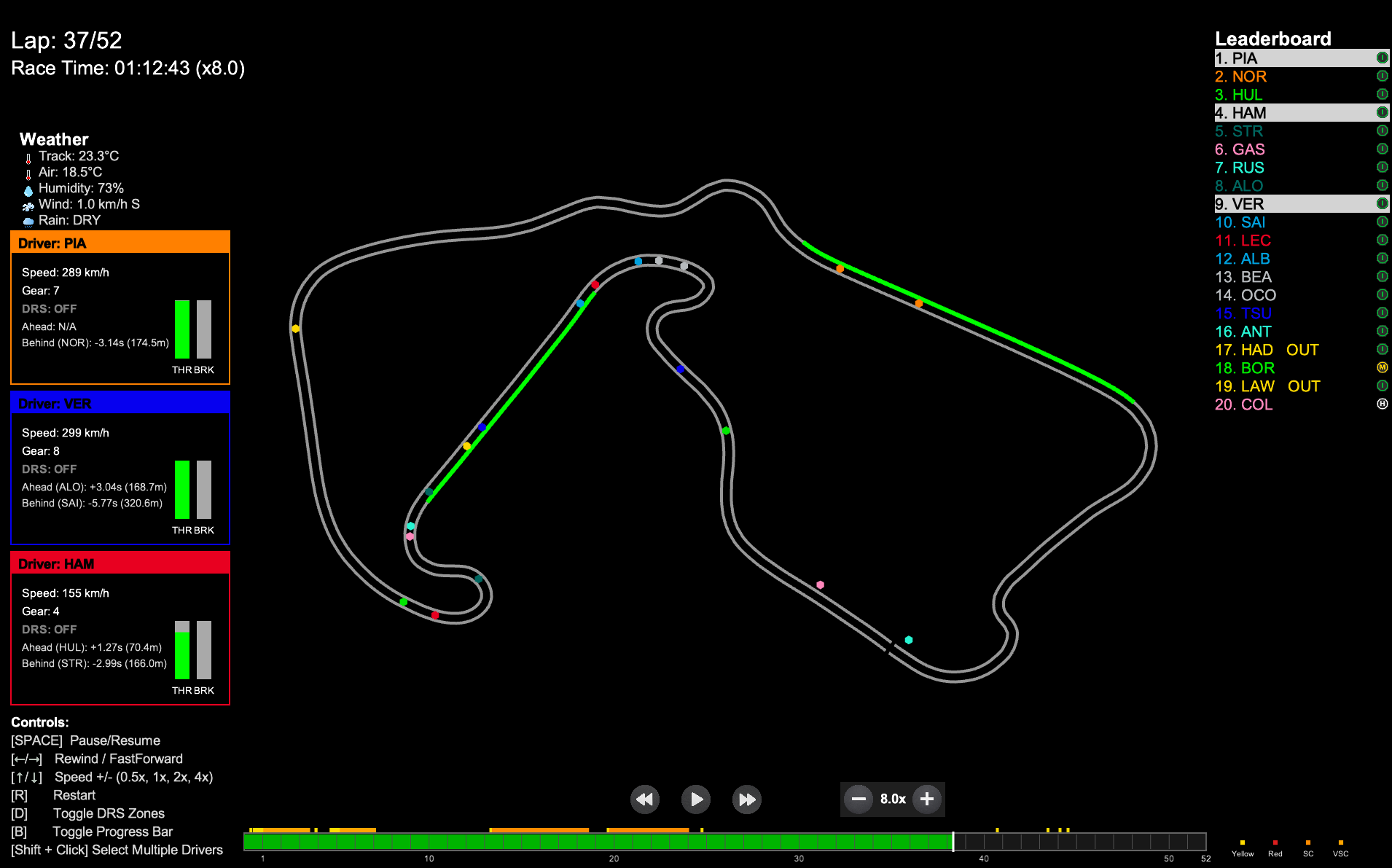
HUGE NEWS: The telemetry stream feature is now in a usable state. See the telemetry demo documentation for access instructions, data format details, and usage ideas.
The replay includes a simulated Safety Car that appears on track whenever the F1 data indicates a Safety Car deployment (track status code 4). Since the F1 API does not provide GPS telemetry for the actual Safety Car, its position is simulated based on the race leader's position.
session.track_status).The SC position computation happens in _compute_safety_car_positions() in src/f1_data.py. Each frame gets a safety_car field:
{
  "safety_car": {
    "x": 1234.56,
    "y": 7890.12,
    "phase": "on_track",
    "alpha": 1.0
  }
}
| Field | Description |
|-------|-------------|
| x, y | World coordinates of the SC |
| phase | "deploying", "on_track", or "returning" |
| alpha | Opacity value from 0.0 (invisible) to 1.0 (fully visible), used for fade in/out animation |
Note: If you have existing cached.pklfiles from previous runs, you must re-run with--refresh-datato generate SC position data. Older cached files will simply show no Safety Car.
Recently added support for Qualifying session replays with telemetry visualization including speed, gear, throttle, and brake over the lap distance. This feature is still being refined.
pip install -r requirements.txt
FastF1 cache folder will be created automatically on first run. If it is not created, you can manually create a folder named .fastf1-cache in the project root
First Run Notice: Loading a session for the first time may take noticeably longer because telemetry data must be downloaded, processed, and cached locally. Subsequent launches of the same session are significantly faster..
To get started with this project locally, you can follow these steps:
1. Clone the Repository:
   git clone https://github.com/IAmTomShaw/f1-race-replay
    cd f1-race-replay
      python3 -m venv venv
      source venv/bin/activate
      python -m venv venv
      .\venv\Scripts\activate
pip install -r requirements.txt
4. Run the Application: You can now run the application using the instructions in the Usage section below.
pip install --upgrade fastf1
DEFAULT GUI MENU: To use the new GUI menu system, you can simply run:
python main.py
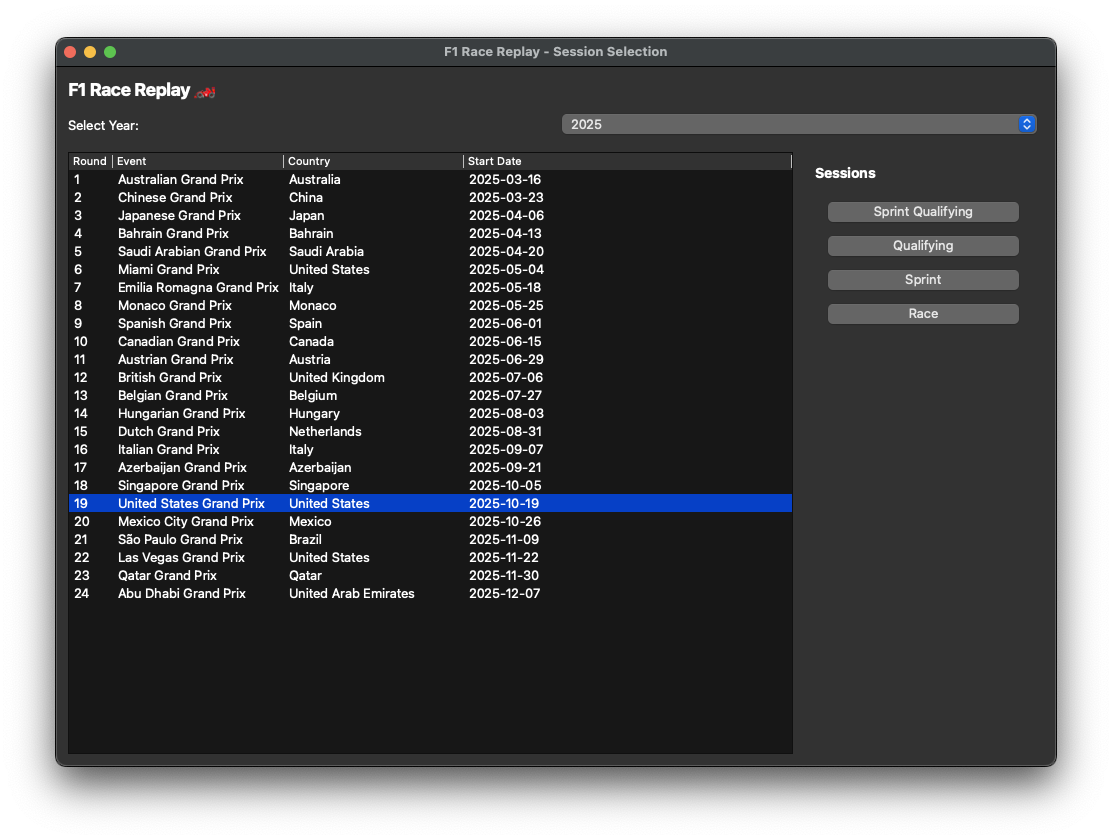
This will open a graphical interface where you can select the year and round of the race weekend you want to replay. This is still a new feature, so please report any issues you encounter.
OPTIONAL CLI MENU: To use the CLI menu system, you can simply run:
python main.py --cli
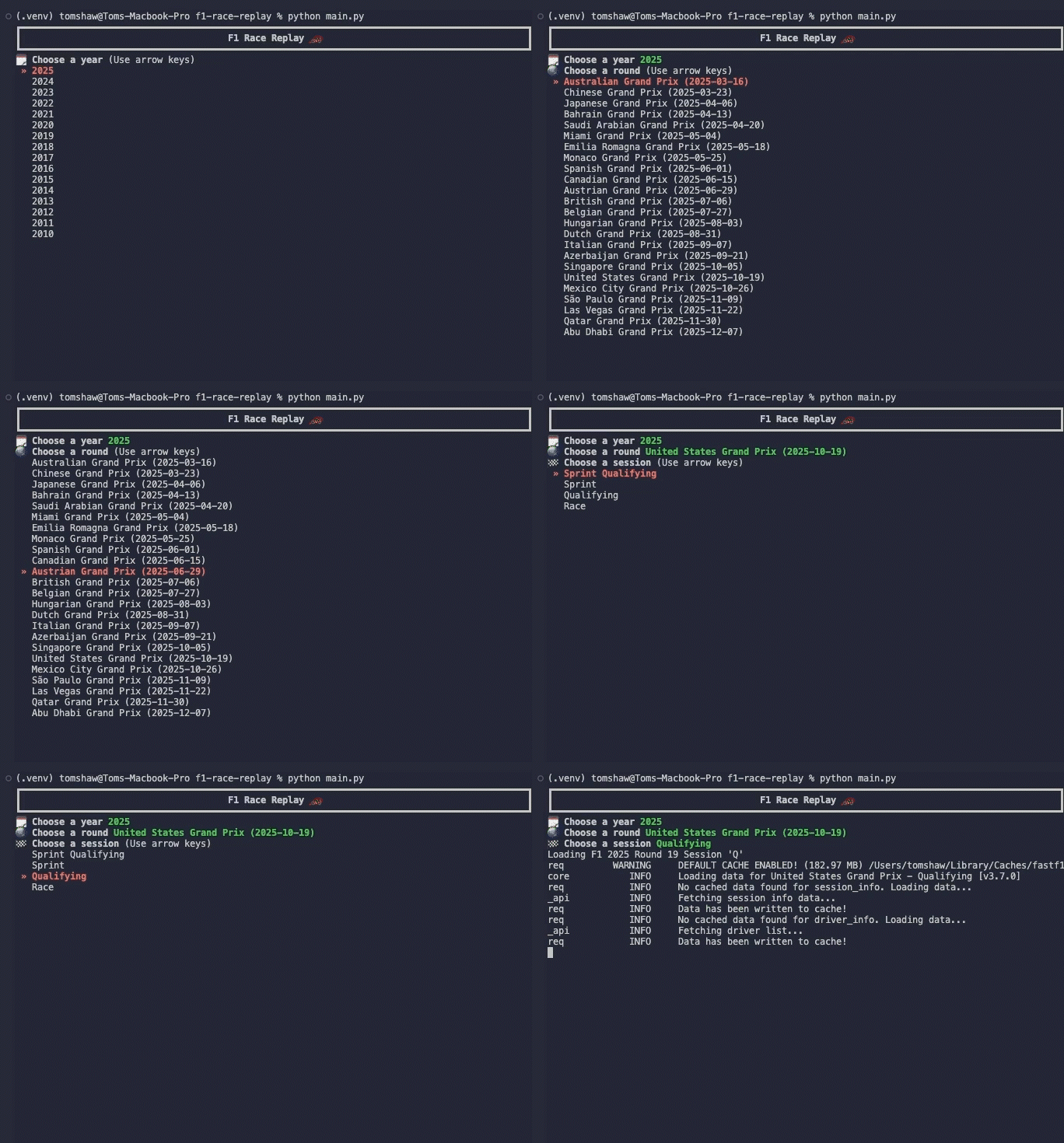
This will prompt you with series of questions and a list of options to make your choice from using the arrow keys and enter key.
If you would already know the year and round number of the session you would like to watch, you run the commands directly as follows:
Run the main script and specify the year and round:
python main.py --viewer --year 2025 --round 12
To run without HUD:
python main.py --viewer --year 2025 --round 12 --no-hud
To run a Sprint session (if the event has one), add --sprint:
python main.py --viewer --year 2025 --round 12 --sprint
The application will load a pre-computed telemetry dataset if you have run it before for the same event. To force re-computation of telemetry data, use the --refresh-data flag:
python main.py --viewer --year 2025 --round 12 --refresh-data
To run a Qualifying session replay, use the --qualifying flag:
python main.py --viewer --year 2025 --round 12 --qualifying
To run a Sprint Qualifying session (if the event has one), add --sprint:
python main.py --viewer --year 2025 --round 12 --qualifying --sprint
f1-race-replay/
├── main.py                    # Entry point, handles session loading and starts the replay
├── requirements.txt           # Python dependencies
├── README.md                  # Project documentation
├── roadmap.md                 # Planned features and project vision
├── resources/
│   └── preview.png           # Race replay preview image
├── src/
│   ├── f1_data.py            # Telemetry loading, processing, frame generation & SC position simulation
│   ├── arcade_replay.py      # Visualization and UI logic
│   └── ui_components.py      # UI components like buttons and leaderboard
│   ├── interfaces/
│   │   └── qualifying.py     # Qualifying session interface and telemetry visualization
│   │   └── race_replay.py    # Race replay interface, SC rendering & telemetry visualization
│   └── lib/
│       └── tyres.py          # Type definitions for telemetry data structures
│       └── time.py           # Time formatting utilities
└── .fastf1-cache/            # FastF1 cache folder (created automatically upon first run)
└── computed_data/            # Computed telemetry data (created automatically upon first run)
When you start a race replay, an Insights Menu automatically appears, providing quick access to various telemetry analysis tools. You can easily create custom insight windows that receive live telemetry data using the PitWallWindow base class:
from src.gui.pit_wall_window import PitWallWindow
class MyInsightWindow(PitWallWindow):
    def setup_ui(self):
        # Create your custom UI
        pass

    def on_telemetry_data(self, data):
        # Process telemetry data
        pass
The PitWallWindow base class handles all telemetry stream connection logic automatically, allowing you to focus solely on your window's functionality.
Key Features:
setup_ui() and on_telemetry_data()python -m src.gui.example_pit_wall_windowpython -m src.gui.insights_menusrc/arcade_replay.py.src/f1_data.py.PitWallWindow base class (see above).There have been several contributions from the community that have helped enhance this project. I have added a contributors.md file to acknowledge those who have contributed features and improvements.
If you would like to contribute, feel free to:
conda environment, you might need to install a few extra packages if you get this error:arcade.application.NoOpenGLException: Unable to create an OpenGL 3.3+ context. Check to make sure your system supports OpenGL 3.3 or higher
$ conda install -c conda-forge libstdcxx-ng
This project is licensed under the MIT License.
No copyright infringement intended. Formula 1 and related trademarks are the property of their respective owners. All data used is sourced from publicly available APIs and is used for educational and non-commercial purposes only.
---
Built with ❤️ by Tom Shaw
→ →
→ →
→ →
→ →
→ →
→ →
→ →
→