1
 →
→
Free GST Billing Software — Free, open-source GST invoice & billing software. Tax Invoice, Proforma, Credit Note, Bill of Supply. CGST/SGST/IGST. Multi-currency. 100% offline, no signup.
IamRamgarhia/Free-GST-Billing-Software is an open-source project on GitHub, mainly written in JavaScript. Free GST Billing Software — Free, open-source GST invoice & billing software. Tax Invoice, Proforma, Credit Note, Bill of Supply. CGST/SGST/IGST. It currently holds 351 stars and 142 forks with 18 open issues, and was last pushed on 2026-10-30 (repository created 2026-03-15).
Git Homed tracks it on the Today's Trending board, currently at rank #64 with 79 new stars today.





Create GST-compliant invoices, file GSTR-1 / GSTR-3B / GSTR-2B reconciliation, track TDS / TCS, bill international clients in 22 currencies, manage inventory — all without paying a single rupee. Ever.
Your data never leaves your computer. No cloud. No signup. No tracking. No limits. Open-source and offline-first.
Always the newest version · about 16 MB · Windows, macOS and Linux in one ZIP · release notes
⬇ Download ZIP | 📦 Releases | 📖 Documentation | ⚡ 3-Step Install | ☁ Run Online (Vercel / Supabase / Railway) | 🧾 First Invoice in 5 Minutes | 📸 Screenshots | 🐛 Report Bug
---
The download ZIP holds a launcher for each system, a plain-English READ ME FIRST.txt, and a _system/ folder with everything else. Extract the ZIP, double-click the launcher for your computer, click Install — it sets itself up, needs no administrator rights, and opens the app in your browser when it is done.
Free-GST-Billing/
├── Free GST Billing - WINDOWS.hta    ← Windows: double-click this
├── Free GST Billing - MAC.command    ← macOS
├── Free GST Billing - LINUX.sh       ← Linux / NAS
├── READ ME FIRST.txt                 ← step-by-step, in plain English
└── _system/                          ← the app (hidden after install)
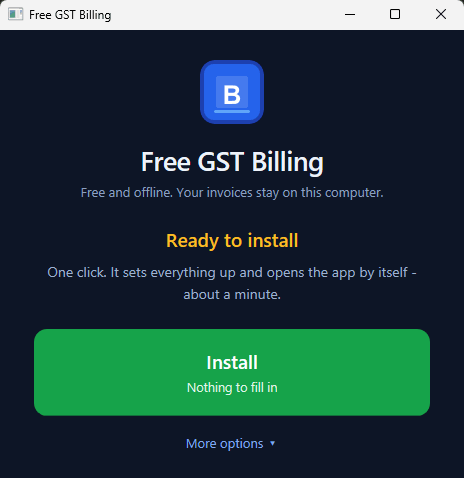
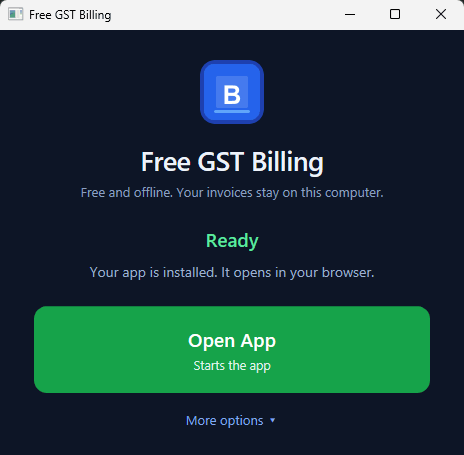
The Windows launcher — one button to install, then one button to open. Everything else is under More options.
1. Download the ZIP → https://github.com/IamRamgarhia/Free-GST-Billing-Software/releases/latest/download/Free-GST-Billing.zip
2. Right-click the ZIP → Extract All → pick a folder you'll remember
3. Open the EXTRACTED folder. Each launcher is named after the system it is for
   — double-click yours:
       Free GST Billing - WINDOWS.hta     (opens a window with buttons)
       Free GST Billing - MAC.command     (opens Terminal)
       Free GST Billing - LINUX.sh        (opens Terminal — chmod +x first if needed)
⚠ Extract the ZIP first. Windows lets you double-click the launcher
while you are still looking inside the ZIP — but then it unpacks that one
file on its own to a temp folder, and the launcher correctly reports
_system folder is missing even though Explorer is showing it to you.Prefer one command? Paste this into PowerShell — no admin rights needed:
irm https://raw.githubusercontent.com/IamRamgarhia/Free-GST-Billing-Software/main/install.ps1 | iex
It fetches the latest release, installs it to
%LOCALAPPDATA%\Programs\Free GST Billing, installs Node.js if you do not have
it, and creates the Desktop shortcut. See Option 1b
for how to choose a different folder.
The launcher:
npm install inside _system/ (one-time, ~2 min)☁ Want to run it online instead (access from multiple devices)? See the full Online Deployment Guide → docs/DEPLOY_ONLINE.md — four paths compared (Railway lift-and-shift, Vercel + Supabase serverless, own VPS, free Cloudflare Tunnel) with costs, trade-offs, SQL schema, and code snippets. Read the trade-offs first — the local install is still the right answer for ~95% of users.
---

Dashboard view — recent invoices, currency-aware revenue cards, overdue alerts, low-stock indicators, and one-click actions.
📸 Want more screenshots? Open an issue and we'll add captures of the New Invoice form, GSTR-2B Reconciliation tab, Multi-Account Payments manager, PRs welcome too.
---
A step-by-step guide for the very first invoice you create after installing. Targeted at users who've never used billing software before.
1. Download the ZIP — always the latest version.
(Do not use the green Code -> Download ZIP button — that gives the source code without the built app.)
2. Right-click the downloaded ZIP → Extract All → pick a folder you'll remember (e.g. Documents\FreeGSTBill)
3. Open the extracted folder → double-click Free GST Billing - WINDOWS (each launcher is named after the system it is for)
4. Click Install Node & App. It installs Node.js for you if you do not have it, then sets everything up. Takes 1–2 minutes the first time
5. Click Open App — the app opens in your browser at http://localhost:47371, and a Desktop shortcut is waiting for you next time
In a hurry? One PowerShell command does steps 1–4 for you:
irm https://raw.githubusercontent.com/IamRamgarhia/Free-GST-Billing-Software/main/install.ps1 | iex💡 Tip: Click the small Install App icon in your browser's address bar to make the app open in its own window like Tally or Word — no browser chrome, looks and feels native.
The Welcome Wizard appears automatically on first launch.
1. Welcome screen → pick your region:
1. Click + New Invoice in the sidebar 2. Pick the invoice type: Tax Invoice for GST-registered sales, Bill of Supply for exempt goods, Proforma for quotes, Delivery Challan for goods movement 3. Pick 📦 Goods or ⏱ Services at the top — this drives the default unit (Nos for goods, Hrs for services) 4. Type the client's name in the Bill To field. If you've billed them before they auto-suggest. Otherwise click + Save as new client and fill the modal. 5. Add line items in the table:
That's it. The PDF saves to Saved Invoices/// and the invoice is logged in your bills list with a unique number.
After clicking Download PDF you get three sharing options inline:
Open the Dashboard. The invoice shows in the list with a status badge.
unpaid → partial → paid)Once you're comfortable with the basics, explore:
---
Most billing software in India — Zoho Invoice, Vyapar, Tally, myBillBook — charges you monthly, stores your financial data on their servers, and locks you in. Free GST Billing Software is the open-source alternative that changes everything.
If you're paying for billing software, you can stop now.
Every 🆕 row below is a feature we shipped in v1.10 that competitors either paywall, cripple in the free tier, or don't offer at all.
| Feature | Free GST Billing Software | Tally Prime | Vyapar | Zoho Books | ClearTax GST | |---|---|---|---|---|---| | Price | ✅ Free forever | ₹22,500–₹67,500 one-time | ₹2,599+/year | ₹899–₹2,999/month | ~₹3,599/year+ | | GST invoices (CGST/SGST/IGST) | ✅ | ✅ | ✅ | ✅ | ✅ | | 🆕 UTGST for intra-UT supplies | ✅ Auto-detected | ⚠ Manual | ❌ | ⚠ Manual | ⚠ Manual | | GSTR-1 / GSTR-3B JSON export | ✅ | ✅ (paid tier) | ⚠ CSV only | ✅ (Standard+) | ✅ | | GSTR-2B reconciliation | ✅ | ✅ (paid tier) | ❌ | ✅ (Premium) | ✅ | | E-Way Bill JSON | ✅ | ✅ | ❌ | ✅ | ✅ | | TDS / TCS on invoices | ✅ Form 26Q / 27EQ-ready | ✅ | ❌ | ✅ | ✅ | | 🆕 TCS on right base + ₹50L threshold | ✅ Auto (Circular 17/2020) | ⚠ Manual | ❌ | ⚠ Manual | ⚠ Manual | | 🆕 Income Tax (ITR) with 234B/C interest | ✅ Free | ❌ | ❌ | ⚠ CA add-on | ✅ (separate product) | | Multi-business / multi-GSTIN | ✅ Unlimited | ✅ (Gold tier) | ⚠ Silver tier | ✅ (Premium) | ✅ | | Multi-account payments per business | ✅ Unlimited | ✅ | ⚠ Paid | ✅ | ✅ | | Custom per-line units (kg, ltr, Hrs + custom) | ✅ | ⚠ Limited | ⚠ Paid | ✅ | ⚠ Limited | | 22-country multi-currency | ✅ | ⚠ Paid | ❌ | ✅ (Premium) | ❌ | | PWA installable (own window, no browser) | ✅ | ❌ Desktop only | ❌ Android-first | ❌ Web only | ❌ Web only | | Offline-first (works without internet) | ✅ | ✅ | ⚠ Limited | ❌ Cloud | ❌ Cloud | | Your data on YOUR computer (no cloud) | ✅ | ✅ | ⚠ Cloud sync | ❌ Cloud | ❌ Cloud | | Open-source (MIT licensed) | ✅ | ❌ Proprietary | ❌ Proprietary | ❌ Proprietary | ❌ Proprietary | | No signup / no email collected | ✅ | ✅ | ❌ Phone+OTP | ❌ Email login | ❌ Email login | | Recurring invoices auto-generation | ✅ | ✅ | ⚠ Paid | ✅ | ⚠ | | 🆕 9 one-click design presets (Modern / Corporate / Retail Brand / …) | ✅ | ❌ | ⚠ 2-3 templates (paid tier) | ⚠ Paid | ❌ | | 🆕 Split-view live preview (settings + preview side-by-side) | ✅ | ❌ | ❌ | ⚠ Small preview | ❌ | | 🆕 User-configurable PDF colours (accent, header, text, divider) | ✅ Every colour | ❌ | ❌ | ⚠ Accent only (paid) | ❌ | | 🆕 Print margins (mm) — top/bottom/left/right | ✅ | ⚠ Paid tier | ❌ | ⚠ Paid | ❌ | | 🆕 Multi-language section labels (English/Hindi/Tamil/Marathi/Bengali) | ✅ Free | ⚠ Paid | ❌ | ❌ | ❌ | | 🆕 Multi-page Rule 48 (Original/Duplicate/Triplicate) — rows never cut | ✅ | ✅ | ⚠ Paid Gold | ⚠ Paid | ⚠ Paid | | 🆕 Watermark (DUPLICATE / DRAFT / custom) on PDF | ✅ | ⚠ Paid | ⚠ Paid Silver | ✅ | ⚠ Paid | | 🆕 Auto-print payment receipt (with view/edit/delete history) | ✅ | ⚠ Paid | ⚠ Paid | ⚠ Paid | ⚠ Paid | | 🆕 Bulk PDF export with progress + cancel | ✅ Free | ⚠ Paid | ❌ | ⚠ Paid | ⚠ Paid | | 🆕 Ctrl+K command palette (search invoices/clients/products) | ✅ | ❌ | ❌ | ❌ | ❌ | | 🆕 Notification bell (overdue + low stock + filings + updates) | ✅ | ⚠ Basic | ⚠ Paid | ✅ | ⚠ | | 🆕 Automatic daily backup + Trash bin (30-day retention) | ✅ Free | ⚠ Manual export | ⚠ Paid cloud-sync | ✅ Cloud-only | ✅ Cloud-only | | 🆕 Transactional restore (rollback on error) | ✅ | ❌ | ❌ | ❌ | ❌ | | 🆕 Setup wizard with 6 business-type presets | ✅ | ❌ | ⚠ Basic | ⚠ Basic | ⚠ Basic | | 🆕 In-app searchable user guide | ✅ | ❌ External PDF | ❌ External | ❌ External | ❌ External | | 🆕 Barcode + QR of invoice number on PDF | ✅ Every invoice | ⚠ Paid | ⚠ Paid | ❌ | ❌ | | 🆕 Feedback QR (Google Reviews link) on PDF | ✅ | ❌ | ❌ | ❌ | ❌ | | 🆕 Google Drive backup + PDF upload (opt-in) | ✅ Free (your OAuth) | ❌ | ⚠ Paid | ✅ (Premium) | ❌ |
Last verified 2026. Competitors' features change; verify on their pricing pages.
If we priced every 🆕 feature at the going rate on the paid alternatives:
---
🆕 What's new (v1.10.30 → v1.10.42, shipped 2026)
> - Direct-HTML vector thermal print (v1.10.42) — 58/80mm receipts skip the raster PDF path and go straight to the printer as vector text. Sharp glyphs on 203-dpi thermal heads, smaller print jobs. User-toggle to switch back to Via-PDF for finicky printers.
- Payment / receipt reconciliation (v1.10.41) — Dashboard auto-heals any orphaned receipts against their invoice; stale-editor saves can no longer wipe a payment recorded in another tab.
- REPRINT badge polish (v1.10.41) — moved to top-right so it never overlaps the logo; default OFF for freelancers/services (retail/POS can opt in).
- Bill of Supply / Delivery Challan (v1.10.39) — the "no GST" invoice types now correctly remove GST from the invoice total.
- PDF colour crash fix (v1.10.40) — swappedcolor-mix(in oklab, …)forrgba(); PDF Save & Download works on every browser again.
- Invoice PDF polish (v1.10.38) — accent-tinted TOTAL DUE anchor, footer-block containers matching Bill To, smart Terms format default (services → formatted, goods → compact).
- Payment Accounts — Account Holder Name + Account Type (v1.10.37) — invoices now show whose name is on the bank and whether it's Savings/Current.
- Portal print preview + settings redesign + business-type gating (v1.10.36) — split-view collapses to one column on mobile, sections gated by business preset (freelancer no longer sees thermal-only options), reusable page-header card across every screen.
- Vector-HTML thermal preview + OCR line items (v1.10.35) — OCR now extracts HSN / qty / rate / tax% per line and fuzzy-matches your saved product catalogue.
- In-app ConfirmModal + PromptModal (v1.10.34) — every native browser confirm/prompt replaced with a theme-aware in-app modal.
- Complete 4-mode discount system (v1.10.25) — Net / Unit / Price-with-Tax + invoice-level Total discount.
- Client credit balance (v1.10.24) — overpayments carry forward and apply to the next bill automatically.
- Focus mode + Ctrl+K command palette + Notification bell (through v1.10.36) — keyboard-first workflow for POS speed.
> Full history: CHANGELOG.md. Earlier v1.10 milestones (UTGST bucket, GST Rule 48 multi-copy, 9 design presets, print margins, multi-language labels, daily backup + Trash bin, transactional restore) remain — see the feature tables below.
| Feature | Details | |---------|---------| | 5 Invoice Types | Tax Invoice, Proforma/Estimate, Bill of Supply, Credit Note, Delivery Challan | | 🆕 Cancel Invoice (not delete) | A saved invoice keeps its number for GST. Cancelling stamps CANCELLED on the PDF and removes it from totals, reports and GST returns; stock goes back. Any other status un-cancels it | | 🆕 Logo, signature and stamp | Upload each separately with its own size slider; signature and stamp print centred, side by side, above the signatory name | | 🆕 GSTIN fills in the state | Type a client's GSTIN and the State is filled from it, offline. A mistyped GSTIN is caught by the checksum the number carries, before it reaches a return | | Auto GST Calculation | CGST + SGST for intra-state, IGST for inter-state — uses Place of Supply override and SEZ flag (Section 16, IGST Act) | | 🆕 UTGST Bucket | Intra-UT supplies for Chandigarh, Ladakh, Andaman & Nicobar, Lakshadweep, Dadra & Nagar Haveli / Daman & Diu correctly file as CGST + UTGST instead of CGST + SGST — required by GSTN portal (Chapter II of GST Act) | | 🆕 Interstate Detection Guard | Blank business-state produces a warning + block instead of silently defaulting to intra-state (fresh installs can no longer ship interstate invoices with wrong tax split) | | HSN/SAC Codes | Add HSN or SAC codes per line item with correct tax rates | | Per-Line Units of Measurement | kg, ltr, mtr, ft, hrs, pcs, sqft + 15 more — plus user-defined custom units (Carat, Bundle, anything). UQC propagated to GSTR-1 and E-Way Bill | | TDS / TCS on Invoices | Section 194Q / 194C / 194J / 194I / 194H / 194O / 195 (TDS) and 206C(1H) / 52 (TCS) with per-quarter Form 26Q / 27EQ-ready CSV reports | | 🆕 TCS on Right Base + ₹50L Threshold | Section 206C(1H) computed on receipt including GST per CBDT Circular 17/2020 (not pre-GST subtotal). ₹50 lakh annual per-counterparty threshold properly enforced — no over-collection on the first invoice | | UPI QR Code | Auto-generated QR code on every Indian-rupee invoice from your UPI ID | | Multi-Currency | Bill in INR + 21 other currencies (USD, EUR, GBP, AED, AUD, SGD, CAD, MYR, ZAR, NGN, KES, SAR, NPR, BDT,
→ →
→ →
→ →
→ →
→ →
→ →
→ →
→