HuskerMinion/techo5 is an open-source project on GitHub, mainly written in Go. Open firmware for the Echo Show 5, 1st and 2nd gen: Alpine Linux instead of Android, no Alexa. It currently holds 709 stars and 119 forks with 0 open issues, and was last pushed on an unknown date (repository created unknown).
Git Homed tracks it on the Today's Trending board, currently at rank #99 with 22 new stars today.
Your Echo Show, rebuilt. Linux inside, Home Assistant in charge, no Amazon cloud.





What's new ·
Built on EchoLocal ·
Why ·
Screenshots ·
Stock vs TECHO5 ·
Install ·
Under the hood ·
Credits ·
TECHO5 ATHENA ·
TECHO5 Dot ·
TECHO5 Spot
---
New: the Echo Show 8 2nd gen (2021, athena) runs TECHO5 on a 64-bit mainline Linux kernel.
The story, the board and the UART pads: TECHO5 ATHENA.
Install: docs/install-athena.md.
TECHO5 (Tech Echo 5) is open firmware for Amazon's Echo Show 5 and Echo Show 8, both
generations of each. It replaces Fire OS and Alexa with a small Alpine Linux image and one Go daemon,
turning the Show into a fast, private Home Assistant voice satellite with a touch screen of its own.
It started on the Show 5, which is where the name comes from.
Every Echo that can be unlocked now runs it. The bootloader exploit these devices are opened with,
amonet, opens most of these Echos, and saiyaku-athena unlocks the Show 8 2nd gen. All of them run the same daemon:
| Device | Model | Repository | Status |
|---|---|---|---|
|  Echo Show 5, 2nd gen (2021,
cronos) | C76N8S | this one | In daily use |
|  Echo Show 5, 1st gen (2019,
checkers) | H23K37 | this one, same binary; hardware notes in techo5-checkers | In daily use |
|  Echo Show 8, 1st gen (2019,
crown) | C7H6N3 | this one, same binary | In daily use |
|  Echo Show 8, 2nd gen (2021,
athena) | A8H3N2 | this one, same daemon on its own 64-bit mainline kernel; the story in TECHO5 ATHENA | In daily use on two units |
|  Echo Spot, 1st gen (2017,
rook) | VN94DQ | TECHO5 Spot | In daily use |
|  Echo Dot, 2nd gen (2016,
biscuit) | RS03QR | TECHO5 Dot | In daily use |
|  Echo, 2nd gen (2017,
radar) | XC56PY | TECHO5 Dot, same release and daemon | Working on one unit |
|  Echo Dot, 3rd gen (2018,
donut) | D9N29T | TECHO5 Dot, same release, its own daemon build | Working on two units |
| Echo Input (2018, cupcake) | C1125P | TECHO5 Dot, the Echo Dot 3rd gen's release and daemon build | Experimental, not yet tried on a unit |
| Android tablets and the Meta Portal, no unlock | Android 8.0 or later, ARM | TECHO5 Panel, an app with the same daemon inside (docs/panel.md) | Tested on a Fire HD 8 (10th gen), a Galaxy Tab S6 Lite and a Meta Portal (2nd gen); other tablets may work |
Every other device amonet opens is a Fire tablet. No Echo made after 2021 has a public unlock.
Beyond the Echos and the Panel's tablets, the Skylight Calendar 15 (150-CAL) runs it too, a wall
calendar with a 1920x1080 touch screen. TECHO5 puts its own 64-bit mainline kernel and the same daemon on it,
over adb, after a full backup. It has no microphone, so it's a screen and a speaker: no wake word,
voice, phone calls or intercom. Tried on one unit, the newest port:
docs/install-skylight.md.
How it compares with EchoLocal, EchoMuse, echo-dot-assist, Kiosk Satellite and View Assist:
docs/comparison.md.
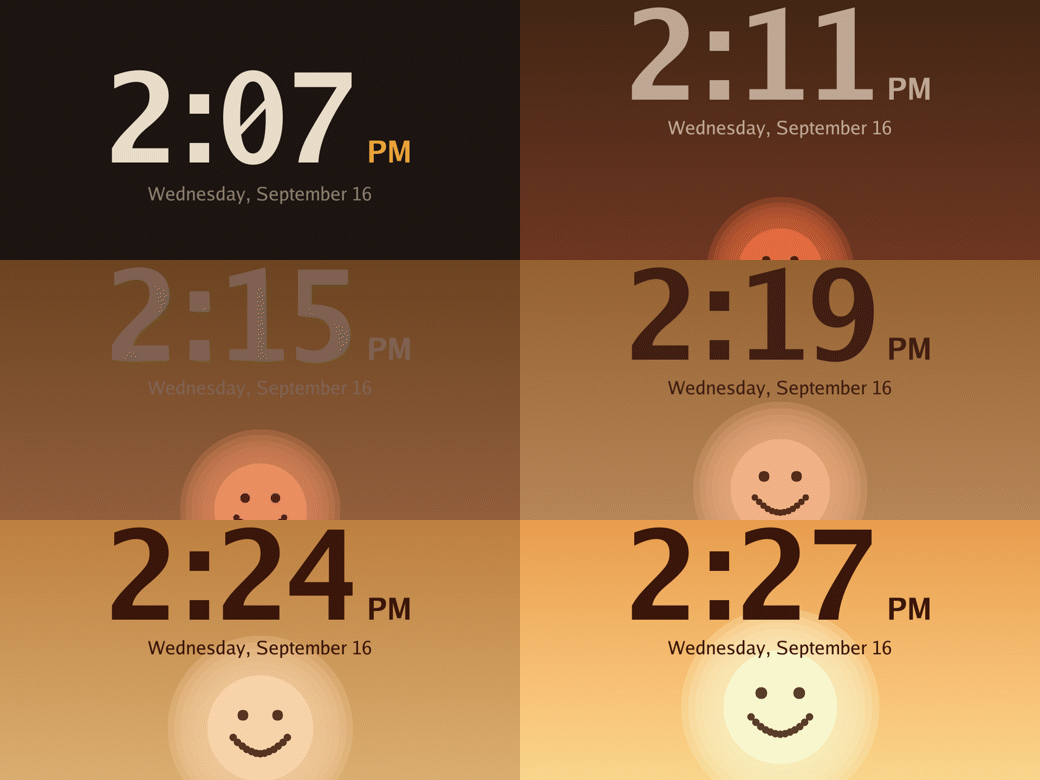
Waking to light. For up to half an hour before an alarm the screen becomes a
dawn, on a curve that does most of its work near the end. Every frame here is drawn by the code
the device draws with.
What's new
The bigger changes of September to November 2026. Every release lists the rest.
- 📞 Call by wake word, Hang up bar, repeating alarms (v1.6.28). A wake word can call a phone book
contact (
#463), calls can keep the page on screen
with a Hang up bar (
#459), and the Set an alarm
blueprint understands repeating days (
#461).
- 🎙️ External microphone processing and custom screens (v1.6.27). An interface for a separately
installed audio processing helper, off unless you choose External
(
#407,
docs/external-asp.md).
Other boards can add their own full-screen pages and show one when idle
(
#447). AirPlay 2 works on the Show 8 2nd gen
(
techo5-athena #5).
- 🎶 Snapcast, your own Headscale and a dark nursery (v1.6.26). Every device can be a
Snapcast client, in step with the house's other Snapcast
speakers (
#406). Tailscale can join a
Headscale server you run instead of Tailscale's, from the setup page or the
headscale_login action (
docs/tailscale.md).
Baby monitor
light turns the listening mark down to its dimmest or off, for a nursery kept dark
(
#448).
- 📝 To-do lists, a baby monitor and your own sounds (v1.6.23). With echo cancellation on, you can
speak right after the wake word, without waiting for the sound. A
To-do tab in the drawer shows
Home Assistant's to-do and shopping lists on the Show, the Skylight and the Panel. A private link
plays the room's sound live in a phone's browser (
Baby monitor, off until you turn it on), and the
wake, volume, button, Bluetooth and Drop In sounds can be your own.
Voice volume and
Call volume
sit beside the music volume, and the assistant's replies can play on another speaker. Pop-ups can be
large or huge for reading across a room (
#396), the night clock can keep Next up
(
#397), and a fan on a drawn dashboard opens speed, direction and presets on a long
press (
#410). The Echo Dot and Echo 2nd gen get a ring that follows the music, and
all of them a
Clearer speech switch. Bluetooth devices such as Hue bulbs can be paired through the
proxy (
#398), the Show 8 2nd gen uses the ondemand CPU governor
(
#413), and the installers try a failed download again
(
#393).
- 🌧️ Rain on the glass, and a news update by voice (v1.6.22). Rain on the weather page and
the weather art gathers on the glass and runs down, and lightning strikes at random with a new bolt
each time. The direct assistant plays a news update when asked.
Wi-Fi quiet hours keeps the device
off the Wi-Fi at night (
#391), and a repeating alarm
can skip one morning from its wake-up light (
#360).
- 📊 Wake scores, a privacy switch and new diagnostics (v1.6.21). Voice request events carry
the wake word's score and why a request was canceled (
#381),
and
Send voice text keeps what you say out of Home Assistant
(
#383). New sensors show CPU usage, wake word load and
the last boot reason (
#386). The Show 8 2nd gen gets an
opt-in boot layer that falls back to the other slot by itself (
#340).
- ⏸️ A longer pause before the device stops listening (v1.6.20). End of speech pause sets how long
a pause ends what you say, from 0.6 to 2 seconds, for anyone who stops to think mid-sentence
(
#374). Clearing Music Assistant's queue now clears
Now Playing at once (
#150), and a Tessera "go to page"
tile opens its page (
#376).
- 👏 A stricter clap, and "Alexa, stop" over a ring (v1.6.19). Clap sensitivity adds a Strict
choice for a room where a desk passes for a double clap, and the clap event carries what it measured
(
#373). A wake word nearly heard over a ringing
timer pauses the ring for the second try (
#372),
and smaller
Calendar chips fit a long list of calendars (
#371).
- 🌍 Galician, and a Monday week (v1.6.18). Screen language gains Galician, with its own voice
words and dates (
#368), and Dutch for the labels
and buttons (
#365). A
Week starts Monday calendar
switch, off by default (
#369), and a wake word
threshold of its own for while the speaker plays (
#367).
- 🔠 Text size and a dashboard layout (v1.6.17). A Text size setting draws every word on the
screen from 70% to 125% (
#363), and
Brightness
steps down to 5% for a dark room (
#362). Drawn
dashboards wrap long tile names (
#357), show a
dimmer's level as a bar (
#358), offer a
Name below
tile layout, and drop the room from a name under its room's heading. AirPlay 2 over IPv6 now really
plays (
#343), and a third Show 8 2nd gen screen is
tested (
#361).
- 🎙️ Record takes of a word (v1.6.16). The setup page can record takes of a wake word on the device's
own microphones, after a press at the device, and hand them over as a zip for training
(
#315). AirPlay 2 plays from a Mac or iPhone that
connects over IPv6 (
#343), Now Playing goes once
Music Assistant's queue is emptied (
#150), and
more of the screen follows
Screen language, with a
translation status page.
- 🌍 French and Turkish on the screen (v1.6.15). Screen language gains French
(
#346) and Turkish
(
#349). Every alarm can be turned off at once for a
trip, and Home Assistant gets a Next scheduled alarm sensor
(
#350). A wake word sent from the setup page
scores on the features it was trained on (
#352).
- 📖 Long answers page along with the voice (v1.6.14). An Assist answer too long for the screen
is shown a page at a time, turning as the voice reads it, on the Show and the Spot
(
#333). The glance chips under the clock
can keep one size (
#332), and a second AirPlay
sender can take over from the first (
#334).
- 🌍 German, Spanish and Italian on the screen (v1.6.13). Screen language gains German
(
#322), Spanish
(
#327) and a first Italian draft
(
#310), and the PIN pad and alarm editor follow
the language too. The 2nd gen Show 8's camera pages and stream use its hardware JPEG encoder
(
#320,
#321), and calls can switch to WebRTC's echo
canceller for their length (
#331).
- 📡 The Panel is a Bluetooth proxy, and AirPlay can set the volume (v1.6.12). On TECHO5 Panel,
Android's Bluetooth now feeds Home Assistant's Bluetooth proxy, with one active connection lent
through it (
#278); the Panel app also bridges the
front camera and, on the JBL Link View, the raw microphone. On the Echos,
AirPlay sets the volume
makes an iPhone's or Mac's AirPlay slider the device's own volume
(
#312), and Home Assistant can turn an alarm
off and back on without deleting it (
alarm_turn_off /
alarm_turn_on,
#317).
- 🖥️ The 2nd gen Show 8 draws its screen on its GPU (v1.6.11). The Show 8 2nd gen's
Mali GPU now draws the panel, which leaves the cores free, and an
Adaptive backlight switch
turns the backlight down on dark screens and draws the pixels brighter by as much, so the screen
looks the same for less light
(
#308). Its camera no longer hangs on a
picture too big for the encoder's buffer (
#309).
Also in v1.6.11: the
Bluetooth Secure Connections switch now really reaches the controller
(
#183), and the installers say when a unit
restarts partway, what was erased and how to finish by hand.
- 🎚️ Wake word scores, and wakesmith for words of your own (v1.6.10). The setup page shows
each wake word's score as it comes, so you can see how close a word gets in your room and pick a
threshold that fits (
#314). To train a word
of your own,
wakesmith does it on your own computer
from synthetic speech plus real voices: takes you record in the browser and the clips your devices
kept.
Training a wake word
- 🎵 Now Playing follows several players (v1.6.10). Pick more than one media player, and the
screen shows whichever is playing. Also in v1.6.10: the 2nd gen Show 8's JD9365 backlight comes
back from off (
#253), reminders speak on a
Home Assistant that isn't in English (
#294),
and Bluetooth proxy connections need an API encryption key.
- 🇯🇵 Japanese, Louder speech and Dim after idle (v1.6.9). The screen in Japanese
(
#270), AirPlay 2 groups that play in step
(
#311), a
Louder speech switch for replies
and announcements,
Dim after idle, and four new skins.
- 🎵 AirPlay 2 on every device (v1.6.8). With the AirPlay switch on, an iPhone can group the
device with other AirPlay 2 speakers, like a HomePod or a Sonos. The
AirPlay 2 switch keeps it
to classic AirPlay if a group doesn't play in step. Its firewall ports are open only while the
AirPlay 2 receiver runs.
- 🛰️ NetBird (v1.6.8). The other way, beside Tailscale, to keep a device in another house in
your Home Assistant, with NetBird's own service or your own server. Off until you give it a setup
key.
docs/netbird.md
- 📶 Also in v1.6.8. Home Assistant can connect to Bluetooth devices through a Show, up to three
at a time, with the new
Bluetooth proxy connections switch
(
#184). Weekend nights can have their own hours
(
#305), and the Skylight's night clock now
dims well below its old floor.
- 🌐 Reach a device from away (v1.6.7). An Echo Show, Echo Spot or Skylight can join your
Tailscale network, so a device in another house stays in your own Home Assistant, and its setup page
can be opened from afar with Remote setup. Off until you give it a key; over the tailnet only Home
Assistant's encrypted connection, the setup page while Remote setup is on, and SSH when it's on get
in.
docs/tailscale.md
- 🆕 The Skylight Calendar 15 (v1.3.0). Not an Echo: the 15-inch wall calendar (150-CAL) runs
TECHO5 on its own 64-bit mainline Linux kernel. Touch, the calendar, photos, dashboards, music and
the radio, Bluetooth, the light sensor and the clock work. It has no microphone, so there's no wake
word or voice, and no phone calls or intercom. One command installs it over adb from its stock
firmware, after a full backup of the unit; it has been tried on one unit. Install:
docs/install-skylight.md
- 📱 TECHO5 on a tablet, no unlock (v1.3.0). TECHO5 Panel is an Android app with the same daemon
inside: Home Assistant adds it like an Echo, with the same wake words, screens, timers, alarms,
intercom and announcements. No unlock and no root, on tablets and the Meta Portal. Tested on a Fire
HD 8 (10th gen), a Galaxy Tab S6 Lite and a Meta Portal (2nd gen); other Android 8.0+ tablets may
work.
TECHO5 Panel,
docs/panel.md
- 🗣️ Also in v1.3.0. Nearest device answers is now on by default, also on devices where it had
been turned off. The Show 8 (both generations) draws some controls larger to fit its screen. The
Show 8 2nd gen's kernel now picks its screen from the name the bootloader passes, so a unit
installed with
--force-panel gets its own screen's driver with the kernel update (ten screens
known; only the BOE ILI9881C one tried on a unit; three tried since v1.6.17).
- 📷 The Echo Show 8 2nd gen's camera works (v1.2.24). Live on its own screen, a Home Assistant
camera, and everything else the other Shows do with theirs (presence, person detection, gestures,
your recorder). It's off while the device is muted or the shutter is closed. It comes with a new
kernel, which the device installs on its own as a trial and puts back if it doesn't come up right.
Also: a
Bluetooth Secure Connections switch for phones that pair and then drop a second later
(
#183); on the Dot, AirPlay recovers when it
stops showing up after the first use
(
techo5-dot#14); and the camera's
/camera.jpg and
/camera.mjpeg pages now ask for the camera password and light the green dot
while they're watched.
If something reads those pages with no password today (a Home Assistant
Generic Camera, a recorder), set a camera password and give it to that with Digest authentication,
or it stops getting pictures.
docs/setup.md
- 📅 A calendar for the wall (v1.2.23). The calendar's new look: a day and a week on their hours,
a cleaner month, Coming up with each day's weather, event icons, countdowns, a filter for which
calendars a screen shows, and the next event at the foot of the clock, each with its own switch
under Settings > Display > Calendar. The screen can stay on when you say "lights off" in its room
(
#179), light themes work over a photo, and
the Show's music buttons are drawn like the rest of its buttons
(
#173). Music Assistant finds a device it
reaches by address again after the device restarts
(
#182), a radio favorite Home Assistant didn't
start says why on the screen (
#174), a
slideshow folder set again is read again at once
(
#180), and the log says why the ambient noise
sensor has no reading (
#178). Thanks to
@christianschmidt and
@tibole.
docs/setup.md
- 🔗 Settings that follow you, a realtime voice, and a camera that knows a person (v1.2.22).
Pick a setting on the setup page and tick the other devices that should keep it in step: each one
agrees first, and a device that was off catches up when it's back. A wake word can be answered by a
speech-to-speech model at OpenAI, xAI or Gemini (it sends your voice to them, and they bill for it;
off until you choose it, with a daily limit). With presence detection on, a Show or Spot can tell a
person from anything else that moves, on the device.
- 🎥 Your Echo as a camera for your recorder, and cameras by the grid (v1.2.21). A Show or Spot can
serve its own camera to Frigate or any NVR over RTSP and ONVIF, with a login and a green dot on the
screen while it's watched; the Show s
 →

 →
 →
 →
 →
 →
 →
 →