1
 →
→
Safety-first disk cleaner and space analyzer for macOS and Windows, with duplicate cleanup, app uninstall, startup management, system optimization, and maintenance.
harry0703/MangoDisk is an open-source project on GitHub, mainly written in Rust. Safety-first disk cleaner and space analyzer for macOS and Windows, with duplicate cleanup, app uninstall, startup management, system optimization It currently holds 3,541 stars and 262 forks with 10 open issues, and was last pushed on 2026-09-30 (repository created 2026-08-01).
Git Homed tracks it on the Today's Trending board.
 MangoDisk
Disk cleanup, storage analysis, and privacy protection for macOS, Windows, and Linux
English · 简体中文 · 繁體中文 · 日本語 · 한국어






Storage
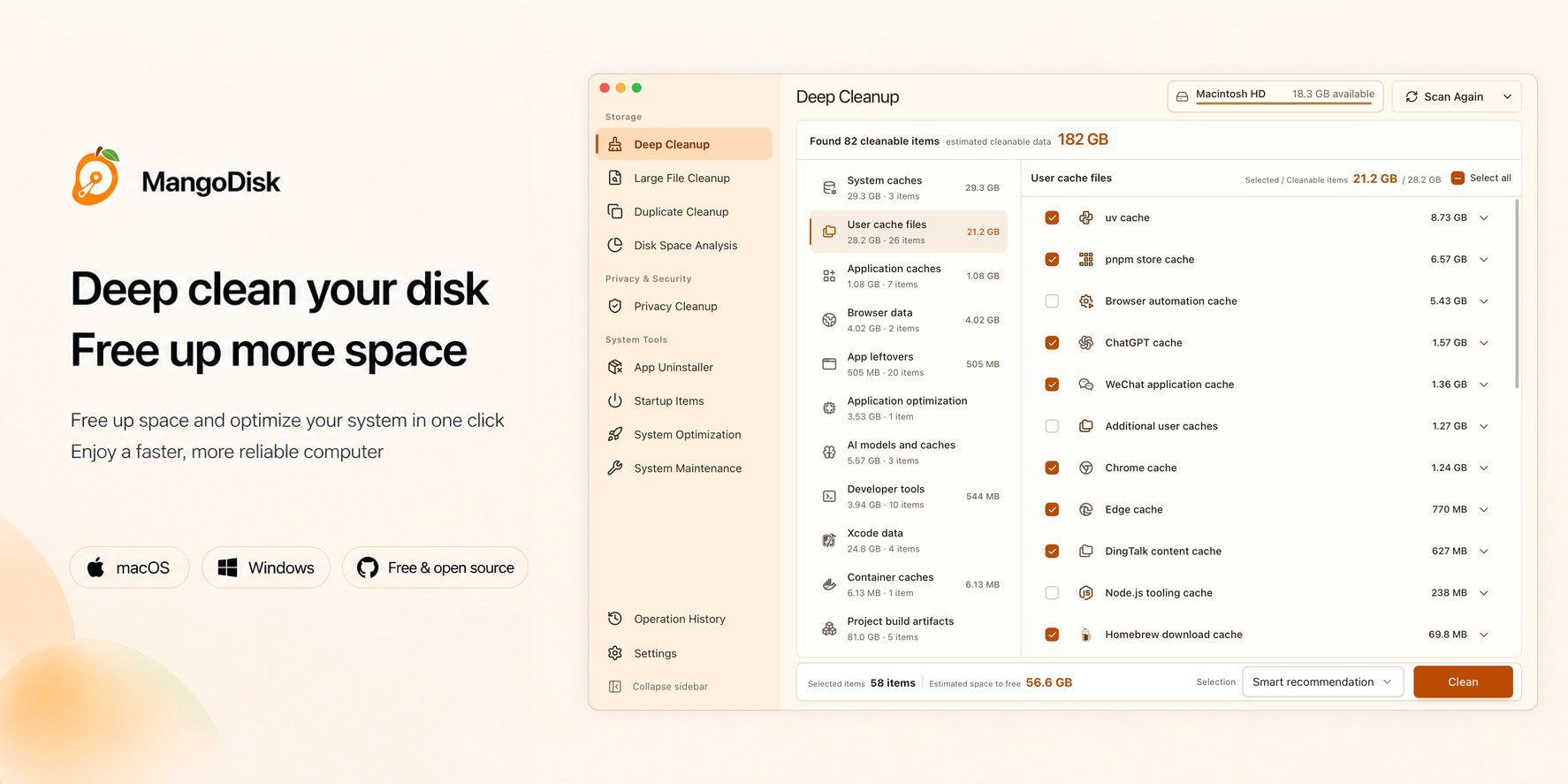
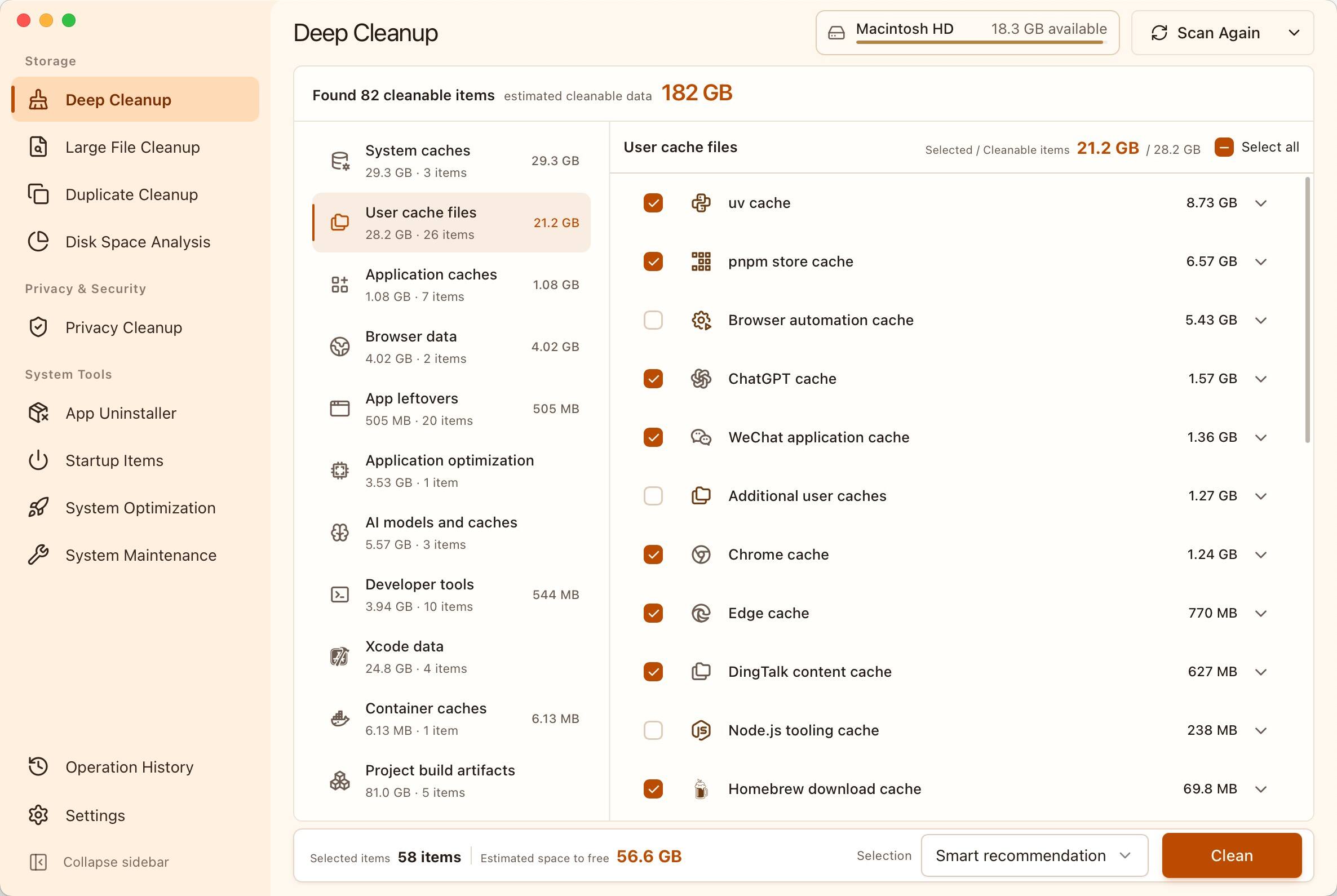
Find cleanable content scattered across the system, applications, developer tools, and local projects in one scan. MangoDisk saves you from checking each location manually and groups the results by reclaimable space:
Quickly find the largest files and reclaim space used by old installers, videos, archives, and other bulky content without digging through folders one by one.
Reclaim space taken up by duplicate copies without treating files as duplicates just because they share a name. Smart selection keeps at least one file in every group, so cleanup stays effortless and safe.
See where your storage is going at a glance. Drill down through a treemap and list to locate the largest folders and files instead of cleaning blindly.
Privacy & Security
Keep browsing history, searches, cookies, recent items, and clipboard data from lingering on your computer. Clear traces left by browsers, applications, and the system to reduce exposure of your activity and make everyday privacy easier to manage.
System Tools
Uninstall applications and clear related caches, settings, and leftovers so removing an application actually gives you the space back. Potential personal files are handled cautiously to reduce the risk of accidental deletion.
Reduce unnecessary startup delays and background resource use, so your computer starts faster and feels lighter. Turn items back on at any time when you need them again.
Reduce unnecessary settings that slow down your system or get in the way. Balance performance, privacy, and personal preferences so your computer feels faster and easier to use.
Fix common problems like missing search results, incorrect icons, no sound, or network connection failures—without hunting down fixes or typing complex commands. Get your computer back to normal sooner.
Activity
Keep a clear record of every cleanup and system change. See how much space you recovered, what completed successfully, and whether anything still needs your attention.
Available since version 1.1.1
Check CPU and memory usage, network speeds, and disk activity at a glance. See which apps use the most memory and free up memory with a click when resources are running low.
Keep these details in your menu bar, taskbar, or system tray—no need to open the main window.
Available since version 1.1.0
Unsure what an item does or what might happen if you change it? AI explanations use the item's description and current scan results to explain its purpose and what to consider before taking action. Spend less time looking things up and make more informed choices.
Get explanations directly from items in Deep Cleanup (built-in rules), Privacy Cleanup, Startup Item Management, System Optimization, and System Maintenance.
Official releases include free explanations each day, with the option to connect your own AI service. AI offers guidance; you decide which actions to take.
[!IMPORTANT]
MangoDisk puts data safety ahead of reclaiming more space.
Cleanup rules and system optimizations only ship after their safety boundaries are clearly defined and they pass validation on real systems.
MangoDisk scans in read-only mode by default. Before cleanup, deletion, uninstall, or system setting changes begin, you can review and confirm exactly what will happen. Results are saved to Operation History.
System Optimization only uses built-in, validated settings. It never accepts arbitrary registry paths, terminal commands, or scripts. MangoDisk reads each setting again after changing it and calls out high-impact items and changes that require administrator access or a restart.
MangoDisk maintains its own cleanup rules. Third-party projects may provide research leads, but a candidate rule is only accepted after reliable sources, safe boundaries, and real-system behavior have been verified. Anything without a clear safety boundary is excluded.
The complete rule library and revision history are open for inspection: view the MangoDisk cleanup rule library.
Deep Cleanup
Find cleanable content across the system, applications, developer tools, and projects to reclaim more space
|
Large File Cleanup Find the files taking up the most space without digging through folders 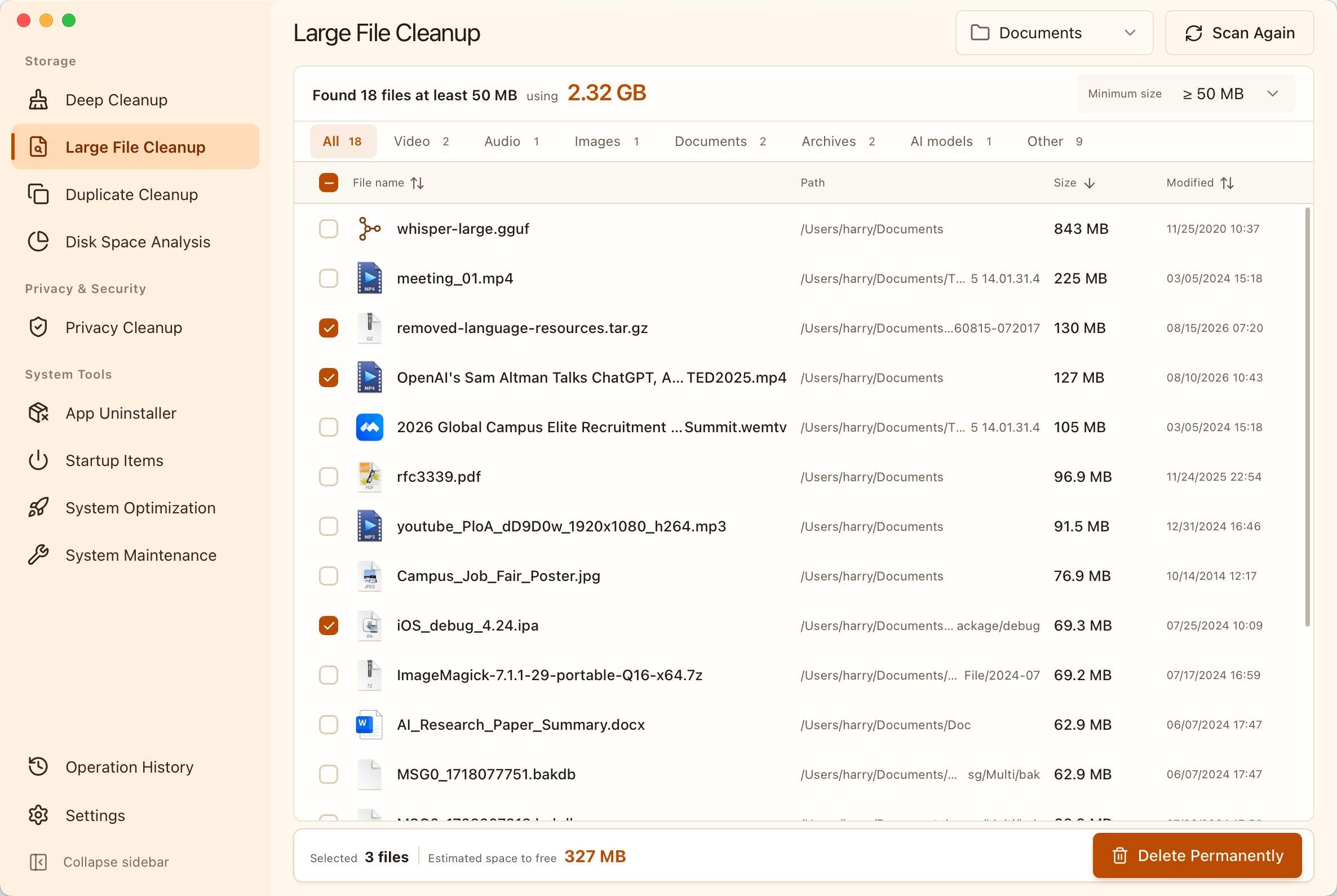
|
Duplicate File Cleanup Safely remove exact duplicates while keeping at least one copy 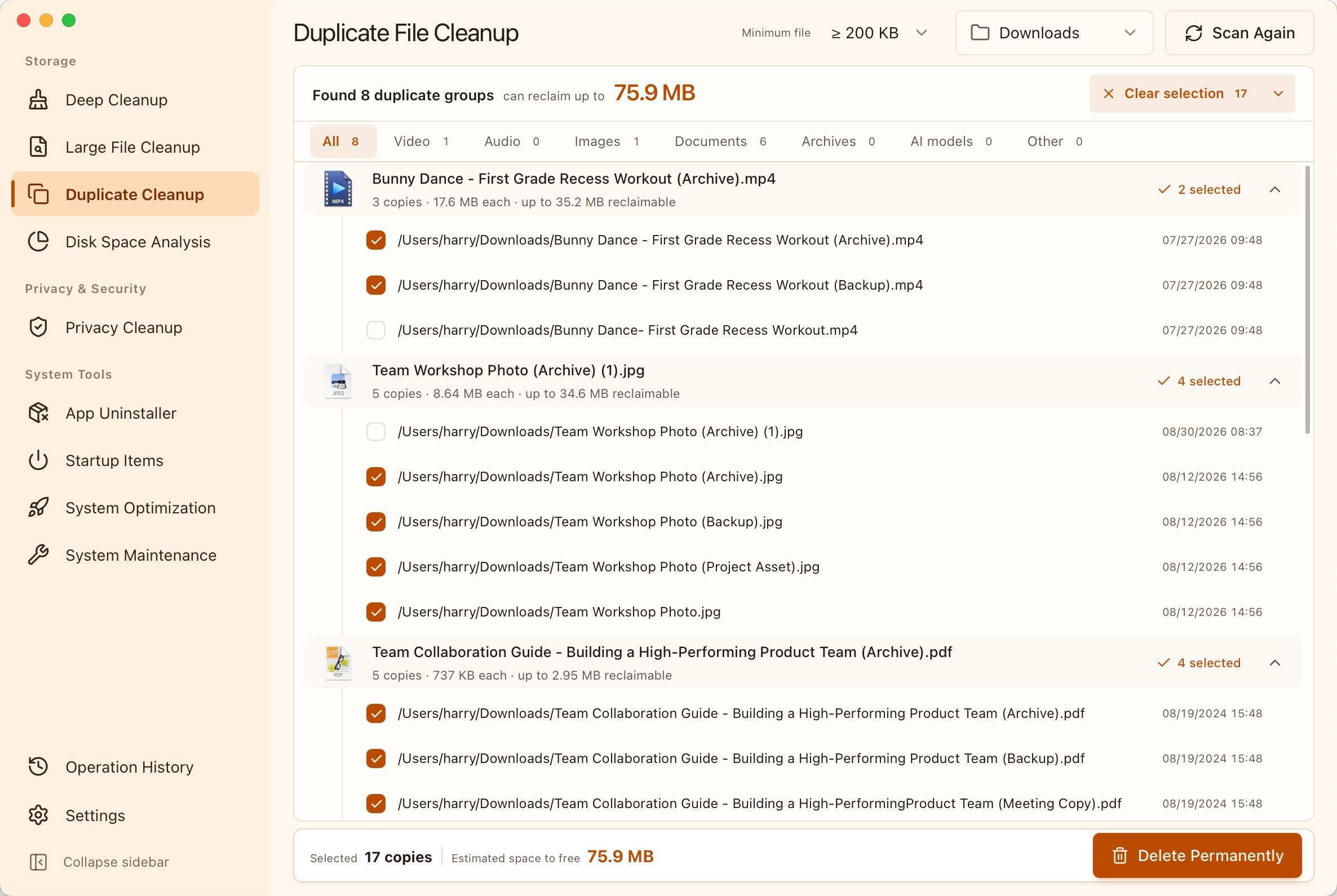
|
|
Disk Space Analysis See where your storage is going and quickly find the largest files and folders 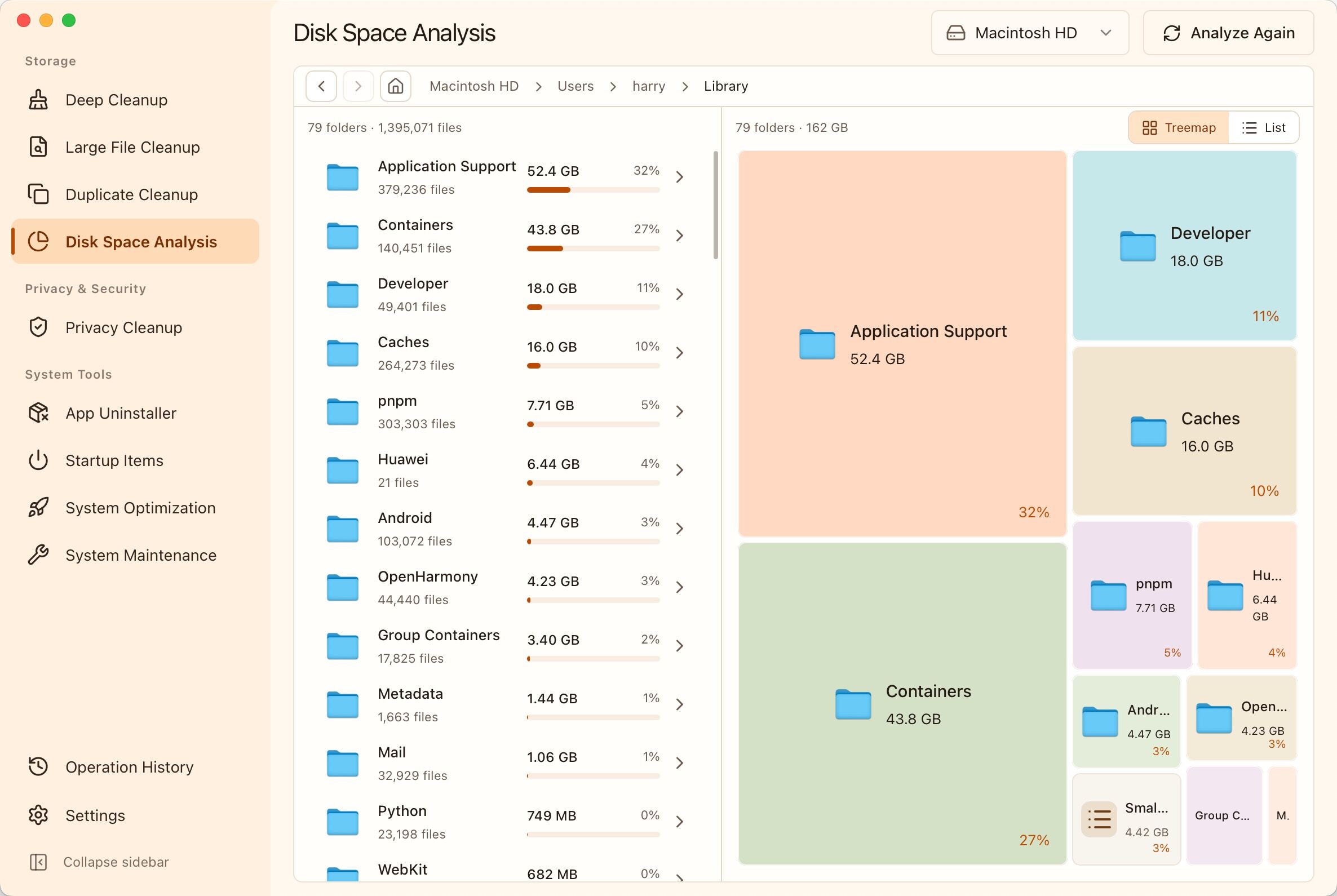
|
Startup Item Management Reduce unnecessary startup programs for faster sign-in and less background activity 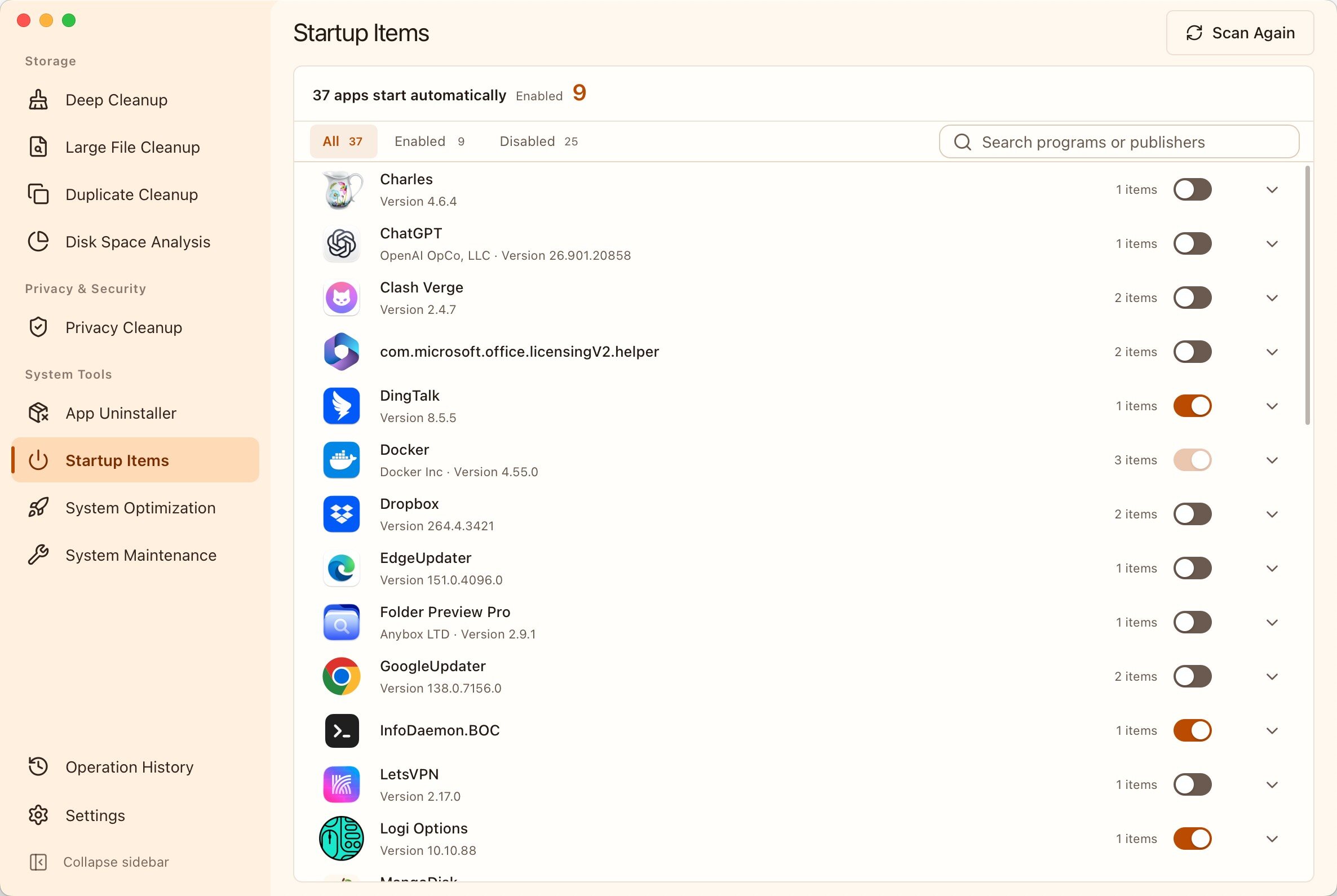
|
|
Application Uninstall and Cleanup Uninstall applications and remove related leftovers to reclaim more space 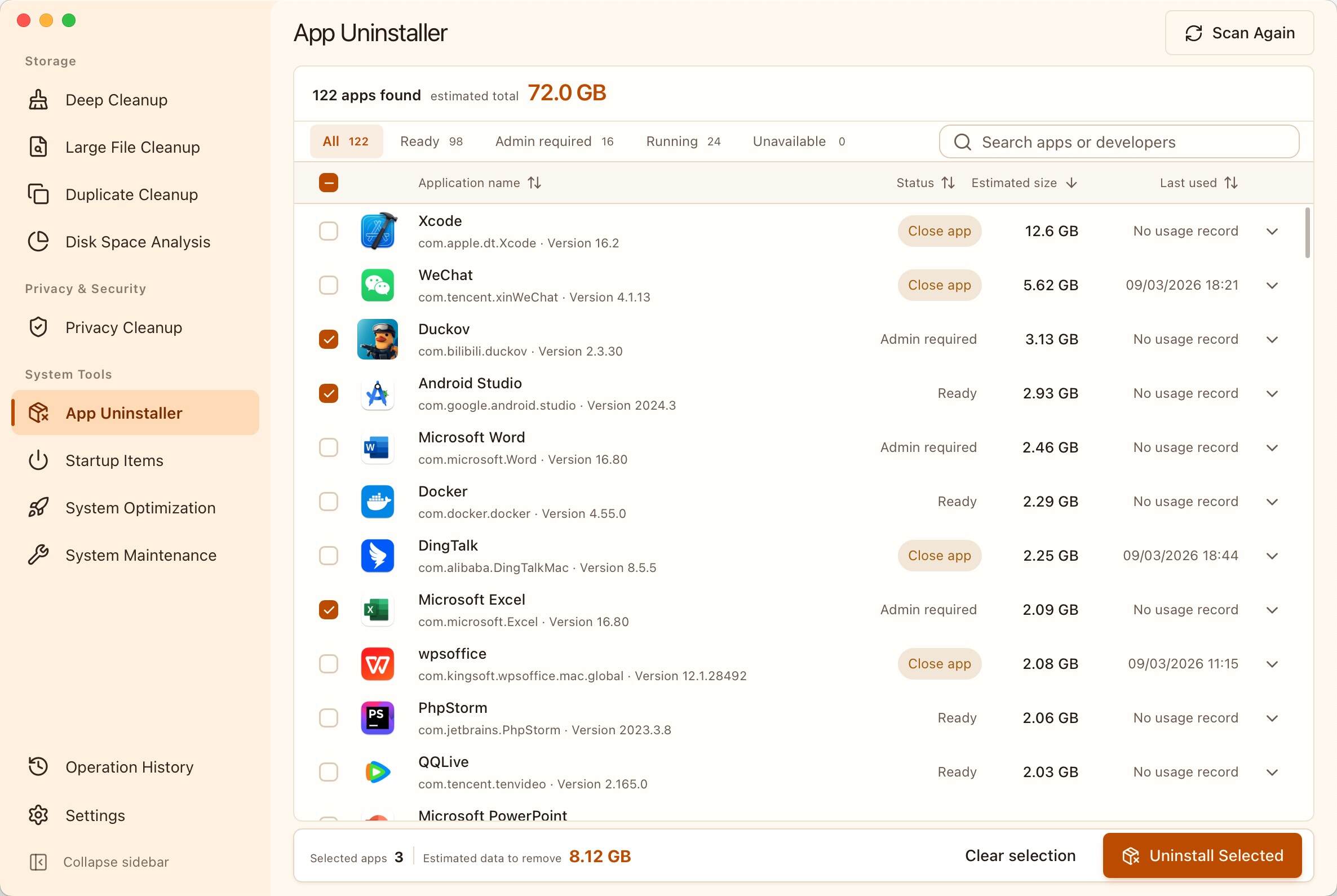
|
System Optimization Optimize performance, privacy, and everyday usability in one click 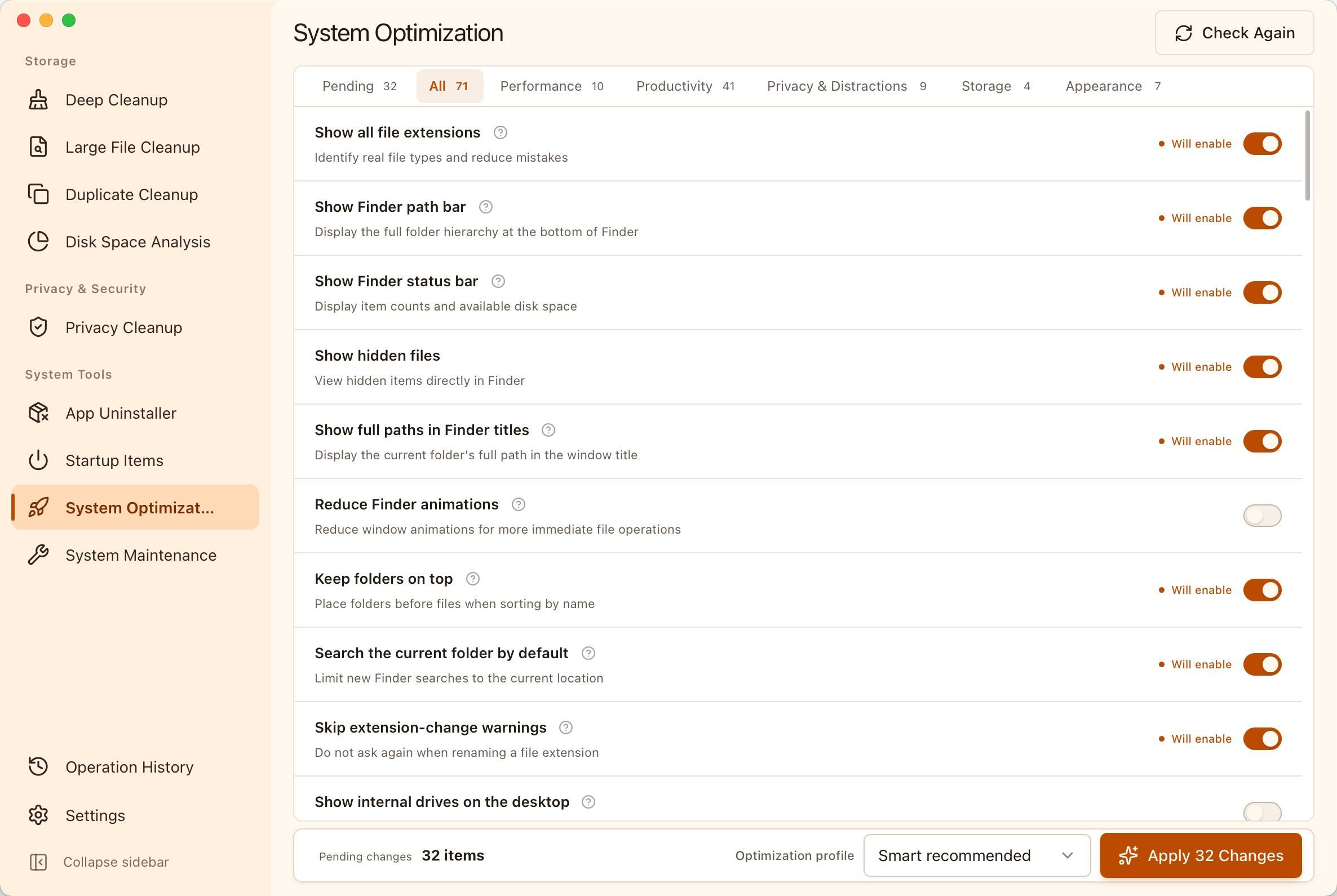
|
|
System Maintenance Fix common system issues quickly and get your computer back to normal 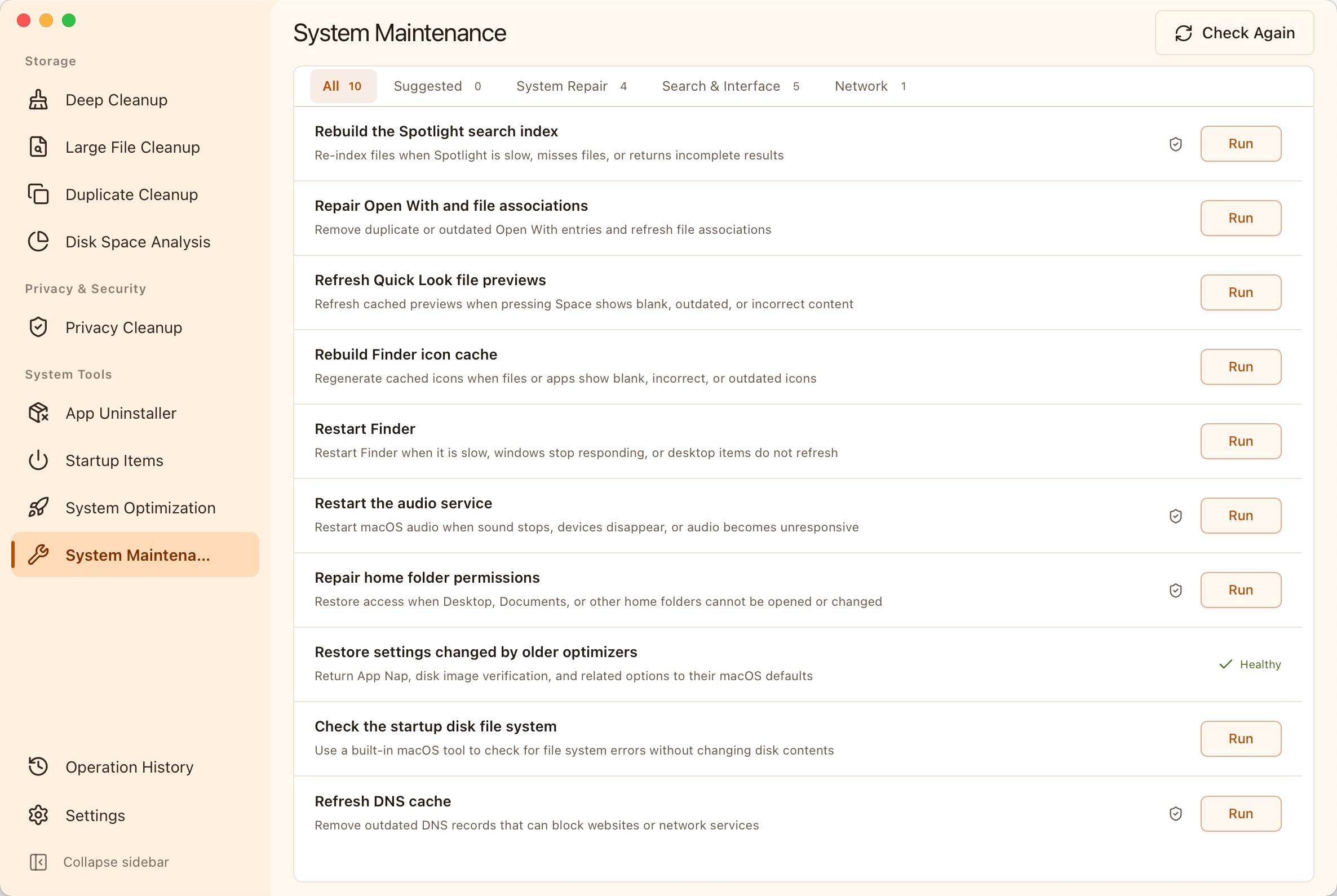
|
Privacy Cleanup Leave fewer activity traces behind and keep everyday use more private 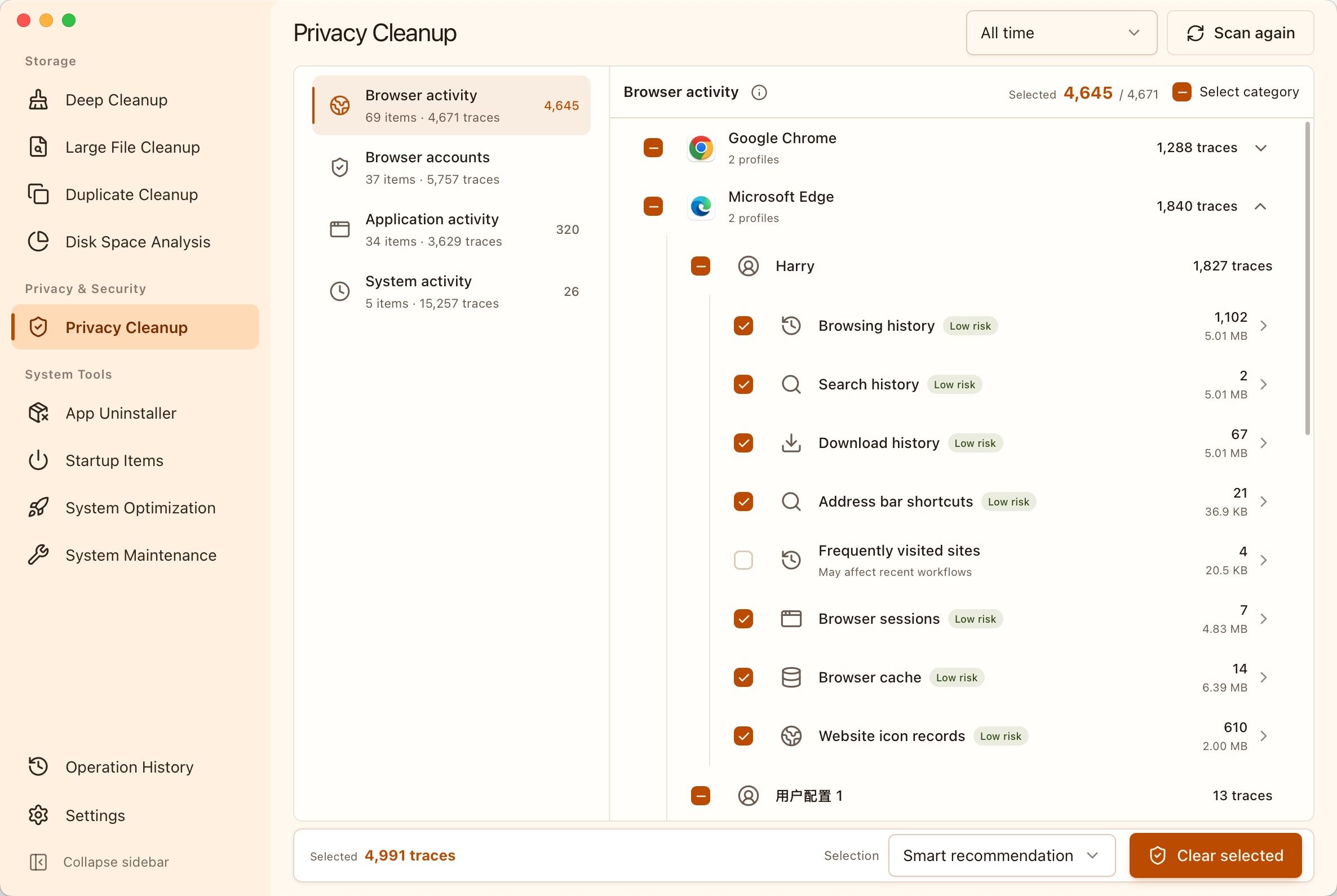
|
[!CAUTION]
> 1. Cleanup, permanent deletion, and uninstall operations may not be reversible. Review the selected content and keep reliable backups of important data.
2. Before running system maintenance or changing a startup item or system setting, make sure you understand its purpose and impact.
3. Some system optimizations can affect security, privacy, battery life, or update behavior.
Download MangoDisk from the official download page or GitHub Releases, then follow the instructions for your operating system below.
Requirements: macOS Monterey 12.5 or later.
Install with Homebrew:
brew install --cask harry0703/tap/mangodisk
Manual installation: Download the DMG from the official download page, open it, and drag MangoDisk into the Applications folder.
Requirements: 64-bit Windows 10 or later.
Install with PowerShell:
irm https://get.mangodisk.app | iex
Install with WinGet (official source):
winget install --id MangoDisk.MangoDisk --exact --source winget
Manual installation: Download the Windows installer from the official download page and follow the installation prompts.
Recommended: Ubuntu 22.04 LTS or later, on x64 or ARM64.
Available as .deb packages and AppImages. Compatibility with other Linux distributions depends on their system libraries and desktop environment.
Install from the terminal (Debian/Ubuntu): This command detects your architecture and installs the latest matching .deb package.
curl -fsSL https://get.mangodisk.app/linux | bash
Manual installation: Choose the package for your architecture on the official download page.
.deb package for your architecture.Use MangoDisk in your terminal or scripts, with the same safety-first cleanup engine as the desktop app.
Install with Homebrew:
brew install harry0703/tap/mangodisk-cli
Install with PowerShell:
irm https://get.mangodisk.app/cli | iex
Install with WinGet (official source):
winget install --id MangoDisk.CLI --exact --source winget
Prebuilt standalone CLI downloads are not yet available for Linux. Follow the Build from Source instructions below to build it yourself.
If mangodisk is not immediately available after installation, open a new terminal, then verify the installation:
mangodisk --version
Common commands:
# Scan and show cleanable content without changing anything
mangodisk clean
Apply the same smart recommendations as the desktop application
mangodisk clean --apply
Preview all selectable content without deleting anything
mangodisk clean --apply --selection all --dry-run
Produce machine-readable JSON output
mangodisk clean --format json --no-progress
mangodisk clean only scans and never modifies files by default. To perform cleanup in a non-interactive environment, you must also pass --yes to confirm explicitly. Run the following command for all available options:
mangodisk clean --help
git clone https://github.com/harry0703/MangoDisk.git
cd MangoDisk
pnpm install --frozen-lockfile
pnpm tauri:dev
pnpm check
cargo test --manifest-path src-tauri/Cargo.toml -p mangodisk-core
pnpm tauri:build
pnpm cli:build
Local builds do not include the signing, notarization, or update metadata provided by official MangoDisk releases. Use them for local development and validation only.
Issues, cleanup rules, fixes, and new features are welcome. Read CONTRIBUTING.md and AGENTS.md before getting started.
Routine cleanup coverage should use build-validated, declarative TOML rules. See src-tauri/crates/mangodisk-core/rules/README.md for the rule schema, safety constraints, and validation instructions.
Before submitting changes, run at least:
pnpm check
cargo test --manifest-path src-tauri/Cargo.toml -p mangodisk-core
Report security vulnerabilities privately through GitHub Security Advisories as described in SECURITY.md. Do not open a public issue for a security vulnerability.
MangoDisk is open source under the GNU General Public License v3.0. Third-party components remain subject to their respective licenses.
→ →
→ →
→ →
→ →
→ →
→ →
→ →
→