1
 →
→
Fast, unofficial Plex client for LG webOS TVs — native 60 fps UI, 4K HEVC/Dolby Vision, no Chromium or WebView.
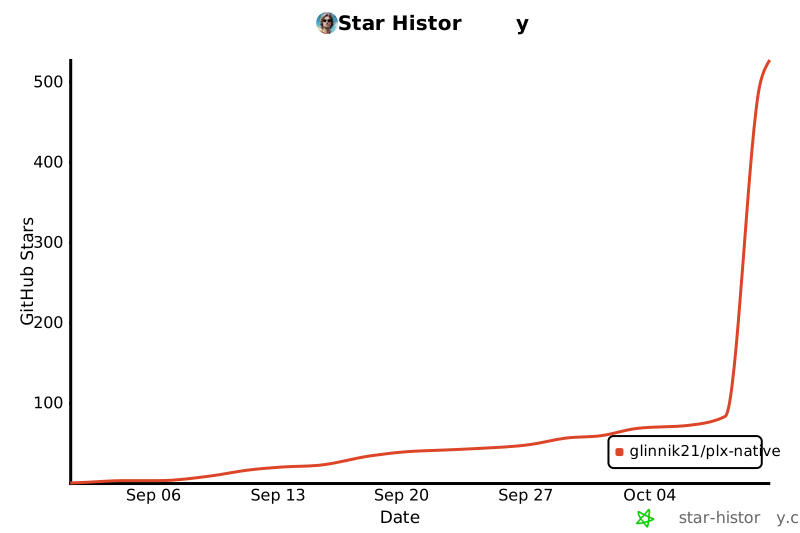
GLinnik21/plx-native is an open-source project on GitHub, mainly written in Rust. Fast, unofficial Plex client for LG webOS TVs — native 60 fps UI, 4K HEVC/Dolby Vision, no Chromium or WebView. It currently holds 528 stars and 45 forks with 10 open issues, and was last pushed on 2026-10-10 (repository created 2026-07-03).
Git Homed tracks it on the Today's Trending board, currently at rank #29 with 167 new stars today.
A fast, unofficial Plex client for LG webOS televisions. Native, not a web page — the interface is drawn straight on the GPU at 60 fps, and video plays on the TV's own decoder.
Website: plxnative.com · Install guide · Troubleshooting
*In daily use on a 2019 LG set. PlxNative is an independent project and is not affiliated with Plex, Inc. or LG. The same install steps are in the repo: installation guide.*
The official Plex app on my old LG is slow. Scrolling a shelf stutters, opening a poster takes a beat too long. It behaves like a web page because it is one: a web app running in the television's Chromium. Patching it doesn't help — the ceiling isn't the code, it's the browser.
So I threw the browser away.
PlxNative draws straight on the GPU and hands video to the same silicon the built-in apps use. No Chromium, no JavaScript, no web view. It just draws. Almost all of it is Rust, and I use it every day to watch things off my server in the next room.
Real captures of the app, not mockups: the same code that runs on the television, on the desktop
simulator, browsing a demo library of openly licensed films
(credits). make screenshots regenerates them.
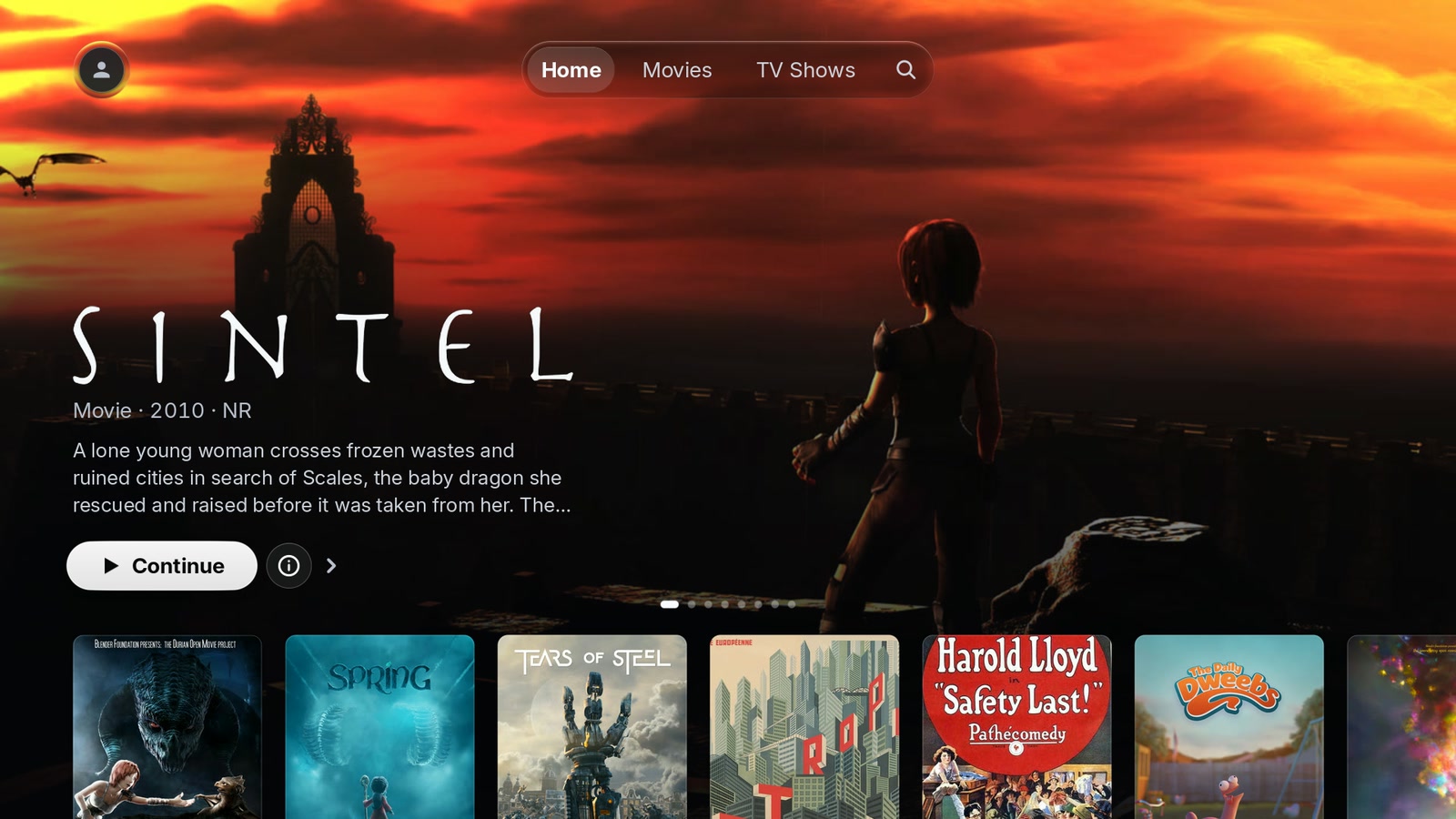
Home — a rotating hero from what you're partway through and what's just landed, shelves under it.
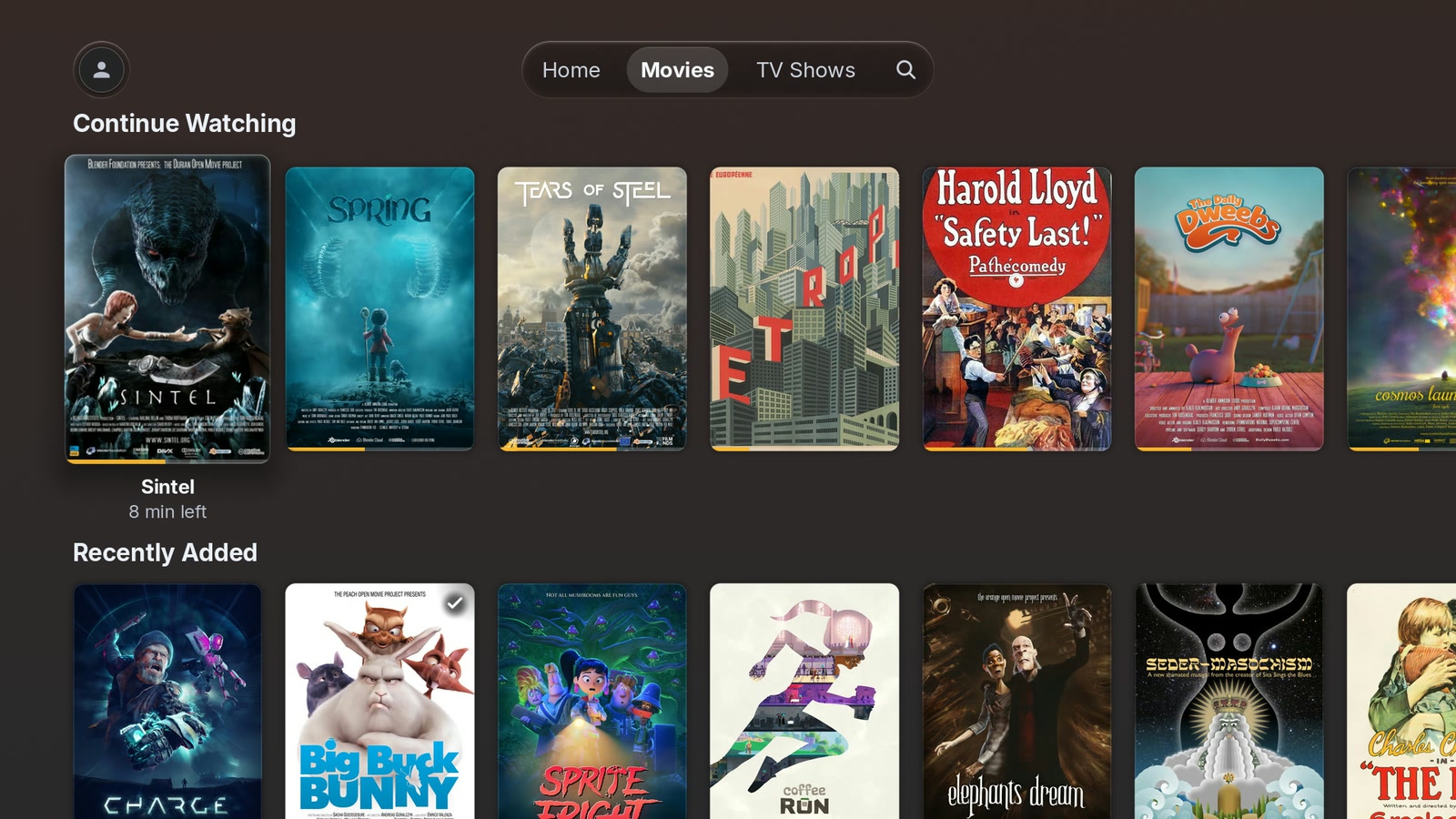
Library — a library opens on its own shelves: what you're partway through, with the time left under the focused card, and what just landed. Further down is the full grid, with sort, filter (including unwatched-only) and an A–Z rail down the side (pictured here).
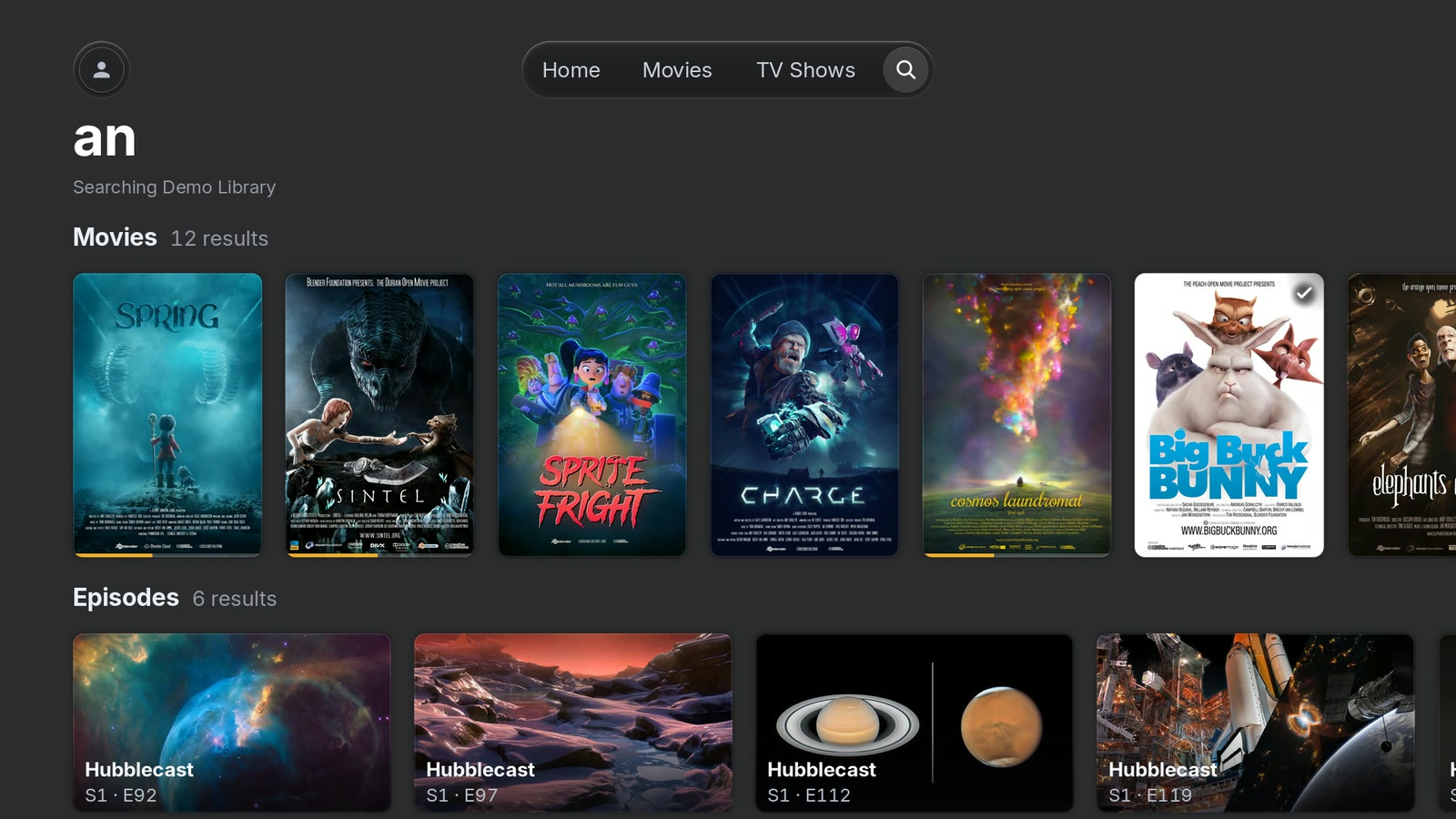
Search — one query across every server you can reach, results grouped by kind.
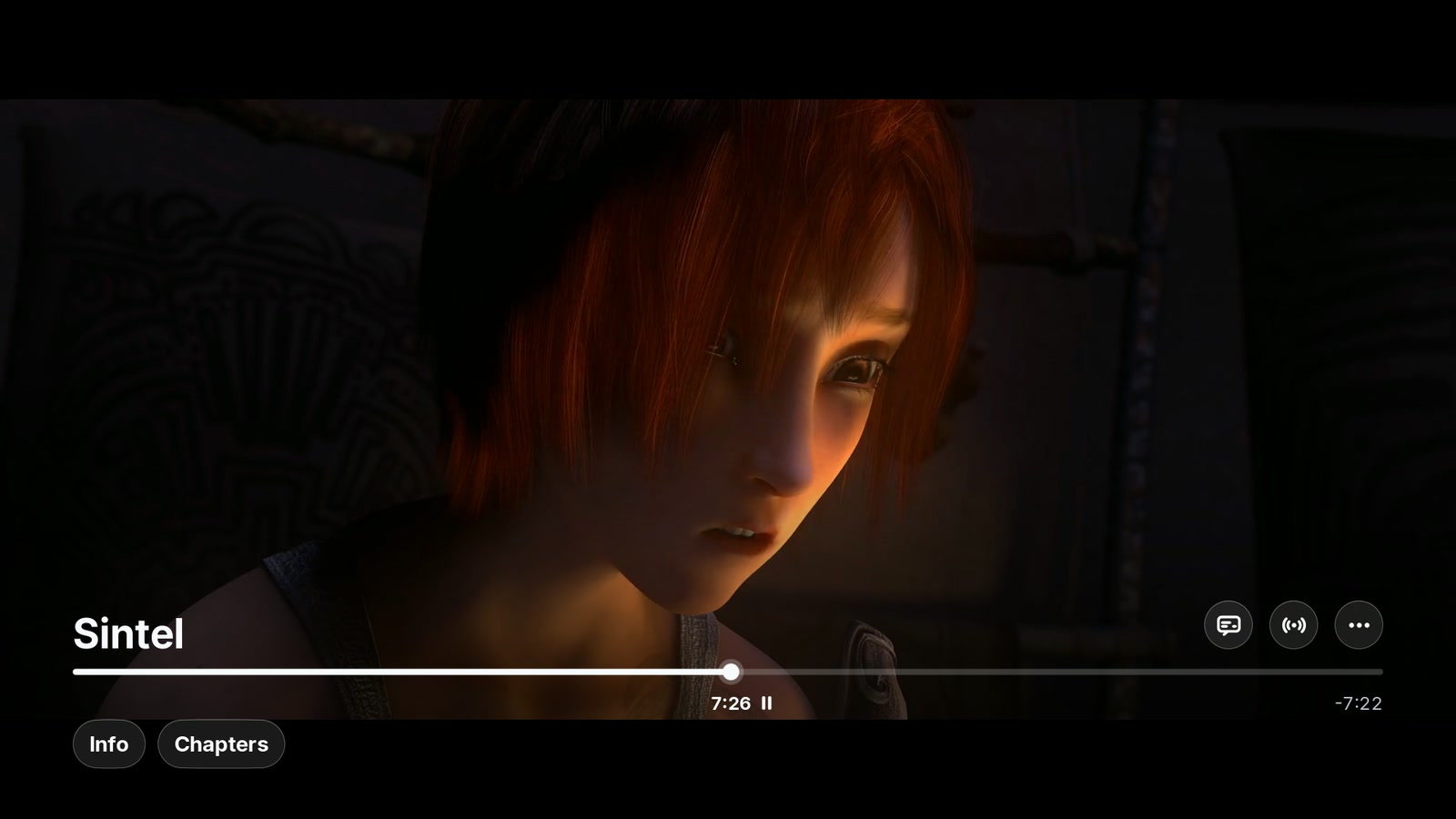
Player — the transport with chapters and track menus, drawn over video the television decodes itself. (In this capture the frame under it was decoded by the simulator.)
It needs webOS 4.0 or newer, with one tested exception: a 2016 set on webOS 3.4.3 signs in, browses, searches and plays (direct play, transcodes, subtitles and seeking) through Developer Mode. Other 3.x releases are untested, and anything older than 3.4 is unknown. Past that, it most likely will. I develop and test on a 2019 set, and opt-in usage reports show video playing on sets from 2018 through the newest, on webOS 11 — both direct play and server transcodes, Developer Mode installs included.
| Where | What happens | |---|---| | Some 2019 sets on LG's k5lp or k3lp chip, installed through Developer Mode | Video won't play. On these sets LG's Developer Mode sandbox can withhold a device the video path needs — Kodi and Moonlight hit the same wall. The app checks for it and says so instead of crashing; other sets on the same chip play normally. On a rooted TV with Homebrew Channel, the failure screen offers Repair, which applies the Homebrew Channel fix to the sandbox (one owner fixed it this way from a root shell; the button itself hasn't been run on an affected set yet). Without root there is no fix. | | 2018 sets on firmware that reports platform release 3.9.3 | Sign-in and browsing work, but video has never been seen to start on one, and no error is reported either: #249. | | webOS 3.x | Seeking restarts the stream at the new position instead of jumping in place, so each seek takes a moment longer. In-place seek depends on the internal layout of LG's 4.x media player, and on 3.4 that layout differs. | | Sets on LG's k6hp chip | A crash seen in opt-in crash reports and not reproduced here, because I have no such set: #174. |
No root is needed. A regular TV in Developer Mode runs everything except the k5lp/k3lp Repair above. What Developer Mode costs you is renewal: if the session lapses, LG removes the apps installed through it (how to keep them). A rooted TV with Homebrew Channel has no expiry.
If something goes wrong, check Troubleshooting first, then tell me what happened — and if you own one of the sets above, it working is as useful a report as it failing.
First time installing an app outside the LG Content Store? Follow the step-by-step installation guide. It starts with a regular LG webOS TV, a computer on the same network, and a Plex account with access to your own or a shared server. No root is required.
Set up LG Developer Mode and connect with webOS Dev Manager, then choose:
.ipk updates fromAlready have Homebrew Channel? Find PlxNative in its catalogue and select Install. Skip the computer setup.
Developer Mode needs periodic renewal. If it expires and LG disables Developer Mode, apps installed through it are removed. Installing Homebrew Channel through Developer Mode does not remove that requirement. The guide explains how to renew the session.
For manual .ipk downloads, verify the release checksum
before installing. Homebrew Channel verifies catalogue downloads for you.
Every day main moves, CI cuts a nightly .ipk from wherever it stands. It installs beside the
regular app as "PlxNative Nightly" — its own tile, its own sign-in — so trying it never touches
the release you already trust.
With Homebrew Channel: under Settings choose Add repository, enter
https://plxnative.com/nightly/repo.json, then install PlxNative Nightly. Every later nightly
appears there as an update. The nightly builds guide has the steps, how
the versions work and what to do if something goes wrong.
Without it: each build is a prerelease, and the newest is always linked from plxnative.com/nightly/latest.json. Install it with Dev Manager; a package installed that way does not update itself.
It is not tested on a television. It passes the same automated build and packaging checks a
release does, but nobody has watched it play. Each nightly is deleted 30 days after it is
published, so link to a specific .ipk at your own risk.
Before a release, CI may publish a release candidate as a
prerelease named like PlxNative 0.8.0-rc.1.
It is the release build itself, so it installs as the regular PlxNative app, replacing the one
you have the way an update would. It is not in the Homebrew Channel, and the Channel will not offer
the final release over it either: reinstall the final by hand once it is out.
Your library data never reaches me. The app talks to your Plex server, to plex.tv to sign in,
and to discover.provider.plex.tv for cast biographies.
Crash reports and usage analytics are off until you turn them on — two separate first-run
questions, each answerable with Don't Share, both reversible later under Account → Settings →
Privacy & data. No title, search term, subtitle line, server name or address can appear in any
report. PRIVACY.md is the whole statement, including the schemas.
ASS/SSA subtitles render natively during direct play, including styles, positioning, overlapping signs and dialogue, karaoke, and embedded fonts. External ASS files retain their original scripts. A re-encode still burns the selected subtitle on the server; over a remux the app draws a sidecar, and an embedded track when the link is local and the Part is 1..=30000 kbps, and otherwise the server burns it.
I built this for how I watch, so it's narrower than Plex's:
Issues and pull requests are welcome, especially from anyone whose television or library differs
from mine — docs/building.md is the build and the test loop, and says what
hardware I most need help with. Feature ideas go to Discussions >
Ideas. Security issues go
through SECURITY.md rather than a public issue.
Error monitoring for PlxNative is sponsored by Sentry.

GPL-3.0-or-later, © 2026 Gleb Linnik. The PlxNative name and its brand artwork are excluded — see
TRADEMARKS.md, which also carries the Plex and LG non-affiliation statements.
Third-party components and their licences are in
THIRD-PARTY-NOTICES.md and licenses/ — notably the app ships its own
LGPL build of FFmpeg. Those notices and licence texts ship inside the .ipk too, so they travel
with the binary and not only with this repository.
This is an unofficial client, not affiliated with, endorsed by, or sponsored by Plex GmbH or LG Electronics. "Plex", "Rotten Tomatoes", "IMDb", "TMDB", "LG" and "webOS" are trademarks of their respective owners; where they appear in the app, they identify whose service or score is being shown.
→ →
→ →
→ →
→ →
→ →
→ →→
→→