1
 →
→
A GitHub CLI extension to enable security features on repositories following best practices from GitHub Security Lab.
GitHubSecurityLab/gh-secure is an open-source project on GitHub, mainly written in Shell. A GitHub CLI extension to enable security features on repositories following best practices from GitHub Security Lab. It currently holds 603 stars and 81 forks with 5 open issues, and was last pushed on 2026-10-02 (repository created 2026-06-30).
Git Homed tracks it on the Today's Trending board.
A GitHub CLI extension to enable security features on public repositories, following best practices from the GitHub Security Lab.
Only an open source project on GitHub where you have admin access.
Running the tool will enable security features for your repository in 2 minutes or less.
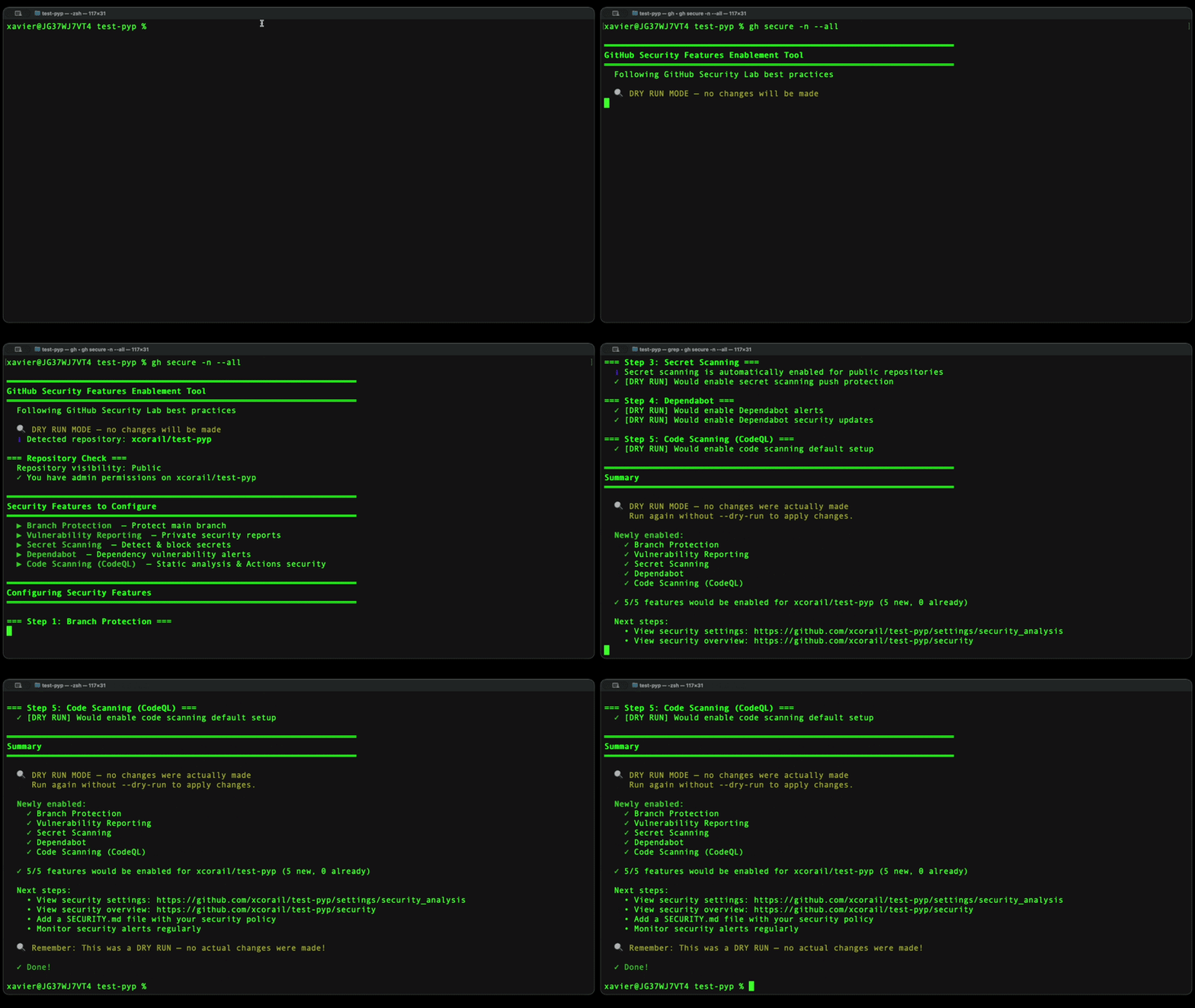
You can use it from your terminal, with an interactive mode or a "just do it" mode.
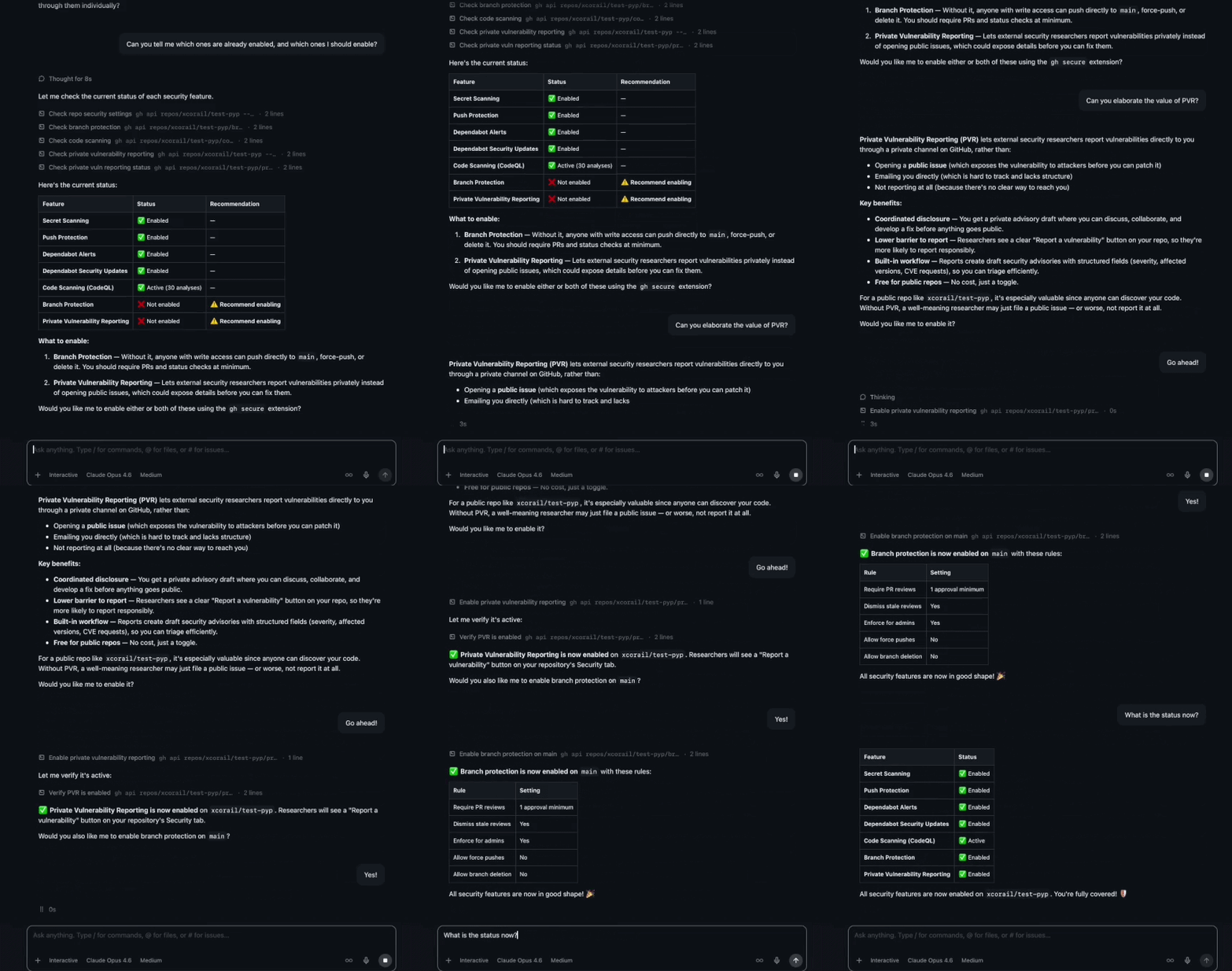
You can also use it from the GitHub Copilot CLI or the GitHub Copilot App, or any other AI assistant who has access to the tool. Ask for an overview of your repository's security, ask for details on specific features, and ask the tool to enable the missing features for you.
gh extension install GitHubSecurityLab/gh-secure
gh) installed and authenticatedgh secure # Interactive mode, all features
gh secure --yes # Enable all features, no prompts
gh secure branch-protection dependabot # Enable only these two features
gh secure bp ss cs -y # Enable 3 features, no prompts
gh secure --repo owner/repo code-scanning # Enable CodeQL on specific repo
gh secure --yes --dry-run # Preview what would be enabled
gh secure status # Check current feature status
gh secure status --repo owner/repo # Check status of specific repo
| Flag | Description |
|------|-------------|
| -r, --repo | Target repository (default: current repo) |
| -y, --yes | Enable selected features without prompting for confirmation |
| -n, --dry-run | Simulate changes without applying them |
| -v, --version | Print version |
| -h, --help | Show help message |
Pass one or more feature names to enable only specific features. If none are specified, all features are included.
| Feature | Shorthand |
|---------|-----------|
| branch-protection | bp |
| vulnerability-reporting | vr |
| secret-scanning | ss |
| dependabot | dep |
| code-scanning | cs |
This tool enables five security features based on GitHub Security Lab recommendations:
gh secure will warn you before enabling legacy branch protection to avoid overlapping or conflicting rules. Documentation
admin:org scope — run gh auth refresh -s admin:org.
gh secure will detect active rulesets and prompt you before enabling it.
You need admin or maintain permissions on the target repository. This is because enabling security features (branch protection rules, code scanning, secret scanning, Dependabot, and vulnerability reporting) requires write access to repository settings. For organization repositories, you may also need the admin:org OAuth scope — run gh auth refresh -s admin:org to add it.
gh-secure uses the GitHub CLI authentication. Run gh auth status to check your current session. If you are not authenticated, run gh auth login and follow the prompts. The tool inherits whatever token and scopes your gh session has.
Enabling these features adds protective guardrails but does not change your source code:
These features significantly raise the security baseline of your project, but no tool can guarantee complete security. They help you detect and prevent common issues — leaked secrets, known vulnerable dependencies, code-level vulnerabilities, and unauthorized changes — but security is an ongoing process. Regularly review alerts, keep dependencies up to date, and follow the GitHub Security Documentation for additional best practices.
This project is licensed under the terms of the MIT open source license. Please refer to the LICENSE file for the full terms.
See CODEOWNERS or reach out to the GitHub Security Lab team.
See SUPPORT.md for details on how to get help with this project.
→ →
→ →
→ →
→ →
→ →
→ →
→ →
→