1
 →
→
TTT Editor (Terminal Text Tool): A real alternative to VS Code, Zed, and Sublime that runs in your terminal. A TUI that feels like GUI. Single binary, zero config.
eugenioenko/ttt is an open-source project on GitHub, mainly written in Go. TTT Editor (Terminal Text Tool): A real alternative to VS Code, Zed, and Sublime that runs in your terminal. A TUI that feels like GUI. It currently holds 511 stars and 36 forks with 75 open issues, and was last pushed on 2026-10-10 (repository created 2026-01-16).
Git Homed tracks it on the Today's Trending board.
The IDE that lives in your terminal. A TUI that feels like GUI. A real alternative to VS Code, Zed, and Sublime that happens to run in your terminal. Single Go binary, zero config.
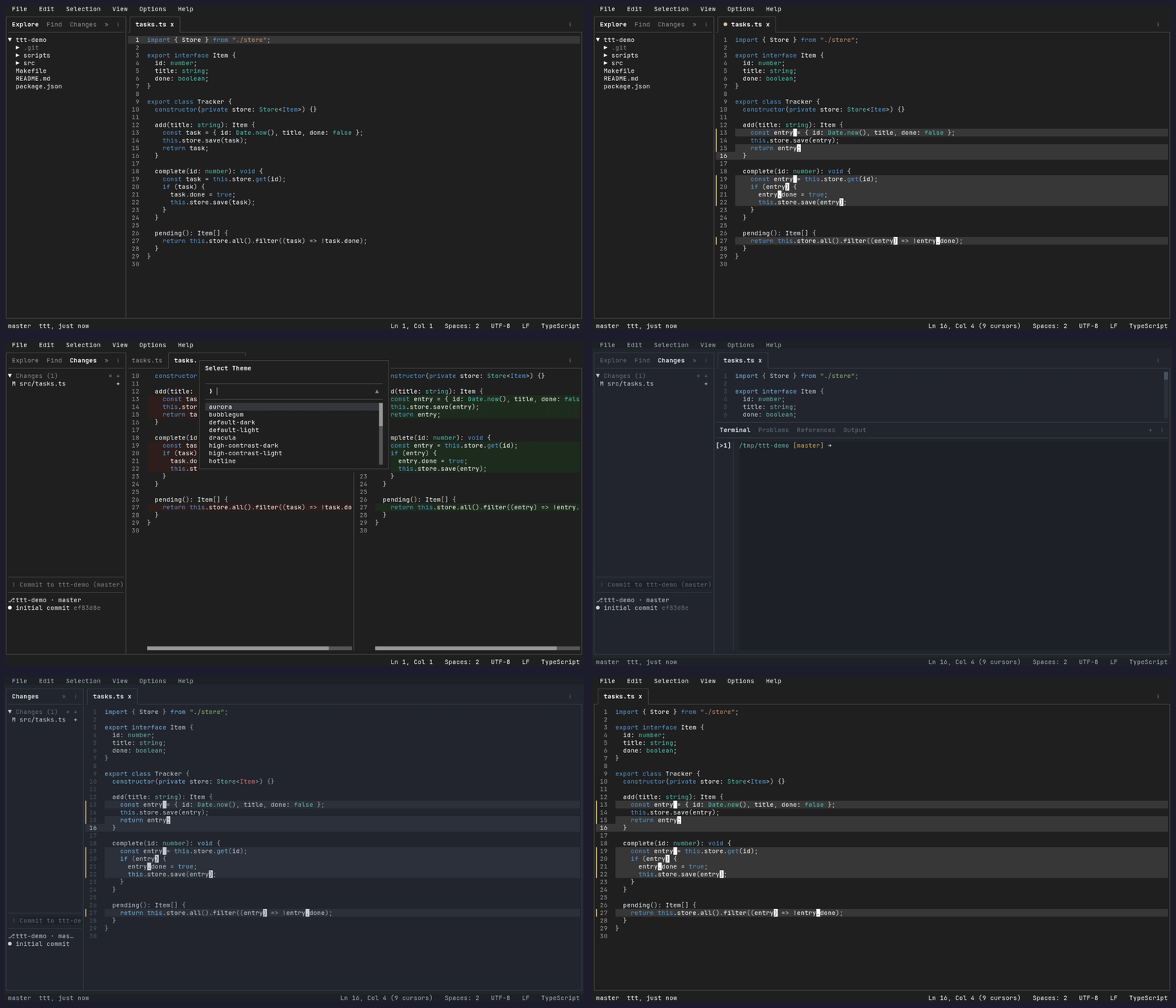
Full documentation lives in docs-web/src/content/docs/ (published at tttedit.dev).
brew tap eugenioenko/ttt
brew trust eugenioenko/ttt
brew install ttt
curl -sSfL https://raw.githubusercontent.com/eugenioenko/ttt/main/install.sh | sh
The script downloads the latest release binary for your OS/architecture and installs it to /usr/local/bin. To install elsewhere:
INSTALL_DIR=~/.local/bin curl -sSfL https://raw.githubusercontent.com/eugenioenko/ttt/main/install.sh | sh
Thanks to @Dominiquini for maintaining the AUR package.
yay -S ttt
Note: The flake tracksmain. A future tagged release will ship a pinned flake; until then, install frommain.
Try it without installing:
nix run github:eugenioenko/ttt
Add to your flake.nix inputs:
{
  inputs.ttt.url = "github:eugenioenko/ttt";
}
Then add inputs.ttt.packages.${system}.default to your environment.systemPackages or home-manager packages.
Thanks to @pirate-boop for keeping the flake's vendorHash in sync.
Requires Go 1.18 or newer:
go install github.com/eugenioenko/ttt/cmd/ttt@latest
This installs the ttt binary to your $GOPATH/bin (or $HOME/go/bin by default). Make sure that directory is in your PATH.
Pre-built binaries for Linux, macOS, and Windows are available on the Releases page. Download the one for your platform, make it executable, and put it in your PATH.
Note: Building from source compiles the latest development code, which may include work-in-progress features and could be less stable than official releases.
git clone https://github.com/eugenioenko/ttt.git
cd ttt
make build
This produces an optimized binary at bin/ttt. Add it to your PATH or copy it somewhere convenient:
cp bin/ttt ~/.local/bin/
TTT is available as a Herdr plugin, so you can open it as a pane inside your Herdr terminal workspace.
herdr plugin install eugenioenko/ttt/herdr-plugin
Once installed, bind it to a key (e.g. Ctrl+b e) to launch TTT in the active worktree with a single keystroke. See the Herdr plugin README for setup and configuration details.
.editorconfig support and indent detection — indentation is picked up automatically per file; manual override via the status bar indent picker( and ,Open multiple project directories in a single session. Each root appears as a collapsible group in the explorer, search, and changes panels.
ttt                             # opens the current directory
ttt .                           # also opens the current directory
ttt /path/to/dir                # opens that directory as the workspace
ttt /path/to/file.go            # opens just the file — no workspace folder
ttt /path/to/file.go:42:5       # opens the file at line 42, column 5
ttt /path/to/repo/subdir        # opens that folder; git features (changes,
                                # branch) use the enclosing git repo root
ttt dir1 dir2                   # opens multiple folders as a multi-root workspace
ttt --workspace project.ttt     # loads a saved workspace file
ttt https://github.com/owner/repo/pull/123 # opens pull request review
Workspace files use the .ttt extension and store a list of folders as relative paths:
{
  "folders": [
    { "path": "." },
    { "path": "../other-project" }
  ]
}
Multi-root file tree in the sidebar (Ctrl+K E). When multiple folders are open, each root is shown as a collapsible group.
explorer.autoReveal to do it on every tab switch"appearance": { "icons": "nerd-font" } or Options > Font IconsSidebar search panel (Ctrl+K F) powered by ripgrep. Results are grouped by file with match counts.
*.go, vendor/)Changes panel in the sidebar (Ctrl+K C) with full staging workflow.
Working-tree files and files under expanded commits can be shown as a compact directory Tree or a full-path List (the default). The choice persists in git.fileView. File-type icons sit between the status letter and the file name; like the Explorer's, they follow the shared appearance.icons setting, need a Nerd Font, and default off — Options > Font Icons toggles them. Changes, commit details, and Explorer expose safe Expand All and Collapse All actions in their relevant menus.
Staging:
Spacebar — toggle stage/unstage on the selected file
a — stage all unstaged files
u — unstage all staged files
+ / - buttons on the section headers — stage/unstage all files in that section
Committing:
Load older commits… to append bounded pages from the same HEAD snapshot
Remote operations:
Pull, Push, Sync (pull then push) from the sidebar actions button
Options; the Changes panel menu provides the same contextual controls
M (modified), A (added), D (deleted), R (renamed), U (untracked)
GitHub pull request review:
ttt https://github.com/owner/repo/pull/123      # review a PR
ttt . https://github.com/owner/repo/pull/123    # review a PR with the repo tree open
Opens the PR as a review surface — commit-by-commit history detail, a live view of the current changes, and the same unified presentation controls as local diffs.
Thanks to @arimxyer for contributing the diff & code review experience.
See Git Integration.
Symbol tree of the current file in the sidebar. Navigate and jump to definitions. Uses LSP document symbols with a built-in fallback for Go and Markdown. Open it from the command palette.
Thanks to @tenox7 for contributing the Outline feature.
> in quick-open mode to switch to command mode; delete the > to switch back? to browse searchable help for panels, navigation, and key chordsThe bottom panel (Ctrl+K B to toggle) contains the Terminal, Problems, and References tabs.
Diagnostics tab — lists all LSP diagnostics (errors, warnings) grouped by file; click to jump to location
References tab — shows results from Find All References; click to jump to location
Terminal tab — integrated terminal emulator (see below)
Integrated Terminal
Built-in terminal emulator. Press Ctrl+T to toggle the terminal panel, or Alt+T for fullscreen.
eugenioenko/xterm-go (a maintained fork of gitpod-io/xterm-go) and PTY management via aymanbagabas/go-ptysettings.json; ANSI colors are theme-configurable via the terminal field in theme.jsonTTT has built-in LSP support for language-aware editing: autocomplete, signature help, go to definition/implementation/type definition, find references, rename symbol, hover, document/selection formatting, format-on-save, and diagnostics.
Language servers are configured via plugins — install the LSP plugin for your language and the corresponding server binary from the Plugins panel or command palette. Available plugins:
lsp-go, lsp-typescript, lsp-python, lsp-c, lsp-rust, lsp-lua, lsp-zig, lsp-vue, lsp-svelte, lsp-css, lsp-html, lsp-json, lsp-yaml, lsp-bash, lsp-docker, lsp-tailwindcss, lsp-kotlin, lsp-java, lsp-ruby, lsp-dart, lsp-elixir, lsp-php, lsp-terraform, lsp-markdown, lsp-haskell
You can also add custom servers manually in ~/.config/ttt/settings.json. To disable LSP entirely: "lsp": { "enabled": false }.
The language segment in the status bar shows server state for the current file: ◉ connected, ◌ starting, ⚠ failed. Click it to open the OUTPUT panel, where each server logs its startup command and stderr under lsp:.
See the LSP guide and LSP feature reference for keybindings, configuration, and per-feature detail.
Tabs follow a pin-on-reclick model similar to VS Code:
TTT supports fully customizable themes via JSON files. Every color is themeable — syntax highlighting, diff backgrounds, sidebar, tabs, status bar, terminal ANSI colors, borders, and semantic colors (success, danger, warning).
10 themes ship in the binary (internal/config/themes/): Aurora, Bubblegum, Default Dark, Default Light, Hotline, Monokai, One Dark, Solarized Dark, Solarized Light, Virtru Dark. Another 78 extra themes are available for download from the repo.
Switch themes via View > Switch Theme (or the command palette) for a live preview. To create a custom theme, copy a built-in file to ~/.config/ttt/themes/ and set "theme" in settings.json. To use your terminal's native colors, set foreground/background to empty strings in your theme file.
See Themes.
TTT supports Lua plugins that add sidebar panels, bottom panel tabs, commands, and keybindings. Plugins run in a sandboxed Lua VM with a permission system — users approve each plugin's capabilities on first load.
Editor emulation — prefer modal or Emacs-style editing? Install Vim Mode (Normal/Insert/Visual modes, the operator/motion/text-object grammar, registers, marks, macros, dot-repeat, : command line and / search) or Emacs Mode (prefix keymaps, kill ring, mark and region, incremental search, universal argument, keyboard macros). Both require ttt 1.1.0 or newer and install from the Plugins sidebar tab.
Installing — open the Plugins sidebar tab to browse and install from the community registry, or use Plugins: Install from URL to install from any git repository. Community plugins are maintained at ttt-plugins: general utilities (color-picker, docker-manager, git-history, go-test-runner, http-client, json-viewer, markdown-preview, notepad, port-finder, spell, todo-scanner), one-click formatter setup (formatter-gofmt, formatter-prettier, formatter-black, formatter-rustfmt, formatter-stylua, formatter-clang-format, formatter-shfmt), and the LSP plugins listed above.
Managing — click an installed plugin to enable/disable it; ↑ to update, × to uninstall, Plugins: Reload for live reload during development. To disable the plugin system entirely: "plugins": { "enabled": false }.
Creating** — plugins are Lua scripts with a plugin.ttt.json manifest. See the Plugin Authoring Guide.
See Plugins.
File, Edit, Selection, View, and Help menus accessible via the menu bar or keyboard shortcuts. Menus display resolved keybindings next to each command. Navigate between menus with left/right arrow keys.
Config files are loaded from /config/ (bundled defaults) or ~/.config/ttt/ (user overrides):
| File | Purpose |
|------|---------|
| settings.json | Editor settings (tabSize, wordWrap, theme, lsp, autocomplete, etc.) |
| keybindings.json | Custom keybindings (VS Code key format) |
| themes/*.json | Custom color themes |
Most settings can be edited from a form: View → Settings, Ctrl+K ,, or Settings: Open Editor Settings from the command palette. Changes are held until you press Apply; Cancel drops them. Settings marked (restart) take effect on next launch. LSP settings and external formatters are JSON-only — use Settings: Open settings.json.
See Settings reference for every key, its type, default, and description.
All keybindings are customizable via keybindings.json. Chord sequences (e.g. ctrl+k e) are supported. Open your keybindings file with Ctrl+K Y, or press Ctrl+P and type ? to browse shortcuts in-app.
The full default keybinding list is in docs-web/src/content/docs/reference/keybindings.md.
TTT uses deterministic tests at several boundaries, from core data structures to real-binary and live-PTY workflows.
Core algorithms such as buffer operations, cursor math, and undo/redo have focused Go tests. Core packages are presentation-independent; syntax highlighting lives in the presentation-owned internal/highlight package.
make test                            # run all unit tests
go test ./internal/core/buffer/      # test a single package
These wire the complete App to an in-memory term.SimScreen and exercise editor state, commands, event dispatch, and rendered output without starting a real terminal.
go test ./tests/e2e/
These launch the real ttt binary via the built-in --exec debug harness, run scripted commands in batch, and assert on screenshots and file contents. No external dependencies beyond vitest. Coverage includes:
cd tests/functional
pnpm install
pnpm test              # run all functional tests
The harness acknowledges scripted input and commands after main-thread handling and redraw. Tests should wait only for genuine asynchronous work, using a unique visible post-transition state; raw elapsed waits belong only in tests whose invariant is timing or delayed lifecycle behavior.
Tests that require live PTY interaction or a real external process boundary. Built with vitest and tui-use, they cover real language servers, external file changes, settings roundtrips, and bracketed paste.
cd tests/integration
pnpm install
pnpm test
Use the smallest deterministic layer that proves an invariant. Functional tests are a compact real-binary contract, not a mandatory copy of lower-layer coverage. Add a broader test only when it establishes behavior unique to that boundary. CI runs the broad regression lanes on pull requests.
A randomized fuzz tester that hammers the editor with thousands of random events — keypresses, mouse clicks, resizes, clipboard operations, and command palette commands — to find panics and crashes that normal testing misses. It runs against an in-memory simulated screen (term.SimScreen) so no real terminal is needed.
All chaos targets run in Docker: the random command stream can write files, persist settings, and open browser tabs, so the harness refuses to run unsandboxed (set CHAOS_ALLOW_HOST=1 to force a host run, e.g. under a debugger).
# Quick run (50 iterations x 500 events)
make chaos
Run continuously (crash logs saved to chaos-output/)
make chaos-docker
Reproduce a specific crash deterministically
CHAOS_REPLAY=chaos-output/crash--.json make chaos-replay
Each crash is saved as a JSON report with the random seed and full event log, so any panic can be replayed and debugged deterministically.
TTT includes a built-in scripted interaction system designed for AI agent interactivity and automated debugging. Think of --exec as a fast Playwright for the terminal — full click, keyboard, and command simulation with screenshot and state dump capture, all without the overhead of a terminal emulation layer.
| Flag | Description |
|------|-------------|
| --exec "commands" | Execute semicolon-separated commands after startup |
| --listen | Start an HTTP command server on 127.0.0.1:4242 (POST /exec accepts the same script format as --exec, against an already-running editor) |
| --plugin FILE | Load a Lua plugin file on startup with full permissions |
| --size WxH | Force screen dimensions (e.g. 120x40) for deterministic layout |
| --debug | Enable debug mode regardless of config |
The TTT_CONFIG_DIR environment variable overrides the config directory (~/.config/ttt) entirely — settings, keybindings, themes, and plugins are read from and written to that directory instead. Use it to run scripted sessions isolated from your real configuration. Headless --exec sessions also use a process-local clipboard so concurrent automation cannot overwrite the desktop clipboard; interactive sessions, including --listen, keep the system clipboard.
--exec CommandsThe --exec flag accepts a semicolon-separated string of commands that run sequentially after the editor starts. AI agents (like Claude Code) can use this to interact with the editor, inspect UI state, and verify behavior programmatically — no manual interaction needed:
| Command | Description |
|---------|-------------|
| click X Y | Simulate a mouse click at screen coordinates |
| key COMBO | Simulate a key press (e.g. key ctrl+p, key enter) |
| type TEXT | Type a string of text character by character |
| exec "Command Name" | Run a command palette command by title |
| screenshot PATH | Save the current screen text to a file |
| debug PATH | Save the editor's debug state as JSON to a f
→ →
→ →
→ →
→ →
→ →
→ →
→ →
→