1
 →
→
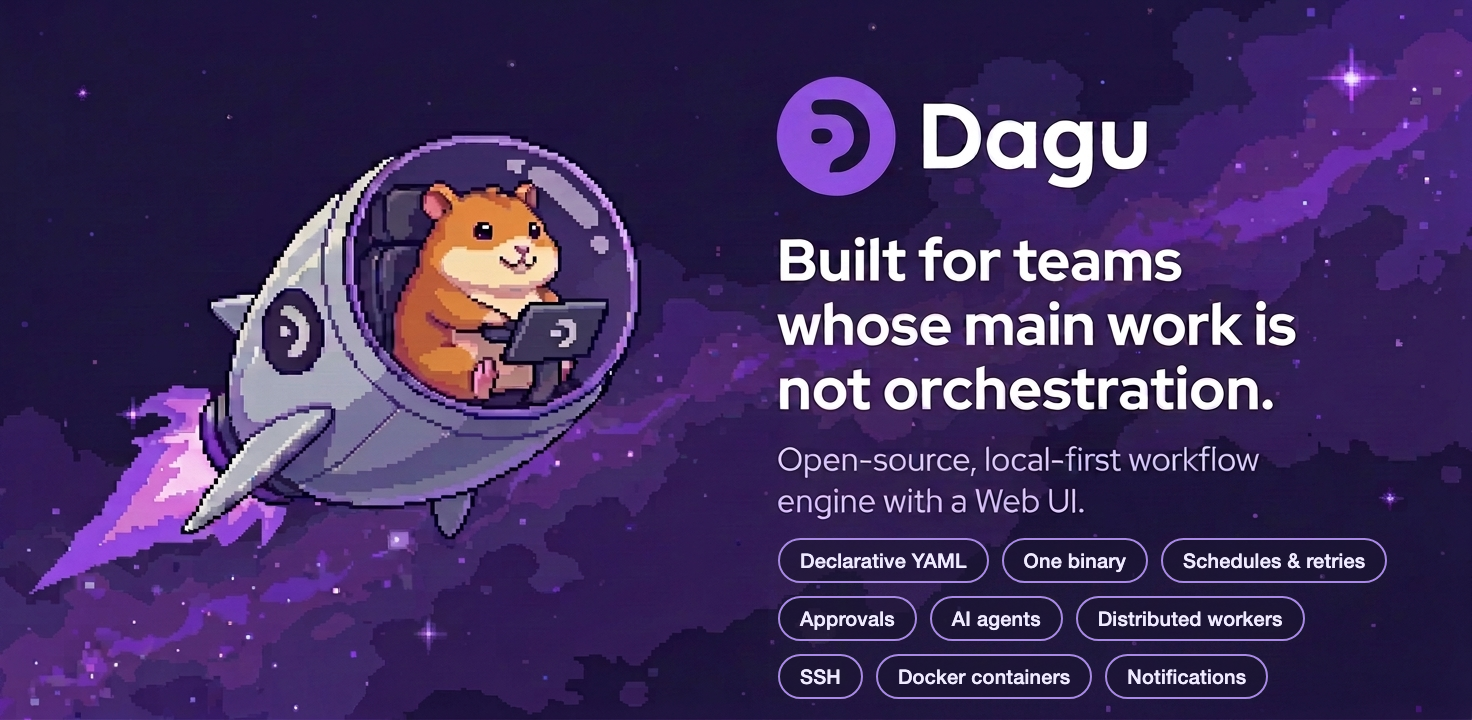
Self-hostable workflow orchestrator for teams whose main work isn't orchestration. Declarative YAML over your scripts, SSH commands, containers, etc; keep workflows separate from business logic.
dagucloud/dagu is an open-source project on GitHub, mainly written in Go. Self-hostable workflow orchestrator for teams whose main work isn't orchestration. It currently holds 4,165 stars and 351 forks with 80 open issues, and was last pushed on 2026-09-27 (repository created 2022-04-22).
Git Homed tracks it on the Today's Trending board, currently at rank #68 with 32 new stars today.
Dagu is a local-first workflow engine for operations and internal automation. It is open source and self-hostable: a single binary with a built-in Web UI, no external database or message broker, running on Linux, macOS, and Windows. Define DAGs in a declarative YAML format. It natively supports shell commands, Docker containers, Kubernetes Jobs, remote commands via SSH, and more through Dagu Actions.
Dagu turns existing scripts and runbooks into production workflows with scheduling, retries, human tasks, and run history. It runs where your data and credentials live: on-prem, air-gapped, edge, or cloud, and scales from a single node to a fleet of workers.
Highlights:
For a quick look at how workflows are defined, see the examples.
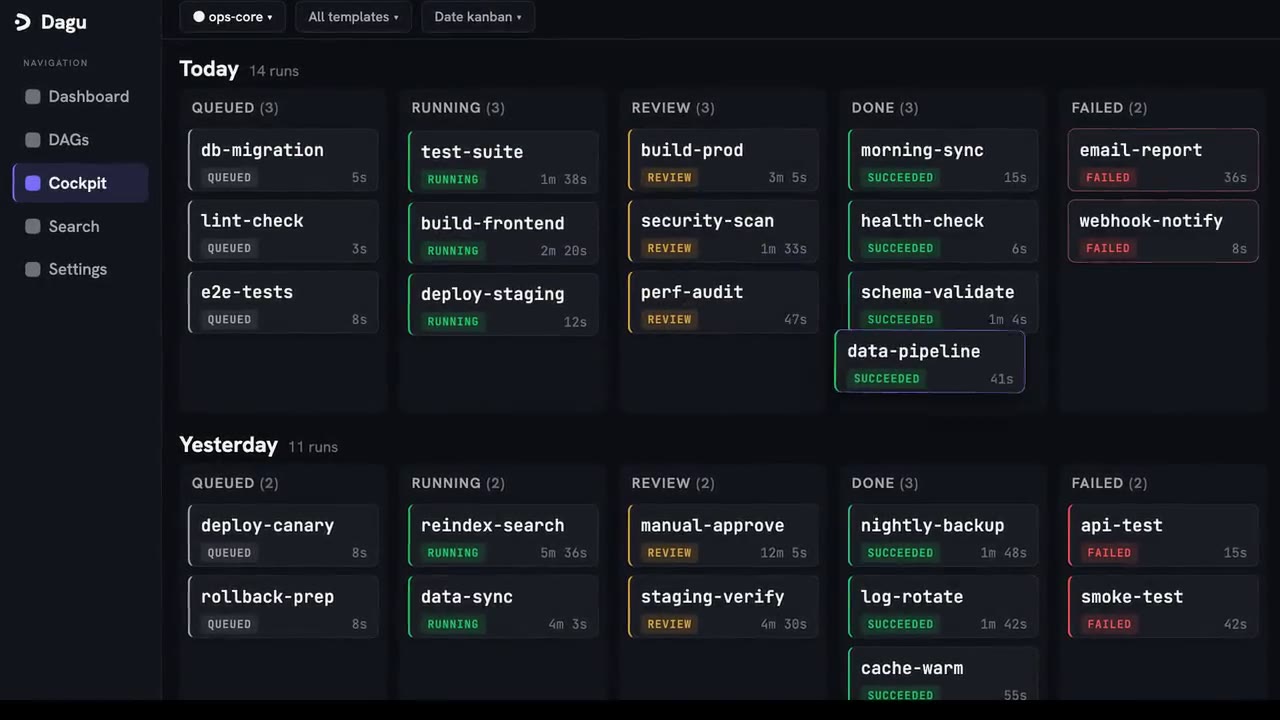
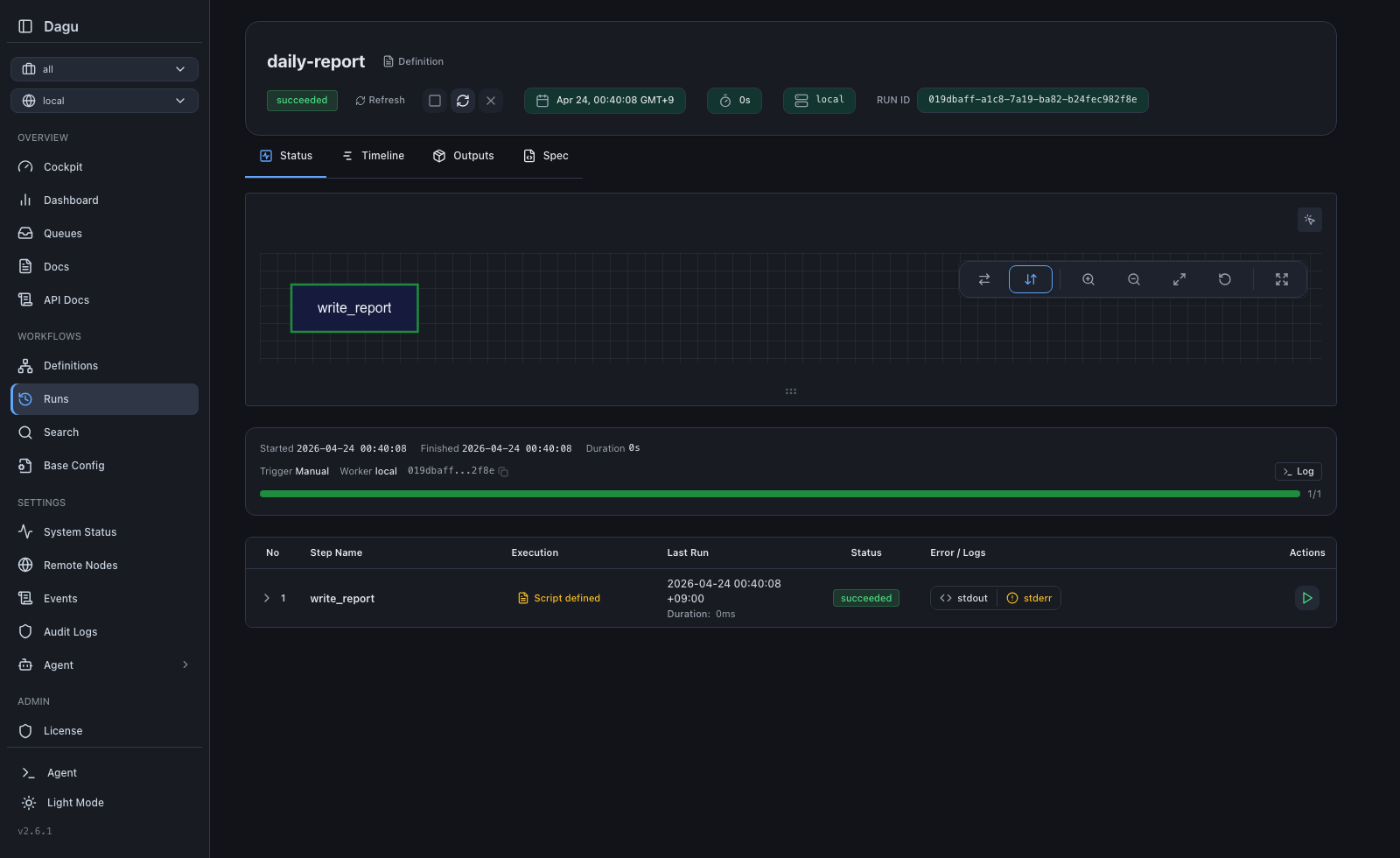
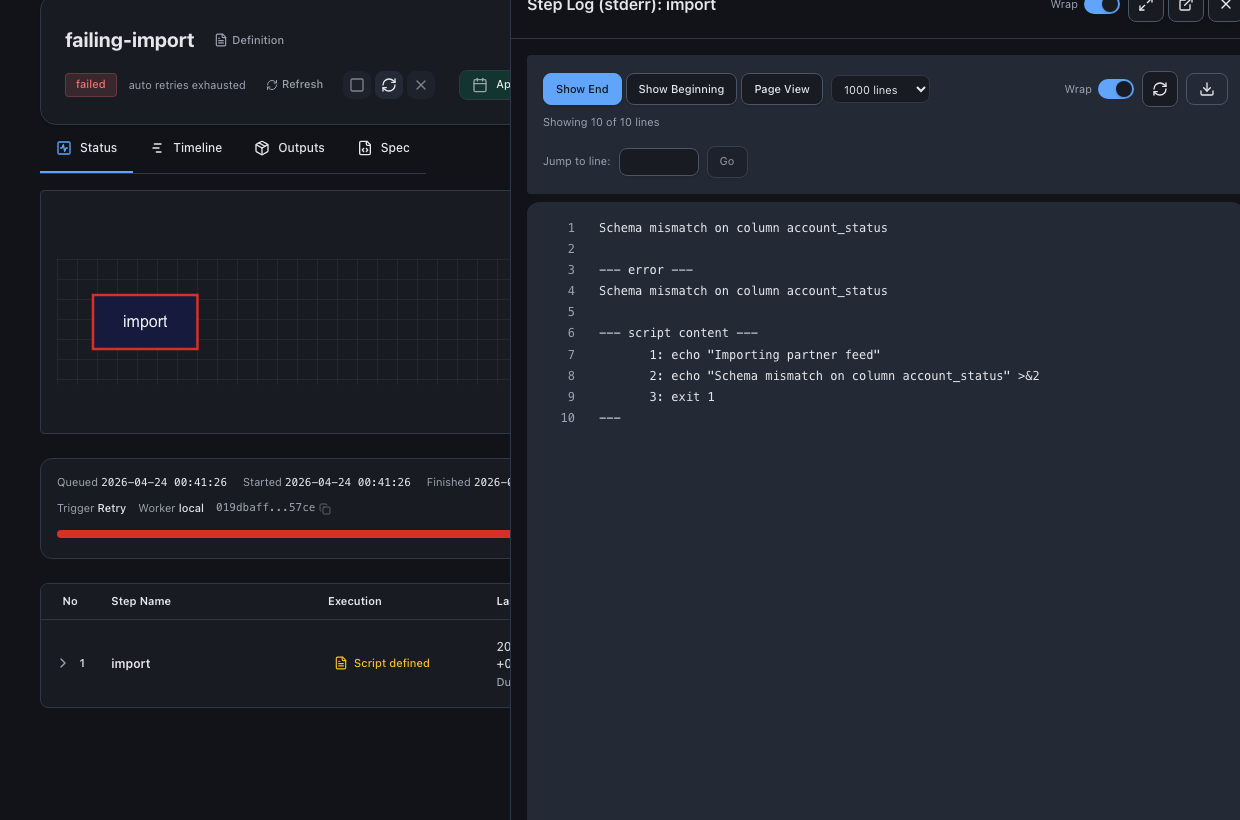
| Run Details | Step Logs | Wiki |
|---|---|---|
|  |
|  |
| 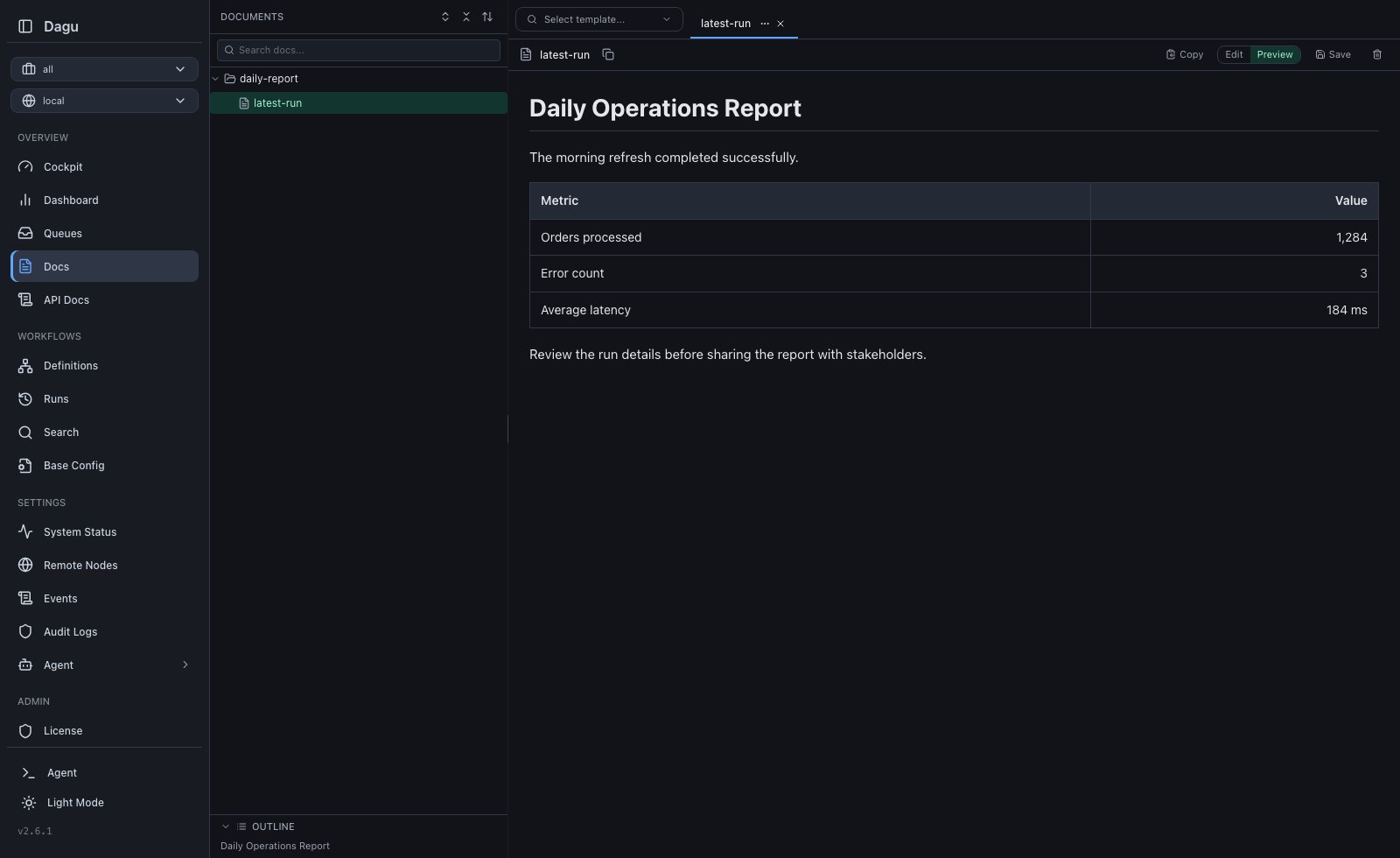 |
|
Try it live: Live Demo (credentials: demouser / demouser)
Orchestration is not your main work. You have scripts and containers that already work. You want a schedule, retries, dependencies, and a place to see logs. The usual options each have a cost:
@dag/@task framework code.Dagu treats workflow structure as configuration, not code. Order, dependencies, retries, schedules, and human tasks go in one YAML file next to your scripts; the engine that runs them is a single process:
  Traditional Orchestrator          Dagu
  ┌────────────────────────┐        ┌──────────────────┐
  │  Web Server            │        │                  │
  │  Scheduler             │        │  dagu start-all  │
  │  Worker(s)             │        │                  │
  │  PostgreSQL            │        └──────────────────┘
  │  Redis / RabbitMQ      │         Single binary.
  │  Python Runtime        │         Self-hosted.
  └────────────────────────┘         Adds scheduling, retries, and human tasks around existing automation.
    6+ services to manage
Your scripts never import the orchestrator. Delete the YAML and they run exactly as before. Keep it, and every run gets a dependency graph, retries, per-step logs, history, and a Web UI.
Dagu stores state in local files and reaches production throughput without external services.
| Use Case | How Dagu Helps |
| --- | --- |
| ETL and data operations | Turn data extraction scripts, SQL queries, dbt commands, and data-processing runbooks into observable pipelines with durable execution. |
| Legacy scripts and scheduled jobs | Turn interdependent scripts into maintainable DAGs with a UI, automatic logging, retries, and notifications instead of opaque cron jobs. |
| Media conversion | Run ffmpeg for video transcoding and format conversion. File-backed state allows workers to run heavy conversions in parallel without single-machine bottlenecks or external databases. |
| Infrastructure and server automation | Run any command or script over SSH on remote servers, keeping logs, results, and notifications in one place. |
| GitHub-driven workflows | Trigger workflows from GitHub events to run automation on private infrastructure without exposing servers to the public internet. |
| Container and Kubernetes workflows | Run Docker containers and Kubernetes Jobs as steps in your workflows without building a custom control plane around containers. |
| Customer support automation | Provide self-service workflows that non-engineering teams can run for diagnostics, database queries, and routine operations without escalating to engineering. |
| IoT and edge workflows | Run sensor polling, local ML inference, data preprocessing, backups, offline sync, and health checks close to the data source with Web UI visibility. |
macOS/Linux:
curl -fsSL https://raw.githubusercontent.com/dagucloud/dagu/main/scripts/installer.sh | bash
Homebrew:
brew install dagu
npm:
npm install -g --ignore-scripts=false @dagucloud/dagu
Windows (PowerShell):
irm https://raw.githubusercontent.com/dagucloud/dagu/main/scripts/installer.ps1 | iex
Docker:
docker run --rm -v ~/.dagu:/var/lib/dagu -p 8080:8080 ghcr.io/dagucloud/dagu:latest dagu start-all
This command does not expose the host Docker daemon to Dagu. Workflows that
usecontainer:oraction: docker.runneed the
container-step Docker setup.
Mounting the Docker socket grants workflows control of the host daemon.
Kubernetes (Helm):
helm repo add dagu https://dagucloud.github.io/dagu
helm repo update
helm install dagu dagu/dagu --set persistence.storageClass=
Replace ` with a StorageClass that supports ReadWriteMany`. See charts/dagu/README.md for chart configuration.
The script installers run a guided wizard that can add Dagu to your PATH, set it up as a background service, and create the initial admin account. Homebrew, npm, Docker, and Helm install without the wizard. See the Installation documentation for all options.
Create hello.yaml:
steps:
- id: hello
run: echo "hello from Dagu"
Run the workflow with:
dagu start hello.yaml
dagu start-all --dags .
Visit http://localhost:8080
Dagu runs on one machine, on temporary workers your platform creates for each run, or on workers you keep running. All three are self-hosted, and the same workflow YAML runs on any of them. See the Deployment Models guide.
Single server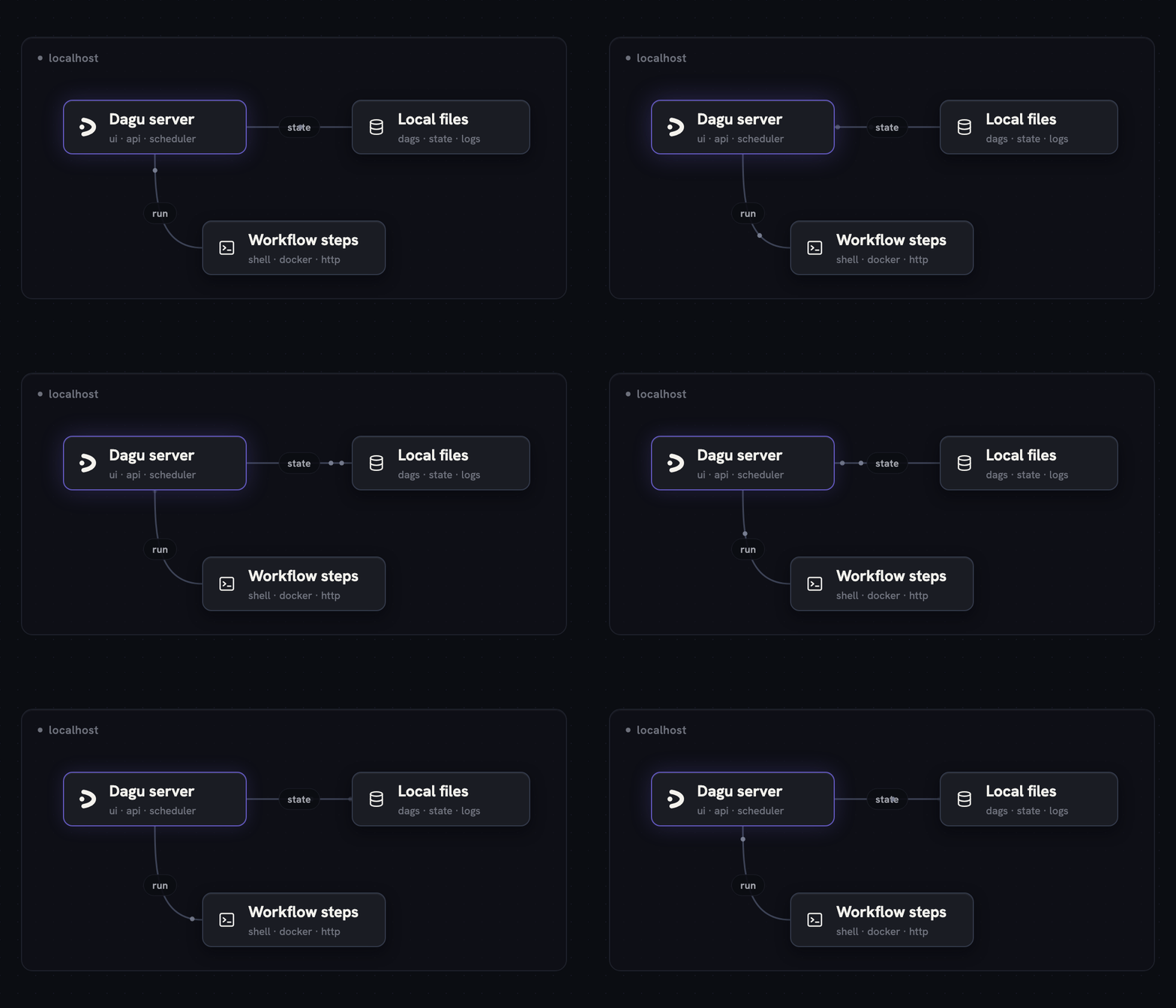
|
Temporary workers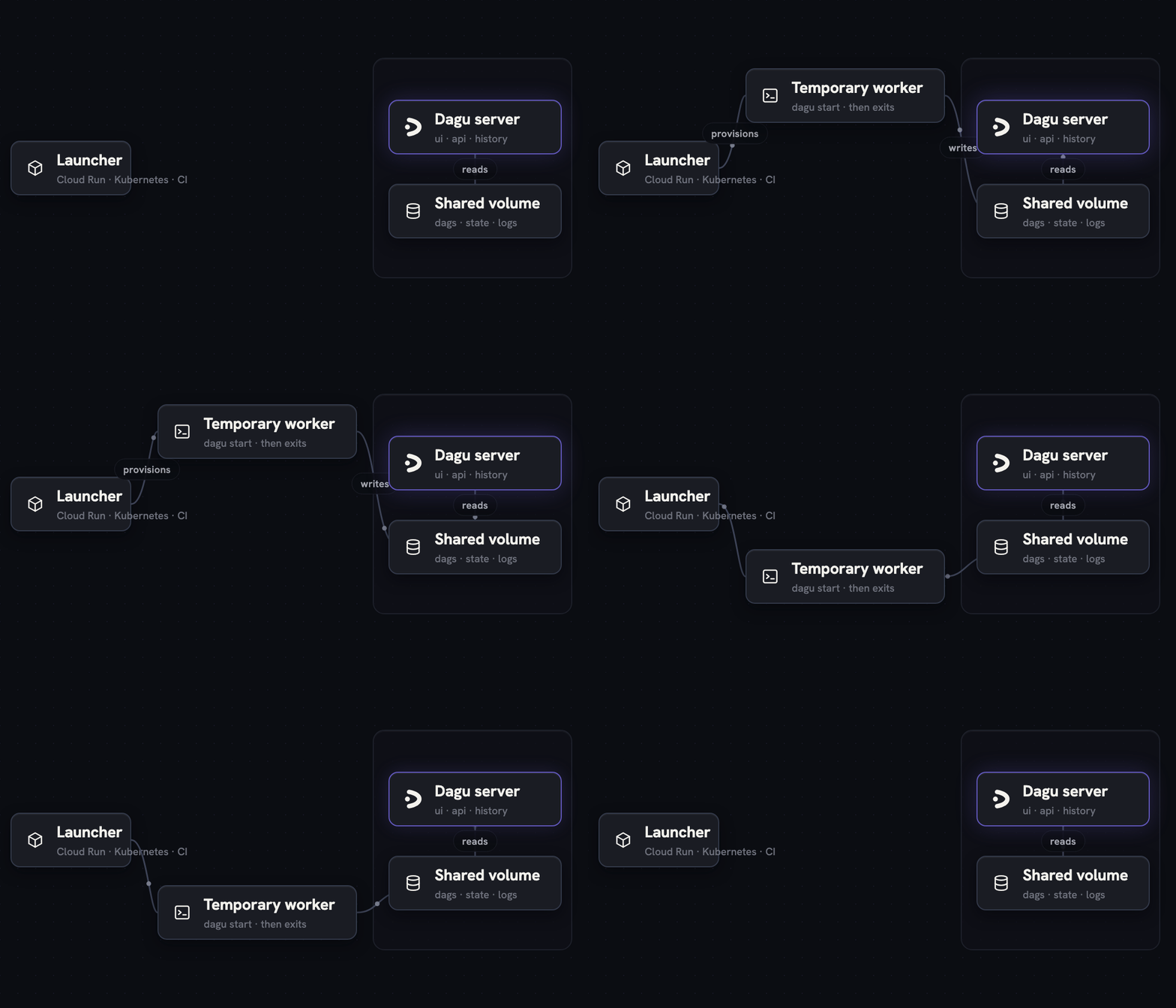
|
Distributed workers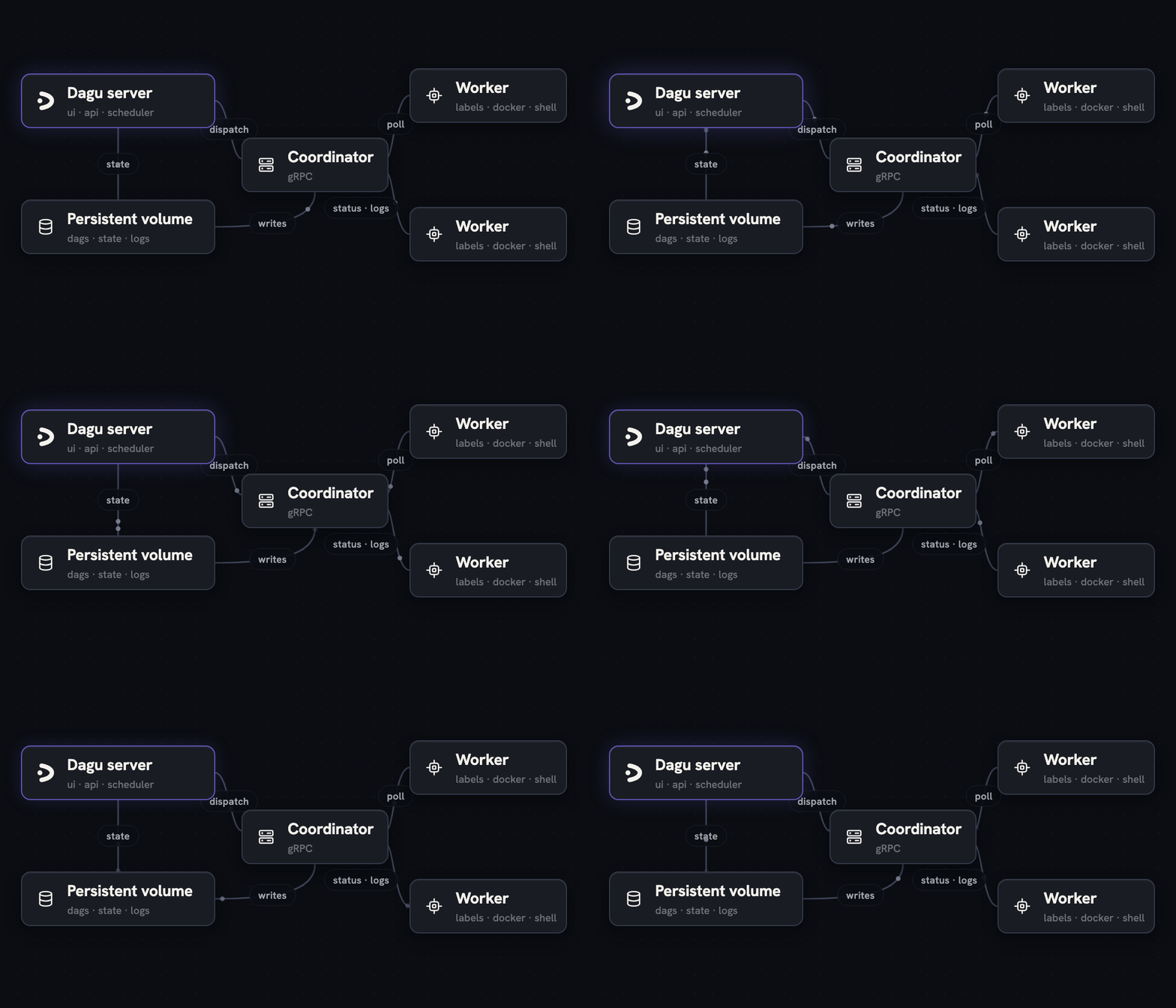
|
| Topology | Execution | Best for |
|----------|-----------|----------|
| Single server | dagu start-all runs the server, scheduler, and steps in one process on one machine. | Development, single-machine scheduled workloads, edge jobs, and internal automation. |
| Temporary workers | Cloud Run Jobs, Kubernetes Jobs, or CI provision a worker per run that invokes the binary and is destroyed when the run ends. The server reads run state from a shared volume. | Ephemeral compute, capacity that falls to zero between jobs, and launchers you already operate. |
| Distributed workers | Workers you keep running poll a coordinator over gRPC and are routed work by label. | Docker and private-network steps, warm toolchains, and multiple execution hosts. |
One binary carries every role. Which roles you start, and where, is what the deployment models differ on.
schedule: and drains the queue.dagu start-all runs the server, scheduler, and coordinator in one process.DAGU_HEADLESS=true to run without the Web UI, which applies to any of the topologies and suits CI or CLI-only environments.
Single server:
┌─────────────────────────────────────────┐
  │  dagu start-all                         │
  │  ┌───────────┐ ┌───────────┐ ┌────────┐ │
  │  │ HTTP / UI │ │ Scheduler │ │Executor│ │
  │  └───────────┘ └───────────┘ └────────┘ │
  │  File-based storage (logs, state, queue)│
  └─────────────────────────────────────────┘
Distributed workers:
┌────────────┐                   ┌────────────┐
  │ Scheduler  │                   │ HTTP / UI  │
  │            │                   │            │
  │ ┌────────┐ │                   └─────┬──────┘
  │ │ Queue  │ │  Dispatch (gRPC)        │ Dispatch / GetWorkers
  │ │(file)  │ │─────────┐               │ (gRPC)
  │ └────────┘ │         │               │
  └────────────┘         ▼               ▼
                    ┌─────────────────────────┐
                    │      Coordinator        │
                    │  ┌───────────────────┐  │
                    │  │ Dispatch Task     │  │
                    │  │ Store (pending/   │  │
                    │  │ claimed)          │  │
                    │  └───────────────────┘  │
                    └────────▲────────────────┘
                             │
                   Worker poll / task response
                   Heartbeat / ReportStatus /
                   StreamLogs (gRPC)
                             │
               ┌─────────────┴─────────────┐
               │             │             │
          ┌────┴───┐    ┌────┴───┐    ┌────┴───┐
          │Worker 1│    │Worker 2│    │Worker N│ Sandbox execution of DAGs
          │        │    │        │    │        │
          └────────┘    └────────┘    └────────┘
Temporary workers:
┌────────────┐   provisions   ┌──────────────┐
  │  Launcher  │───────────────▶│  dagu start  │
  │ Cloud Run  │                │  exits when  │
  │ K8s Job/CI │                │ the run ends │
  └────────────┘                └──────┬───────┘
                                       │ writes
                                       ▼
  ┌────────────┐     reads      ┌──────────────────┐
  │ Dagu server│◀───────────────│  Shared volume   │
  │  UI / API  │                │ dags/state/logs  │
  └────────────┘                └──────────────────┘
No coordinator, and no network path between the two.
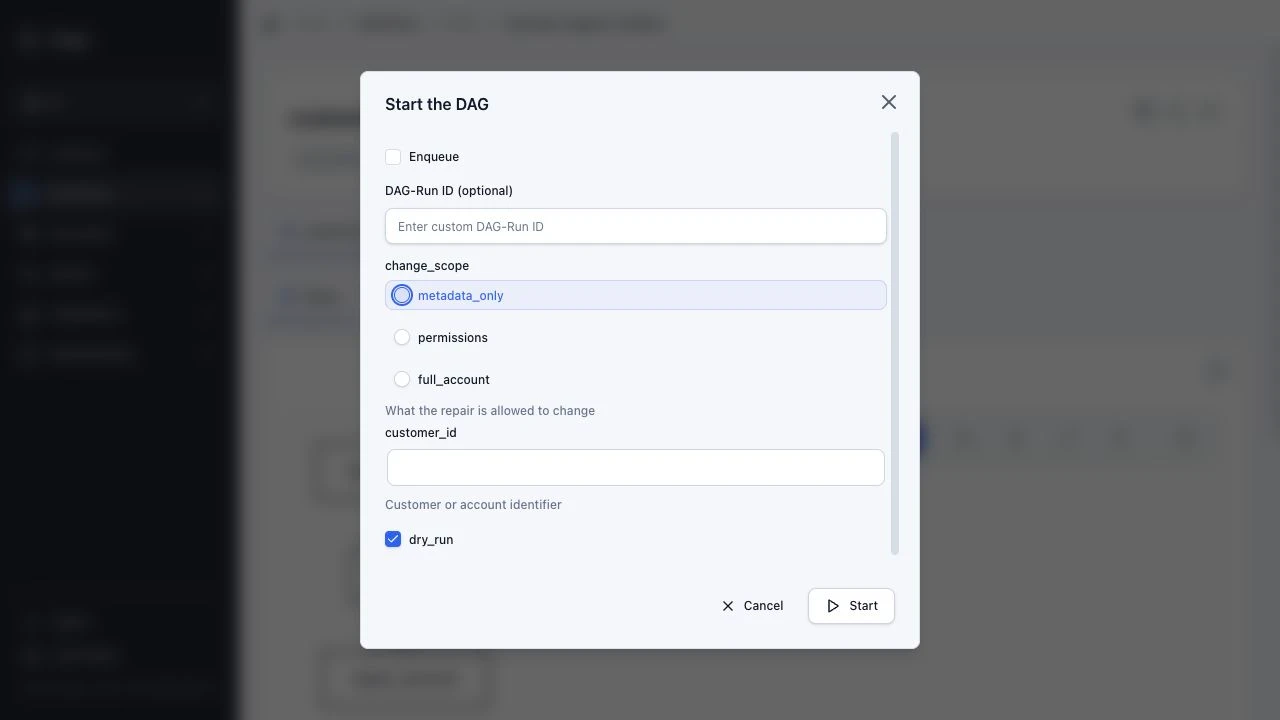
Workflows can define parameters that render as typed input forms in the Web UI and can be referenced by steps.
params:
- name: customer_id
type: string
description: Customer or account identifier
- name: change_scope
type: string
description: What the repair is allowed to change
enum:
- metadata_only
- permissions
- full_account
default: metadata_only
- name: dry_run
type: boolean
default: true
steps:
- id: extract
run: >-
./scripts/extract.sh
--customer "${params.customer_id}"
--scope "${params.change_scope}"
--dry-run="${params.dry_run}"
retry_policy:
limit: 3
interval_sec: 30
When Dagu itself runs in Docker, enable Docker daemon access before using container steps.
Pass standard docker run options directly in YAML, including the image, pull policy, platform, volume mounts, working directory, and resource limits:
resources:
limits:
cpu: 500m
memory: 512Mi
steps:
- id: report
action: docker.run
with:
image: ghcr.io/acme/reporting:1.4.2
pull: always
platform: linux/amd64
working_dir: /work
volumes:
- ~/orders:/work/data
auto_remove: true
command: python generate_report.py --input /work/data/orders.csv
See the Docker and DAG Run Resource Limits documentation for all configuration options.
The parent invokes the same child DAG for multiple targets and limits concurrent child runs:
steps:
- id: patch
action: dag.run
with:
dag: patch-host
params:
host: ${ITEM}
parallel:
items:
- web-1.internal
- web-2.internal
- db-1.internal
max_concurrent: 2
---
name: patch-host
params:
- name: host
type: string
ssh:
user: deploy
host: ${params.host}
steps:
- id: apply
run: apt-get update -q && apt-get upgrade -y
See the Sub-DAGs documentation for parameter passing and fan-out options.
ssh:
user: deploy
host: web-1.internal
key: ~/.ssh/deploy_key
steps:
- id: health
run: curl -f http://localhost:8080/health
retry_policy:
limit: 3
interval_sec: 10
- id: restart
run: systemctl restart myapp
depends: health
See the SSH documentation for authentication and connection options.
schedule:
- "0 /6 " # Every 6 hours
overlap_policy: skip # Skip if previous run is still active
catchup_window: "5h" # Catch up missed runs when scheduler is down for up to 5 hours
timeout_sec: 3600
handler_on:
failure:
run: notify-team.sh
exit:
run: cleanup.sh
See the Scheduling and Lifecycle Handlers documentation for all options.
steps:
- name: flaky-api-call
run: curl -f https://api.example.com/data
retry_policy:
limit: 3
interval_sec: 10
continue_on:
failure: true
See the Durable Execution and Continue On documentation for retry policies and failure handling.
steps:
- id: extract
run: ./extract.sh
- id: transform_a
run: ./transform_a.sh
depends: extract
- id: transform_b
run: ./transform_b.sh
depends: extract
- id: load
run: ./load.sh
depends: [transform_a, transform_b]
%%{init: {'theme': 'base', 'themeVariables': {'background': '#18181B', 'primaryTextColor': '#fff', 'lineColor': '#888'}}}%%
graph LR
    A[extract] --> B[transform_a]
    A --> C[transform_b]
    B --> D[load]
    C --> D
    style A fill:#18181B,stroke:#22C55E,stroke-width:1.6px,color:#fff
    style B fill:#18181B,stroke:#22C55E,stroke-width:1.6px,color:#fff
    style C fill:#18181B,stroke:#22C55E,stroke-width:1.6px,color:#fff
    style D fill:#18181B,stroke:#3B82F6,stroke-width:1.6px,color:#fff
See the Control Flow documentation for dependencies, conditions, and repetition.
Save this as workflow.yaml:
type: build
working_dir: .
steps:
- id: uppercase
inputs:
- name: source
path: source.txt
outputs:
- name: result
path: uppercase.txt
run: |
#!/bin/sh
tr '[:lower:]' '[:upper:]' < "${inputs.source}" > "${outputs.result}"
Run it:
printf 'alpha\n' > source.txt
dagu start workflow.yaml
Run dagu start workflow.yaml again and Dagu reuses uppercase.txt. Change source.txt and the step runs again. ${outputs.result} is a temporary path that Dagu publishes as uppercase.txt after the command succeeds.
Build workflows currently run locally. See Build Workflows for dependency inference and reuse rules.
tools:
- jqlang/[email protected]
steps:
- id: inspect
run: jq --version
- id: summarize
action: python-script@v1
with:
input:
rows: [42, 8]
script: |
return {"total": sum(input["rows"])}
Dagu installs declared portable CLIs before the DAG run, exposes them on PATH for host command steps, and caches them on each worker. Tool provisioning uses aqua as the default provider; the standard registry resolves to the latest aqua-registry release automatically. Pin a specific artifact with package@version#sha256: when the release tag alone is not a strong enough guarantee. See the Tools documentation and Dagu Actions for more details.
params:
- BUILD_ID
steps:
- id: notify
action: acme/[email protected]
with:
text: "Build ${params.BUILD_ID} finished"
- id: audit
depends: notify
run: 'echo "Notification result: ${steps.notify.outputs.messageId}"'
A third-party Dagu Action package contains a DAG, manifest, schemas, and helper files behind an action: reference. See the Dagu Actions and Third-Party Actions documentation for details.
steps:
- name: batch-job
action: kubernetes.run
with:
namespace: production
image: my-registry/batch-processor:latest
resources:
requests:
cpu: "2"
memory: "4Gi"
command: ./process.sh
See the Kubernetes documentation for Job configuration options.
For more examples, see the Examples documentation.
Dagu includes a built-in MCP server at http://localhost:8080/mcp. MCP clients can inspect workflows and run state, maintain Dagu's built-in Wiki pages, preview and apply DAG or Wiki page changes, and control runs through the same authenticated server boundary as the REST API.
See the MCP overview and quickstart.
Dagu includes built-in actions that run within the Dagu process or on the selected worker. Local shell commands use the run: field; structured work uses action:.
| Action | Purpose |
|----------|---------|
| run: field | Local shell commands and scripts (bash, sh, PowerShell, custom shells) |
| exec | Direct process execution without shell parsing |
| noop | Output-only or approval-only placeholder step |
| log.write | Write structured log messages |
| docker.run / container.run | Run containers with registry auth, volume mounts, and resource limits |
| kubernetes.run / k8s.run | Execute Kubernetes Jobs with namespace, image, and resource settings |
| ssh.run | Remote command execution over SSH |
| sftp.upload / sftp.download | File transfer over SFTP |
| `http.reque
→ →
→ →
→ →
→ →
→ →
→ →
→ →
→