English |
简体中文
![]() Chatbox
(Community Edition)
Chatbox
(Community Edition)
Your Ultimate AI Copilot on the Desktop.
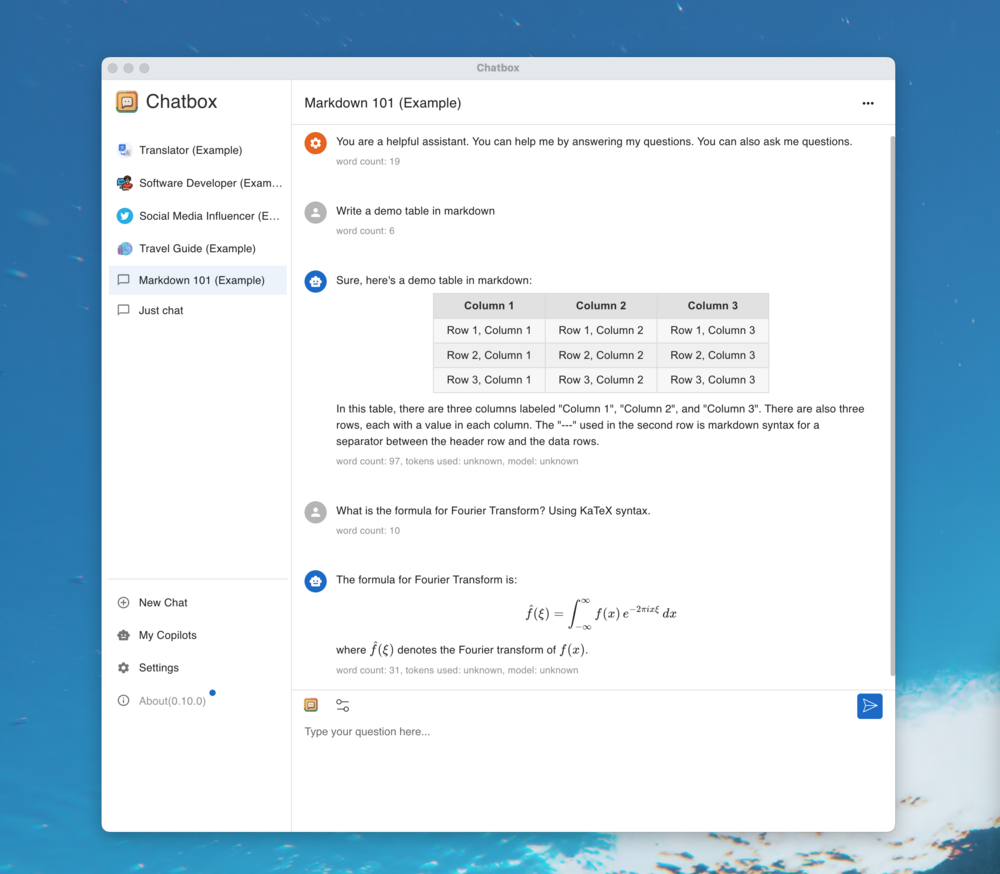
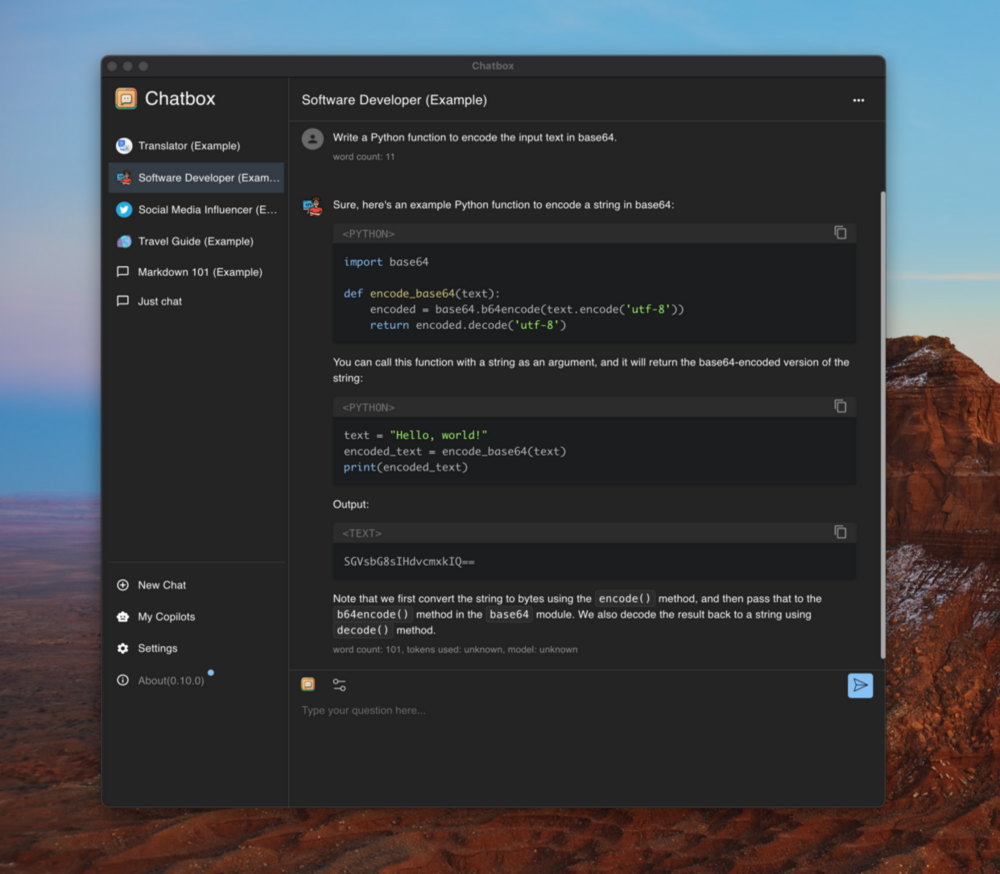
Chatbox is a desktop client for ChatGPT, Claude and other LLMs, available on Windows, Mac, Linux






---
This is the repository for the Chatbox Community Edition, open-sourced under the GPLv3 license.
Chatbox is going open-source Again!
We regularly sync code from the pro repo to this repo, and vice versa.
Download
Desktop
iOS/Android
![]()
![]()
![]() .APK
.APK
For more information: chatboxai.app
Quick Start
For End Users
1. Download the appropriate installer for your platform from the
releases page
2. Install and launch Chatbox
3. Configure your AI provider (OpenAI, Claude, etc.) in settings
4. Start chatting!
System Requirements
| Platform | Minimum Version | Architecture |
|----------|----------------|--------------|
| Windows | Windows 10 | x64 |
| macOS | macOS 11 (Big Sur) | Intel/Apple Silicon |
| Linux | Ubuntu 20.04+ / AppImage supported distros | x64 |
Features
🤖 AI Model Support
- Support for Multiple LLM Providers
:gear: Seamlessly integrate with a variety of cutting-edge language models:
- OpenAI (ChatGPT)
- Azure OpenAI
- Claude
- Google Gemini Pro
- Ollama (enable access to local models like llama2, Mistral, Mixtral, codellama, vicuna, yi, and solar)
- ChatGLM-6B
- Image Generation with Dall-E-3
:art: Create the images of your imagination with Dall-E-3.
:speech_balloon: Advanced prompting features to refine and focus your queries for better responses.
🖥️ User Experience
:floppy_disk: Your data remains on your device, ensuring it never gets lost and maintains your privacy.
- No-Deployment Installation Packages
:package: Get started quickly with downloadable installation packages. No complex setup necessary!
- Ergonomic UI & Dark Theme
:new_moon: A user-friendly interface with a night mode option for reduced eye strain during extended use.
:keyboard: Stay productive with shortcuts that speed up your workflow.
:arrow_forward: Provide rapid responses to your interactions with immediate, progressive replies.
📄 Content & Formatting
- Markdown, Latex & Code Highlighting
:scroll: Generate messages with the full power of Markdown and Latex formatting, coupled with syntax highlighting for various programming languages, enhancing readability and presentation.
- Prompt Library & Message Quoting
:books: Save and organize prompts for reuse, and quote messages for context in discussions.
👥 Collaboration & Sharing
:busts_in_silhouette: Collaborate with ease and share OpenAI API resources among your team.
Learn More
🌐 Platform Availability
:computer: Chatbox is ready for Windows, Mac, and Linux users.
:globe_with_meridians: Use the web application on any device with a browser, anywhere.
:phone: Native iOS and Android applications for on-the-go access.
🌍 Localization
:earth_americas: Catering to a global audience by offering support in multiple languages:
- English
- 简体中文 (Simplified Chinese)
- 繁體中文 (Traditional Chinese)
- 日本語 (Japanese)
- 한국어 (Korean)
- Français (French)
- Deutsch (German)
- Русский (Russian)
- Español (Spanish)
✨ More Features
:sparkles: Constantly enhancing the experience with new features!
FAQ
How to Contribute
We welcome contributions from the community! Here's how you can help make Chatbox better:
🐛 Reporting Issues
- Use GitHub Issues to report bugs or request features
- Before creating a new issue, please search existing issues to avoid duplicates
- Provide detailed information including steps to reproduce, expected behavior, and screenshots if applicable
🔧 Pull Requests
1. Fork the repository and create your branch from
main
2. Make your changes and ensure the code follows our coding standards
3. Test your changes thoroughly
4. Update documentation if needed
5. Submit a pull request with a clear description of the changes
🌍 Translations
Help make Chatbox accessible to more people by contributing translations:
- Translation files are located in the
src/locales directory
- Follow the existing translation format
- Submit a PR with your translation improvements
📖 Documentation
- Improve README, API documentation, or user guides
- Fix typos or clarify unclear instructions
- Add examples and tutorials
🌟 Other Ways to Contribute
- Star the repository to show your support
- Share Chatbox with others
- Answer questions in GitHub Discussions
- Provide feedback and suggestions
Thank you for contributing! 🙏
Development
Prerequisites
Before you begin, ensure you have the following installed:
- Node.js (v20.x – v22.x) - Download here
- pnpm (v10.x or later) - Install via
corepack enable && corepack prepare pnpm@latest --activate
- Git - Download here
Quick Setup
1. Clone the repository
   git clone https://github.com/chatboxai/chatbox.git
   cd chatbox
2. Install dependencies
pnpm install
3. Start development server
pnpm run dev
The application will start in development mode with hot-reload enabled.
Build Commands
| Command | Description |
|---------|-------------|
| pnpm run dev | Start development server with hot-reload |
| pnpm run package | Build and package for current platform |
| pnpm run package:all | Build and package for all platforms |
| pnpm run build | Build for production without packaging |
| pnpm run lint | Run Biome to check code quality |
| pnpm run test | Run Vitest test suite |
Project Structure
chatbox/
├── src/
│   ├── main/               # Electron main process
│   ├── renderer/           # React renderer (UI)
│   ├── preload/            # Electron preload scripts
│   └── shared/             # Shared utilities
├── doc/                    # Documentation and assets
├── resources/              # App resources and icons
├── team-sharing/           # Team collaboration features
└── package.json            # Project configuration
Development Tips
- Use
pnpm run lint before committing to ensure code quality
- Follow the existing code style and patterns
- Test your changes on both light and dark themes
- Ensure cross-platform compatibility when making UI changes
Troubleshooting
Issue: pnpm install fails
- Solution: Ensure you're using pnpm (not npm or yarn) and Node.js version is within the required range. Run
corepack enable if pnpm is not found.
Issue: Build fails on Windows
- Solution: Run
pnpm config set script-shell "C:\\Program Files\\git\\bin\\bash.exe" if using Git Bash
Issue: Changes not reflecting in development
- Solution: Stop the dev server, delete
node_modules/.vite, and restart
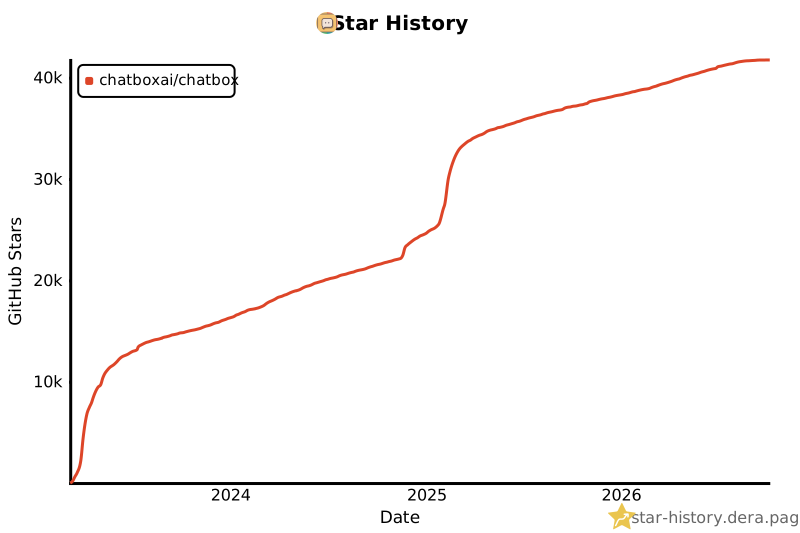
Star History
Contact
Email
License
LICENSE
 →
→


 →
→ →
→ →
→ →
→ →
→