
1
 →
→browser-use/video-use is an open-source project on GitHub, mainly written in Python. Edit videos with coding agents It currently holds 25,722 stars and 3,111 forks with 115 open issues, and was last pushed on 2026-08-30 (repository created 2026-04-12).
Git Homed tracks it on the Today's Trending board, currently at rank #33 with 155 new stars today.
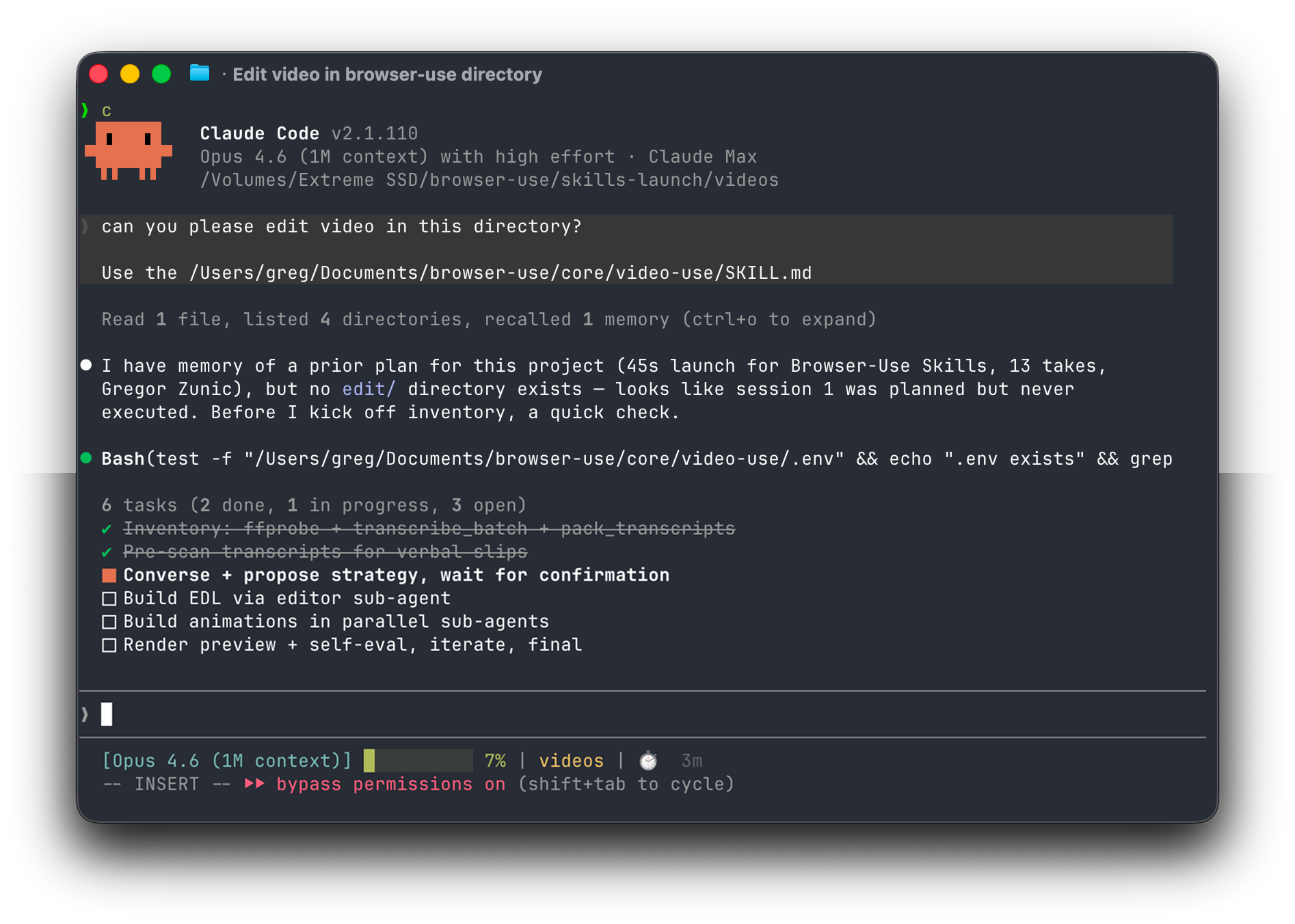
Introducing video-use — edit videos with Claude Code. 100% open source.
Drop raw footage in a folder, chat with Claude Code, get final.mp4 back. Works for any content — talking heads, montages, tutorials, travel, interviews — without presets or menus.
Try video-use in Browser Use Cloud.
umm, uh, false starts) and dead space between takesproject.md so next week's session picks up where you left offPaste into Claude Code, Codex, Hermes, Openclaw, or any agent with shell access:
Set up https://github.com/browser-use/video-use for me.
Read install.md first to install this repo, wire up ffmpeg, register the skill with whichever agent you're running under, and set up the ElevenLabs API key — ask me to paste it when you need it. Then read SKILL.md for daily usage, and always read helpers/ because that's where the editing scripts live. After install, don't transcribe anything on your own — just tell me it's ready and wait for me to drop footage into a folder.
The agent handles the clone, dependencies, skill registration, and prompts you once for your ElevenLabs API key (grab one at elevenlabs.io/app/settings/api-keys).
Then point your agent at a folder of raw takes:
cd /path/to/your/videos
claude    # or codex, hermes, etc.
For always-on editing from your own VPS or Telegram, run the agent through Browser Use Box. Watch the 15-second demo.
And in the session:
edit these into a launch video
It inventories the sources, proposes a strategy, waits for your OK, then produces edit/final.mp4 next to your sources. All outputs live in <videos_dir>/edit/ — the skill directory stays clean.
If you'd rather do it by hand:
# 1. Clone and symlink into your agent's skills directory
git clone https://github.com/browser-use/video-use ~/Developer/video-use
ln -sfn ~/Developer/video-use ~/.claude/skills/video-use        # Claude Code
ln -sfn ~/Developer/video-use ~/.codex/skills/video-use       # Codex
2. Install deps
cd ~/Developer/video-use
uv sync                         # or: pip install -e .
brew install ffmpeg             # required
brew install yt-dlp             # optional, for downloading online sources
3. Add your ElevenLabs API key
cp .env.example .env
$EDITOR .env                    # ELEVENLABS_API_KEY=...
The LLM never watches the video. It reads it — through two layers that together give it everything it needs to cut with word-boundary precision.
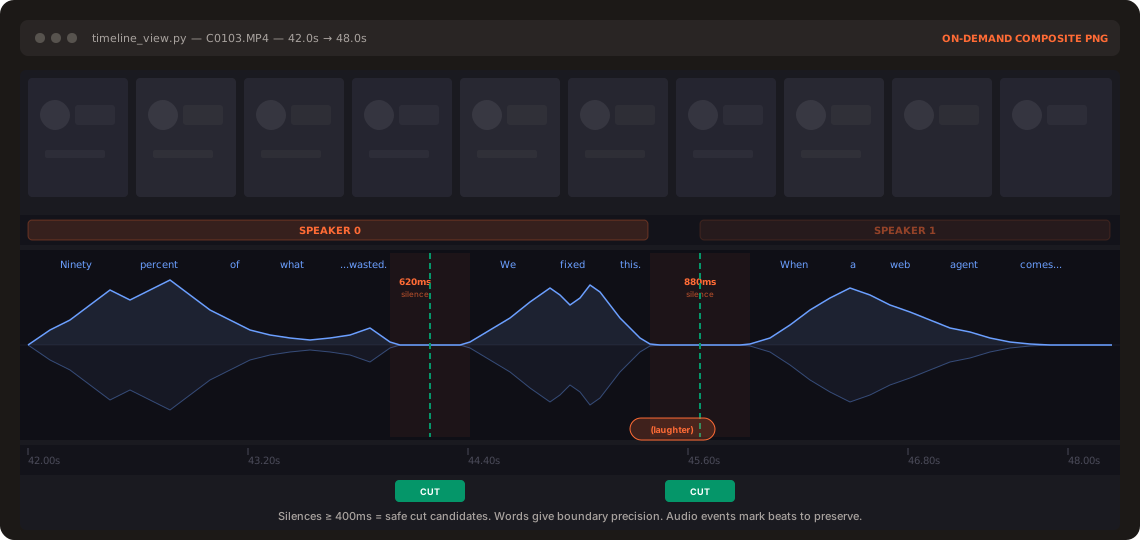
Layer 1 — Audio transcript (always loaded). One ElevenLabs Scribe call per source gives word-level timestamps, speaker diarization, and audio events ((laughter), (applause), (sigh)). All takes pack into a single ~12KB takes_packed.md — the LLM's primary reading view.
## C0103  (duration: 43.0s, 8 phrases)
  [002.52-005.36] S0 Ninety percent of what a web agent does is completely wasted.
  [006.08-006.74] S0 We fixed this.
Layer 2 — Visual composite (on demand). timeline_view produces a filmstrip + waveform + word labels PNG for any time range. Called only at decision points — ambiguous pauses, retake comparisons, cut-point sanity checks.
Naive approach: 30,000 frames × 1,500 tokens = 45M tokens of noise.
Video Use: 12KB text + a handful of PNGs.
Same idea as browser-use giving an LLM a structured DOM instead of a screenshot — but for video.
Transcribe ──> Pack ──> LLM Reasons ──> EDL ──> Render ──> Self-Eval
                                                              │
                                                              └─ issue? fix + re-render (max 3)
The self-eval loop runs timeline_view on the _rendered output_ at every cut boundary — catches visual jumps, audio pops, hidden subtitles. You see the preview only after it passes.
1. Text + on-demand visuals. No frame-dumping. The transcript is the surface. 2. Audio is primary, visuals follow. Cuts come from speech boundaries and silence gaps. 3. Ask → confirm → execute → self-eval → persist. Never touch the cut without strategy approval. 4. Zero assumptions about content type. Look, ask, then edit. 5. 12 hard rules, artistic freedom elsewhere. Production-correctness is non-negotiable. Taste isn't.
See SKILL.md for the full production rules and editing craft.
→ →
→ →
→ →
→ →
→ →
→ →
→ →
→