1
 →
→
Modern, easy to use download automation for torrents and usenet.
autobrr/autobrr is an open-source project on GitHub, mainly written in Go. Modern, easy to use download automation for torrents and usenet. It currently holds 3,085 stars and 219 forks with 14 open issues, and was last pushed on 2026-09-24 (repository created 2021-08-11).
Git Homed tracks it on the Today's Trending board, currently at rank #77 with 33 new stars today.

autobrr redefines download automation for torrents and Usenet, drawing inspiration from tools like trackarr, autodl-irssi, and flexget. We've combined the best of these worlds into one versatile tool that can do it all, and then some.



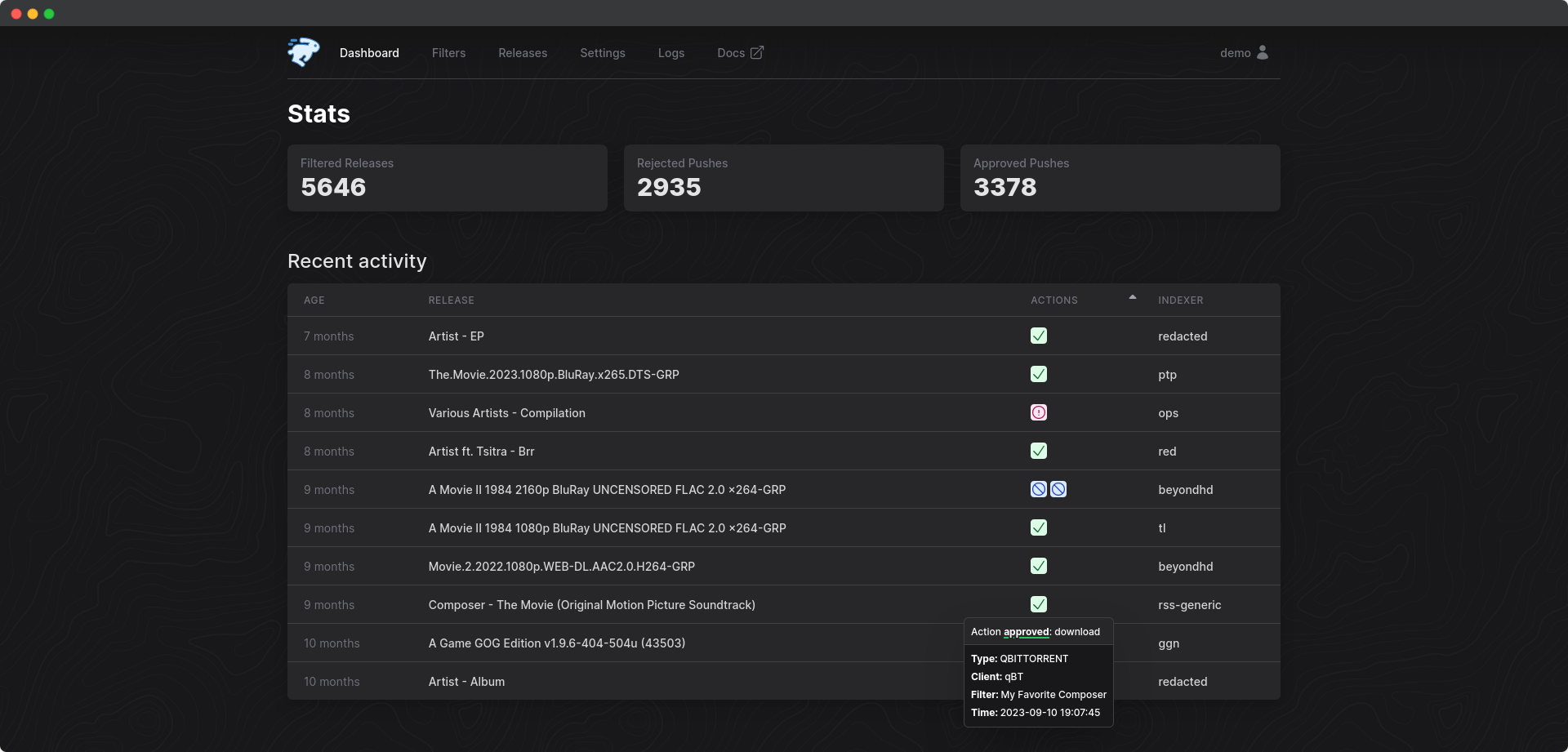
Full documentation can be found at https://autobrr.com
1. What Is Autobrr? 2. Key Features
3. InstallationWhat is autobrr, and how does it fit into the ecosystem?
We can start by talking about torrent trackers (hereby referred to as indexers) and maintaining ratio. You are required to maintain a ratio with most indexers. Ratio is built by seeding your torrents. The earlier you're seeding a torrent, the more peers you make yourself available to on that torrent.
Software like Radarr and Sonarr uses RSS to look for new torrents. RSS feeds are updated regularly, but too slow to let you be a part of what we call the initial swarm of a torrent. This is where autobrr comes into play.
Many indexers announce new torrents on their IRC channels the second it is uploaded to the site. autobrr monitors such channels in real time and grabs the torrent file as soon as it's uploaded based on certain conditions (hereby referred to as filters) that you set up within autobrr. It then sends that torrent file to a download client of your choice via an action set within the filter. A download client can be anything from qBittorrent and Deluge, to Radarr and Sonarr, or a watch folder.
When your autobrr filter is set to send the torrent files to Radarr and Sonarr, they will decide if it's something they want and then forward it to the torrent client they are set up with.
autobrr can also send matches (torrent files that meets your filter's criteria) directly to torrent clients like qBittorrent, Deluge, r(u)Torrent, and Transmission. You don't need to use the *arr suite to make use of autobrr.
A lot of indexers do not announce new torrents in an IRC channel. You can still make use of these indexers with autobrr since it has built-in support for feeds as well. Both Torznab, Newznab, and regular RSS is supported. RSS indexers are treated the same way as regular indexers within autobrr.
Usenet support via Newznab feeds allows you to easily manage everything in a single application. While there are a lot of applications that handle RSS well, we think autobrr offers very easy-to-use filtering to help you get the content you want.
You can use Usenet feeds and send to arrs or send directly to SABnzbd or NZBGet.
For comprehensive installation instructions, visit our Installation Guide. This guide provides detailed steps for different platforms, including Windows, Linux, Docker, and more.
Remember to head over to our Configuration Guide to learn how to set up your indexers, IRC, and download clients after you're done installing.
Swizzin users can simply run:
sudo box install autobrr
Saltbox users can simply run:
sb install autobrr
For more info check the docs
QuickBox users can simply run:
qb install autobrr -u ${username}
For more info check the docs
box install autobrrbox install autobrrWe have support for a couple of other providers out of the box. Please contact us on Discord if your provider is missing. The scripts require some input, but do most of the work.
wget https://gobrr.sh/install_feral && bash install_feral
wget https://gobrr.sh/install_bytesized && bash install_bytesized
For other providers the Seedbox.io installer should work. If not, open an issue or contact us on Discord
wget https://gobrr.sh/install_sbio && bash install_sbio
Modify accordingly if running with unRAID or setting up with Portainer.
BASE_DOCKER_DATA_PATH to match your setup. Can be simply ./datadocker-compose.yml and add the following. If you have an existing setup change to fit that.
version: "3.7"
services:
autobrr:
container_name: autobrr
image: ghcr.io/autobrr/autobrr:latest
restart: unless-stopped
environment:
- TZ=${TZ}
user: 1000:1000
volumes:
- ${BASE_DOCKER_DATA_PATH}/autobrr/config:/config
ports:
- 7474:7474
Then start with:
docker compose up -d
[!CAUTION]
This image comes without a shell, and external filtering and actions relying on exec will therefore not work with anything but compiled static binaries.
To clarify:BASHandSHshell scripts WILL NOT WORK!
> Use the standard image if you rely on this functionality.
For users who prioritize container security, one of the long-term maintainers offers alternative Docker images built on Distroless. Specifically the distroless/static-debian12:nonroot base image.
Distroless images do not contain a package manager or shell, thereby reducing the potential attack surface and making them a more secure option. These stripped-back images contain only the application and its runtime dependencies.
The repository for these builds can be found here: https://github.com/s0up4200/autobrr-distroless
Check the Windows Setup Guide here.
/bin/bash -c "$(curl -fsSL https://raw.githubusercontent.com/Homebrew/install/HEAD/install.sh)"
brew install autobrr
brew services start autobrr
Download the latest release, or download the source code and build
it yourself using make build.
wget $(curl -s https://api.github.com/repos/autobrr/autobrr/releases/latest | grep download | grep linux_x86_64 | cut -d\" -f4)
Run with root or sudo. If you do not have root, or are on a shared system, place the binaries somewhere in your home directory like ~/.bin.
tar -C /usr/local/bin -xzf autobrr*.tar.gz
This will extract both autobrr and autobrrctl to /usr/local/bin.
Note: If the command fails, prefix it with sudo and re-run again.
On Linux-based systems, it is recommended to run autobrr as a sort of service with auto-restarting capabilities, in order to account for potential downtime. The most common way is to do it via systemd.
You will need to create a service file in /etc/systemd/system/ called autobrr.service.
touch /etc/systemd/system/[email protected]
Then place the following content inside the file (e.g. via nano/vim/ed):
```systemd title="/etc/systemd/system/[email protected]" [Unit] Description=autobrr service for %i After=syslog.target network-online.target
[Service] Type=simple User=%i Group=%i ExecStart=/usr/bin/autobrr --config=/home/%i/.config/autobrr/
[Install] WantedBy=multi-user.target
Start the service. Enable will make it startup on reboot.
By default, the configuration is set to listen on 127.0.0.1. While autobrr works fine as is exposed to the internet,
it is recommended to use a reverse proxy
like nginx, caddy
or traefik.
If you are not running a reverse proxy change host in the config.toml to 0.0.0.0.
Environment Variables
The following environment variables can be used:
| Variable                               | Description                                              | Default     |
|----------------------------------------|----------------------------------------------------------|-------------|
| AUTOBRR__HOST                        | Listen address                                           | 127.0.0.1 |
| AUTOBRR__PORT                        | Listen port                                              | 7474      |
| AUTOBRR__BASE_URL                    | Base URL for reverse proxy                               | /         |
| AUTOBRR__BASE_URL_MODE_LEGACY        | Base URL Mode Legacy for old proxy setups                | true      |
| AUTOBRR__LOG_LEVEL                   | Log level (DEBUG, INFO, WARN, ERROR)                     | INFO      |
| AUTOBRR__LOG_PATH                    | Log file location                                        | -           |
| AUTOBRR__LOG_MAX_SIZE                | Max size in MB before rotation                           | 10        |
| AUTOBRR__LOG_MAX_BACKUPS             | Number of rotated logs to keep                           | 5         |
| AUTOBRR__CUSTOM_DEFINITIONS          | Path to custom indexer definitions                       | -           |
| AUTOBRR__CHECK_FOR_UPDATES           | Enable update checks                                     | true      |
| AUTOBRR__DATABASE_TYPE               | Database type (sqlite/postgres)                          | sqlite    |
| AUTOBRR__DATABASE_MAX_BACKUPS        | Number of backups to keep                                | 5         |
| AUTOBRR__DATABASE_DSN                | Database connection string. Use this or individual vars  | -           |
| AUTOBRR__POSTGRES_HOST               | PostgreSQL host                                          | -           |
| AUTOBRR__POSTGRES_PORT               | PostgreSQL port                                          | 5432      |
| AUTOBRR__POSTGRES_DATABASE           | PostgreSQL database name                                 | -           |
| AUTOBRR__POSTGRES_DB                 | PostgreSQL database name                                 | -           |
| AUTOBRR__POSTGRES_USER               | PostgreSQL username                                      | -           |
| AUTOBRR__POSTGRES_PASS               | PostgreSQL password                                      | -           |
| AUTOBRR__POSTGRES_PASSWORD           | PostgreSQL password                                      | -           |
| AUTOBRR__POSTGRES_SSLMODE            | PostgreSQL SSL mode                                      | disable   |
| AUTOBRR__POSTGRES_SOCKET             | PostgreSQL unix socket                                   | -           |
| AUTOBRR__POSTGRES_EXTRA_PARAMS       | Additional PostgreSQL parameters                         | -           |
| AUTOBRR__OIDC_ENABLED                | Enable OpenID Connect authentication                     | false     |
| AUTOBRR__OIDC_ISSUER                 | OIDC issuer URL                                          | -           |
| AUTOBRR__OIDC_CLIENT_ID              | OIDC client ID                                           | -           |
| AUTOBRR__OIDC_CLIENT_SECRET          | OIDC client secret                                       | -           |
| AUTOBRR__OIDC_REDIRECT_URL           | OIDC callback URL                                        | -           |
| AUTOBRR__OIDC_DISABLE_BUILT_IN_LOGIN | Disable login form (only works when using external auth) | false     |
| AUTOBRR__METRICS_ENABLED             | Enable Metrics server                                    | false     |
| AUTOBRR__METRICS_HOST                | Metrics listen address                                   | 127.0.0.1 |
| AUTOBRR__METRICS_PORT                | Metrics listen port                                      | 9074      |
| AUTOBRR__METRICS_BASIC_AUTH_USERS    | Metrics basic auth users                                 | -           |
| AUTOBRR__PROFILING_ENABLED           | Enable profiling                                         | false     |
| AUTOBRR__PROFILING_HOST              | Profiling listen address                                 | 127.0.0.1 |
| AUTOBRR__PROFILING_PORT              | Profiling listen port                                    | 6060      |
Docker secrets
All ENV vars have a _FILE option where it can read contents from a file, such as docker secrets. See the example below:
volumes: postgres: ```
Join our friendly and welcoming community on Discord! Connect with fellow autobrr users, get advice, and share your experiences. Whether you're seeking help, wanting to contribute, or just looking to discuss your ideas, our community is a hub of discussion and support. We're all here to help each other out, so don't hesitate to jump in!
Whether you're fixing a bug, adding a feature, or improving documentation, your help is appreciated. Here's how you can contribute:
autobrr.Check out the full guide for contributing here.
autobrr repository and clone it to start working on your changes.See an area that needs clarity or additional information? Feel free to update our documentation here.
We follow a code of conduct that promotes respectful and harassment-free experiences. Please read our Code of Conduct before participating.
autobrr is proudly open-source and is released under the GNU General Public License v2 or later (GPLv2+). This license allows you the freedom to run, study, share, and modify the software:
→ →
→ →
→ →
→ →
→ →
→ →
→ →
→