1
 →
→
Atomic Agent is a local-first AI agent. Runs open-weight models on your own machine via llama.cpp.
AtomicBot-ai/atomic-agent is an open-source project on GitHub, mainly written in TypeScript. Atomic Agent is a local-first AI agent. Runs open-weight models on your own machine via llama.cpp. It currently holds 2,999 stars and 254 forks with 36 open issues, and was last pushed on 2026-10-07 (repository created 2026-04-21).
Git Homed tracks it on the Today's Trending board.

Drives your browser, edits files, runs approved commands, and remembers context across sessions. Open source, running on our TurboQuant llama.cpp for +30-50% throughput on small local models.












Quick Install · Uninstall · Benchmarks · Why Local-First · Ways to Use It · Docs

---
A local-first AI agent that runs the control loop and all state on your machine. It works across your machine: browse the web, read and edit files, run approved shell commands, inspect documents, remember context across sessions, schedule follow-ups, and call external tools over MCP. Run it on a local model, a cloud model, or both at once in Fusion mode, where one model plans and a pool of workers executes. Embed it in your own apps over HTTP or a Tauri sidecar. llama.cpp first, so small quantized models stay useful for long, multi-step work on consumer hardware.
macOS / Linux:
curl -fsSL https://atomicagent.io/install | sh
Windows (PowerShell):
irm https://atomicagent.io/install.ps1 | iex
The installer downloads the release archive, verifies the checksum, and installs the CLI plus support assets (grammars/, native prebuilds, and bundled ripgrep). Atomic Agent updates itself in place; after an update the TUI prompts you to restart. Outside the TUI, run atomic-agent update (or atag update) to check for a newer release and re-run the installer in place; atomic-agent update --check probes without installing, and --version pins a specific release. Only the installed binary can self-update; a dev checkout updates via git.
[!NOTE]
Developer preview. APIs, commands, config, and behavior are still moving, so pin a release if you need a stable integration point. Current builds: macOS (Apple Silicon), Linux x64 / arm64, and Windows x64. Intel Macs are not supported yet; Windows on ARM runs the x64 build under emulation.
atomic-agent
Both installers also drop a short alias next to the binary, so this is the same thing:
atag
[!TIP]
Need a second agent? Press Ctrl+N (or run /window) inside the TUI: it opens a new terminal window with a fresh atomic-agent in the same directory.
[!TIP]
Want to go through first-time setup again? Run/onboarding(or/setup) in the TUI, or start it withatomic-agent tui --onboarding. Your providers, keys, sessions and memory are kept.
[!TIP]
Coming from another agent? The first run offers to bring your data over: tick the sources it found and the import runs, without overwriting anything already here and without touching the source. What moves depends on the source:
> - Claude Code: skills, memory, MCP servers, sessions, and (opt-in) provider keys
- Codex: skills, memory, sessions, and (opt-in) provider keys
- Oh-My-Pi: skills, MCP servers, and sessions
- Pi: skills and sessions
- Hermes: sessions, cron jobs, and (opt-in) provider keys
- OpenClaw: sessions and cron jobs
> Later, run/importin the TUI oratomic-agent importfrom the shell.
One command removes everything: the state directory (config, memory, sessions, tasks, traces, downloaded models), the binary and its atag alias, the asset directories beside them, and the PATH line the installer added to your shell rc file:
atomic-agent uninstall
It prints exactly what it will delete, with sizes, and then asks you to type the word uninstall. Nothing is uploaded and nothing is kept; this cannot be undone. Preview it with atomic-agent uninstall --dry-run, keep your data with --keep-data, keep the binary with --keep-binary, leave your shell rc file alone with --keep-path, or skip the prompt in a script with --yes. The same flow is the last entry in the TUI's own menu (Esc → Danger zone, or /uninstall).
If something isn't working:
1. Copy your error logs and system specs. 2. Open an issue on GitHub. 3. Or ask for help in our Discord.
Building something with Atomic Agent, stuck on setup, or just want to share what you are working on? Grab a slot and talk to the team directly: cal.com/atomicagent/demo. No agenda required. Questions, feedback, feature requests, or a plain hello all count. We read every issue and every Discord message too, but sometimes a 15-minute call beats a week of comments.
On the public GAIA validation Level 1 split (53 tasks), Atomic Agent and Hermes drove the same local qwen-3.6-35b-a3b (llama-server, UD-Q4_K_XL), with the same step budget and timeout. The only variable is the agent loop.
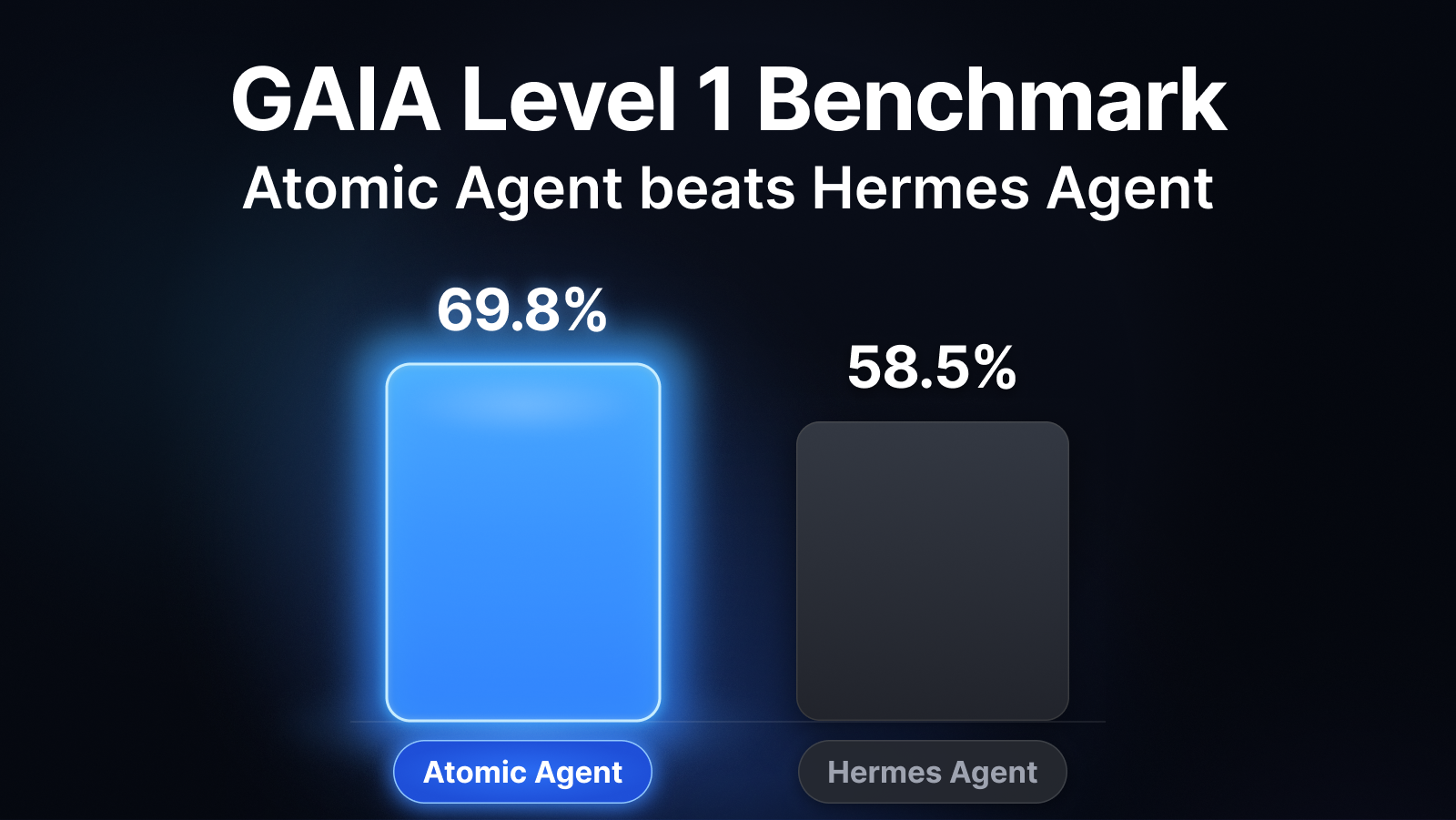
| Metric | Atomic Agent | Hermes | |---|---|---| | Accuracy | 37/53 = 69.8% | 31/53 = 58.5% | | Avg wall / task | ~217 s | ~351 s | | Head-to-head wins | +15 atomic-only | +9 Hermes-only |
%%{init: {"themeVariables": {"xyChart": {"backgroundColor": "transparent", "titleColor": "#0b63f6", "plotColorPalette": "#0b63f6"}}}}%%
xychart-beta
    title "GAIA L1 accuracy (higher is better, %)"
    x-axis ["Atomic Agent", "Hermes"]
    y-axis "Accuracy (%)" 0 --> 100
    bar [69.8, 58.5]
%%{init: {"themeVariables": {"xyChart": {"backgroundColor": "transparent", "titleColor": "#0b63f6", "plotColorPalette": "#0b63f6"}}}}%%
xychart-beta
    title "Avg wall time per task (lower is better, s)"
    x-axis ["Atomic Agent", "Hermes"]
    y-axis "Seconds / task" 0 --> 400
    bar [217, 351]
The same loop holds up as the local model shrinks. Same GAIA L1 split, Atomic Agent alone:
| Chat model | Accuracy | Avg wall / task |
|---|---|---|
| qwen-3.6-35b-a3b (UD-Q4_K_XL) | 37/53 = 69.8% | ~217 s |
| qwen-3.5-9b (Q4_K_M) | 28/53 = 52.8% | ~152 s |
| gemma-4-12b (it-qat UD-Q4_K_XL) | 24/53 = 45.3% | ~423 s |
Even a 9B model clears half of GAIA L1 through the same context-frugal loop. (Different Atomic Agent versions per row; see the write-up for provenance.)
Full reproducible write-up: GAIA-L1-EXPERIMENT.md · Raw artifacts (matrices, NDJSON traces, logs): gaia-l1-eval-2026-06-11 release.
The control loop and all state run on your machine, not a hosted service:
.env secrets live under `` as plain files and SQLite databases. See Privacy and Egress for what can leave the machine and how to switch it off.llama.cpp. Bring your own llama-server or let the CLI manage one. Cloud providers and Fusion are opt-in.An agent is a loop: the model picks an action, something runs it, the result feeds back in, and it repeats until the job is done. The catch is cost. Every turn re-sends the growing context through the model, so a naive loop gets slower and pricier each pass, and small local models choke on it fastest.
Atomic Agent keeps the loop cheap. One inference produces one JSON array of tool calls, and it runs them without re-encoding the whole world every turn:
flowchart LR
    A[Prompt] --> B[Decide]
    B --> C[Run]
    C --> D[Compress]
    D -->|not done| A
    D -->|done| E[Reply]
1. Prompt: a compact prompt goes to the local model.
2. Decide: the model returns one JSON array of tool calls. On a local llama-server the output is grammar-constrained (GBNF) so the format is always valid; cloud providers use native tool calling.
3. Run: the core executes them; independent reads run in parallel, risky actions ask first.
4. Compress: results and state are summarized, not pasted back in full.
5. Repeat: loop again until reply, finish, or cancel. Long jobs keep going past 25-step checkpoints while they make progress, bounded by a per-task ceiling (1000 steps or 2 hours by default), and end with a summary rather than a cut-off.
The model chooses actions. Atomic Agent owns the loop, the state, the approvals, the traces, the stop conditions, and the failure boundaries.
We run local models on our own TurboQuant llama.cpp (AtomicBot-ai/atomic-llama-cpp-turboquant-nightly):
llama.cpp setup. Set localModels.managed.autoUpdate: false to pin the backend.Atomic Agent's prompt is engineered so a small model never wastes tokens or breaks format:
llama-server, cache_prompt and slot pinning can reuse KV-cache instead of re-encoding the prompt every turn.[{...}].Atomic Agent drives a full desktop tool surface. Dangerous actions are routed through approvals; independent read-only calls run in parallel.
| Area | Capabilities |
|---|---|
| Browser | Navigate, click, type, search, manage tabs, scroll, and read compact ARIA state via playwright-core (Chrome / Edge / Brave / Chromium). |
| Web & HTTP | Web search with configurable providers (Exa, DuckDuckGo, Brave, SearXNG); fetch and extract pages or make arbitrary HTTP requests, both SSRF-guarded, separate from the browser. |
| Filesystem & shell | Read, write, edit, patch, glob, grep, diff, watch, hash, list, archive extract, run approved shell commands, and inspect or kill processes. |
| Desktop | Clipboard read/write, desktop notifications, and window list/focus. |
| Documents | Extract text locally from PDF, DOC, DOCX, XLSX, PPTX, ODT, RTF, and plain text. |
| Git | Read-only status, log, diff, show, blame, and branch inspection, plus local write tools (init, add, commit, checkout, merge) behind the same approval ladder as file writes. Remote sync (clone, fetch, pull, push, remote) is off by default; turn on git.remoteSync in the Integrations tab and every sync is approval-gated. |
| GitHub | Act on GitHub as you once a token is saved in the Integrations tab: list pull requests and issues, create them, and comment on issues. Writes are approval-gated. /report files a bug report with your logs at the privacy level you pick and sends nothing until you confirm. |
| E-mail | Give the agent its own @atomicmail.ai inbox from the Integrations tab (Atomic Mail) to list its inbox (sender, subject, preview) and send plain-text messages; sends are approval-gated and cannot be granted for the session. Background model downloads can mail you when they finish. |
| Verify | verify.syntax checks files by type and never reports an unchecked file as passing; verify.run runs a command, a service or a page against a throwaway copy of the working directory (off macOS, build and dependency folders are linked rather than copied, and a tree over 2 GB runs in place), with checks like exit 0 or status 200. |
| Memory | Profile facts, notes with hybrid recall, links, lessons, procedures, voting, and reflection. |
| Tasks | Durable deferred turns, cron schedules, intervals, webhooks, and agent-created reminders. |
| Skills | View and run Markdown skill playbooks (scripts are approval-gated), install more from ClawHub or GitHub skill repos. Ships with 18 starter skills (Docker, GitHub, Notion, Obsidian, PDF, and more; 15 outside macOS, where the Apple ones are skipped), auto-installed on first run. |
| Vision | Optional vision.describe for multimodal models with mmproj, kept outside the text transcript. |
| MCP | Connect external MCP servers; their tools, resources, and prompts join the same registry. |
| Fusion | One model plans and hands the independent bulk of a job (wide reads, drafts, tests) to a pool of workers via fusion.delegate, then checks and merges their results. Usually a cloud orchestrator with local workers; either side can be any configured provider. |
| Providers | Local llama-server by default; OpenAI-compatible, OpenRouter, AI/ML API, and Gemini providers when configured, plus one-click presets for Anthropic, Groq, DeepSeek, Mistral, xAI, Together, Ollama, LM Studio, Atomic Chat and more, with live model catalogs and mid-session switching. Your existing Claude Code and OpenAI Codex subscriptions work too, driven through their own signed-in CLIs with no API key. Reasoning-only completions from reasoning models are recovered instead of failing the turn. |
| Telegram & Discord | Remote control from your phone: a session per chat, approval buttons, files both ways, and opt-in scheduled-task reports on Telegram. Run several bots at once from the Swarm tab (/swarm), each with its own token and owner. |
| Composio | Connect 1500+ SaaS toolkits (Gmail, Slack, Notion, Linear, and more) with OAuth handled for you. Set up from the Integrations tab; tools arrive as mcp.composio.* and every write to a real account stays approval-gated. |
Atomic Agent's memory is not a giant chat log pasted back into the prompt. It's a local, inspectable store: durable identity, episodic notes, associations, distilled lessons, and reusable procedures. The prompt sees compact pointers, and full bodies are recalled by tool call only when the agent needs them.
### profile with contextual keyword gating; facts are versioned, with queryable history.atomic-agent memory export --vault writes notes, lessons and procedures into a vault as linked Markdown files.Use the CLI for simple sessions, automation, and debugging. Use the TUI for an interactive control console: approvals, logs, models, skills, tasks, memory, MCP, channels, and traces.
atomic-agent run --cwd /path/to/work
atomic-agent tui --cwd /path/to/work
atomic-agent skill list
atomic-agent task list
atomic-agent trace list --limit 10
Context. The chip at the right of the composer shows the transcript against its ceiling and the model's window. History is limited in tasks, not tokens: one task is a thing you asked plus everything the agent did answering it, and agent.conversationMaxPairs (1-1000, default 200) sets how many the prompt carries. Click the chip or run /context to change the count and see the cost before you send.
| Mode | What it does |
|---|---|
| default | Approvals follow agent.approvalLevel. |
| plan | Read-only; the agent presents a plan, then you can run it in auto or bypass permissions. |
| auto | File writes inside the workspace stop asking. |
| bypass permissions | Nothing asks this session; hardline shell-guard rules still block. |
Switch modes with /mode, ctrl+g M, or the composer chip. On an approval prompt, ctrl+y approves, ctrl+d denies, ctrl+f grants the category, ctrl+b retargets a write or grants a shell command's shape, esc aborts, and typing answers the agent in words. /theme switches between six palettes: classic-dark, classic-light, toxic-green, khorne-red, darky-dark, moon-yellow. The TUI is clickable; to select text, drag over plain text, or turn the mouse off with /mouse off or --no-mouse. Handy slash commands: /help, /tools, /model, /privacy. A failed or long turn raises a desktop notification, sessions are named from their first prompt, and inside a herdr pane the TUI labels the pane with its state.
Full TUI guide: TUI.md.
local and cloud are the two routes the composer always offered. Fusion adds a third: one model orchestrates and a pool of workers executes the parts it delegates. The usual pairing is a cloud orchestrator with local llama-server workers, but neither leg is tied to a kind: a local model can plan for cloud workers, and /runmode swap trades the two legs. The only rule is that the legs are two different providers. The block is additive and llm.activeTextProvider stays authoritative:
"llm": {
  "activeTextProvider": "openrouter",
  "runMode": {
    "mode": "fusion",
    "fusion": { "orchestratorProvider": "openrouter", "workerProvider": "local-llama", "workers": 3 }
  }
},
"localModels": { "managed": { "parallel": 3 } }
workers (1..8, default 2) is the default fan-out width when the orchestrator does not name one; it is not a ceiling, and the orchestrator can ask for more on a given call. What bounds the width on a local leg is localModels.managed.parallel, the llama-server --parallel slot count (default "auto", sized from the daemon's context; a number pins it; applied on the next daemon start). On a cloud worker leg the width is capped by cloudWorkers (1..32, default 4). The orchestrator model is the provider's defaultChatModel; on a local leg the worker model is the one the managed daemon serves. reviewStallSteps (default 6, 0 disables) nudges an orchestrator that keeps reading instead of delegating or replying.
In the TUI, fusion is the last row of the composer's Where it runs switch (ctrl+r, or click the backend word): it needs two providers that can answer, one per leg, and says which one is missing otherwise. While it is on, the backend word is an orange chip and the composer and the chat bubbles take the same tint. /runmode local|cloud|fusion and ctrl+g 1/2/3 pick a mode from the keyboard; /runmode swap trades the orchestrator and worker legs; /runmode status says what the mode resolves to.
On the fusion route the strip gains a fourth control, Workers (→ past the model, or click the worker count): it picks the worker model and the default fan-out width, and /runmode workers N does the same from the keyboard. The provider and model controls address the orchestrator leg. On a local worker leg the worker count also sets localModels.managed.parallel, so restart the local daemon to apply it.
Once fusion is on, the orchestrator gains one tool, fusion.delegate, and prompt guidance telling it to plan first and hand the independent bulk down: reading many files, first drafts, boilerplate, tests, wide searches. Each part it delegates runs as its own throwaway worker turn (several at a time), and their replies come back into the same call for the orchestrator to check and merge; you see each worker start and finish in the chat feed. The orchestrator itself does not run mutating tools. Workers cannot delegate further, cannot reach you, and cannot schedule tasks or write memory. Approving a fan-out lets its workers write and run commands inside the directories it names; anything outside them comes back as a named path, and the orchestrator sends the task out again with that path so you can approve the wider scope.
The CLI can manage a paired llama.cpp setup for chat and embeddings:
```bash atomic-agent mod
→ →
→ →
→ →
→ →
→ →
→ →
→ →
→