andreknieriem/open-headunit is an open-source project on GitHub, mainly written in Kotlin. Headunit App for displaying Android Auto It currently holds 2,688 stars and 234 forks with 0 open issues, and was last pushed on an unknown date (repository created unknown).
Git Homed tracks it on the Today's Trending board.
Open Headunit
![]()
![]()

Open Headunit is an Android app that allows you to turn your Android tablet or phone into an Android Auto receiver. This project is a revived version of the original headunit project by the great Michael Reid. The original project can be found here:
https://github.com/mikereidis/headunit
NOTE!
Android Auto 17.4 and newer can prevent legacy wireless triggers from launching projection, including Self-Mode and automated startup via Wireless Helper. Rooted devices have a workaround: re-enable Android Auto's wireless startup receiver.
Choose from the five options below according to your Android Auto version and setup:
1.
USB Wireless Android Auto Dongle (Recommended): Hardware dongles provide seamless, hardware-level plug-and-play.
2.
Native Mode: Direct Wi-Fi Direct or Headunit Hotspot handshake.
3.
Headunit Server (Developer Mode): An option for wireless projection and Self-Mode without root. On the device running Android Auto, open its developer settings and tap "Start Headunit Server".
4.
Wireless Helper: The legacy startup flow works with Android Auto up to
17.3; for
17.4+ on rooted devices, see option 5.
5.
Root workaround (AA 17.4+): Re-enable
WirelessStartupReceiver with one root command to restore the previous wireless startup flow, including Wireless Helper, without starting the developer headunit server. See
the command and setup below.
Screenshots
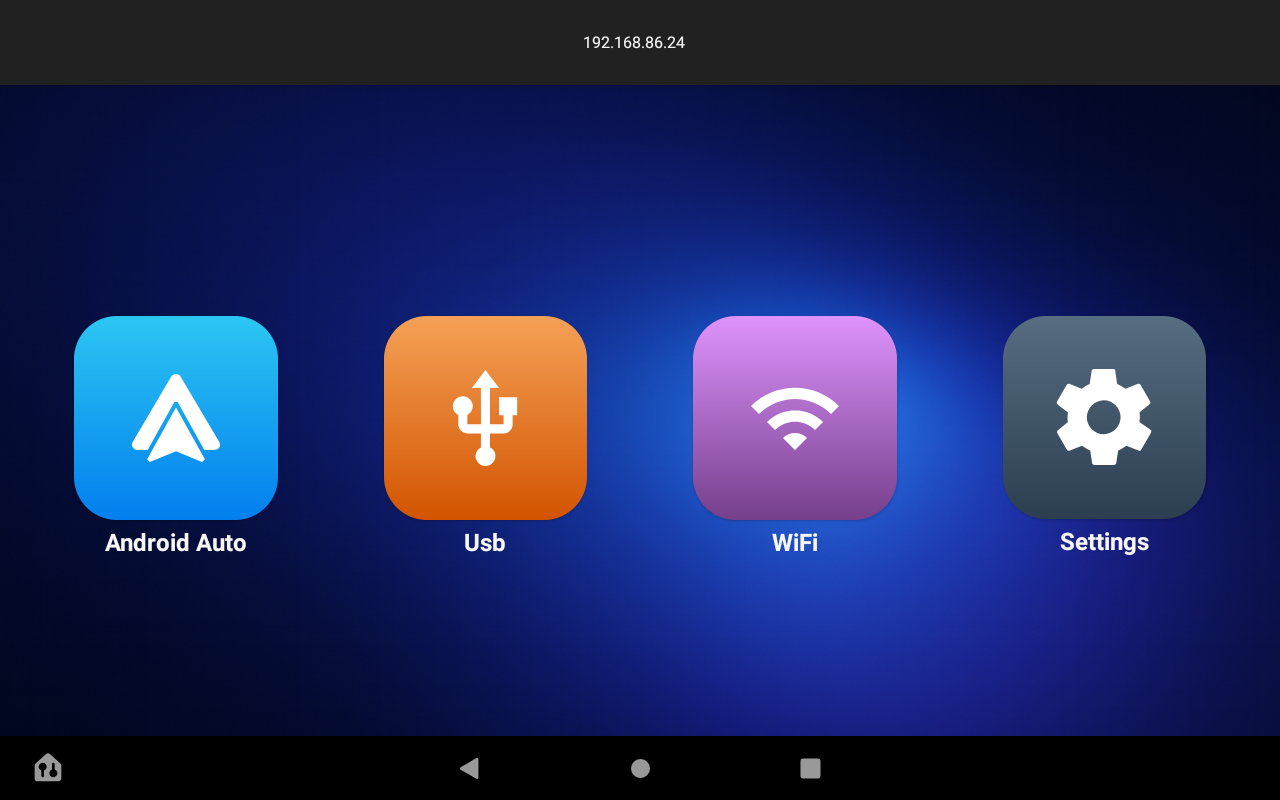
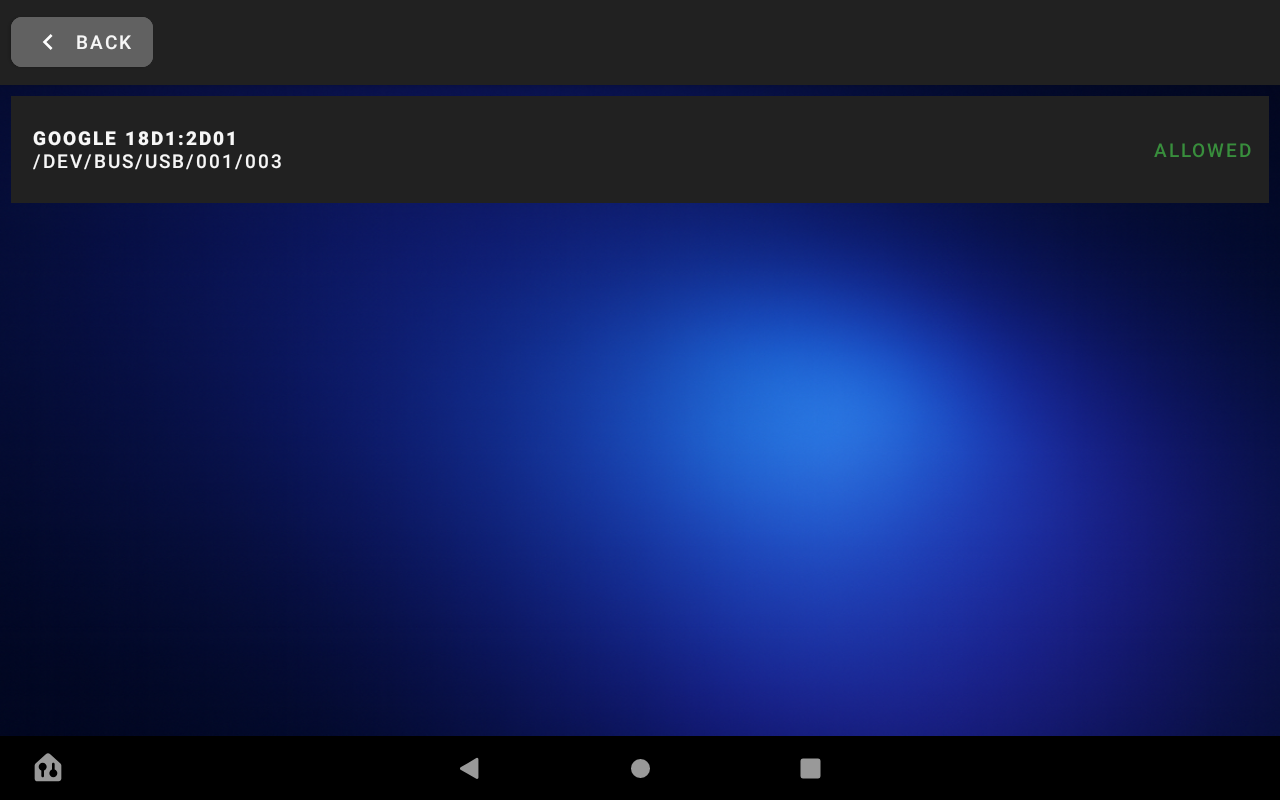
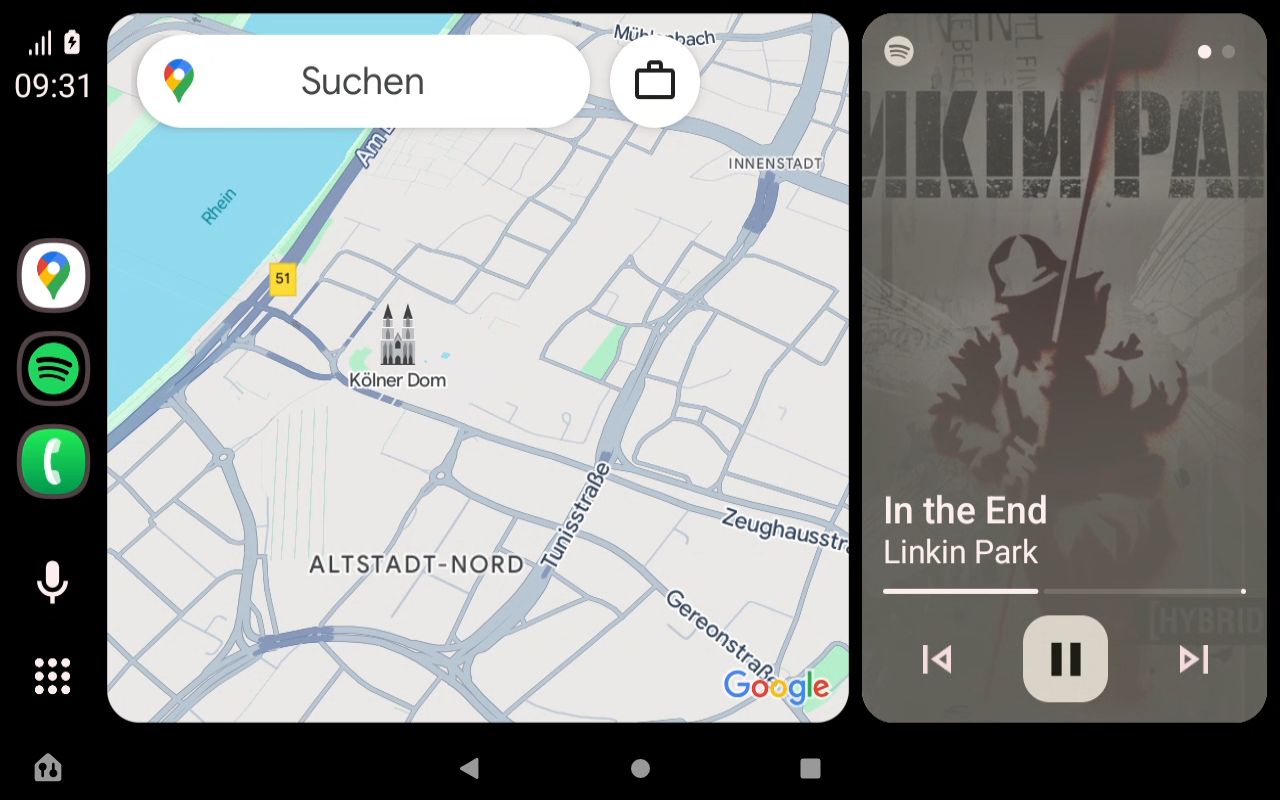
How to use
Check out the Wiki for detailed documentation, setup guides and troubleshooting!
Wired USB Connection
- Connect your Android device (phone) to the tablet running Open Headunit via USB cable.
- Make sure that Android Auto is installed on your phone.
- Set your phone to Host-Mode if nescessary and select Android Auto
- Click the USB Button in Open Headunit, find your phone and click the right button to allow connection
- Click on your phone in the list and wait for Android Auto to start
Wireless Connection Options
Choose from the five options below depending on your Android Auto version and setup:
1. USB Wireless Android Auto Dongle (Most Reliable)
- A standard hardware USB Wireless Android Auto Dongle (plugged into the headunit) handles the entire wireless negotiation independently.
- Provides seamless plug-and-play connection regardless of phone Android Auto version.
2. Native Mode (Wi-Fi Direct / Headunit Hotspot)
- Directly communicates with Android Auto's native wireless protocol without helper apps.
- Supports Wi-Fi Direct (P2P) or the Headunit Hotspot transport.
- Configure under Open Headunit Settings -> Android Auto Mode -> Native Mode.
FYT external Bluetooth module transport (experimental)
On FYT units where the phone pairs for calls with a separate Bluetooth module (for example
DUDUAUTO on DUDUOS), Native Mode can carry its Android Auto Bluetooth handshake through
/dev/auto_serial, the relay the stock Car Link app (
com.syu.carlink) uses, while calls remain on the module and the vehicle microphone/speakers. Tested so far only on DUDUOS with a BLINK module.
Requirements:
- An FYT unit that exposes
/dev/auto_serial (Car Link's external-module backend, sys.fyt.bluetooth_type above zero).
- Nothing extra where the node is app-openable, as it is for the stock Car Link. Where it is not (node mode or SELinux), root access for Open Headunit, used as a fallback.
- The stock
com.syu.carlink package disabled, because two readers on the same terminal split protocol messages.
- The phone paired with the module; pairing and phone priority remain managed by the module.
Setup:
1. Disable the stock client:
adb shell pm disable-user --user 0 com.syu.carlink (prefix with
su -c if the shell refuses).
2. In Open Headunit, select
Native Mode and enable
Connect through the FYT external Bluetooth module.
3. Keep the phone paired with the module and connect normally.
On a detected FYT module unit with this transport off, Native Mode refuses to start and names this setting, instead of listening on a radio the phone is not paired with. If the channel cannot be opened (Car Link still enabled or running, or the node not app-openable and root denied), the reason is shown on screen and retried with a growing delay.
Android Bluetooth driver selection, preferred-phone and wake-list controls are intentionally hidden on this route because Android cannot see or dial phones bonded to the external module. To roll back, turn this transport off and re-enable the stock client with adb shell pm enable com.syu.carlink (prefix with su -c if needed).
3. Headunit Server (No-Root Option for Self-Mode on AA 17.4+)
- Starts the native Android Auto developer server directly on your phone or on the same device (Self-Mode).
- Setup:
1. Open Android Auto settings on your phone (or tablet in Self-Mode).
2. Scroll down and tap
Version 10 times to unlock Developer settings.
3. Tap the three-dot menu in the top right corner and choose
Start headunit server.
4. In Open Headunit, tap the
WiFi button to connect (or use Self-Mode).
4. Wireless Helper
- Our companion app triggers the wireless connection automatically in the background.
- Compatibility: Android Auto v17.3 and below, or v17.4+ with the root workaround in option 5.
- Download: Wireless Helper on Google Play Store
- Setup: Set Open Headunit Wireless Mode to Helper Mode, ensure both devices are in the same network or Wi-Fi Direct group, and start the service in the Wireless Helper app.
5. Root Workaround for Android Auto 17.4+
On the device running Android Auto (normally the phone), open a
root shell, for example by running
su in a terminal and granting root access. Then run:
pm enable --user 0 \
com.google.android.projection.gearhead/com.google.android.apps.auto.wireless.setup.receiver.WirelessStartupReceiver
Re-enabling this receiver restores the previous wireless startup flow on affected Android Auto versions. Keep using the same Wireless Helper / Helper Mode setup as before; the developer headunit server is not required for this workaround. Root is needed on the device running Android Auto, not on a separate head unit.
--user 0 targets the primary Android user. This is an internal Android Auto component: the workaround requires it to exist in the installed version, and future updates may change its name or behavior.
Connect Wirelessly via Intent (Power Users)
You can trigger a wireless connection attempt using an Android Intent. This is useful for automation tools like
Tasker,
MacroDroid, or via
ADB.
URI Scheme: headunit://connect?ip=<PHONE_IP>
Example ADB Command:
adb shell am start -a android.intent.action.VIEW -d "headunit://connect?ip=192.168.1.25"
Known Issues
- Google Maps in Portrait Mode: Touch interactions (searching, scrolling) within Google Maps may not work as expected when using Portrait Mode on some devices. Fix: Try reducing the Pixel density (DPI) setting to below 200 (e.g., 190) in the app settings. This often restores full functionality.
- Wireless Connection Drops: If the connection drops frequently, disable "WiFi Assistant" or "Switch between networks" in your phone's WiFi settings to prevent it from killing the connection due to "no internet." Check battery saving options.
- Self-mode on Android 10 (Q) and below: Google has disabled the automatic wireless projection startup for Android 10 and below in Android Auto versions 16.4 and higher. While Self-mode still works on newer Android versions, it is normally impossible to trigger projection on Android 10 and below directly with recent Google app updates. Workaround: You can still use Self-mode on these devices by starting the built-in Android Auto Headunit Server and connecting via Wi-Fi mode (loopback). See the Troubleshooting Guide for step-by-step instructions.
- WiFi-Direct needs long to connect: A user finds that this is related to Google Assistant instead of Gemini for AA. If you use Gemini on newer AA versions it just runs smooth again. No idea why this happens.
- Stuck on Android is starting Check your video codec in the settings and set it to h264 if you have a device which does not support h265. Some devices have a broken h265 decoder and this will cause the app to stuck on "Android is starting" and never start the projection.
Planned
- more customization options for the UI and the app itself
- Info/Help descriptions to the settings for better understanding
Changelog
v.3.5.0-beta4
- Native AA: reconnect to a network that is still there, instead of rebuilding it every time
- Native AA: wake the phone over the Bluetooth module on a cold start, and from the WiFi button
- Native AA over hotspot: stop advertising an endpoint that moves, bring the hotspot back after a boot or ACC wake- #1014
- Native AA: recover when the platform deletes the group mid-join, bring the hotspot back after sleep, log the Bluetooth link, and stop a QR crash below Android 4.4
- Added: Option to use Open Headunit as a launcher, thanks to @amp3r1 for some improvements
- External Bluetooth module: make the WiFi button work, find the module after a boot, and keep a Bluetooth auto-start from being lost behind the settings screen
- Added: Simplified Chinese 🇨🇳, Indonesian 🇮🇩, Hindi 🇮🇳, Thai 🇹🇭, European Portuguese 🇵🇹
- Connection: one attempt at a time, hold auto-connect behind settings and the pill's X, and fix the dongle's TLS handshake- #1015
- Request low-latency Wi-Fi during wireless projection, thanks to @emotionbug
- Add on-demand "Check for Updates" button
- Add FYT BLINK/DUDUAUTO module transport for Native AA thanks to @dohun0310
- Added: BSSID recovery via IPv6 EUI-64
- Mic: isolate capture sessions and bound uplink flow control, thanks to @emotionbug
- Audio: stabilize playback and AAC recovery with opt-in AAudio, thanks to @emotionbug
- WPP: retain active control connections and isolate listener generations, thanks to @emotionbug
- Added: Apps drawer, thanks to @amp3r1
- Navigation: stop the road name from sticking after the road changes
- Self Mode: release the dummy VPN once the session is up, and start none for Android Auto 17.4 and later
- Wireless: hold every automatic bring-up while the unit is asleep, and replay it once when the screen comes on
- WiFi Direct: stand the station down again when the platform rejoins it mid-session
- Native AA: ride out a ZLink daemon restart at cold start, and confirm a restarted hotspot stays up
- Video: no codec on a dying surface, and a picture after a screen-off return in Texture mode
- Automation: restore the three dropped automation commands, and stop Headunit Server connects preempting each other
- Fix: crash when the USB service is missing, thanks to @muayyad-alsadi - #1057
- Added: Performance overlay with its own settings screen, choose which lines it shows
- Added: Root workaround for Android Auto 17.4+ wireless startup in the README, thanks to @mixalbl4-127
v.3.4.0
- USB: connect non-Pixel phones without fighting a fast-reverting dongle
- Feat/automation command surface
- Video-Fit and ultrawide touch enhancements with dynamic scaling and rework all the options, thanks to @o-jardenass and @Sesam17
- Several enhancements for native mode, thanks to @o-jardenass
- Added darkmode for splashscreen
- Added ADB-Server to disable/close OEM apps like Zlink, Autokit etc. to reduce conflicts with OpenHU
- Added Support for BYD Steering wheel keys, thanks to @nicoruy
- Added floating Exit Button, thanks to @Sesan17
- Added Log to clipboard, thanks to @peter9811
- Native for External BT's + Connection Status pill + AAC improvements to @o-jardenass
- Moved Ui-Scale to theming
- Native AA: say when the unit's WiFi radio is off instead of retrying in silence
- Fix: Endless Loop in Permission Requests.
- Give Video its own transport thread
- Stop old Android promising what it cannot do
- Measure and size the audio sink
v.3.3.1
- Added: Option to auto-resume media playback on quick reconnect if music was playing before disconnect
- Fixed: Errors shown in playconsole
- Big Improvements to native mode. Huge Thanks to @o-jcardenass for this!
v.3.3.0
- Begin for theming of the App.
- Refactor WiFi-Code from AapService into their own classes for better maintenance, thanks to @MrEAlderson
- Refactor Self-Mode and USB-Mode from AapService into their own classes for better maintenance, thanks to @MrEAlderson
- Refactor Audio and Video Code from AapService into their own classes for better maintenance, thanks to @o-jcardenass
- USB-Blacklist Filter to prevent the app from asking for non Android phones
- Added: Option to disable the clock, thanks to @MrEAlderson
- Added: French translation 🇫🇷 thanks to @phiDu-fr
- Fix/session lifecycle and video concealment
- Video: pace the transport thread instead of shedding reference frames
- UI: a destroyed activity stops listening, and a recycled row keeps its subtitle
- Fix Android 4 Problems
- Fix Orientation issues
- Several Native Mode fixes and enhancements
- Mic: fix the uplink, and let the phone keep the microphone
- Fix: Close keyboard that stays open on older Android versions to prevent layout issues
- Per-channel audio stream selection, thanks to @nicoruy
- Added Android Auto 17.4 Notice for users, who don't know why their wireless setup broke
- Clean Up Dark Mode and Theming Option confusions
- Fix: Projection dies when a Bluetooth keyboard connects or disconnects
v.3.2.6
- Fix settings UI crash and dpi input on older Android devices
- Fix video artifacts
- Fixing wireless stack where failures stay broken until restart
- Bringing back old style USB List
- Fix broken theme after import: Reapply Theme selection after Settings import
- Make HUD Mode for apply for the whole app
v.3.2.5
- Fix black screen after backgrounding, and the washed-out picture a dropped frame leaves
- Fix headunit server socket leak
- Car GPS: deliver the head unit's fix when the phone asks, and keep it flowing
v.3.2.4
- Fix: Video and audio never catch up after a wireless link stall, thanks to @o-jcardenass
- Fix: Native AA wake poke takes down the head unit's own hands-free link, thanks to @o-jcardenass
- Stop the setup wizard from overwriting the reported manufacturer, thanks to @o-jcardenass
- Added: Let the Bluetooth side keep the media buttons, thanks to @o-jcardenass
v.3.2.3
- Adding custom log location (App folder or Download folder)
- additional fixing for the fps/freeze problems. Thanks to @o-jcardenass and @andrecuellar for helping
- Fix/hotspot unreadable config
- NativeAA: show when a P2P group that lands on channel 12 or 13
v.3.2.2
- Fixing location jumping, especially on lower speeds
- Fixing screen flicker again in video decoder
- Fix/video throughput telemetry and keyframe lockout, thanks to @o-jcardenass
- Fix Steering Wheel Buttons not working anymore
- added new native mode without WiFi-Direct creation, thanks to @o-jcardenass
v.3.2.1
- Fixing new welcome screen reappears, thanks to @andrecuellar
- Fixing screen flicker every 10s thanks to @o-jcardenass
- Fixing HW decoding on kitkat thanks to @o-jcardenass
- Fixing 2 Fatal errors shown in play console
- fix: move mic timestamp inside encrypted payload (byte 4), thanks to @bruno303
- making native mode work better and on more devices, thanks to @o-jcardenass
v.3.2.0
- Don't grab audio focus on connect in dynamic mode, thanks to @bnayahu
- Acquire transient audio focus while AA audio plays, thanks to @bnayahu
- Add GitHub Actions CI (build + unit tests), thanks to @bnayahu
- Fix picture stuck if used within DUDU's PiP, thanks to @MrEAlderson
- Fix(wifi): use public API for frequency, thanks to @DerTeufel
- Added pixel aspect ratio setting, thanks to @axel92b
- Added more audio features to gain audio focus and work with dsp headunits as setting
- Added display over other apps permission for better compatibility with some headunits, espacially with self mode
- Fix transport get stucked on multiple reconnects, thanks to @notathf
- Add car keys support for FYT headunits, thanks to @MrEAlderson
- Added Option to flip projection horizontal for Headup-Displays
- Recover automatically from post-first-frame video display stalls, thanks to @andrecuellar
- Settings and Onboarding Wizard redesign for better usability, thanks to @andrecuellar
- Fixing mulitiple WiFi-Direct and Native AA connection issues, thanks to @o-jcardenass, @andrecuellar and @notathf
- Various fixes PR, thanks to @MrEAlderson
- Selfmode on AA 17.4 now connects to the headunit dev server or opens the AA settings to start it
- Rename the app to Open Headunit because of confusion with Headunit Reloaded (HUR)
v.3.1.1
- Reduce pressure on sensor events like night and gps and start/stop these events in onConnected, onDisconnect and onDestroy
- Merged ffmpeg PR #625 by @mmwtl. This added ffmpeg software decoder for h265, which old devives could benefit a lot. Thank you!
- Wi-Fi Direct changes. Prevent duplicate start, graceful resets, cleaned up stale groups
- Remove Automatic Play Integrity Checks, so Playstore won't check the license and link to the playstore in headunits
- Added manual bssid for native Mode. This should help for users where the bssid is hidden for the app, thanks to @rakshan-kumr
- Added immediately network scan with wifi connection, thanks to @MrEAlderson for the PR
v.3.1.0
- Added libusb as alternative to the native usb stack for better compatibility with some devices
- Fixed Layout in Portrait Mode in nearly square devices
- Added Scale Slider for loading screen media
v.3.0.1
- Fixed: App Exit on Disconnect
- Enhanced: USB Workflow. This will hopefully eliminate some random usb disconnects
- Fixed keyboard input on Android < 6 Devices
- Enhanced WiFi Direct-Mode
- Enhanced File Selector for some devices
- Fixed some fatal errors, showing in play console
v.3.0.0
- Added: Custom loading screen (image/GIF/video), thanks to @andrecuellar
- Added: Settings-Reset Button, if you mess up something in the settings, you can now reset them to default
- Removed: Old deprecated ssl library written in C-Code for better maintenance, stability and smaller file sizes
- Added: Direct Logging to file without logcat, thanks to @Anton111111
- try to fix connection lost on carrier lost again
- keep usb disconnection for 8s alive, for maybe restarts of usb dongles
- Implement car headlight signal mode (ILL+) for night theme management, thanks to @minhtuanact
- Added settings export and import functionality with backup options, thanks to @JanRi3D
- Added whitelist to usb connection for not interrupting with iPhones and other usb devices
- Added QR Code for easy connection with wireless helper
- Fixed: BT auto-connect dragging phone into wireless flow during USB session, thanks to @andrecuellar
- Persist Auto-Optimize wizard settings synchronously, thanks to @andrecuellar
- Added ability to swipe with two fingers from the right side to switch fullscreen mode and Normal (all bars) mode, thanks to @Anton111111
- Improved: usb button auto connect, thanks to @bezprobeloff
- Catched an fatal error listed in the play console
- Fixed: Audio Stutter on some devices since 2.1.1
- Fixed: USB device list duplicates and Android Auto projection launch on Android 10+, thanks to @jeancarloscc
- Enhanced: Google Nearby. It was buggy with 2 FPS video
- Fixed: Navigation Button mapping now working
v.2.3.1
- Fixed a connection lost on for example borders
- Binding socket to wifi network if available to prevent connection drops on carrier lost
- Added Static Audio Focus Toggle to prevent audio focus loss on some devices
- Fixing samsung routines and modes
- Fixing wrong orientation on start if holding the phone wrong. Now uses the orientation from settings
- Try to fix usb errors with AAwireless Dongles
- Added Audio Mixer to mix different audio tracks, thanks to @jeffdapaz for the idea
- Added Autostart on BT for multiple devices
- Fixed Microphone input source was wrong mapped
- Added Vietnamese translation 🇻🇳 thanks to @minhtuanact
- Merged PR #549 - implement back key routing and add keymap for back key, thanks to @JanRi3D
v.2.3.0
- Added some new buttons for keymap
- Fixed 3 Fatal errors
- Fixed video decoder settings for allwinner devices
- Added new navigation intents
- Included PR #456
- Added new "Autostart on WiFi" Setting #324
- Fixed empty bssid on native AA. Should now work on more devices
- Fixed a new fatal with media sessions
- Readded fullscreen overlays system icons #351
- Remap Enter (66) to Dpad Center (23) for Rotary Knob #459
- Debounce multiple key events if key event is the same in 100ms #465
- Moved Mic settings to own fragment and added 3 new options for the new mic enhancement from version 2.2.2, which defaults to off for better compatibility
- Merged PR #481 - Apply MediaTek 60fps and audio optimizations, thanks to @mrkontrast-coder
- Some rewrite of the AudioTrackWrapper, to enhance stability and minimize stutters
- Merged PR #490 - Add UI scale settings, thanks to @Anton11111
- Merged PR #502 - Navigation Broadcast Updates. Thanks to @Bastel2020
v.2.2.2
- Fixed: Exit on disconnect now stops the carmode too
- Fixed: Exit intent not closing the app
- Fixed: Orientation not working great on app switch, if you have "auto or sensor" enabled
- Again: Steering Wheel and Keymapping got some changes, maybe this will work on more devices
- Extend mic debugging and add NoiseSuppressor, AutomaticGainControl and AcousticEchoCanceler for better voice quality
- Fixed an issue where the Android USB system prompt wouldn't appear for phones. The prompt is now enabled by default and can be separately disabled for USB thumb drives. It calls "Listen for USB Devices" setting and it decouples the system USB prompt from the Auto-Start behavior. This will bring back the old functionality for all and can be disabled for those who are annoyed of the popup for non Android Auto devices
- Fixed: Rescale and UpdateUI if the useable area differs from the one negiotated. This happens on devices which lie about their navbars.
- Fixed: Fatal Crash on devices below lollipop on disconnection
- Fixed: Auto-Night mode over 3 hours of in the UK and other countries, thanks to @BinarySimple17
- Add separate audio streams setting and update related functionality thanks to @Anton111111
- Enhanced: When audio sink is off, the app no longer tries to get media focus at all
v.2.2.1
- **Fixed a fatal error in UBS conncetions since 2.2.0. Thi

 →
→ →
→ →
→ →
→ →
→ →
→ →
→ →
→