






1
 →
→
Use Claude Code, Codex, Pi, and OpenCode (and 6 other harnesses) for free (1.3B+ free tokens) from your terminal, app, IDE, or phone
Alishahryar1/free-claude-code is an open-source project on GitHub, mainly written in Python. Use Claude Code, Codex, Pi, and OpenCode (and 6 other harnesses) for free (1.3B+ free tokens) from your terminal, app, IDE, or phone It currently holds 55,946 stars and 8,947 forks with 415 open issues, and was last pushed on 2026-09-25 (repository created 2026-01-28).
Git Homed tracks it on the Today's Trending board, currently at rank #35 with 111 new stars today.
Independent open-source project. Not affiliated with or endorsed by Anthropic. Claude and Claude Code are trademarks of Anthropic.
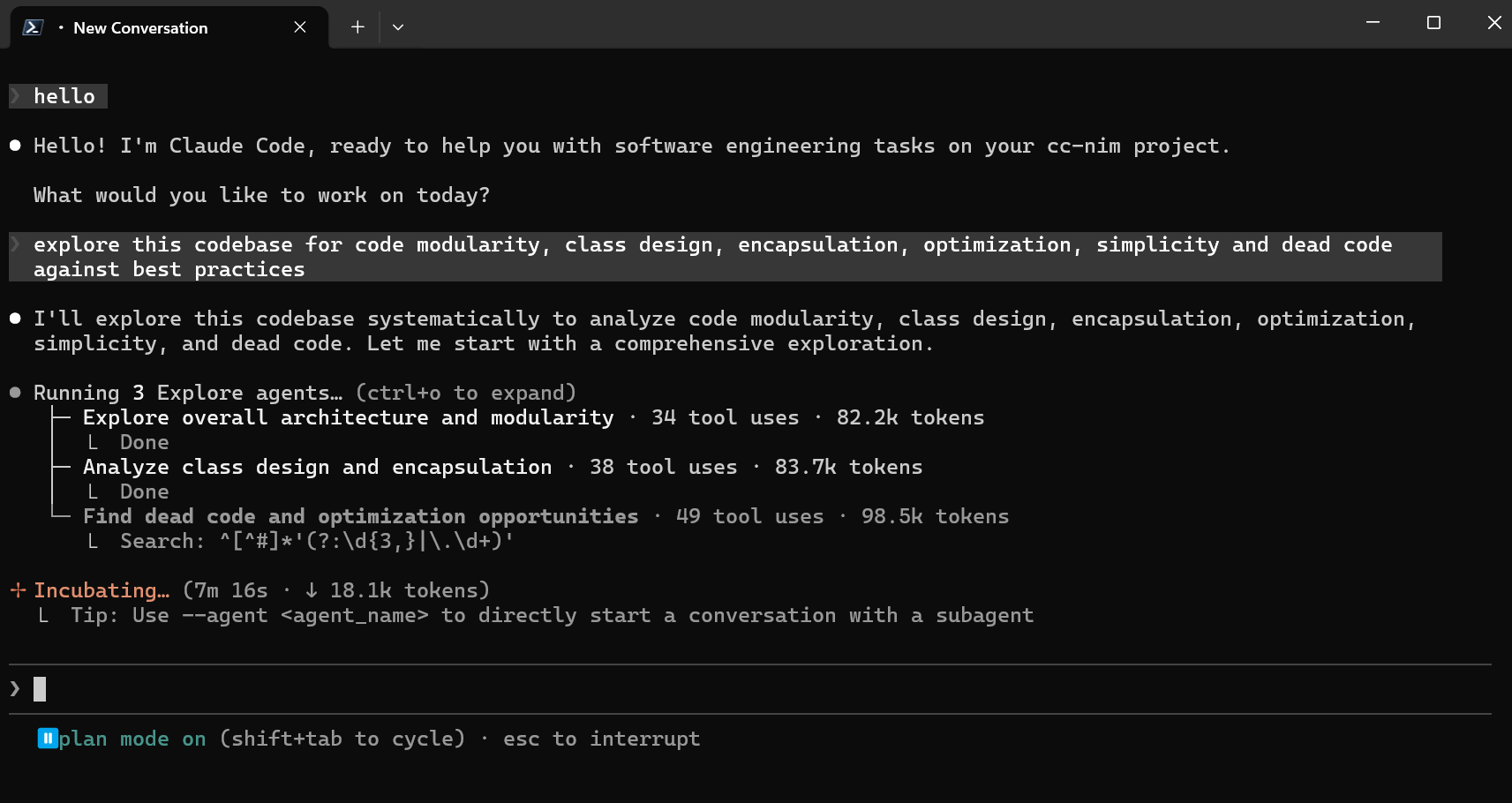
Claude Code running with FCC.
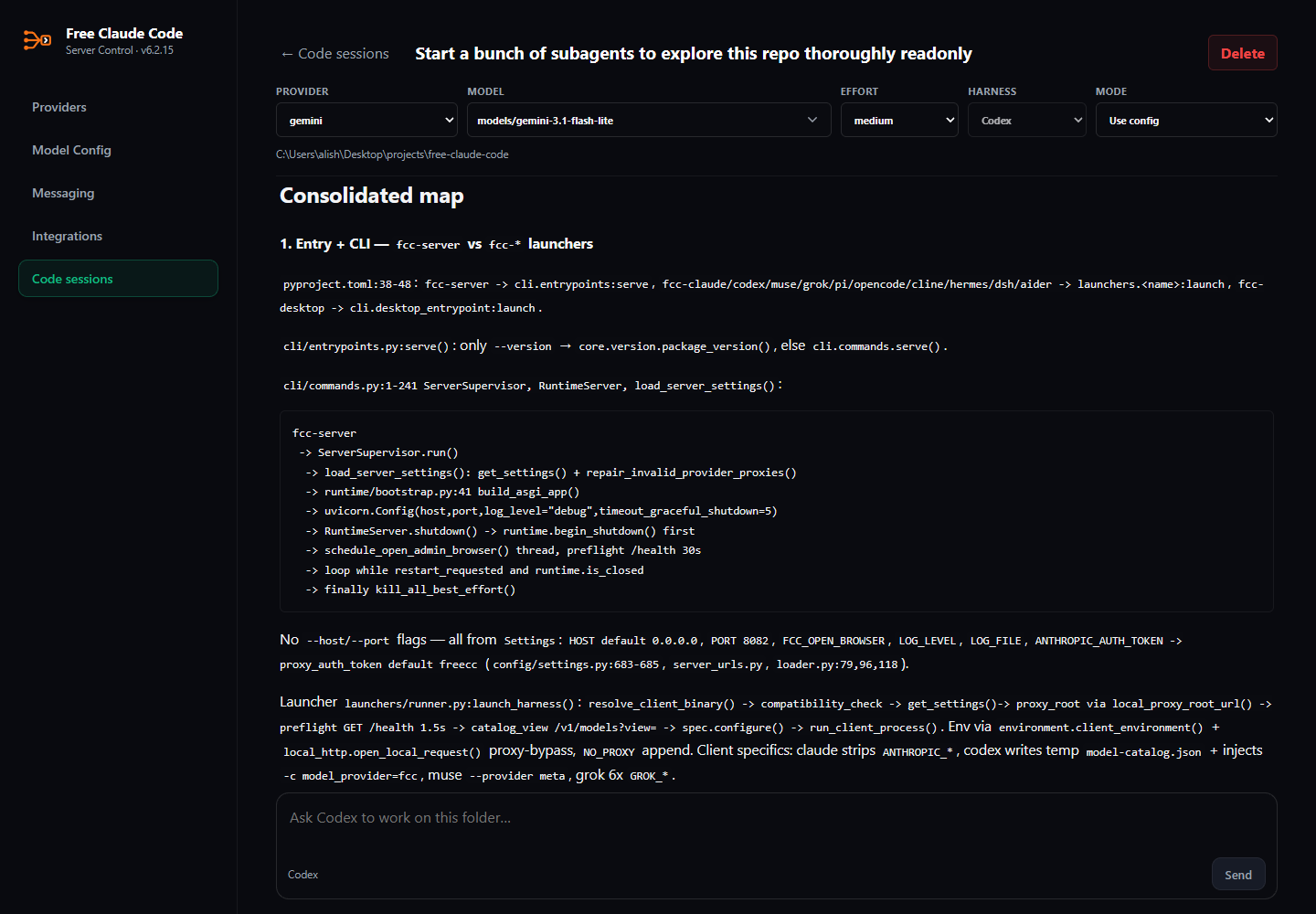
A native Codex session in FCC's browser UI.
macOS/Linux:
curl -fsSL "https://raw.githubusercontent.com/Alishahryar1/free-claude-code/main/scripts/install.sh" | sh
Windows PowerShell:
& ([scriptblock]::Create((irm "https://raw.githubusercontent.com/Alishahryar1/free-claude-code/main/scripts/install.ps1")))
When prompted, choose at least one coding agent and optionally RTK. You can review the installers before running them: install.sh and install.ps1.
Open Free Claude Code from your desktop or Start menu.
Open Free Claude Code from your desktop or Applications folder.
Run:
fcc-server
FCC opens the Admin UI after starting. On Windows and macOS, use the tray or
menu-bar icon to open Admin, restart, or quit. When using fcc-server, keep its
terminal open.
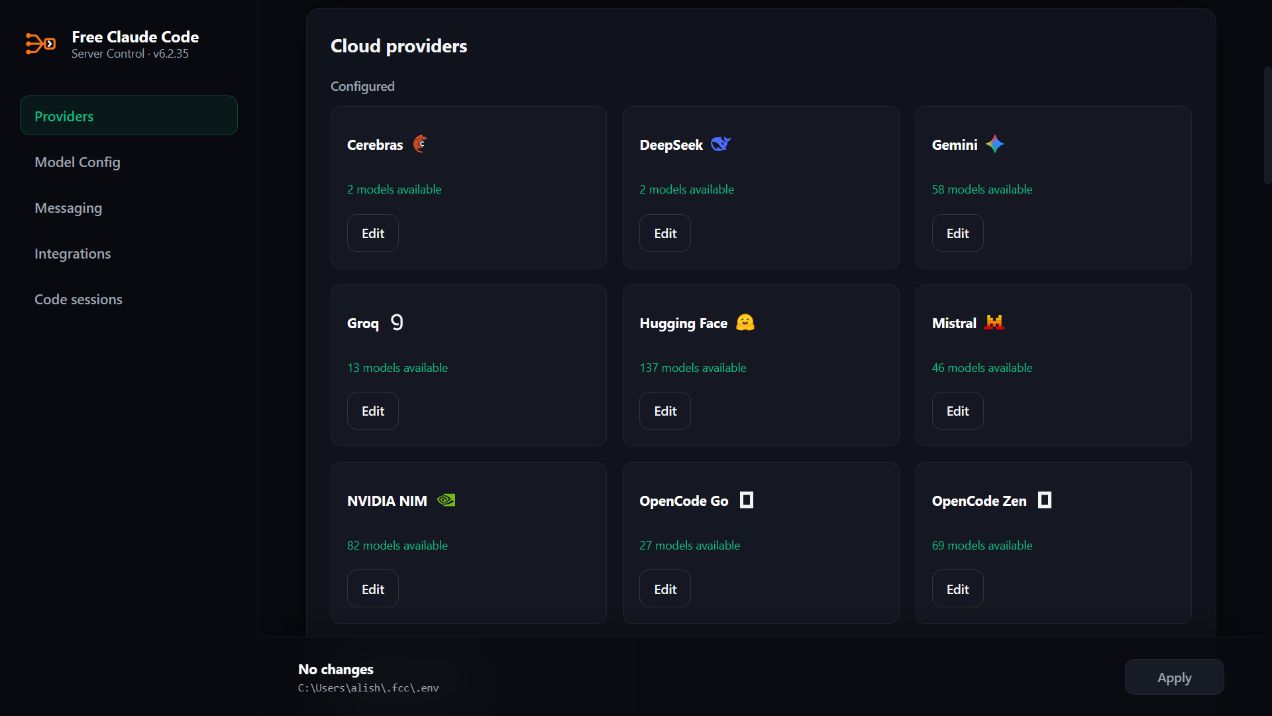
1. Create an API key at build.nvidia.com/settings/api-keys.
2. Open the Admin UI URL from the server log.
3. Paste the key into NVIDIA_NIM_API_KEY.
4. Leave MODEL on the default nvidia_nim/nvidia/nemotron-3-super-120b-a12b, or search the model dropdown and select another model.
5. Click Apply.
To protect the local proxy with a bearer token, enable Proxy Authentication in Admin.
Claude Code:
fcc-claude
Codex:
fcc-codex
Pi:
fcc-pi
OpenCode 2:
fcc-opencode
To upgrade from OpenCode 1, close OpenCode and rerun the FCC installer with
OpenCode selected. For npm or other package-manager installations, follow
OpenCode's migration instructions
first. For npm v1, run npm uninstall -g opencode-ai, then rerun the FCC installer.
RTK integration is temporarily unavailable for OpenCode 2. RTK continues to work with the other supported agents.
Use fcc-opencode for coding and sessions. Use plain opencode for commands
such as upgrades, service management, ACP, and MCP setup.
Cline:
fcc-cline
Hermes:
fcc-hermes
DeepSeek Harness Web:
fcc-dsh
Grok Build:
fcc-grok
Muse Code:
fcc-muse
Aider:
fcc-aider
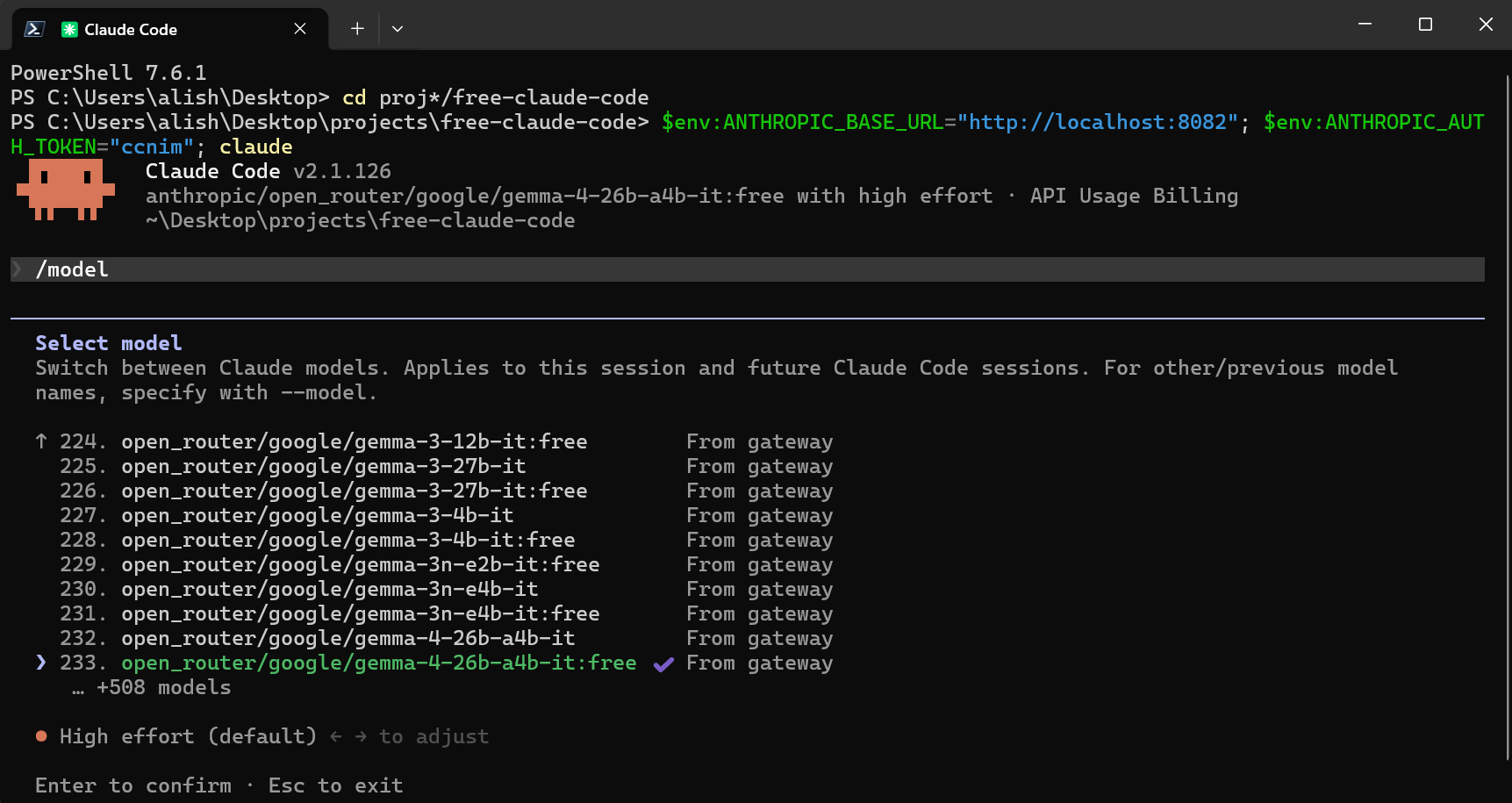
Select an FCC model from Claude Code's native /model picker.
1. Open a provider link below for its key, models, or setup instructions.
2. In the Admin UI, configure the listed setting. For OpenAI / ChatGPT
subscription access, use Providers → OAuth providers instead.
3. Search the MODEL dropdown and select a model. If the provider cannot list
models, enter / manually.
4. Click Apply.
Optional: add an ordered Fallback Models list under Model Config. It applies to every connected client. A failed request may reach and consume usage from more than one provider before succeeding.
| Provider | Admin UI setting | Example MODEL |
| --- | --- | --- |
| NVIDIA NIM | NVIDIA_NIM_API_KEY | nvidia_nim/nvidia/nemotron-3-super-120b-a12b |
| OpenRouter | OPENROUTER_API_KEY | open_router/openrouter/free |
| Groq | GROQ_API_KEY | groq/llama-3.3-70b-versatile |
| ClinePass | CLINE_API_KEY | cline_pass/cline-pass/kimi-k3 |
| OpenAI / ChatGPT | Connect ChatGPT in the Admin UI | openai/ |
| OpenAI API | OPENAI_API_KEY | openai_api/gpt-5.6-sol |
| GitHub Copilot | Connect GitHub Copilot in the Admin UI | github_copilot/ |
| xAI (Grok) | XAI_API_KEY | xai/grok-4.5 |
| QwenCloud Token Plan | QWENCLOUD_API_KEY | qwencloud/qwen3.7-plus |
| QwenCloud Coding Plan | QWENCLOUD_CODING_API_KEY | qwencloud_coding/qwen3.7-plus |
| Together AI | TOGETHER_API_KEY | together/zai-org/GLM-5.2 |
| DeepInfra | DEEPINFRA_API_KEY | deepinfra/deepseek-ai/DeepSeek-V4-Flash |
| SiliconFlow | SILICONFLOW_API_KEY | siliconflow/Qwen/Qwen3-32B |
| Nebius Token Factory | NEBIUS_API_KEY | nebius/Qwen/Qwen3-30B-A3B |
| Chutes | CHUTES_API_KEY | chutes/Qwen/Qwen3-32B-TEE |
| Featherless AI | FEATHERLESS_API_KEY | featherless/Qwen/Qwen3-32B |
| Agnes AI | AGNES_API_KEY | agnes/agnes-2.0-flash |
| ZenMux | ZENMUX_API_KEY | zenmux/deepseek/deepseek-v4-flash-free |
| W&B Inference | WANDB_API_KEY | wandb/openai/gpt-oss-20b |
| Azure OpenAI | AZURE_OPENAI_API_KEY and AZURE_OPENAI_BASE_URL | azure_openai/ |
| Google AI Studio (Gemini) | GEMINI_API_KEY | gemini/models/gemini-3.1-flash-lite |
| Google Vertex AI | VERTEX_PROJECT_ID + ADC | vertex/google/gemini-3.5-flash |
| DeepSeek | DEEPSEEK_API_KEY | deepseek/deepseek-chat |
| Mistral La Plateforme | MISTRAL_API_KEY | mistral/devstral-small-latest |
| Mistral Codestral | CODESTRAL_API_KEY | mistral_codestral/codestral-latest |
| OpenCode Zen | OPENCODE_API_KEY | opencode_zen/gpt-5.3-codex |
| OpenCode Go | OPENCODE_API_KEY | opencode_go/minimax-m2.7 |
| Vercel AI Gateway | AI_GATEWAY_API_KEY | vercel/openai/gpt-5.5 |
| Amazon Bedrock | AWS_BEARER_TOKEN_BEDROCK | bedrock/openai.gpt-oss-120b |
| Hugging Face Inference Providers | HUGGINGFACE_API_KEY | huggingface/Qwen/Qwen3-Coder-480B-A35B-Instruct:fastest |
| Cohere | COHERE_API_KEY | cohere/command-a-plus-05-2026 |
| Wafer | WAFER_API_KEY | wafer/DeepSeek-V4-Pro |
| Kimi API | KIMI_API_KEY | kimi/kimi-k2.5 |
| Kimi Code | KIMI_CODE_API_KEY | kimi_code/k3 |
| MiniMax | MINIMAX_API_KEY | minimax/MiniMax-M3 |
| Cerebras Inference | CEREBRAS_API_KEY | cerebras/gpt-oss-120b |
| SambaNova | SAMBANOVA_API_KEY | sambanova/Meta-Llama-3.3-70B-Instruct |
| Kilo.ai | KILO_API_KEY | kilo/kilo-auto/free |
| Fireworks AI | FIREWORKS_API_KEY | fireworks/accounts/fireworks/models/llama-v3p3-70b-instruct |
| Novita AI | NOVITA_API_KEY | novita/deepseek/deepseek-v4-flash-0731 |
| Cloudflare Workers AI | CLOUDFLARE_API_TOKEN and CLOUDFLARE_ACCOUNT_ID | cloudflare/@cf/moonshotai/kimi-k2.6 |
| Z.ai Coding Plan | ZAI_API_KEY | zai/glm-5.2 |
| Z.ai API (pay as you go) | ZAI_API_KEY | zai_api/glm-4.7-flash |
| TokenRouter | TOKENROUTER_API_KEY | tokenrouter/moonshotai/kimi-k3-free |
| NaraRoute | NARAROUTE_API_KEY | nararoute/kimi-k3-free |
| Poolside AI | POOLSIDE_API_KEY | poolside/poolside/laguna-s-2.1 |
| LLM7.io | LLM7_API_KEY | llm7/default |
| Scaleway | SCW_SECRET_KEY | scaleway/deepseek/deepseek-v4-flash |
| Lightning AI | LIGHTNING_API_KEY | lightning/lightning-ai/Qwen3.8-27B |
| Experiential Labs | EXPLABS_API_KEY | experiential/union-alpha |
| Ollama Cloud | OLLAMA_API_KEY | ollama_cloud/qwen3-coder:480b |
| LM Studio | LM_STUDIO_BASE_URL | lmstudio/ |
| llama.cpp | LLAMACPP_BASE_URL | llamacpp/ |
| Ollama | OLLAMA_BASE_URL | ollama/ |
github_copilot/ from the model picker.
Available models and quotas depend on your subscription and organization policies.
Restart an already-running agent after connecting.
AZURE_OPENAI_BASE_URL to its complete v1 endpoint, such as
https://YOUR-RESOURCE-NAME.openai.azure.com/openai/v1/, and select a
deployment that supports Chat Completions. Enter the deployment name as a
custom model slug if it does not appear in the model dropdown.
kimi_code/. Kimi API credit keys usekimi/. Kimi Code plans are for personal interactive coding-agent use under
Kimi's community guidelines.
qwencloud_coding/. QwenCloud Token Plan keysqwencloud/. The keys and endpoints are not interchangeable. Coding Plan
is for local, personal, interactive coding-agent use under the
Coding Plan terms.
OPENCODE_API_KEY but use the explicitopencode_zen/ and opencode_go/ model prefixes.
BEDROCK_BASE_URL to the URL for the same region asgcloud auth application-default login once. Service-account
files and attached service accounts also work. Set VERTEX_PROJECT_ID, and
optionally change VERTEX_LOCATION from its global default.
ollama/ prefix.
Start LM Studio's local server, load a tool-capable model, and use the model identifier shown by LM Studio with the lmstudio/ prefix. The default URL is http://localhost:1234/v1.
Start llama-server with its OpenAI-compatible Chat Completions API and enough context for the model. Use the local model ID with the llamacpp/ prefix. LLAMACPP_BASE_URL defaults to http://localhost:8080/v1.
ollama pull llama3.1
ollama serve
Use the tag shown by ollama list with the ollama/ prefix. OLLAMA_BASE_URL defaults to http://localhost:11434.
MODEL is the fallback for every request. Select a model for MODEL_FABLE, MODEL_OPUS, MODEL_SONNET, or MODEL_HAIKU to override an individual Claude Code tier. Select None to use MODEL.
Open Admin UI → Model Config → Reasoning and select the behavior you want.
| Selection | Behavior | | --- | --- | | From client (default) | Use the effort sent by your coding agent. If none is sent, keep the provider default. | | Off | Request reasoning to be disabled. | | Low, Medium, High, X-High, or Max | Override the client with the selected reasoning level. | | Inherit (Fable, Opus, Sonnet, and Haiku only) | Use the root Reasoning selection. |
Providers that do not support a selected control retain their own behavior.
For editor and app integrations, install the client, start FCC, then open Admin UI → Integrations and click Connect on its card.
Run FCC on the same computer and in the same user environment as the client you are configuring.
Configure integrations from Admin UI → Messaging, then click Apply.
1. Create a bot in the Discord Developer Portal.
2. Enable Message Content Intent and invite it with read, send,
message-history, and Manage Messages permissions so /clear can remove
user prompts.
3. Set Messaging Platform to discord.
4. Enter Discord Bot Token, Allowed Discord Channels, and an absolute Allowed Directory.
5. Apply the settings and restart the server if requested.
1. Create a bot with @BotFather. 2. Get your numeric user ID from @userinfobot. In groups, grant the bot permission to delete messages. 3. Set Messaging Platform to telegram. 4. Enter Telegram Bot Token, Allowed Telegram User ID, and an absolute Allowed Directory. 5. Apply the settings and restart the server if requested.
| Usage | Behavior |
| --- | --- |
| /stats | Show session state. |
| Standalone /stop | Cancel all work. |
| Reply with /stop | Cancel only the selected request while other queued requests continue. |
| Standalone /clear | Clear all FCC conversations and their messages in this chat. |
| Reply with /clear | Delete the selected message and the chain of replies to it. Keep other conversations. |
NVIDIA NIM transcription support is included in every installation. In Admin UI → Messaging → Voice, enable voice notes, select nvidia_nim, and choose a supported model. Configure your NVIDIA NIM API key on the Providers page.
For local Whisper on CPU or CUDA, re-run the installer with the local voice option:
macOS/Linux:
Local Whisper on CPU or CUDA:
curl -fsSL "https://raw.githubusercontent.com/Alishahryar1/free-claude-code/main/scripts/install.sh" | sh -s -- --voice-local
Local Whisper with CUDA 13.0:
curl -fsSL "https://raw.githubusercontent.com/Alishahryar1/free-claude-code/main/scripts/install.sh" | sh -s -- --voice-local --torch-backend cu130
Windows PowerShell:
Local Whisper on CPU or CUDA:
& ([scriptblock]::Create((irm "https://raw.githubusercontent.com/Alishahryar1/free-claude-code/main/scripts/install.ps1"))) -VoiceLocal
Local Whisper with CUDA 13.0:
& ([scriptblock]::Create((irm "https://raw.githubusercontent.com/Alishahryar1/free-claude-code/main/scripts/install.ps1"))) -VoiceLocal -TorchBackend cu130
After installing local support, restart fcc-server. In Admin UI → Messaging → Voice, enable voice notes, select cpu or cuda, and choose the Whisper model. Local gated models need HUGGINGFACE_API_KEY.
Run fcc-server --version to check the installed version without starting FCC.
Stop all running FCC commands, then run:
fcc-update
For local voice support, include --voice-local (macOS/Linux) or -VoiceLocal (Windows), plus your --torch-backend or -TorchBackend option if used.
If your installation does not have fcc-update yet, run the installer once to add it.
To install or update only Muse Code:
& ([scriptblock]::Create((irm "https://raw.githubusercontent.com/Alishahryar1/free-claude-code/main/scripts/install-muse.ps1")))
To remove the Muse Code copy installed by FCC, keeping its data:
& ([scriptblock]::Create((irm "https://raw.githubusercontent.com/Alishahryar1/free-claude-code/main/scripts/uninstall-muse.ps1")))
Uninstalling FCC leaves Muse Code installed.
Stop every running FCC command before uninstalling.
Removes
→ →
→ →
→ →
→ →→→
→→→ →
→